

Les meilleurs outils sans code que les utilisateurs de WordPress peuvent utiliser sont des plugins qui vous permettent de créer des pages, de développer une audience et de gérer votre site sans écrire de code. Je travaille avec WordPress depuis plus de dix ans et j'ai toujours utilisé des outils comme ceux-ci car je ne suis pas développeur.
Pendant longtemps, cela semblait limitant. De nombreux outils WordPress supposaient que vous étiez à l'aise avec la modification de fichiers ou l'ajout d'extraits de code, même pour de petits changements.
Cela a changé. Aujourd'hui, il existe des outils WordPress sans code solides qui permettent aux débutants de gérer des choses comme la création de pages, les formulaires, le référencement, l'analyse et les sauvegardes grâce à des contrôles visuels simples.
Dans ce guide, je partage les meilleurs outils sans code pour WordPress que j'ai réellement utilisés et que je recommanderais si vous souhaitez aller plus vite sans engager de développeur.
Résumé rapide des meilleurs outils sans code
Si vous êtes pressé, voici une comparaison rapide de mes meilleurs choix pour vous aider à décider :
| # | Outil | Idéal pour | Tarifs |
|---|---|---|---|
| 🥇 1 | SeedProd | Créez des pages de destination et des mises en page de site | À partir de 39,50 $/an |
| 🥈 2 | RafflePress | Organisez des concours pour augmenter le trafic et les inscriptions par e-mail | À partir de 39,50 $/an |
| 🥉 3 | WPForms | Ajoutez des formulaires de contact et des paiements | À partir de 39,50 $/an |
| 4 | MonsterInsights | Consultez les analyses dans WordPress | À partir de 99,50 $/an |
| 5 | Tout-en-un SEO | Gérez le référencement sur la page sans code | À partir de 49,50 $/an |
| 6 | OptinMonster | Créez des pop-ups et des campagnes de capture de prospects | À partir de 9 $/mois |
| 7 | Easy Digital Downloads | Vendez des téléchargements et des produits numériques | À partir de 99 $/an |
| 8 | Duplicateur | Sauvegardez et migrez un site | À partir de 49,50 $/an |
| 9 | Smash Balloon | Affichez les flux de médias sociaux sur votre site | À partir de 49 $/an |
| 10 | Thrive Suite | Outils marketing tout-en-un (constructeur, prospects, tests) | À partir de 299 $/an |
| 11 | UserFeedback | Recueillez les commentaires des clients avec des sondages | À partir de 49,50 $/an |
Dans ce guide, je me concentre sur les outils No Code qui aident aux tâches courantes de WordPress comme la création de pages, l'ajout de formulaires, l'amélioration du SEO, le suivi des performances, la vente de produits et la protection de votre site. Ce sont des outils que j'utilise lorsque je veux accomplir des choses sans modifier les fichiers de thème ou ajouter des extraits de code.
Ils permettent aux débutants de gérer des choses comme la création de pages, la capture de prospects, les bases du SEO et la gestion du site via des interfaces simples qu'il est réaliste d'utiliser au quotidien.
Comment j'ai choisi les meilleurs outils sans code
Avec autant d'outils WordPress sans code disponibles, je voulais être clair sur la façon dont j'ai réduit cette liste. J'ai seulement inclus des outils que j'ai réellement utilisés et trouvés pratiques pour de vrais sites WordPress.
- Ils devaient être vraiment sans code. J'ai exclu tout ce qui nécessitait l'ajout de CSS, la modification de fichiers ou le collage d'extraits de code juste pour fonctionner correctement.
- Ils devaient être faciles à utiliser. Ces outils devaient avoir du sens pour quelqu'un qui n'est pas développeur et qui n'a pas le temps de lire de longues documentations.
- Ils devaient être fiables. Je me suis concentré sur les outils qui fonctionnaient de manière cohérente comme prévu, sans casser les mises en page ni causer de conflits.
- Ils devaient offrir un support réel. Si quelque chose tourne mal, je veux savoir qu'il existe une documentation appropriée ou une équipe de support pour m'aider.
Si vous débutez, je vous recommande de vous concentrer sur un outil pour créer des pages, un pour les formulaires ou la capture de prospects, et un pour le SEO ou le suivi avant d'ajouter quoi que ce soit d'autre.
Les meilleurs outils sans code pour WordPress
Trouver les bonnes applications et les bons outils sans code peut sembler difficile au début. Il y a beaucoup d'informations disponibles, ce qui rend difficile le choix d'un outil qui correspond le mieux à vos besoins.
Heureusement, j'ai fait le travail pour vous. Ci-dessous, vous trouverez mes meilleures suggestions de plugins sans code pour WordPress, avec les raisons pour lesquelles je pense qu'ils sont les meilleurs dans ce qu'ils font.
1. SeedProd
| Tarifs : À partir de 39,50 $/an |
| Plan gratuit / Essai : Version gratuite disponible |
| Fonctionnalités remarquables : |
| 🔹 Constructeur de pages de destination par glisser-déposer 🔹 Constructeur de thèmes pour en-têtes, pieds de page et modèles 🔹 Pages "Bientôt disponible" et "Mode maintenance" |
| Idéal pour : Créer des pages et des mises en page de site WordPress sans code |
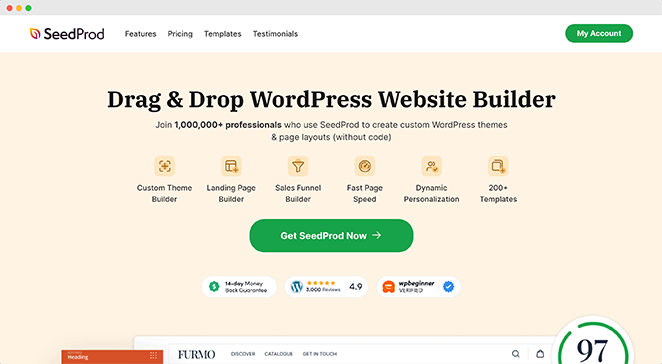
SeedProd est l'outil sans code que j'utilise lorsque j'ai besoin de créer des pages de destination ou de concevoir un site WordPress sans toucher aux fichiers de thème ni écrire de CSS.
Avec plus d'un million d'utilisateurs et une interface utilisateur puissante par glisser-déposer, SeedProd rend la conception de sites Web sans code facile.
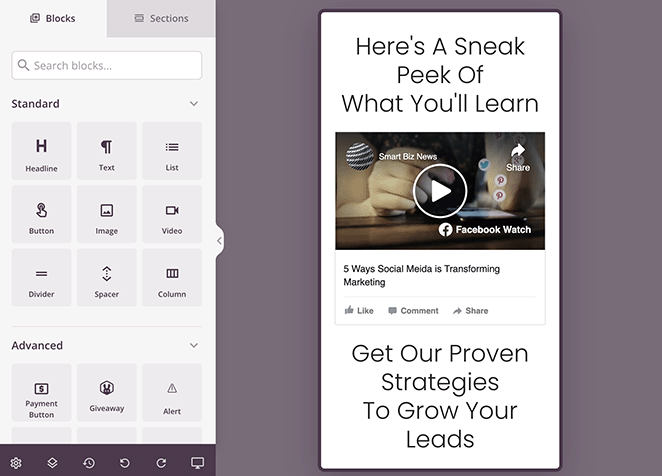
L'une de mes choses préférées à propos de SeedProd est qu'il propose des centaines de thèmes préconçus et de modèles de mise en page pour donner un coup de pouce à votre conception WordPress. Que vous créiez une page de vente ou une page de remerciement, vous trouverez une conception entièrement personnalisable pour démarrer rapidement.
Vous pouvez même lancer un site Web personnalisé en quelques secondes en utilisant le constructeur de sites Web IA de SeedProd. Écrivez simplement une brève description de votre site, et il générera un thème entièrement personnalisé, vous aidant à gagner du temps et à être en ligne plus rapidement.
De plus, le constructeur de pages comprend des outils de conception par pointer-et-cliquer pour presque toutes les fonctionnalités de conception Web, y compris :
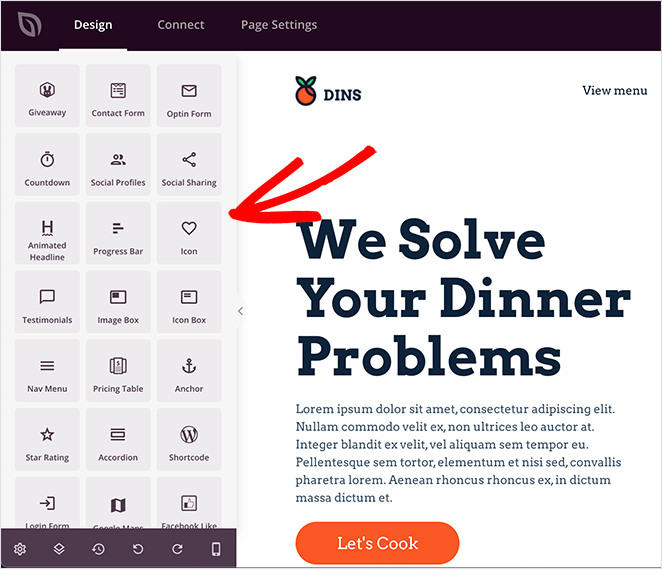
- Tableaux de prix
- Formulaires de contact
- Animations
- Pop-ups vidéo
- Galeries d'images
- Boutons d'appel à l'action
- Accordeons
- Témoignages et avis
- Formulaires d'inscription
- Compte à rebours
- Cartes Google
- Et plus encore
Vous pouvez même prévisualiser votre conception sur divers appareils mobiles pour vous assurer qu'elle est parfaite sur les ordinateurs de bureau, les mobiles et les tablettes.
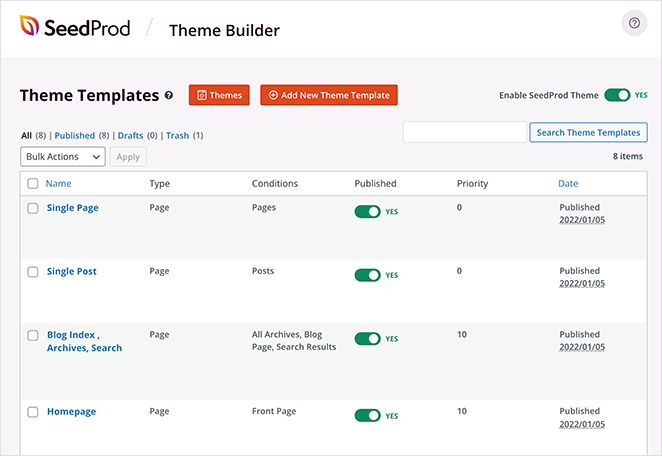
La fonctionnalité Theme Builder de SeedProd porte le développement sans code au niveau supérieur. Vous pouvez personnaliser chaque partie de votre thème WordPress, des en-têtes et pieds de page aux barres latérales et pages de commerce électronique, le tout sans codage.
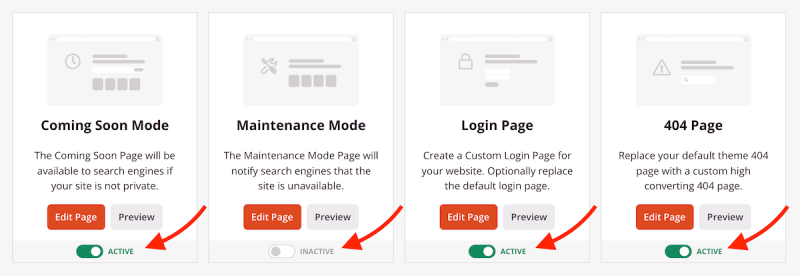
Une autre chose que j'apprécie beaucoup, ce sont les fonctionnalités intégrées de "bientôt disponible" et de "mode maintenance". Elles vous permettent de créer de l'anticipation parmi vos utilisateurs sans laisser les modifications du site perturber leur expérience. Vous pouvez créer habilement des pages "bientôt disponible" et "mode maintenance" et les échanger avec le site en direct lorsque vous êtes prêt.
De plus, SeedProd s'intègre aux services de marketing par e-mail populaires comme Mailchimp et Constant Contact. Il s'intègre également nativement avec WooCommerce et Easy Digital Downloads pour les sites Web de commerce électronique.
Pourquoi je le recommande : SeedProd aide les utilisateurs de tous niveaux à concevoir de superbes pages WordPress sans écrire de code. Que vous construisiez votre premier site Web ou que vous en gériez plusieurs, SeedProd offre une création de site de premier ordre et sans tracas.
2. RafflePress

| Tarifs : À partir de 39,50 $/an |
| Plan gratuit / Essai : Version gratuite disponible |
| Fonctionnalités remarquables : |
| 🔹 Constructeur de concours par glisser-déposer 🔹 Modèles de concours pré-faits 🔹 Actions d'entrée multiples (e-mail + social) |
| Idéal pour : Organiser des concours WordPress pour augmenter les abonnés par e-mail et l'engagement |
J'utilise RafflePress lorsque je veux organiser des concours sur WordPress pour augmenter le trafic, les abonnés par e-mail ou l'engagement sur les réseaux sociaux sans développement personnalisé. Avec son interface conviviale, il est facile pour quiconque de créer et de gérer des concours en ligne sur WordPress.
J'ai beaucoup utilisé ce plugin et j'apprécie toujours ses modèles de concours pré-faits qui rendent la création d'un concours en ligne un jeu d'enfant. De plus, le constructeur de concours par glisser-déposer vous permet d'ajouter et d'organiser différents éléments en quelques clics.
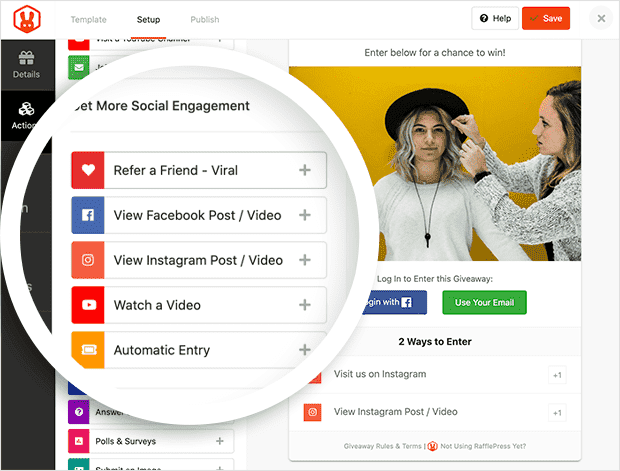
J'adore aussi la polyvalence de RafflePress. Il prend en charge de nombreuses méthodes d'entrée, des inscriptions simples aux options plus complexes comme l'engagement sur les réseaux sociaux. Que vous souhaitiez encourager les visiteurs à aimer votre page Facebook, à suivre votre compte Twitter ou à regarder une vidéo YouTube, vous trouverez une action de concours pour répondre à vos besoins.
De plus, RafflePress garantit que vos concours sont adaptés aux mobiles. Les participations aux concours seront superbes et fonctionneront de manière fluide sur n'importe quel appareil, augmentant ainsi votre portée potentielle et votre engagement.
En outre, il s'intègre parfaitement aux services de marketing par e-mail et aux plateformes de médias sociaux populaires, ce qui facilite la promotion de votre concours et la collecte de prospects.
Pourquoi je le recommande : RafflePress aide les petites entreprises à augmenter le trafic de leur site Web, le nombre d'abonnés par e-mail et l'engagement sur les médias sociaux grâce à des campagnes de concours virales. Il est facile à utiliser, ne nécessite aucun codage et dispose d'une version gratuite limitée.
3. WPForms
WPForms est l'outil sans code que j'utilise pour ajouter des formulaires de contact, des paiements et des enquêtes à WordPress sans modifier de modèles ni écrire de PHP.
| Tarifs : À partir de 39,50 $/an |
| Plan gratuit / Essai : Version gratuite disponible |
| Fonctionnalités remarquables : |
| 🔹 Constructeur de formulaires par glisser-déposer 🔹 Modèles de formulaires pré-faits 🔹 Logique conditionnelle et téléchargements de fichiers (plans payants) |
| Idéal pour : Ajouter des formulaires de contact, des paiements et des enquêtes sans code |
Avec son constructeur de formulaires par glisser-déposer, vous pouvez créer n'importe quel formulaire pour votre site Web WordPress sans code. Nous utilisons ce plugin ici sur SeedProd, et c'est un excellent choix pour mon propre site Web personnel.
WPForms est flexible, vous permettant de créer d'innombrables formulaires, y compris des formulaires de contact, des formulaires de paiement, des formulaires d'enquête, des formulaires de newsletter, et bien plus encore. Il offre même des centaines de modèles de formulaires pré-faits, ce qui en fait un excellent choix pour les débutants.
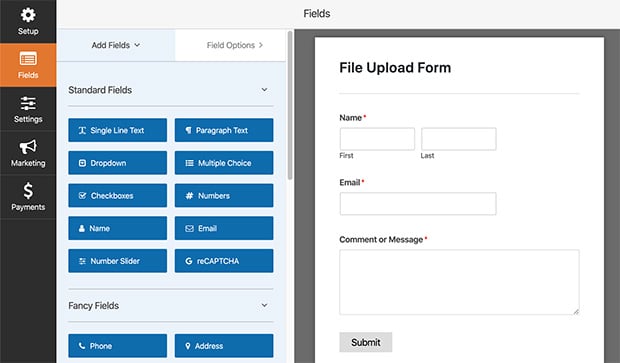
La création de formulaires avancés est également un jeu d'enfant. Avec la logique conditionnelle, vous pouvez afficher ou masquer des champs de formulaire en fonction de la sélection de l'utilisateur. Et avec la fonction de téléchargement de fichiers, vous pouvez accepter des soumissions de fichiers sur votre site Web directement depuis votre formulaire Web.
WPForms s'intègre aux plateformes marketing et de paiement populaires, garantissant que vos formulaires non seulement ont fière allure, mais fonctionnent aussi superbement pour les besoins de votre entreprise. Vous pouvez même utiliser Zapier pour vous connecter à d'autres outils tels que Google Sheets, les Chatbots et les applications de messagerie.
Pourquoi je le recommande : WPForms aide les débutants et les utilisateurs avancés à créer des formulaires Web hautement personnalisables dans WordPress sans écrire de code. Avec des centaines de modèles et des fonctionnalités avancées de création de formulaires, vous pouvez créer n'importe quel formulaire qui répond aux besoins de votre entreprise.
Pour plus de détails, consultez notre avis sur WPForms.
4. MonsterInsights

| Tarifs : À partir de 99,50 $/an |
| Plan gratuit / Essai : Version gratuite disponible |
| Fonctionnalités remarquables : |
| 🔹 Rapports Google Analytics dans WordPress 🔹 Configuration facile sans ajouter manuellement de code de suivi 🔹 Suivi du commerce électronique et du comportement (plans payants) |
| Idéal pour : Visualiser les analyses du site dans WordPress sans extraits de code |
MonsterInsights est l'un des meilleurs plugins d'analyse WordPress, avec plus de 3 millions d'utilisateurs. C'est l'outil sans code que j'utilise pour voir les données de Google Analytics dans WordPress sans ajouter de code de suivi ni modifier les fichiers de thème.
MonsterInsights organise vos données Google Analytics et les présente dans des rapports faciles à lire directement dans votre tableau de bord WordPress. Ainsi, vous pouvez comprendre qui visite votre site Web et comment il interagit avec lui.
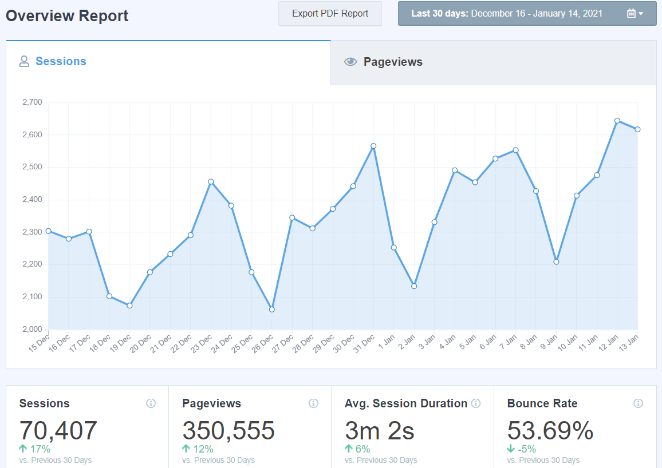
De plus, le plugin offre des statistiques en temps réel, le suivi du commerce électronique et le suivi du comportement, le tout sans avoir besoin de programmation. Avec des informations puissantes telles que les articles les plus populaires, les vues de pages, les sources de référence, et plus encore, MonsterInsights est un compagnon fiable pour tout propriétaire de site WordPress afin d'améliorer ses performances.
Pourquoi je le recommande : MonsterInsights aide les propriétaires de sites Web à se connecter à Google Analytics, à comprendre les performances de leur site et à transformer des tâches d'analyse complexes en processus simples et efficaces.
Pour plus d'informations, veuillez consulter notre avis sur MonsterInsights.
5. All in One SEO
| Prix : À partir de 49,50 $/an |
| Plan gratuit / Essai : Version gratuite disponible |
| Fonctionnalités remarquables : |
| 🔹 Paramètres SEO sur la page pour les titres et les méta 🔹 Plans de site XML et outils de schéma 🔹 Redirections et contrôles de partage social (plans payants) |
| Idéal pour : Gérer les tâches SEO WordPress de base sans modifier le code |
All in One SEO est l'outil sans code que j'utilise pour gérer les tâches SEO WordPress de base telles que les titres, les plans de site et le schéma sans modifier les fichiers de thème ni écrire de balisage. C'est l'un des meilleurs plugins SEO WordPress qui garantissent que votre site Web est convivial pour les moteurs de recherche.
Avec ce plugin, vous pouvez optimiser votre site Web pour les moteurs de recherche afin de maximiser le trafic et les ventes. Sa suite d'outils SEO sans code vous aide à optimiser les titres, à créer des plans de site XML, à ajouter des balises Meta, à insérer du balisage de schéma, et plus encore.
Même si vous êtes novice en matière de SEO, cet outil rend le processus transparent et sans stress. Par exemple, son outil d'analyse de contenu vous guide dans la création de contenu riche en SEO qui se classe plus haut sur les moteurs de recherche.
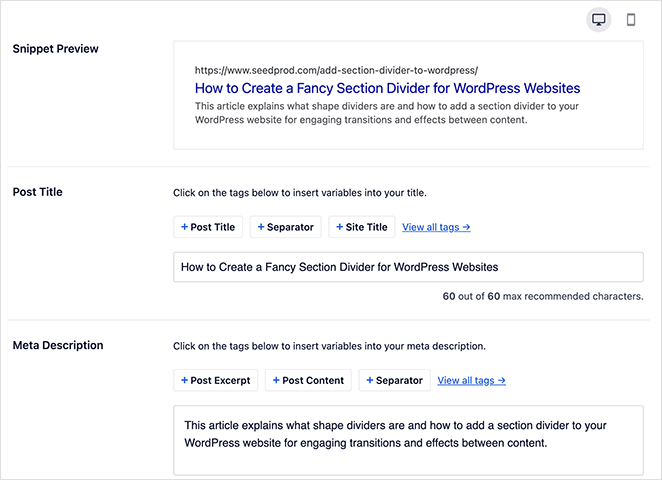
De plus, il est doté d'une intégration intégrée aux médias sociaux, de liens internes et de redirections automatiques, garantissant que toutes vos bases SEO sont couvertes sans avoir à vous soucier de la programmation.
Pourquoi je le recommande : All In One SEO justifie sa place parmi les meilleurs outils sans code pour WordPress. Il est facile à utiliser, nécessite une configuration minimale et vous guide dans l'optimisation de votre site Web pour les moteurs de recherche.
Pour plus de détails, veuillez consulter notre avis sur AIOSEO.
6. OptinMonster
| Tarifs : À partir de 9 $/mois |
| Plan gratuit / Essai : Aucun plan gratuit indiqué |
| Fonctionnalités remarquables : |
| 🔹 Créateur de campagnes par glisser-déposer pour les pop-ups 🔹 Règles de ciblage et déclencheurs d'affichage 🔹 Modèles prédéfinis pour la capture de prospects |
| Idéal pour : Créer des pop-ups et des formulaires d'inscription sans scripts personnalisés |
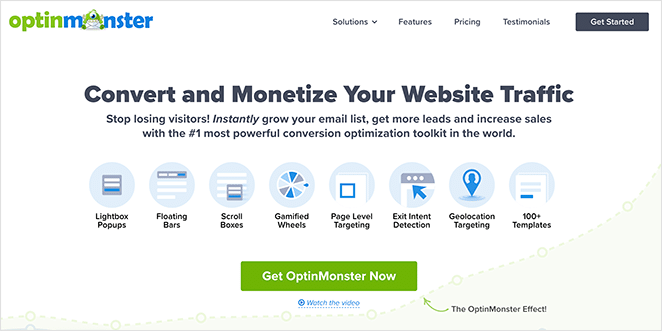
OptinMonster est un excellent choix pour créer des pop-ups et des campagnes d'inscription dans WordPress sans scripts personnalisés ni développement front-end. Il aide à augmenter les taux de conversion et à maximiser la génération de prospects grâce à des campagnes d'inscription faciles.
Avec cette plateforme sans code, vous pouvez créer des campagnes d'inscription à forte conversion avec glisser-déposer et sans aucune connaissance en codage. Vous pouvez commencer avec un modèle prédéfini et tout créer, des pop-ups complexes aux tapis de bienvenue plein écran, en passant par les barres flottantes, les roues de réduction, et plus encore.
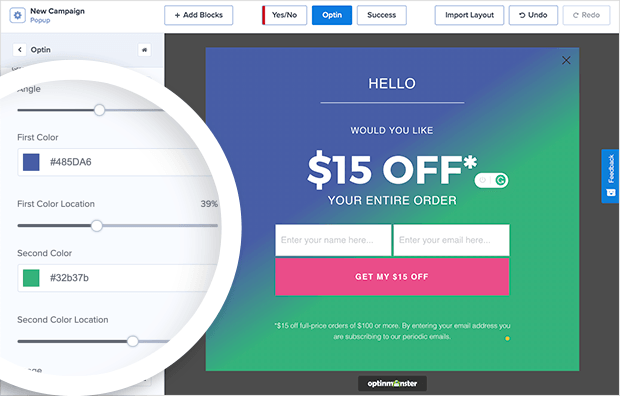
OptinMonster complète ses outils de conception faciles avec de puissantes fonctionnalités de ciblage et de segmentation afin que vos efforts marketing atteignent les bonnes personnes au bon moment. Par exemple, vous pouvez créer des pop-ups d'intention de sortie accrocheurs qui s'affichent lorsque les utilisateurs sont sur le point de quitter votre site.
De plus, cette puissante application Web fonctionne de manière transparente avec des plateformes de développement tierces, notamment Shopify, Drupal, Squarespace, BigCommerce, et plus encore.
Compte tenu de toutes ces fonctions, il n'est pas étonnant qu'OptinMonster se classe parmi les meilleurs outils sans code pour les utilisateurs de WordPress, en particulier ceux qui cherchent à avoir un impact sur leur génération de prospects.
Pourquoi je le recommande : OptinMonster aide les propriétaires de sites Web à avoir un impact sur la génération de prospects grâce à son créateur de campagnes facile par glisser-déposer, ses modèles prédéfinis et ses règles de ciblage intelligentes.
Pour plus d'informations, consultez notre guide des meilleurs plugins de popup WordPress.
7. Easy Digital Downloads
| Tarifs : À partir de 99 $/an |
| Plan gratuit / Essai : Aucun plan gratuit indiqué |
| Fonctionnalités remarquables : |
| 🔹 Paiement de produits numériques dans WordPress 🔹 Codes de réduction et gestion des clients 🔹 Options de rapports et de passerelles de paiement |
| Idéal pour : Vendre des téléchargements numériques sans créer de boutique personnalisée |
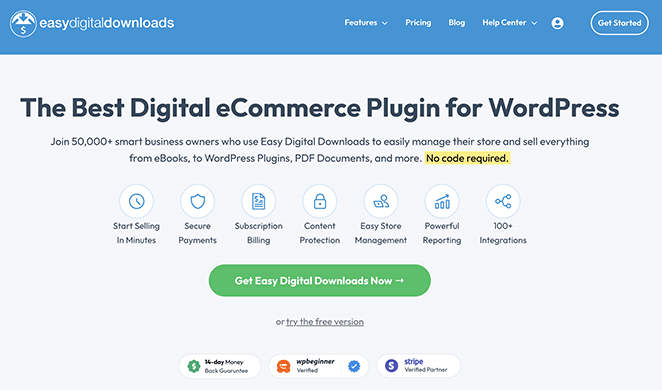
Easy Digital Downloads est l'un des meilleurs plugins eCommerce pour les téléchargements numériques. Il vous permet de vendre des produits numériques depuis WordPress en utilisant des paramètres de produit simples au lieu de construire une configuration eCommerce personnalisée.
Grâce à une intégration facile à WordPress, vous pouvez vendre de tout, des eBooks et plugins WordPress aux PDF et cours en ligne depuis une boutique en ligne intuitive.
La beauté d'Easy Digital Downloads réside dans sa simplicité. Vous pouvez facilement ajouter de nouveaux produits, définir des prix et créer des codes de réduction sans toucher à une seule ligne de code. C'est aussi simple que de remplir un formulaire.
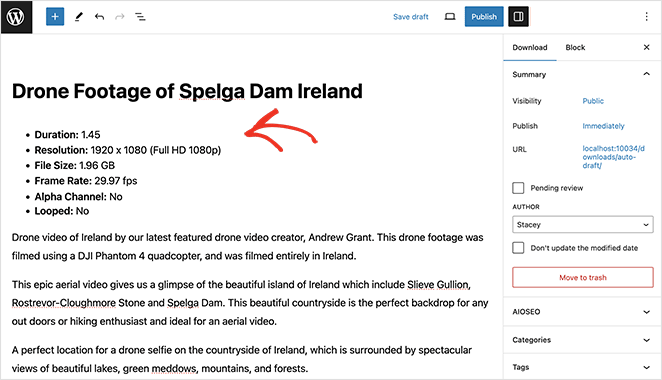
De plus, vous pouvez configurer diverses passerelles de paiement, vous permettant de vendre à un public plus large. Le système de reporting détaillé de l'outil fournit également des informations opportunes sur votre entreprise, vous permettant de prendre des décisions basées sur les données et d'augmenter vos ventes.
Pourquoi je le recommande : Easy Digital Downloads aide les startups, les entrepreneurs, les blogueurs et les petites entreprises à vendre des produits numériques sur WordPress sans avoir à se soucier de code complexe.
8. Duplicateur
| Prix : À partir de 49,50 $/an |
| Plan gratuit / Essai : Version gratuite disponible |
| Fonctionnalités remarquables : |
| 🔹 Workflow guidé de migration de site 🔹 Sauvegardes planifiées (plans payants) 🔹 Options de restauration faciles pour la récupération |
| Idéal pour : Sauvegarder et déplacer des sites WordPress sans exportations manuelles |
Duplicator est l'un des meilleurs plugins de migration et de sauvegarde pour WordPress. Il permet de sauvegarder ou de déplacer un site WordPress sans exporter manuellement les bases de données ou modifier les fichiers de configuration.
En quelques étapes simples, vous pouvez créer un « package » qui comprend les plugins, les thèmes, le contenu et la base de données de votre site. Vous pouvez ensuite migrer le package vers n'importe quel emplacement, tel qu'un serveur différent ou un autre domaine.
Les sauvegardes sont un jeu d'enfant avec Duplicator. L'outil vous aide à planifier des sauvegardes, ce qui signifie que les informations de votre site Web sont toujours sécurisées. Vous pouvez restaurer votre site rapidement en cas de problèmes, éliminant ainsi les temps d'arrêt qui pourraient affecter vos revenus ou votre présence en ligne.
La convivialité de Duplicator est redoutable, surtout pour les débutants. Avec son interface intuitive et ses instructions claires, vous n'avez pas besoin d'être un expert WordPress pour effectuer des migrations et des sauvegardes comme un professionnel.
Pourquoi je le recommande : Duplicator aide les propriétaires de sites Web à sauvegarder, restaurer et déplacer facilement leur site WordPress d'un emplacement à un autre sans perdre de contenu ni engager un développeur.
9. Smash Balloon

| Tarifs : À partir de 49 $/an |
| Plan gratuit / Essai : Versions gratuites disponibles (limitées) |
| Fonctionnalités remarquables : |
| 🔹 Plugins de flux pour les principales plateformes sociales 🔹 Contrôles de personnalisation visuelle des flux 🔹 Mises à jour automatiques pour maintenir les flux à jour |
| Idéal pour : Ajouter des flux de médias sociaux à WordPress sans intégrations |
Smash Balloon vous permet d'afficher des flux de médias sociaux en direct sur votre site sans intégrer de scripts ni gérer manuellement les connexions API.
Smash Balloon propose plusieurs plugins de flux pour différentes plateformes de médias sociaux, notamment Facebook, Instagram, YouTube, TikTok et X (anciennement Twitter). Avec chaque plugin, vous pouvez importer un flux de votre contenu social le plus récent sans écrire de code.
Avec Smash Balloon, vos flux sont mis à jour automatiquement, vous évitant de mettre manuellement votre site à jour avec du nouveau contenu social. De plus, son générateur de flux visuel vous permet de personnaliser vos flux de médias sociaux pour qu'ils correspondent au thème et à la marque de votre site Web, afin de créer un aspect cohérent pour vos visiteurs.
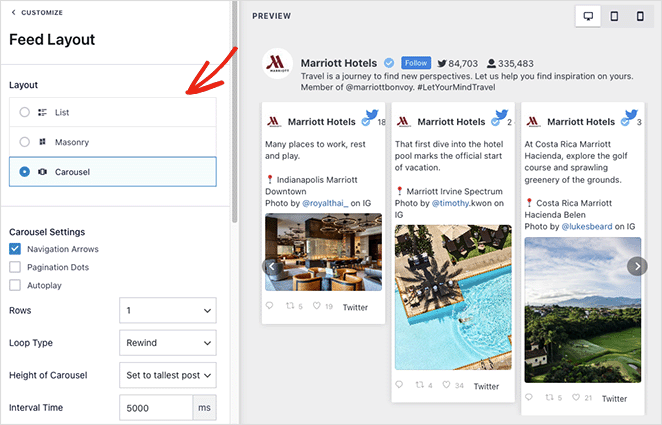
Au-delà de ses capacités de conception, Smash Balloon est un excellent outil pour stimuler l'engagement client. Il vous permet d'afficher des avis, des publications et des photos de médias sociaux sur votre site Web. Ce faisant, vous renforcez votre preuve sociale, engagez votre public et améliorez l'authenticité de votre marque, mais vous incitez également les visiteurs du site à se joindre à la conversation directement sur votre plateforme.
Pourquoi je le recommande : Avec son interface simple et ses instructions faciles à suivre, Smash Balloon permet d'ajouter et de gérer facilement du contenu de médias sociaux dans WordPress sans codage.
Pour plus de détails, veuillez consulter notre avis approfondi sur Smash Balloon.
10. Thrive Suite
| Tarifs : À partir de 299 $/an |
| Plan gratuit / Essai : Aucun plan gratuit indiqué |
| Fonctionnalités remarquables : |
| 🔹 Plusieurs plugins pour la création et le marketing 🔹 Constructeur de pages, prospects, quiz et outils de test 🔹 Tableau de bord et modèles unifiés |
| Idéal pour : Une boîte à outils marketing tout-en-un pour WordPress sans développements personnalisés |
Thrive Suite regroupe des outils de création de pages, de génération de prospects, de test et de marketing afin que vous puissiez gérer les fonctionnalités de croissance dans WordPress sans assembler de solutions personnalisées.
L'un de ses outils sans code les plus populaires est Thrive Architect, un puissant constructeur de pages par glisser-déposer. Avec lui, vous pouvez concevoir et personnaliser des pages uniques de qualité professionnelle sans écrire une seule ligne de code.
Pour stimuler l'engagement de votre site, Thrive Suite propose Thrive Quiz Builder, un outil facile à utiliser pour créer des quiz captivants et interactifs. Couplé à Thrive Leads, une solution de génération de prospects, ces outils fonctionnent harmonieusement pour faire monter en flèche votre liste d'e-mails et vos taux d'engagement.
Thrive Suite ne s'occupe pas seulement de la partie visible de votre site Web, mais aussi de la partie cachée. Avec Thrive Optimize, son outil de test A/B, vous pouvez tester différentes sections de votre site Web et prendre des décisions basées sur des données pour améliorer les performances de votre site.
Donc, si vous recherchez une fonctionnalité élevée, une facilité d'utilisation et une polyvalence dans un ensemble soigné, vous ne pouvez pas vous tromper avec Thrive Suite.
Pourquoi je le recommande : Thrive Suite est une excellente suite d'outils sans code qui couvre toutes les étapes de la création, de la gestion et du marketing d'un site WordPress sans avoir à engager un développeur.
11. UserFeedback

| Prix : À partir de 49,50 $/an |
| Plan gratuit / Essai : Essai gratuit disponible |
| Fonctionnalités remarquables : |
| 🔹 Modèles d'enquêtes pour des objectifs de feedback courants 🔹 Options de logique et de ciblage (plans payants) 🔹 Affichage d'une question à la fois |
| Idéal pour : Collecter les commentaires des utilisateurs dans WordPress sans enquêtes personnalisées |
UserFeedback est le plugin de feedback leader pour WordPress, approuvé par plus de 300 000 sites Web pour ses puissantes fonctionnalités d'enquête. Il vous permet de collecter des commentaires et de mener des enquêtes directement sur votre site WordPress sans créer de formulaires personnalisés ni de logique d'enquête.
Le plugin combine parfaitement des fonctionnalités avancées et une facilité d'utilisation, ce qui en fait le choix idéal pour créer des enquêtes professionnelles sans avoir besoin de connaissances techniques.
Avec UserFeedback, vous pouvez créer des enquêtes illimitées avec un large éventail de types de questions, des simples évaluations par étoiles et des choix multiples aux réponses détaillées en texte libre. La plateforme facilite la prise en main grâce à sa collection de modèles prédéfinis, parfaits pour les enquêtes NPS, les retours sur produit, les enquêtes de satisfaction client, et plus encore.
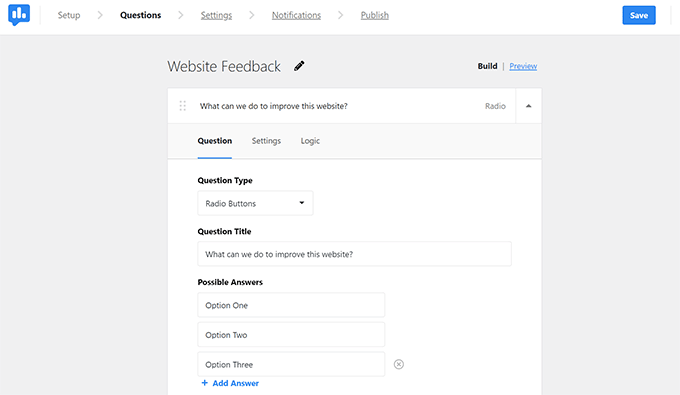
L'outil se distingue par ses fonctionnalités avancées : types de questions flexibles, modèles prêts à l'emploi, logique intelligente qui modifie les questions en fonction des réponses précédentes, et ciblage précis de l'audience. De plus, il affiche une seule question à la fois, ce qui aide à lutter contre la fatigue des enquêtes et améliore les taux de complétion.
L'un de ses plus grands atouts est sa connexion avec Google Analytics via MonsterInsights. Cela fournit des informations claires sur vos résultats d'enquête et accélère l'analyse des retours directement depuis le tableau de bord WordPress.
Pourquoi je le recommande : UserFeedback aide les utilisateurs de WordPress à vraiment comprendre leur audience grâce à des outils d'enquête puissants mais faciles à utiliser. Ses fonctionnalités avancées, sa conception conviviale et son analyse détaillée en font la meilleure solution pour collecter et comprendre les retours précieux des utilisateurs.
Comment choisir les meilleurs outils No Code pour WordPress
Avec autant d'options disponibles, choisir les bons outils No Code peut sembler décourageant. Pour vous faciliter la tâche, posez-vous les questions suivantes :
- De quelles fonctionnalités ai-je besoin ? La rapidité de chargement des pages est-elle une priorité ? Ou vous concentrez-vous sur l'amélioration de la sécurité du site ? Une fois vos besoins définis, il est plus facile de présélectionner les outils.
- Fonctionnera-t-il avec mes plugins existants ? Les problèmes de compatibilité peuvent entraîner des dysfonctionnements et ralentir la vitesse de votre page.
- Est-il facile à utiliser ? Bien que les outils No Code soient accessibles, certains sont plus conviviaux. Recherchez des outils avec une interface claire et une bonne expérience utilisateur.
- Est-il dans mon budget ? Alors que certains outils offrent des services de base gratuits, d'autres facturent des frais pour des fonctionnalités plus avancées. Trouvez un équilibre entre votre budget et vos exigences.
En fin de compte, les outils que vous choisissez dépendent de vos besoins et de vos circonstances. Évaluez donc attentivement les fonctionnalités de chaque outil, et n'hésitez jamais à les essayer – la plupart des outils No Code offrent des périodes d'essai.
FAQ sur les outils No Code pour WordPress
J'espère que ce guide vous a aidé à trouver les meilleurs outils No Code pour WordPress. Ces outils sont conçus pour faciliter votre processus de création de site Web, même si vous n'êtes pas un expert en codage.
Si vous recherchez encore plus d'outils No Code pour WordPress, vous trouverez les guides suivants utiles :
- Meilleurs plugins Lightbox WordPress
- Comment créer un site d'adhésion avec WordPress
- Meilleurs services téléphoniques d'entreprise (WPBeginner)
- Meilleurs plugins SMTP pour une livraison d'e-mails réussie
- Meilleurs plugins WooCommerce pour faire décoller vos ventes
- Meilleurs plugins de chat en direct pour WordPress
Merci de votre lecture ! Nous serions ravis d'entendre vos réflexions, alors n'hésitez pas à rejoindre la conversation sur YouTube, X et Facebook pour plus de conseils et de contenu utiles pour développer votre entreprise.



