

TL;DR:
A PPC landing page is a standalone page built to match one ad and drive one action. Send paid clicks here instead of your homepage and you stop wasting ad budget.
- Match the ad: Keep the headline, offer, and CTA the same from the ad to the page so visitors know they are in the right place.
- Strip distractions: Remove the navigation menu, footer links, and anything that lets a paid visitor wander off.
- Keep forms short: Ask only for what you need, usually a first name and email.
- Track and noindex: Set up conversion tracking, add UTMs, and noindex the page so it stays out of organic search.
- Build it in WordPress: Use SeedProd to drag, drop, and publish a fast, distraction-free PPC landing page without code.
You launched a Google Ads campaign, picked your keywords, and sent every click to your homepage. The budget drained, and the leads never came.
A homepage is built to do a dozen jobs at once, so a single ad click gets scattered across menus and competing links. A dedicated landing page does the opposite, with one message and one action.
Unbounce’s 2024 benchmark report, drawn from 41,000 pages, puts the average landing page conversion rate at 6.6%. Below are the eight practices the best pages share, plus how to build one in WordPress.
What Is a PPC Landing Page (and Why You Need One)?
A PPC landing page is a standalone page built to match a single ad and drive one action. Visitors land here after clicking your paid ad, and everything on the page points them toward one clear goal.
That goal depends on your campaign. For instance it might be one of these:
- Signing up for your newsletter
- Registering for a webinar or event
- Buying a product or service
- Requesting a demo or quote
So why not just point ads at your homepage? Because a dedicated page does more than give visitors a place to land. It gets more out of every click you pay for.
- Better Google Ads Quality Score: A relevant, fast page improves your landing page experience, which can lower your cost per click.
- Stronger ROI: Every dollar goes further when your ad sends clicks to a page designed to capture leads or sales.
- Higher conversions: One focused page with one call to action beats a homepage full of choices.
Next, let’s walk through the best practices that make PPC landing pages convert.
PPC Landing Page Best Practices
Whether you’re an expert or just starting with PPC marketing, these landing page best practices help you get more out of your page and your ad spend. I use these on my own SeedProd pages, and they make the difference between a page that earns clicks and one that wastes them.
1. Make PPC Landing Pages Unique to Each Campaign
Build a separate landing page for every campaign. Sending different campaigns to the same page confuses visitors and pushes up your bounce rate.
For example, if your goal is to grow your email list, sending people to a page asking for social shares won’t help. You need a landing page with a sign-up form to collect email addresses.
Pointing ads at your homepage is tempting, but it gives visitors too many choices and dilutes your Google Ads intent. A dedicated page gives them a single choice instead.
2. Match Your Headline, Offer, and CTA to the Ad
Message match is the single biggest lever you have. When the words on your ad show up again on the page, visitors instantly know they are in the right place, and Google rewards that relevance with a better Quality Score.
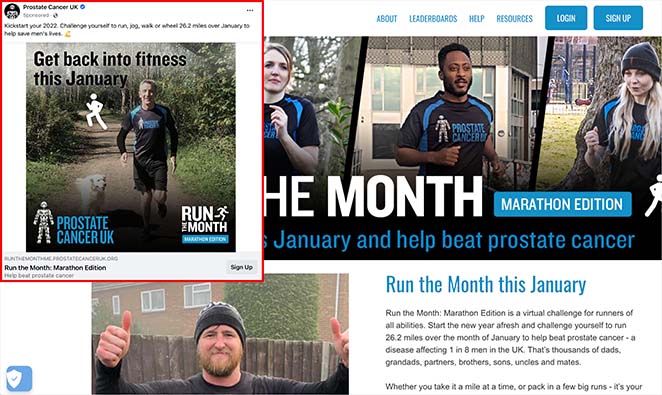
The fix is to keep four things consistent from the ad to the page:
- Ad keyword: The search term that triggered your ad.
- Headline: Echo that keyword in your page headline.
- Offer: Make the promise on the page the same one in the ad.
- CTA: Use the same action language on the button.
For example, if you’re running a Black Friday campaign offering 15% off your whole site, the page should carry that exact promise:
- Headline: 15% Off Everything for Black Friday Week
- Copy or image: Limited-time discount, 15% off
- CTA: Get 15% Off
A mismatch between the ad and the page is one of the most common reasons a call-to-action gets ignored. Later in this guide I’ll show you how SeedProd can match the headline to the exact search term automatically.
3. Keep Your Copy Brief and Compelling
Your visitor wants a quick answer, not an essay. They scan for the offer, the proof, and the button, then decide in seconds.
Keep your copy short and break it up with bold headings, bullet points, and tight sentences so the message lands at a glance.
4. Use Engaging Video Content
Video explains a complex offer faster than a wall of text. Add one where it helps, and keep it tied to what your ad promised.
For example, if you’re selling a product, a short how-to video or demo can lift conversions by showing the thing in action.
5. Include Testimonials and Reviews
People won’t pay for something they don’t trust yet. Social proof closes that gap before they reach the button.
Add customer reviews and video testimonials as proof, and back them up with trust badges from payment processors and security companies.
6. Use Minimal Form Fields
Every extra field is a reason to abandon. Long, complicated forms put people off and cost you leads.
Limit your form to the essentials, usually a first name and email. You can always ask for more once you’ve built a relationship.
7. Remove Unnecessary Distractions
Every link that isn’t your CTA is a way out. The best PPC landing pages remove the main navigation menu so visitors can’t browse instead of converting.
Cut the footer links, drop the social media icons, and lose any animation that pulls attention from the offer.
Speed counts here too. Most people abandon a page that takes more than a few seconds to load, so follow these tips to optimize your landing page for speed and conversions.
8. Track and Measure Every Page
You can’t improve a page you aren’t measuring. Set up tracking before you spend a cent on clicks.
- Add conversion tracking: Install your Google Ads tag or a GA4 conversion event so you know which clicks turn into leads or sales.
- Use UTMs: Tag your ad URLs so you can see exactly which campaign and keyword sent each visitor.
- Noindex the page: PPC pages target paid traffic and change with testing, so keep them out of organic search with a noindex tag.
9. Optimize for Mobile
More than half of paid-search clicks now happen on a phone, so your page has to work thumb-first. A page that looks great on desktop and breaks on mobile quietly burns ad budget.
- Compress hero images: Big images are the main reason mobile pages load slowly.
- Keep CTAs thumb-reachable: Make buttons large and easy to tap without zooming.
- Test the form on a phone: Fill it in yourself on mobile before the campaign goes live.
10. A/B Test Different Page Elements
A/B testing means changing one element at a time to see what improves performance. Test one thing at a time, not everything at once, or you won’t know what actually worked.
Start with the elements that move conversions most: your headline, CTA, images, buttons, and button colors.
SeedProd doesn’t have built-in split testing, so for now you run the test with a third-party tool like VWO. Duplicate your SeedProd page, change one element on the copy, and send half your traffic to each to compare.
PPC Landing Page Examples
The best way to see these best practices working is to look at real pages. Here are three live examples, each showing one thing it gets right that you can borrow.
Shopify Free Trial: One Goal, Backed by Social Proof
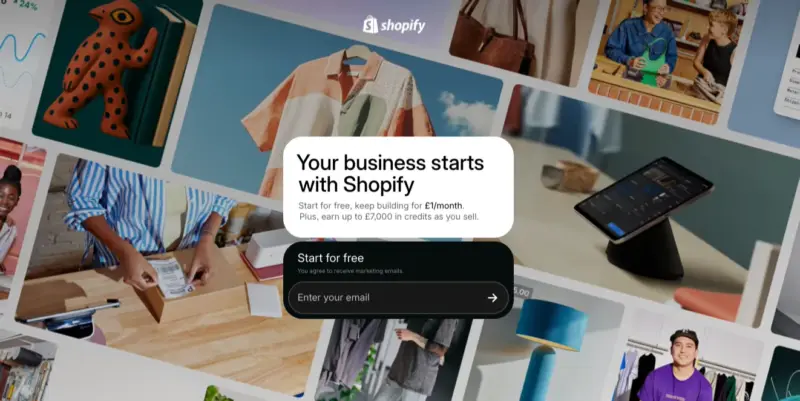
Shopify’s free trial page repeats one CTA, “Start for free,” down the whole page with no site navigation to wander into. A row of recognisable brand logos and a short customer quote do the trust work without cluttering the offer.
Takeaway: Give the page one job and let social proof carry the credibility.
Audible Free Trial: One Clear Offer With Honest Terms

Audible’s free trial page states the trial length and the price after it right next to the button: “$8.99/mo. after 30 days. Cancel anytime.” Being upfront removes the hesitation that kills paid-click conversions.
Takeaway: Put the honest terms next to the CTA so visitors don’t stall over the small print.
Mailchimp Sign-Up: A Short Form and Nothing Else
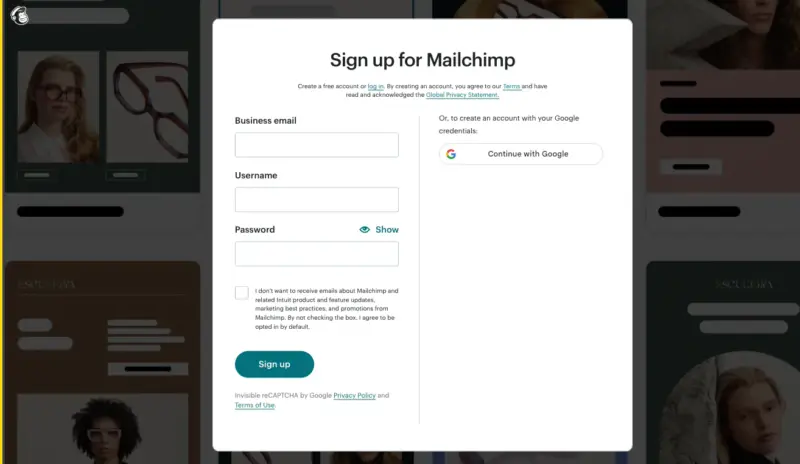
Mailchimp’s sign-up page is a logo, four fields, and one “Sign up” button, with no navigation at all. It’s the cleanest illustration of “remove every distraction” for a lead-capture page.
Takeaway: When the goal is a signup, cut everything that isn’t the form or the button.
How to Create a PPC Landing Page in WordPress
The fastest way to get a PPC landing page live in WordPress is with a landing page builder. For this tutorial I use SeedProd, the best drag-and-drop website builder for WordPress.

SeedProd lets you build a distraction-free, fast-loading page that matches your ad in minutes, with no code and no theme to wrestle. You drag, drop, and see every change live as you make it.
It includes everything you need for a high-converting PPC landing page:
- Responsive landing page templates
- Pre-made sections
- Sign up and contact forms
- Customizable CTA buttons
- Countdown timers
- Testimonial and video blocks
- Email marketing integration
- Mobile editing and previews
SeedProd is also built with bloat-free code, so your page loads fast for the best user experience.
Here’s how the process works: 1. Install SeedProd. 2. Choose a template. 3. Customize your page. 4. Configure your settings. 5. Publish. Follow the steps below.
Step 1. Install and Activate SeedProd
First, go to the SeedProd pricing page and sign up for a license. There is a free version in the WordPress plugin repository, but we’ll use the Pro version for its advanced features.
Next, head to the Downloads tab in your account dashboard and download the plugin .zip file. On the same page, copy your license key to use shortly.
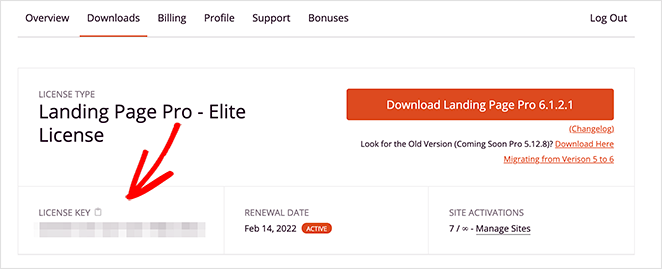
After downloading SeedProd, install and activate the plugin on your site. If you need help, follow these instructions on installing a WordPress plugin.
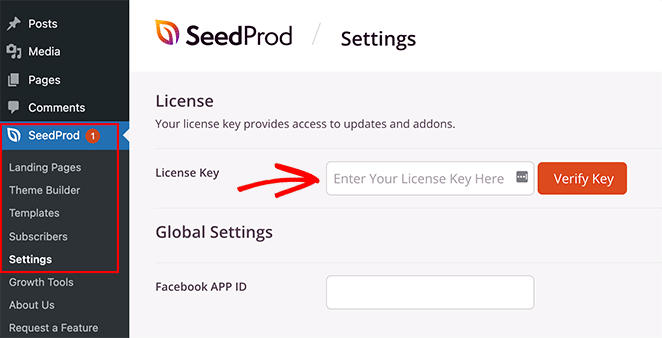
Now go to SeedProd » Settings and enter your license key to activate your premium features. Click the Verify Key button before moving on.
Step 2. Choose a Landing Page Template
Next, choose a template for your PPC page. Go to SeedProd » Landing Pages and click the Add New Landing Page button.
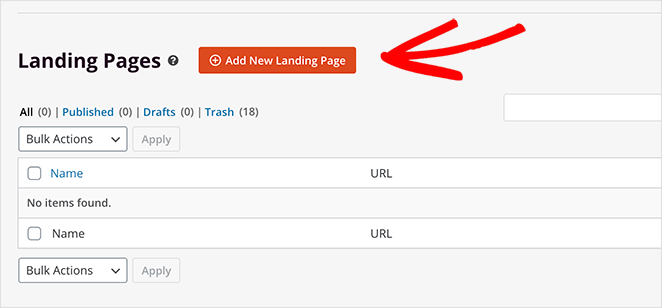
That opens the templates library, where you pick a premade design as the foundation for your page.
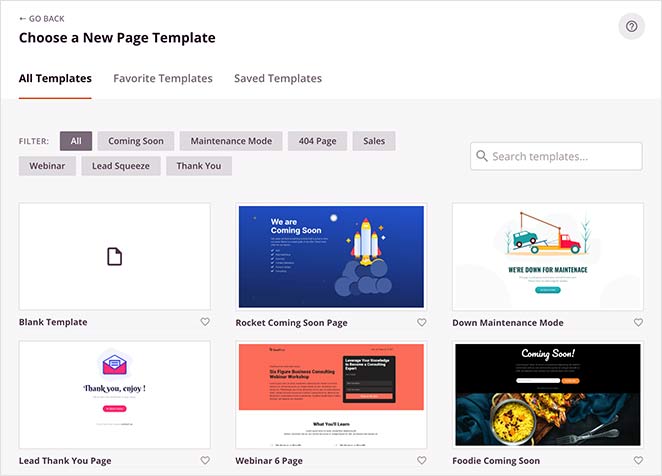
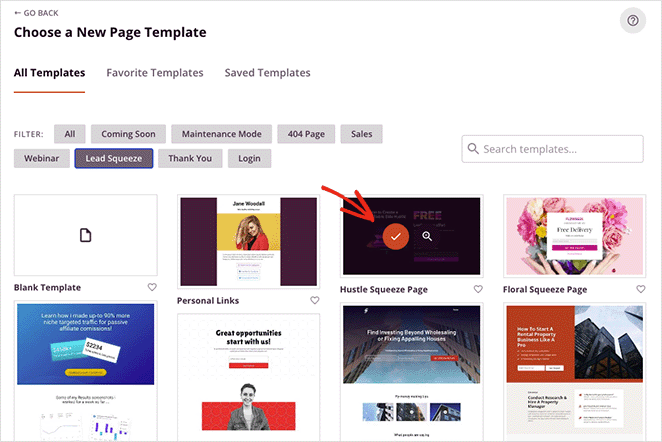
There are 300+ landing page templates, and you can filter them by clicking the tabs along the top. When you find one that fits, hover over it and click the orange checkmark icon.
We’ll use the “Access Squeeze Page” template for this tutorial.
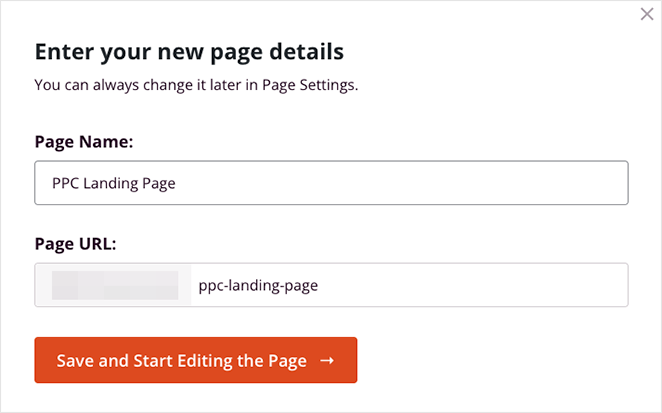
On the next screen, give your page a name and a custom URL. You can change this later, so click Save and Start Editing the Page to continue.
Step 3. Customize Your PPC Landing Page
You’ll see your template inside SeedProd’s drag-and-drop editor. Blocks and sections sit on the left, and you add them to your page by dragging and dropping.
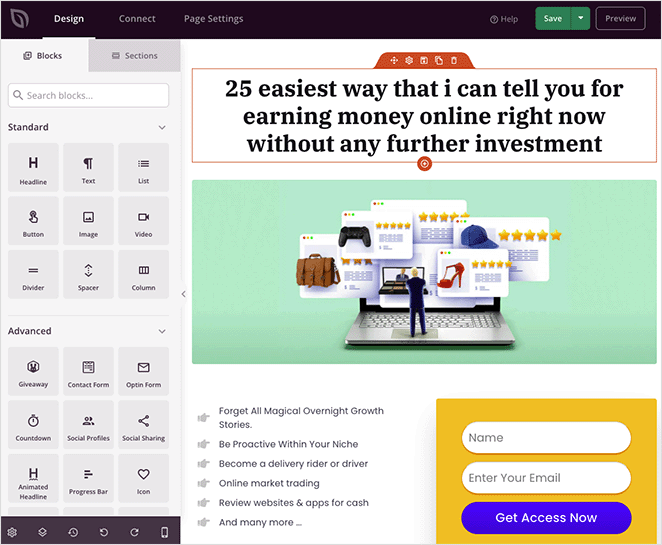
On the right is a live preview of your page. Click any element to change its content and settings.
For example, click the headline and its settings open on the left. From there you can add a headline that matches your PPC campaign and set its alignment, heading level, and size.
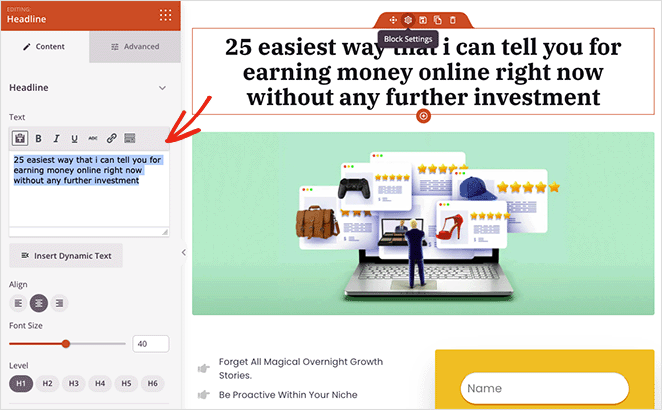
In the Advanced tab, you control typography, colors, spacing, and attributes. You can also show or hide the headline on mobile, desktop, or both.
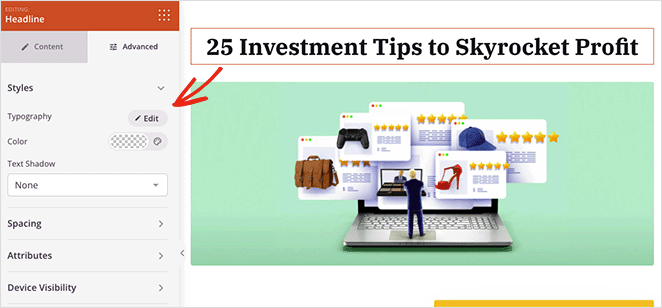
Match Your Headline to the Ad Keyword Automatically
SeedProd’s Dynamic Text feature inserts a value from a URL query parameter straight into your page. You can use it to set the headline from the search term that triggered your ad.
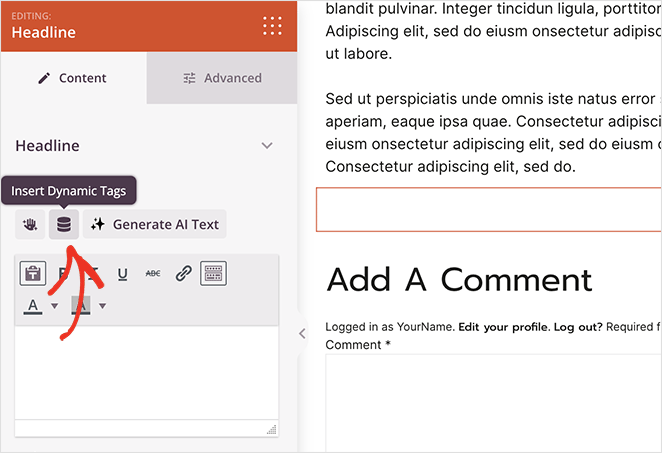
So when someone searches “blue running shoes” and clicks your ad, your headline can read “blue running shoes” too. The page then echoes the exact keyword the visitor just typed.
That tightens message match at the keyword level, which is what Google looks at for landing page experience and Quality Score. Tighter message match also tends to lift conversions, and Dynamic Text is available on the Pro and Elite plans.
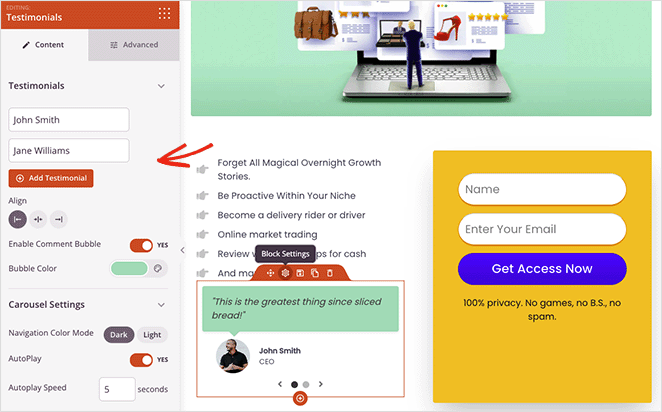
Back in the editor, adding more elements follows the same drag-and-drop principle. Say you want social proof: drag over the Testimonials block and enter comments from current customers.
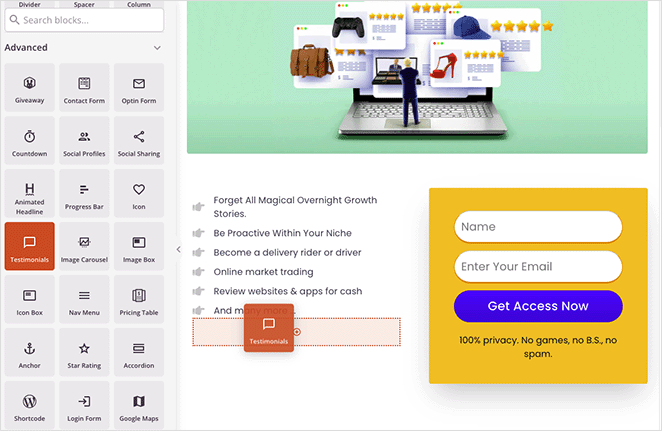
You can add as many testimonials as you like and show them in a sliding carousel with headshots, job titles, and custom colors.
Keep customizing by editing the rest of your page:
- Logo
- Optin form
- Images
- Footer text
If you’re using an optin form to collect emails, click the Connect tab at the top to integrate your email marketing service provider.
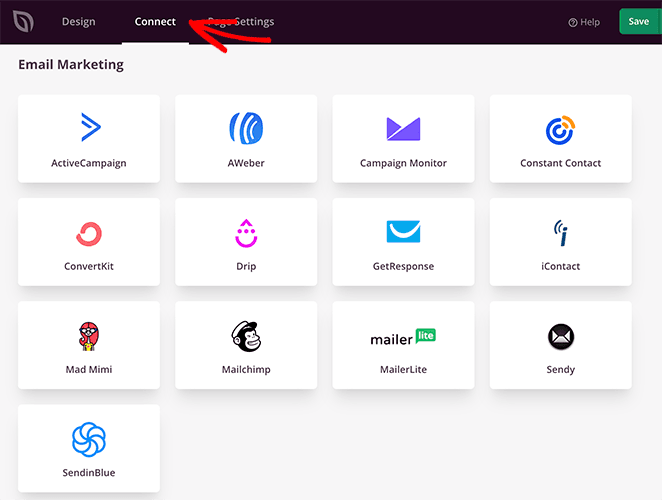
SeedProd has direct integrations for many popular services, such as Constant Contact, Mailchimp, and ConvertKit. Choose a provider and follow the on-screen steps to connect your email list.
You can also connect your page to Google Analytics, Recaptcha, and other services through Zapier.
When everything looks right, click the Save button in the top-right corner.
Ready to build yours?
Get a PPC landing page that matches your ad in minutes
SeedProd’s drag-and-drop builder, 300+ templates, and Dynamic Text mean no code and no theme wrestling. Just publish a page built to convert paid clicks.
Start Building FreeStep 4. Configure Your Settings
Next, set up a few page options by clicking the Page Settings tab. Here you can change your page name, landing page URL, and add your Facebook App ID.
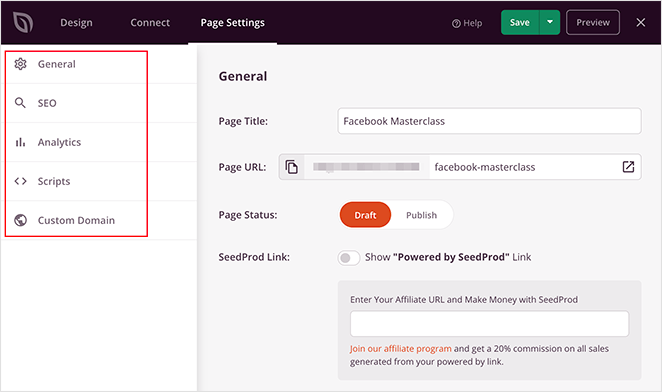
If you have an SEO plugin installed, such as All in One SEO, you can set your on-page SEO here. This is also where you’d add a noindex tag to keep the page out of organic search.
You can also track page performance with an analytics plugin like MonsterInsights.
As we covered earlier, it’s best practice to create a unique page for each PPC campaign. SeedProd’s Domain Mapping feature makes this easier by giving each landing page its own custom domain name.
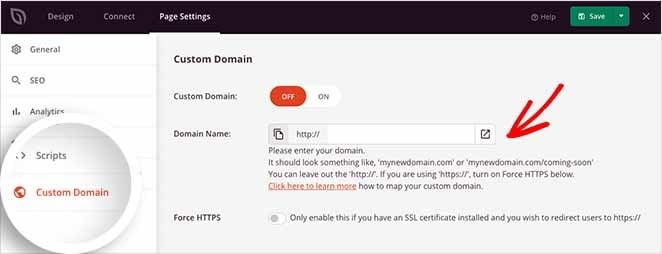
That means you can run as many pages as you like, each on its own domain, from one WordPress install. Domain Mapping is an Elite plan feature, so check your plan first. Here’s a guide on how domain mapping works.
Step 5. Launch Your PPC Landing Page
Publishing is fast. Click the dropdown arrow on the Save button and select Publish.
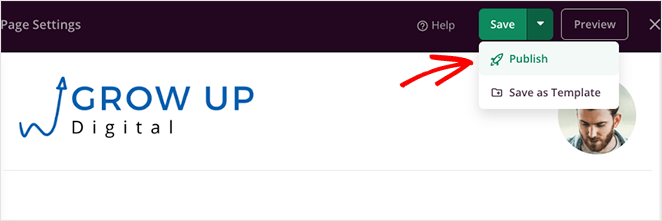
You’ll see a notice telling you the page is now live.

Click the See Live Page button to view your finished page.
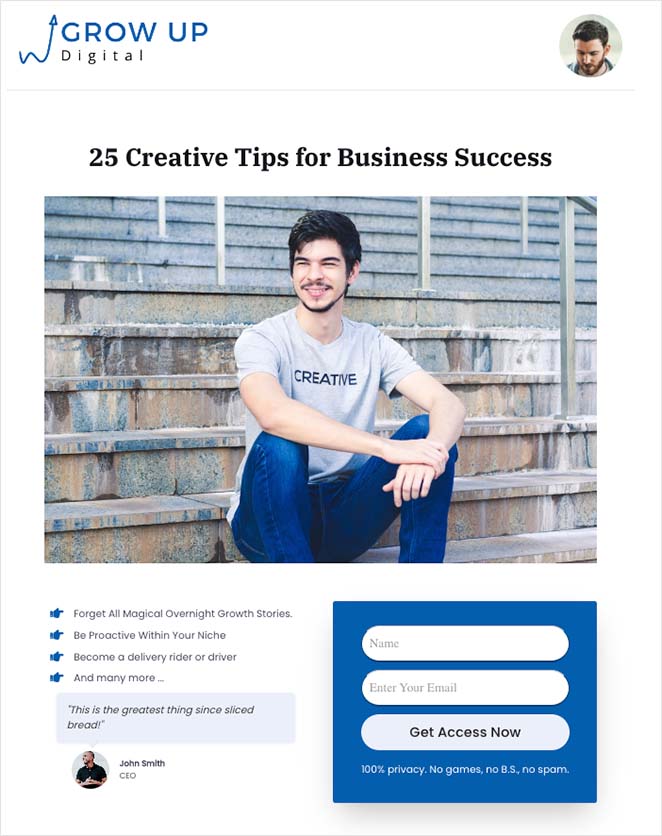
What to Do First
If all of this feels like a lot, don’t try to do it everywhere at once. Start with one campaign.
Pick the campaign you spend the most on, build one page that matches that ad’s keyword and offer, set one CTA, and noindex it. Then watch the numbers for a week before you change anything.
One clean page that matches one ad will teach you more than a dozen rushed ones.
FAQs About PPC Landing Pages
Should I noindex my PPC landing page?
Yes, in most cases. A PPC landing page targets paid traffic, not organic search, and it changes often as you test, so a noindex tag keeps it out of Google’s index and avoids competing with your main pages. The exception is if you also want the page to rank organically, which is rare for a dedicated ad page.
Should PPC traffic go to a landing page or my homepage?
Send it to a dedicated landing page, not your homepage. Your homepage gives visitors too many choices and dilutes the intent your ad created. A landing page matches the ad and points to one action, which converts paid clicks far better.
How many form fields should a PPC landing page have?
Keep it to the fewest fields you can. For most lead-gen pages, a first name and email are enough, and every extra field lowers your completion rate. You can always collect more details once someone has signed up.
How many PPC landing pages should I have?
Create at least one landing page for each ad group or campaign. Matching each page to its specific offer keeps your message consistent and drives better results.
Ready to Build Your PPC Landing Page?
You now know how to build a PPC landing page in WordPress that matches your ad, removes distractions, and turns paid clicks into leads, without hiring a developer. Build one page, match it to one ad, and let the numbers show you what to do next.
If you found this helpful, you might also like our guides on landing page conversion rates and the difference between a landing page and a sales page.
Thanks for reading! We’d love to hear your thoughts, so please feel free to join the conversation on YouTube, X and Facebook for more helpful advice and content to grow your business.



