

TL;DR: How to Create a Kickstarter Landing Page in WordPress
A Kickstarter landing page lets you collect emails, build a backer list, and generate excitement before your campaign goes live. Here’s how to build one with SeedProd:
- Install SeedProd: Activate the plugin and go to SeedProd » Landing Pages.
- Choose a template: Pick from hundreds of pre-made templates and click the checkmark icon to select.
- Customize your page: Add your headline, project details, reward tiers, testimonials, and a CTA button linking to Kickstarter.
- Connect your email service: Use the Connect tab to integrate Mailchimp, ConvertKit, or another ESP to capture signups.
- Configure SEO settings: Add your meta title and description via AIOSEO in the Page Settings tab.
- Publish: Preview on mobile, then hit Publish to make your page live.
When I planned my first Kickstarter launch, I quickly realized something: the default project page wasn’t enough to build trust or capture leads early. I built a custom Kickstarter landing page in WordPress instead, and it made a big difference in how people responded.
A well-designed Kickstarter campaign landing page helps you build hype, collect email signups, and show potential backers why your idea is worth supporting. It also gives you more control than the Kickstarter platform alone.
In this guide, I’ll show you how I use WordPress and SeedProd to build Kickstarter landing pages that actually get results. You’ll see how to design your page, add pledge rewards, collect emails, and get people excited to support your project.
- What Is a Kickstarter Landing Page?
- What Should a Kickstarter Landing Page Include?
- Kickstarter Landing Page Examples
- What to Write on Your Kickstarter Landing Page
- How Do I Create a Kickstarter Landing Page?
- How to Drive Traffic to Your Kickstarter Landing Page
- Kickstarter Landing Page Frequently Asked Questions
What Is a Kickstarter Landing Page?
A Kickstarter landing page is a standalone page on your own website where potential backers can learn about your project, see your rewards, join your waitlist, and decide whether to support your campaign.
Unlike the Kickstarter platform’s built-in pre-launch page, your external landing page collects email addresses, builds your backer list before launch day, and gives you full control over the design and messaging. The Kickstarter pre-launch page is useful for signaling intent on the platform itself. Your own landing page is where you actually convert visitors into committed supporters.
Here’s a Kickstarter landing page example to show you what we mean:
You can use this type of crowdfunding landing page before your campaign goes live to grow your Kickstarter waitlist and build early interest.
What Should a Kickstarter Landing Page Include?
To create an effective Kickstarter landing page, include these key elements:
- Compelling Headline: Lead with your product name and the problem it solves in one line. Make it scannable in under three seconds.
- Project Description: Explain what your project is, what problem it solves, when it launches, and why it matters. Keep it tight.
- Engaging Visuals: Use high-quality images, demo videos, and product photos that show your idea in action, not just in concept.
- Rewards and Tiers: Spell out each pledge level in plain language. Name the reward, the price, and what backers get. No jargon.
- Social Proof: Early quotes from testers, press mentions, or endorsements from credible people reduce backer hesitation faster than any copy.
- Progress and Updates: Show where you are in development and any milestones you’ve already hit. Momentum signals trustworthiness.
- Call-to-Action: One primary call-to-action per page. Either “Join the waitlist” or “Back this project.” Not both.
- Social Sharing Buttons: Make it easy for visitors to share your campaign. Embed social media sharing buttons in a visible spot, not buried at the bottom.
- Contact Information: Add an email address or contact form so backers can reach you with questions before committing.
- FAQs and Support: Address the 3-5 questions backers ask before pledging. A good FAQ section removes friction at the decision point.
- Countdown Timer: A launch countdown builds urgency and prompts visitors to sign up before your campaign goes live. SeedProd’s Countdown block drops in with one drag.
If you’re still gathering interest before launch, a Kickstarter pre-launch page can help you collect emails and validate your idea early.
Kickstarter Landing Page Examples
The best way to understand what makes a Kickstarter landing page work is to look at real campaigns that raised serious money. I’ve pulled three campaigns from Kickstarter’s history that each do one thing exceptionally well.
Polycade Sente: What a Strong Headline Looks Like
The Polycade Sente campaign headline is four words: “The Modular Arcade System.” No tagline or benefit stack. Just product name and what it is.
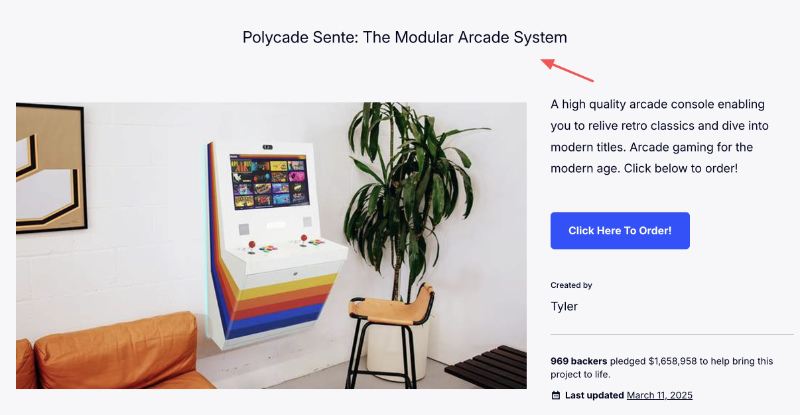
That restraint is the lesson. When your headline tries to do too much, like explain the product, name the benefit, and create urgency all at once, it does none of those things well. Polycade picks one job for the headline (identify the product clearly) and lets the imagery carry the emotional appeal.
Write your headline the same way: [product name] + [what it does or what it is]. Save the benefits for the section below.
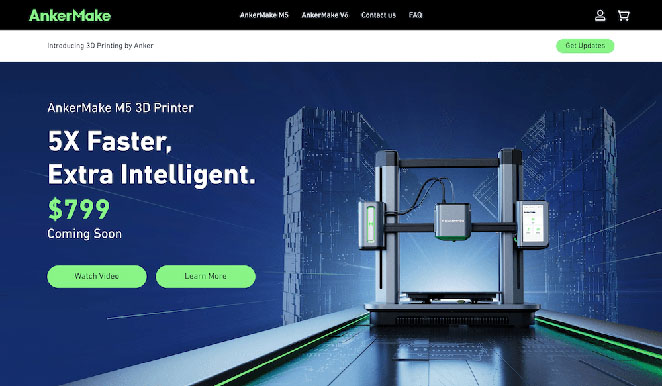
AnkerMake M5: How to Structure Above the Fold
The M5 campaign leads with one specific, measurable claim: “5X Faster Printing.” Not “faster than ever”, or “industry-leading speed.” A number.
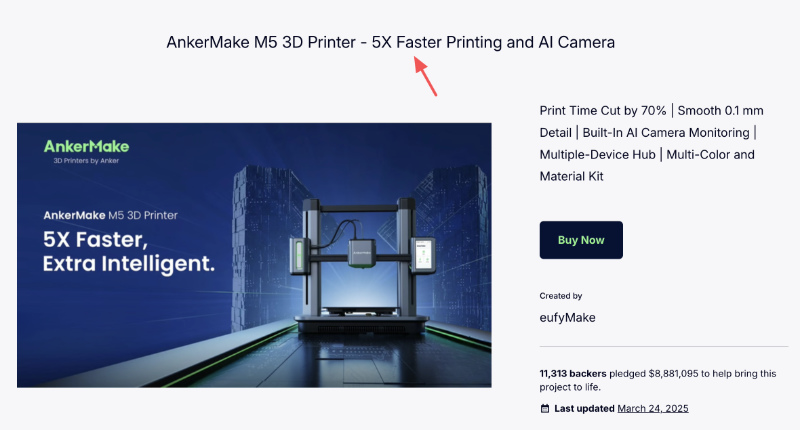
Below that headline: product video. Below the video: one CTA. That sequence, claim, evidence, action, appears in most of Kickstarter’s highest-funded campaigns. It works because each element earns the next one.
If your above-the-fold section has more than three elements, cut until it doesn’t.
Loka Chai Maker: How Visuals Build Credibility
Loka’s campaign uses lifestyle photography throughout, the product in a real kitchen, steam rising, chai being poured.

That choice does two things. It shows the product working, and it puts the reader inside the experience. Backers aren’t just looking at a device; they’re imagining making chai with it.
Use the same principle on your external landing page. A photo of your product being used converts better than a photo of your product sitting there.
What to Write on Your Kickstarter Landing Page
Most first-time creators spend hours on design and minutes on copy. That’s backwards. The words on your Kickstarter landing page do more conversion work than any color scheme or layout choice.
Here’s what actually matters in the copy:
Headline Formula
Your headline needs to answer one question: what is this and why should I care? The formula that works: [Product name] + [core problem it solves] or [key result it delivers]. “Polycade Sente: The Modular Arcade System” works because it names the product and the category. “5X Faster 3D Printing” works because it leads with the result.
Avoid headlines that tell backers how to feel (“The Most Exciting Kitchen Tool of 2026”). Write headlines that tell them what the product does.
One Goal Per Call to Action
Your page should have one primary CTA: either collect an email signup for pre-launch, or send visitors directly to your Kickstarter project page. Mixing both on the same page splits your conversion.
If you’re still in pre-launch, collect the email. You can always link to Kickstarter once the campaign is live. A backer’s email address is more valuable than a click that might not convert on launch day.
Urgency Language That Earns Its Place
Urgency copy only works when there’s a real reason to act now. “Campaign ends in 14 days” works. “Don’t miss out” doesn’t. A countdown timer connected to your launch date is the most honest urgency signal you can use, and SeedProd’s Countdown block makes it a one-drag addition to any page.
For pre-launch pages, “early backer pricing” or “first 100 supporters get…” creates real urgency tied to real value. Manufactured urgency backfires with the crowdfunding audience, who’ve seen it too many times.
Copy Matters More Than Design
A polished page with weak copy won’t convert. A plain page with sharp, honest copy will. The campaigns that raise the most money are the ones where the creator can clearly explain the problem they’re solving and why their solution is better.
Write your copy first. Then build the page around it.
How Do I Create a Kickstarter Landing Page?
During the pre-launch phase of your Kickstarter project, you can use Kickstarter’s platform to create a project coming soon page. However, their built-in pages’ features and customization options are limited, making it difficult to include the essential elements mentioned above.
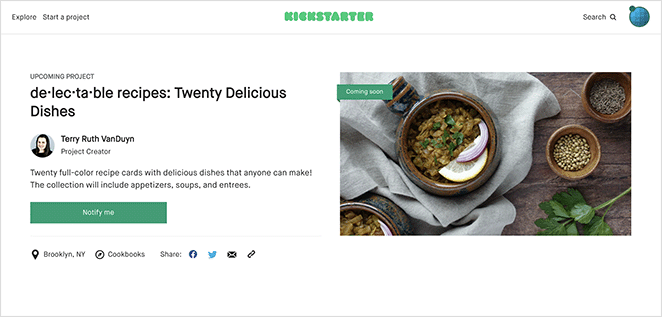
Instead, I recommend creating a Kickstarter landing page on your project website. That way, you can control its overall design and functionality.
For WordPress website owners, the easiest way to make a Kickstarter landing page is by using a visual website builder plugin.
In this guide, I’ll use SeedProd, a drag-and-drop website builder with over 1 million users. It lets you create high-converting WordPress pages without code.

In under 30 minutes, you can create a landing page for your Kickstarter campaign and include everything you need to attract backers. You won’t need to start from scratch either. SeedProd has hundreds of pre-made landing page templates, ready for you to customize with its visual drag-and-drop builder.
Follow the steps below to see how easy it is to make a Kickstarter landing page in WordPress using SeedProd.
Step 1. Install and Activate SeedProd
The first step is to install and activate the SeedProd plugin on your WordPress website.
If you need help getting started, you can see our documentation on how to install SeedProd.
Note: For this guide, we’ll use the Pro version of SeedProd for its advanced features.
Step 2. Choose a Landing Page Template
After activating SeedProd, navigate to SeedProd » Landing Pages from your WordPress dashboard. On this page, scroll past the page modes section and click the Add New Landing Page button.
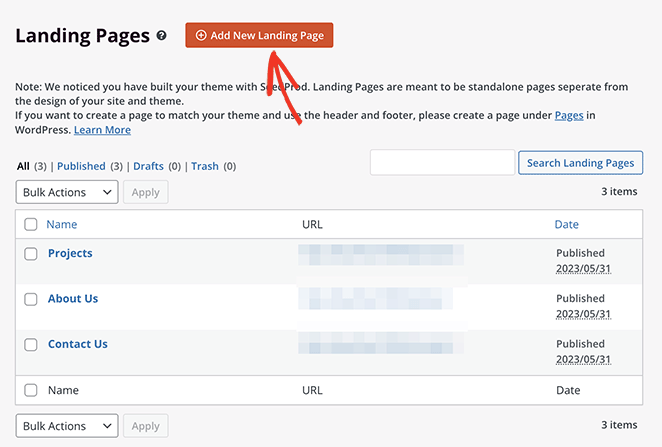
This opens SeedProd’s template library, where you can choose a design that suits the style and theme of your Kickstarter campaign.
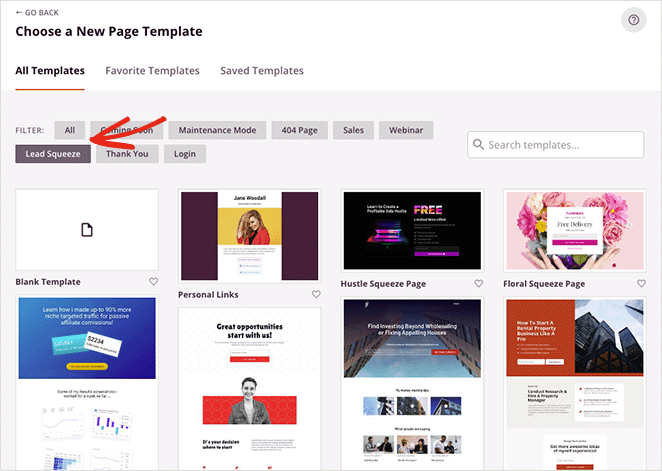
Since hundreds of templates are available, it’s best to click the filters along the top. That way, you can narrow down your search by goal, such as:
- Coming Soon
- Maintenance Mode
- 404 Page
- Sales
- Webinar
- Lead Squeeze
- Thank You
- Login
After finding a template you like, hover over it and click the checkmark icon.
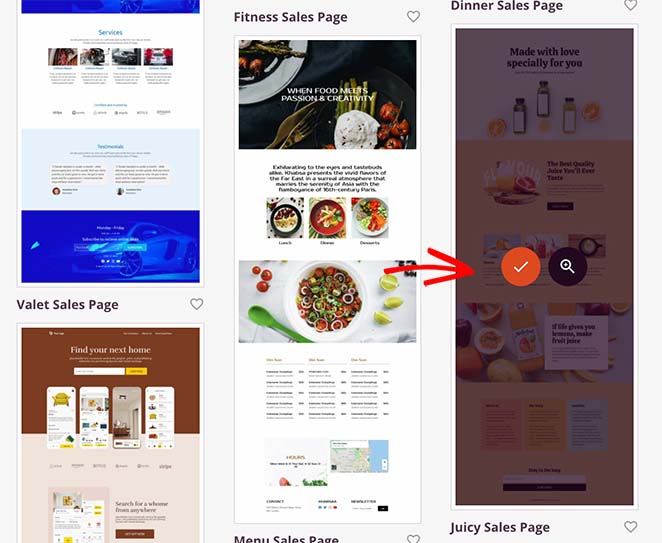
For this guide, we’ll use the Juicy Sales Page.
Next, fill in your landing page name and URL, then click the Save and Start Editing the Page button.
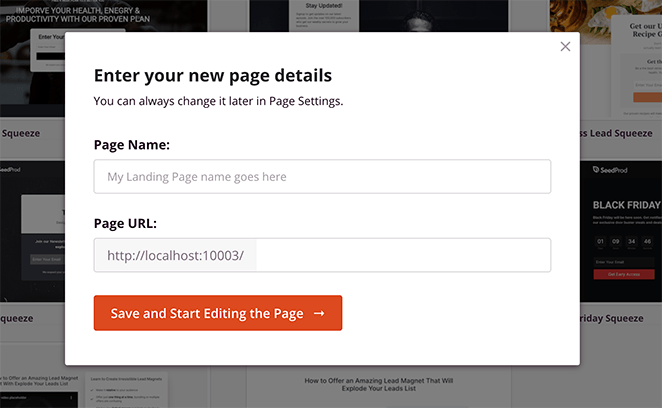
Now you’ll head to SeedProd’s page builder, where you can customize your Kickstarter project page.
Step 3. Customize Your Landing Page for Kickstarter
The SeedProd builder has two panels: blocks and settings on the left, live preview on the right. You can drag any block from the left panel and drop it directly onto your design.
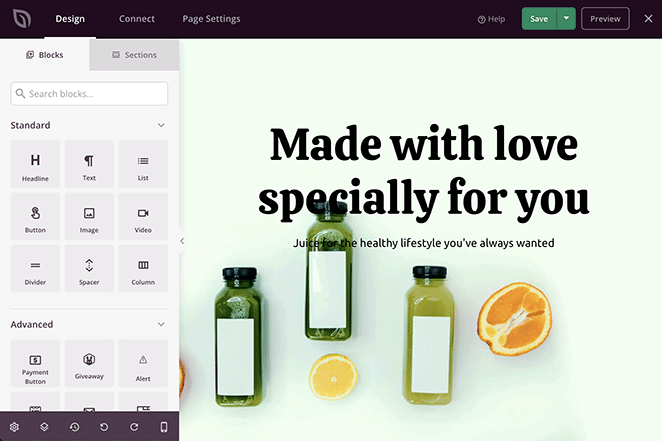
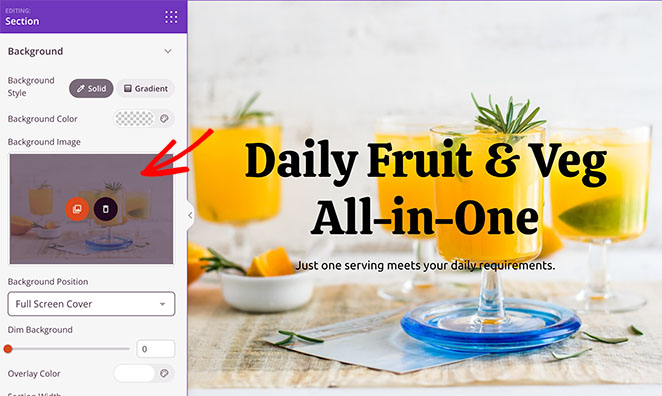
You can click anywhere on the preview to customize your template and add information about your Kickstarter project. For example, clicking the headline lets you change it and adjust its styling.
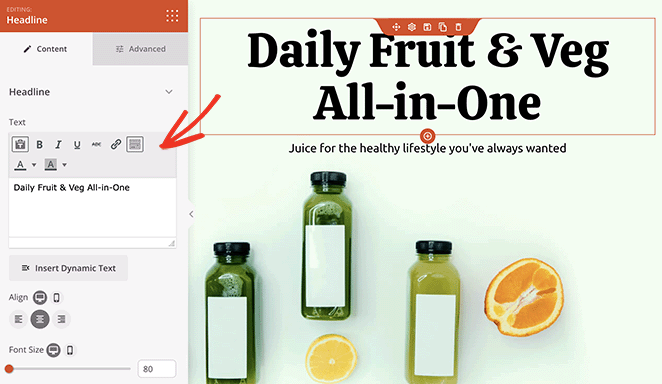
Selecting a section allows you to edit the background image, its position, and overlay styling.
Adding Your Project Details
Now let’s move on to adding more information about your Kickstarter campaign. Customize the next sections of your template to include your project story and explain why your project is worth backing.
If your template has text sections with demo content, edit these with content about your product. It’s also worth adding a call-to-action button for users to click through to your Kickstarter page.
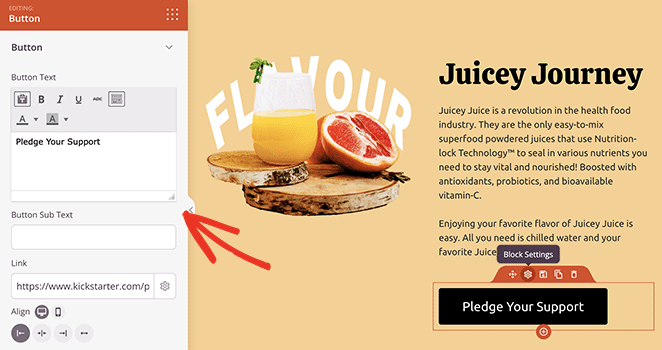
SeedProd’s Button block is ideal for this. It includes space to add button sub-text, icons, styling options, and a URL field. You can use this field to link to your project on Kickstarter.
Including Testimonials
A good Kickstarter campaign uses social proof to increase trust and show credibility. With SeedProd, you can add testimonials to your campaign page using the Testimonials block.
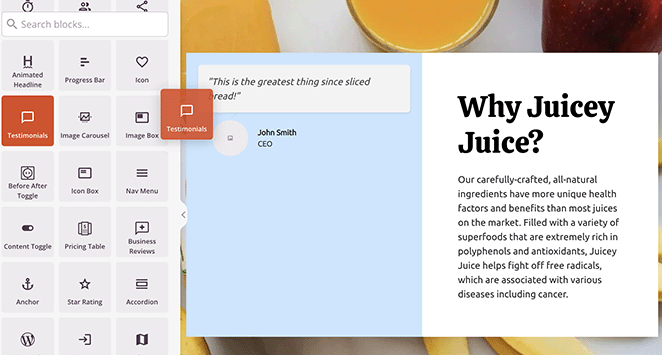
Drag the block from the left-hand panel and drop it onto your design.
From there, you can include multiple testimonials, add reviewer headshots, adjust the styling, and even activate a testimonial carousel.
You can also drag over the social media sharing block to prompt users to share your project with friends.
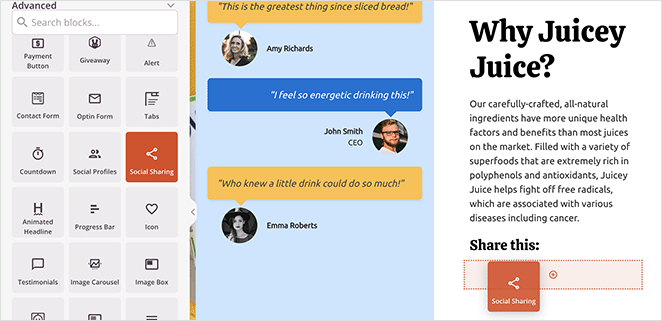
In the block settings, there are share buttons for all the major social media networks, including Facebook, Twitter, LinkedIn, and Pinterest.
Adding Pledge Rewards
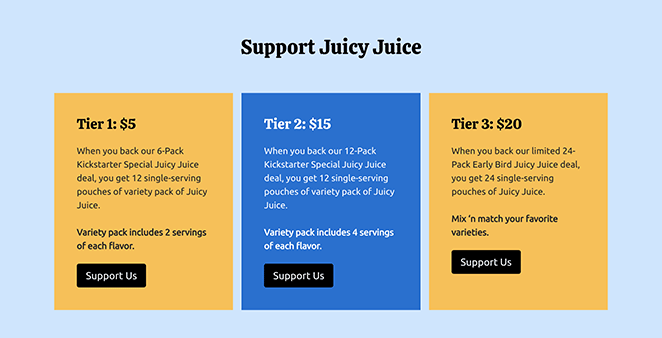
Pledge rewards are how you’ll incentivize users to back your Kickstarter. You can build an attractive reward section on your landing page using a combination of columns, rows, and blocks.
The template we’re using already has a handy column section in place. All you need to do is swap out the content with your own reward tiers.
Here we’ve added an extra heading and CTA buttons for each pledge amount to incite action.
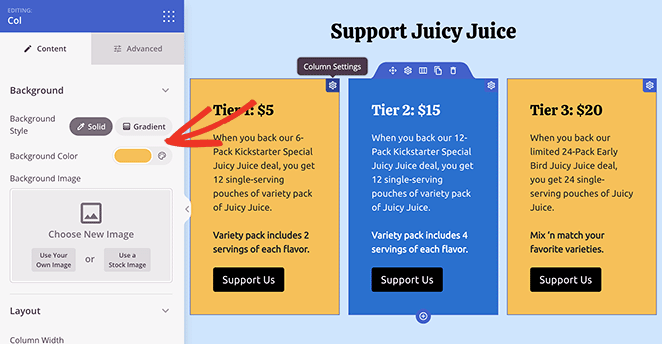
To customize the column colors as above, click the gear icon for each column and use the color picker to choose a new background color.
If you want to offer early pledges directly, you can also add a Stripe payment button to your landing page.
Addressing Frequently Asked Questions
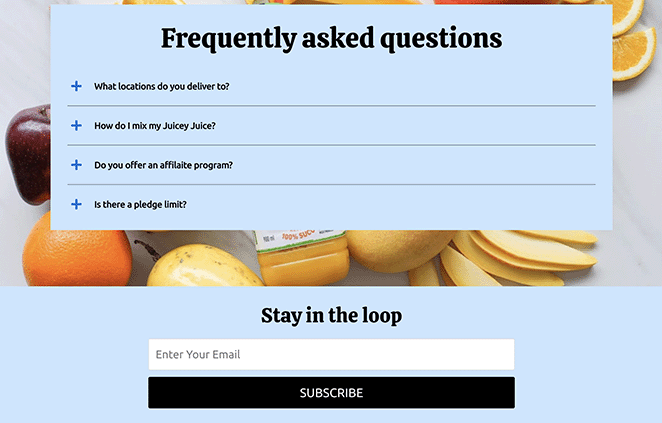
To avoid pledge hesitation, address common questions that potential backers have about your Kickstarter project. In SeedProd, you can add a ready-made FAQ section by navigating to the Sections tab.
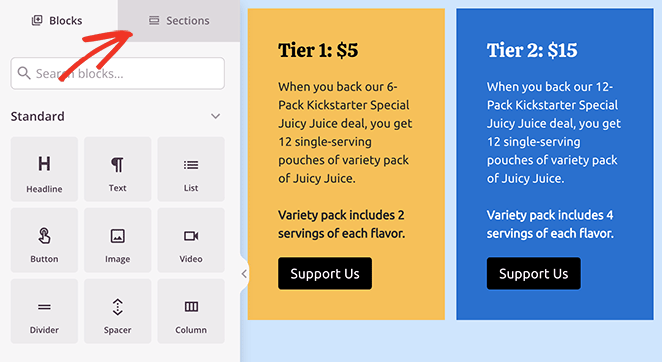
From there, find the FAQ heading and choose a pre-made FAQ section by clicking the plus icon.
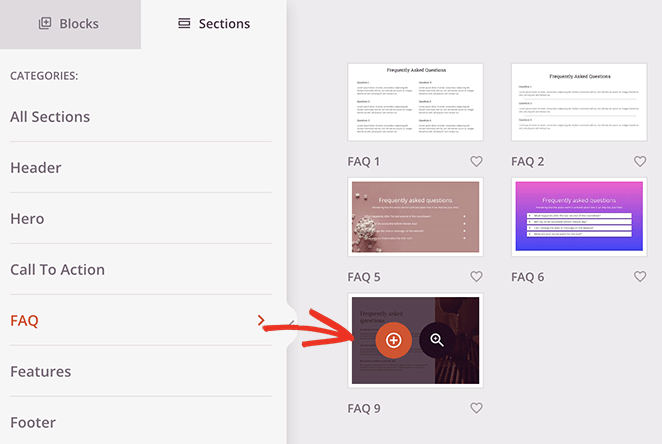
SeedProd automatically adds new sections to the bottom of your landing page design. To move it, click the Move icon and drag the section to the best spot.
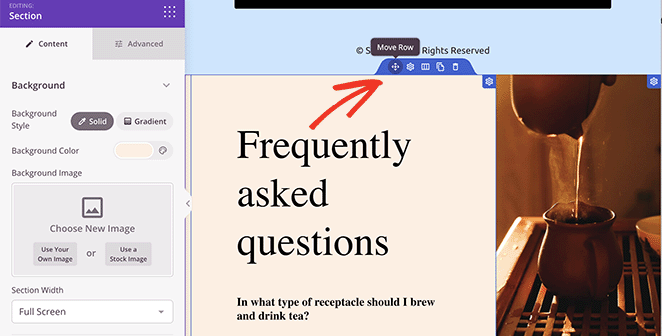
After, you can customize the section like any other element on your page. For example, you can replace the text blocks with SeedProd’s Accordion block to take up less space.
This means readers can show or hide the most relevant questions for their needs.
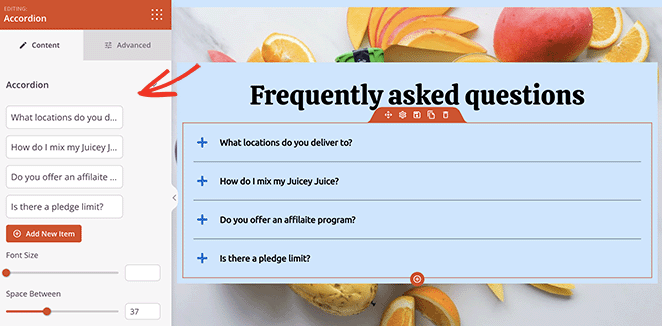
Continue customizing your Kickstarter landing page until it covers all the essential points mentioned earlier in this guide. Remember to click the Save button to store your changes.
Step 4. Connect Your Email Marketing Service
A dedicated Kickstarter email signup page is one of the most effective ways to stay in touch with early supporters. It lets you build a list of interested backers before launch and keep them updated as the campaign progresses.
To do this, integrate your landing page with an email marketing service like Mailchimp or ConvertKit. This will let you collect email addresses and automatically add them to your email list for future communication.
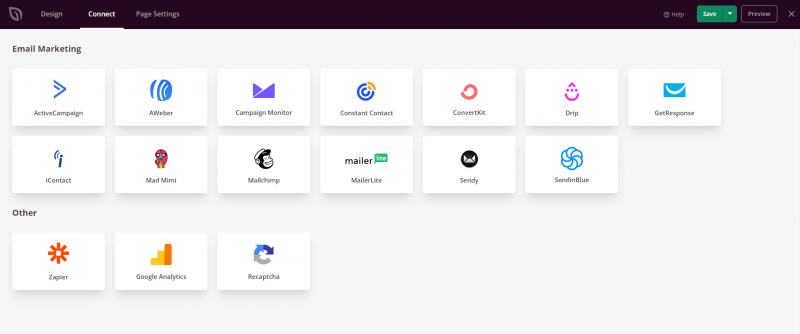
You can do this by clicking the Connect tab at the top, then choosing your preferred email service from the list. See our email integration documentation for full details on setting up your favorite email provider.
Step 5. Configure Your Landing Page Settings
To optimize your Kickstarter landing page for search engines and improve its visibility, configure important settings by clicking the Page Settings tab.
Here, you can use All in One SEO, the best WordPress SEO plugin, to add a meta title, meta description, and more to help search engines understand the content of your page.
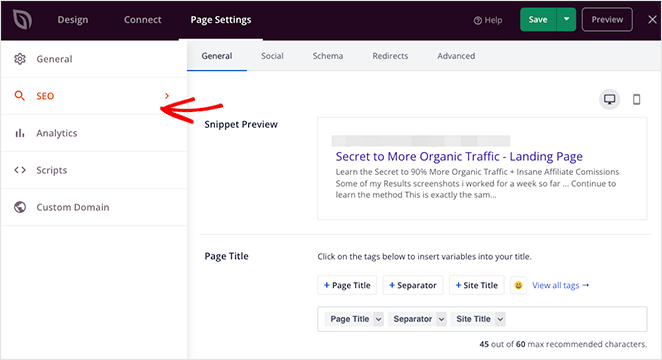
You can also configure other settings, such as adding tracking scripts for Google Analytics or choosing a custom domain name for your page.
Step 6. Publish Your Kickstarter Landing Page
Once you’ve finished customizing and configuring your landing page, it’s time to publish it. SeedProd makes it simple to preview your page and make sure everything looks right before making it live.
Click the mobile icon in the bottom settings panel to preview your page on mobile devices.
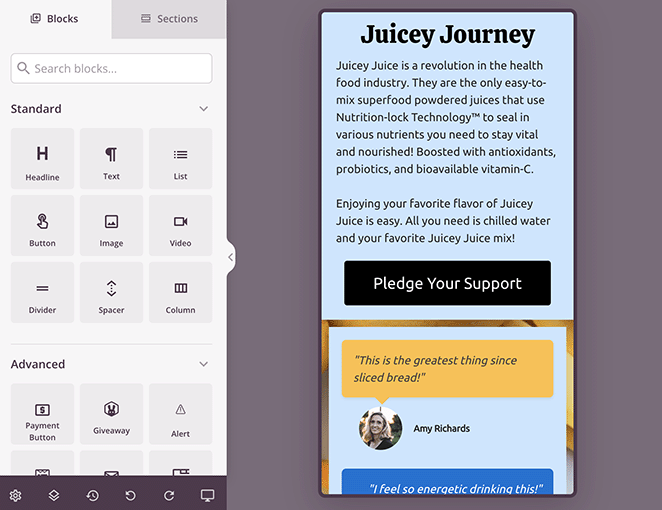
Once you’re satisfied, hit the Publish button, and your Kickstarter landing page will be live and ready to attract backers.
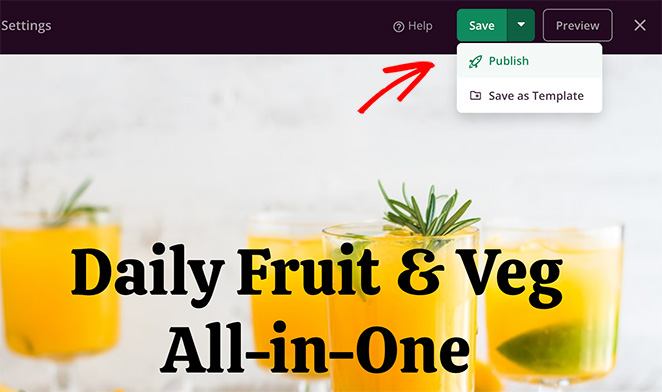
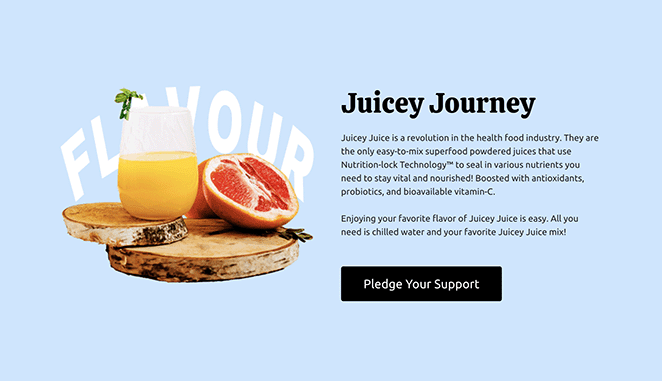
Here is a preview of the Kickstarter landing page we made in this guide.


How to Drive Traffic to Your Kickstarter Landing Page
Building your page is only half the job. Once it’s live, you need people to find it. Here are the four channels that work best for crowdfunding pre-launch traffic:
- Your email list: If you already have subscribers, tell them first. A warm audience converts at a much higher rate than any cold traffic source. Even a list of 200 people can seed early momentum that makes your campaign look credible on day one.
- Paid ads: Facebook and Instagram ads targeting interest-based audiences work well for Kickstarter campaigns because you can get very specific (product category + income level + past backer behavior). Start small, test two or three ad creative variations, and scale what converts.
- Social organic: Post project updates, behind-the-scenes content, and early access announcements on the platforms where your target audience spends time. Consistency matters more than volume. One post per day in the two weeks before launch builds more anticipation than a flood of posts on launch day.
- SEO for pre-launch keyword capture: Publishing your landing page early gives search engines time to index it. Target long-tail queries like “[your product type] pre-order” or “[your product category] Kickstarter.” You won’t rank overnight, but even a handful of organic visits per day adds up before your campaign goes live.
Kickstarter Landing Page Frequently Asked Questions
What makes a Kickstarter landing page convert better than the default Kickstarter page?
Your own landing page gives you control over design, messaging, and data that the default Kickstarter pre-launch page does not. You can capture email addresses directly into your own list, run retargeting ads to visitors, A/B test your copy, and include elements like countdown timers, testimonials, and reward tier breakdowns that Kickstarter’s built-in tools restrict.
The result is a higher-quality backer list before your campaign even goes live.
How do you build hype before a Kickstarter launch using a landing page?
Start with a countdown timer tied to your launch date and an email signup form that promises early-backer pricing or exclusive updates. Then drive traffic to the page consistently in the weeks before launch rather than all at once.
Share progress milestones, behind-the-scenes content, and prototype photos on social media and link back to your landing page. Backers who find you before launch day are far more likely to pledge on day one, which is when Kickstarter’s own algorithm decides whether to feature your project.
Can I use SeedProd to create a Kickstarter pre-launch page for free?
SeedProd has a free version, but the advanced features you need for a high-converting Kickstarter pre-launch page (including email integrations, countdown timers, and the full template library) require the Pro plan. The Pro plan starts at $39.50/year and gives you access to all the tools covered in this guide.
For a campaign where you’re asking backers to commit money, the Pro features pay for themselves quickly.
What should I put above the fold on a Kickstarter landing page?
Above the fold is the section of your page visible without scrolling. It needs to answer three questions immediately: what is this, why does it matter, and what should I do next. That means a clear headline with your product name and core benefit, a single strong visual (product photo or short video), and one CTA button.
Don’t use navigation menus, multiple CTAs, or long text blocks above the fold. Everything that doesn’t serve those three questions should be below the fold.
Next Steps
You now have everything you need to build a Kickstarter landing page that collects emails, builds a backer list, and gets people genuinely excited about your project. The default Kickstarter page was never going to do that work for you.
Start with a SeedProd template, write copy that leads with your biggest claim, and get the page live early enough that search engines can find it before launch day.
Here’s some further reading we think you’ll find helpful in your business journey:
- How to make a price list in WordPress
- How to create a landing page with a payment gateway
- How to create a Facebook Ads landing page
- How to build a podcast landing page
Thanks for reading! We’d love to hear your thoughts, so please feel free to join the conversation on YouTube, X and Facebook for more helpful advice and content to grow your business.



