

Trying to choose between Divi vs Beaver Builder, or wondering if there’s something better? I’ve tested all three major WordPress builders, including SeedProd, and each one has clear pros and cons depending on your goals.
In this guide, I’ll compare Divi, Beaver Builder, and SeedProd side by side to help you find the best drag-and-drop builder for your WordPress site. Whether you want full-site control, a simple layout editor, or a lightning-fast way to build landing pages,
| Feature | Divi | Beaver Builder | SeedProd |
|---|---|---|---|
| Ease of Use | Moderate | Beginner-Friendly | Very Easy |
| Templates | 193+ Packs | Basic Templates | Landing + Theme Templates |
| Page Speed | 2.10s | 1.27s | 1.18s |
| Free Version | No | Yes | Yes |
| Best For | Design Flexibility | Simplicity | Speed + Conversions |
- Final Verdict: Which Page Builder Should You Use?
- Divi vs Beaver Builder vs SeedProd: Key Differences
- Interface: Which Builder Is Easiest to Use?
- Content Modules: What Can You Add?
- Styling Options: How Much Control Do You Get?
- Templates: Which Builder Has the Best Designs?
- Speed: Which One Loads Fastest?
- Pricing: Which One Fits Your Budget?
SeedProd is the fastest option and the best choice for landing pages and beginners. It’s what I personally use and recommend. Beaver Builder is the pick for clean, simple layouts without a learning curve. Choose Divi only if you need full design freedom and are comfortable with a more complex editor.
To make things easier, I’ve broken the comparison into the features that matter most, starting with how each builder actually feels to use.
Interface: Which Builder Is Easiest to Use?
Each page builder in this list has a drag-and-drop visual interface to create pages in real time. Let’s look at the interface for each plugin to see which is the easiest to use.
Divi Builder Interface
The Divi builder’s interface is minimal, with a full-screen layout. Before adding page elements, you have to click a plus icon to add a new row. After, you can click inside the row to see a list of modules that you can insert with a single click.
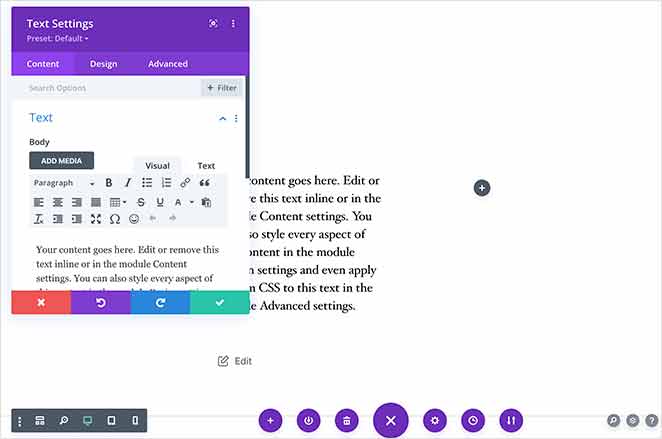
Once you’ve inserted a new module, a popup appears with options to edit the content, design, and advanced customization settings.
Beaver Builder Interface
Beaver Builder’s interface is similar to Divi’s. When you create a new page, a popup appears on the right-hand side, where you can drag and drop content modules onto the page.
After inserting a module, a different popup appears to enter custom content and edit the style.
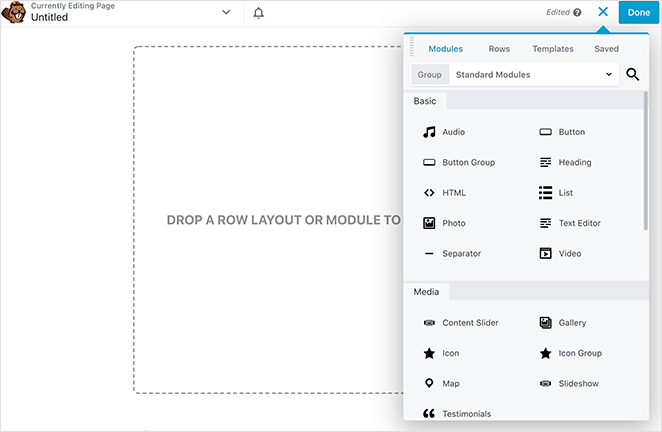
Beaver Builder differs because it adds new rows and columns to your page automatically, saving you from creating them individually.
You can learn more about this plugin in our Beaver Builder review.
SeedProd Interface
The SeedProd page builder interface has a slightly different layout. It has a sidebar on the left to drag and drop different page blocks and a live preview on the right to see your changes in real time.
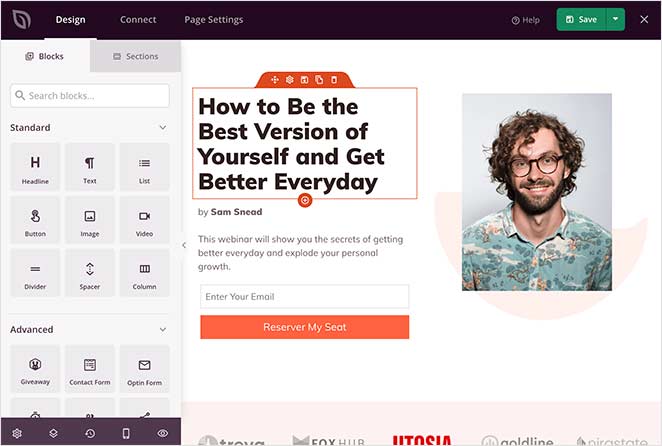
Unlike Divi and Beaver Builder, clicking any block on your page shows the customization options on the left-hand side. This allows a clean preview of how your page looks without popups concealing your page design.
Key Takeaway: SeedProd has the cleanest, most beginner-friendly interface with no popups. Divi and Beaver Builder give you more control, but the editing experience can feel more cluttered.
Content Modules: What Can You Add?
The best WordPress page builders make it easy to build pages with customizable content modules. They’re the building blocks of your page and allow you to create pages freely without designing and coding each area from scratch.
Many page builder plugins have a long list of modules that include basic design elements like text, headings, images, and buttons. They also include more specialized modules like contact forms, subscription forms, blog post lists, and more.
Below we’ll look at the key content elements and modules offered by Divi, Beaver Builder, and SeedProd.
Divi Builder Page Elements
The Divi builder has all the essential content modules you need to create functional WordPress pages. The more advanced modules include:
- Blog posts
- Filterable portfolios
- Galleries
- Post sliders
- Circle counters
- Maps
- And more.
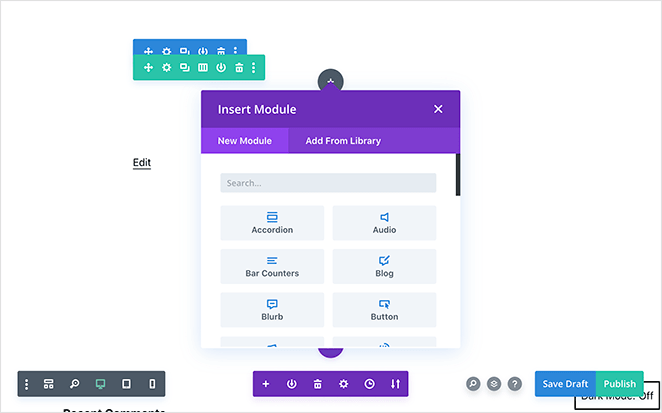
These modules are ideal if you want to create a full WordPress website with Divi’s theme builder.
Yet, if you only want to build a landing page, there are many features you simply won’t use. It also lacks social sharing buttons, which are crucial for raising brand awareness.
Beaver Builder Modules
In Beaver Builder, you can add text, images, videos, lists, and more with the basic page modules.
The advanced content modules include:
- Social share buttons
- Contact forms
- Testimonials
- Recent posts
- Subscribe forms
- Number counters
- Countdown clocks
- Post carousels
- Galleries
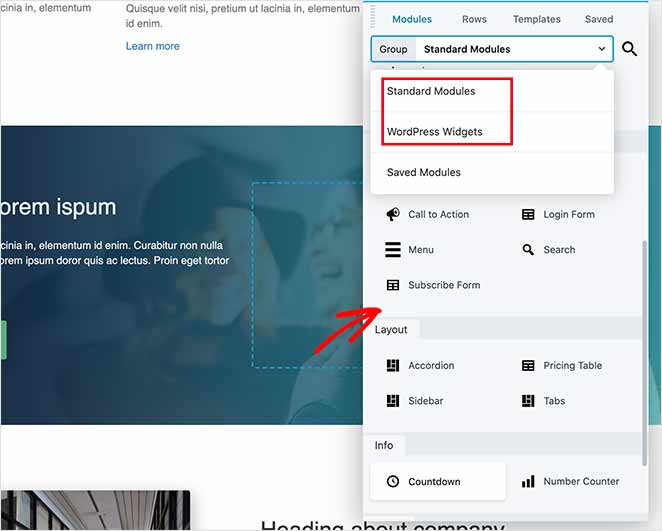
You can also insert various WordPress widgets from other WordPress plugins, like calendars, audio players, and more.
Beaver Builder doesn’t share many of the modules you get with Divi. For instance, it doesn’t have a portfolio, social follow icons, team members, or native comments modules.
SeedProd Landing Page Blocks
Compared to Divi and Beaver Builder, SeedProd has the ideal balance of standard and specialized content modules, which they call content blocks. SeedProd’s blocks center on creating both landing pages and WordPress themes easily without code.

While the standard blocks help create your page’s foundation, the advanced blocks focus on lead generation.
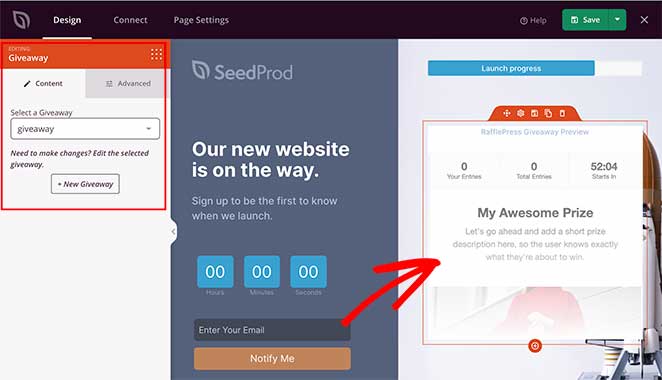
For instance, the Giveaway block lets you show a RafflePress giveaway on your landing page in a mobile-responsive widget. With a successful giveaway, you can drive targeted traffic to your page and boost your leads.
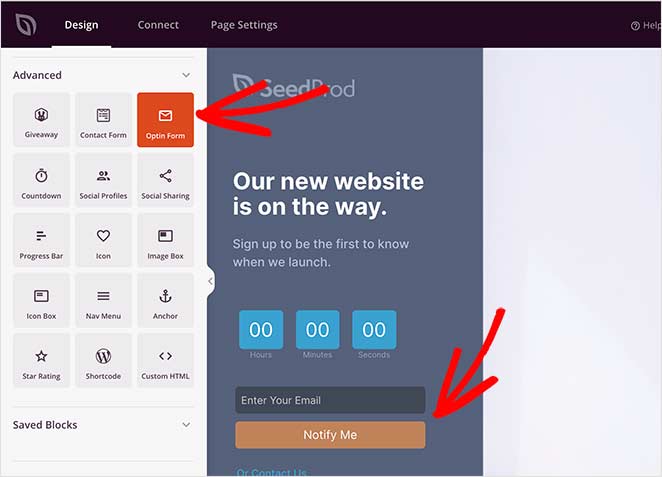
The Optin Form block allows you to show sign-up forms on your landing page and integrate it with your email marketing service to collect leads.
SeedProd’s Contact Form block integrates seamlessly with WPForms, the best form builder plugin for WordPress, to provide visitors with an easy way to get in touch.
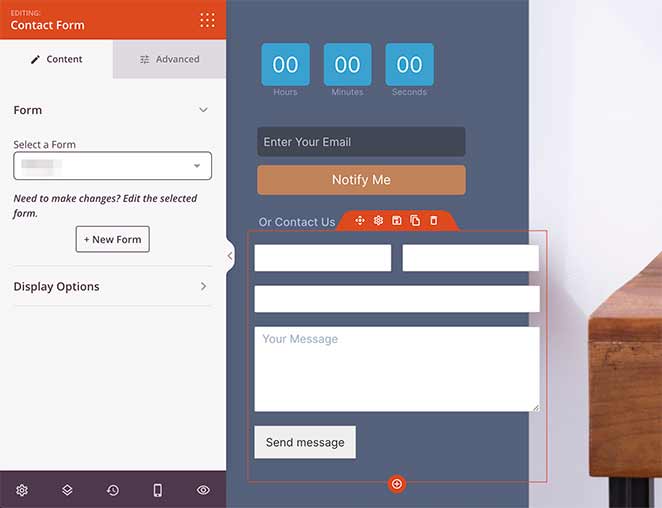
Other Advanced blocks include:
- Countdown Timer
- Social Profiles
- Login form
- Social Media Sharing
- Progress Bar
- Heart Icon
- Image Box
- Icon Box
- Navigation Menu
- Anchor Links
- Star Rating
- WordPress Shortcode
- Custom HTML
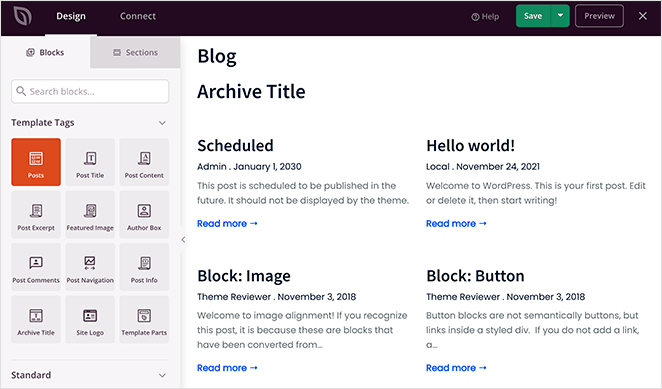
Because SeedProd is a powerful WordPress theme builder too, it includes blocks that center on displaying dynamic WordPress content, including:
- Blog posts
- Post titles
- Archive titles
- Featured image
- Comments
- Post info
- Author box
And WordPress widgets you can use throughout your theme design.
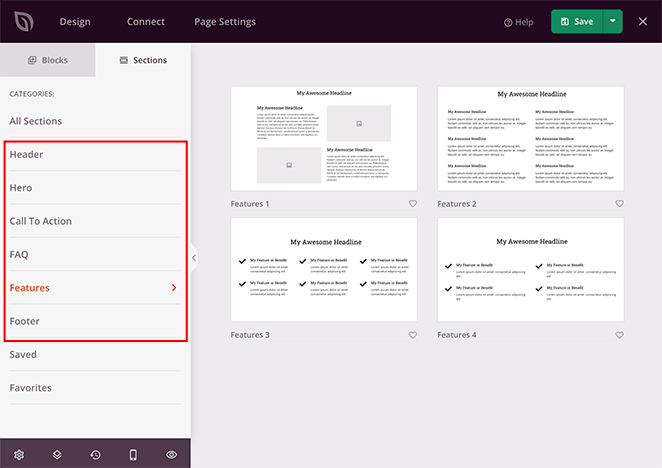
As well as blocks, SeedProd also has Sections. This allows you to add whole premade sections of content to your page with a single click. As a result, you won’t need to build page layouts block by block.
Key Takeaway: Divi offers the most design-focused modules, Beaver Builder keeps it simple, and SeedProd gives you conversion-focused blocks like opt-ins, countdowns, and giveaways.
Styling Options: How Much Control Do You Get?
While content modules can help build your page, you’ll want to customize your design to suit your branding. For this reason, page builders offer advanced styling controls, with some easier to navigate than others.
Here’s a comparison of advanced styling in Divi vs Beaver Builder vs Seedprod.
Divi Builder Advanced Styling
The Divi builder’s advanced styling options are available in the popup window for each module.
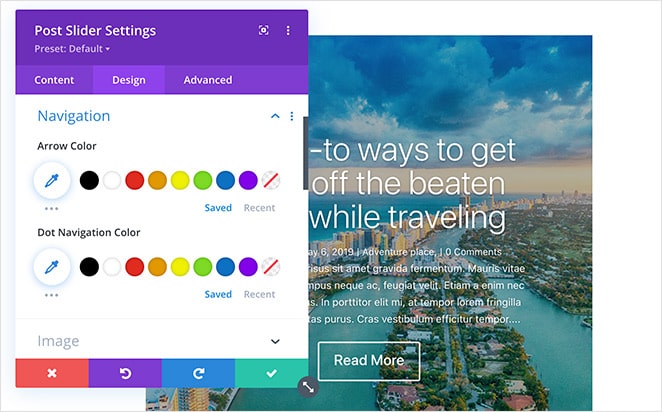
Inside the window are 3 different tabs with several settings you can edit, including:
- Content – To control the content of the module, including arrows, images, etc.
- Design – For various color and alignment settings.
- Advanced – To add custom CSS, attributes, effects, and more.
If, at any point, you’re confused by the settings, you can click the help icon to watch a video and read the documentation for each module.
Beaver Builder Advanced Styling
Like Divi, Beaver Builder’s settings are available in a popup window when clicking a particular module.
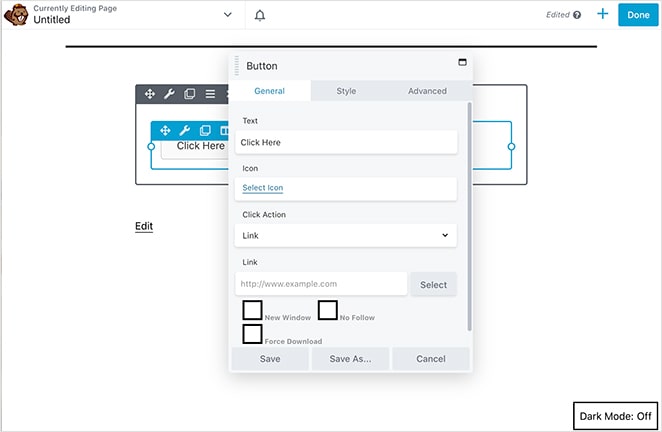
It has 3 different tabs, which include:
- General – For basic content and functions.
- Style – To choose individual colors, alignment, font sizes, etc.
- Advanced – With margin control, mobile responsive settings, animations, user roles, CSS, and more.
It also lets you show modules based on if a user is logged in or out of your website.
SeedProd Advanced Styling
SeedProd’s styling options are available on the page builder’s left-hand side when you click a block on your page.
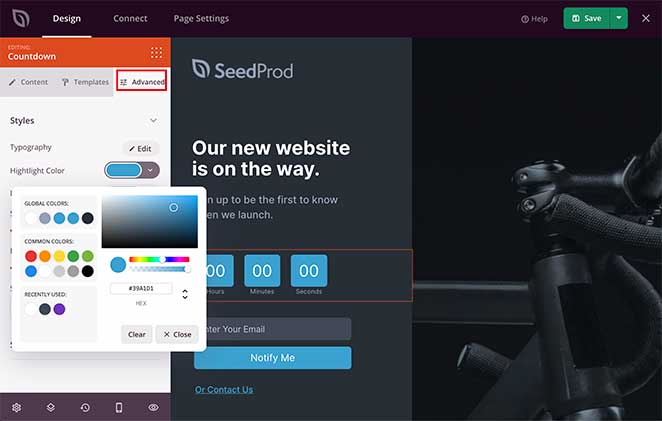
Like the other builders on this list, it also offers 3 different tabs:
- Content – Add content and change the font size, alignment, and more.
- Templates – Choose a premade design for that specific block and implement it with a single click.
- Advanced – Change typography, spacing, shadows, border radius, colors, etc.
Where SeedProd’s styling differs from Divi and Beaver Builder is with how easy it is to use. You can change styles with simple sliders and buttons, making them easy to adjust.
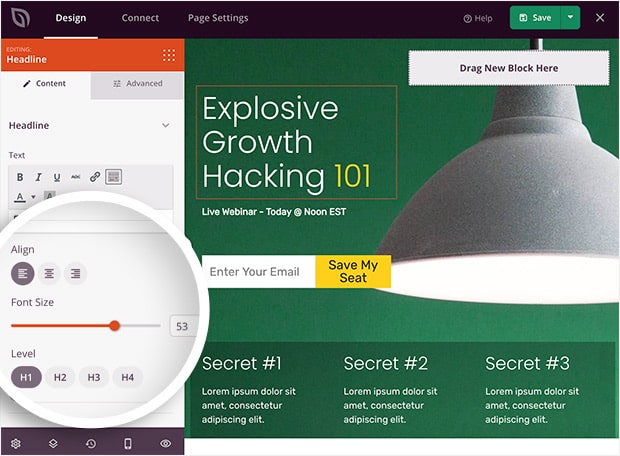
Each tab is also specific to that particular landing page block, so you won’t find any irrelevant or confusing settings.
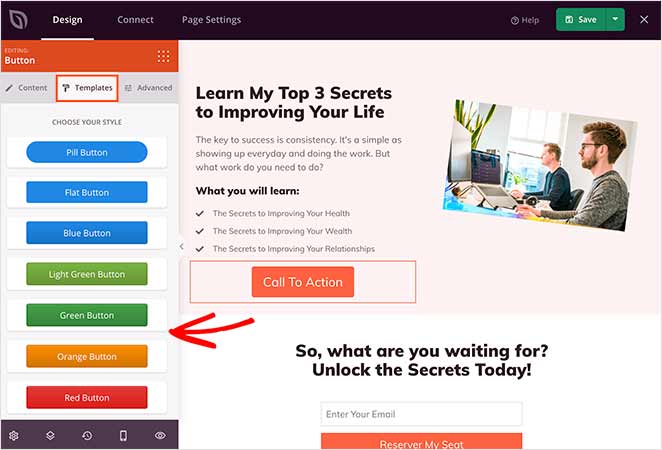
A fantastic feature that makes SeedProd stand out is the block templates. Almost every advanced page block has several premade templates, so you can switch styles with a single click.
Need a different call to action button? Click the Templates tab and pick one from the list.
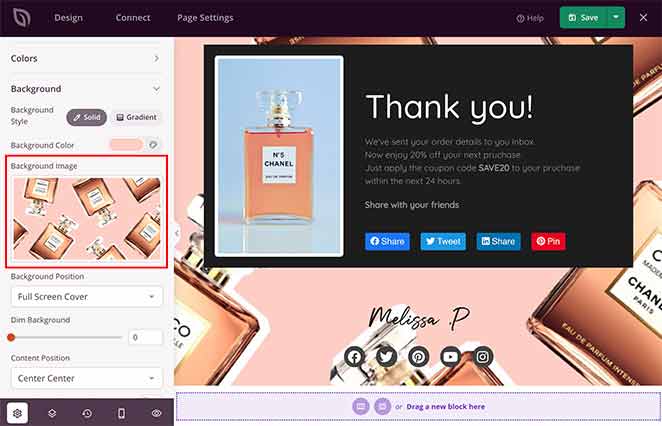
It’s also possible to control the color, background, and font settings globally. Just click the Global Settings option to upload custom backgrounds and manage the finer details of your page.
Not sure which colors or fonts work well together?
With SeedProd, you won’t need design experience to make a great-looking page. In the Color and Fonts sections, you can choose from over 20+ color palettes and font pairings to get everything looking how you want.
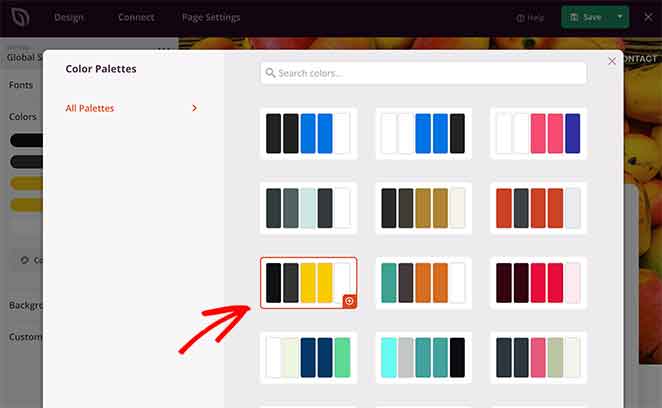
Key Takeaway: All three builders offer deep styling control, but SeedProd makes it easier with sliders, block templates, and fewer distractions. Divi is more powerful but more complex.
Templates: Which Builder Has the Best Designs?
No page builder is complete without a library of landing page templates and themes. A quality landing page template makes it easy to get closer to the design you want.
Divi, Beaver Builder, and SeedProd all offer a selection of templates, which we explore below.
Divi Builder Templates
When you create any page with Divi, you’re instantly asked if you want to start from a blank page or choose a premade template.
The templates come as complete website packs, allowing you to create a consistent look across your website’s pages. Every page template in the pack has the same color and font themes, yet each design serves a different purpose.
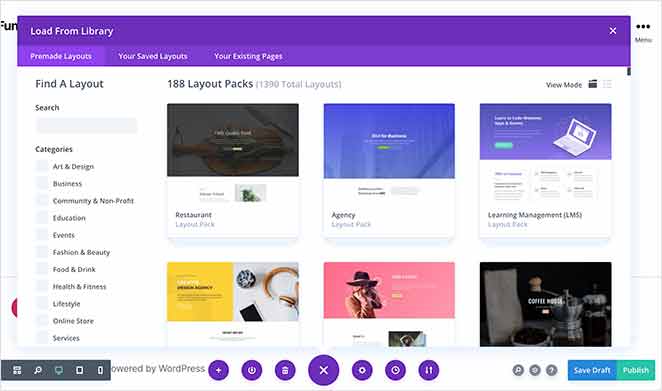
For instance, you can create a shop page, about page, blog page, and more.
Divi has over 193 layout packs with thousands of individual page themes. This is an excellent choice for creating complete website designs.
Beaver Builder Templates
Beaver Builder has 2 different template sections: landing pages and content pages.
The landing pages are a good choice for 1-page websites and have designs for lifestyle blogs, mobile apps, small businesses, and more.
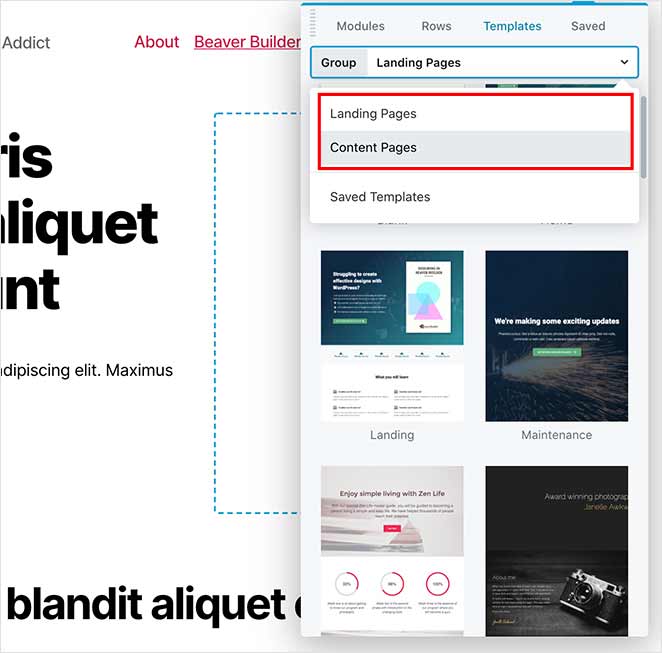
The content page templates are similar to Divi in that they’re suitable for portfolio pages, contact pages, and other internal WordPress pages.
Beaver Builder’s themes are more limited than Divi’s selection, but they’re a good starting point for many business websites.
SeedProd Templates
Upon creating a new theme in SeedProd, you can choose from several complete WordPress theme designs to create a custom WordPress theme without writing a single line of code.
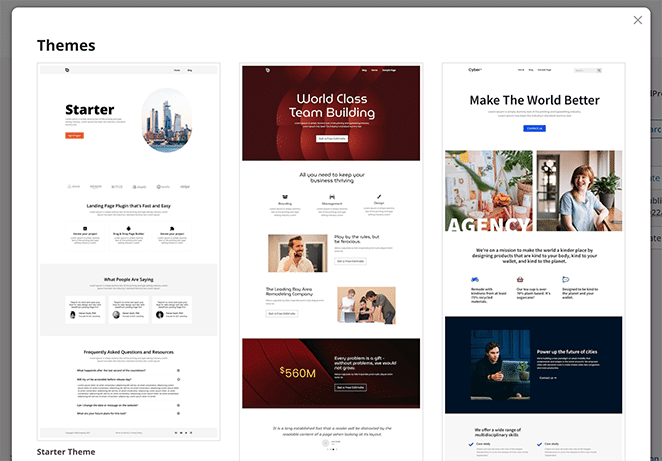
Moreover, you can choose from hundreds of responsive landing page templates.
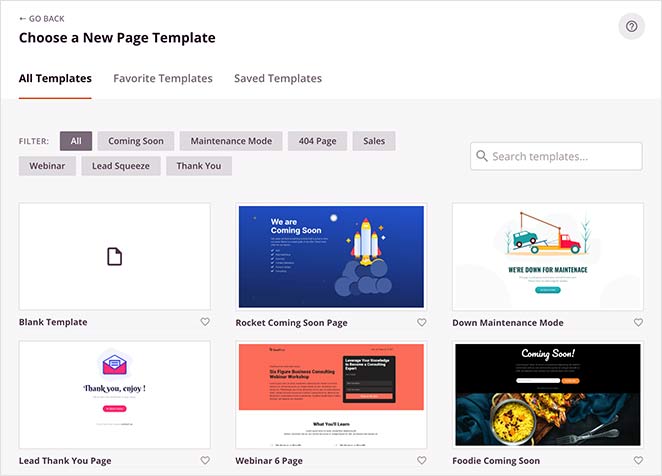
You can filter the templates based on your marketing goal by clicking any of the following headings:
- Coming Soon
- Maintenance Mode
- 404 Page
- Sales Landing Page
- Webinar Page
- Lead Squeeze
- Thank You
- Log In Page
SeedProd is also the only tool on this list with a coming soon mode, maintenance mode, 404 page, and login page mode built right into the plugin. With only 1 click, you can create a coming soon page and control who does and doesn’t see your website under construction.
Making small updates to your website? Just put WordPress in maintenance mode and show a countdown timer for when you’re finished.
As you can see, SeedProd’s customizable landing page templates are the perfect choice for creating highly successful landing pages in WordPress.
Key Takeaway: Divi has the biggest library of full-site layouts. SeedProd is best if you’re focused on high-converting landing pages. Beaver Builder offers fewer options but covers the basics well.
Speed: Which One Loads Fastest?
Some page builders have a reputation for slowing down WordPress. Even a 1-second delay in page loading times can frustrate visitors and cost you conversions.
I retested all three builders in February 2026. For SeedProd and Beaver Builder, I built a simple test page (heading, image, button) on a live site and measured it with GTmetrix. The full HAR files are saved. For Divi, which bundles the theme and builder together, I measured server-side performance using Query Monitor and Core Web Vitals using Chrome DevTools under identical local conditions with no caching active.
GTmetrix Results: Page Builder Front-End Footprint
| Metric | SeedProd | Beaver Builder |
|---|---|---|
| Full page onLoad | 556ms | 985ms |
| Total requests | 16 | 20 |
| CSS files | 5 | 6 |
| JS files | 8 | 9 |
SeedProd loads in 556ms, which is 1.8x faster than Beaver Builder’s 985ms. Divi is a theme and builder bundle, so its footprint can’t be isolated the same way. The server-side results are below.
Query Monitor Results: Server-Side Performance (SeedProd vs Divi)
| Metric | SeedProd | Divi |
|---|---|---|
| Page generation time | 0.0457s | 0.0916s |
| Peak memory | 4.3 MB | 13.0 MB |
| Database queries | 34 | 86 |
Divi uses 3x more memory and runs 2.5x more database queries than SeedProd. And that’s before any page content is rendered.
In Chrome DevTools testing, Divi was also the only builder tested with a Cumulative Layout Shift (CLS) score of 0.16, meaning content visibly shifts during load. SeedProd and Beaver Builder both scored 0. Divi’s LCP was 0.85s vs SeedProd’s 0.59s.
Key Takeaway: SeedProd is the fastest builder by a significant margin, 1.8x faster than Beaver Builder in GTmetrix testing. Divi carries the heaviest server-side footprint and was the only builder with layout shift issues in testing.
Pricing: Which Builder Fits Your Budget?
After comparing all 3 WordPress page builders, let’s see how much they cost.
Divi Builder Pricing
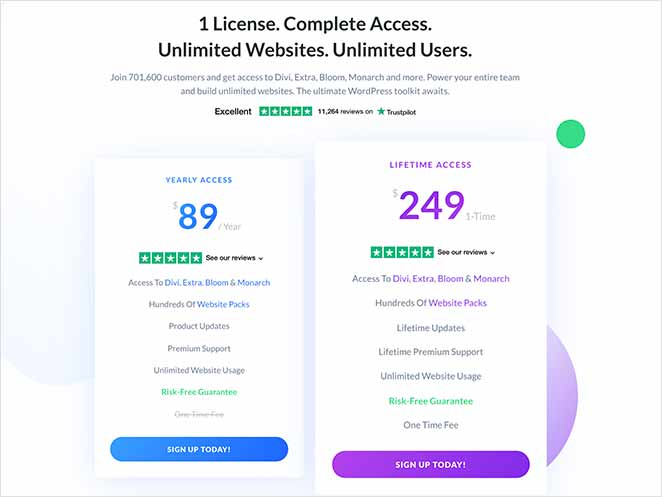
The Divi builder doesn’t have a free version currently. It comes as part of the Divi Theme from Elegant Themes with several of their other products. Pricing for the bundle starts at $89 annually.
You can also buy lifetime access for a one-time fee of $249.
Beaver Builder Pricing
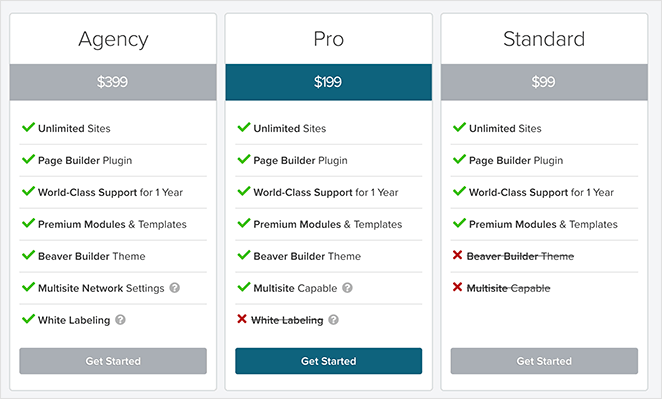
Beaver Builder offers a free version of the plugin to create basic pages in WordPress. To access premium features, the pricing starts from $99 per year.
SeedProd Pricing
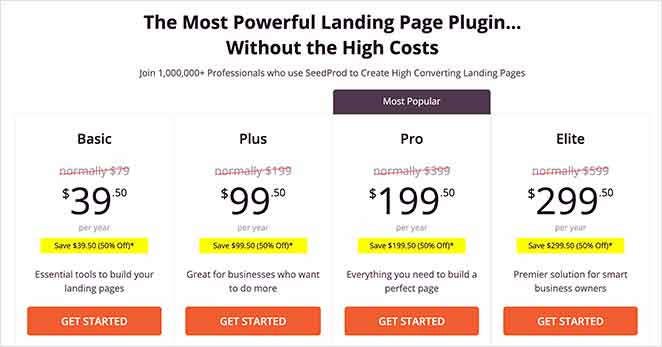
SeedProd has a free version you can find in the official WordPress plugin repository. This allows you to use all of the standard landing page blocks and many responsive page templates.
For the best features, you’ll want to get SeedProd premium, which starts at only $39 per year.
Key Takeaway: Divi and Beaver Builder start around $89–$99/year with no free version (Divi). SeedProd is the most affordable, with a free version and premium plans starting at $39/year.
Frequently Asked Questions
Which is better for beginners: Divi, Beaver Builder, or SeedProd?
SeedProd is the most beginner-friendly of the three. It has a clean sidebar interface with no popups, simple sliders for styling, and pre-built block templates that make it easy to get a professional result without design experience. Beaver Builder is also beginner-friendly but has fewer conversion-focused features. Divi has a steeper learning curve and is better suited to users who want deep design control.
Is SeedProd better than Divi for landing pages?
Yes, for landing pages specifically, SeedProd is the stronger choice. It was built for conversion-focused pages and includes dedicated blocks for opt-in forms, countdown timers, giveaways, and social proof, features Divi doesn’t include natively. SeedProd is also significantly faster, which directly affects conversion rates.
Does Beaver Builder slow down your WordPress site?
Beaver Builder is one of the lighter page builders available. In my GTmetrix testing, it loaded in 985ms, faster than many builders but about 1.8x slower than SeedProd’s 556ms. Beaver Builder compiles its styles into a single cached CSS/JS file, which keeps its request count low and performance solid for most sites.
Can you use Beaver Builder or Divi to build a coming soon page?
Neither Beaver Builder nor Divi includes a built-in coming soon mode. SeedProd is the only builder in this comparison with a dedicated coming soon mode, maintenance mode, 404 page mode, and login page mode built directly into the plugin, activated with a single click.
Verdict: Which Page Builder Should You Use?
All three page builders have their strengths, but they suit different needs. Here’s how to choose the one that fits you best:
- ✅ Choose Divi if you want complete design freedom and don’t mind a steeper learning curve. It’s powerful, but can feel overwhelming at first.
- ✅ Choose Beaver Builder if you prefer a clean, simple builder that’s easy to learn. It’s a good choice for straightforward layouts and internal pages.
- 🚀 Use SeedProd if you want the best balance of speed, ease of use, and results. It’s the fastest, most beginner-friendly builder and the one I personally recommend.
I’ve tested all three, and if your goal is to build landing pages that convert without getting lost in menus or slowing down your site, SeedProd is the easiest and most effective way to get there.
And if you liked this article, then please follow us on Twitter and Facebook for more useful content to help grow your business.



