

Launching a new website can feel exciting and overwhelming at the same time. You’ve poured hours into building it, but now comes the hard part: getting people to actually show up.
I’ve launched more than a few sites over the years. Some flopped, some took off. The difference wasn’t the design or product. It was the plan. Having a clear launch marketing plan made all the difference.
That’s why I started using something I call the 3P Website Launch Plan. It breaks your launch into three simple stages: Plan, Promote, and Push Forward.
In this guide, I’ll walk you through how to create a website launch marketing plan using this method. Whether you’re launching your first site or just want better results this time, you’ll learn exactly what to do before, during, and after launch day.
What Goes Into a New Website Launch Marketing Plan?
The 3P Website Launch Plan Overview
First, here is the process I follow for planning my website launch:
| Phase | Focus | Key Actions |
|---|---|---|
| Plan | Lay the foundation | Set goals, define audience, create content calendar, prepare SEO |
| Promote | Build anticipation | Email campaigns, coming soon page, social media teasers, press outreach |
| Push Forward | Launch and grow | Announce the site, track performance, continue content and promo |
Website Launch Timeline at a Glance
This is they typical timeline I follow when launching a new website:
| Phase | Main Focus | Timeline |
|---|---|---|
| Pre-Launch | Goals, SEO, teaser page, email list, promo content | 2–4 weeks before launch |
| Launch Week | Announcements, social push, email blast, PR | Day of launch + 7 days |
| Post-Launch | Monitor traffic, update content, keep promoting | 1–4 weeks after launch |
What I Learned From My Own Website Launches
I’ve launched a lot of WordPress sites for clients and myself. Here’s what separated the launches that worked from the ones that didn’t:
- No email list means starting from zero. I set up a coming soon page four weeks before one launch and collected 200+ emails first. Compare that to an earlier launch where I skipped this step and got almost no traffic on day one. The list made all the difference.
- A coming soon page does more than collect emails. Using SeedProd, I built one with a countdown timer and opt-in form. It also got my domain indexed in Google before the site went live, so I was not starting from scratch with SEO on launch day.
- Announcements only land with a warm audience. Posts on launch day get almost no traction unless you have been teasing the launch on social media and email for at least two weeks beforehand.
- Set goals before launch, not after. A specific target, like 500 visitors in 30 days or 50 email sign-ups, tells you whether the launch worked and gives you something concrete to improve next time.
How Do You Create a New Website Launch Marketing Plan?
As we’ve established, an impressive website launch requires a solid plan. So, without further ado, let’s dive in and create your new website launch marketing plan together.
- Define Your Goals and Target Audience
- Audit Your Current Marketing Channels
- Create a Content Calendar
- Optimize Your Website for Search Engines
- Start Promoting Your Website Pre-Launch
- Work Through Your Pre-Launch Checklist
- Launch Your Website With a Bang
- Track Your Results
- Set Up or Update Your Google Business Profile
Define Your Goals and Target Audience
This is the first step in the Plan phase. It lays the foundation for a successful launch.
Are you aiming for a specific number of website visitors? Or do you want to increase product sales or newsletter sign-ups?
Set 1-3 measurable launch goals before you start promoting. Common targets: 500 unique visitors in the first week, 100 email subscribers before going live, or 10 qualified leads in the first month. A specific number tells you whether your launch succeeded and what to adjust next time.
Understanding your target audience is equally important. Ask yourself who would benefit most from your product or service and what kind of content would keep them engaged.
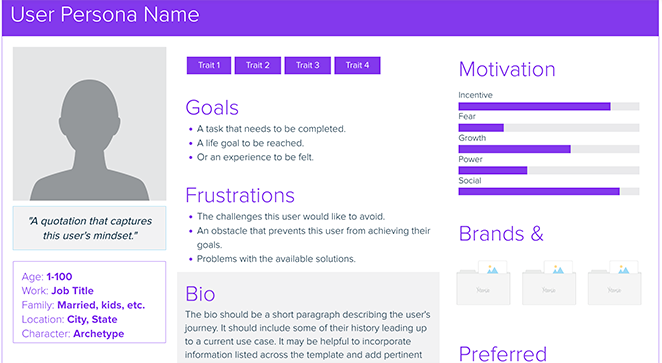
You may need to conduct market research or create customer personas to help answer these questions. Here’s a persona template example from Xtensio that helps generate one quickly:
Audit Your Current Marketing Channels
If you haven’t started yet, you can see this guide to learn how to start building an email list.
Create a Content Calendar
Once your goals and strategy are clear, your content calendar becomes the glue that holds the Plan phase together.
Use a content calendar to plan and organize your promotion. It maps out what you will publish and when, so nothing important falls through the cracks before launch.
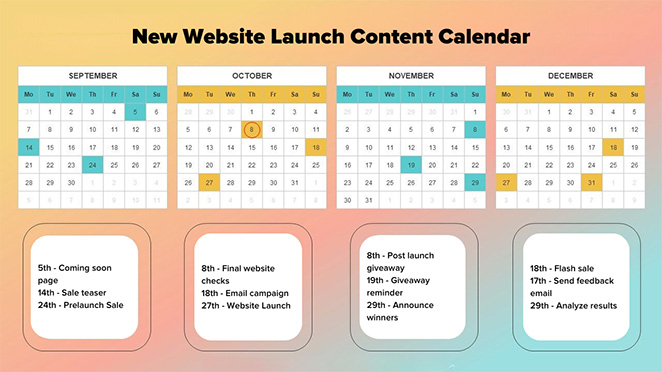
Here are some steps to create an effective content calendar:
- Select the type of content you plan to publish: This could be anything from guest posts on other websites, email newsletters, social media updates, podcasts, webinars, or videos. Ensure the content types align with your brand’s voice and appeal to your audience.
- Identify key dates and milestones: These might include product launches, sale periods, or relevant holidays or events. Plan your content to leverage these opportunities.
- Establish a publishing schedule: Decide how often and on which days to post your content. You can publish more frequently before the website launch to build anticipation.
- Assign roles: Choose who is responsible for content creation, editing, approval, and distribution to ensure everything stays on track.
Optimize Your Website for Search Engines
If you want people to find your website, it needs to show up in search results. That’s where optimizing your website for search engines comes in.
This is known as search engine optimization (SEO), and it’s critical to the success of your website launch. It’s one of the biggest ways to drive organic traffic to your site.
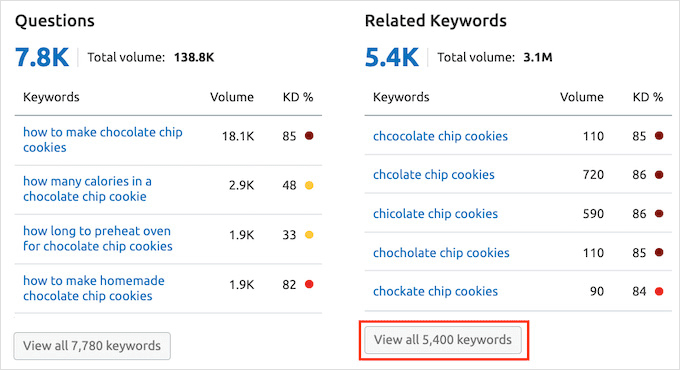
To get started, perform keyword research, finding words and phrases that users will likely use when searching for you. Then, add relevant keywords to strategic places on your site, such as in your meta tags, homepage, headings, and content.
Keyword stuffing can hurt your rankings. Focus on relevance and genuine helpfulness, not keyword frequency.
Also address the technical side: site structure, clean URLs, a sitemap, and mobile optimization. Most visitors arrive on a phone, so mobile-friendliness is non-negotiable.
Finally, start building backlinks. Guest posts, influencer partnerships, and genuinely useful content are the most reliable ways to earn them.
For more help, please see our guide on how to rank a new website.
Start Promoting Your Website Pre-Launch
Now it’s time to move into the Promote phase of your launch, where you build excitement and drive early interest.
First, consider adding a coming soon landing page to your website. This is one of the most effective tools in the Promote phase, especially if you’re building an email list. Even though your site isn’t live yet, this page can capture early interest and allow visitors to sign up for updates.

Pitch this page through your existing marketing channels to let your audience know something exciting is coming.
Tip
You can build a high-converting coming soon page in minutes using SeedProd. Just drag in blocks like opt-in forms, countdown timers, or even a giveaway, without coding.
Here’s what it looks like using the drag-and-drop builder:
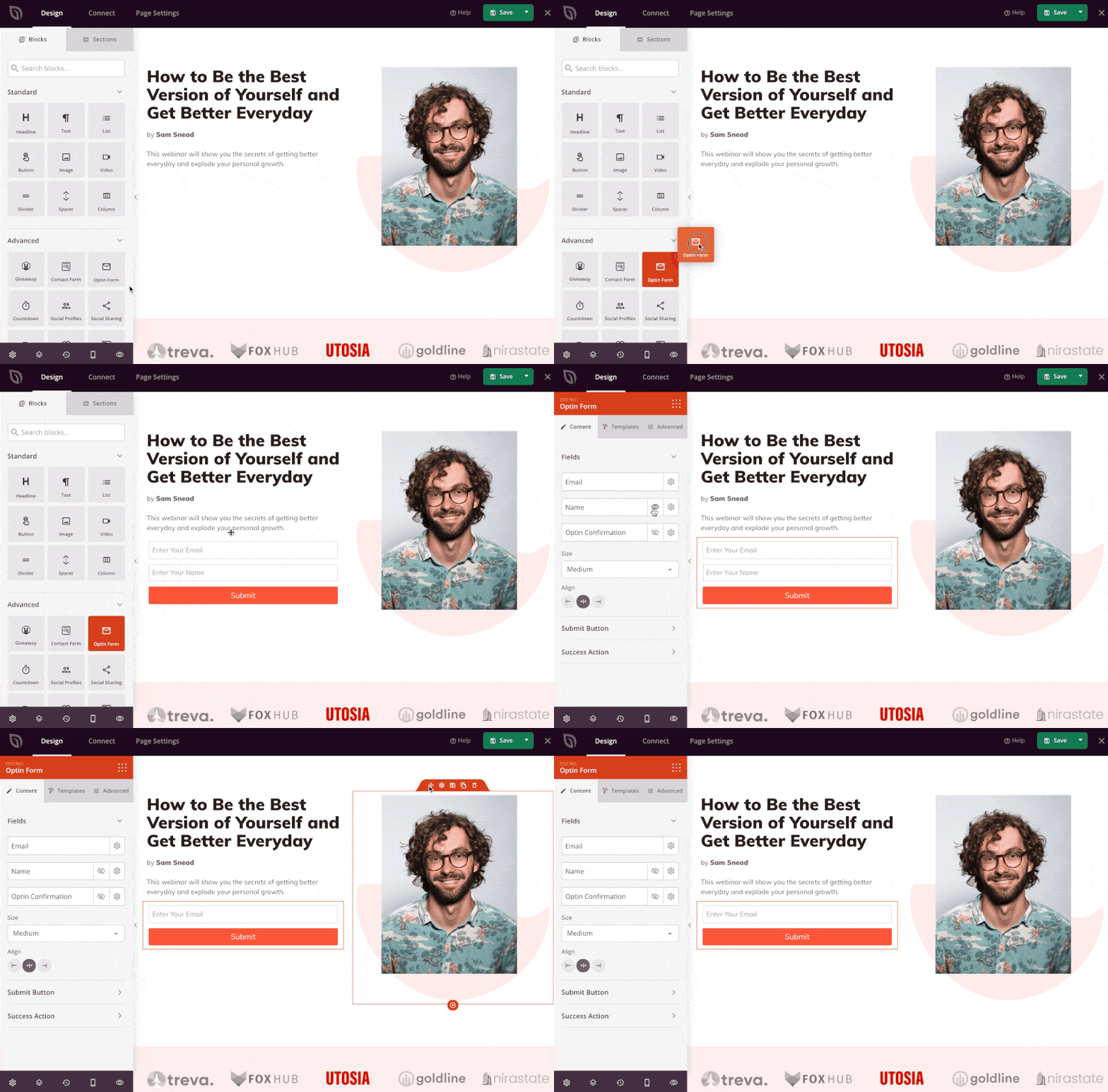
You can also customize your opt-in form to start collecting emails right away:
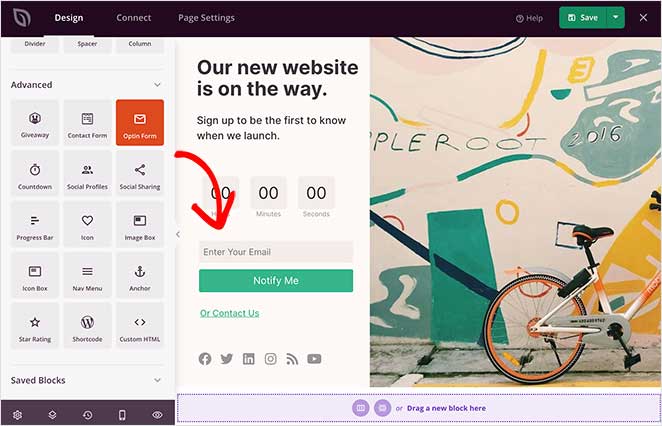
SeedProd integrates with popular email providers like Mailchimp, Constant Contact, and Drip, so you can automatically grow your list before launch.
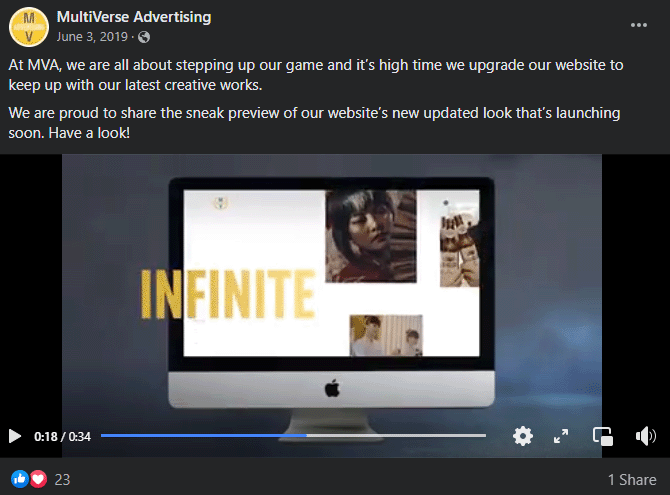
Next, use the power of your social media platforms to tease your website launch and share exciting sneak peeks. Crafting teaser posts and offering exclusive previews can maintain your audience’s interest and keep them eagerly awaiting your website’s debut.
Email marketing is another great way to promote your website.
Create an email campaign, providing subscribers with insider knowledge and exclusive benefits. You could even give your email list early access to the website or special offers to build anticipation.

Finally, reach out to media outlets and bloggers in your industry. A single feature or mention from a popular source can boost your visibility. Create a compelling press release or media kit encouraging them to share news about your upcoming launch.
Work Through Your Pre-Launch Checklist
Before you hit the launch button, run through a pre-launch checklist covering your website’s technical aspects.
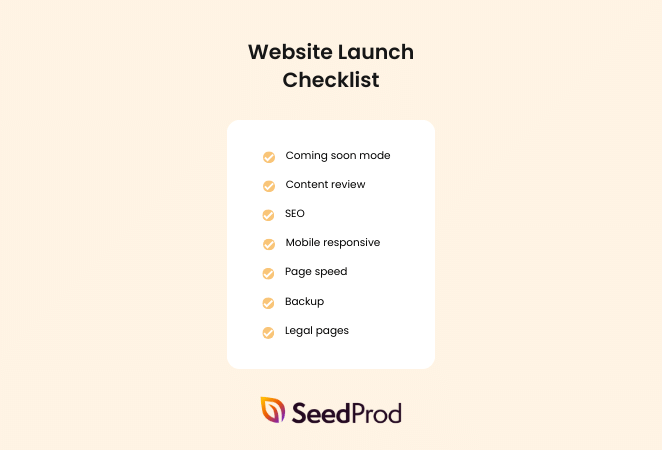
This could include tasks like:
- Perfecting your web design
- Finalizing your web development
- Cross-browser and device functionality testing
- Checking website links for errors
- Ensuring WordPress plugins work correctly
- Uploading eCommerce products
A well-optimized website should not only attract but also retain visitors. So, inspect your load times and make sure they’re fast enough, even for those with low internet speeds. You should also ensure your site is fully optimized for mobile devices.
Confirm that your forms, such as contact, sign-up, or purchase forms, work flawlessly and are easy to use. Also, have a clear, easy-to-understand privacy policy available for all your users.
For a full list of items, see our 24-point checklist for a successful WordPress website launch.
Launch Your Website With a Bang
The big day is here. This is the Push Forward phase, where your pre-launch work pays off.
Start with a launch announcement that clearly communicates what your site does and who it is for.
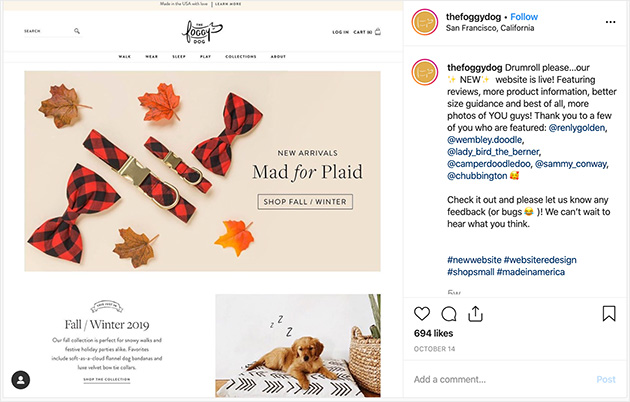
This could be a press release, a blog post, an email campaign, or a video announcement. The goal is to generate curiosity and interest, leading readers to your website.
Need some inspiration? See our guide on how to write a new website announcement email.
Next, share announcements across all your marketing channels, such as LinkedIn, Facebook, and X (formerly Twitter). Remember those channels you identified and optimized? It’s time to put them to work.
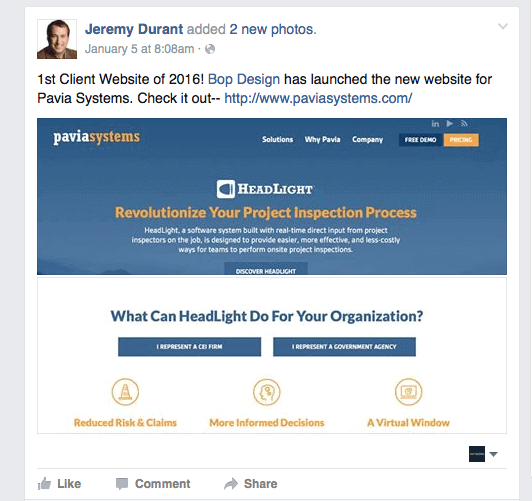
Whether it’s social media, email newsletters, or influencer partnerships, ensure your website launch message is everywhere your target audience interacts.
Paid advertising is worth considering if you want faster reach. A modest Google Ads or Facebook Ads budget, even $50-100, can put your site in front of the right audience in days rather than weeks.
I’d treat it as a launch boost rather than a long-term strategy, but it’s especially useful if your organic traffic takes time to build. See our guide on how to create a high-converting landing page to make sure your ads have somewhere worth sending people.
Want to make your launch even more exciting? Consider running a promotion, like a giveaway or a contest. These tactics can create interest and drive more traffic to your new site.
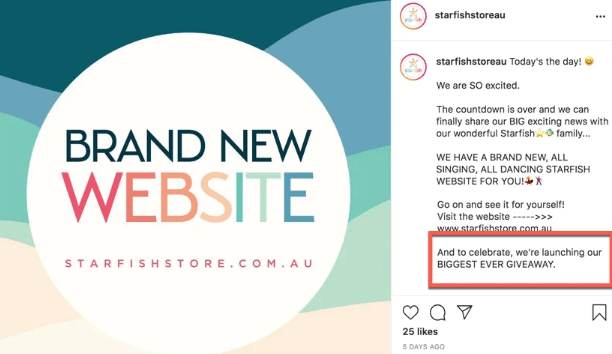
Even offering a special discount on your products or services for a limited period is a huge draw.
Launch Tip
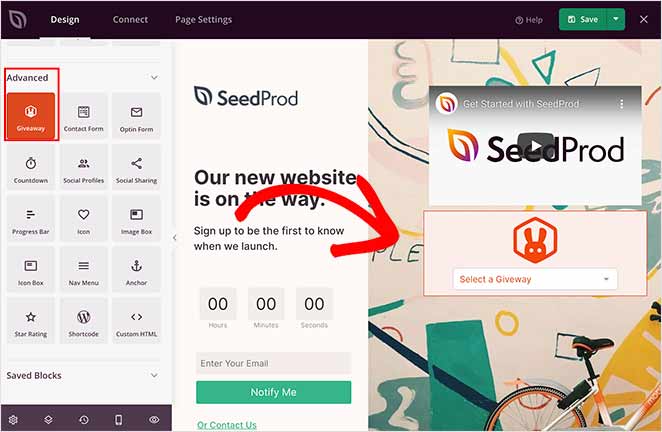
Want to get more eyes on your launch? Try running a giveaway using SeedProd and RafflePress. It’s a powerful combo that lets you build your list, reward early fans, and spark viral sharing, before your site even goes live.
You can add a giveaway block right to your coming soon page:
Then choose your campaign from the dropdown:
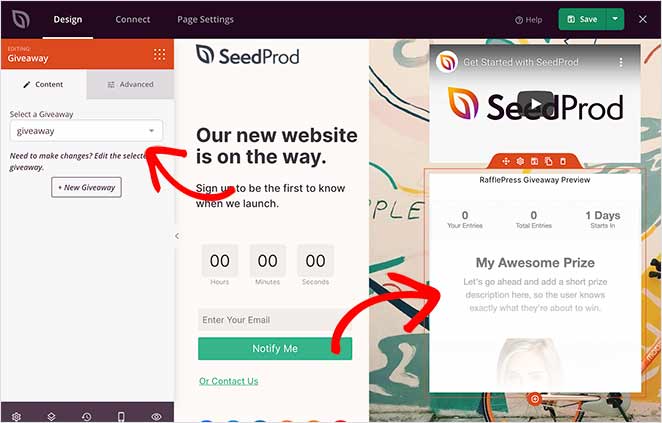
This is a great way to turn early visitors into excited brand advocates, and grow your audience before launch day even arrives.
Track Your Results
Now that it’s live, watch your website analytics to track its performance. This is where the Push Forward phase earns its name: you’re not just launching, you’re learning and improving in real time.
Tracking your results over time will provide insights to help you tweak and optimize your strategy. This involves monitoring website traffic, user behavior, and conversion rates.
Set up two tools before launch, not after: Google Analytics and Google Search Console.
Google Analytics tracks user behavior, where visitors come from, which pages they visit, and where they drop off. Google Search Console shows which search queries drive traffic and flags any indexing errors. Together, they give you the full picture of how your launch is performing.
Here are some tips to get the most from your analytics:
Who’s visiting your website? Where are they coming from? What pages are they spending time on?
Here are the key metrics to track in your first 30 days, what they tell you, and when to take action:
| Metric | What It Tells You | When to Adjust |
|---|---|---|
| Sessions / Users | How many people are finding your site | If under 100 sessions in week 1, increase promotion channels |
| Bounce rate | Whether visitors stay or leave immediately | Over 70% on key landing pages means messaging or speed needs work |
| Email sign-up rate | How well your list-building offer is converting | Under 1% means revise the offer or the opt-in placement |
| Conversion rate | Visitors completing your main goal (purchase, contact, sign-up) | Under 1-2% for a new site warrants testing different CTAs or page layouts |
| Top traffic sources | Which channels are actually sending visitors | Double down on what’s working; cut time on what’s not |
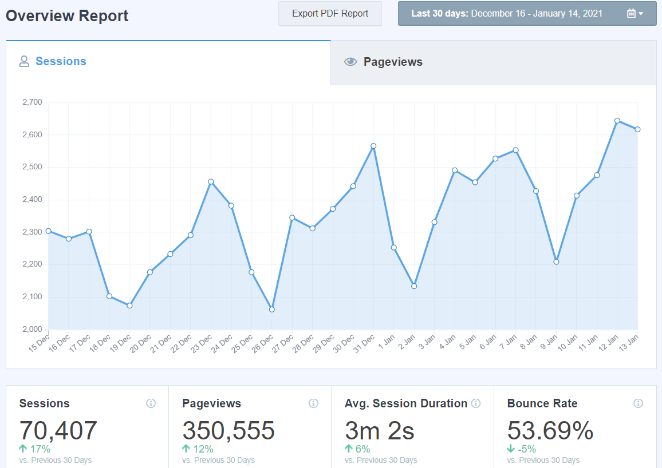
In the example above, we used MonsterInsights, the best Google Analytics plugin for WordPress, to make sense of our data.
Remember the goals you set at the beginning of your launch? Now is the time to compare your outcomes with your expectations.
Understanding your expected versus actual results can help you tweak your strategy moving forward.
Set Up or Update Your Google Business Profile
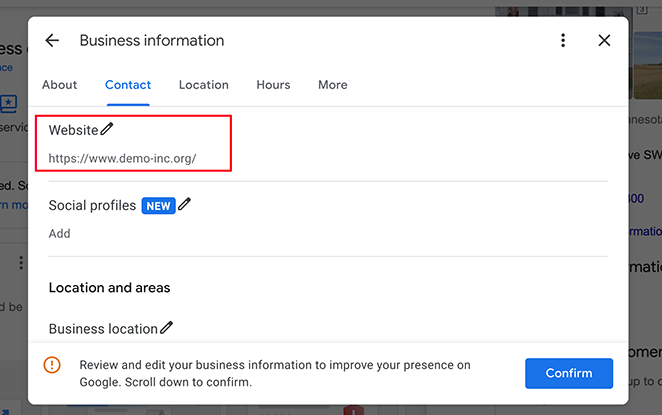
One step many new site owners skip: updating their Google Business Profile with the new URL right after launch.
If you have a local business, this matters more than most launch tactics. Your Google Business Profile controls how your business appears in Maps and local search results.
Go to Google Business Profile, update your website link, add photos of your new site or space, and confirm your business details are current. It takes less than 10 minutes and directly improves your local visibility.
Planning the launch of your site is crucial. If you’re looking for a practical example, take a look at our tutorial on how to make a wedding website in WordPress to understand effective strategies in action.
New Website Launch Marketing Plan FAQs
How long before launch should I start marketing my website?
Start marketing your website at least 4 weeks before launch. Put up a coming soon page immediately so Google can start indexing your domain and you can begin collecting email addresses. Use weeks 2-3 to tease content on social media and send warm-up emails to your list. By launch day, you want a primed audience ready to share, not a cold start with no one watching.
How do I build an email list before my website launches?
Set up a coming soon page with an email opt-in form before your site goes live. Offer an incentive, like early access, a discount, or a free resource, to encourage sign-ups. Tools like SeedProd let you build a coming soon page in minutes and connect it directly to email providers like Mailchimp or Constant Contact. Then promote the page through your social media profiles and any existing audience you have.
How do I write a website launch announcement?
A good website launch announcement explains what your site is, who it helps, and what’s new or exciting about it. Keep it short: one paragraph for email, two or three sentences for social media. Lead with what the reader gets, not what you built. Include a direct link to the site and a clear call to action, like “check it out” or “grab the early-access offer.” See our guide on how to write a website announcement email for templates and examples.
Do I need a coming soon page before my website launches?
You don’t need one, but it makes a real difference. A coming soon page lets you collect email subscribers, build anticipation, and get your domain indexed in Google before launch day. Without it, you’re starting cold: no list, no SEO head start, and no audience primed to share. With it, launch day becomes a campaign with momentum rather than a quiet debut.
How much does it cost to launch a website?
The cost depends on whether you hire a developer or build it yourself, and whether you run paid ads. A developer-built small business website typically costs $300 to over $1,000. If you use a WordPress theme builder, the cost is much lower. See our guide on the cost of creating a custom WordPress theme for details.
What should I do after launching a new website?
After launch, submit your site to Google Search Console so it gets crawled and indexed. Set up Google Analytics to track traffic, then update your Google Business Profile and social media profiles with the new URL.
Should you do SEO before or after your website launch?
Both. Before launch, identify your target keywords and build them into your site structure and page content. After launch, use Google Search Console to monitor rankings and optimize as you publish new content.
A solid launch marketing plan is what separates sites that get noticed from ones that go live to silence. Work through the Plan, Promote, and Push Forward phases in order, and you’ll have a real foundation to build on from day one.
You might also find the following guides helpful for your new WordPress site launch:
- Best Marketing Automation Tools for Small Business
- How to Secure Your WordPress Site from Hackers
- Best WordPress Cookie Consent Plugins
- Website Welcome Message Examples to Engage New Visitors
- How to Create a Pre-Launch Landing Page
- How to Create a Press Page in WordPress
Thanks for reading! We’d love to hear your thoughts, so please feel free to join the conversation on YouTube, X and Facebook for more helpful advice and content to grow your business.




