

TL;DR: Should Landing Pages Have Navigation? Data from multiple A/B tests shows that removing navigation from landing pages increases conversions. Here’s what you need to know.
- Navigation distracts — every menu link is an exit ramp away from your offer.
- Ad spend suffers — visitors who click away from a PPC landing page waste your cost-per-click budget.
- The data is clear — HubSpot, Yuppiechef, and Career Point College all saw conversion lifts after removing navigation.
- Exceptions exist — long-form pages can use anchor-based on-page navigation; logo-only headers are fine.
- SeedProd removes it automatically — enable Full-Width Page mode and navigation is gone, no coding required.
Are you still using landing page navigation?
It might make sense to include navigation links when designing landing pages on your website. However, doing so can hurt your marketing efforts, reducing leads and potential customers.
In this article, I’ll explain why you should remove landing page navigation links to increase conversions.
What Is a Navigation Menu?
There are 3 types of navigation you can use:
- Main Navigation: divides your website content into a menu with links to each site section.
- Local Navigation: sub-sections that classify content, often included in dropdown-menus on the main navigation.
- Contextual Navigation: links within your content, such as “read more” links, back buttons, and hyperlinks related to another page on your site.
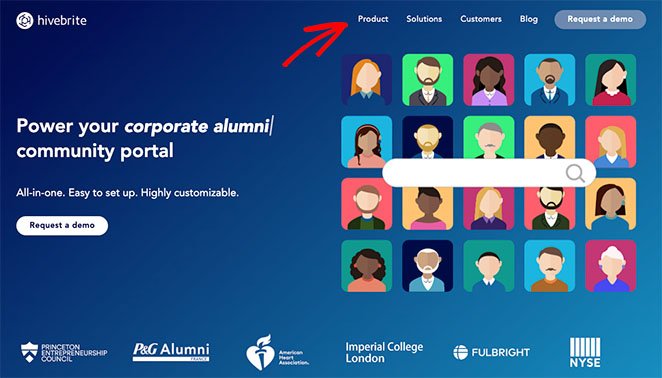
Here is an example of navigation on a page header:
And here is the same example of navigation links in the footer:
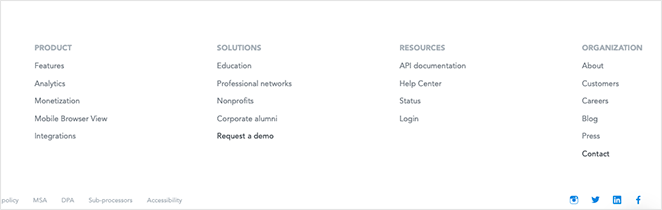
What these links have in common is they help users find information on your website.
Including website navigation on your homepage is an excellent way to educate visitors about your business, products, or services. However, this type of navigation can have the opposite effect on landing pages, as I’ll explain below.
What Is the Difference Between a Homepage and a Landing Page?
A landing page is a standalone page designed to get visitors to take one specific action. It doesn’t educate or inform like a homepage does.
Homepages should educate and inform visitors about your business, but landing pages have a completely different purpose. Instead of informing visitors, landing pages are designed for users to convert into leads and new customers.
For example, after visiting your homepage, users might read your About page, browse your products, read a blog post, and then fill in a form to join your email list. Yet after visiting a landing page, users have a single choice: read the information, join your list, or click away.
| Feature | Homepage | Landing Page |
|---|---|---|
| Purpose | To explain what your business is about | To get visitors to take action |
| User Actions | Click around, read more, explore | Click a button or leave |
| Content | Covers lots of topics | Focused on one offer or goal |
| Navigation | Full menu with many links | Few or no links — just one focus |
| Design | Detailed and informative | Simple with a clear CTA |
| Audience | Anyone visiting your site | People interested in your offer |
| Goal | Help visitors explore | Get conversions (signups, sales, etc.) |
Bottom line: Home pages are designed to educate and inform, but landing pages aim to convince and convert.
Why Should You Remove Your Landing Page Navigation Menu?
Although navigation links lead visitors away from conversion goals, around 84% of landing pages still include them.
Why Do Navigation Bars Distract Visitors?
When you put navigation links on a standalone landing page, you connect it to other pages on your website. That means it’s no longer “standalone.” As a result, it can distract visitors from the offer your landing page includes.
Here’s an example of this concept.
Let’s say we’re searching Google for an email marketing tool and see this Google Ad:
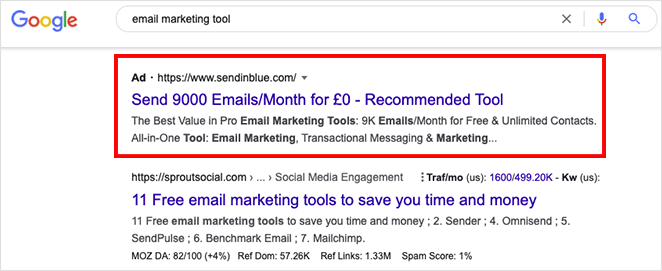
You click the ad and see this landing page from Brevo, formerly Sendinblue:
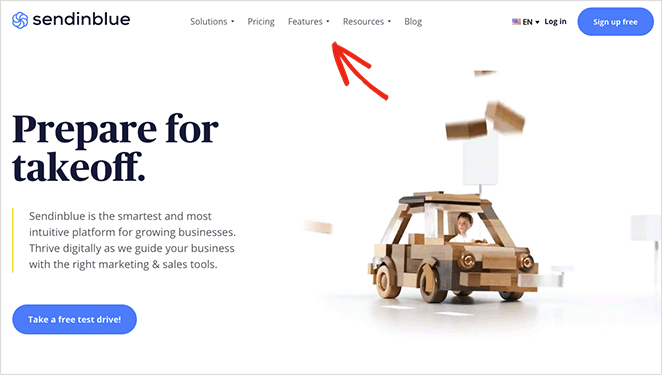
It’s an attractive page with an eye-catching headline and a tempting offer to test drive the platform. Yet you can’t help but notice the bar at the top of the page.
The menu bar includes clickable links that let you check out their pricing page, features, resources, and even read their blog. Each link gives you an excuse to leave the page, taking your eyes away from the main offer: the free plan.
This isn’t what a landing page should do.
Another search result takes you to the Salesforce landing page.
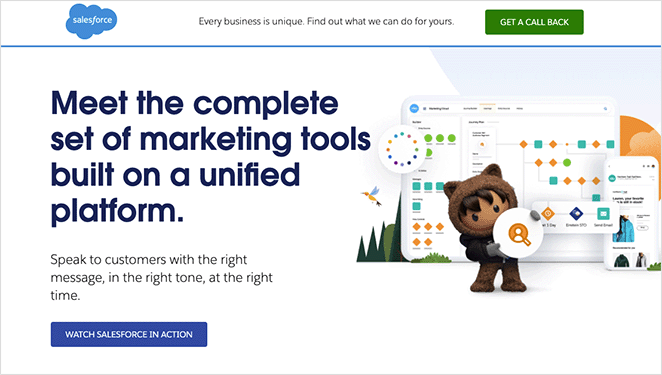
This page also has excellent headlines and copy to convince you to convert. However, it only includes links to tour the product or start a free trial. Both links help visitors decide to convert, leading to higher conversion rates.
How Do Navigation Links Waste Your Ad Spend?
Many businesses use landing pages for Pay-Per-Click (PPC) Google Ad campaigns, and when users click your ad, it costs you money. This is known as Cost-Per-Click (CPC) and relates to how much you pay for each click.
When you include navigation links on a landing page connected to your ad, you give visitors a reason not to convert. You’re paying for the click, then handing them a way out.
The visitor may click a link to your homepage, blog post, or even your social media profiles. By leaving your landing page, they ignore your call-to-action, making the cost of their initial ad click a waste.
Removing navigation from your landing page keeps users on the page with a greater chance of converting, making the cost worthwhile.
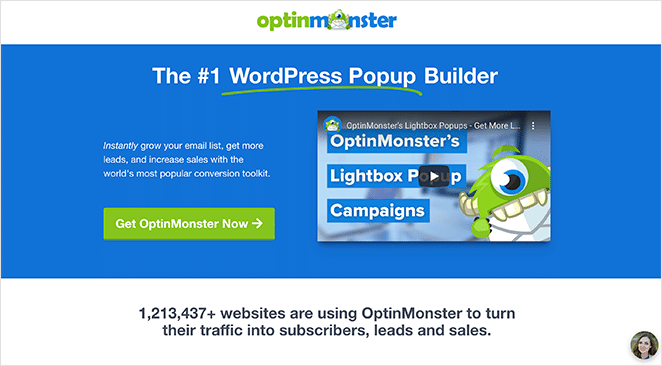
If you take a similar approach to OptinMonster in this example and remove your navigation, you can reduce cost per acquisition, giving you a greater return on investment.
How Much Do Navigation Menus Hurt Conversion Rates?
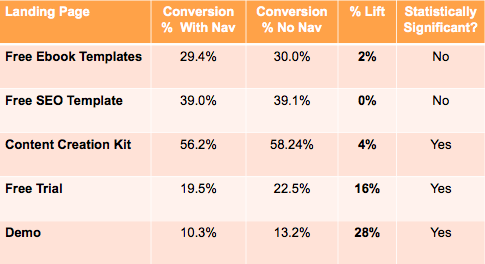
The data is consistent: removing navigation from landing pages increases conversions. HubSpot A/B tested 5 landing pages with and without navigation exit links.
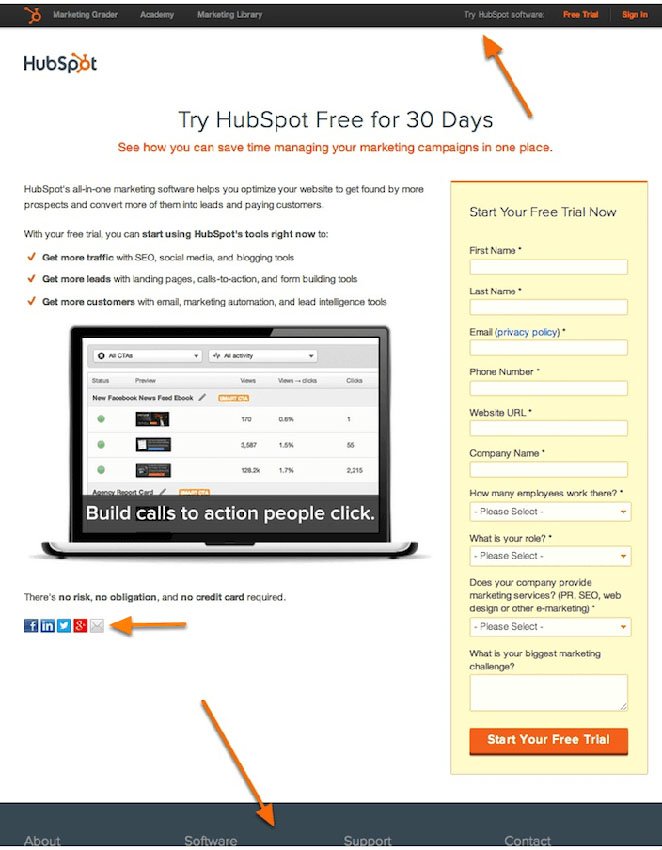
The landing page version without exit links increased conversion rates by 0-28% depending on the page. The lift was highest on middle-of-funnel pages – the closer someone is to buying, the more navigation pulls them off track.
Other companies have seen even larger gains. Yuppiechef removed navigation from their Wedding Registry landing page and doubled their conversion rate from 3% to 6%, a 100% increase.
Career Point College removed their top navigation and moved the form above the fold, which lifted conversions from 3.12% to 13.64% – a 336% increase, according to Unbounce.
Considering only 16% of landing pages have no navigation, removing it from your page is one of the top ways to increase your conversions.
When Is Navigation Acceptable on a Landing Page?
Removing all navigation is the right call for most landing pages, but there are a few legitimate exceptions worth knowing.
Anchor-based on-page navigation is fine on long-form pages. If your landing page is several screens tall, a sticky “jump to” menu that scrolls visitors to different sections of the same page keeps them engaged rather than pulling them away. The key is that every link stays on the page.
Logo-only headers pass too. Linking your logo back to your homepage is standard practice. It doesn’t distract from the offer; it just reassures visitors they’re on a legitimate site.
Privacy and terms links near form submissions are sometimes legally required, especially for GDPR compliance. Keep these in the footer, small and unobtrusive.
Everything else – full header menus, blog links, product nav, social media icons – should go. The goal is one page, one action.
How to Create a Landing Page Without Navigation
Creating a landing page without navigation is easy with a landing page builder. WordPress website owners can use a drag-and-drop landing page plugin to make one visually without hiring a developer.
I recommend SeedProd, the best WordPress visual website builder with over 1 million users. SeedProd removes the navigation automatically when you create a landing page — no coding, no CSS, no webmaster needed.

In my testing, SeedProd pages load in 556ms on average, compared to 1,882ms for Elementor-built pages. A faster landing page keeps visitors focused on the CTA, not waiting.
Here’s how to remove navigation from your landing page using SeedProd:
- Activate SeedProd: install the plugin from your WordPress dashboard and activate your license.
- Create a new landing page: go to SeedProd » Landing Pages and click “Add New Landing Page.”
- Enable Full-Width Page mode: SeedProd removes the header and footer automatically, so your landing page has no navigation from the start.
Follow this step-by-step guide to create a landing page without navigation with SeedProd in WordPress.
Or, if you’re ready to dive in, you can get started with SeedProd here.
Frequently Asked Questions
Should landing pages have navigation?
No — data consistently shows that removing navigation from landing pages increases conversions. HubSpot’s A/B test across 5 pages found lifts of 0-28%, with middle-of-funnel pages seeing the biggest gains.
Yuppiechef doubled their conversion rate by removing navigation, and Career Point College saw a 336% increase. The more focused your landing page, the better it converts.
When should you keep navigation on a landing page?
There are three acceptable exceptions: anchor-based on-page navigation for long-form pages (links that jump to sections of the same page), a logo-only header link for brand trust, and privacy or terms links in the footer when required for GDPR compliance.
Everything else — full header menus, social icons, blog links — should be removed. The goal is one page, one action.
Do navigation links hurt landing page conversion rates?
Yes. Every navigation link on a landing page is an exit point. Visitors who click away rarely return to convert.
The impact is biggest on middle-of-funnel pages where visitors are close to a buying decision. Top-of-funnel pages see smaller lifts (0-4%), but high-intent pages can see conversion increases of 16-28% or more when navigation is removed.
How do you remove navigation from a landing page in WordPress?
The easiest way is to use SeedProd. When you create a landing page in SeedProd and enable Full-Width Page mode, it removes the header and footer navigation automatically — no custom CSS or code required.
If you’re not using a page builder, you can remove navigation by editing your theme’s page template or adding CSS to hide the header on specific pages. SeedProd’s approach is faster and doesn’t require touching theme files.
Does removing landing page navigation really increase conversions?
Yes, and multiple independent tests confirm it. HubSpot, Yuppiechef, and Career Point College all saw meaningful conversion increases after removing navigation from their landing pages.
The underlying reason is simple: fewer distractions mean more focus on your offer. When visitors can’t click away to explore your site, they either convert or leave — and a well-designed landing page tips that balance toward converting.
There you have it!
I hope you liked this article and it helped you learn the benefits of removing landing page navigation. You might also enjoy this guide on how to create a landing page without a website. And these website layout examples that drive conversions.
Thanks for reading! We’d love to hear your thoughts, so please feel free to join the conversation on YouTube, X and Facebook for more helpful advice and content to grow your business.




