
Latest SeedProd News

WordPress Tutorials, Tips, and Resources to Help Grow Your Business

8 High-Converting Ebook Landing Page Examples (+ Templates)

8 High-Converting Ebook Landing Page Examples (+ Templates) 

[aioseo_eeat_author_tooltip show-label="true" show-image="true" show-tooltip="true"]     [aioseo_eeat_reviewer_tooltip show-label="true" show-image="true" show-tooltip="true"]

TL;DR: An ebook landing page is a focused web page designed to trade a free ebook for contact information. Ebook landing pages convert at 24%—more than double the 11% average for standard landing pages.

I’ve analyzed over 50 ebook landing pages from successful companies. I hand-picked these 8 based on conversion performance, industry diversity, and how easily you can recreate them in WordPress.

According to HubSpot, 43.6% of marketers say generating leads is their main goal. Ebook landing pages are perfect for just that.

In this guide, I’ll share some of my favorite ebook landing page examples. We’ll look at why they work so well and how you can use the same ideas to create your own high-converting pages.

Why Create a Landing Page for Your Ebook?

You’ve put a ton of work into creating your ebook. But even the best content fails if nobody sees it.

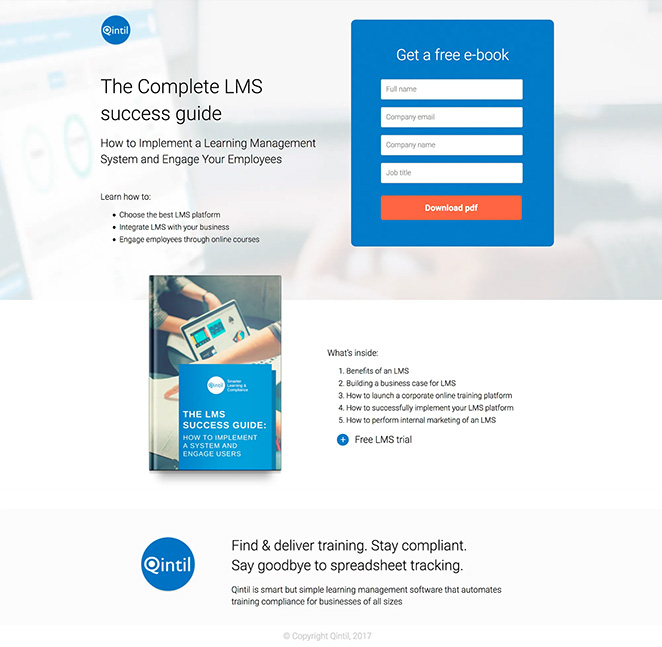
Dedicated landing pages solve this. For example, Qintil, a company that makes learning software, needed more leads. They created an ebook about their software and promoted it through a special landing page.

Quintil Ebook landing page example

The page clearly showed the ebook’s value, made signup easy, and used visuals to build trust. The result? A high-performing page that turned visitors into qualified leads. You can see the full case study here.

A well-optimized landing page gives you laser focus on conversion, measurable results you can track, and SEO benefits from targeted content.

5 Principles All High-Converting Ebook Landing Pages Share

I’ve analyzed dozens of high-performing pages and these 5 principles show up every time.

PrincipleWhat It MeansWhy It Works
Single CTA FocusOne goal only: capture the email. No navigation menus, no sidebar links, no competing calls-to-action.Removing choices reduces decision fatigue. Visitors either want the ebook or they don’t.
Above-the-Fold Value PropYour headline, ebook cover, and primary benefit must appear without scrolling. Visitors understand what they’re getting in under 3 seconds.The ebook cover provides visual proof your offer exists. A benefit-focused headline explains why they should care.
Short Forms (3-5 Fields Max)Most ebook landing pages only ask for name and email. Forms with 3-5 fields convert 15-20% better than forms with 7+ fields.Every additional form field increases completion time and reduces conversions. Only request information you’ll actually use.
Strategic Social ProofTestimonials, case study mentions, or download counts placed mid-page, after you’ve explained the value but before the final CTA.Social proof works best when it addresses specific doubts visitors have about whether your ebook delivers.
Mobile-First DesignSingle-column layouts, large tap targets for buttons, and forms that don’t require zooming.Over 60% of web traffic comes from mobile devices. Your ebook landing page must work perfectly on phones.

These principles aren’t about being fancy. They’re about removing friction and making it easy for visitors to say yes.

What’s the Conversion Rate for Ebook Landing Pages?

Ebook landing pages convert at 24% according to Leadpages data. Standard landing pages average 11%.

The performance difference comes from the clear value exchange. Visitors receive immediate value (the ebook) in return for their email address. This transactional clarity reduces hesitation.

For content marketers, ebook landing pages are the highest-converting lead magnet format available.

Ready to see what makes a great ebook landing page tick? Let’s dive into some standout examples.

Ebook Landing Page Examples That Convert

I’ve analyzed these 8 examples across SaaS, marketing, and enterprise companies. Each demonstrates different approaches to the same goal: converting visitors into leads.

1. Flywheel

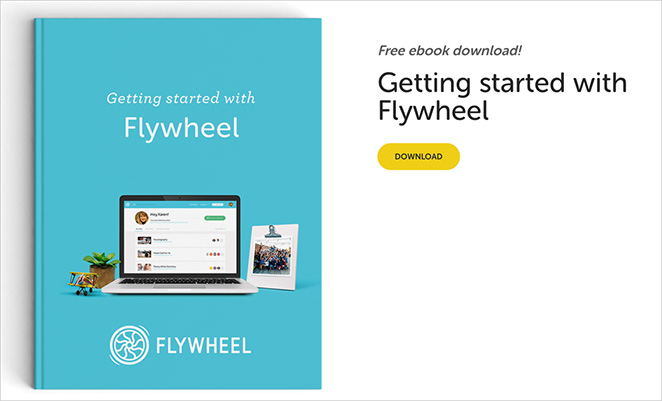
Flywheel, a WordPress hosting company, uses a single-column ebook landing page. The page includes three key elements: a benefit-focused headline, a 3D ebook cover mockup, and a one-click download button.

This design converts well because it follows the principle of cognitive ease. Visitors see the complete offer above the fold without requiring a form.

Flywheel’s approach demonstrates that SaaS companies can build trust by offering value before asking for anything in return.

Flywheel ebook landing page example

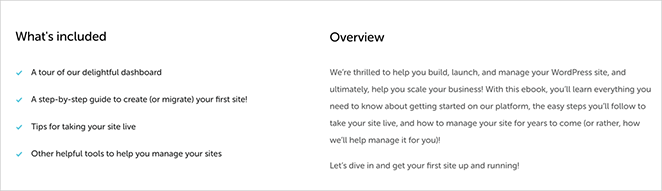
The call-to-action is straightforward – a simple button that takes you directly to the PDF download. To convince you it’s worth downloading, they’ve included a few bullet points explaining what you’ll learn from the ebook.

Flywheel ebook landing page copywriting
What Flywheel DoesHow to Use This Idea
Clear, descriptive headlineWrite a clear title that explains your ebook’s subject in 10 words or less
One-click “Download PDF” buttonConsider offering immediate downloads without requiring signup to build trust first
Bullet points of ebook topicsUse bullet points to show specific topics covered
Professional ebook cover imageCreate an attractive ebook cover that looks professional
Page works well on all devicesTest your page on mobile devices
Simple, focused designRemove any elements that don’t support the conversion goal

2. BlogTyrant

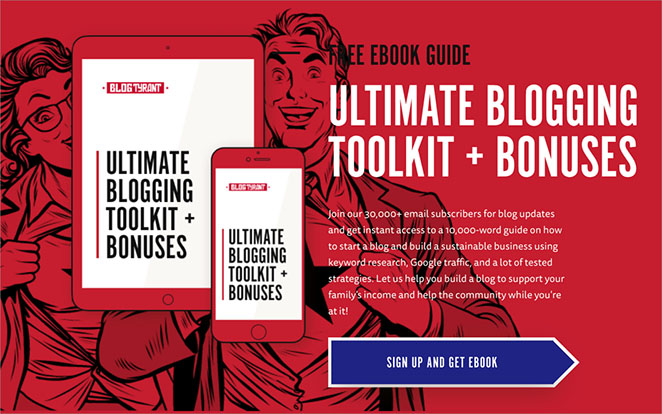
BlogTyrant, a blogging education site, positions their ebook offer at the bottom of their homepage. The page displays a “Free Ebook Guide” label, the ebook title, and a cover image.

This homepage integration approach works because it captures visitors who are already engaged with the content. The popup email signup converts traffic that’s already warming up.

BlogTyrant’s strategy shows that content sites can use strategic placement instead of dedicated landing pages.

BlogTyrant ebook landing page example

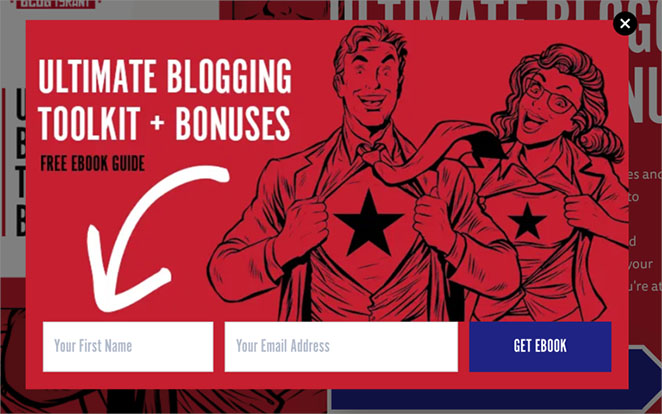
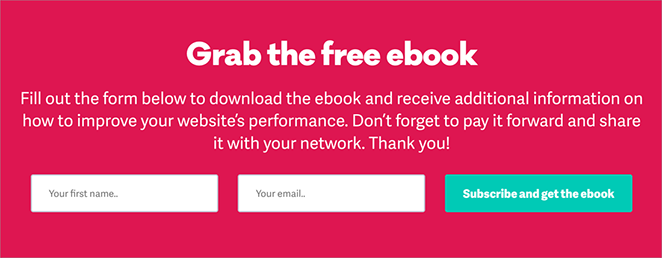
There’s a clear “Sign up and get ebook” button below, so you know exactly what to do next. Click it, and a small window pops up asking for your email address.

Ebook landing page opt-in popup

Now, using a pop-up is a bit of a gamble. Some folks find them helpful, while others might be annoyed. But BlogTyrant is confident their ebook is valuable enough to make it worthwhile.

What BlogTyrant DoesHow to Use This Idea
Positions ebook offer at homepage bottomConsider strategic homepage placement if your site gets consistent traffic
Says “Free Ebook Guide”Emphasize “free” to increase interest and reduce download friction
Shows ebook title clearlyMake titles immediately understandable and benefit-focused
Shows ebook cover pictureUse professional cover images that look like real books
Uses “sign up and get ebook” buttonProvide clear calls-to-action that explain exactly what happens next
Uses popup for email signupExplore popup conversion methods to grow your email list from existing traffic

3. Microsoft

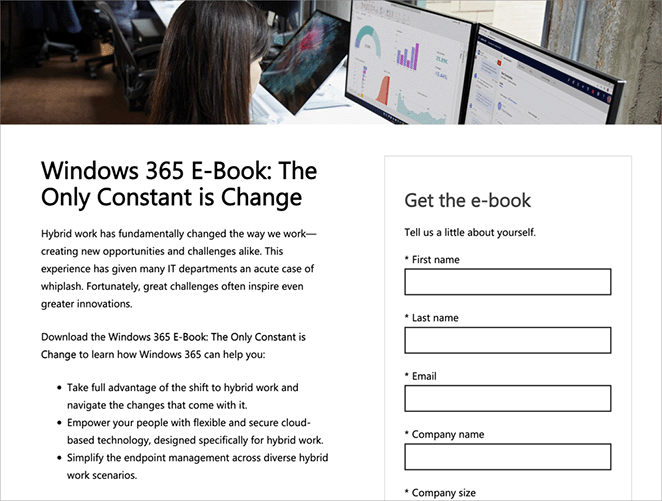
Microsoft, a technology corporation, uses longer forms with multiple fields on their ebook landing pages. The forms request company name, job title, and industry in addition to basic contact information.

This approach prioritizes lead quality over quantity. Microsoft accepts lower conversion rates in exchange for more qualified leads.

Microsoft’s page demonstrates that enterprise companies with longer sales cycles benefit from detailed lead qualification upfront.

Microsoft ebook landing page example

Interestingly, Microsoft asks for a lot of information. This is tricky because people usually don’t like filling out long forms.

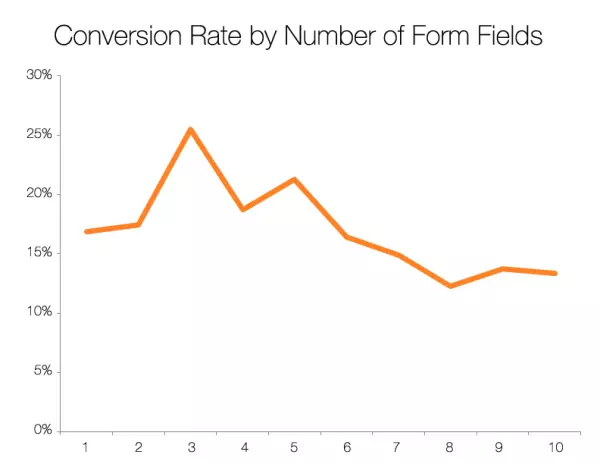
Dan Zarrella, a marketing expert, found that as the number of form fields increases, fewer people tend to complete the form. But the drop isn’t as big as you might think.

Conversion rate by number of form fields

Microsoft must believe that the quality of leads they get from more detailed forms is worth losing some

What Microsoft DoesHow to Use This Idea
Uses a big, eye-catching imageAdd attractive imagery that visually represents your ebook’s value
Has a clever, relevant titleCreate titles that address specific reader needs or pain points
Lists clear benefits of the ebookExplicitly state what visitors will learn in concrete terms
Uses a longer form for lead qualityConsider whether detailed forms align with your goals—more fields mean fewer conversions but better-qualified leads
Offers additional resourcesProvide supplementary learning resources to increase perceived value

4. HubSpot

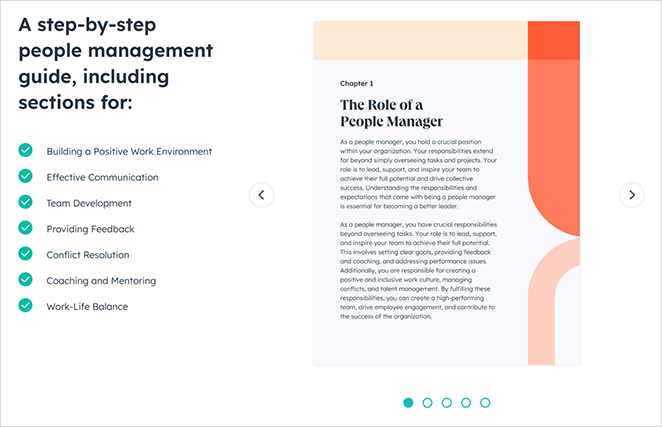
HubSpot, a marketing software company, includes content previews via slideshow on their ebook landing pages. The pages feature the ebook cover, topic lists, FAQ sections, and multiple download buttons throughout.

This comprehensive approach works because it removes conversion barriers by answering objections before they arise.

HubSpot’s strategy shows that providing extensive information can increase conversions when your audience needs reassurance.

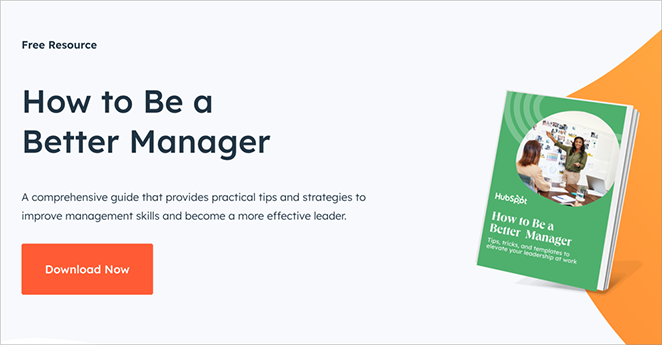
HubSpot ebook landing page example

As you scroll down, HubSpot builds your interest. They list out the topics covered in the ebook, touching on key management skills like building a positive work environment and resolving conflicts.

Ebook landing page design

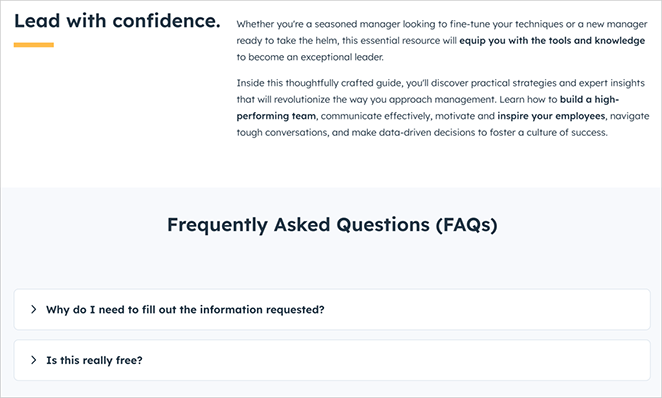
For those who need more convincing, HubSpot goes the extra mile. They dive deeper into the ebook’s content, explain who it’s for, and answer common questions with a handy FAQ section.

Ebook landing page FAQs
What HubSpot DoesHow to Use This Idea
Emphasizes that it’s freeMake “free” prominent in your headline and subheadings
Shows ebook cover imageDisplay covers professionally at multiple sizes for different screen widths
Lists topics coveredDetail specific learning outcomes using bullet points
Uses a slideshow of contentsProvide content previews showing actual ebook pages or chapters
Includes FAQsAnswer common questions through an FAQ section
Has two download buttonsPlace conversion opportunities strategically throughout the page rather than only at the top

5. Pixelgrade

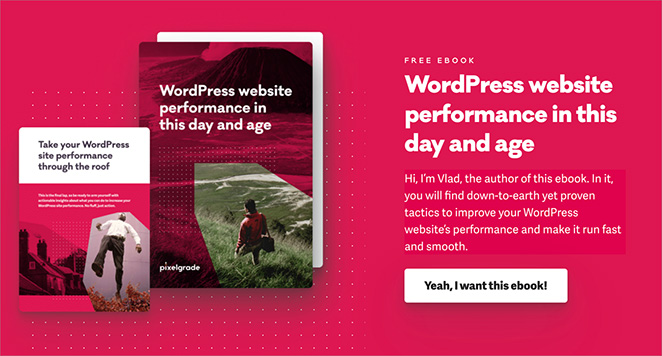
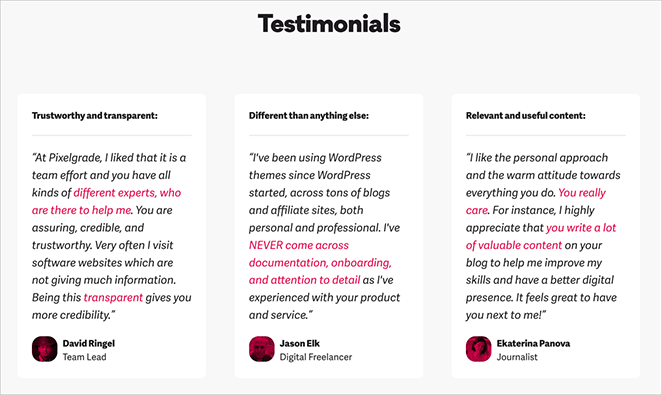
Pixelgrade, a WordPress theme company, includes personal author messages on their ebook landing pages. The pages feature the author’s photo, background, main takeaways, and customer testimonials.

This personal approach works because it makes the ebook feel like trusted advice from a knowledgeable friend rather than corporate content.

Pixelgrade’s page demonstrates that creator-driven companies benefit from highlighting individual expertise.

Pixegrade ebook landing page examples

As you scroll down, the page unfolds like a story. You’ll see the main takeaways from the ebook, almost like a movie trailer showing the best parts.

Ebook landing page testimonials

Finally, you get to know the author a bit better. This isn’t just any ebook; it’s advice from someone who knows their stuff and wants to help.

Ebook landing page signup form
What Pixelgrade DoesHow to Use This Idea
Shows a big ebook cover imageDisplay covers prominently at the top of the page
Uses a personal message from the authorAdd personal author introductions with photos to build connection
Lists key takeawaysHighlight key learnings visitors will gain from reading
Includes testimonialsInclude social proof through testimonials from previous readers
Introduces the authorEstablish author credibility by mentioning relevant experience
Uses casual, friendly languageMaintain an approachable, conversational tone that feels personal rather than corporate

6. Salesforce

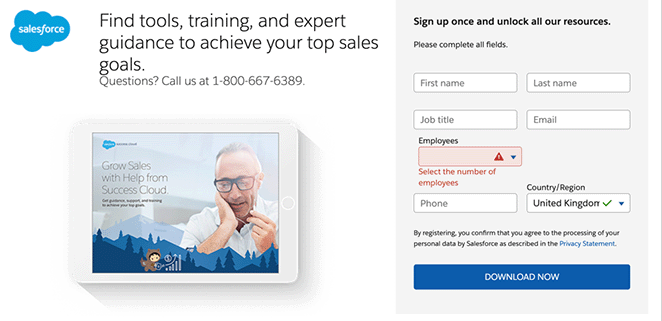
Salesforce, a CRM software company, keeps their ebook landing pages simple. The pages show the cover, promise access to a broader resource library, and use straightforward forms.

This minimal approach works because Salesforce has strong brand recognition. Their existing audience already knows and trusts them.

Salesforce’s page demonstrates that established brands can succeed with simpler pages when visitor trust is already high.

Salesforce ebook landing page example
What Salesforce DoesHow to Use This Idea
Shows an ebook cover imageDisplay covers professionally without clutter
Promises access to more resourcesSuggest additional value beyond the single ebook to increase perceived benefit
Uses a clear, action-oriented CTAMake download buttons obvious and use descriptive text like “Get Your Free Ebook”
Keeps the page simpleAvoid unnecessary design elements that distract from the conversion goal
Asks for detailed informationRequest strategically valuable user data that helps with lead scoring, but keep forms reasonable

7. Optimizely

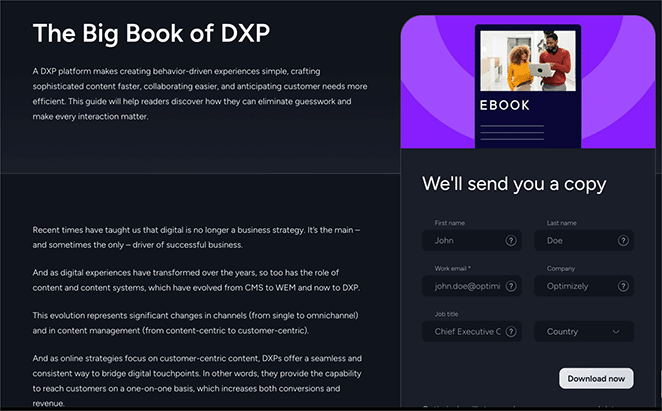
Optimizely, an experimentation platform, provides detailed ebook descriptions and includes educational content directly on the landing page. The pages use eye-catching graphics and friendly form language.

This educational approach works because teaching visitors immediately establishes expertise and builds authority.

Optimizely’s strategy shows that companies selling complex products benefit from demonstrating knowledge upfront.

Optimizely ebook landing page example
What Optimizely DoesHow to Use This Idea
Uses a bold, clear titleMake your ebook title stand out visually and ensure it’s immediately understandable
Provides a detailed descriptionExplain why your ebook is valuable and what it covers
Includes educational contentGive readers a taste of what they’ll learn
Uses eye-catching graphicsMake your page visually appealing to grab attention
Keeps the form simpleDon’t ask for too much information upfront
Uses a friendly form headingMake your form feel inviting and personal

8. Marigold

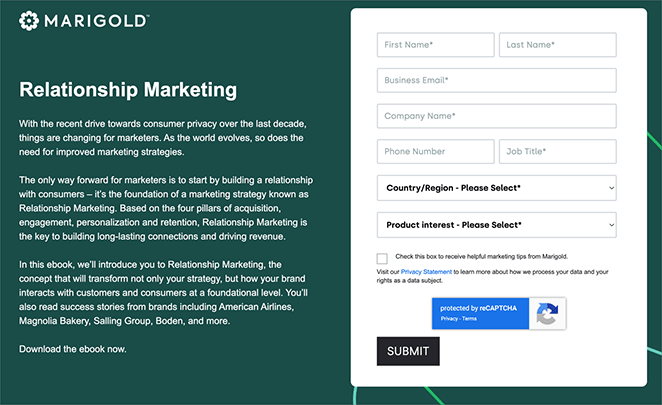
Marigold, a relationship marketing platform, uses clear titles and mentions recognizable case studies like American Airlines and Magnolia Bakery. The page keeps copy concise and CTAs obvious.

This straightforward approach works for B2B audiences who want quick information without excessive marketing language.

Marigold’s page could be strengthened with more images and a shorter form, but it demonstrates that clarity matters more than design complexity.

Marigold ebook landing page example
What Marigold DoesHow to Use This Idea
Uses a clear, concise titleKeep your ebook title simple, relevant, and directly focused on the benefit
Explains why the topic matters nowShow why timing matters for your specific topic
Previews ebook contentPreview content structure with chapter or section descriptions
Mentions case studiesHighlight real-world examples and recognizable brands if applicable
Includes a clear CTAProvide obvious next steps with a single, clear CTA

Ebook Landing Page Examples: Quick Comparison

Here’s how these 8 examples compare across key conversion factors:

ExampleIndustryKey FeaturesBest ForConversion Focus
FlywheelWordPress Hosting (SaaS)No-signup download, bullet points, minimal designTrust-building with new audiencesRemoving all friction
BlogTyrantBlogging EducationHomepage placement, popup signup, cover displayContent sites with existing trafficConverting warm visitors
MicrosoftEnterprise TechnologyLong forms (6-8 fields), eye-catching images, multiple resourcesB2B with long sales cyclesLead qualification over quantity
HubSpotMarketing Software (SaaS)Content preview, slideshow, FAQ, multiple CTAsCautious buyers needing reassuranceObjection removal
PixelgradeWordPress ThemesAuthor bio, testimonials, personal message, friendly toneCreator-driven brandsPersonal connection
SalesforceCRM Software (Enterprise)Simple layout, library access, brand trustEstablished brands with recognitionLeveraging existing credibility
OptimizelyExperimentation Platform (SaaS)Educational content, detailed descriptions, visual designComplex products needing explanationDemonstrating expertise
MarigoldMarketing Platform (B2B)Clear copy, case study mentions, minimal designB2B audiences wanting quick infoClarity without fluff

How to Create an Ebook Landing Page in WordPress

You can create a high-converting ebook landing page in WordPress without coding. The process takes about 15-20 minutes.

I use SeedProd myself because it handles the layout and spacing automatically. You don’t need design skills.

SeedProd is a drag-and-drop WordPress website builder trusted by over 1 million websites. You can use it to create custom WordPress themes, custom landing pages, and custom WooCommerce stores without any code.

SeedProd is a drag-and-drop WordPress website builder trusted by over 1 million websites. You can use it to create custom WordPress themes, custom landing pages, and custom WooCommerce stores without any code.

The basic steps are: choose a template, customize your headline and copy, upload your ebook cover, connect your email service, and publish. For detailed step-by-step instructions, see our complete guide on how to create an ebook landing page in WordPress.

6 Easy to Use Ebook Landing Page Templates

SeedProd includes six pre-designed templates specifically for ebook promotions. They use industry best practices and responsive layouts, so you can be confident they’ll convert well.

Template NameLayout StyleBest For
Ebook Landing PageSplit-screen with large imageHighlighting cover art and clear copy
Ebook Download PageFlipped split-screen (Above fold)Immediate visibility and social sharing
Free Ebook Landing PageLong-form detailed scrollingDetailed offers requiring testimonials
Ebook Squeeze PageShort, dark backgroundHigh-focus lead capture
Ebook Sales PageMinimalist with Sneak PeekConvincing visitors to buy or download
Ebook Opt-In PageColorful long-formAnswering FAQs and providing details

All of these templates are fully customizable. You can change colors, add your own images, adjust layouts, and more. This means you can make your landing page match your brand perfectly.

FAQs About Ebook Landing Pages

What is the best file format for an ebook?
PDF is the most common ebook format. It’s easy to create and works on almost every device including phones, tablets, and computers. PDF files maintain your formatting and don’t require special ebook readers.
How long should an ebook landing page be?
For a free ebook, keep your landing page short. You only need enough text to explain the value and get the user to sign up. Include your headline, 3-5 bullet points, the ebook cover, and a simple form. Longer pages with testimonials and FAQs work better for premium or paid ebooks where visitors need more convincing.
Do I need a full website to create an ebook landing page?
No, you don’t. Tools like SeedProd allow you to publish a standalone landing page even if you don’t have a full website set up yet. You can use a custom domain and create a single-page site focused entirely on your ebook offer.
What is the difference between a squeeze page and a landing page?
A squeeze page is a specific type of landing page. Its only goal is to capture an email address in exchange for something valuable like an ebook. A general landing page might have other goals like product sales, webinar signups, or course enrollments. Squeeze pages are typically shorter and more focused than standard landing pages.
What should I include on an ebook landing page?
Include five core elements: a benefit-focused headline, a 3D ebook cover visual, a short form with 3-5 fields maximum, social proof or testimonials, and a clear call-to-action button. Pages with these elements convert at 24% on average. Avoid navigation menus or links that distract from your conversion goal.
What makes an ebook landing page effective?
Effective ebook landing pages remove friction and clearly communicate value. They use single-column layouts, place the complete offer above the fold, minimize form fields to 3-5 maximum, and avoid any navigation or links that could take visitors away. The best pages answer “What will I learn?” and “Why should I care?” within 3 seconds.
Should I use a popup or dedicated landing page for my ebook?
A dedicated landing page converts better for traffic from ads, social media, or email campaigns. Popups work well for existing website visitors who are already engaged with your content. The landing page approach produces 18-25% higher conversions for cold traffic because it provides more space to explain value and build trust.

Next, Learn More About Landing Pages

A good ebook landing page converts visitors into leads by removing distractions and clearly showing value. The 8 examples above demonstrate different approaches, but they all follow the same core principles: single CTA focus, above-the-fold value props, short forms, and mobile-first design.

With SeedProd, you can create a clean, high-converting ebook landing page in minutes without touching code. Choose a template, customize your headline and cover, connect your email service, and publish.

Ready to capture more leads? See these helpful resources:

Thanks for reading! We’d love to hear your thoughts, so please feel free to join the conversation on YouTubeX and Facebook for more helpful advice and content to grow your business.

Disclosure: Our content is reader-supported. This means if you click on some of our links, then we may earn a commission. We only recommend products that we believe will add value to our readers.