

TL;DR: How to Announce a New Website by Email
A pre-launch email campaign builds your list before you go live, so launch day starts with real traffic instead of silence. Here’s the process:
- Coming Soon Page: Set one up first, it’s where your first email signups come from.
- Content & Social: Post platform-specific teasers on Instagram, LinkedIn, and X to drive traffic to that page.
- Email Series: Send 2-3 emails over the weeks before launch; teaser, what’s coming, and launch day.
- Subject Lines: Keep them under 50 characters, use emotional words, and personalize where you can.
- Subscriber Exclusives: Offer early access or a deal only subscribers get, it converts curious visitors into signups.
When I built my first site, I thought the hard part was over. But announcing the launch? That’s what really tripped me up. I had no idea how to write a new website announcement email that people would actually read, let alone click.
If you’re in the same boat, this guide will walk you through exactly how to write a pre-launch email that builds excitement, drives early traffic, and gets people on your list before you even launch. I’ll even show you 9 real examples to copy.
How to Announce a New Website by Email (Step-by-Step Guide)
There’s no one perfect email, but there is a process. These steps will help you build your list, write emails people open, and create buzz before your site goes live.
Step 1: Create a Coming Soon Page to Collect Emails
Before you write a single email, you need somewhere to send people, and a way to capture signups. A coming soon page solves both problems in about 15 minutes, and it lets you start collecting emails before your full site exists.
If you have zero subscribers right now, this is where you start. The coming soon page is your email list’s first source. Every visitor who lands on it is a potential subscriber before you’ve launched a thing.
A coming soon page is a special kind of webpage that gives people a sneak peek at what’s coming. It hides the work going on behind the scenes while still giving visitors a reason to stay in touch.
The great thing about using coming soon landing pages is they can build your email list before launch day. With the SeedProd landing page plugin‘s social sharing features, you can get others to spread the word too.

So let’s look at how to build a coming soon page with SeedProd in WordPress.
First, click here to get started with SeedProd, then follow these instructions for installing a WordPress plugin.
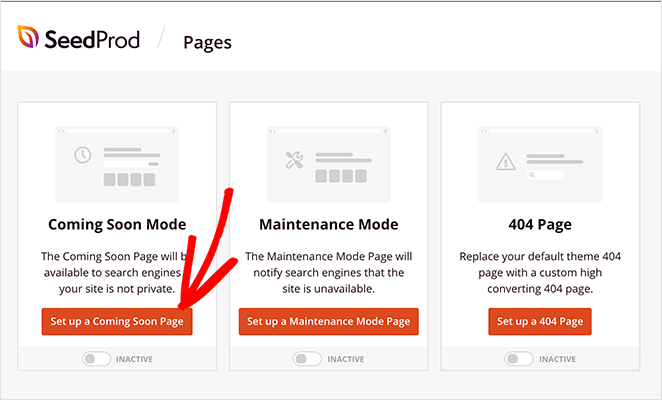
After activating the plugin, click the SeedProd icon from your WordPress admin area to view the dashboard, which gives you the option to create and activate a coming soon page, 404 landing page, or a maintenance mode page. You can also create several other types of landing pages.
To create your coming soon page, click the Set up a Coming Soon Page button.
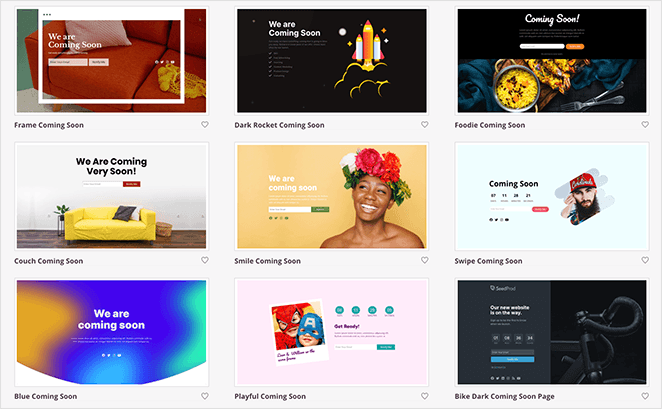
SeedProd comes with a range of pre-built coming soon page templates to make designing your page easier. Choose the one you like most to launch the visual page editor.
From here, you can design your page by adding some of the following elements using the easy drag-and-drop page builder:
- An email optin form to collect visitor emails so you can let them know when your site is going live.
- Social share buttons so visitors can share your site on social media.
- Social profile buttons for visitors to follow you on sites like X and Facebook.
- A contact form for people to ask for more information.
- A countdown timer so people know how long is left until your site launches.
- And much more.
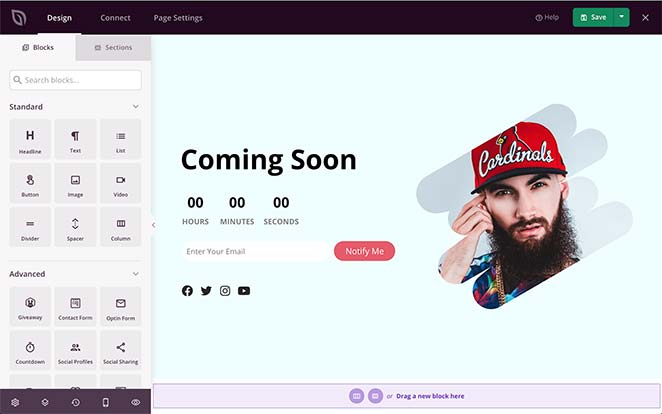
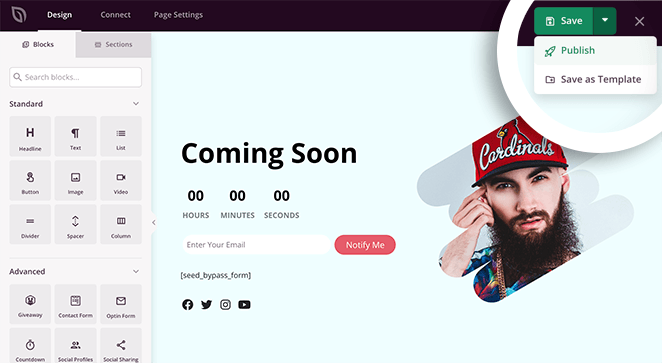
When you’re happy with your coming soon page, publish your page by clicking the downwards arrow next to the Save button and clicking Publish.
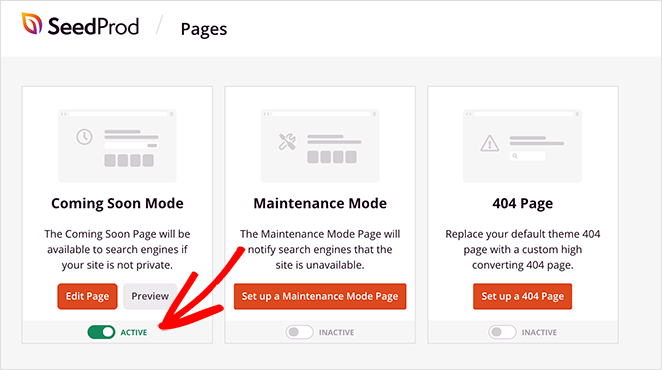
After, head back to your SeedProd dashboard, where you can activate your coming soon page. To do that, just click the toggle from Inactive to Active.
Your coming soon page is now live and ready to collect the emails of interested visitors.
Here’s the full loop: the coming soon page collects signups, those signups go onto your email list, your list receives a short email series, and by launch day you have an audience ready to visit. That’s the whole funnel. The rest of these steps show you how to fill it.
Step 2: Build Anticipation with New Content
Before you have a live site, social platforms are your traffic source. People see your posts, click through to your coming soon page, and sign up. What you post and where you post it determines how many of them actually do.
The key is platform-specific content, not one post copied across every channel. Here’s what works on each:
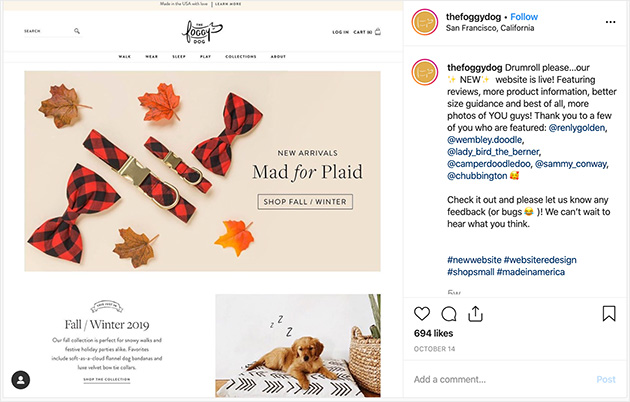
- Instagram: Share behind-the-scenes photos and short teaser clips. The Foggy Dog showcased their new website on Instagram with details on new features and shoutouts to those involved in building it — a mix of personal and product that works well for the platform.
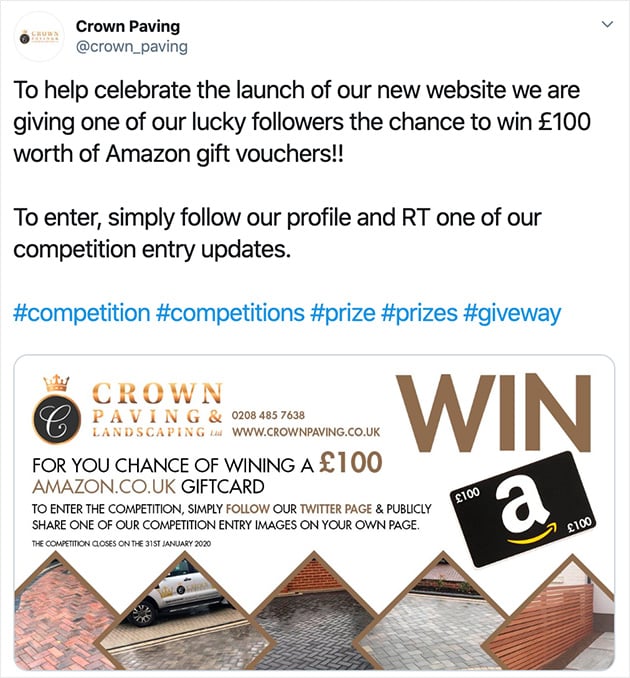
- X: Run a question-and-answer session with your followers, or share quick updates. Crown Paving combined their site launch with a competition on X, which generated strong interest from existing followers and pulled in new ones.
- LinkedIn: Write a short post about what you’re building and why. Professional audiences respond to the story behind the launch, not just what the site does.
- Guest posts: Write a guest post on a related blog mentioning your new site to reach an audience that already trusts the publication.
- YouTube: Record a short video announcement and publish it with a link to your coming soon page in the description.
Every piece of content should point back to your coming soon page. That’s how the social effort turns into email subscribers.
Step 3: Send a Pre-Launch Email Series
Instead of sending one big launch email, spread it out. A short email series keeps people curious and gives you more chances to show what’s coming.
One example could be a series of 3 emails sent over several days, covering different talking points:
- A screenshot of a new area of your site.
- A collage of product images that will feature in your new store.
- A video trailer talking about something coming soon.
Each email can cover one talking point that might seem unrelated to begin with. When all three emails are read, the connections become clear.
An excellent example of a pre-launch email campaign sent over time is the one delivered by Asana.
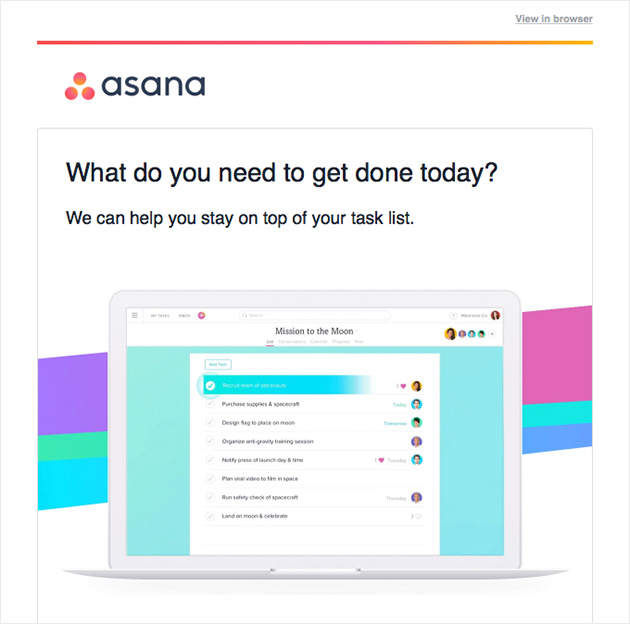
In the first email of their welcome series, they provide 3 tasks you can get done using their software.
3 days later, they send another email asking what you need to get done and encouraging you to get started.
2 days after that, there’s an email talking about the Asana dashboard. The series ends after another 2 days highlighting the calendar view.
This campaign does 3 key things:
- Makes the reader feel welcome.
- Highlights important product features.
- Builds interest over time.
What to Write in Each Email
The most common question I hear about pre-launch emails is “but what do I actually write?” Here’s the structure that works for each email in the series.
Every announcement email needs three things: a hook that tells the reader why this matters to them, a preview of what’s coming, and one clear action to take. That’s it. Aim for 150-250 words per email which is enough to be useful, short enough to actually be read.
Announcement Email Templates You Can Copy
Here are three reusable templates for your pre-launch sequence. Swap in your details and send.
Email 1: The Teaser (send 2-3 weeks before launch)
Subject: Something new is coming…
Hey [first name],
I’ve been working on something I think you’ll love, and I wanted you to be one of the first to know.
[Insert one-sentence description of your site or product]. It’s been a few months in the making, and it’s almost ready.
Here’s a sneak peek: [one image or detail to share].
Keep an eye on your inbox — I’ll be sharing more soon.
[Your name]
Email 2: The Launch Day Email (send on launch day)
Subject: It’s live! Come see [site name]
Hey [first name],
It’s finally here. [Site name] is live, and because you signed up early, you get first access.
Here’s what you’ll find: [2-3 bullet points of the most valuable features or content].
[Button or link: Visit the site]
I’d love to know what you think. Hit reply and tell me.
[Your name]
Email 3: The Post-Launch Follow-Up (send 3-5 days after launch)
Subject: Did you get a chance to check it out?
Hey [first name],
A few days ago I launched [site name], and I wanted to follow up in case you missed it.
Since launch, [something new or notable — a new piece of content, a popular feature, early feedback]. If you haven’t visited yet, now is a good time.
[Button or link: Visit the site]
Thanks for being part of the early group. You signed up before any of this existed.
[Your name]
The post-launch email matters more than most people realize. Early subscribers want to know their patience paid off. A short follow-up 3-5 days after launch brings back people who missed the launch day email and gives you a second traffic spike with almost no extra work.
Step 4: Write Attention-Grabbing Email Subject Lines
Great subject lines get your emails opened. Without them, all your hard work might go unseen. Here’s how to write subject lines that stand out in crowded inboxes.
The thing about subject lines is you don’t have a lot of space to play with. Research from Campaign Monitor shows most subject lines range from 41-50 characters. With mobile screens, it’s even less than that, so get the important parts in at the start.
Some ways to improve your website announcement email subject line include:
- Telling people exactly what they get when they open your emails.
- Adding their first name in the subject line to keep them engaged.
- Avoiding trigger words that will send your email into the spam folder.
- Using tried and tested subject lines that convert and adapt them to suit your brand.

This subject line from RafflePress is a great example of using a combination of key information, emotional words, and the clever use of emojis.
Did you know? Emotional content can increase the effectiveness of email marketing by as much as 70%! Just don’t get too enthusiastic with those emojis.
The emotional words here are Proven and Viral because they spark an emotional response of trust and excitement in readers.

The above example from MonsterInsights claims to help readers with a specific goal in a short time span. They further emphasize the claim with the use of the emotional word, ‘seriously.’
You can even go as far as to include a little humor in the subject lines.

This one we spotted is simple enough to get across the main idea while using a fun play on words to help with engagement.
The next thing to tackle is keeping the momentum going once you’ve launched your new website. A great way to do that is to build exclusivity into your launch plan.
Step 5: Offer Subscriber-Only Exclusives
Early access offers can turn a casual signup into a committed reader. When someone gets something before the public does, like a discount, a first look, or a pre-order slot, they’re invested before your site even goes live.
To take advantage of this in your new website announcement email, let readers know they have a chance to become part of an exclusive group.
You could offer subscriber exclusives, including:
- Early access to your services or website.
- The ability to pre-order your products.
- The chance to receive information that’s not available to the general public.
You can even go one step further by including this offer on your coming soon page to create the fear of missing out on something exciting.
IsItWP achieves a sense of exclusivity with its Black Friday optin popup.
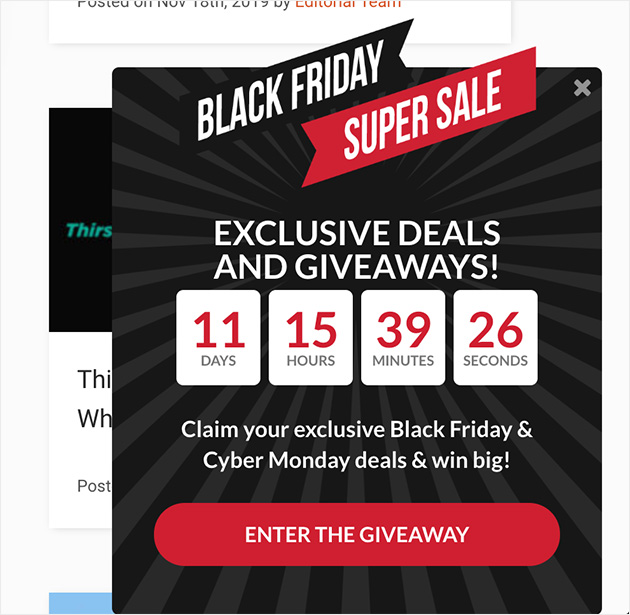
The eye-catching design grabs your attention right away, and the countdown timer creates a sense of urgency, prompting you to click.
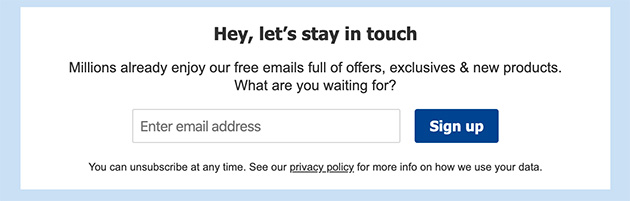
Online pharmacist Boots uses a simple optin form with the promise of exclusive deals for email subscribers.
You can use OptinMonster to add optin forms with countdown timers to any website easily.
New Website Announcement Launch Email FAQs
Still have questions? These are the most common things people ask when planning a new website announcement email campaign.
How do you write a website announcement email?
Start with a hook that tells the reader why this matters to them — a problem you’re solving, something you’re releasing, or access they’re getting first.
Follow with a short preview of what’s coming (2-3 specific details), then close with one clear call to action. Keep it under 250 words. The best announcement emails feel like a note from a person, not a press release.
What should I say in a new website launch email?
Your launch day email needs three things: confirmation that the site is live, 2-3 specific highlights of what subscribers will find there, and a direct link to visit.
Acknowledge that they signed up early — it makes them feel like insiders rather than just another email address. Keep the tone warm and direct, not formal. One clear button or link is enough; don’t give them five things to click.
How do you promote the launch of a new website?
The most effective pre-launch combination is a coming soon page collecting emails, platform-specific social posts driving traffic to that page, and a short email series (2-3 emails) building up to launch day.
Add a subscriber exclusive — early access, a discount, a sneak peek — and you give people a reason to sign up before the site exists. By launch day, you have an audience ready to visit instead of starting from zero.
What subject lines work best for website launch emails?
Subject lines in the 41-50 character range tend to perform best because they display fully on both desktop and mobile. Use an emotional word (“finally,” “exclusive,” “first look”), personalize with the reader’s first name when possible, and be specific about what’s inside.
For your launch day email, something direct works well: “It’s live — come see [site name].” For teaser emails, curiosity-based lines (“Something new is coming…”) outperform benefit-forward ones because the reader doesn’t know enough yet to care about benefits.
Build Your Launch List with SeedProd
You went from no list and no site to subscribers waiting for launch day. That’s the whole process and it starts with a coming soon page that captures signups before you have anything to show.
SeedProd makes this easy with its drag-and-drop builder. You can publish a coming soon page in minutes, connect your email service, and start collecting signups today, without touching a line of code.
If you need some help adding Google Analytics to track your launch performance, check out this guide.
Thanks for reading! We’d love to hear your thoughts, so please feel free to join the conversation on YouTube, X and Facebook for more helpful advice and content to grow your business.




FANTASTIC because i am launching my new website in a week’s time.I am going to implement your great suggestions
That’s great to hear Sandya. We wish you the best of luck if your launch!
This is an awesome read! with out any doubt, I will be following it to launch our new website in a week or two!
We’re so glad you found this post helpful. Good luck with your new website launch!
I just launched my website and blog this week… appreciate these suggestions!
We’re so pleased to hear that Madeleine. Congratulations on your new site!
Brilliant ideas – We are launching a new site in two weeks and I am definitely going to apply some of the ideas shared above. Thank you :)
You’re very welcome Ahmed. We wish you every success with the launch of your new site!
SOOOOOO glad I came across this article – I’m finalising my new coaching website as we speak and planning to go live shortly – hadn’t known how to go about promoting it. This has given me so many ideas! Thanks so much
Excellent news Kate! We’re so glad you found this post helpful. If you need any more help, feel free to ask.