
TL;DR: How to Create an Affiliate Marketing Landing Page That Converts
An affiliate marketing landing page drives one action, which is to get visitors to click your affiliate link or join your program. Here’s how to build one in WordPress using SeedProd, including must-have elements and compliance steps.
SeedProd has a free version if you’re just getting started.
- Install SeedProd – Download, install, and activate the plugin, then verify your license key.
- Create a new landing page – Click “Add New Landing Page,” choose a template, and set your page name and URL.
- Customize for your offer – Add your headline, benefits copy, testimonials, and a single CTA using the drag-and-drop editor.
- Configure page settings – Connect your email provider and set up SEO fields in the Page Settings tab.
- Publish and test – Click Publish, preview your page, then run A/B tests on your headline and CTA to improve conversions.
Sending paid traffic straight to an affiliate program page is one of the most expensive mistakes new affiliates make. Without a dedicated landing page, you’re competing with the merchant’s messaging, losing control of the conversion, and leaving money on the table. A focused affiliate marketing landing page changes that with one offer, one message, and one action.
I’ve tested this with SeedProd on my own sites, and the difference between a dedicated presell page and sending traffic directly to an offer is significant. In this guide, I’ll show you how to create an affiliate marketing landing page in WordPress, what elements it needs, and how to stay compliant with FTC requirements.
- What Is an Affiliate Marketing Landing Page?
- Do You Always Need a Landing Page?
- What Should an Affiliate Landing Page Include?
- What Do High-Converting Affiliate Landing Pages Look Like?
- Common Affiliate Landing Page Mistakes
- How to Create an Affiliate Marketing Landing Page
- How to Test and Optimize Your Affiliate Landing Page
- FAQs on Affiliate Marketing Landing Pages
What Is an Affiliate Marketing Landing Page?
An affiliate marketing landing page is a standalone page built around one goal, like getting visitors to click your affiliate link, buy the product you’re promoting, or join your affiliate program. Unlike a homepage or blog post, it removes every navigation link and competing CTA so the visitor has one choice.
You’ll also hear it called a bridge page, presell page, or partner landing page depending on its purpose. All three versions do the same job: warm up a visitor before sending them to the merchant’s page.
There are two main types:
- Product promo page: Convince visitors to buy an affiliate product or service.
- Recruitment page: Invite potential partners to join your affiliate program.
According to Unbounce’s analysis of 464 million visits, the median landing page conversion rate is 6.6%. That’s the baseline you’re trying to beat. Landing page conversion rates vary by niche and offer, but a focused page consistently outperforms a generic homepage send.
Affiliate Landing Page vs. Blog Post vs. Homepage
Each page type serves a different purpose. Here’s how they compare:
| Page Type | Purpose | Navigation | Best For |
|---|---|---|---|
| Affiliate landing page | Drive one specific action | None (removed) | Paid ads, email campaigns, preselling an offer |
| Blog post | Educate and drive multiple CTAs | Full site navigation | Organic search traffic, content marketing |
| Homepage | Introduce your brand | Full site navigation | Brand awareness, multiple audience segments |
Do You Always Need a Landing Page?
You don’t always need a landing page for affiliates, but the cases where you don’t are narrower than most affiliates think. Direct linking (sending traffic straight to the merchant) can work for high-trust, well-known products where the buyer already knows the brand.
You need a dedicated landing page when you’re running paid ads (most ad networks require a landing page URL you control), when building an email list from affiliate traffic, or when promoting a less familiar product that needs a presell. A squeeze page or bridge page between your traffic source and the merchant’s checkout removes friction and adds your own endorsement.
The honest answer is a dedicated page almost always outperforms direct linking because you control the message, the tracking, and the CTA. Direct linking is a shortcut that usually costs conversions.
What Should an Affiliate Landing Page Include?
An affiliate marketing landing page works best when it has a clear structure. Each section should guide visitors toward one action like clicking your affiliate link or joining your program.
- Headline: Start with a benefit-driven headline that explains why the visitor should care.
- Value and Benefits: Show how the product or program helps them. Use short, persuasive bullet points.
- Compelling Copy: Keep it focused on outcomes. Every sentence should move readers closer to your CTA.
- Visuals: Add product images, demo videos, or graphics that prove your offer’s value.
- Social Proof: Use testimonials, reviews, or trust badges to remove doubt.
- FAQ Section: Address common objections before visitors click away.
- CTA Buttons: Repeat a single, clear call to action throughout the page.
When you combine these elements, your affiliate landing page keeps attention, builds trust, and drives conversions.
Affiliate Disclosure Requirements
The FTC requires you to disclose affiliate relationships clearly and conspicuously. That means placing a disclosure at the top of your page or near your first CTA, not buried in the footer.
Your disclosure should be in plain language (“I earn a commission if you buy through my link”) and any affiliate links must use rel="nofollow sponsored" attributes. Google also expects this markup. Missing a disclosure doesn’t just risk FTC complaints, but it can get your ads rejected and undermine trust with your audience.
What Do High-Converting Affiliate Landing Pages Look Like?
The fastest way to improve your own page is to study what’s already working. These four affiliate landing pages nail the fundamentals in different ways.
NordVPN
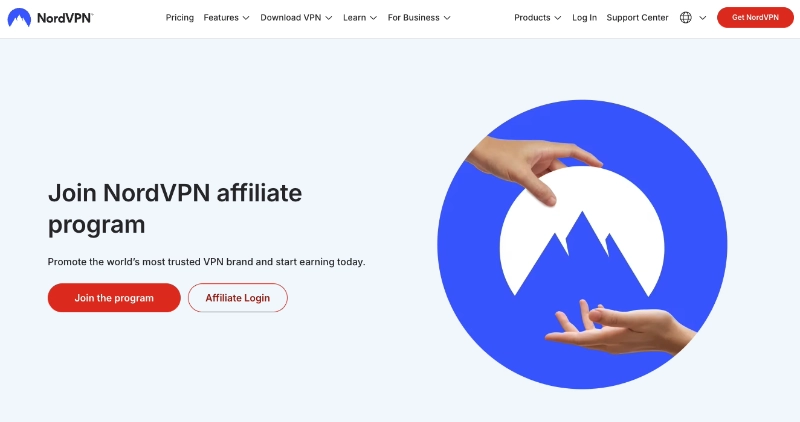
NordVPN’s affiliate page leads with a bold commission headline above the fold and a single CTA. It uses trust badges and a clean layout with no distracting navigation. The page makes one promise and one ask.
HubSpot

HubSpot’s affiliate page layers in strong social proof with partner logos and segmented CTAs for different affiliate types. If your audience includes multiple buyer personas, segmenting your CTAs the way HubSpot does can lift conversions significantly.
Shopify

Shopify puts their earnings promise above the fold before anything else. Their “how it works” section uses three numbered steps that make the process feel achievable. It’s simple, specific, and direct.
Semrush

Semrush leads with specific commission numbers and uses exclusivity framing to create urgency. Naming exact numbers ($200 per sale, $10 per free trial) makes the offer feel real in a way that vague promises never do.
Common Affiliate Landing Page Mistakes
Most affiliate landing pages fail for the same reasons. Here are the mistakes I see most often:
- Sending traffic directly to affiliate links without a presell: You skip your chance to add context, build trust, and track behavior.
- Too many CTAs: More than one goal per page splits visitor attention and kills conversion rates.
- Ignoring mobile load speed: A slow page on mobile costs you conversions before the visitor reads a word.
- No affiliate disclosure: Missing FTC-required disclosures puts your income and reputation at risk.
- Copying the merchant’s page: If your landing page says the same thing as the merchant’s sales page, you’re adding no value. Your page should provide your perspective, your proof, and your framing.
How to Create an Affiliate Marketing Landing Page
Today, I’ll use SeedProd to design, build, and launch an affiliate marketing page.

SeedProd is a drag-and-drop website builder that lets you create and publish an affiliate landing page in WordPress without writing code. In my testing, pages typically go live in under 10 minutes using a template.
With hundreds of mobile-responsive landing page templates, it’s straightforward to get started. From there, you can customize your design in the drag-and-drop editor without writing code.
SeedProd is lightweight and fast with zero bloat. That means you can spin up pages quickly without impacting your page loading speed.
With that in mind, follow the steps below to create an affiliate marketing landing page with SeedProd.
Video Tutorial
Step 1. Install and Activate SeedProd
The first step is to download the SeedProd landing page plugin.
After downloading SeedProd, install and activate the plugin on your WordPress website. If you need help with that, follow these steps to install a WordPress plugin.
Once the plugin is active on your WordPress site, you’ll see a welcome page asking for your license key. You can find your license key in the Downloads section of your SeedProd account.
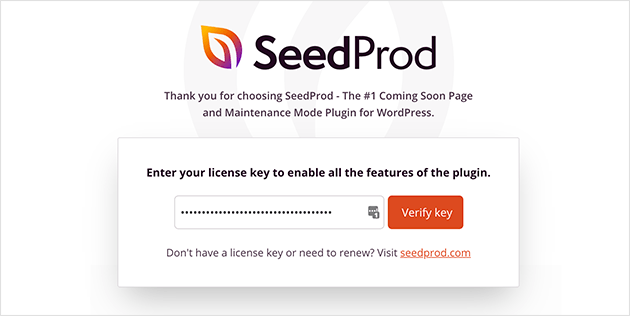
From there, enter your license key and click the Verify Key button.
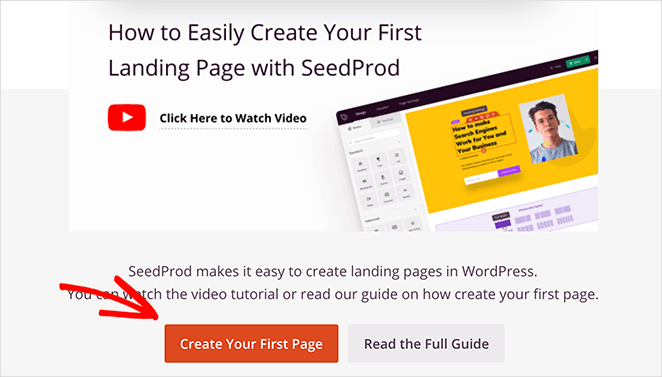
Now scroll down the page and click the Create Your First Page button to get started.
Step 2. Create a New Landing Page
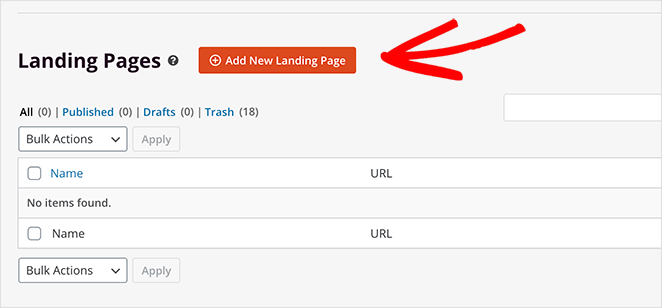
Under the page modes area is where SeedProd lists any standalone page you create. Click the Add New Landing Page button to make your first page.
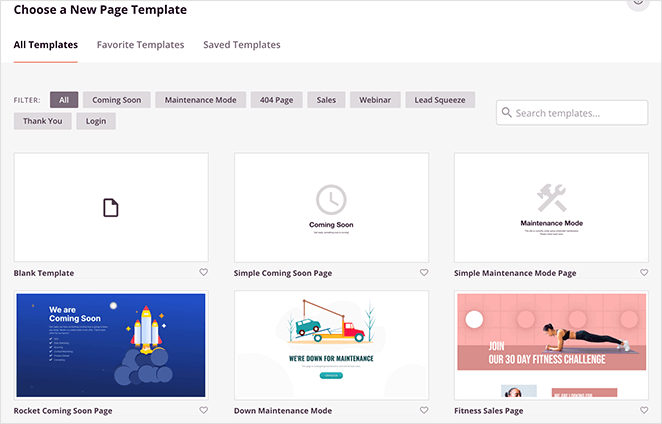
From there, you’ll see a library of mobile-friendly landing page templates. Click any tab along the top to filter the templates by goal or purpose.
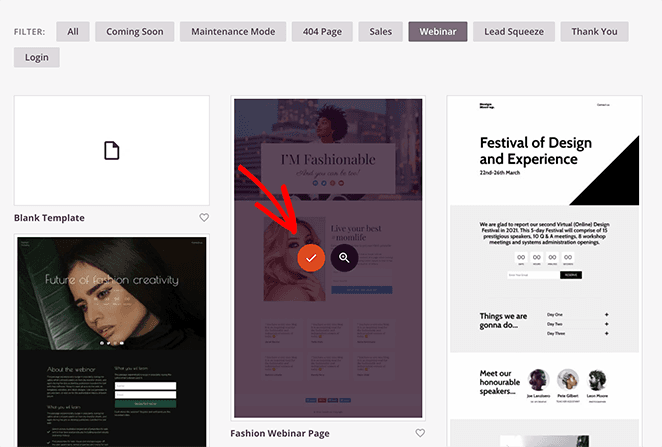
When you find a template you like, hover over it and click the checkmark icon.
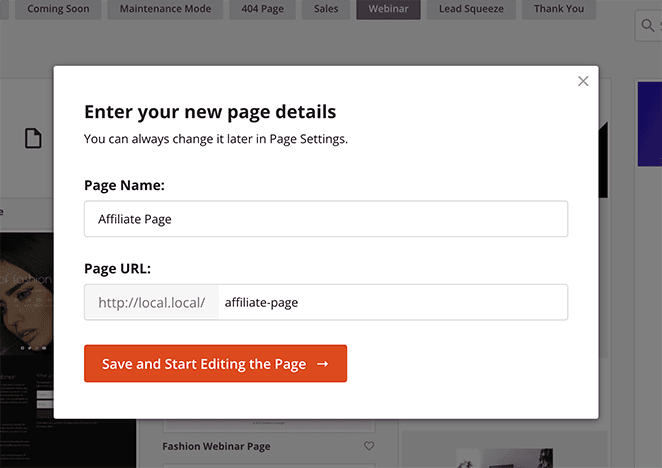
Now a popup appears asking for your landing page name and URL. After entering your information, click the Save and Start Editing the Page button.
Step 3. Customize Your Landing Page for Affiliates
On the next screen is SeedProd’s visual drag-and-drop page builder. This is where you customize your template and add content to promote your affiliate marketing campaign or affiliate products.

The builder is straightforward to use. Blocks and sections on the left let you customize your page, while the right side shows a live preview of your design.
To start customizing, click any element on the right to see customization options on the left. Clicking the hero section, for example, lets you change the background image and style.

From there, you can click the trashcan to delete the existing image and upload a new photo from your WordPress media library, computer, or from SeedProd’s stock photo gallery.
Many landing page blocks have different styles you can apply with a single click. If you click the social media icons block and select the Templates tab, you can choose from 12 different presets.

To add content to your page, drag and drop any content block into place, like the countdown timer below.

Adding a countdown timer is one of the best ways to build urgency and encourage readers to sign up. The ticking clock pushes visitors to act before the offer expires.
It’s also a good idea to include testimonials or case studies as social proof. Your audience needs evidence that your affiliate program or product is worth investing in.
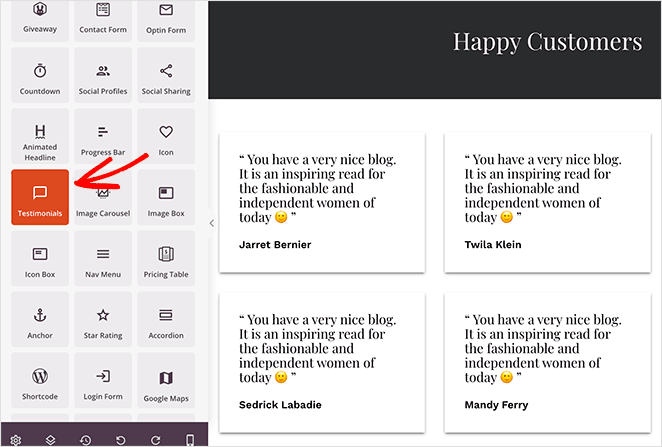
SeedProd also lets you customize the background, colors, and fonts globally. To access the Global Settings panel, click the cog icon in the bottom-left corner of the screen.


Keep customizing your page until you’re happy with the design. Click the Save button regularly to store your changes.
Step 4. Configure Your Affiliate Page Settings
Moving on, let’s look at some settings to get your page ready to publish. First, email providers.
If your affiliate page goal is to collect email addresses, you’ll need to connect your email service provider. The good news is SeedProd integrates with all the top email marketing services.
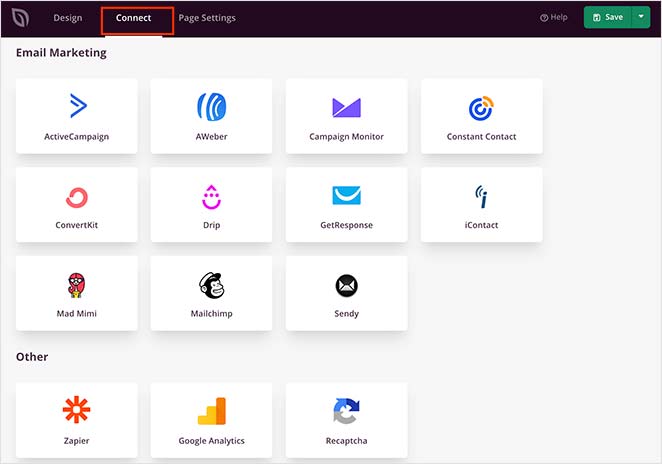
Click the Connect tab at the top of your screen to see available services. Find your service and follow the on-screen instructions to connect your account.
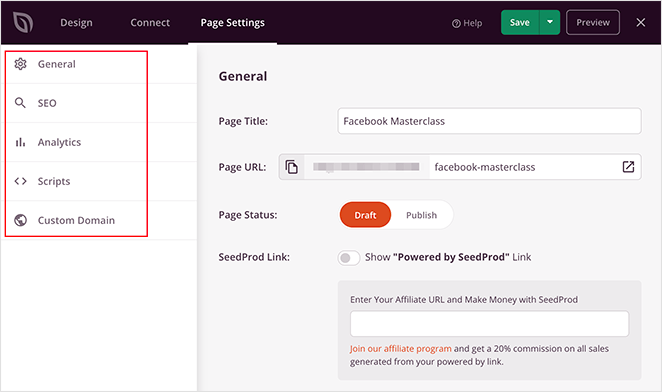
In the Page Settings tab, you can configure your general landing page settings, enter your landing page SEO information, and track performance with a Google Analytics plugin.
Step 5. Publish Your Affiliate Marketing Landing Page
With your affiliate page design in place, you’re ready to publish it. Click the dropdown arrow on the Save button and click Publish.

From there, you can preview your page to see how it looks before sharing it with your audience.

How to Test and Optimize Your Affiliate Landing Page
Publishing your page is the start, not the finish. The affiliates who consistently outperform are the ones who treat their landing page as a test, not a finished product.
Here’s where to focus your A/B testing first:
- Headline: Your headline determines whether visitors read the rest of the page. Test one specific benefit against a more general version.
- CTA button copy: “Get My Free Guide” converts differently than “Download Now.” Small wording changes often produce big results.
- CTA button color: High-contrast colors draw the eye. Test your current color against a bolder alternative.
- Social proof placement: Testimonials above the fold often outperform testimonials at the bottom.
- Load speed: Every second of load time reduces conversions. SeedProd’s lightweight build helps here, but run a speed test after publishing.
One counterintuitive finding worth knowing is conversion-focused copy, urgency, and specificity often outperform polished aesthetics. A page that looks “ugly” but names exact numbers, uses real testimonials, and has one clear CTA will frequently beat a visually refined page with vague messaging.
FAQs on Affiliate Marketing Landing Pages
What should I include on an affiliate marketing landing page?
Your page needs a benefit-driven headline, a short value statement, proof (testimonials or case studies), a single CTA repeated throughout, and an affiliate disclosure. Remove all navigation links so visitors stay focused on one action.
Do I need my own website to create an affiliate landing page?
You don’t need a full website, but you do need your own landing page URL. Most ad networks and affiliate programs reject direct links to merchant pages. SeedProd works with any existing WordPress site, and there’s a free version if you’re just starting out.
How do I track conversions on an affiliate landing page?
Connect Google Analytics to your SeedProd page via the Page Settings tab and set up goal tracking for CTA button clicks. Most affiliate networks also provide conversion pixels you can add to your page’s thank-you or confirmation URL.
What’s the difference between an affiliate landing page and a blog post?
A landing page has one goal and no navigation – every element pushes toward a single CTA. A blog post can have multiple CTAs, covers a topic broadly, and keeps site navigation intact. Landing pages convert paid and email traffic; blog posts are built for organic search.
How do I add an affiliate disclosure to my landing page?
Place a short disclosure at the top of the page or directly above your first CTA, not in the footer. The FTC requires it to be clear and conspicuous. A simple statement works: “I earn a commission if you purchase through my link, at no extra cost to you.”
Mark your affiliate links with rel="nofollow sponsored" attributes. This satisfies both FTC guidelines and Google’s link attribute requirements.
Your landing page is the difference between affiliate traffic that converts and traffic that bounces. Once you’ve published, the real work is testing: headline variants, CTA placement, and social proof positioning.
You don’t need to code or hire a designer. With SeedProd, you can pick a template, drop in your content, and publish a high-converting affiliate program page in minutes.
If you’d like more ideas, check out these guides next:
- Best WooCommerce Affiliate Plugins
- How to Create an Affiliate Program in WordPress
- Best Content Locker WordPress Plugins
Thanks for reading. Please follow us on YouTube, Twitter, and Facebook for more helpful content to grow your business.