

TL;DR
Shopping cart abandonment is when someone adds items to their cart and leaves before paying. The average rate sits around 70%, so the goal is two-track: stop the friction that makes people leave, and win back the ones who go anyway.
- What it is: An abandoned cart is a started purchase that never finished, usually at the cart or the checkout step.
- Why it happens: Surprise shipping costs, slow pages, forced accounts, and trust worries are the top causes.
- Prevention: Show all costs upfront, allow guest checkout, and speed up your pages so shoppers never bail.
- Recovery: Use exit popups, saved carts, retargeting, and email reminders to bring leavers back.
- Mobile matters: Mobile carts get abandoned far more often, so fast, simple checkout is non-negotiable.
- Start here: Show every cost before checkout and turn on guest checkout. Those two fix the biggest leaks first.
You worked hard to get someone to click “Add to Cart,” and then they vanished. The item is sitting in a cart somewhere, and the sale never landed.
Shopping cart abandonment happens when someone adds items to their cart but leaves your site before completing the purchase. It is surprisingly common, with an average abandonment rate of around 70% across industries.
I saw this happen again and again on a WooCommerce store I managed. It is frustrating to watch potential sales disappear right at the finish line, especially after all the work to get someone interested in the first place.
Most guides stop at “send a reminder email.” That misses the point. The reminder only matters once you have fixed the friction that made the shopper leave, so the real work splits into two tracks: prevention and recovery.
Prevention means removing the reasons people abandon in the first place. Recovery means bringing back the ones who leave anyway. In this guide, I will show you what causes shoppers to leave and share 14 fixes I use to reduce shopping cart abandonment, no code needed.
What Is Shopping Cart Abandonment?
Shopping cart abandonment happens when someone adds items to their cart on your site but leaves before completing the purchase. Think of it like walking around a physical store, filling your basket, and then leaving it behind before you reach the till.
- Average cart abandonment rate: around 70%
- Mobile shoppers abandon far more often, closer to 85%
- Most abandoned carts include 1 to 3 items
Cart Abandonment vs. Checkout Abandonment
These two terms get mixed up, and the difference changes how you fix the problem. Cart abandonment is when a shopper adds items, then leaves before starting checkout at all.
Checkout abandonment is when they start checkout and bail partway through, often at the shipping or payment step. Cart drop-offs usually point to price or intent. Checkout drop-offs usually point to friction in the form itself.
How to Calculate Your Abandonment Rate
You can work out your rate with one formula. Take your completed transactions, divide by the carts created, and subtract that from 1.
1 – (Completed Transactions ÷ Carts Created) × 100
So if 300 carts were created and 100 turned into purchases, that is 1 – (100 ÷ 300) = 0.67, or a 67% abandonment rate. Tools like MonsterInsights calculate this for you with built-in eCommerce reports.
Why Do People Abandon Shopping Carts?
There is no single reason shoppers leave without buying. Here are the most common issues that cause abandoned carts:
- Lack of trust: Shoppers do not feel safe entering payment details
- High shipping costs: Surprise fees often drive people away
- Complicated checkout: Too many steps or form fields
- Limited payment options: Preferred methods not available
- Price comparison: Users leave to check competitor pricing
- Slow site speed: Pages that take too long to load
- Glitches or poor UX: Errors or broken elements kill trust fast
A lot of this comes down to loss aversion. A surprise shipping cost at checkout does not feel like a small fee, it feels like losing money you thought you were keeping.
That reaction is why hidden costs do so much damage. According to Baymard Institute, around 39% of abandonments happen because extra costs like shipping, tax, and fees were too high.
Mobile makes it worse. Mobile carts are abandoned noticeably more often than desktop, because slower loads and fiddly forms turn small irritations into reasons to quit.
How to Track Shopping Cart Abandonment
Before you can fix abandoned carts, you need to track them. Here are a few beginner-friendly ways to do that:
- Enable Enhanced eCommerce tracking in Google Analytics
- Use MonsterInsights to view cart and checkout behavior reports in WordPress
- Check your abandoned checkout emails (Shopify, WooCommerce)
Need help setting it up? Follow this step-by-step guide on how to track shopping cart abandonment in Google Analytics.
How to Fix Shopping Cart Abandonment
Now that you know how to track abandonment rates, it is time to fix them. Here are 14 ways I use to reduce shopping cart abandonment so you can secure more of those sales.
1. Use Exit-Intent Popups
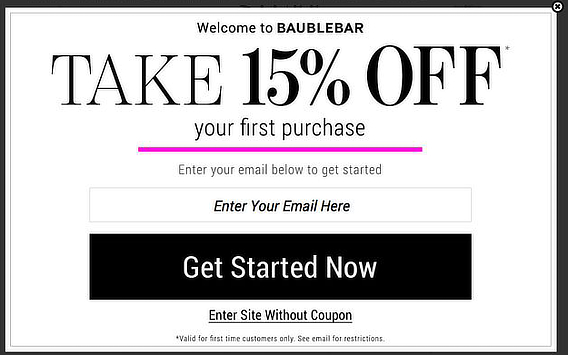
An effective way to recover a leaving shopper is to use exit-intent popups.
This type of popup works on any page, including a WordPress checkout page and shopping cart pages. It detects when a visitor is about to leave, then displays a message that encourages them to stay with a discount code, an offer, or more information.
A good example is offering visitors a money-off coupon code much like the one below.
With exit-intent technology from OptinMonster, you can make offers more targeted by showing a different message based on the products a visitor looked at or the pages they visited. It also offers A/B split testing to improve your cart recovery.
To learn how to create an exit-intent popup on Shopify, you can check out this step-by-step guide.
2. Get Rid of Surprises
Show all fees and shipping costs early so shoppers know exactly what to expect. Unexpected costs like shipping fees and taxes are some of the most common reasons people leave.
People do not like surprises when they are buying things. To remove the shock, clarify all extra costs and shipping options upfront before shoppers add products to their carts.
But how do you do that when shipping costs change and fluctuate?
The answer is to add a shipping calculator to your product pages so customers can see shipping costs before adding products to their cart.
If you use WooCommerce for your online store, you can get a WordPress plugin to add a shipping calculator for you, like the WooCommerce Calculate Shipping Button plugin.
For Shopify, many themes have a shipping rate calculator built in, which is a simple place to start. Or you can add a calculator to any of their themes yourself.
If there are any other fees, such as:
- Sales tax
- Handling fees
- Item customization charges
Make them clear on the product page to avoid surprises and confusing your customers.
3. Keep the Shopping Cart Visible
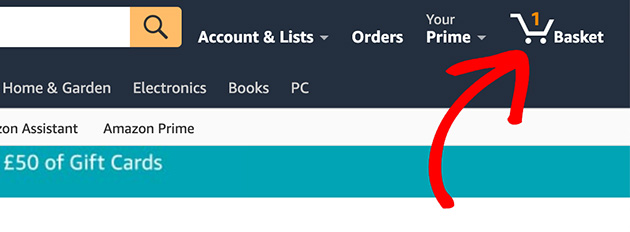
Make the cart icon visible at all times so shoppers can return to it easily. Many people who abandon their carts want to save the products for another day, so keeping the cart in view stops them forgetting all about it.
One way to do this is to display your cart icon at the top of the screen, where it is easy to notice. When people click or hover over it, the icon can expand.
Amazon keeps its shopping cart top-of-mind in a similar way. The basket icon shows exactly how many items are in your cart, so you know at a glance you have not finished your purchase.
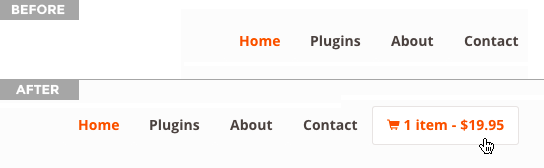
WooCommerce stores can add a cart icon like this using the WooCommerce Menu Bar Plugin, or you can add a shopping cart to WordPress a few different ways.
4. Allow Guests to Checkout
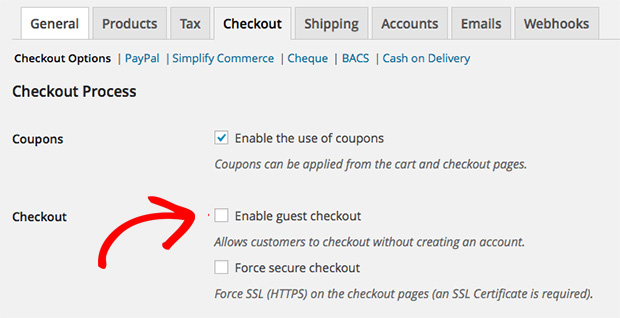
Let first-time buyers check out without creating an account. Asking shoppers to create an account right before checking out is one of the fastest ways to lose them.
It is a lot to ask of first-time customers. Imagine the following scenario.
You found a product you love on a site you have never shopped on before. When you start checkout, you are asked to add your information, then leave the site to confirm your email address, then go back to finish buying.
Would you go through all that for a product you can probably get somewhere else without the extra steps? Probably not.
Take that barrier down by adding a guest checkout option. You can always ask them to sign up after they have completed their purchase.
To enable guest checkout in WooCommerce, check the enable guest checkout checkbox.
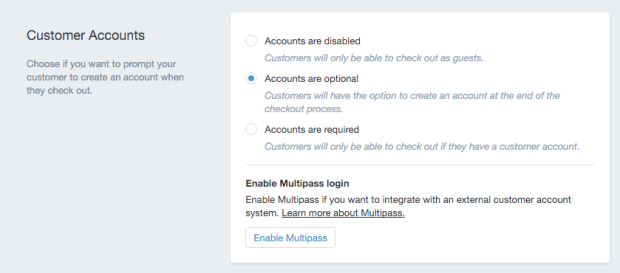
And if you use Shopify, select the accounts are optional option inside the Customer Account Settings.
5. Make Checking out Faster
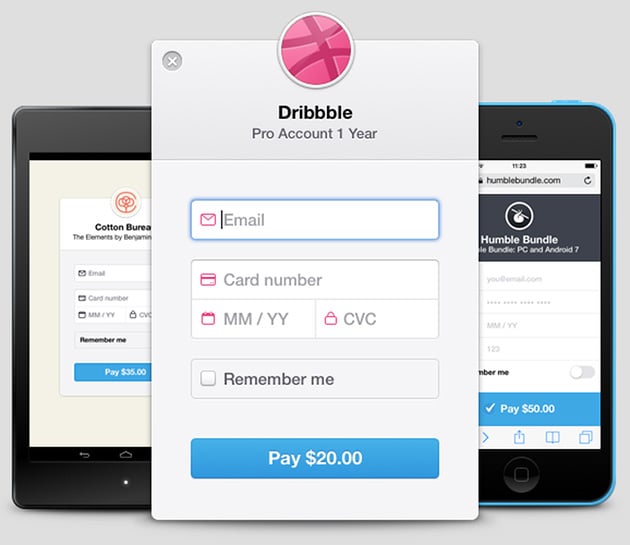
Cut extra steps so shoppers can check out in a few clicks. Every page they have to click through before paying is a chance to lose them, so keep things as simple as possible.
The design portfolio site Dribbble is a good example of a fast checkout process, as you can see above.
All customers do is enter their email and card information, then click to pay. They do not even need to enter a name.
The remember me option matters too. Checking it means the customer will not have to re-enter that information next time they buy from the site.
Express and one-click checkout options take this further. Letting shoppers pay with Apple Pay, Google Pay, or Shop Pay skips the form entirely, and buy-now-pay-later options remove the price barrier in the moment. Both reduce the friction that loses mobile shoppers especially.
Build a Custom WooCommerce Checkout Page with SeedProd
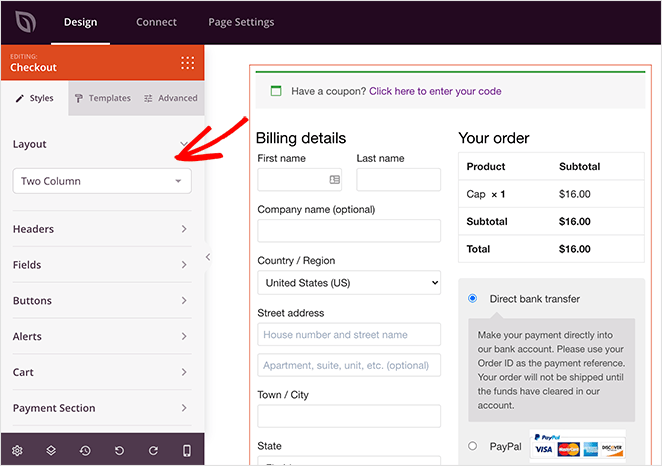
If you want to strip your checkout down to the essentials, the fastest route is to build a custom checkout page that removes the friction yourself.
SeedProd is a drag-and-drop WordPress website builder, and its visual editor lets you design a checkout page that drops the fields you do not need, all without writing code or hiring a developer.
It integrates directly with WooCommerce, so you face no compatibility issues with your online store. The output is bloat-free, which keeps your pages loading fast enough to hold a shopper’s attention at the moment it matters most.
Follow this step-by-step guide to create a custom checkout page with SeedProd.
Built for WooCommerce
Build a checkout page that stops shoppers bailing
Drag-and-drop your way to a lean WooCommerce checkout that drops the fields nobody fills in. No code, no developer, live in minutes.
Fix my checkout page6. Make it Easier to Get in Touch
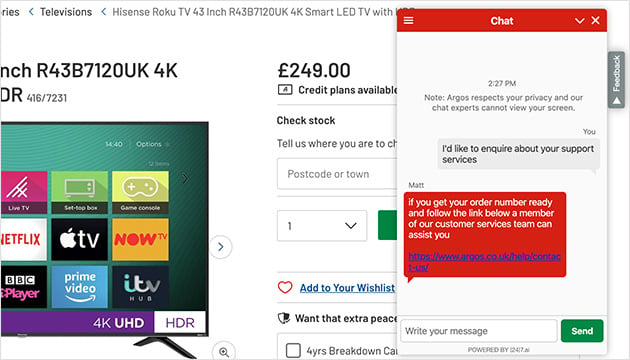
Offer live chat, clear contact info, or an FAQ so shoppers can get last-minute questions answered. Some customers need to ask something before they buy, and it is your job to make that easy.
Send them to your frequently asked questions page, or give them a direct way to reach you. A live chat function is one of the best options here.
Live chat can keep visitors happy, increase average order value, and turn window shoppers into paying customers. Here are some of the best live chat plugins for WordPress to help you find the right one.
If you cannot offer live chat, making your phone number and email contact details easy to find works almost as well. It also helps to make sure your shopping cart page links clearly to support, so questions never become a reason to leave.
7. Let Shoppers Save Their Cart
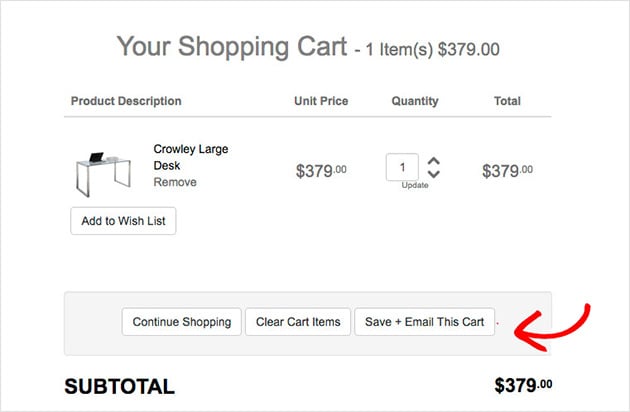
Give shoppers the option to save their cart and come back later. Most online shoppers are comparison shoppers, opening the same products across different sites to compare prices.
This can go on for days, swapping between tabs before they decide. So it makes sense to let shoppers save the items they have added.
Once they save a cart, you can use retargeting ads and other methods to reach the shoppers who have not checked out yet. Depending on your platform, there are several ways to do this.
For example, Shopify Professional or Unlimited lets you monitor abandoned carts and send recovery emails with a link back to their items.
8. Display Security Badges
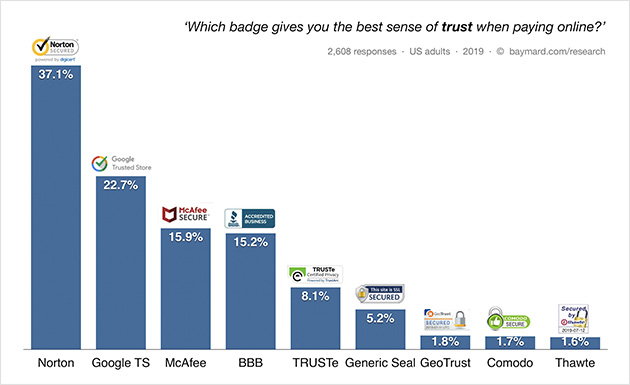
Show trusted payment and security logos to build confidence at checkout. Most shoppers are concerned about the security of their information, especially on a site they have not used before.
Showing verified security badges can go a long way toward improving trust and reducing cart abandonment. But not all badges carry the same weight.
According to research by Baymard Institute, the Norton Secured seal is the most trusted badge. It is worth looking into each option to find the best fit for your site.
You can include logos from PayPal, Apple Pay, and other payment gateways you use. Try A/B testing different logos to see which combination works best, and follow this guide on how to add trust badges to WooCommerce.
9. Use Remarketing to Target Cart Abandoners
Show personalized ads to shoppers who left items in their cart. Remarketing is an advertising method that costs little compared to chasing brand-new customers, since you are reaching people who already showed interest.
It works by showing customized ads to people who recently visited your website. Those ads can remind shoppers who abandoned their cart, across other websites and social media, to come back and finish the order.
10. Use Scarcity Marketing

Create urgency with low-stock messages or countdown timers. Shoppers often need a small nudge to finish, and scarcity gives them one.
One way to use scarcity is to show how many products are left in stock. Telling a customer there are only 4 pairs of sneakers left in their size can motivate them to buy before they miss out.
Another way is to display a countdown timer for a flash sale or special deal. When shoppers see they only have a few hours left, they are more likely to complete the purchase than keep browsing.
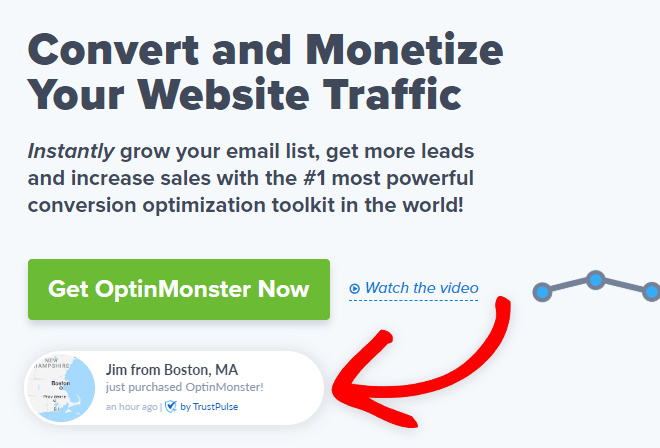
You can go a step further by combining a countdown timer with social proof.
Check out TrustPulse, which displays a popup notification whenever someone buys one of your products. TrustPulse reports that this kind of social proof can increase site conversions by up to 15%.
Here is a detailed TrustPulse review to get you started.
11. Offer Free Shipping
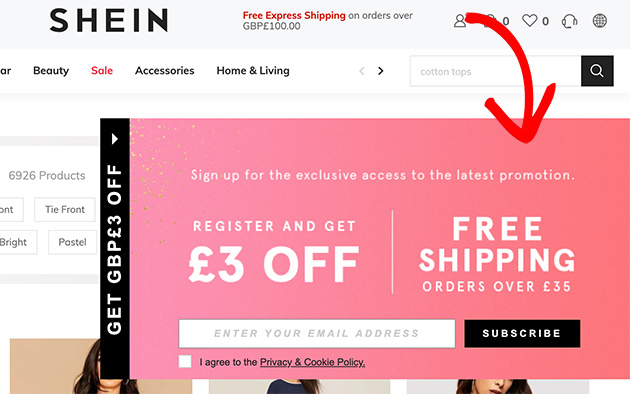
Free shipping is one of the top incentives to finish a purchase. Shipping costs are the number-one reason shoppers abandon their carts, so removing that cost removes the biggest objection.
Free delivery is a strong selling point. Take advantage of it by making it clear to potential customers that shopping with you includes free shipping.
With that reassurance, shoppers are less likely to look elsewhere for a better deal and more likely to complete their purchase.
12. Double Down on Email Marketing
Send automatic reminder emails to bring shoppers back to their cart. Email marketing is one of the most reliable recovery tools you have.
After users opt in to receive emails, you can create a sequence that triggers when a customer abandons their cart. Typically this means setting up an email service provider with an automation feature.
Send these emails at specific intervals, such as 1 hour, 24 hours, and 72 hours after abandonment. Then monitor open rates, click-through rates, and conversion rates, and A/B test different subject lines, content, and offers to improve them.
13. Improve Your Page Load Times
Speed up your site so shoppers do not bounce before checkout. Slow loading times create a frustrating experience and push potential customers off your site before they buy.
Faster pages improve the overall experience, which lifts satisfaction and conversions. According to Akamai research, even a one-second delay in page load time can cut conversions by around 7%.
This matters most on mobile, where carts are abandoned closer to 85% of the time. Slow loads and fiddly forms hit mobile shoppers hardest, so a fast, simple checkout (see Fix #5) is where the speed work pays off.
To reduce cart abandonment, optimize your page load times by:
- Minimizing HTTP requests
- Compressing and optimizing images
- Implementing lazy loading for images and other elements
- Minimizing render-blocking resources
- Enabling browser caching
- Compressing and minifying CSS, JavaScript, and HTML files
- Using a Content Delivery Network (CDN)
14. Use Social Proof

Social proof is when people follow the actions of others because they assume it is the right move. In an online store, it builds trust and confidence in potential customers.
Some ways to add social proof to your store to reduce cart abandonment include:
- Customer reviews and ratings: Positive reviews from past customers reassure new shoppers
- Testimonials: Quotes from happy customers vouch for your product quality
- User-generated content: Photos and posts from real customers build confidence
- Best-sellers: Highlighting popular products signals they are well-liked by others
You can feature testimonials on your store pages, or showcase your popular products to reinforce that other shoppers trust you.
Where to Start Right Now
If you only do two things this week, do these. Unexpected costs and forced accounts are the top two reasons people leave, so they are the leaks worth plugging first.
- Show every cost (shipping, tax, fees) before checkout, ideally on the product page
- Turn on guest checkout so first-time buyers never hit an account wall
Both take minutes to set up and stop the abandonments that hurt most. Everything else in this guide builds on those two fixes.
FAQs About Shopping Cart Abandonment
What is the difference between cart abandonment and checkout abandonment?
Cart abandonment is when a shopper adds items but leaves before starting checkout. Checkout abandonment is when they begin checkout and quit partway through, often at shipping or payment.
Cart drop-offs usually point to price or intent. Checkout drop-offs usually point to friction in the form.
What is the psychology behind cart abandonment?
A lot of it comes down to loss aversion. A surprise shipping cost at checkout does not feel like a small fee, it feels like losing money you thought you were keeping, so the shopper backs out.
That is why hidden costs do the most damage, accounting for around 39% of abandonments.
What is a normal mobile cart abandonment rate?
Mobile cart abandonment runs higher than desktop, often around 85%. Slower page loads and harder-to-use forms are the main reasons mobile shoppers give up before paying.
What is a good shopping cart abandonment rate?
Anything below 60% is good, but most industries average around 70%. The lower your rate, the more sales you are recovering.
How do I calculate my cart abandonment rate?
Use this formula: 1 – (Completed Transactions ÷ Carts Created), then multiply by 100. Tools like MonsterInsights calculate it for you with built-in eCommerce reports.
What causes shopping cart abandonment in WooCommerce?
Common causes include high shipping costs, slow page load times, required account creation, and a complicated checkout. A custom WooCommerce checkout page that removes friction helps fix most of them.
Can I recover abandoned carts with WordPress?
Yes. You can recover abandoned carts using WordPress plugins for email reminders, popups, and retargeting. You can also build optimized cart and checkout pages with SeedProd.
Does offering free shipping reduce cart abandonment?
Yes. Free shipping is one of the most effective ways to reduce cart abandonment. Shoppers often leave when unexpected shipping costs appear at checkout.
Turn Abandoned Carts Into Sales
From small tweaks like showing shipping costs early to bigger plays like retargeting and email reminders, even one or two of these fixes can move your conversion rate.
If you are on WordPress and want an easy way to build fast, optimized checkout pages, SeedProd handles the design without code, so shoppers keep moving toward the finish line. Try SeedProd today.
Thanks for reading! We’d love to hear your thoughts, so please feel free to join the conversation on YouTube, X and Facebook for more helpful advice and content to grow your business.



