

TL;DR: How to Create a Pre-Launch Landing Page A pre-launch landing page goes live before your product and collects email sign-ups so you have a ready audience on launch day. Here’s the fast version:
- Know the 5 essentials – headline, persuasive body copy, clear CTA, strong visuals, and social proof.
- Install SeedProd – a drag-and-drop website builder for WordPress with pre-built coming soon page templates.
- Choose a template – filter by “Coming Soon” and pick one that fits your brand.
- Add your content – customize the headline, description, countdown timer, and email opt-in form.
- Connect your email service – link your email marketing provider so sign-ups go straight to your list.
- Publish and activate coming soon mode – turn on SeedProd’s coming soon mode so the pre-launch page is live while your main site stays hidden.
You’re close to launching, but nobody knows it yet. Without a pre-launch landing page to collect email sign-ups first, you go live to silence and have to build an audience from scratch.
In this guide, I’ll show you how to build one in WordPress using SeedProd. You’ll have a live waitlist landing page collecting sign-ups in under an hour.
What Is a Pre-Launch Landing Page?
A pre-launch landing page is a single-purpose page that goes live before your main website or product, designed to collect email sign-ups and build an audience before you launch. And a well-built one converts a meaningful share of visitors.
Some of the many benefits of creating a prelaunch landing page include:
- Build excitement and anticipation for your launch
- Capture leads and build your email list before you even launch
- Validate your product or service idea and get valuable feedback
- Start building your brand and online presence early on
With this in mind, let’s look at how to make a pre-launch landing page in WordPress.
What Does a Pre-Launch Landing Page Need?
A pre-launch landing page is more than just a pretty placeholder for your upcoming website or product. It’s a tool to build excitement, capture leads, and set the stage for a successful launch.
To make sure your pre-launch page hits all the right notes, here are the essential elements to include:
An Attention-Grabbing Headline
You know what they say about first impressions, right? Your headline is the first thing people see, so it needs to be eye-catching and make them want to stick around. It is, after all, a virtual welcome mat for your pre-launch party.
A killer headline does three things:
- Grabs Attention: It’s like that catchy song you can’t get out of your head but for your landing page.
- Highlights Benefits: Tell people how your product or service will improve their lives. What problem are you solving?
- Keeps it Snappy: No need to write a novel. Get your point across quickly and clearly.
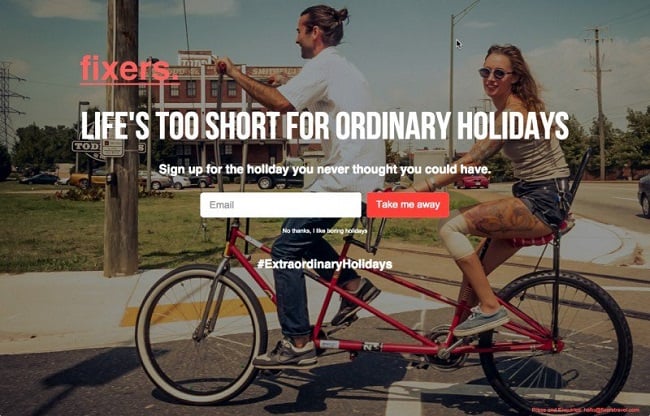
Need some inspiration? Check out these headline formulas and examples:
- [Your Product Name]: The [Benefit] Solution You’ve Been Waiting For (Intriguing and benefit-driven)
- Join the Waitlist and Be the First to Try [Your Product Name] (Creates exclusivity)
- Get Exclusive Early Access to [Your Product Name] – Sign Up Now! (A clear call to action)
Engaging Body Copy
Alright, you’ve got their attention with your headline – now it’s time to seal the deal with some persuasive body copy.
This is where you dive deeper and sell them on the benefits of your product or service.
Here are a few copywriting tips:
- Benefits Over Features: Remember, people buy based on emotions and then justify with logic. So, instead of just listing features (e.g., “Our software has a drag-and-drop interface”), translate those features into tangible benefits (e.g., “Our intuitive drag-and-drop interface makes building your website a breeze – even if you’re a complete beginner”).
- Address Objections: What common concerns or hesitations might your target audience have? Acknowledge those objections and provide compelling counter-arguments.
- Use Persuasive Language: Strong verbs, vivid imagery, and a conversational tone can make your copy more engaging and persuasive.
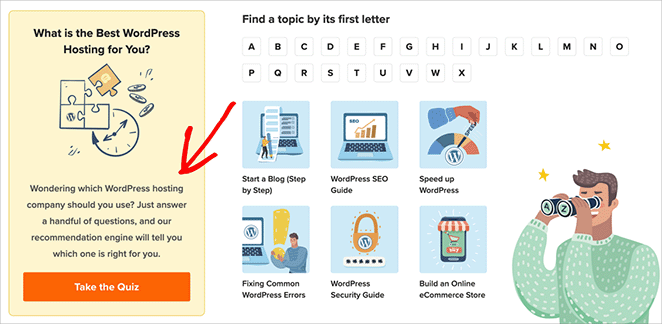
Just look at the copywriting in the example above. It gives users exactly what they want in a way that’s friendly and engaging.
A Clear and Compelling Call to Action (CTA)
Don’t leave them hanging. Tell people exactly what you want them to do next.
Your CTA should be clear, concise, and impossible to miss. Use strong verbs that create a sense of urgency and encourage action.
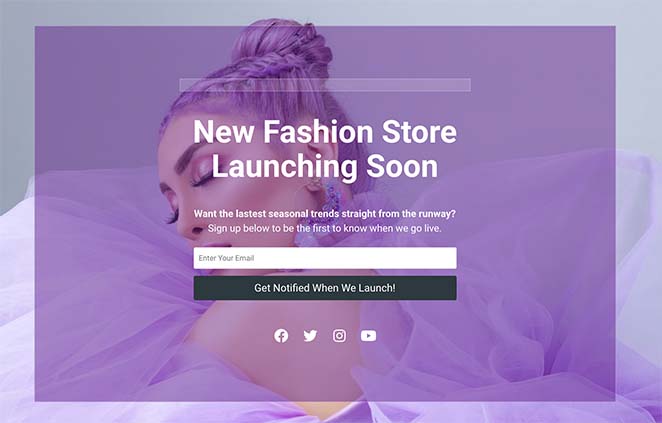
Here are some CTA verbs I always use that pack a punch:
- Get
- Join
- Download
- Claim
- Start
- Discover
And if you need more inspiration, here are some of my favorite call-to-action examples.
Eye-Catching Images and Videos
A picture is worth a thousand words, right? Well, on a landing page, it can be worth a thousand sign-ups. High-quality visuals can make or break your pre-launch page.
Choose images and videos that are relevant to your product, service, or brand, engaging enough to make people want to learn more, and which show your product/service in action.
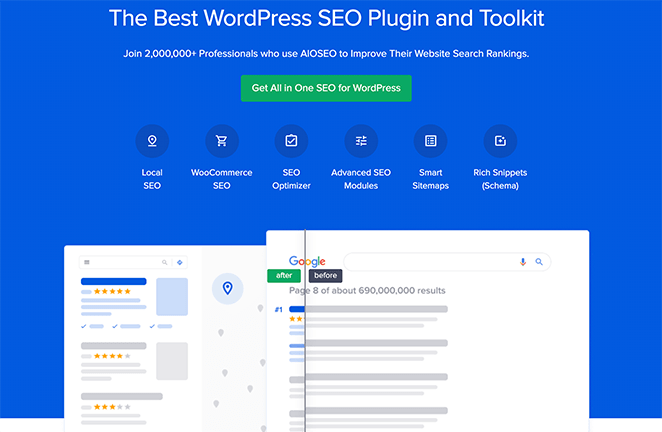
I particularly love this example from AIOSEO. They use a before and after slider to clearly explain how their product works.
Here are a few ideas for visual content to get your creative wheels turning:
- Product Mockups: Give people a sneak peek at what you’re building.
- Behind-the-Scenes Photos: Share your journey and create a personal connection.
- Explainer Videos: Quickly and engagingly demonstrate how your product or service works.
- Customer Testimonial Videos: (If you have them already.) Nothing builds trust like social proof.
Trust-Boosting Social Proof
Remember that friend who told you about the amazing new restaurant they tried? You probably trusted their recommendation because they had nothing to gain from it. That’s social proof in action.
People are more likely to trust your brand if they see that others are already on board and singing your praises. In fact, HubSpot reports that 88% of consumers trust reviews as much as personal recommendations.
Even in the pre-launch phase, you can start building that trust.
Here’s how:
- Testimonials: Do you have a few early adopters who rave about your product or service? Ask them if they’d be willing to share a short testimonial.
- Media Mentions: Has your company or product been featured in any publications? Add those logos to your page.
- Social Media Counts: If you’ve already built up a social media following, flaunt it. Display your follower counts on your landing page to show that people are interested in what you’re doing.
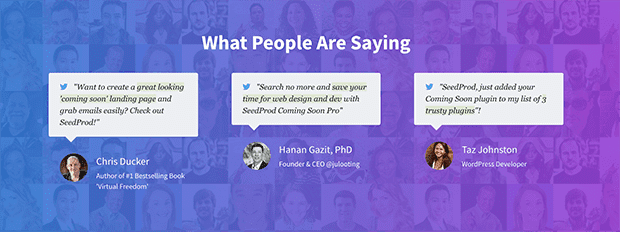
Not all five elements carry equal weight when it comes to getting sign-ups. Your headline does the most work, so if it isn’t stopping people, nothing else matters.
After that, your opt-in form needs to be visible without scrolling – above the fold. Social proof (testimonials, media mentions, follower counts) belongs below the form, to reassure people who are almost convinced but not quite.
Pre-Launch Landing Page Checklist:
- Attention-grabbing headline
- Persuasive body copy focused on benefits
- Clear CTA with a strong action verb
- High-quality images or video
- Social proof (testimonials, media mentions, or follower counts)
How Do You Create a Pre-Launch Landing Page in WordPress?
Now the fun part: actually building your pre-launch landing page. WordPress makes this easy, especially with the right tools.

For this, I highly recommend SeedProd, a drag-and-drop website builder for WordPress. In over 10 years of content marketing, I’ve tried my fair share of landing page builders, and it’s the one I keep coming back to.
SeedProd’s coming soon mode is the only way to show a pre-launch page across your WordPress site while keeping the real site hidden. With it, you can publish your pre-launch page while still building your main site behind the scenes.
SeedProd’s drag-and-drop builder makes designing landing pages fast. Start with a professionally designed template and customize it to match your brand – there are options built specifically for pre-launch pages.
Let’s break down the process step by step.
Step 1. Install & Activate SeedProd
First, install and activate SeedProd on your WordPress website. SeedProd has a free version, but I’m using SeedProd Pro for this guide, which includes Pro templates.
If you need help, you can see our guide on how to install SeedProd.
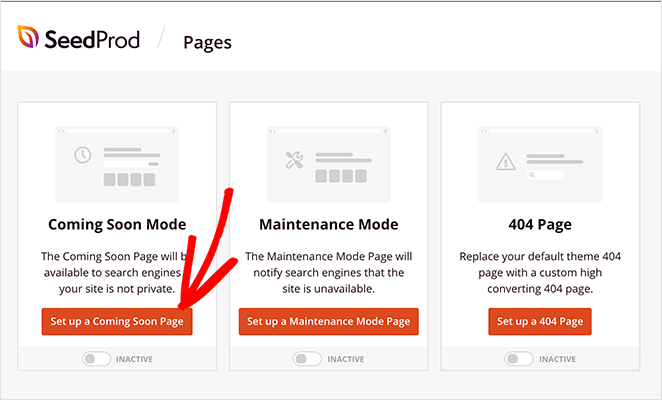
After installing the plugin, go to SeedProd » Landing Pages from your WordPress dashboard. Then, click the “Set Up a Coming Soon Page” button.
Step 2. Choose a Pre-Launch Page Template
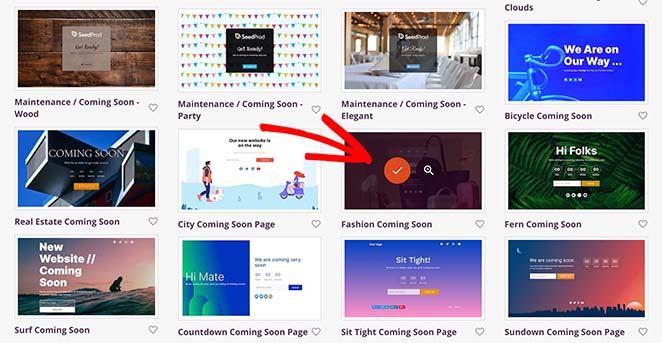
Now, it’s time to pick out a design. SeedProd has many pre-made templates. There’s even a whole category just for coming soon pages.
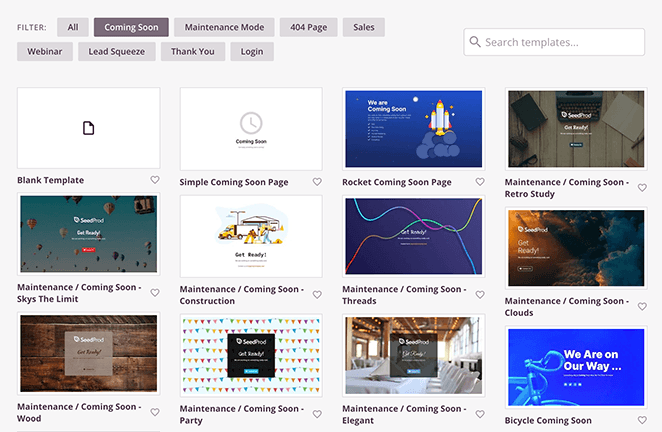
To find them, click the “Coming Soon” filter at the top. Then, pick the one that best fits your brand and the product you’re launching.
To do this, hover your mouse over it and click the orange checkmark icon.
Step 3. Add Your Pre-Launch Content
Now it’s time to bring your pre-launch page to life. SeedProd makes this easy with its drag-and-drop page builder. You’ll see your chosen template, and you can start customizing everything right away.
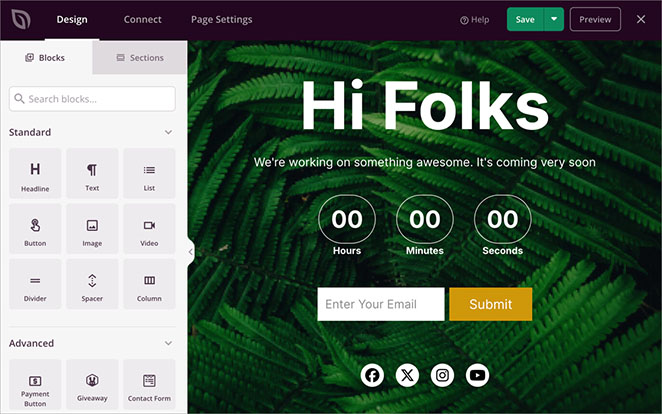
The template is made up of different “blocks.” They’re like building blocks for your page. You can change the text in any block, swap out images, add your logo, and even add countdown timers and customer testimonials.
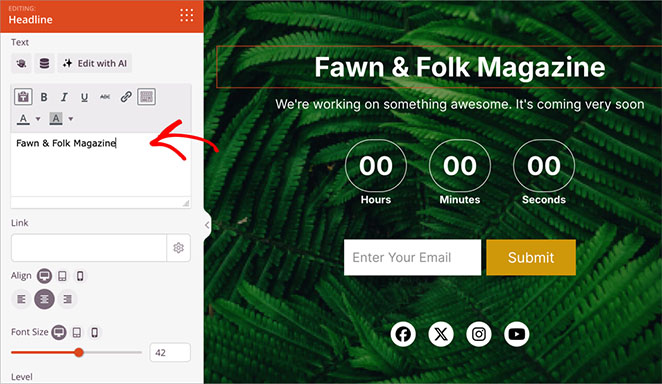
Just click on a block, and you’ll see all the ways you can customize it in the left-hand menu.
For example, click the Headline to change the text to something that reflects your brand and what you’re launching.
Remember the essential elements I talked about earlier?
- A catchy headline
- Clear descriptions
- Eye-catching pictures
- A call-to-action button that tells people exactly what to do next
Add these to your page so visitors get excited about the launch of your next big thing.
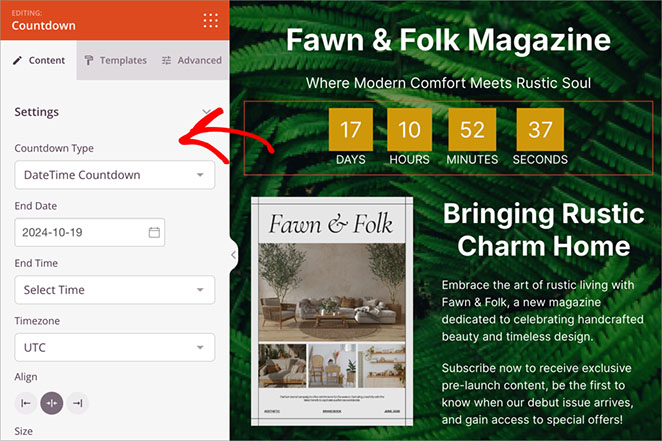
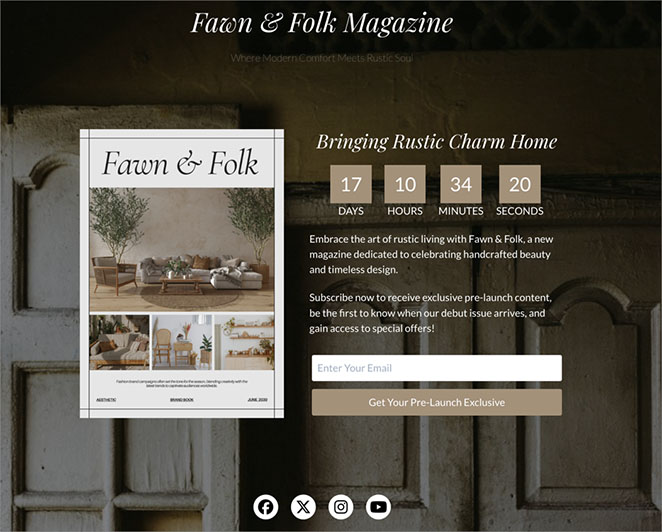
In this example, I’ve added an extra element of urgency using the Countdown Timer block. It gives users a visual guide telling them when exactly the pre-launch period is over.
Step 4. Customize Your Pre-Launch Landing Page
Your pre-launch page content is set – now let’s make it visually engaging. SeedProd offers a range of customization options to help you align the design with your brand.
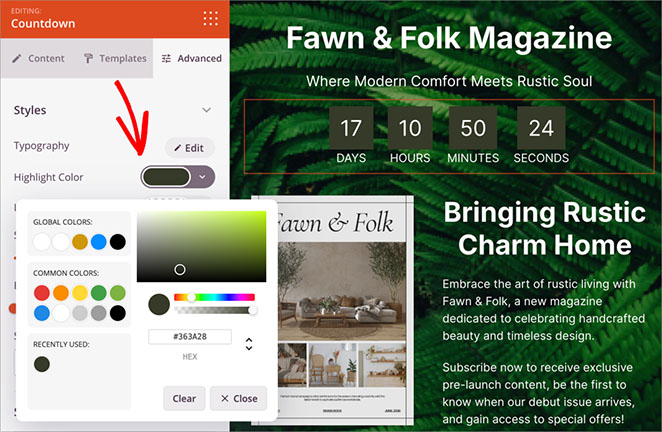
Each element on your page is controlled by a block with customizable settings. For example, match your brand’s color scheme by selecting a block, locating the color settings, and choosing the perfect shade.
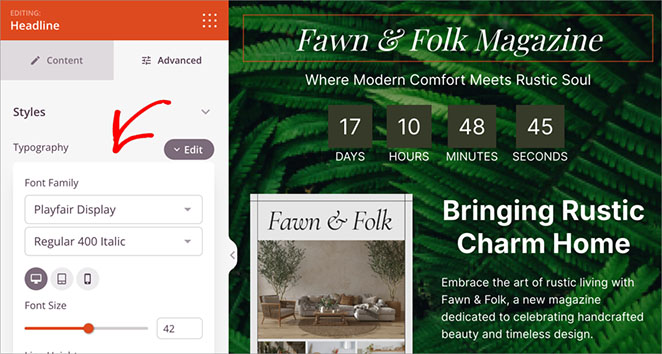
You can apply the same level of customization to fonts. Choose a text block, locate the font settings (typically in the “Advanced” tab), and experiment until you find the perfect match.
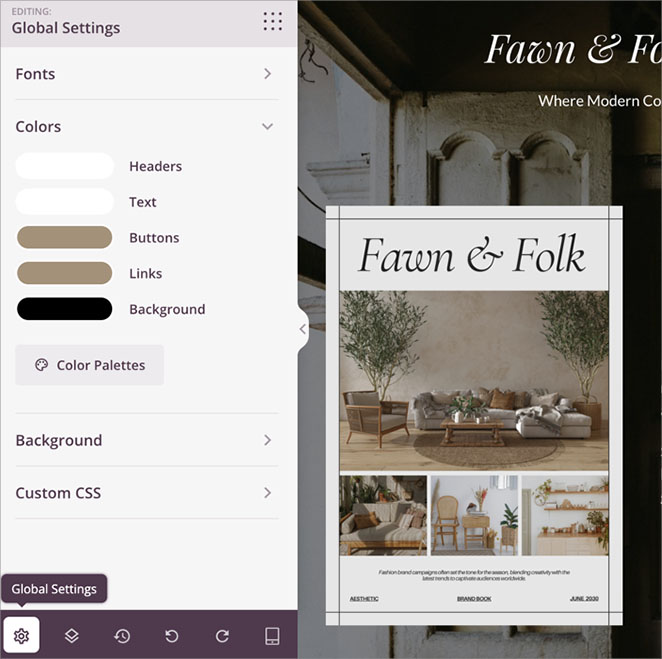
Pro Tip: For ultimate efficiency, explore the “Global Settings.” Define your brand colors and font styles once, and SeedProd will apply them across your entire page, saving you valuable time.
Step 5. Integrate Your Email Marketing Service
Your pre-launch landing page is a prime opportunity to start growing your email list – a valuable asset for a successful launch and beyond. SeedProd makes it easy to connect your landing page’s opt-in form to your preferred email marketing service.
Inside the SeedProd page builder, click on the “Connect” tab at the top.
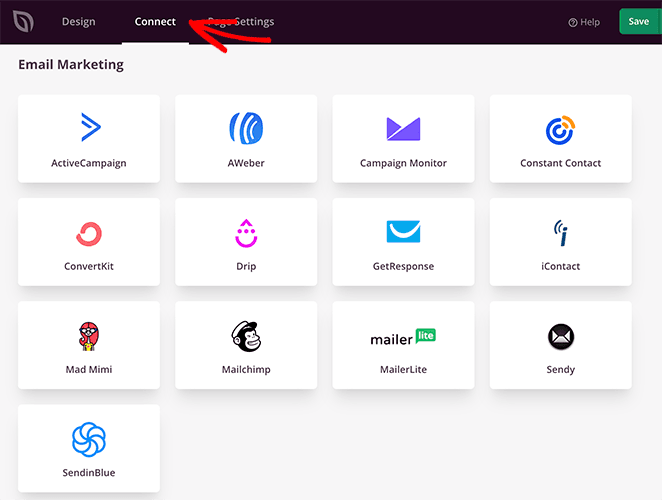
You’ll see a list of popular email marketing services. Find yours and click to connect.
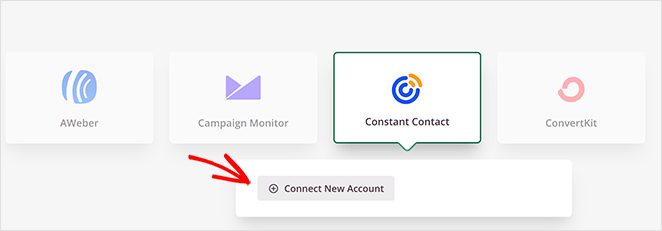
From there, follow the instructions to connect your email list.
Now, every time someone signs up for updates, joins your waitlist, or claims an offer on your pre-launch page, they’ll be automatically added to your email list.
You’ll be building anticipation and a ready-made audience before you even launch.
Step 6. Preview, Test, and Publish Your Page
You’re almost ready to unveil your pre-launch page to the world. But before you hit publish, let’s make sure it delivers a seamless experience across all devices.
SeedProd makes this easy with built-in preview tools.
Use the device icons (typically at the bottom of the page builder) to see how your page looks on desktops, laptops, tablets, and smartphones.
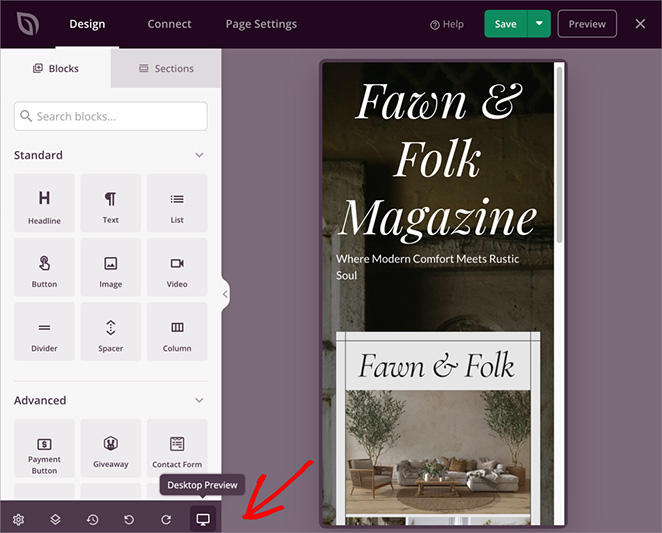
If anything seems off, don’t worry. Just go back and adjust things until it looks good everywhere.
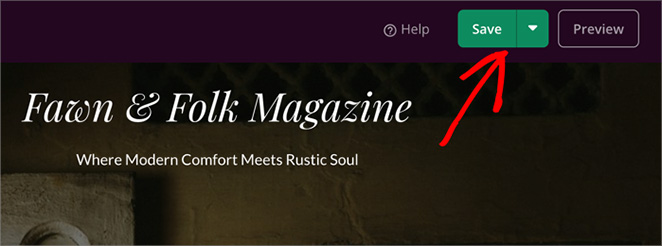
Once you’re happy with your page, it’s time to share it. To do so, click the green “Save” button at the top of the page and choose “Publish.”
Now you can preview the page to see it in action. Here’s the one I made for this guide:
When you’ve published your pre-launch page, you’ll need to enable coming soon mode so your visitors will see that page across your website.
To do this, click the “X” button to close the page editor and head back to the SeedProd dashboard.
Then, head to the Coming Soon Mode section and turn the toggle from Inactive to Active.
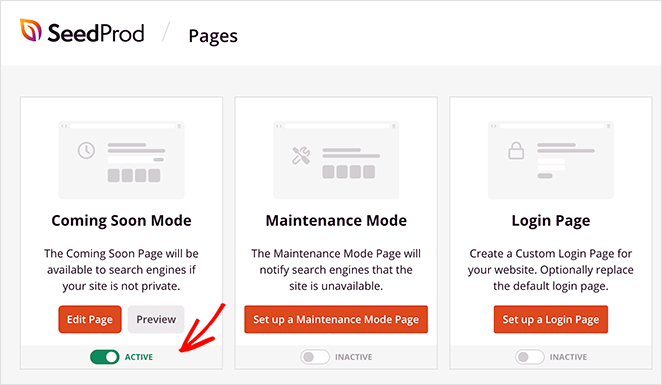
Now, coming soon mode is enabled across your whole website, so visitors will see the pre-launch page you just created.
Show Your Pre-Launch Page on Specific Pages
If you prefer to only show your pre-launch page on certain parts of your website, edit the page you just created, click the “Settings” tab, and navigate to the “Access Controls” heading.
Then scroll down to the Include/Exclude URLs section and add the URLs where you want to show your pre-launch page.
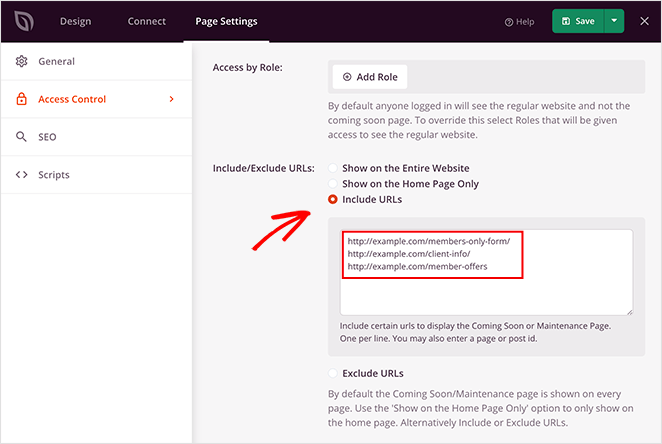
Now, instead of showing your prelaunch notice on every part of your website, it will only appear on the pages you indicated.
What Do Great Pre-Launch Landing Pages Look Like?
I always find it quite difficult to get my creativity going for any type of design. So, to help you out, here are some of my favorite pre-launch page examples from real brands online.
App Manager 5.0
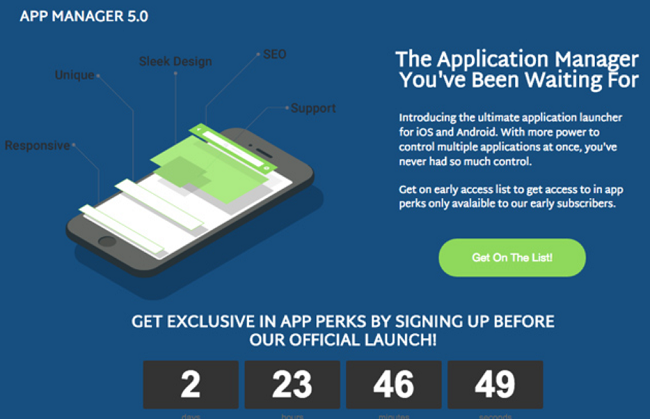
This pre-launch page from App Manager 5.0 gets the structure right. The design is sharp, using a phone illustration and clear callouts to highlight specific features.
The headline addresses a real problem (managing multiple apps), the text explains early-bird perks, and a countdown timer creates urgency. The “Get On The List!” button is prominent and action-oriented.
What it does well: it pairs urgency (timer) with incentive (early-bird perks), so visitors have two reasons to sign up, not just one.
Tapster App
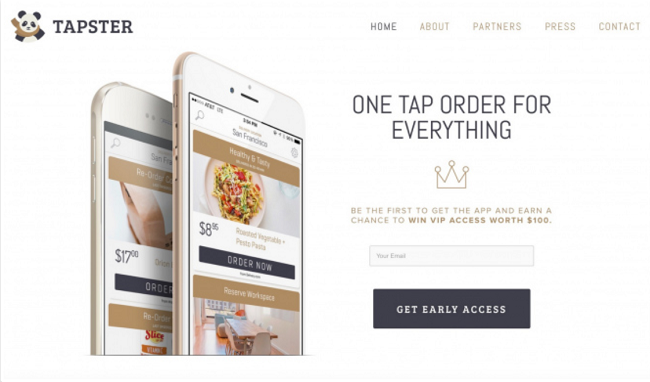
Tapster’s pre-launch page is simple but effective. Phone mockups showcasing different app uses communicate the product’s purpose without a word of explanation.
What it does well: the offer of VIP access frames sign-up as something you earn, not just something you do. That exclusivity framing increases perceived value before the product even exists.
PandaDoc
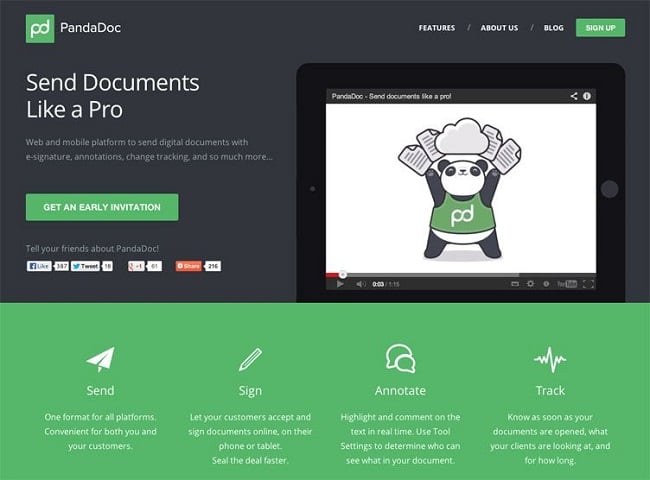
This example from PandaDoc uses a playful panda mascot to instantly anchor the brand personality. The headline “Send Documents Like a Pro” is aspirational and solves a clear pain point.
What it does well: framing sign-up as an “Early Invitation” creates a sense that access is curated, not open to everyone. That’s a simple word choice that changes how the offer feels.
The Astonishing Post

This pre-launch page for The Astonishing Post is full of personality. It’s busy and artsy, just like the magazine they’re launching, and the bold center image grabs attention immediately.
What it does well: the page mirrors the product’s voice exactly. A pre-launch page doesn’t need to be minimal to work. It needs to feel like what’s coming. This one does that without being confusing.
The signup form is simple, and they even promise not to spam you, which is always nice.
Frequently Asked Questions
What is the difference between a coming soon page and a pre-launch landing page?
A coming soon page is typically a simple placeholder that tells visitors your site is under construction. A pre-launch landing page is more intentional: it’s designed to build excitement, collect email sign-ups, and validate your idea before launch. Both go live before your main site, but a pre-launch page actively works to grow your audience while you finish building.
How long before launch should you set up a pre-launch landing page?
I’d set it up as early as possible, ideally 4 to 6 weeks before your planned launch date. That gives you enough time to build a meaningful email list and test your messaging. Longer than two weeks before launch and momentum usually holds; shorter than that and you won’t collect enough sign-ups to make launch day count.
What should you include on a pre-launch landing page?
At minimum: an attention-grabbing headline, a clear description of what’s coming, a simple email opt-in form above the fold, and at least one trust signal such as social proof or a media mention. A countdown timer is optional but adds urgency, especially in the final days before launch when your page becomes a launch countdown page visitors return to check.
Can you use the free version of SeedProd for a pre-launch landing page?
Yes, SeedProd’s free version includes coming soon page functionality and lets you collect email sign-ups. The paid version adds access to Pro templates, advanced customization options, and more email integrations. For most pre-launch pages, the free version is enough to get started.
Get started with SeedProd to build your pre-launch page and start collecting sign-ups before launch day.
You might also find the following tips and tutorials helpful when launching a new product, service, or website:
- How to Create a New Website Launch Marketing Plan
- How to Market Your Website Before Launch
- 24 Point Checklist For A Successful WordPress Website Launch
Thanks for reading! We’d love to hear your thoughts, so please feel free to join the conversation on YouTube, X and Facebook for more helpful advice and content to grow your business.



