



TL;DR: 7 Best WordPress Email Subscription Popup Plugins
I tested these plugins on real WordPress sites. Here’s the short version of what I found.
- OptinMonster – Best for advanced targeting; exit-intent, A/B testing, and 700+ templates from $9/month
- Thrive Leads – Best for data-driven testing; SmartExit+ and deep analytics at $99/year
- Bloom – Best for Elegant Themes members; 100+ designs and 6 opt-in types from $89/year
- MailOptin – Best for all-in-one automation; free version available on WordPress.org
- Convert Pro – Best for agencies; unlimited sites on all plans from $89/year
- PopupAlly – Best free pick; non-intrusive popup design, free or $99/year for Pro
- SeedProd – Best for email capture built into your site design; 14 direct email integrations on Plus plan ($199/year) and above
I added one popup to my blog and went from 2-3 email signups a day to 15-20, in a single week. But it took me years of testing to find the plugin that actually worked, and another year to figure out why the first five I tried didn’t.
I’ve installed and tested dozens of WordPress email subscription popup plugins across my own sites and client projects. This comparison breaks down the ones worth using, what they’re each best for, and which to avoid if you’re just starting out.
| # | Plugin | Best For | Free Plan | Starting Price |
|---|---|---|---|---|
| 🥇 1 | OptinMonster | Advanced targeting, A/B testing | 14-day guarantee | From $9/month |
| 🥈 2 | Thrive Leads | Data-driven marketers | None | From $99/year |
| 🥉 3 | Bloom | Elegant Themes members | No | From $89/year |
| 4 | MailOptin | All-in-one automation | Yes (limited) | From $99/year |
| 5 | Convert Pro | Agencies, multi-site owners | No | From $89/year |
| 6 | PopupAlly | Beginners, non-intrusive design | Yes (2 popups) | Free or $99/year |
| 7 | SeedProd | Email capture in site design | No | From $199/year (Plus) |
What’s a WordPress Email Subscription Popup Plugin?
A WordPress email subscription popup plugin adds an opt-in form to your website. This form asks visitors to sign up for your email list, and it’s like having a friendly helper always ready to grow your newsletter signups.
These list building plugins are smart and can:
- Create eye-catching email capture forms and popup designs
- Set up rules for when to show your newsletter signup popup
- Customize opt-in popups based on who’s visiting
- Help you comply with data protection laws through required consent checkboxes
- Connect to CRM systems beyond email services, so you can manage leads in one place
For example, you can show different popups to new and returning visitors, or display them when someone is about to leave your site.
The best part? These plugins usually work with popular email services, so new subscribers are added to your list automatically without any extra work.
How I Chose These WordPress Email Subscription Popup Plugins
I’ve reviewed hundreds of WordPress plugins over 13 years. For this list, I installed each plugin on a fresh WordPress site and evaluated it across five criteria.
- Setup time. A plugin should have you capturing emails within 30 minutes of installation. I timed the first popup from install to live on each one.
- Design flexibility. Templates are a starting point. I tested how easily I could match each popup to a site’s existing design without writing custom code.
- Targeting options. Basic time-delay triggers are table stakes. I focused on which plugins let you target based on behavior: exit intent, scroll depth, page visited, and referral source.
- Email service compatibility. I tested connections to Mailchimp, ConvertKit, and ActiveCampaign, the three most common services WordPress users run.
- Performance impact. A popup that slows your site costs you conversions elsewhere. I checked each plugin’s effect on page load using GTmetrix.
WordPress Email Subscription Popup Plugins Compared
Now that I’ve covered the basics, let’s get to the good stuff. I’ve spent several hours testing these email subscription popup plugins and here’s what I found.
1. OptinMonster: Best for Advanced Targeting and A/B Testing
| Pricing | Starts at $9/month |
| Free Plan / Trial | 14-day money-back guarantee |
| Standout Features | 🔹 Drag-and-drop builder 🔹 Exit-intent technology 🔹 Page-level targeting 🔹 A/B testing 🔹 Mobile-specific popups |
| Rating | A+ |
| Best For | Beginners and advanced users who want full control |
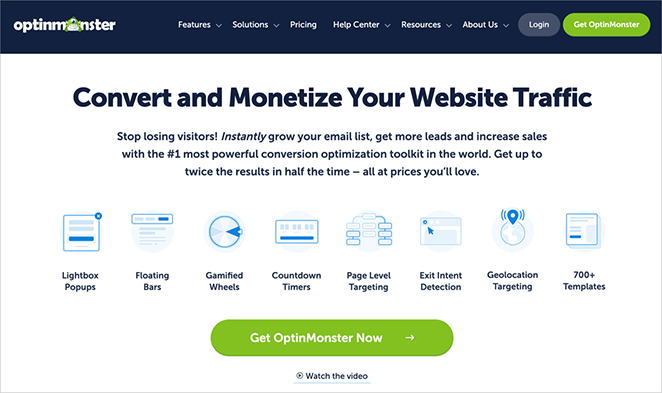
OptinMonster is the best popup subscription plugin for building your email list. It’s easy to use even if you don’t know how to code.
You can create stunning popups and forms by simply dragging and dropping elements. OptinMonster offers over 700 pre-made templates, so you’re sure to find one that fits your style.
You can also choose from different campaign types, such as popups, bars that float on the page, and full-screen welcome messages. What makes OptinMonster stand out is that it provides everything you need to increase your website’s leads.
My Experience
The plugin guided me through every step, and I connected it to my WordPress site in no time.
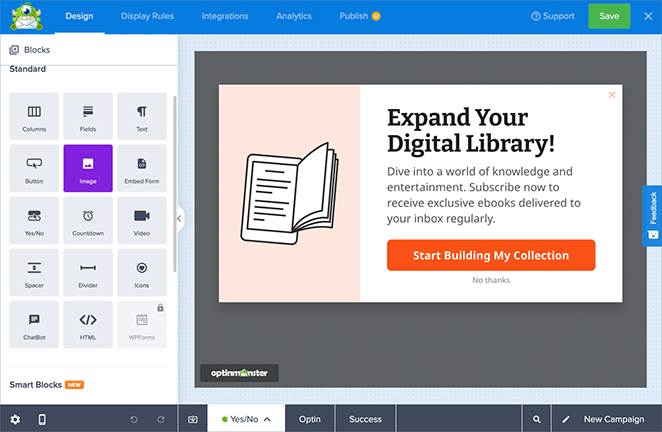
I loved the drag-and-drop builder. It lets me choose from lots of templates or start from scratch. Changing the design was a snap, and I could immediately see my changes.
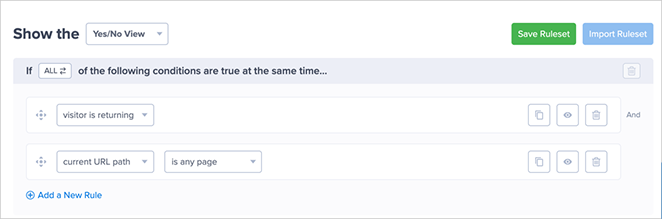
What really impressed me was how I could target specific visitors. I made a popup that showed up when people were about to leave my blog, and another one appeared after they had spent some time on my homepage.
I even made a special offer just for visitors who came back to my site. This level of personalization helped me get better results.
Features I Loved
- Drag-and-drop builder with a wide range of templates
- Exit-intent technology that catches visitors before they leave
- Page-level targeting for personalized messages
- A/B testing to optimize conversion rates
- Mobile-specific popups for a better user experience on smartphones
- Integrates with Mailchimp, ConvertKit, AWeber, ActiveCampaign, and 30+ email marketing platforms
- MonsterLinks™ that turn any link into a 2-step opt-in
- Behavior automation for advanced targeting
- Detailed analytics to track performance
| Pros | Cons |
|---|---|
| 700+ templates with drag-and-drop customization | Cloud-based; popups load from OptinMonster’s servers, not your WordPress install |
| Exit-intent, scroll, and behavioral triggers built in | Advanced features require Pro or Growth plan ($29-$49/month) |
| A/B testing with statistical significance tracking | Monthly billing only on the Basic plan |
| Integrates with Mailchimp, ConvertKit, AWeber, and 30+ platforms | Overkill for simple single-form needs on new or low-traffic sites |
Pricing & Plans
OptinMonster’s pricing structure is tiered:
- Basic: $9/month (billed annually) – Good for beginners, includes basic features
- Plus: $19/month – Adds A/B testing and more campaign types
- Pro: $29/month – Includes advanced targeting and analytics
- Growth: $49/month – Full suite of features, perfect for agencies
All plans come with a 14-day money-back guarantee, which I found reassuring when I first signed up.
Verdict
OptinMonster is the strongest all-around pick for growing an email list once your site has real traffic. The targeting depth and template library justify the monthly cost at scale. If you’re just starting out, begin with MailOptin’s free version and switch to OptinMonster when you’re ready to run structured A/B tests.
2. Thrive Leads: Best for Data-Driven Email List Growth

| Pricing | Starts at $99/year |
| Free Plan / Trial | None |
| Standout Features | 🔹 SmartExit+ technology 🔹 A/B testing and analytics 🔹 SmartLinks for existing subscribers 🔹 Multiple form types 🔹 Asset delivery for lead magnets |
| Rating | A |
| Best For | Data-driven marketers who want deep testing options |
Thrive Leads is a WordPress popup plugin that helps you attract more email subscribers. It can be used to create different types of signup forms, such as popups and slide-ins.
What makes Thrive Leads special is that it helps you get the most out of your forms. You can test different versions to see what works best, and you can show special offers to people who are already on your email list.
My Experience
Right after I installed Thrive Leads, I could start creating signup forms. The drag-and-drop editor made it really easy to customize the forms and make them look exactly how I wanted.
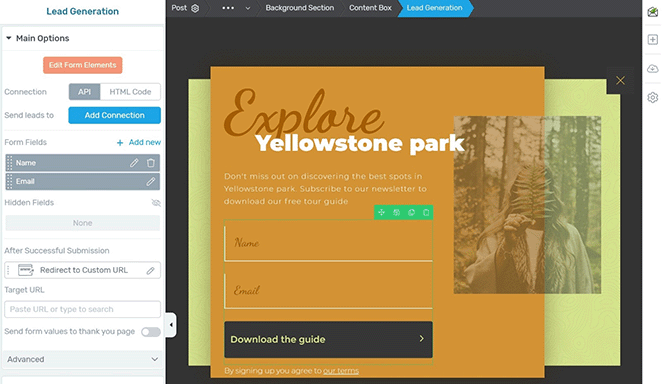
I loved the SmartExit+ feature, which pops up a form just as someone is about to leave my site. It’s a great way to grab attention and get people to sign up before they go.
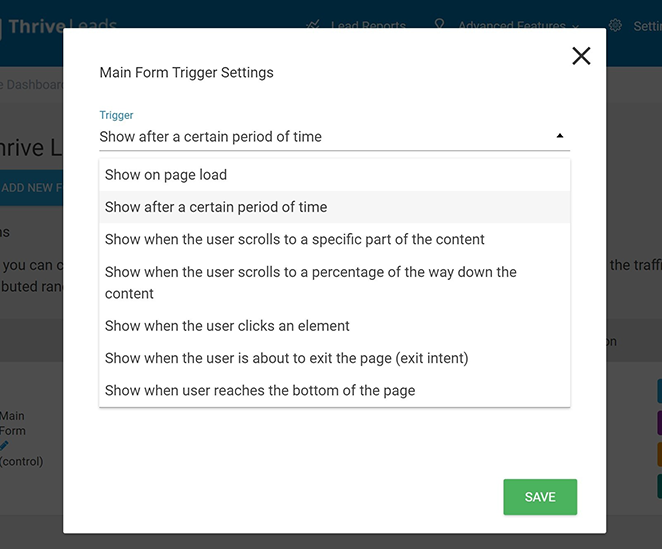
The best part was the A/B testing. I could try out different designs, headlines, and offers to see what my audience liked best. It made a huge difference in the number of people who signed up.
Features I Loved
- Drag-and-drop form builder
- Multiple form types (lightbox, ribbon, in-line, etc.)
- SmartExit+ technology
- A/B testing and analytics
- SmartLinks for targeting existing subscribers
- Integration with major email marketing services
- Asset delivery for lead magnets
- Mobile-friendly designs
| Pros | Cons |
|---|---|
| Best-in-class A/B testing including multi-variant tests | Steeper learning curve than OptinMonster |
| SmartLinks hide forms from existing subscribers | Best value requires Thrive Suite subscription ($299/year) |
| Deep analytics showing revenue per subscriber | Editor less intuitive than competing drag-and-drop builders |
| Standalone license available at $99/year | No free version or trial |
Pricing & Plans
Thrive Leads offers a straightforward pricing structure:
- Standalone: $99/year
- Thrive Suite: $299/year
All plans include one year of full feature access, updates, and support.
Verdict
Thrive Leads is built for marketers who want to test their way to better conversion rates. If you’re not planning to run structured A/B tests, the complexity isn’t worth it. Pick OptinMonster for a simpler setup.
3. Bloom: Best for Elegant Themes Members

| Pricing | Starts at $89/year (Elegant Themes) |
| Free Plan / Trial | No free plan |
| Standout Features | 🔹 100+ templates 🔹 6 opt-in types 🔹 Trigger and display settings 🔹 A/B testing 🔹 Part of Elegant Themes membership |
| Rating | B+ |
| Best For | Divi users and Elegant Themes members |
Bloom is an email popup plugin designed to increase your website’s email subscribers. It’s made by the same folks behind the Divi theme, so you know it’s going to be stylish and easy to use.
This plugin gives you loads of options for creating beautiful signup forms that match your website’s look and feel. If you’re already using other Elegant Themes products, Bloom fits right in, making it simple to manage everything in one place.
My Experience
Getting started with Bloom was a breeze, especially since I was already familiar with Elegant Themes. The plugin is easy to navigate, and I was creating signup forms in minutes.
I loved the selection of pre-made templates. They looked fantastic right away, and I could customize them to match my website’s style.
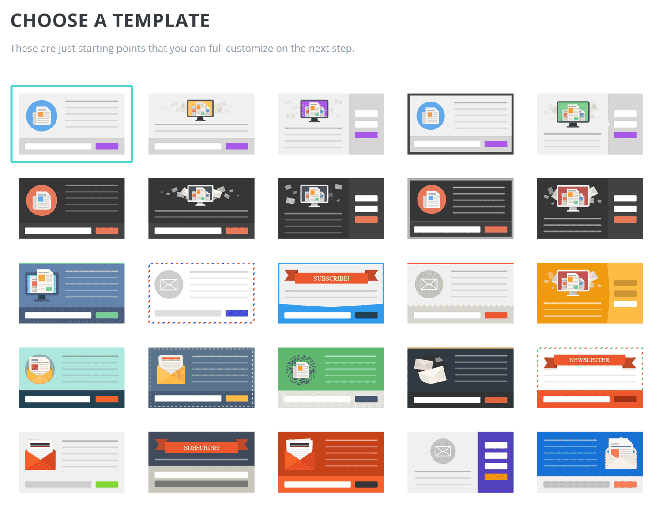
Bloom gives you a lot of control over when and where your forms appear. You can have them pop up after a visitor has been on your site for a while, scrolled down the page, left a comment, or even bought something.
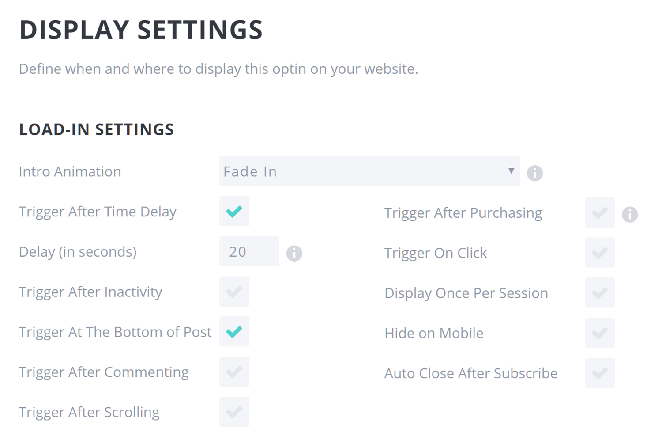
That level of flexibility makes a big difference.
Features I Loved
- 100+ pre-made templates
- 6 different opt-in types (pop-up, fly-in, inline, etc.)
- Trigger options (time, scroll depth, after content, etc.)
- A/B testing capabilities
- Detailed statistics and insights
- Integration with popular email marketing services
- Automatic image optimization for faster loading
- Display settings for precise targeting
| Pros | Cons |
|---|---|
| 100+ stylish templates with strong design quality | Only valuable as part of Elegant Themes membership |
| 6 opt-in form types covering most use cases | A/B testing less advanced than OptinMonster or Thrive Leads |
| Good value if you’re already an Elegant Themes member | No exit-intent popup in the standard setup |
| Automatic image optimization built in | Slower development cycle compared to other plugins on this list |
Pricing & Plans
Bloom is available as part of the Elegant Themes membership:
- Yearly Access: $89/year
- Lifetime Access: $249 (one-time fee)
Both plans include access to all Elegant Themes products, including Divi, Extra, and Monarch.
Verdict
Bloom is a solid choice if you’re already paying for Elegant Themes. The templates and form types are more than enough for most sites. If you’re not an Elegant Themes member, the standalone value doesn’t justify the cost of a membership.
4. MailOptin: Best for Built-In Email Automation
| Pricing | Starts at $99/year |
| Free Plan / Trial | Free version available on WordPress.org |
| Standout Features | 🔹 Form builder + email automation 🔹 A/B testing 🔹 Page-level targeting 🔹 Newsletter automation 🔹 Analytics and CRM integration |
| Rating | A- |
| Best For | Bloggers and small businesses who want built-in automation |
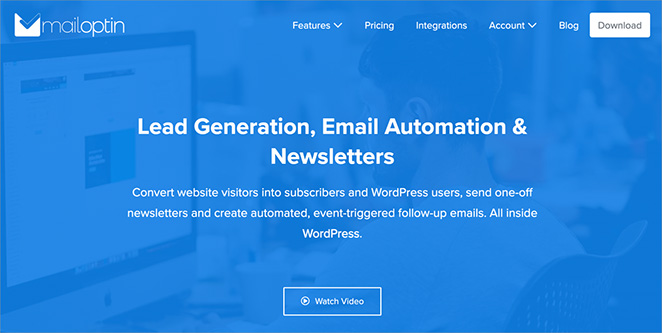
MailOptin is an all-in-one solution for growing and managing your email list inside WordPress. It allows you to create eye-catching signup forms and use the automation features to send timely and engaging emails to your subscribers.
What makes MailOptin unique is that it does double duty: it helps you get more subscribers and then keeps those subscribers interested with automated emails. There’s no need for multiple tools or complicated setups.
My Experience
MailOptin walked me through connecting my email service and creating my first signup form. It’s all very user-friendly, even if you’re new to this kind of thing.
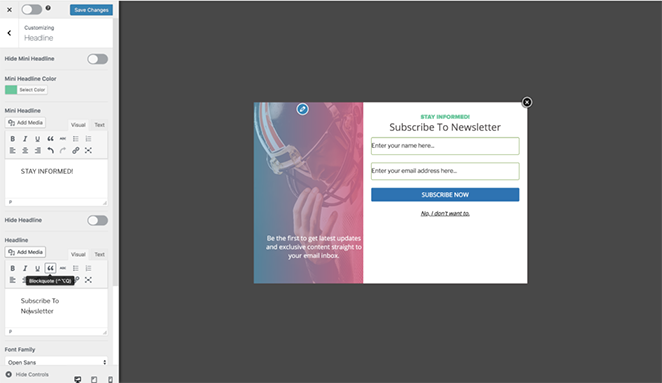
I was really impressed by how easy it was to set up automated emails. Now, my blog posts automatically get sent out as newsletters, which saves me so much time.
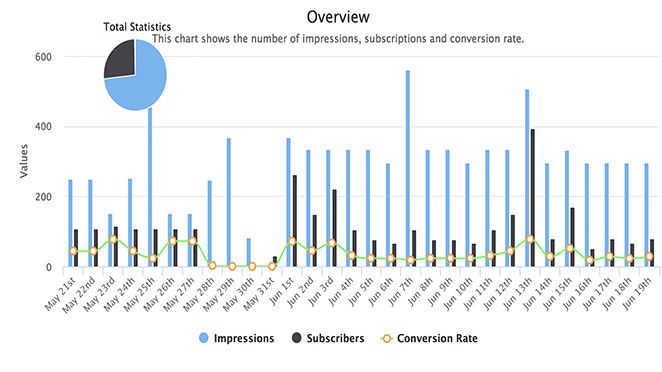
I also love that I can show different signup forms on different pages of my website, so the forms are always relevant to what people are reading. Plus, MailOptin gives you detailed stats on how your forms perform.
Features I Loved
- Drag-and-drop form builder
- Multiple opt-in types (lightbox popup, slide-in, sidebar, etc.)
- Email automation for sending blog posts as newsletters
- Page-level targeting
- A/B testing capabilities
- Detailed analytics and insights
- Integration with popular email marketing services and CRMs
- Exit-intent technology
- Mobile-friendly designs
| Pros | Cons |
|---|---|
| Combines popup forms with built-in newsletter automation | Email automation can feel complex for beginners |
| Free version available on WordPress.org | Lite plan ($99/year) is fairly limited; most users will need Pro at $289/year |
| Subscriber data stays in WordPress, no third-party dependency | Smaller template library than OptinMonster or Thrive Leads |
| Page-level targeting on all paid plans | Support response times can be slow on lower plans |
Pricing & Plans
MailOptin offers three pricing tiers:
- Lite: $99/year for 1 site
- Pro: $289/year for 3 sites
- Agency: $499/year for unlimited sites
All paid plans come with a 14-day money-back guarantee. A limited free version is also available on WordPress.org.
Verdict
MailOptin is the only plugin on this list that handles both list capture and newsletter automation, which makes it the right pick if you want one tool for both jobs. Start with the free version to test the interface before committing to the Pro plan at $289/year.
5. Convert Pro: Best for Agencies and Multi-Site Owners
| Pricing | Starts at $89/year |
| Free Plan / Trial | 14-day money-back guarantee |
| Standout Features | 🔹 100+ templates 🔹 Advanced targeting 🔹 Exit-intent 🔹 A/B testing 🔹 Unlimited site license |
| Rating | A |
| Best For | Agencies and site owners who want advanced control |
Convert Pro lives up to its name. It’s designed to turn your website visitors into subscribers and customers. Created by the same team behind the Astra theme, this powerful WordPress plugin makes it easy to build eye-catching popups and opt-in forms that get results.
Whether you’re just starting out or not, Convert Pro has you covered. It offers a user-friendly experience with tons of templates to get you started, plus advanced targeting options if you want to take things further.
My Experience
Convert Pro’s setup process walked me through everything quickly, and I had my first popup up and running in no time.
I loved how simple it was to customize the popups to match my site. The drag-and-drop editor is intuitive, and I could instantly see my changes.
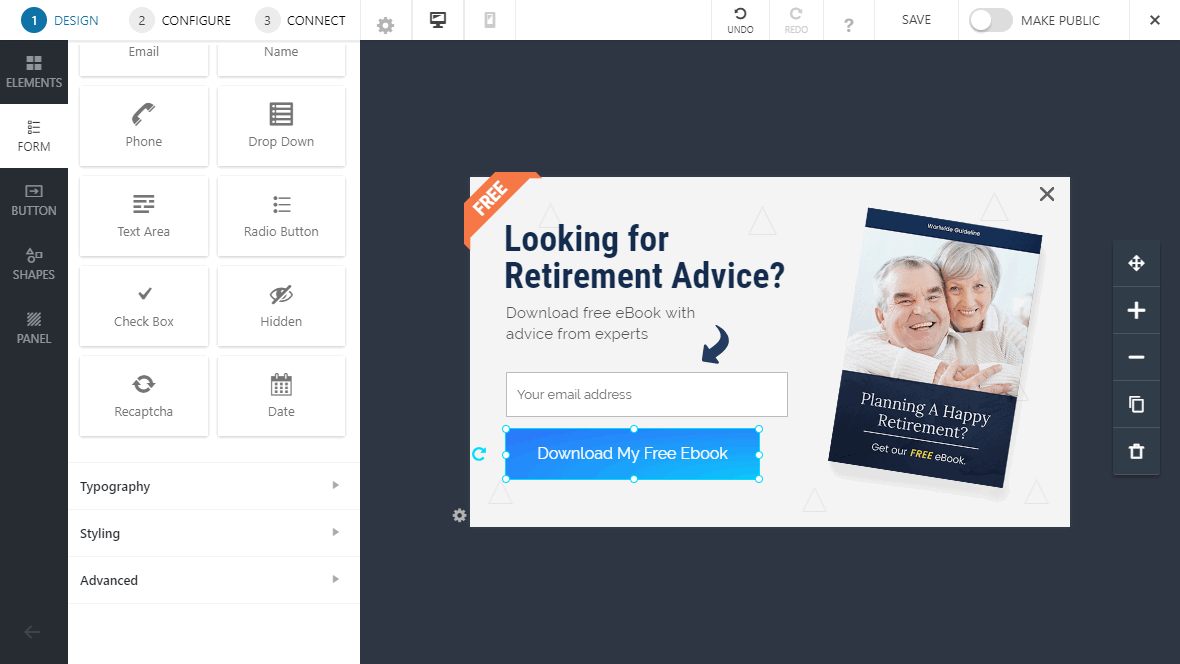
Convert Pro also gives you a ton of control over who sees your popups and when. I could target people based on what they did on my site, what kind of device they were using, and even where they were located.
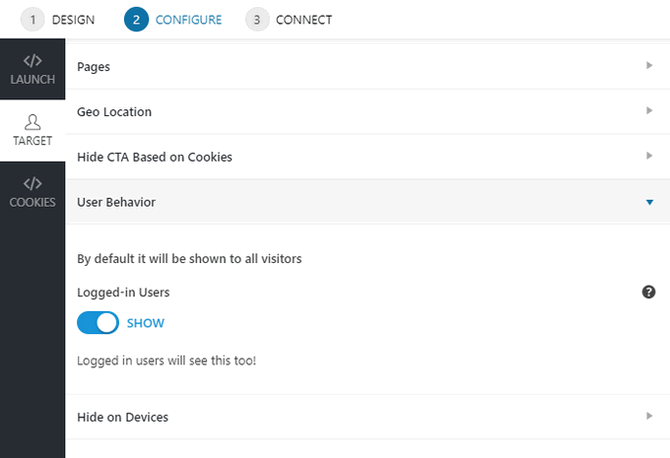
Plus, the exit-intent popups were great for catching people right before they left.
Features I Loved
- Drag-and-drop popup builder
- 100+ pre-designed templates
- Multiple popup types (modal, slide-in, info bar, etc.)
- Advanced targeting and trigger options
- A/B testing functionality
- Detailed analytics dashboard
- Integration with major email marketing services and CRMs
- Mobile-responsive designs
- Exit-intent technology
| Pros | Cons |
|---|---|
| Unlimited sites on all plans, best value for agencies | No free version; 14-day money-back guarantee only |
| Advanced targeting: geo, device type, referral URL | Analytics less detailed than OptinMonster |
| Lifetime purchase option at $349 one-time | Higher price per site for single-site owners |
| From Brainstorm Force (Astra team), regular updates | Smaller template library than OptinMonster |
Pricing & Plans
Convert Pro offers a straightforward pricing structure:
- Annual: $89/year for unlimited sites
- Lifetime: $349 one-time payment for unlimited sites
Both plans include all features, updates, and support. There’s also a 14-day money-back guarantee.
Verdict
Convert Pro is the right call for agencies managing multiple client sites, since the unlimited license pays for itself quickly across projects. Solo site owners should compare it to other WordPress plugins in this space, as OptinMonster offers a larger template library and more detailed analytics.
6. PopupAlly: Best Free Option for Non-Intrusive Popups

| Pricing | Free or $99/year for Pro |
| Free Plan / Trial | Free version available |
| Standout Features | 🔹 Mobile-friendly 🔹 Exit-intent and scroll-based triggers 🔹 A/B testing (Pro) 🔹 Elegant templates 🔹 User-friendly setup |
| Rating | B+ |
| Best For | Beginners and creators who want non-intrusive popups |
PopupAlly helps you create attractive popups on your WordPress site that look great on phones and computers. It’s easy to use and focuses on making popups that don’t annoy your visitors.
Unlike some popups that interrupt people, PopupAlly helps you create ones that are elegant and actually improve user experience. You can use the free version, or upgrade to the pro version for more features.
My Experience
Setting up PopupAlly was easy. The plugin walked me through creating my first popup, and it was easy to navigate.
I was impressed by how much I could customize the popups, even with the free version. It was important to me that the popups matched the style of my website, and PopupAlly made that simple. Plus, the popups automatically adjusted to look good on phones and computers.
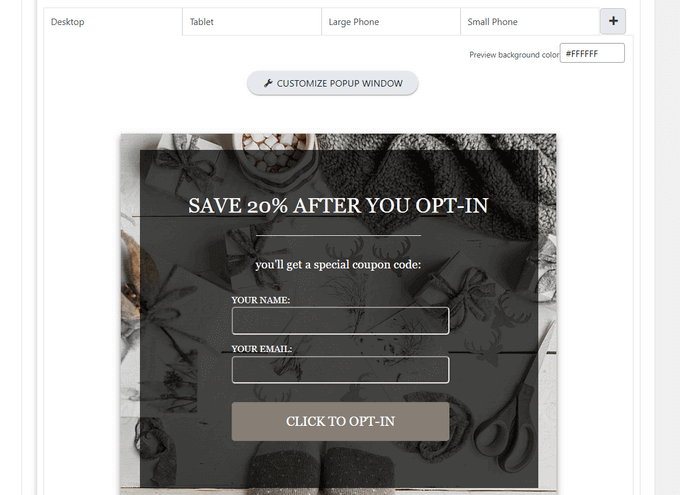
When I upgraded to the pro version, I got even more control over who saw my popups and when. I could set them to appear based on what people did on my site, how long they’d been on a page, or even if they were about to leave.
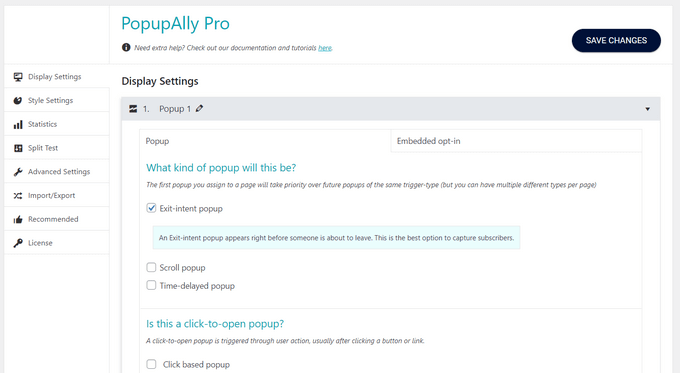
That last one, called “exit-intent,” was really helpful for getting people to sign up before they clicked away.
Features I Loved
- Easy-to-use popup builder
- Mobile-responsive designs
- Multiple popup types (time-based, scroll-based, exit-intent, etc.)
- Customizable templates
- A/B testing (in pro version)
- Integration with major email marketing services
- Advanced targeting options (in pro version)
- Analytics and insights
| Pros | Cons |
|---|---|
| Free version available for beginners | Free version limited to 2 popups |
| Focused on non-intrusive, reader-friendly popup design | A/B testing only available in Pro ($99/year) |
| Simple setup suitable for beginners | Fewer integrations than OptinMonster or Convert Pro |
| Mobile-responsive designs included | Less active development compared to other plugins on this list |
Pricing & Plans
PopupAlly offers both a free version and a pro version:
- Free: Basic features, limited to 2 popups
- Pro: $99/year
The pro version comes with a 30-day money-back guarantee.
Verdict
PopupAlly is the go-to if you want a non-intrusive email popup that won’t annoy your visitors. The free version’s 2-popup limit is tight, but it’s a smart starting point before committing to the $99/year Pro upgrade.
7. SeedProd: Best for Email Capture Built Into Your Site Design

| Pricing | From $199/year (Plus plan required for email integrations) |
| Free Plan / Trial | No (limited coming soon page available free) |
| Standout Features | 🔹 Drag-and-drop subscription form blocks 🔹 14 direct email integrations (Mailchimp, ConvertKit, ActiveCampaign, and more) 🔹 Coming soon pages for pre-launch list building 🔹 Works with any WordPress theme 🔹 No coding required |
| Rating | A |
| Best For | WordPress site owners who want email capture built into their page design |
SeedProd is a drag-and-drop website builder for WordPress that includes email subscription forms as part of its block library. Rather than adding a popup overlay on top of your existing pages, SeedProd lets you embed subscription forms directly into landing pages, custom theme pages, and coming soon templates.
It connects to major email marketing services, including Mailchimp, ConvertKit, ActiveCampaign, AWeber, Drip, and more, so new subscribers go directly into your list without any manual work. The coming soon page feature is particularly useful for pre-launch list building: visitors see a polished hold page with a signup form, and every address collected is ready when you go live.
My Experience
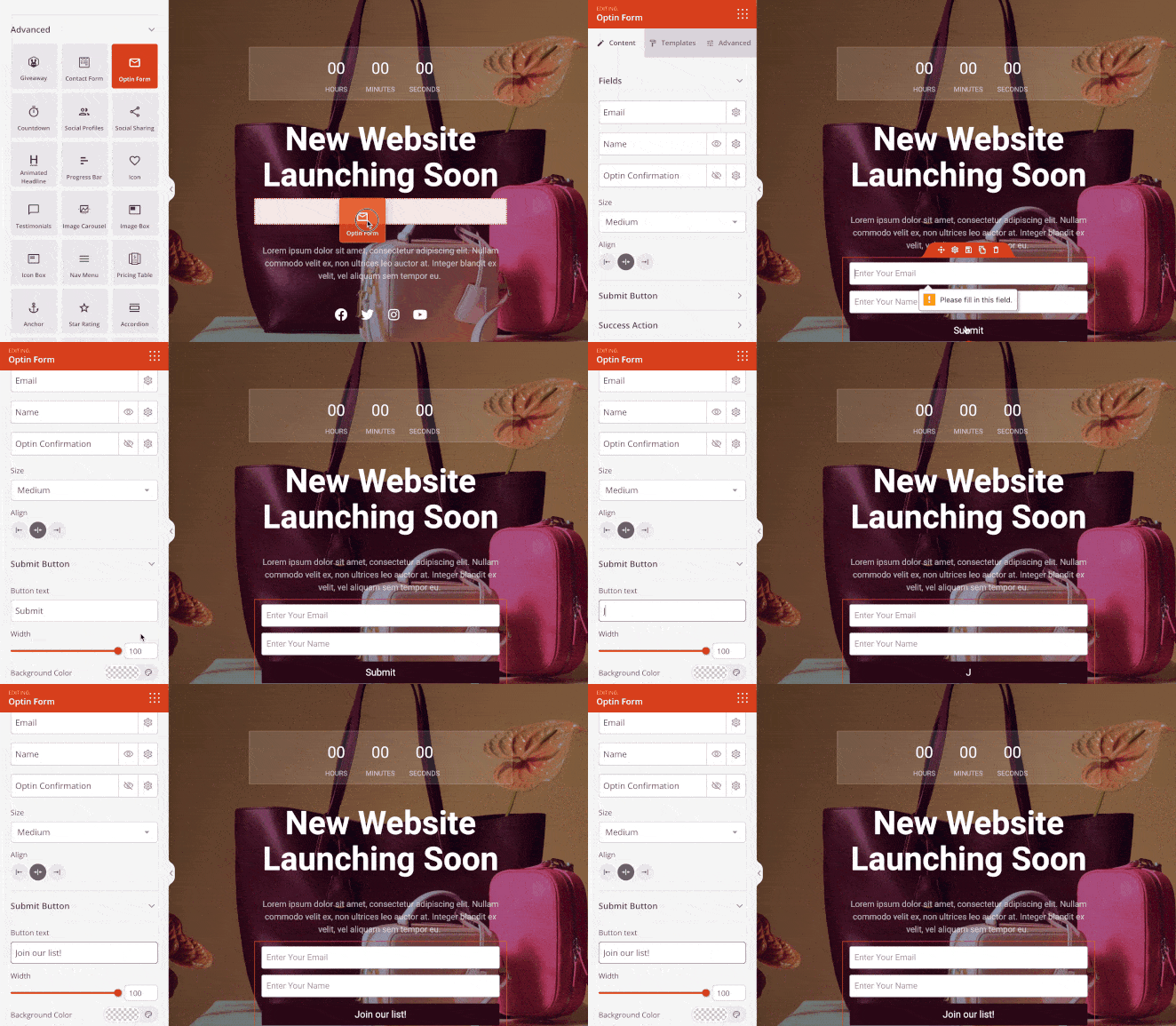
I use SeedProd to build landing pages and custom WordPress themes on my own sites. Adding a subscription form block takes about 60 seconds: click the block, pick your email service, authenticate, and choose your list. The form goes live immediately, no shortcode or widget setup needed.
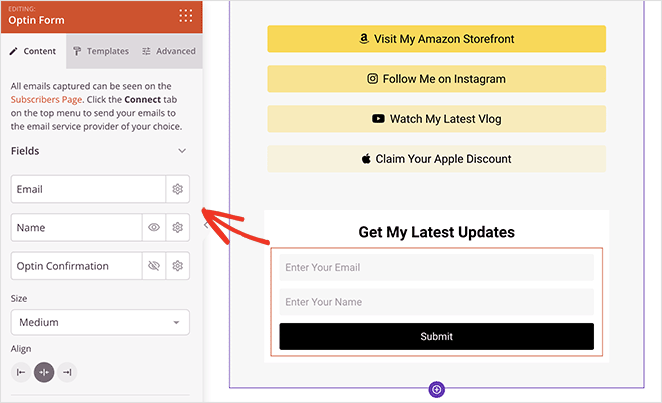
The coming soon page feature is one I use before launching new projects. Visitors see a branded pre-launch page with an email signup, and subscribers flow straight into my list from day one.
Features I Loved
- Drag-and-drop form blocks, add email capture anywhere on a SeedProd page
- 14 direct email integrations including Mailchimp, ConvertKit, ActiveCampaign, AWeber, Drip, GetResponse, MailerLite, and Brevo, plus Zapier for 500+ additional services
- Coming soon pages that capture leads before your site launches
- Custom landing page templates with built-in opt-in form blocks
- Works with all WordPress themes, no conflicts or custom CSS needed
- No coding required, drag-and-drop editor throughout
| Pros | Cons |
|---|---|
| Email capture built into your pages, no extra popup plugin needed | Not a standalone popup plugin, no exit-intent overlay functionality |
| 14 direct email integrations, plus Zapier for 500+ services | Email integrations require Plus plan ($199/year), Basic plan doesn’t include them |
| Coming soon pages for pre-launch list building | No free plan (limited coming soon feature is free) |
| Drag-and-drop, no coding or shortcodes required | Less behavioral targeting than OptinMonster or Thrive Leads |
Pricing & Plans
- Basic: $79/year, 1 site (note: email marketing integrations NOT included on Basic)
- Plus: $199/year, 3 sites, email marketing integrations, theme builder
- Pro: $399/year, 5 sites, 300+ templates, priority support, dynamic text
- Elite: $599/year, 100 sites, WooCommerce support, Easy Digital Downloads
Verdict
Choose SeedProd if you want email capture built into your page design rather than added as a popup overlay. You’ll need the Plus plan ($199/year) or above for email integrations. If you specifically need exit-intent targeting or behavioral triggers, pair SeedProd with OptinMonster rather than replacing it.
How to Choose the Right WordPress Email Subscription Popup Plugin
The best plugin depends on your budget, your email service, and how much targeting you need. Here’s how to match your situation to the right tool.
- Starting out with a small budget. Go with MailOptin’s free version or PopupAlly’s free tier. Both let you add a working subscription popup without spending anything. Upgrade when your list starts generating revenue.
- Running an established site with real traffic. OptinMonster’s exit-intent targeting and A/B testing pays for itself at scale. The $9/month Basic plan covers most use cases; step up to Pro ($29/month) when you need to segment by behavior.
- Managing multiple client sites. Convert Pro’s unlimited site license ($89/year) gives you everything you need across all your projects without per-site fees.
- Already using Elegant Themes. Bloom is included in your membership at no extra cost, and the design quality fits naturally with the Divi ecosystem.
- Building your WordPress site from scratch. SeedProd handles email capture alongside your full site build, no separate popup plugin layer needed, and it connects to all major email services from day one.
What’s the Best WordPress Email Subscription Popup Plugin?
After comparing these email subscription popup plugins, OptinMonster is the clear winner. Here’s why:
- OptinMonster is surprisingly easy to use, even for beginners, yet it’s loaded with advanced features like exit-intent popups and A/B testing.
- It’s specifically designed to help you get more email subscribers and consistently delivers impressive results.
- It works with blogs, business sites, and WooCommerce stores.
- It’s regularly updated with new features and improvements, so you know you’re getting the best possible tool.
While other plugins have their strengths, OptinMonster offers the most well-rounded package of features, user experience, and proven results.
Frequently Asked Questions
What is the best free WordPress email subscription popup plugin?
MailOptin and PopupAlly both offer free versions. MailOptin’s free version is available on WordPress.org and includes basic popup and form types. PopupAlly’s free version limits you to 2 popups but is the simpler option for beginners who want non-intrusive popup designs.
How do I add an email subscription popup in WordPress?
Install an email subscription popup plugin such as OptinMonster or MailOptin, then connect it to your email marketing service. Use the plugin’s drag-and-drop editor to design your popup, set your trigger rules, and publish. The whole process takes about 30 minutes on your first try.
What is the difference between an email subscription plugin and a newsletter plugin?
An email subscription plugin captures visitor email addresses through opt-in forms and popups. A newsletter plugin sends emails to your list. MailOptin does both. Most other plugins on this list handle only list building and rely on external services like Mailchimp to manage and send your newsletters.
Do WordPress popup plugins slow down my site?
Most modern popup plugins load their scripts asynchronously, which minimizes the impact on page speed. Performance varies by plugin. OptinMonster is cloud-based, which offloads processing from your server. I tested each one with GTmetrix and found the impact manageable across all, though heavier plugins like Thrive Leads add more to page weight.
Can I add an email popup in WordPress without coding?
Yes. Every plugin on this list uses a drag-and-drop editor that requires no coding. You can create, design, and publish an email capture form entirely through the visual interface. Setup typically takes 20 to 30 minutes, including connecting your email service.
I hope this comparison helped you find the best email subscription popup plugin for your WordPress website. While you’re here, you may also find the following email marketing guides helpful:
- Effective Email Unsubscribe Page Examples
- Best SMTP Plugins For Successful Email Delivery
- How to Set Up a Professional Free Business Email Address
- Mailchimp WordPress Integrations to Power Your Email List
Ready to add email capture to your WordPress site without a separate popup plugin? Get SeedProd Now and build landing pages, coming soon pages, and subscription forms, all from one drag-and-drop builder.
Thanks for reading! We’d love to hear your thoughts, so please feel free to join the conversation on YouTube, X and Facebook for more helpful advice and content to grow your business.



