



TL;DR: The best WordPress file upload plugin is WPForms for most sites. Here’s how the main picks break down by use case:
- WPForms: Best all-around pick for file upload forms, job applications, and client submissions.
- File Upload Types by WPForms: Best free option for extending which file types WordPress accepts.
- Big File Uploads: Best for raising WordPress’s default file size limit without server config changes.
- Easy Digital Downloads: Best for selling and delivering digital files as products.
- Gravity Forms: Best for developers building complex forms that include file submissions.
You’ve got a WordPress site and you need to collect files from visitors. Maybe it’s a job application, a client document, or a photo submission. WordPress doesn’t make this obvious out of the box, and searching for a solution sends you down a rabbit hole of plugins with wildly different purposes.
In my 13+ years working with WordPress, I’ve tested more file upload solutions than I can count. In this guide, I’ll walk you through the best WordPress file upload plugins for 2026, ranked by use case so you can find the right fit fast.
WordPress doesn’t include front-end file upload functionality by default. Whether you need a client portal form, support for large files, or a system for selling digital downloads, you’ll need a plugin to handle it.
Most of the options on this list also support file submissions from visitors who aren’t logged in, which is the standard setup for business sites collecting client documents, job applications, or photo entries.
Best WordPress File Upload Plugins to Try
| Plugin | Best For | Free Version | Starting Price | Good Free Option? |
|---|---|---|---|---|
| WPForms | All-around file upload forms | Yes (no file upload) | $49.50/year | No |
| File Upload Types | Extending accepted file types | Yes (fully functional) | Free | Yes |
| Formidable Forms | Advanced forms with logic | Yes (no file upload) | $39.50/year | No |
| Gravity Forms | Developer-grade form building | No | $59/year | No |
| Easy Digital Downloads | Selling digital files | Yes (limited) | $199/year | No |
| WordPress File Upload | Simple front-end uploads | Yes (functional) | €20 (Pro) | Yes |
| Big File Uploads | Raising the file size limit | Yes (fully functional) | Free | Yes |
| File Manager | Back-end and front-end file management | Yes (functional) | $25 (Pro) | Yes |
I tested 8 plugins against five criteria to find the options that actually work for real business sites. Here’s what I evaluated:
- Ease of setup: how quickly you can add an upload field without touching code
- File type and size controls: whether you can restrict accepted formats and set size limits
- Front-end upload support: whether visitors can upload without logging in
- Integrations: compatibility with email services, payment gateways, and page builders
- Pricing: value at each tier, and whether the free version is genuinely useful
1. WPForms
Best WordPress File Upload Plugin

WPForms is the best WordPress file upload plugin, with a 4.9 out of 5-star rating on WordPress.org and over 6 million active users. It helps beginners and experienced users build file upload forms, contact forms, and many other form types with its drag-and-drop form builder.
It’s worth mentioning that WPForms is part of the Awesome Motive family of products, same as SeedProd. It earned the top spot on its own merits after testing, and I wanted to be upfront about that.
Our Review
I found it took under 5 minutes to create a file upload form with WPForms. The form builder is fast, easy to navigate, and has plenty of customization options for the file upload field.
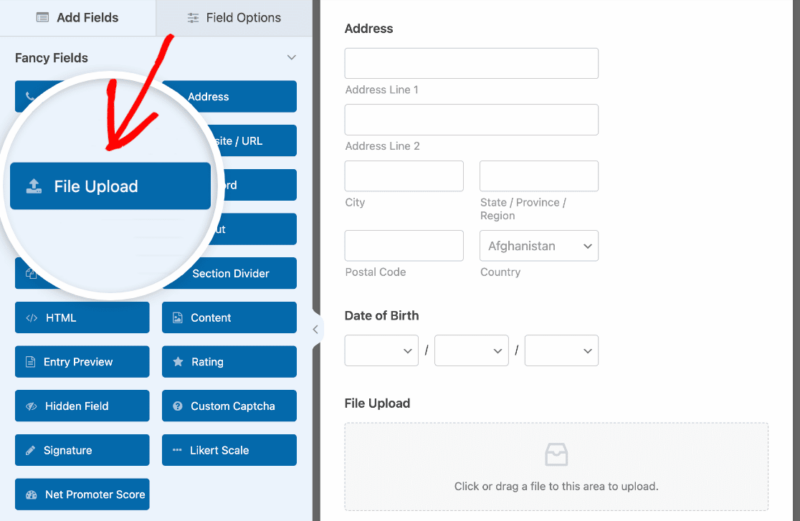
The field supports the most popular file types, and you can edit any placeholder text to be more user-friendly. You can display your file upload form anywhere on your site, including posts, pages, and sidebar widgets with a WordPress block or shortcode.
I appreciate that you can accept multiple file formats. This means image submissions, videos, documents, and any other file type your business requires are all covered in one field.
You can also accept multiple files at once. For example, users can upload a resume and a cover letter in a single submission.

WPForms lets you set file size limits for uploads, which I found extremely useful for controlling server space.
Any data accepted through your form is easy to manage. You can export files to Google Sheets and Google Drive, or receive file uploads as email attachments to your business email address.
Key file-upload-specific features I found most useful:
- Drag-and-drop multi-file upload with preview
- File size limit controls per form field
- Accepted file type restrictions
- Ajax upload (no page reload)
- Google Drive and email attachment export
Pros:
- Fastest setup of any file upload form plugin I tested
- Front-end file upload works without requiring user login
- Conditional logic lets you show the upload field only when relevant
Cons:
- File upload feature requires a paid plan (free version doesn’t include it)
- If you only need file uploads and not a full form builder, it’s more than you need
Pricing and Plans
WPForms offers several pricing options, starting from $49.50 per year for a single site. There’s also a free version of WPForms that doesn’t include the file upload feature.
Choose WPForms if you need a form builder that handles client file uploads alongside contact forms, payments, and email integrations in one plugin.
Once you’ve set up your WPForms file upload form, you need a page for it to live on. That’s where SeedProd comes in.
SeedProd’s drag-and-drop visual website builder lets you create a dedicated client upload page without touching code. You pick a template, drop in a WPForms block, and your page is live.

It’s the fastest way I’ve found to turn a file submission form into a professional-looking client portal page on any WordPress site. See SeedProd’s plans here.
2. File Upload Types by WPForms
Best WordPress File Upload Plugin for File Types
File Upload Types is another plugin from the WPForms team. It offers a direct way to accept different types of files in WordPress that the platform doesn’t support natively.
The plugin makes the process of accepting different file types on the front end of your site straightforward. Its interface removes the guesswork for end users.
Our Review
This plugin works with WPForms forms. You can include file uploads in different form types, such as giveaway entries, job applications, and more.
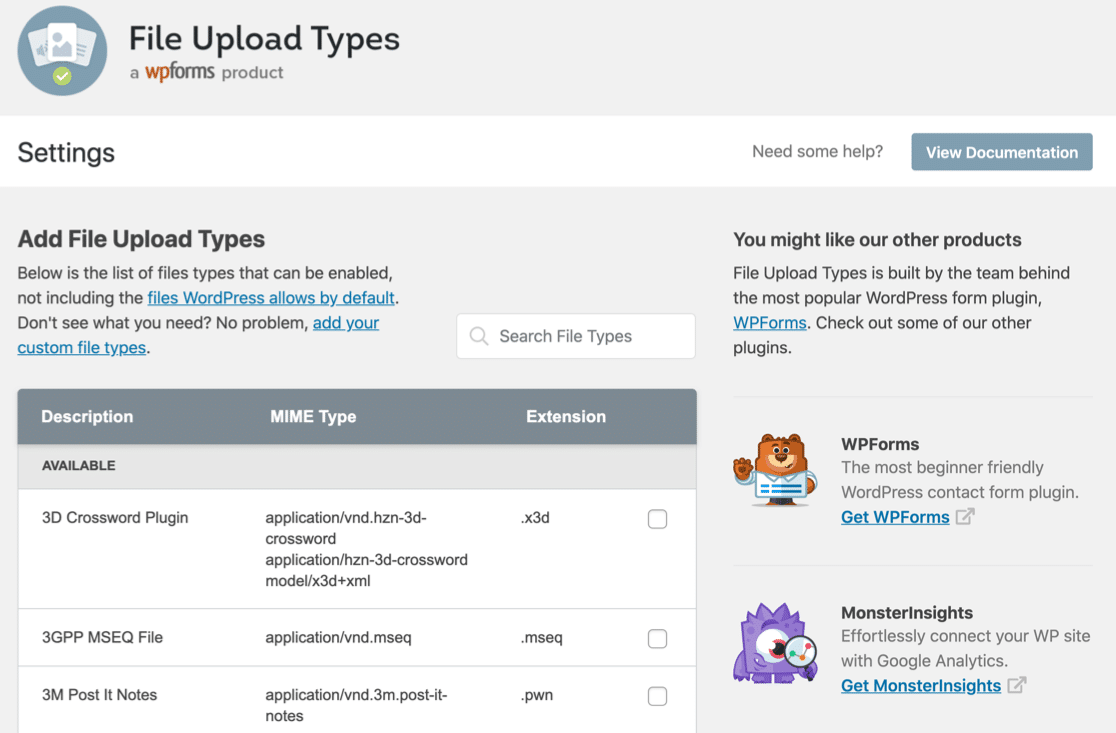
I found the plugin easy to set up. I could configure different file types for users to upload in minutes, and it required zero coding knowledge.
What I appreciated most is its support for a wide variety of file types that WordPress doesn’t natively support, including:
- .ai
- .zip
- .xml
- .svg
- .csv
- .mobi
- .cad
- .dwg
- .dxf
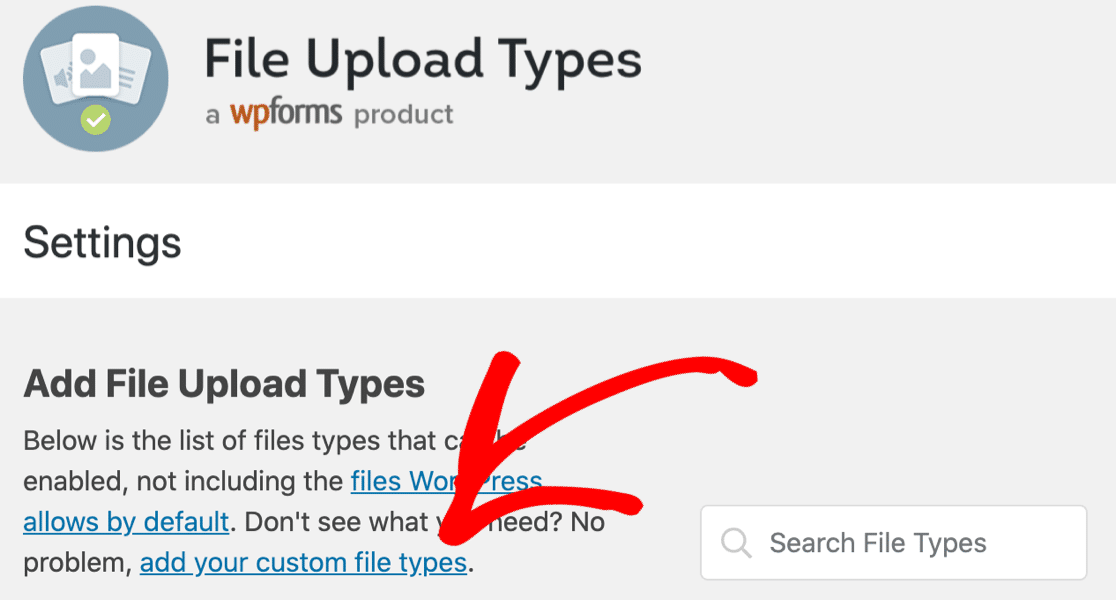
You can also add custom file types. If your site needs a less common format, the plugin covers that too.
Pros:
- Completely free with no feature restrictions
- Supports rare and custom file formats WordPress blocks by default
- Dead simple setup with no configuration complexity
Cons:
- Requires WPForms to be useful (not a standalone file upload plugin)
- Only extends file type support; doesn’t add front-end upload functionality on its own
Plans and Pricing
File Upload Types is a free WordPress file upload plugin. If you’re on a tight budget, you can use it at no cost and accept front-end file submissions of various types.
Choose File Upload Types if you’re already using WPForms and need to expand which file formats visitors can submit without any additional cost.
3. Formidable Forms
Advanced WordPress File Upload Form Plugin

Formidable Forms is one of the most advanced form builder plugins that goes beyond file uploading. This WordPress plugin lets you create custom forms, surveys, quizzes, and more while offering file upload as a field option.
Our Review
During my testing, I found that Formidable Forms delivers on its name. It provides a reliable platform for managing various form-related tasks, including file uploads.
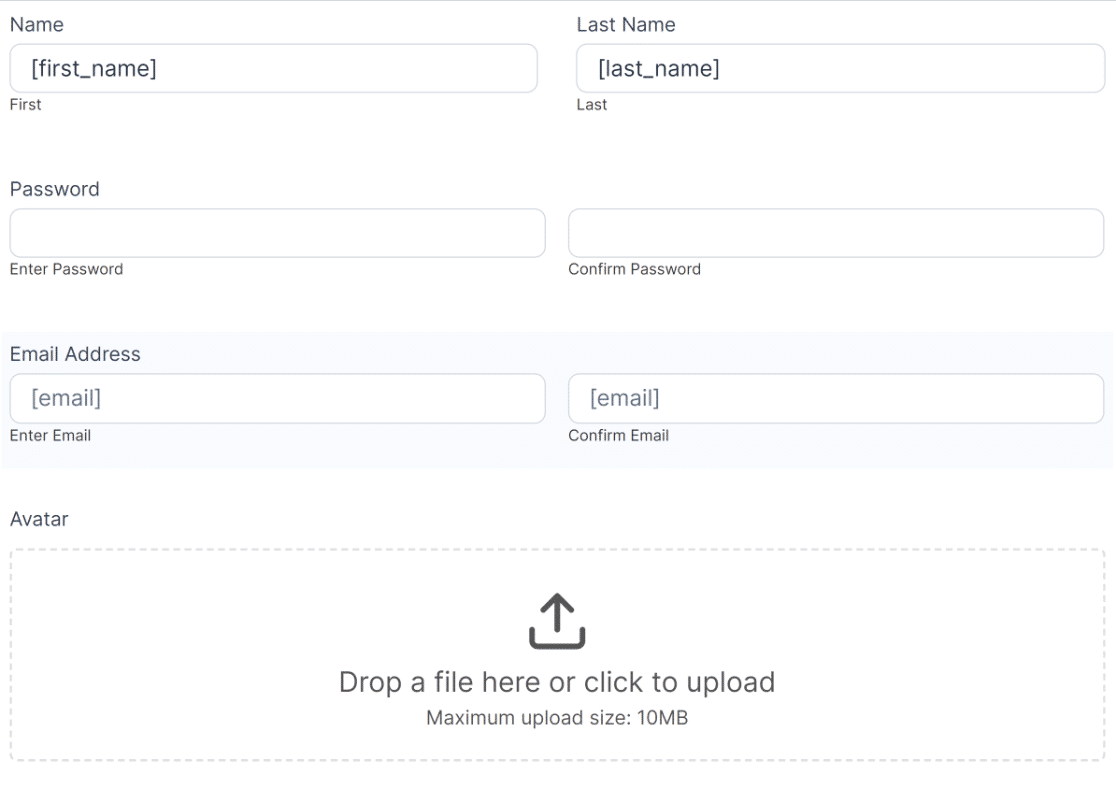
Creating a file upload form was straightforward, and the plugin handled large file sizes without issue.
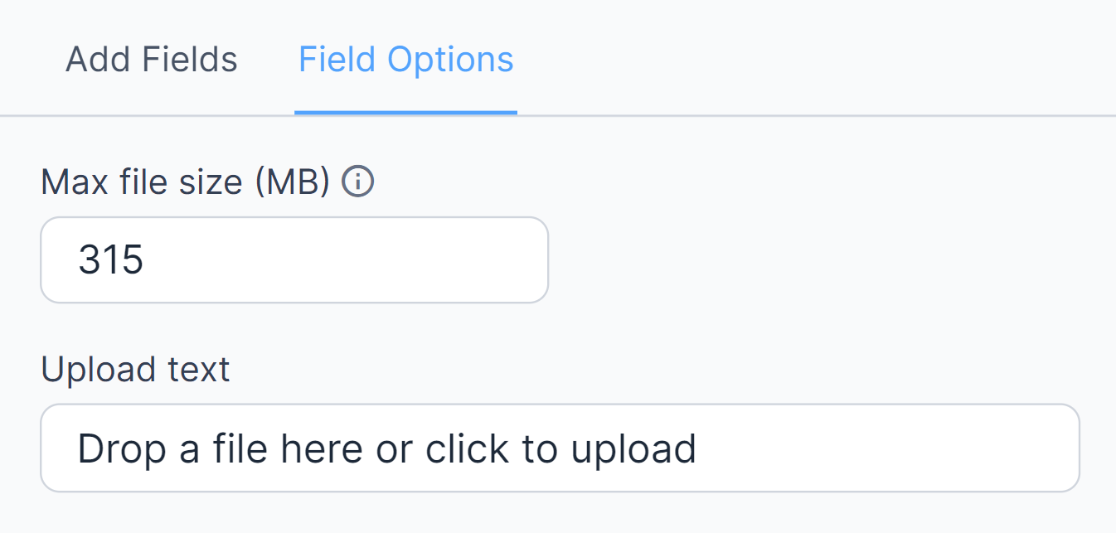
I found Formidable Forms’ flexibility genuinely useful. Users can upload any number of files in various file types, including images, PDFs, spreadsheets, and more.
The security options stood out. You can restrict file types and sizes and delete old files when they’re replaced. If you’re running a WooCommerce store and need customers to upload files for custom product orders (printable items, personalized products), Formidable Forms handles that workflow well.
Pros:
- Handles complex form logic alongside file uploads
- Good WooCommerce compatibility for product-specific file submissions
- Security controls for restricting file types and sizes
Cons:
- File upload feature requires a paid plan
- Steeper learning curve than WPForms for beginners
Plans and Pricing
You can get started with the limited free version of Formidable Forms. To access the file upload feature, you’ll need a premium plan starting at $39.50 per year.
Choose Formidable Forms if you need complex conditional logic, multi-step forms, or WooCommerce integration alongside file upload capabilities.
4. Gravity Forms
Best WordPress File Upload Plugin for Developers
Gravity Forms is one of the most established WordPress form builders on the market. It’s built for developers and agencies who need granular control over form behavior, including file upload submissions.
Our Review
Gravity Forms is developer-first by design. The interface is less visual than WPForms, but the flexibility it offers is significant. File upload fields can be restricted by type, size, and count, and the form data integrates with dozens of third-party services via hooks and add-ons.
The plugin works well for client file upload workflows that require conditional routing. For example, you can trigger different notifications or store file data differently based on what type of file was uploaded or what other form fields contained.
One thing worth noting: Gravity Forms has no free version. You pay from day one, which makes WPForms a better starting point if you’re not sure what you need yet.
Pros:
- Deep developer customization via hooks, filters, and add-ons
- Multi-file upload with conditional logic works well for complex client intake forms
- Mature plugin with a large ecosystem of integrations
Cons:
- No free version; paid from the start
- Higher learning curve than WPForms for non-developers
- UI is dated compared to newer form builders
Pricing and Plans
Gravity Forms starts at $59/year for a single site license. File upload functionality is available at all paid tiers.
Choose Gravity Forms if you’re a developer building custom workflows for client file submissions and need the flexibility of a code-first plugin ecosystem.
5. Easy Digital Downloads
Best File Upload Plugin for Digital Downloads
Easy Digital Downloads is one of the best WordPress eCommerce plugins for digital downloads. It helps you manage and sell digital products from your WordPress site, including PDF files, music, software, books, and more.
Our Review
Easy Digital Downloads has a clean system for handling digital files. The plugin connects with WordPress natively and provides an intuitive interface for product management.
Adding files to your products is straightforward, with the option to assign multiple files per product. You can upload files to cloud platforms like AWS, Dropbox, and others.

After uploading your files, you can password-protect them and allow download access to those with an active license.
The multi-vendor marketplace feature stood out in testing. With this enabled, users can upload and sell files through your website, letting you create an online marketplace similar to CreativeMarket.
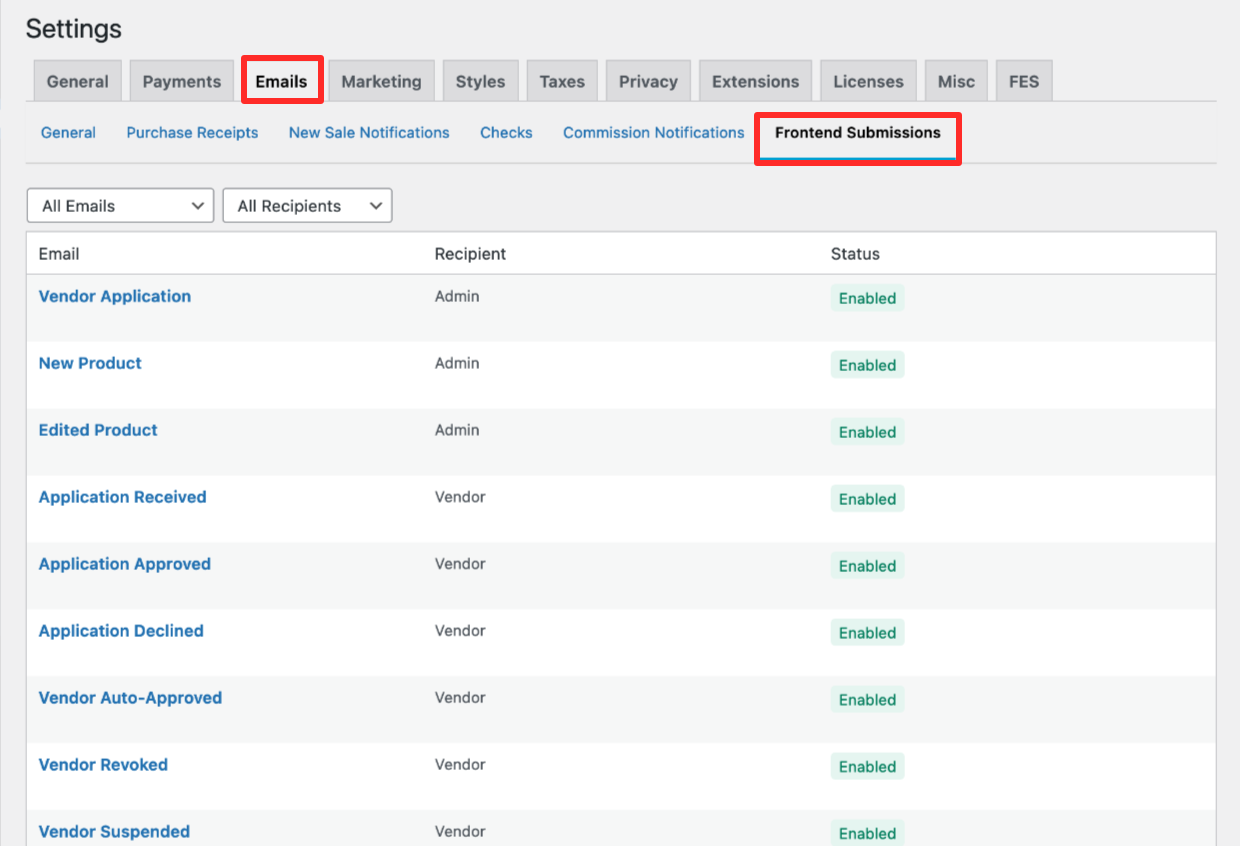
Easy Digital Downloads also connects with SeedProd, so you can customize your online store’s appearance without hiring a developer.
Pros:
- Built specifically for selling and delivering digital files
- Multi-vendor support for marketplace-style sites
- Cloud storage integrations (AWS, Dropbox)
Cons:
- User file uploads (front-end submissions) require the Professional plan at $599/year
- Overkill if you don’t need eCommerce functionality
Pricing and Plans
Pricing for Easy Digital Downloads starts from $199 per year. To allow users to upload their own files, you’ll need the Professional plan starting from $599.
Choose Easy Digital Downloads if you’re selling digital products and need a full eCommerce system. It’s not the right tool if your goal is collecting user-uploaded files through a form.
6. WordPress File Upload
Simple WordPress File Upload Plugin

WordPress File Upload is a freemium plugin dedicated to adding file upload functionality to your website. It has an average 4.4-star rating on WordPress.org and over 20,000 active installs.
The plugin is straightforward, with a user-friendly settings panel where you can add a file upload form to any WordPress page. It supports front-end uploads without requiring user login, which is the setup most business sites need for accepting client file submissions.
Our Review
WordPress File Upload gives you meaningful control over how the upload experience works. You can customize the form appearance and redirect users after uploading.
Uploads completed in under 3 seconds in my test. I didn’t run into problems with large files either.

In the plugin settings, you can enter specific file extensions, add a GDPR consent checkbox, enable email notifications, a single-click upload button, and set form colors. Custom form fields for additional data are also available.
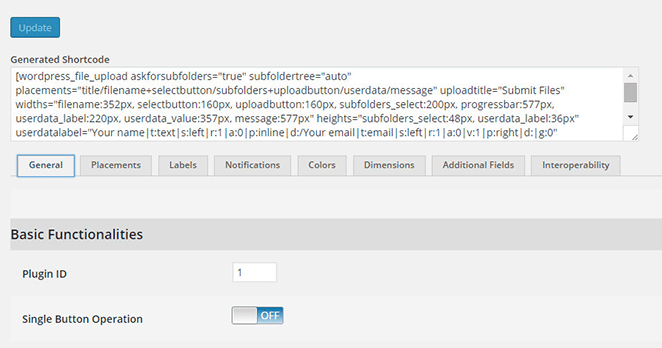
I also liked that uploaded files can be automatically added to your WordPress media library or attached to the page or post. FTP access is available too if your workflow requires it.
Pros:
- Front-end uploads work without user login or registration
- Good customization for a lightweight plugin (colors, redirects, GDPR checkbox)
- Free version is functional for most basic use cases
Cons:
- Interface feels dated compared to WPForms or Gravity Forms
- No built-in form builder beyond the upload field itself
Pricing and Plans
WordPress File Upload is free. You can upgrade to the Pro version for €20.
Choose WordPress File Upload if you need a simple, no-frills front-end upload form that works without user registration and doesn’t require paying for a full form builder.
7. Big File Uploads
Best File Upload Plugin for Large Files

Big File Uploads is a popular WordPress plugin that solves one of the most common WordPress frustrations: the default file size limit. By default, WordPress restricts how large an uploaded file can be, and the limit is often lower than what users need for video, audio, or large design files.
Our Review
With Big File Uploads, you can raise the size limit for user uploads to hundreds of GBs without editing server configuration files.
It took about 2 minutes to change the size limit in my test. The plugin doesn’t add any extra complexity beyond that one setting.
Note that Big File Uploads doesn’t add front-end upload functionality on its own. For that, you’ll want to pair it with the Infinite Uploads plugin or another file upload plugin on this list.
After installing and activating, you can set different upload size limits by user role, such as administrator, editor, or author. If you have a WordPress store where contributors upload product files, this is genuinely useful.
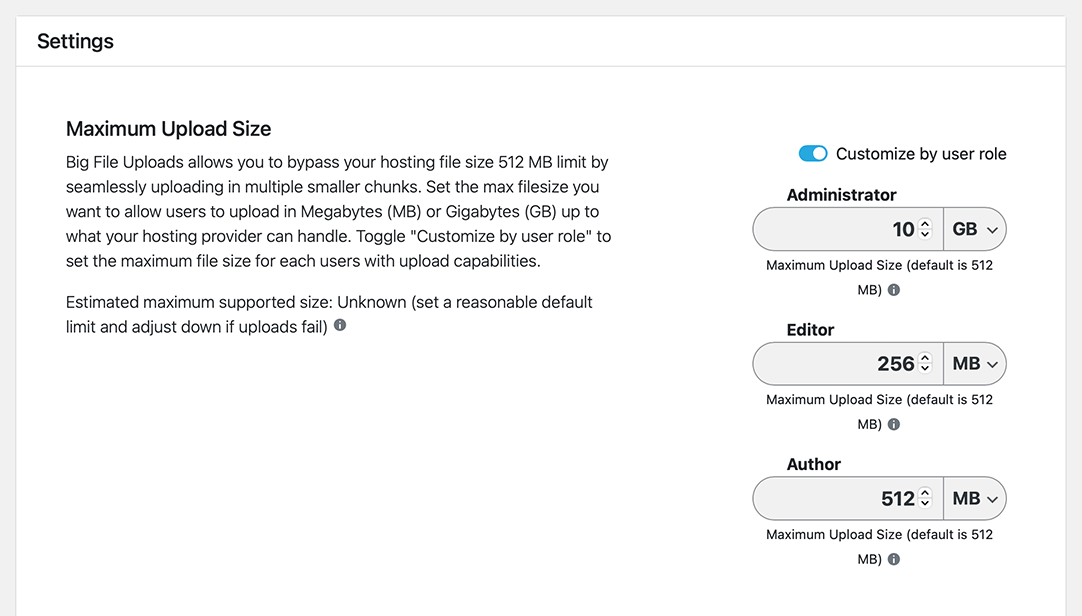
The plugin also works without compatibility issues alongside other file upload plugins. I didn’t run into any conflicts during testing.
Pros:
- Free with no restrictions
- No server configuration required to raise file size limits
- Per-user-role size limits for multi-author sites
Cons:
- Doesn’t add front-end upload functionality on its own
- You’ll need a second plugin to actually accept file submissions from visitors
Pricing and Plans
Big File Uploads is completely free. No matter your budget, you can use it to increase file size limits on any WordPress site.
Choose Big File Uploads if the WordPress file size limit is the specific problem you’re solving. Pair it with WPForms or WordPress File Upload for complete front-end file submission capability.
8. File Manager
WordPress File Management Plugin
File Manager extends the default functionality of your WordPress Media Library. It also works as a file upload plugin because it provides both back-end and front-end file uploads. If you need a way to keep your WordPress files organized and secure, this plugin gives you folder-level control you don’t get with the native media library.
Our Review
The plugin connected with my WordPress dashboard without issues, allowing me to manage files directly from the back end. The front-end file upload option simplifies submissions for visitors too.
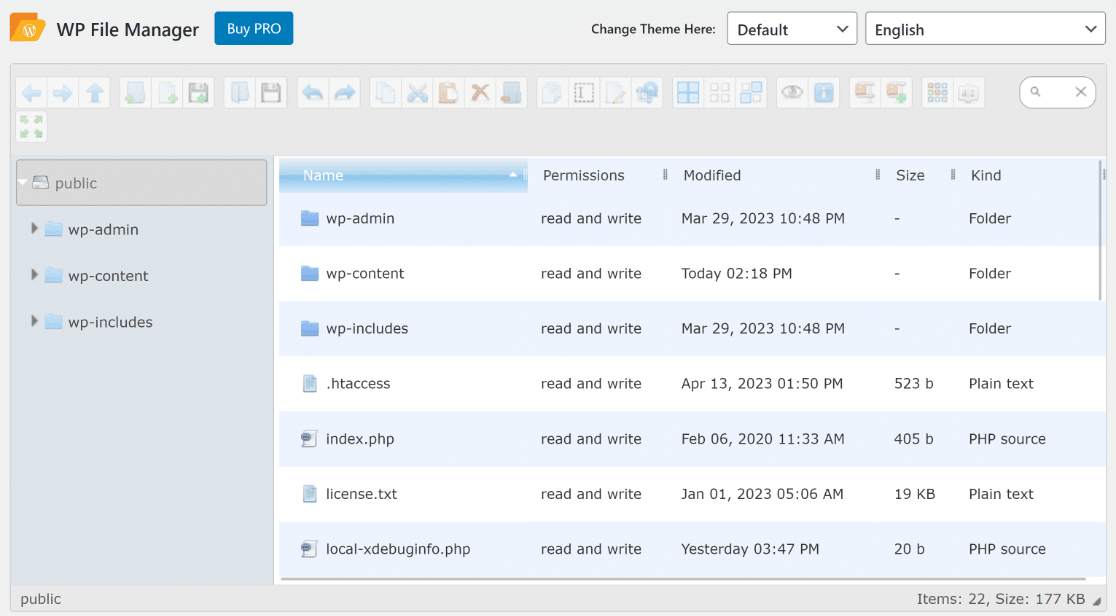
Adding the file upload field to any page is as simple as copying and pasting a shortcode. No extra configuration needed for basic use.
What stood out was the ability to set permissions for who can manage files. You can hide files and features by user role, which is useful for sites where you want visitors to submit files but not browse your entire file system.
Pros:
- Handles both back-end file management and front-end file uploads in one plugin
- Role-based permissions for file access control
- Free version is functional for most needs
Cons:
- Shortcode-based setup is less intuitive than drag-and-drop form builders
- Less polished UI than dedicated form plugins
Pricing and Plans
File Manager offers a free version that you can use right away. The premium version starts from $25.
Choose File Manager if you need to manage your WordPress files at the folder level alongside accepting front-end uploads, and you want to do it with one plugin.
Frequently Asked Questions
How do I create a file upload form in WordPress?
The fastest way to create a file upload form in WordPress is with WPForms. Install the plugin, create a new form, and drag a File Upload field into your form layout. You can restrict accepted file types, set a maximum file size, and configure email notifications when a file is submitted. Once saved, embed the form on any page using the WPForms block or shortcode. The whole setup takes about 5 minutes.
Can I let users upload files without logging in?
Yes. Several plugins on this list support front-end file upload without requiring user login or registration. WordPress File Upload handles this well in its free version. WPForms also supports it by default since form submissions don’t require an account. This is the most common setup for client intake forms, job application forms, and photo submission workflows where requiring registration would reduce conversions.
What is the maximum file upload size in WordPress by default?
WordPress’s default file upload limit is typically 2MB to 64MB depending on your hosting environment. Most shared hosts set it at 32MB or lower. You can check your current limit under Media > Add New in the WordPress dashboard. To raise it without editing server configuration files, install the Big File Uploads plugin. It lets you set a custom limit up to hundreds of GBs through the WordPress admin in about 2 minutes.
Can I restrict which file types users can upload in WordPress?
Yes. Most file upload plugins include controls for restricting accepted file types. In WPForms, you can set an allowed types list directly on the file upload field (for example, .pdf and .jpg only). In WordPress File Upload, you enter allowed extensions in the plugin settings. Restricting file types is important for security, preventing visitors from submitting executable files or other formats that could be misused.
Is there a completely free WordPress file upload plugin?
Yes. Big File Uploads and File Upload Types by WPForms are both fully functional in their free versions. WordPress File Upload also has a useful free tier. If you need a front-end file submission form with no paid plan required, WordPress File Upload is the strongest free option. Note that WPForms and Formidable Forms require a paid plan to access the file upload field, even though both have free versions available.
What Is the Best WordPress File Upload Plugin?
For most sites, WPForms is the right pick. It handles client file uploads, job applications, and photo submissions in minutes, with front-end upload that works without user login. For large file size issues specifically, Big File Uploads is the fastest free fix. And if you’re selling digital files rather than collecting them, Easy Digital Downloads is built for that workflow.
Once you’ve chosen your file upload plugin, you’ll need a page to put it on. SeedProd lets you build a clean, professional client upload page with a drag-and-drop editor in minutes. No developer required.
Next: Discover More Best WordPress Plugins
We hope this guide has helped you find the best WordPress file upload plugins for your website. Before you leave, you may also find the following top WordPress plugin suggestions helpful.
- Best WooCommerce Plugins to Skyrocket Your Sales
- 9 Best WordPress FAQ Plugins
- Top 12 Best WordPress Membership Plugins
- 8 Best WordPress Popup Plugins
- 9 Best WordPress Survey Plugins Compared
- 7 Best WordPress Landing Page Plugins to Boost Conversions
- 10+ Best SMTP Plugins For Successful Email Delivery
Thanks for reading! We’d love to hear your thoughts, so please feel free to join the conversation on YouTube, X and Facebook for more helpful advice and content to grow your business.



