


Do you want to get the SeedProd WordPress Theme Builder, Page Builder, Coming Soon Page, and Maintenance Mode plugin for free? Did you know you can use the lite version of SeedProd without spending a penny?
Let’s be real, who doesn’t love a good freebie? Especially in WordPress, where plugin costs can add up fast. I’m all about maximizing value, and SeedProd Lite is a fantastic way to do just that.
In this guide, I’ll show you exactly what the free version includes, how it compares to Pro, and how to install it in under two minutes.
What Is SeedProd Lite?
SeedProd Lite is the free version of SeedProd. It’s a drag-and-drop WordPress website builder trusted by over 1 million websites. You can use it to create custom landing pages, coming soon pages, and maintenance mode pages without writing any code. The free version never expires.
The powerful access controls in its coming soon page mode allow you to work on your site privately while visitors see a coming soon or maintenance page.
As a content marketer, I rely on coming soon pages a lot. They’re essential for building anticipation and capturing leads before a launch. SeedProd Lite makes setting these up an absolute breeze.
So how much is the lite version of SeedProd? The great news is the lite version of SeedProd is entirely free, forever.

Here’s what’s included in the free version and what requires a paid plan:
| Feature | SeedProd Lite (Free) | SeedProd Pro |
|---|---|---|
| Landing page builder | ✓ Included | ✓ Included |
| Coming soon & maintenance mode | ✓ Included | ✓ Included |
| Basic page blocks (headlines, buttons, images, video) | ✓ Included | ✓ Included |
| Responsive design, works with any WordPress theme | ✓ Included | ✓ Included |
| Import/export landing pages | ✓ Included | ✓ Included |
| Landing page templates | Limited selection | 100+ professionally designed templates |
| WordPress theme builder | ✗ Not included | ✓ Included |
| WooCommerce store builder | ✗ Not included | ✓ Included (Elite) |
| Email integrations (MailChimp, AWeber, ActiveCampaign, etc.) | ✗ Not included | ✓ Included |
| Pro blocks (countdown timers, optin forms, Google Maps, etc.) | ✗ Not included | ✓ Included |
| Custom login page & Easy Digital Downloads | ✗ Not included | ✓ Included |
What You Can Build with SeedProd Lite for Free
The free version is genuinely useful on its own. I use SeedProd to build and manage pages on this site, so I know firsthand what Lite can do.
With SeedProd Lite you can build coming soon pages, maintenance mode pages, and basic landing pages like sales pages, squeeze pages, webinar pages, and thank you pages. It’s the fastest way I’ve found to put a site in maintenance mode without it looking broken.

When I set up a new site in maintenance mode, SeedProd’s default page is clean and professional straight out of the box. You can customize it with your own logo and message in a few clicks, no theme changes required.
You won’t get the full theme builder or email integrations with Lite, but for protecting a site under development or capturing leads before launch, it does the job well.
How Do I Activate the Free Version of SeedProd?
Installing SeedProd Lite takes about two minutes. First, make sure you’re using WordPress.org, not WordPress.com. If you’re not sure what the difference is, check out this guide on WordPress.org vs. WordPress.com.
Then follow these steps:
Step 1: Go to Plugins and Search for SeedProd
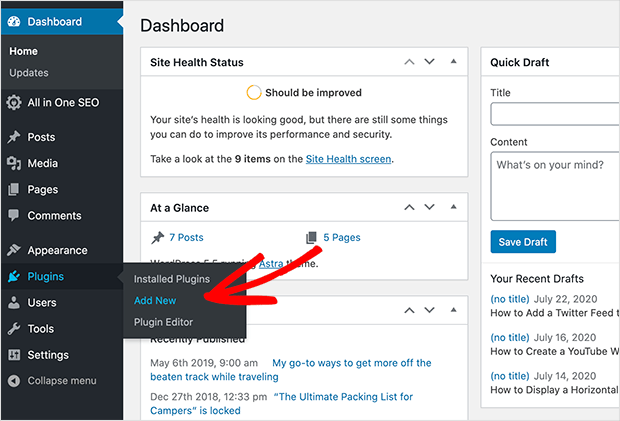
In your WordPress dashboard, hover over Plugins in the left-hand menu and click Add New Plugin.
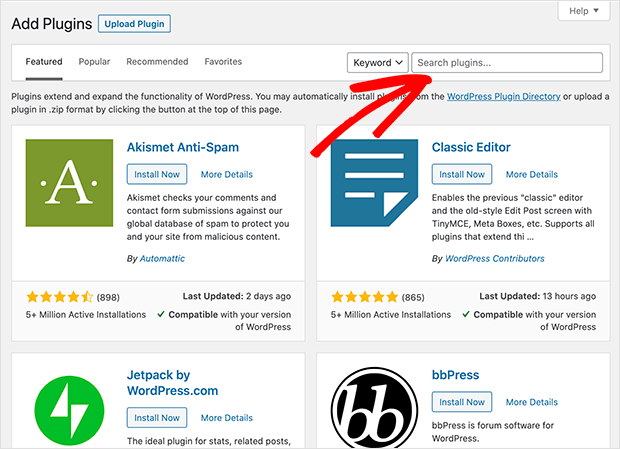
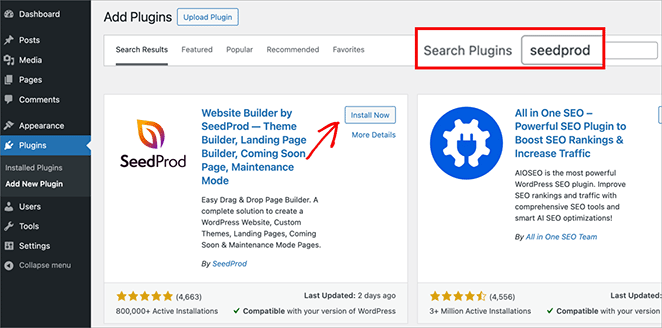
In the search box in the top right corner, type SeedProd. The plugin called “Website Builder by SeedProd” will appear at the top of the results.
Step 2: Click Install Now
Click the Install Now button next to “Website Builder by SeedProd — Custom Theme Builder, Landing Page Builder, Coming Soon, Maintenance Mode & more”.
Step 3: Activate the Plugin
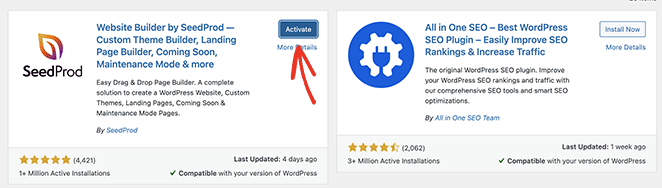
Once the plugin installs, click the blue Activate button. WordPress will redirect you back to the Plugins page when it’s done.
Step 4: Open the SeedProd Dashboard
After activation, you’ll see SeedProd appear in your WordPress left-hand menu. Click it to open the SeedProd dashboard.
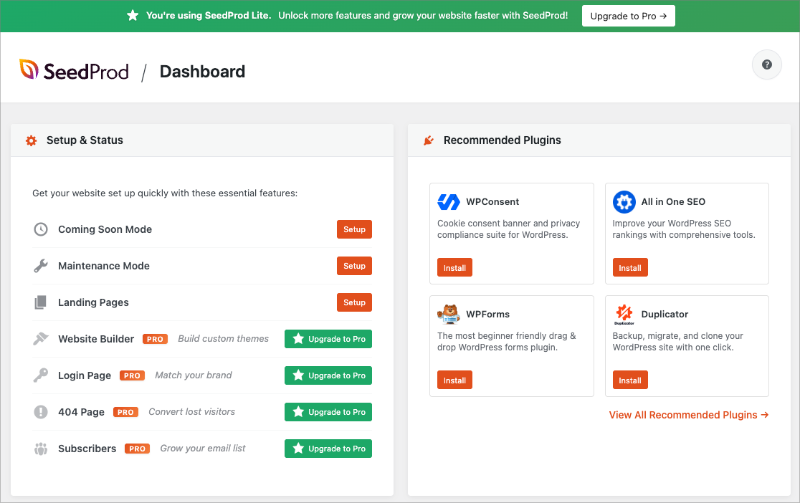
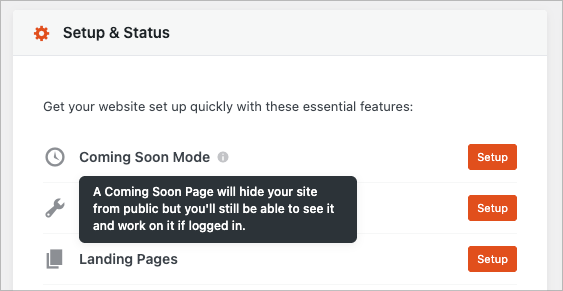
From here you can enable coming soon or maintenance mode with a single toggle, or click Landing Pages to start building your first page. I usually head straight to the coming soon toggle when setting up a new site.
Step 5: Create Your First Page
Click Add New Landing Page to choose a template and open the drag-and-drop builder. SeedProd loads your page in the visual editor where you can click any element to edit it.
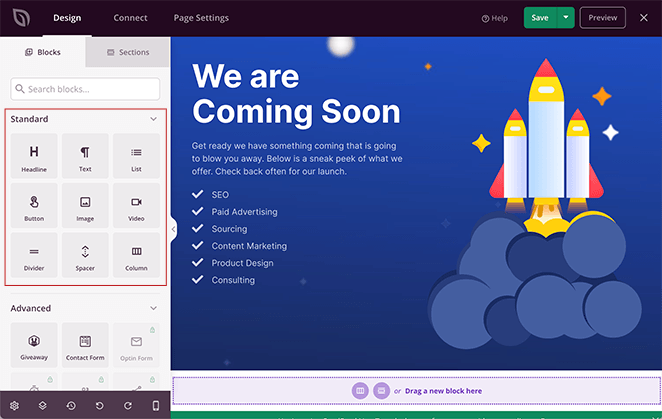
Your SeedProd free trial is now ready to go. You can start building landing pages, coming soon pages, and maintenance pages right away.
If you decide you want the theme builder, email integrations, or Pro blocks later, upgrading is straightforward from the SeedProd dashboard. SeedProd Pro comes with a 14-day money-back guarantee, so you can try the paid features risk-free.
Frequently Asked Questions About SeedProd’s Free Version
Does SeedProd have a free trial for Pro features?
SeedProd doesn’t offer a time-limited Pro trial, but SeedProd Lite is free forever with no expiry date. If you want to test Pro features before committing, SeedProd Pro includes a 14-day money-back guarantee. You can upgrade to Pro, try all the premium features for two weeks, and get a full refund if it isn’t the right fit.
What can I build with SeedProd Lite for free?
SeedProd Lite is completely free and doesn’t expire. You can download it from WordPress.org and use it indefinitely at no cost. The free version includes the drag-and-drop builder, coming soon and maintenance mode pages, and basic landing page templates. You can build sales pages, squeeze pages, webinar pages, thank you pages, and more. Features like the theme builder, WooCommerce integration, and premium email integrations require a paid SeedProd Pro plan.
What’s the difference between SeedProd Lite and SeedProd Pro?
SeedProd Lite gives you the core drag-and-drop builder, coming soon and maintenance mode pages, and basic landing page creation at no cost. SeedProd Pro adds the full WordPress theme builder, 100+ professionally designed landing page templates, email marketing integrations (MailChimp, AWeber, ActiveCampaign, and more), WooCommerce store builder, pro blocks, and dynamic personalized pages. See the full comparison in the table above.
Next, Get Started with SeedProd
You now know how to get an unlimited free trial of SeedProd, so what are you waiting for?
If you need a little help building your first page, check out my guide on how to create a coming soon page in WordPress.
Here are some other things you can do with SeedProd:
- How to Customize a Password Protected Page in WordPress
- How to Put Your WordPress Site in Maintenance Mode
- How to Enable Maintenance Mode for WooCommerce Shop Pages
- How to Create a Modern Under Construction Page in WordPress
Thanks for reading! We’d love to hear your thoughts, so please feel free to join the conversation on YouTube, X and Facebook for more helpful advice and content to grow your business.




