


Beaver Builder vs Elementor est l'une des comparaisons de constructeurs de pages WordPress les plus courantes car les deux peuvent créer des sites professionnels, mais ils font des compromis très différents. Le bon choix dépend de ce que vous construisez et du contrôle dont vous avez réellement besoin.
J'ai utilisé les deux sur des projets clients et personnels pendant plus de 13 ans, et j'ai refait des tests récents en 2026 pour refléter leurs performances actuelles. J'ai également comparé SeedProd sur les mêmes mises en page pour la vitesse et la conversion, et ces résultats ont modifié ma perspective, en particulier pour les pages de destination et les sites d'entreprise.
- Comment j'ai testé Beaver Builder vs Elementor
- Beaver Builder vs Elementor vs SeedProd : Aperçu
- Quel constructeur de pages a l'interface la plus simple ?
- Modules de contenu comparés
- Options de style : Qui vous donne plus de contrôle sur la conception ?
- Modèles de page et thèmes : Quel constructeur gagne ?
- Quel constructeur de pages dispose des meilleurs outils d'IA ?
- Résultats des tests de vitesse et de performance
- Tarification : Quel est le coût de chaque constructeur ?
- Comparaison côte à côte
- Verdict final : Le meilleur constructeur de pages en 2026
- FAQ sur Beaver Builder vs Elementor
Comment j'ai testé Beaver Builder vs Elementor
Pour trouver la meilleure option, je me suis concentré sur les fonctionnalités qui importent le plus aux chefs d'entreprise.
J'ai construit la même page de test dans les trois constructeurs sur mon site WordPress actif : un titre H1, un paragraphe, un bouton et une image.
J'ai exécuté chaque page via GTmetrix trois fois et j'ai enregistré les résultats médians. Google Tag Manager était actif sur les trois pages, ce qui affecte la taille brute de la page de manière égale mais se charge de manière asynchrone, donc cela ne bloque pas le rendu.
Voici les critères spécifiques que j'ai utilisés pour cette revue :
- Facilité d'utilisation : L'interface est-elle conviviale pour les débutants ? Pouvez-vous construire une page sans coder ?
- Vitesse : Le constructeur ajoute-t-il du bloat au code ? À quelle vitesse les pages se chargent-elles ?
- Fonctionnalités : Inclut-il des éléments essentiels comme des formulaires de contact, des CTA et des compteurs de décompte ?
- Modèles : Existe-t-il des modèles de haute qualité pour différents types de sites ?
- Outils IA : Dispose-t-il d'une IA native pour le contenu ou la conception ?
- Prix : Quel est le coût et qu'obtenez-vous à chaque niveau ?
Beaver Builder vs Elementor vs SeedProd : Aperçu
Voici un simple aperçu de ces trois constructeurs de pages WordPress.
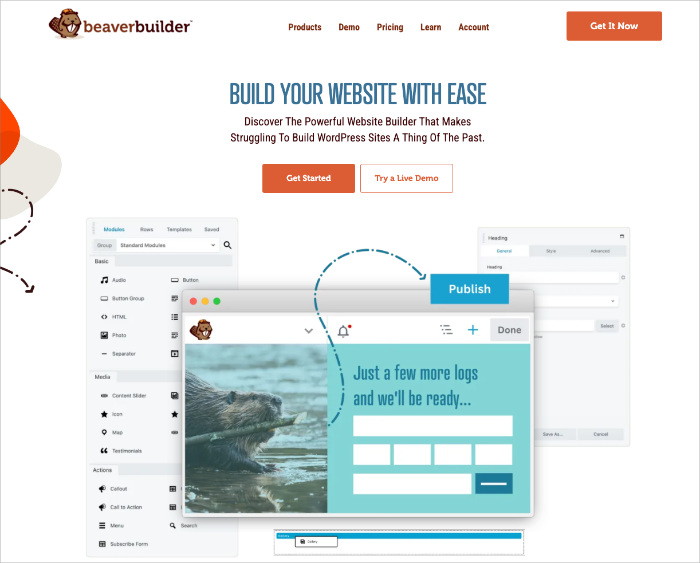
Aperçu de Beaver Builder
Note : 4/5 étoiles
Prix : À partir de 99 $/an
Fonctionnalités remarquables :
- Interface glisser-déposer épurée
- Performance fiable et stable
- Bon support développeur
- Marquage blanc sur les plans supérieurs
- Compatible avec la plupart des thèmes
Version gratuite : Oui
Beaver Builder est un constructeur de pages stable et facile à utiliser, basé sur le glisser-déposer, conçu pour un code propre et des performances constantes. Il est idéal pour les développeurs et les agences qui souhaitent un outil fiable qui s'intègre parfaitement à presque tous les thèmes WordPress.
L'interface est minimale et sans distraction, ce qui la rend rapide à apprendre et efficace pour créer des mises en page simples et complexes. Je l'ai utilisé pour des sites clients pendant des années car il plantait rarement entre les mises à jour.
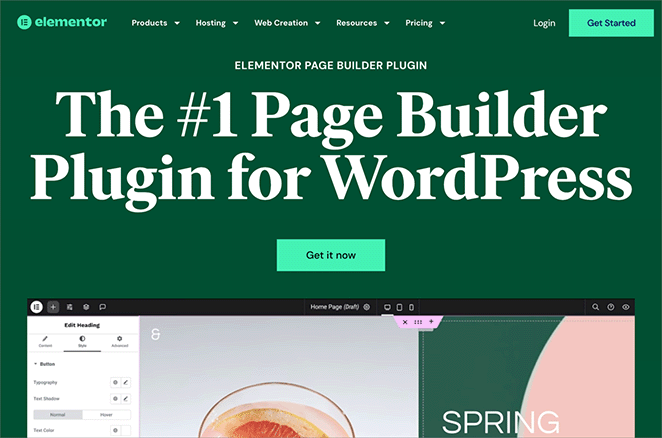
Présentation d'Elementor
Note : 4,5/5 étoiles
Prix : À partir de 59 $/an
Fonctionnalités remarquables :
- Immense bibliothèque de widgets et de modèles
- Édition en ligne et style avancé
- Constructeur de thème complet
- Outils IA pour le contenu et la mise en page
- Grande communauté de support
Version gratuite : Oui
Elementor est l'un des constructeurs de pages WordPress les plus populaires, offrant une flexibilité créative inégalée. Son éditeur glisser-déposer et sa grande bibliothèque de widgets en font une option puissante pour créer à la fois des pages de destination et des sites Web complets.
Avec un constructeur de thème intégré et des fonctionnalités IA, il est idéal pour les concepteurs qui souhaitent un contrôle visuel total. Le compromis est la complexité : Elementor est puissant mais prend plus de temps à apprendre et ajoute plus de surcharge à vos pages.
Aperçu de SeedProd
En comparant Beaver Builder et Elementor, j'ai testé SeedProd comme troisième option pour tous ceux qui se soucient principalement de la vitesse, des conversions et de la simplicité. Il n'essaie pas de rivaliser sur le nombre de widgets. Il est conçu pour les spécialistes du marketing et les propriétaires d'entreprise qui ont besoin de pages qui se chargent rapidement et convertissent bien.
Note : 5/5 étoiles
Prix : À partir de 39,50 $/an

Fonctionnalités remarquables :
- Constructeur de thème par glisser-déposer
- Plus de 300 modèles de pages de destination
- Modes « En construction » et 404 intégrés
- Support des blocs WooCommerce et IA
- Chargement le plus rapide dans les tests
Version gratuite : Oui
SeedProd combine un constructeur glisser-déposer avec des blocs axés sur la conversion tels que des formulaires d'inscription, des comptes à rebours et des widgets de cadeaux. C'est le moins cher des trois et le plus rapide dans mes tests de vitesse, et ce, de manière significative.
Une mise en garde honnête : si vous avez besoin d'animations de défilement complexes ou d'éléments qui apparaissent de plusieurs directions, Elementor est le meilleur choix. SeedProd est conçu pour la vitesse et la conversion, donc ces effets de mouvement lourds ne font pas partie de la boîte à outils. C'est un compromis délibéré, pas un oubli.
Quel constructeur de pages a l'interface la plus simple ?
Chaque constructeur fournit un éditeur visuel glisser-déposer, mais leurs mises en page et leurs flux de travail diffèrent considérablement. Voici ce que j'ai trouvé après avoir créé la même page dans les trois.
Expérience de l'interface Beaver Builder
Beaver Builder utilise un espace de travail minimal. Les menus restent masqués jusqu'à ce qu'ils soient nécessaires, ce qui maintient la zone d'édition dégagée. L'ajout d'éléments ouvre des panneaux de paramètres compacts plutôt qu'une barre latérale complète.
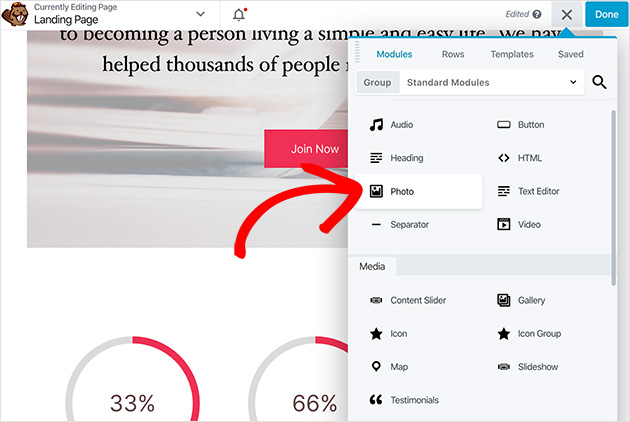
La seule chose qui m'a surpris : il n'y a pas de barre latérale persistante. Beaver Builder utilise à la place des panneaux flottants.
Cela semblait daté par rapport à l'interface utilisateur sombre et moderne d'Elementor au début. Une fois que je me suis habitué, le flux de travail était rapide. Mais si vous venez d'Elementor, attendez-vous à quelques minutes de « attendez, où est passé ça ? »
Il gère automatiquement les mises en page en colonnes, ce qui réduit le temps d'installation. Pour les développeurs et les utilisateurs qui souhaitent se concentrer sur la mise en page sans distractions, c'est un excellent choix.
Avantages :
- Efficace et rapide une fois que vous maîtrisez le système de pop-up
- Un minimum d'encombrement pour vous garder concentré
- La gestion automatique des colonnes réduit les étapes d'installation
Inconvénients :
- L'absence de barre latérale persistante peut dérouter les utilisateurs d'Elementor
- L'interface semble datée par rapport aux concurrents
Expérience de l'interface Elementor Pro
Elementor divise l'espace de travail en deux sections : un aperçu en direct à droite et un panneau latéral pour les contrôles à gauche. La mise en page est intuitive une fois que vous la connaissez, mais la profondeur de la barre latérale peut vous ralentir.
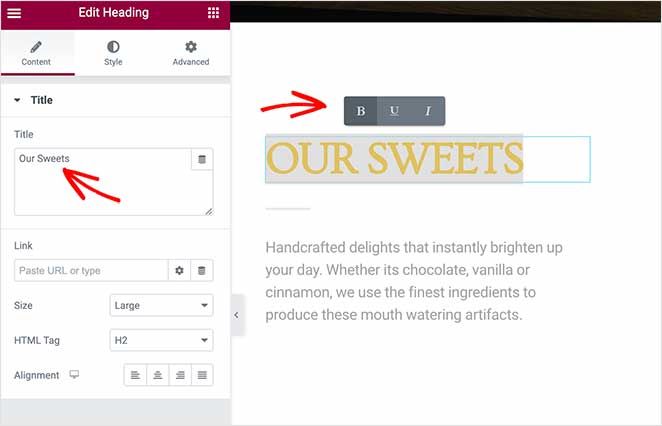
La friction spécifique que j'ai rencontrée le plus souvent : pour modifier quelque chose comme la couleur au survol d'un bouton, j'ai dû naviguer dans trois sous-panneaux de la barre latérale. Ce niveau de contrôle est vraiment utile pour les conceptions complexes. Mais pour les pages simples, cela fait plus d'étapes que nécessaire.
Elementor prend en charge l'édition de texte en ligne et une large gamme d'options de personnalisation. La création de colonnes nécessite des étapes manuelles lors de la configuration de la mise en page, ce qui ajoute du temps par rapport à la gestion automatique de Beaver Builder.
Avantages :
- Mise en page intuitive en écran partagé
- L'édition de texte en ligne est rapide pour les modifications de copie
- Le clic droit et le copier-coller accélèrent le travail répétitif
Inconvénients :
- La profondeur des sous-panneaux ralentit les modifications de style simples
- La création manuelle de colonnes ajoute des étapes
- Courbe d'apprentissage plus raide que les deux autres
Expérience de l'interface SeedProd
SeedProd utilise une disposition de barre latérale épurée similaire à celle d'Elementor, mais avec moins de distractions. Tous les outils essentiels sont organisés logiquement, et les fonctionnalités de création de thèmes sont faciles d'accès sans configuration supplémentaire.

Lors de mes tests, SeedProd a été le plus rapide pour créer une page à partir de zéro. Les blocs sont clairement étiquetés et faciles à trouver, et la barre latérale ne nécessite pas de naviguer dans des sous-panneaux pour les modifications de style de base.
Avantages :
- Temps de création de la première page le plus rapide des trois
- Barre latérale claire et bien organisée
- Pas de navigation dans les sous-panneaux pour les modifications de style courantes
Inconvénients :
- Moins de flexibilité de conception qu'Elementor pour les mises en page complexes
- Pas de contrôles d'animation complexes
Mon verdict : Les trois constructeurs sont intuitifs, mais ils conviennent à différents utilisateurs. Beaver Builder est le plus rapide pour les développeurs qui apprécient un espace de travail sans distractions. Elementor offre aux concepteurs le contrôle le plus approfondi. SeedProd est le plus rapide pour créer des pages qui doivent être mises en ligne rapidement.
Modules de contenu comparés
Les constructeurs de pages utilisent des modules, des éléments ou des blocs pour ajouter du contenu et des fonctionnalités à votre site. J'ai comparé les trois en fonction des modules que vous utilisez réellement lors de la création de pages pour un site d'entreprise.
Modules de contenu Beaver Builder
Beaver Builder se concentre sur la praticité et la stabilité. Il comprend des modules de base comme les témoignages, les curseurs et les boutons sociaux, couvrant l'essentiel pour la plupart des sites Web. L'ensemble de modules est fiable et cohérent sur différents thèmes WordPress.
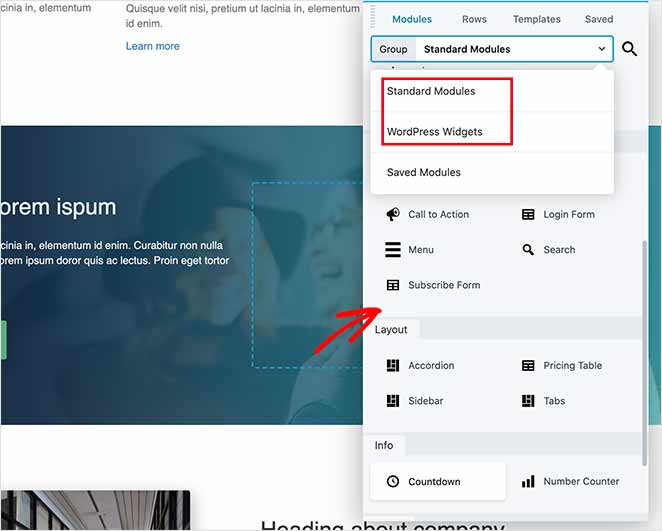
Beaver Builder offre moins de modules spécialisés de conversion ou de marketing par rapport à ses concurrents. Si vous avez besoin de formulaires d'inscription, de comptes à rebours ou de widgets de cadeaux prêts à l'emploi, vous devrez ajouter des plugins tiers.
Modules de contenu Elementor
Elementor offre la plus grande sélection de widgets, avec plus de 100 options puissantes dans sa version Pro et bien d'autres disponibles via des modules complémentaires tiers. Cette gamme prend en charge tout, des simples mises en page textuelles aux effets de conception avancés.
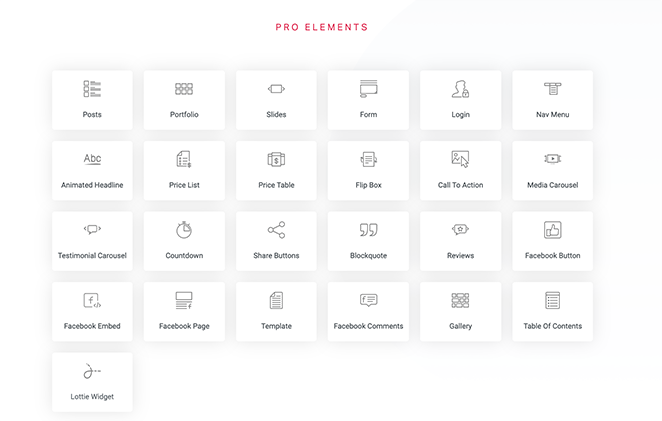
La large sélection ajoute de la flexibilité mais peut augmenter le temps de configuration. Trouver le bon widget nécessite souvent un défilement supplémentaire. Il convient mieux aux utilisateurs qui souhaitent un contrôle créatif maximal et qui ne craignent pas de passer du temps dans la bibliothèque.
Blocs et éléments de page de destination SeedProd
Les blocs de SeedProd sont axés sur la performance et les conversions. Il comprend tous les blocs essentiels ainsi que des éléments marketing spécialisés comme les formulaires d'inscription, les comptes à rebours et les widgets de cadeaux. Cela le rend particulièrement efficace pour créer des pages de destination à forte conversion.

Lorsque WooCommerce est installé, ces blocs s'intègrent directement aux données de vos produits, ce qui facilite la conception de pages de boutique personnalisées sans plugins supplémentaires.
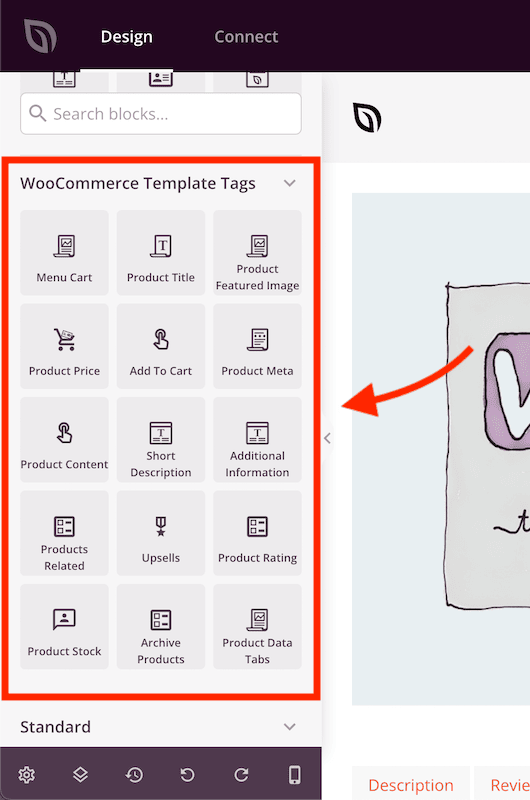
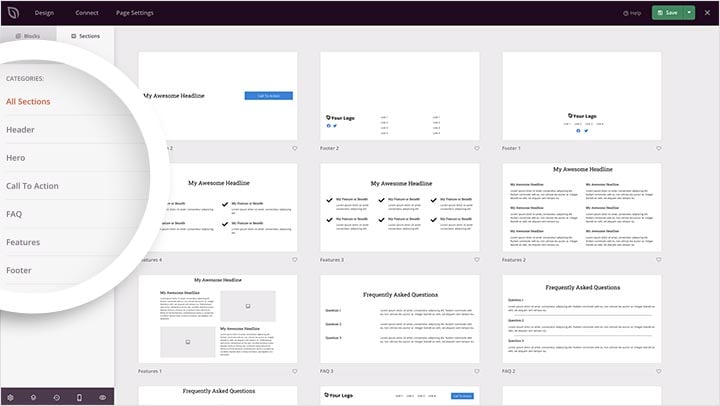
SeedProd comprend également des sections prêtes à l'emploi pour les témoignages, les fonctionnalités et les tableaux de prix, qui peuvent être insérées en un clic pour accélérer le processus de création.
Options de style : Qui vous donne plus de contrôle sur la conception ?
La flexibilité de style détermine le degré de contrôle que vous avez sur l'apparence de votre site. Voici comment les trois se comparent en fonction de mes tests.
Options de style dans Beaver Builder
Beaver Builder organise les contrôles de style en trois onglets : Général, Style et Avancé. Cette disposition est efficace pour apporter des ajustements de conception précis. Il prend en charge l'espacement personnalisé, la visibilité réactive et l'affichage conditionnel pour les utilisateurs connectés.
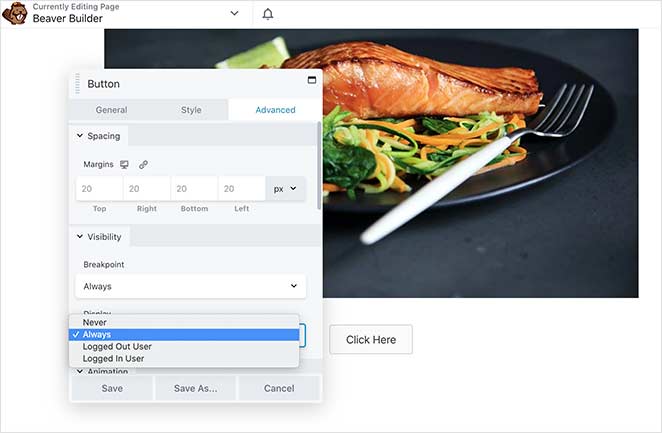
L'interface est stable et prévisible, ce qui aide à maintenir la cohérence entre les pages. Pour les développeurs qui créent des sites clients, cette prévisibilité est un avantage considérable.
Options de style dans Elementor
Elementor offre trois onglets de style principaux : Contenu, Style et Avancé, avec des effets et des animations supplémentaires superposés. Les effets de mouvement, les contrôles d'espacement personnalisés et les séparateurs de forme permettent des conceptions visuelles très soignées.
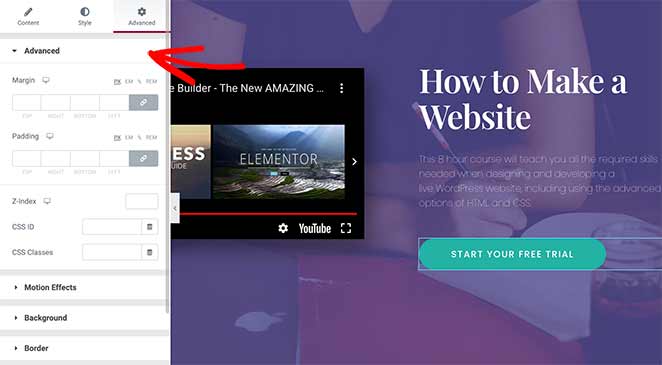
Les fonctionnalités de clic droit et de copier-coller rationalisent le travail de style répétitif, ce qui permet de gagner du temps lors de constructions importantes. Si vous avez besoin d'une personnalisation visuelle approfondie, Elementor est le plus performant des trois.
Options de style dans SeedProd
SeedProd simplifie le style grâce à un système d'onglets : Contenu, Modèles et Avancé. Chaque onglet se concentre sur des options pratiques, des ajustements rapides de polices et de couleurs aux modèles de conception de blocs complets qui se mettent à jour instantanément.
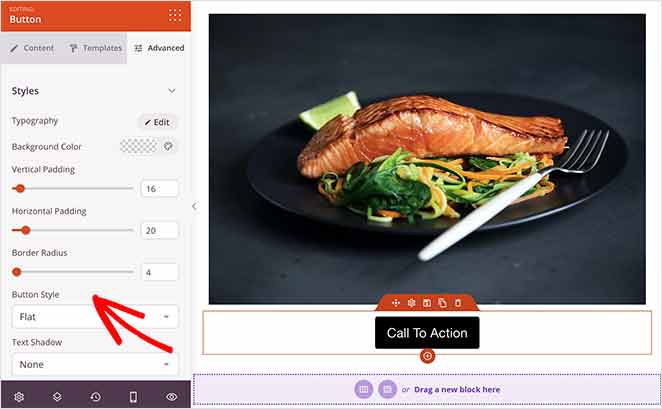
La fonctionnalité de modèle de bloc est particulièrement efficace. En un clic, vous pouvez appliquer des conceptions pré-stylisées à des sections ou des blocs.

Les paramètres globaux vous permettent d'ajuster les polices, les couleurs et la marque sur votre site à partir d'un seul endroit, ce qui maintient la cohérence sans modifications manuelles.

Mon verdict : Elementor gagne en profondeur de conception. Beaver Builder gagne en stabilité et en prévisibilité. SeedProd gagne en rapidité d'exécution pour les pages axées sur la conversion.
Modèles de page et thèmes : Quel constructeur gagne ?
Les modèles vous font gagner du temps en vous offrant une base de conception professionnelle à personnaliser. Voici comment la bibliothèque de chaque constructeur se compare.
Modèles dans Beaver Builder
Beaver Builder divise ses modèles en pages de destination et en pages de contenu. Ils couvrent la plupart des catégories d'entreprises, mais la sélection est plus petite que ce que proposent Elementor ou SeedProd.
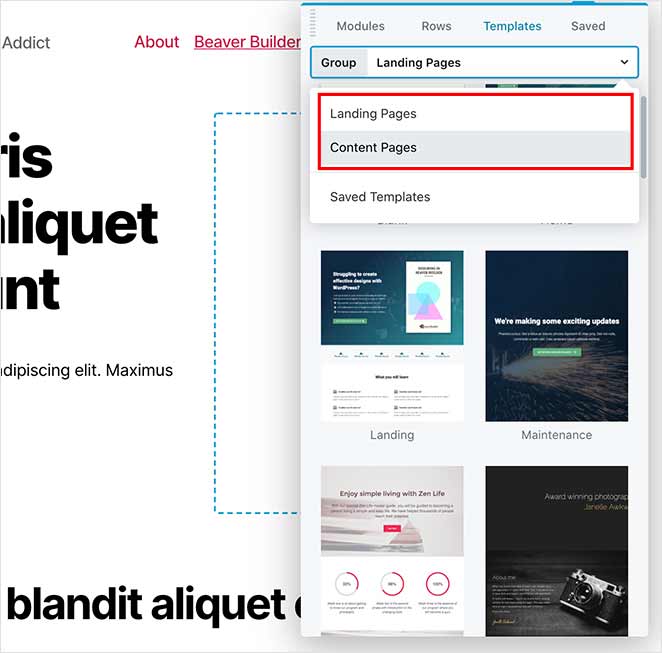
Les modèles fonctionnent mieux avec le thème propre à Beaver Builder ou tout thème offrant des mises en page pleine largeur. L'utilisation d'une configuration compatible garantit que les conceptions s'affichent correctement sur toutes les pages.
Modèles dans Elementor
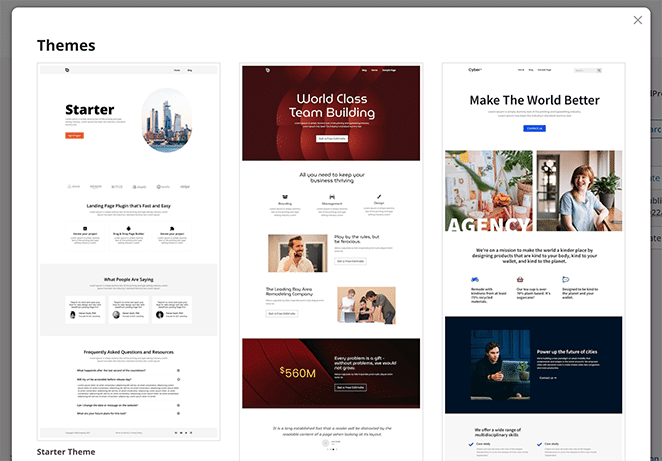
Elementor fournit l'une des plus grandes bibliothèques de modèles, y compris plus de 300 conceptions de pages et des kits de site Web complets. Ses filtres intégrés permettent de trouver rapidement la bonne conception. De nombreux modèles sont disponibles dans la version gratuite, mais les options les plus avancées nécessitent Elementor Pro.
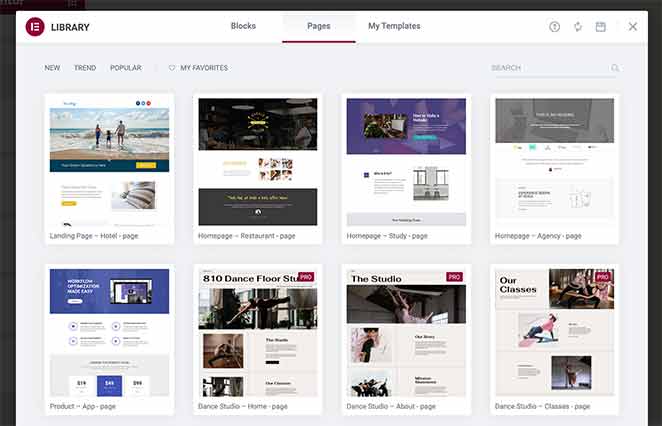
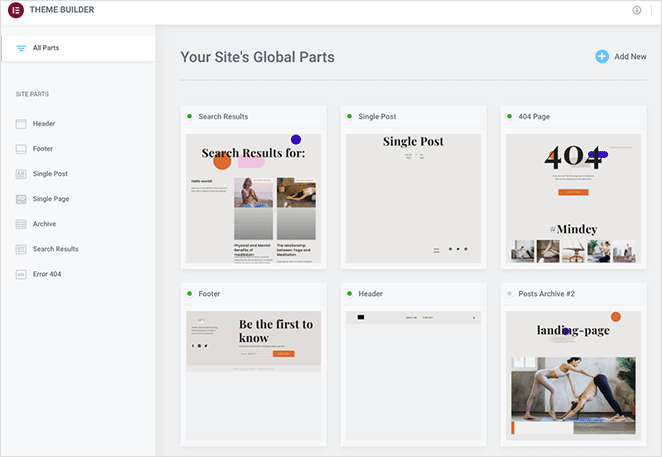
La fonctionnalité de kits de site Web simplifie la création de sites complets en regroupant les en-têtes, les pieds de page et les modèles de pages dans un seul package importable. Pour les configurations minimales, le thème gratuit Hello fonctionne bien comme base.
Modèles dans SeedProd
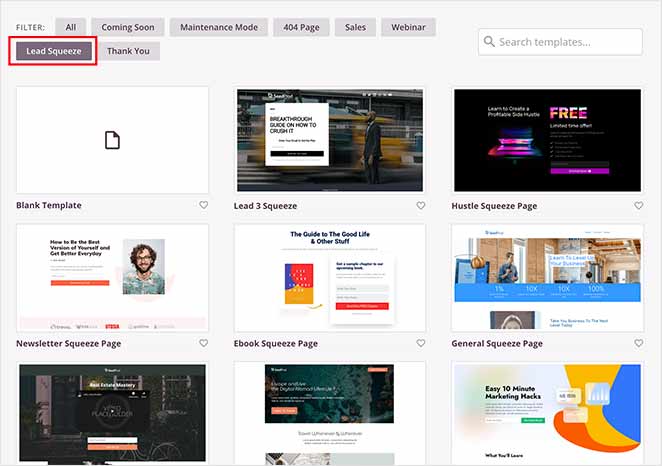
SeedProd comprend plus de 300 modèles de pages de destination conçus par des professionnels, classés par objectif : génération de prospects, ventes de produits, inscription à des événements, et plus encore. Chaque modèle est optimisé pour les conversions et la réactivité mobile.
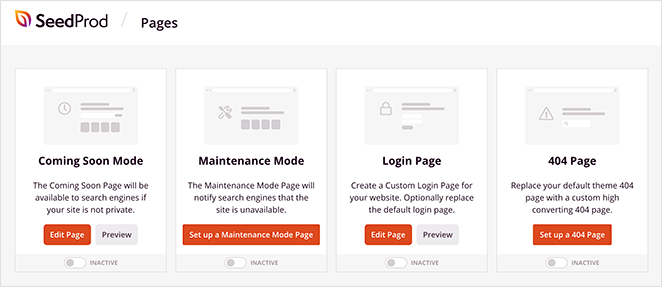
SeedProd fournit également des modèles dédiés pour les pages Bientôt disponible et Maintenance inclus dans la version gratuite, vous n'avez donc pas besoin de les créer à partir de zéro. Les pages 404 personnalisées nécessitent la version Pro.
La fonctionnalité de kits de site Web permet aux utilisateurs de concevoir des thèmes WordPress complets sans codage, en combinant l'édition visuelle avec un contrôle au niveau du thème.
Quel constructeur de pages dispose des meilleurs outils d'IA ?
Les outils d'IA peuvent accélérer la conception et la création de contenu. Voici ce que j'ai trouvé en testant les dernières fonctionnalités d'IA dans les trois constructeurs.
Outils d'IA de Beaver Builder
Beaver Builder n'a actuellement aucune intégration d'IA native. Il repose entièrement sur la saisie manuelle et les modules complémentaires tiers pour la génération de contenu ou de conception. Cela garantit une sortie stable et prévisible, mais limite les options d'automatisation par rapport aux concurrents.
Fonctionnalités d'IA d'Elementor
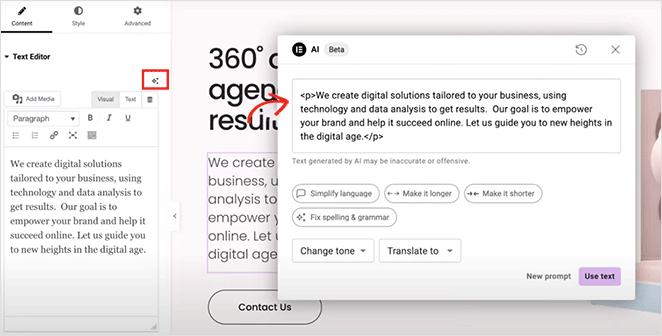
Elementor intègre des outils d'IA directement dans son éditeur. Vous pouvez générer et modifier du texte, du CSS et des extraits de code personnalisés sans quitter l'espace de travail. Il suggère également automatiquement le texte alternatif et les légendes d'images pour l'optimisation de l'accessibilité.
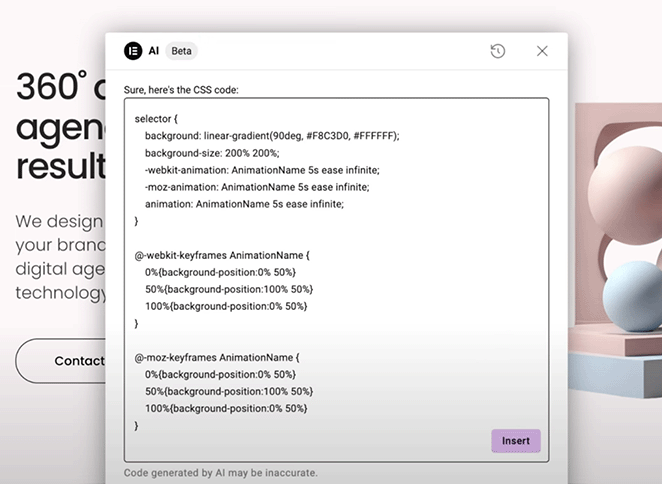
L'assistant d'IA est utile pour l'idéation créative et la rédaction, mais fonctionne mieux avec des invites spécifiques plutôt qu'une automatisation complète. Les fonctionnalités d'IA avancées nécessitent un abonnement IA distinct en plus d'Elementor Pro.
Fonctionnalités d'IA de SeedProd
L'assistant d'écriture IA de SeedProd peut générer des titres, des introductions et des FAQ à partir d'une simple invite. L'interface est intuitive pour ajuster la longueur et le style du texte avec une configuration minimale.
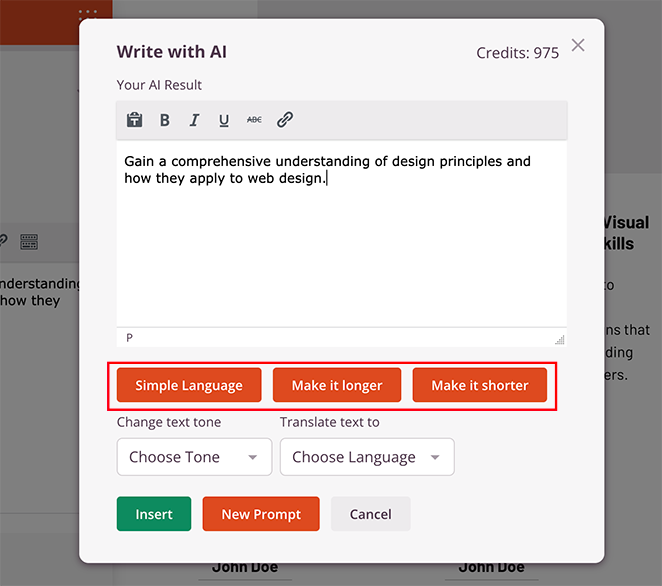
La fonctionnalité de génération d'images par IA vous permet de créer de nouvelles images basées sur des descriptions textuelles et de les modifier par la suite, ce qui signifie que vous n'avez pas à recommencer à chaque fois. Gardez à l'esprit que la génération d'images par IA utilise des crédits, donc une utilisation à haut volume s'accumule.

Résultats des tests de vitesse et de performance
La vitesse de la page affecte à la fois l'expérience utilisateur et les classements SEO. J'ai testé les trois constructeurs en utilisant des pages identiques sur la même installation WordPress et j'ai fait passer chacun par GTmetrix.
| Constructeur | Temps de chargement de la page | DOM chargé | Taille de la page | Requêtes totales | Fichiers CSS | Fichiers JS | Domaines externes |
|---|---|---|---|---|---|---|---|
| SeedProd | 556 ms | 291 ms | 2 115 Ko* | 16 | 5 | 8 | 1 |
| Beaver Builder | 985 ms | 748 ms | 1 539 Ko | 20 | 6 | 9 | 1 |
| Elementor | 1 882 ms | 851 ms | 1 857 Ko | 32 | 12 | 14 | 3 |
* La taille brute de page plus importante de SeedProd est due au chargement asynchrone de Google Tag Manager en arrière-plan. GTM ne bloque pas le rendu, c'est pourquoi le temps de chargement reste le plus rapide.
SeedProd s'est chargé en 556 ms. C'est 1,8 fois plus rapide que Beaver Builder et 3,4 fois plus rapide qu'Elementor sur le même matériel.
Lorsque j'ai examiné la cascade GTmetrix, la raison était claire. Elementor a chargé 32 requêtes au total : 12 fichiers CSS, 14 fichiers JavaScript, et il a appelé 3 domaines externes, y compris Google Fonts (fonts.googleapis.com et fonts.gstatic.com). Chaque domaine externe ajoute une recherche DNS, qui s'accumule à chaque chargement de page.
Beaver Builder était plus intelligent à ce sujet. Il compile votre mise en page en un seul fichier CSS mis en cache et un seul fichier JS mis en cache. Moins de requêtes, moins de surcharge. C'est pourquoi il a atteint 985 ms malgré le chargement de plus de contenu de page que la page de test de SeedProd.
SeedProd a chargé seulement 5 fichiers CSS et ses propres scripts totalisaient 45 Ko. Pas de domaines de polices externes, pas de bundles de widgets inutilisés. La page était légère car le constructeur est conçu pour être léger.
Tarification : Quel est le coût de chaque constructeur ?
Les trois constructeurs utilisent un modèle freemium. Chacun offre une version gratuite avec des fonctionnalités de base et des niveaux payants pour des fonctionnalités avancées.
Tarifs de Beaver Builder
La tarification de Beaver Builder est idéale pour les développeurs et les agences qui ont besoin d'un constructeur stable pour des sites illimités. Tous les plans payants permettent une utilisation sur des sites illimités, ce qui est un avantage significatif par rapport à Elementor si vous gérez plusieurs projets clients.
- Version gratuite : Modules de glisser-déposer de base pour les tests et les petits projets
- Standard : 99 $/an — Modules premium, modèles, un an de mises à jour et de support
- Pro : 199 $/an — Inclut le thème Beaver Builder et le support multisite
- Agence : 399 $/an — Ajoute le marquage blanc pour les sites clients
Pour obtenir une personnalisation complète du thème, y compris les en-têtes et les pieds de page, vous avez besoin du plan Ultimate, qui ajoute l'extension Beaver Themer.
Tarifs d'Elementor
Elementor offre une tarification flexible pour les designers. Une chose à savoir avant d'acheter : le Theme Builder complet n'est disponible qu'à partir du niveau Advanced. Si vous commencez avec le plan Essentials à 59 $ en vous attendant à créer des en-têtes et des pieds de page, vous atteindrez une limite et devrez passer à la version supérieure.
- Version gratuite : Widgets de base et modèles de base pour des mises en page simples
- Essentials : 59 $/an — Widgets WooCommerce et modèles premium pour un site web. Theme Builder non inclus.
- Advanced : 99 $/an — Jusqu'à trois sites, Theme Builder inclus
- Expert : 199 $/an — Jusqu'à 25 sites
- Agence : 399 $/an — Jusqu'à 1 000 sites
Le module complémentaire IA optionnel ajoute des coûts au-delà du plan de base. Si vous avez besoin d'automatisation créative, tenez-en compte.
Tarifs SeedProd
SeedProd est l'option la plus abordable. Le plan Pro est un excellent choix pour la plupart des propriétaires d'entreprise. Il comprend le Theme Builder complet et des outils d'IA intégrés pour générer du texte et des images. Si vous avez des questions sur le plan qui vous convient le mieux, vous pouvez nous contacter directement.
- Version Gratuite : Templates, constructeur de pages de destination et blocs essentiels
- Basique : 39,50 $/an — Blocs Pro, intégrations avancées, templates premium
- Plus : 99,50 $/an — Intégrations de marketing par e-mail et modes "Bientôt disponible"/Maintenance
- Pro : 199,50 $/an — Theme Builder complet, prise en charge de WooCommerce, outils d'écriture et d'images IA
- Elite : 239,60 $/an — Sites illimités
Comparaison côte à côte
Voici la comparaison complète en un coup d'œil.
| Fonctionnalité | Beaver Builder | Elementor | SeedProd |
|---|---|---|---|
| Facilité d'utilisation | Interface propre et minimale | Beaucoup de fonctionnalités, courbe d'apprentissage plus raide | Le plus simple à utiliser dans l'ensemble |
| Flexibilité de conception | Modules de base et contrôle de la mise en page | Le plus de widgets, d'effets et d'outils de mise en page | Blocs ciblés pour les conversions |
| Vitesse | 985 ms lors de mes tests | 1 882 ms lors de mes tests | 556 ms lors de mes tests |
| Outils IA | Pas d'IA intégrée | IA pour le texte, la mise en page et les images | IA simple pour le texte et les images |
| Modèles | Bibliothèque plus petite | Plus de 300 pages, Kits de site Web | Plus de 300 templates axés sur la conversion |
| Constructeur de thèmes | Plans supérieurs uniquement (module complémentaire Beaver Themer) | Plan avancé et supérieur | Plan Pro et supérieur |
| Prix de départ | 99 $/an | 59 $/an | 39,50 $/an |
| Idéal pour | Développeurs et agences | Concepteurs souhaitant un contrôle total | Marketeurs et propriétaires d'entreprise |
Verdict final : Le meilleur constructeur de pages en 2026
SeedProd est le meilleur choix pour la plupart des propriétaires d'entreprises et des blogueurs. Il s'est chargé en 556 ms lors de mes tests GTmetrix, 1,8 fois plus rapidement que Beaver Builder et 3,4 fois plus rapidement qu'Elementor. Il a le prix de départ le plus bas, l'interface la plus simple et l'ensemble de fonctionnalités axées sur la conversion le plus solide sans nécessiter de plugins supplémentaires.
- Configuration simple qui ne ralentit pas votre site
- Plus de 300 modèles conçus par des professionnels
- Modes « Bientôt disponible » et « Maintenance » intégrés
- Outils puissants de gestion des abonnés
Choisissez Beaver Builder si vous êtes un développeur créant des sites complexes pour des clients. Il offre une grande stabilité et un code propre. Beaver Builder compile vos mises en page en fichiers mis en cache, ce qui maintient la sortie optimisée. La politique de sites illimités sur tous les plans payants le rend rentable pour les agences.
Choisissez Elementor si vous avez besoin d'une flexibilité de conception maximale, d'animations avancées ou d'une grande bibliothèque de widgets et que vous êtes prêt à gérer la complexité et le poids supplémentaires. Elementor est le plus puissant des trois pour la conception visuelle.
Une chose à noter : Gutenberg, l'éditeur de blocs intégré de WordPress, s'est considérablement amélioré et est gratuit. Si vous créez un blog simple ou un site de contenu et que vous n'avez pas besoin de pages de destination ou d'un constructeur de thèmes, cela vaut la peine d'être considéré avant de payer pour un constructeur premium.
Vous voulez aller plus loin ? Consultez notre section tutoriels pour des guides étape par étape sur la création avec SeedProd, ou lisez notre guide sur l'anatomie d'une page de destination pour tirer le meilleur parti de tout constructeur que vous choisissez.
FAQ sur Beaver Builder vs Elementor
Beaver Builder est-il meilleur qu'Elementor pour le SEO ?
Beaver Builder peut être meilleur pour le SEO si la performance et la sortie de code propre sont vos principales priorités. Dans mes tests, les pages créées avec Beaver Builder se sont chargées en 985 ms contre 1 882 ms pour Elementor. Des pages plus rapides améliorent les scores Core Web Vitals, qui sont un facteur de classement Google. Cela dit, les deux constructeurs peuvent bien se classer si vous évitez les animations lourdes, gardez les mises en page simples et optimisez les images et la mise en cache.
Elementor vaut-il la peine par rapport à Beaver Builder ?
Elementor vaut la peine si vous souhaitez une flexibilité de conception maximale, des options de style avancées et une grande bibliothèque de widgets sans dépendre de code personnalisé. Si vous préférez une interface plus simple et des pages plus rapides, Beaver Builder ou SeedProd conviennent mieux. Elementor devient également cher si vous avez besoin du Theme Builder, car cela nécessite le plan Advanced à 99 $/an.
Beaver Builder est-il toujours bon en 2026 ?
Oui. Beaver Builder reste un excellent choix pour les développeurs et les agences. Il se met à jour plus lentement qu'Elementor, mais cette stabilité est en fait un argument de vente pour les sites clients. Son système de mise en cache des mises en page maintient la rapidité des pages, et la politique de sites illimités sur tous les plans payants le rend rentable pour les agences gérant plusieurs projets.
Les gens utilisent-ils toujours Elementor ?
Oui, Elementor reste l'un des constructeurs de pages WordPress les plus utilisés. Il compte plus de 12 millions d'installations actives. La principale raison pour laquelle les gens s'en éloignent est la vitesse de chargement des pages et la complexité. Si la vitesse est une priorité, Beaver Builder et SeedProd le surpassent tous deux dans les tests de temps de chargement.
Puis-je passer de Beaver Builder à Elementor (ou vice versa) ?
Oui, mais cela nécessite de reconstruire vos pages manuellement. Il n'y a pas de chemin de migration direct entre les constructeurs de pages. Votre contenu ne sera pas transféré proprement car chaque constructeur stocke les données de mise en page dans son propre format. Il faut en tenir compte avant de faire votre choix : quel que soit le constructeur avec lequel vous commencez, vous y resterez probablement à long terme.
Merci de votre lecture ! Nous serions ravis d'entendre vos réflexions, alors n'hésitez pas à rejoindre la conversation sur YouTube, X et Facebook pour plus de conseils et de contenu utiles pour développer votre entreprise.




C'est intéressant. J'utilise Elementor Pro pour mon site web et j'ai toujours l'impression qu'il ralentit mes pages, peu importe ce que j'essaie... Mais la difficulté sera de passer à autre chose...
Salut Judith ! Malheureusement, il n'y a pas de moyen facile de passer d'un constructeur de pages à un autre (car cela impliquera de recréer tous les modèles de thèmes et les pages de destination).
Vous pouvez essayer les recommandations suggérées dans cet article pour améliorer la vitesse de votre site web : https://www.wpbeginner.com/wordpress-performance-speed/
J'espère que cela vous aidera !
Bien.
J'aimerais gagner ce MacBook. Alors je laisse un commentaire ici 😊
Bonne chance, Martin !
Oui, c'est très intéressant
Merci pour l'info
MacBook Air M2, viens à la maison !
C'était utile
Comparaisons informatives
Je ne comprends pas cela
Salut John, vous êtes invité à nous contacter pour une explication plus approfondie.
merci pour l'info
Bonjour,
Y a-t-il des recommandations de plugins de filtrage avec ce constructeur SeedProd ?
Merci
Salut Mas. Ce guide sur les meilleurs plugins de recherche WordPress pourrait vous être utile.
Merci pour l'info
Les vidéos étaient très intéressantes, informatives et éducatives. J'ai apprécié le visionnage et j'ai appris quelques choses. Les programmes semblent simples et faciles à mettre en œuvre.
J'ai même voté pour Beaver Pro dans le vote et je l'ai juste aimé depuis l'icône
bons conseils
Article super utile !
Beau site !
Wow, j'ai trouvé cet article très utile
Merci pour la comparaison. Seedprod semble être un bon constructeur de pages.
Seedprod est très utile.
J'utilise toujours Elementor pour construire mes sites web
Excellent outil !
a bien décrit tous les aspects du sujet. très informatif
Le niveau gratuit d'options de construction semble très bon pour commencer. Les fonctionnalités payantes et les mises à niveau semblent à un prix raisonnable et faciles à mettre en œuvre lorsque vous êtes prêt.
C'est une excellente approche Edward. Les versions gratuites sont parfaites pour avoir une idée du fonctionnement de tout.
J'en ai vraiment besoin et j'ai tous mes doigts et mes orteils croisés
CHOUETTE !
Cool
Excellent article, merci pour ce tutoriel !
Ça a l'air génial
Je vais vérifier tous ces produits
Article informatif très intéressant.
le site a une belle ambiance
J'ai adoré voir les comparaisons détaillées entre les 3 ! Merci de partager !
wow, c'était tellement instructif. merci
Une si bonne comparaison. Merci !
Stupendously Awesome
Très clair ! merci pour l'effort.
Excellent outil !
Vous trouvez sûrement les meilleures offres, merci
Merci pour votre perspicacité !
Excellent outil.
BONNE CHANCE À TOUS !
J'avais l'habitude de construire des pages à la main. Des outils comme celui-ci sont excellents et font gagner beaucoup de temps. Merci pour cette critique.
De rien Jesse. Notre objectif est de rendre la création de pages si facile que n'importe qui peut le faire :)
Bien
Génial
Excellent ❤️
Merci pour l'info. Bonne chance à tous.
J'adore la comparaison détaillée - très utile
BONNE CHANCE tout le monde !
Une conception d'interface conviviale est vraiment agréable à avoir
infos utiles, merci.
Plus il y a d'offres, mieux c'est
Continuez à nous proposer des offres!!!!!!!!!!!!!!
Ce fut un article très instructif
J'adore
Excellent aperçu utile des options et des fonctionnalités de chacun pour avoir une image plus claire de la façon dont ils correspondent aux besoins que l'on pourrait avoir.
Merci Thomas. Nous aimons recevoir des commentaires comme celui-ci et nous l'apprécions vraiment.
Très instructif
Passez une excellente journée !
Merci Hugh. Nous espérons que vous aussi !
Après avoir lu votre article, SeedProd semble être plus convivial, beaucoup plus facile à utiliser que les concurrents. Bonne information à avoir sous la main, merci pour l'article.
De rien Gina. Nous sommes plus qu'heureux de vous aider avec toutes les questions ou commentaires que vous pourriez avoir.
Semble très avancé et j'adore toutes les informations fournies, cela m'aiderait vraiment à poursuivre mon éducation
Excellente nouvelle Shannon. Vous pourriez aimer notre guide sur l'anatomie d'une page de destination pour vous aider à démarrer.
Dépasse mes capacités... mais je suis vieux.
Nous serions plus qu'heureux de vous expliquer comment tout cela fonctionne Jeane. Remplissez simplement notre formulaire de contact et nous vous répondrons rapidement.
J'ai entendu parler de SeedProd pour la première fois dans la newsletter WPBeginner. Ce qui est disponible s'est avéré à la hauteur du battage médiatique. Et j'ai hâte que le reste du logiciel soit publié.
Merci pour vos aimables commentaires William.
C'est une excellente comparaison et un excellent tutoriel.
Très utile et extrêmement instructif, merci beaucoup
Incroyable !!
C'est une excellente comparaison, merci ! J'ai utilisé SeedProd, Beaver Builder et Elementor.
C'est vraiment une période intéressante pour les constructeurs de pages. Si vous avez besoin de conseils supplémentaires, n'hésitez pas à consulter notre section tutoriels.
Beaucoup à considérer ici. Merci.
Si j'en ai jamais besoin, je l'utiliserai.
C'est formidable de l'entendre Alan. Si vous avez besoin d'aide ou de conseils, vous êtes invité à nous contacter à tout moment.
Super utile, merci !
C'est intéressant !
Tellement intéressant de l'utiliser
Génial
J'adore
J'adore les comparaisons, merci
Nous sommes ravis que vous trouviez cela utile, Karen.
Bonnes informations, que je ne connaissais pas auparavant.
Je suis ravi de l'apprendre, Marty. Si vous avez besoin d'aide, nous sommes toujours là pour vous donner un coup de main :)
Je vous souhaite un joyeux Thanksgiving et merci pour le concours MacBook !
Merci Samuel. Joyeux Thanksgiving à vous aussi.
J'adorerais gagner ceci pour mon cadeau d'anniversaire. J'ai besoin d'un ordinateur portable.
Très utile cet article !
Des informations détaillées sont appréciées
Article très perspicace. J'apprécie vos efforts.
J'adore la facilité d'utilisation de Seedprod.
Merci pour l'information
Bien
SeedProd ressemble à un très bon constructeur de pages.
Article très utile, merci d'être entré dans tant de détails !
Je vais acheter ceci et jouer avec, en remerciement d'avoir utilisé vos modèles « bientôt disponible » et « maintenance » gratuitement pendant un bon moment !
C'est merveilleux à entendre Carole. Si vous avez besoin d'aide, vous êtes plus que bienvenus pour ouvrir un ticket de support et nous vous répondrons rapidement.
merci pour la comparaison. trop compliqué pour moi aussi
Je suis nouveau sur SeedProd. J'ai déjà créé deux pages de destination. J'adore jusqu'à présent. Pas difficile à utiliser.
Nous sommes heureux de l'apprendre, Kat. N'oubliez pas que si vous avez besoin d'aide, vous êtes invités à nous contacter.
C'était utile
Merci pour le cadeau !
J'ai été très satisfait de Seedprod jusqu'à présent !
C'est tellement bon à entendre, Shauna.
Merci pour l'info
J'ai commencé avec Beaver Builder et j'utilise maintenant la version gratuite d'Elementor. Je garderai SeedProd à l'esprit à l'avenir.
J'ai mis du temps à m'habituer à l'interface utilisateur en passant à WordPress, mais cette présentation approfondie devrait me mettre sur les rails.
Si vous avez besoin d'aide Ozzie, n'hésitez pas à nous contacter.
Merci pour cet article informatif.
j'ai hâte d'essayer :)
Vous sentez-vous chanceux aujourd'hui ? Qu'est-ce que cela signifie même ? Eh bien, je ne me sens chanceux que lorsque je gagne quelque chose. Voyons si Seedprod peut me faire sentir chanceux !
Très informatif !
Idéal pour les pages « Prochainement »
Merci pour les informations, c'est utile.
Le voici !
merci beaucoup pour tout
vous faites du bon travail
allez allez allez
Utile et merci pour l'explication détaillée
De rien Stakos !
Quelques outils sympas pour le constructeur de sites Web !!!
J'adorerais ce MacBook.
La création de pages WordPress a beaucoup évolué depuis ses débuts. Des outils et fonctionnalités nouveaux et modernes ont rendu très facile la mise en place d'une page décente tout en construisant simultanément une liste d'e-mails.
lecture intéressante
Merci
C'est intéressant. J'utilise Elementor mais je vais peut-être essayer seedprod.
Bonne chance à tous
cool
C'est un excellent tutoriel
J'ai adoré les comparaisons détaillées entre chacun ! Chacune mettant en évidence les outils et les fonctionnalités de chacun ! Merci d'avoir partagé et montré pourquoi seedprod !
De rien Kyra. Nous espérons que cela vous a aidé à prendre une décision.
J'adore l'interface. Et elle semble super facile à utiliser.
Merci !
Informations intéressantes, merci !
Merci pour les comparaisons, maintenant je sais quel plugin choisir :)
Génial !
Bien !
Je veux vraiment gagner. Je sais que les chances sont très faibles, mais il faut quand même essayer si l'on veut gagner.
C'est l'esprit ! Bonne chance :)
Continuer mon éducation pour ma fille et moi est ma priorité principale et j'économise de l'argent pour cela. Cela aiderait tellement
excellent effort
Ce fut une toute nouvelle expérience pour moi et j'ai apprécié la vidéo
Merci pour l'information
J'adorerais gagner
Ce serait une vraie bénédiction. Notre fille vient de s'inscrire à Penn Foster High School pour pouvoir obtenir son diplôme d'ici le 31 décembre. Notre ordinateur portable vient de tomber en panne et ce serait génial. Merci pour cette chance !
Nous croisons les doigts pour toi Amanda ! Bonne chance :)
Très informatif
Ce serait une vraie bénédiction de Dieu de pouvoir gagner le MacBook !
C'est utile si vous avez un site Web. J'adorerais gagner le macbook.
Ouah
Incroyable
Informations très utiles qui expliquent clairement les fonctionnalités à rechercher dans un constructeur de pages et comment décider quelles options me conviennent le mieux !
Ça semble intense mais facile.
Très intéressant, informatif et éducatif.
Seedprod est un excellent plugin de construction, il devrait être facile à utiliser
Mon Dieu ! J'ai tellement à apprendre mais c'est très intéressant.
Excellentes informations ! Continuez comme ça.
Merci d'organiser ce concours. J'adorerais gagner un Macbook.
Moi aussi !
Le seul tueur d'Elementor
Merci pour la comparaison !
En tant qu'utilisateur, la facilité du glisser-déposer et l'intégration par e-mail changent la donne. Lancement de sites Web sans stress et élégant ? SeedProd assure !
Excellente analyse ! 👏 L'article compare en profondeur Beaver Builder, Elementor et SeedProd, couvrant des aspects essentiels tels que l'interface, les modules, le style, les modèles, les performances et les prix. Les informations détaillées en font une ressource précieuse pour choisir le bon constructeur de pages WordPress. Félicitations ! 🚀
Je vous remercie tous d'avoir organisé la tombola, je suis reconnaissant pour vos produits et votre gentillesse !
C'est le meilleur, oui SeedProd prend le dessus sur Elementor
Peut-être que je vais passer à celui-ci
Je n'utilise plus WordPress. Mais je veux gagner ce Macbook. Votre constructeur de site semble intéressant, mais je n'ai aucun moyen de l'utiliser pour le moment.
Mesdames et Messieurs, je vous présente - le commentaire gagnant ! :-)
Merci pour l'information
J'adore le site, il est facile et il n'a aucun bug ❤️
Ça me ferait un effet fou si je gagnais ça. Youpi !
Je tiens à profiter de cette occasion pour remercier les constructeurs de pages, ils me facilitent vraiment la vie et j'ai l'impression de pouvoir faire des choses pertinentes sans coder !
Nous sommes ravis de l'apprendre, Luis. Nous aimons que, grâce à des plugins comme SeedProd, nous puissions faciliter la création de pages pour tout le monde.
Fonctionnalité incroyable que j'aie jamais trouvée, mais certaines fonctionnalités me rendent confus.
Qu'est-ce qui vous rend confus ? Je serais plus qu'heureux de vous éclairer.
Intéressant !
J'apprécie toujours quand la recherche est faite pour moi. Merci.
Bien
On voit vraiment la différence entre un modèle « prêt à l'emploi » et un site web bien conçu. Cela ressemble à d'excellents outils.
très utile !
Tout ce qui m'aide à créer plus facilement
Plugin incroyable, fortement recommandé
Excellent timing, mon Mac commence à agir un peu bizarrement ces derniers temps.
ces gars font un super concours !
Merci pour l'article. J'ai utilisé SeedProd pour les pages « Bientôt disponible », mais je vais maintenant l'essayer pour un site web entier.
Merci pour les informations détaillées, les comparaisons et les aides visuelles.
Informations incroyables !!! Merci !
Merci pour cet excellent article.
C'est tout simplement génial !
Merci pour l'info !
Vraiment incroyable
Merci pour l'info :D
Les kits de site web sont une excellente solution pour tout le monde.