



Un lead magnet es un recurso gratuito que ofreces a los visitantes de tu sitio web a cambio de su dirección de correo electrónico. Creas el contenido, lo subes a WordPress, creas una página de destino con un formulario de registro y conectas tu servicio de marketing por correo electrónico. Ese es todo el proceso, y esta guía te guía a través de cada paso.
He configurado lead magnets en WordPress muchas veces, y la mecánica es más simple de lo que la mayoría de los tutoriales la hacen parecer. La parte más difícil es elegir el formato correcto y asegurarse de que la gente realmente quiera lo que ofreces.
¿Qué es un Lead Magnet?
Los formatos comunes de lead magnet incluyen listas de verificación, libros electrónicos, plantillas, minicursos y códigos de descuento. Los mejores resuelven un problema específico y tardan menos de 10 minutos en consumirse.
Los lead magnets funcionan porque lo gratuito tiene un efecto medible en el comportamiento. Como encontró un estudio de la Universidad de Duke, el atractivo de una oferta aumenta significativamente cuando el precio cae a cero.
Una página de destino de lead magnet bien dirigida suele convertir entre un 25% y un 50%, en comparación con un 1% a un 5% de una página estándar que solicita una dirección de correo electrónico sin ningún incentivo.
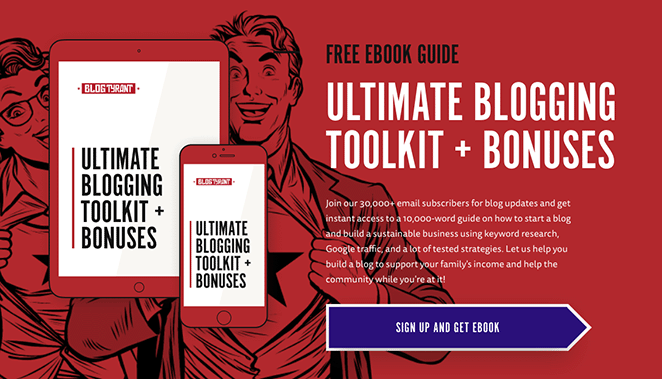
¿Qué hace que un lead magnet sea bueno?
El error más común con los lead magnets es hacerlos demasiado amplios. Una "Guía completa de marketing" suena impresionante pero convierte mal porque promete demasiado y no ofrece nada específico.
Los lead magnets que realmente crean listas de correo electrónico tienen algunas cosas en común.
| Calidad | Qué Significa | Ejemplo |
|---|---|---|
| Resuelve un problema específico | Alcance estrecho, alta relevancia | "Checklist de rutina matutina de 5 minutos" vs. "Guía de salud" |
| Ofrece victorias rápidas | Valor en los 10 minutos posteriores a la descarga | Una lista de verificación, no un ebook de 50 páginas |
| Específico para tu audiencia | Habla de la situación de una persona | "Calendario de contenido de Instagram para bloggers de comida" no "Plantillas de redes sociales" |
| Previsualiza tu oferta de pago | Crea apetito por más | Un capítulo gratuito de un curso de pago |
| Fácil de consumir | Escaneable, accionable, menos de 10 minutos | Hoja de trabajo de 1 página vs. curso largo en video |
Por lo que he visto, los lead magnets que tienen dificultades son aquellos que intentan ser exhaustivos. Una lista de verificación que resuelve un problema en dos minutos supera a un ebook de 40 páginas cada vez, porque la gente realmente la usa.
Cómo crear un lead magnet que convierta
Aquí están los pasos para configurar un lead magnet en WordPress, desde la elección de tu formato hasta ponerlo frente a las personas adecuadas.
- Paso 1. Averigua con quién estás hablando
- Paso 2. Elige un lead magnet que tu audiencia quiera
- Paso 3. Diseña y formatea tu lead magnet
- Paso 4. Añade tu Lead Magnet a WordPress
- Paso 5. Crea una página de agradecimiento para tu lead magnet
- Paso 6. Crea la página de destino de tu lead magnet
- Paso 7. Corre la voz sobre tu lead magnet
- Ejemplos reales de lead magnets que funcionan
Paso 1. Averigua a quién te diriges
Tu lead magnet debe coincidir con tu público específico. La audiencia de un entrenador de fitness quiere una lista de verificación de ejercicios, no una plantilla de plan de negocios. Antes de crear nada, ten claro para quién lo estás haciendo y cuál es su mayor problema sin resolver.
Para saber esto, lee foros de la industria, consulta blogs de la competencia o envía una encuesta rápida a tus suscriptores actuales. Nuestra guía sobre cómo crear un formulario de encuesta en WordPress puede ayudarte a configurar uno rápidamente.
Cuanto más clara sea tu imagen de a quién te diriges, más fácil será cada uno de los demás pasos. Una audiencia vaga conduce a un lead magnet vago, y un lead magnet vago es ignorado.
Paso 2. Elige un lead magnet que tu audiencia quiera
No todos los formatos de lead magnet funcionan igual de bien para todas las audiencias.
Las listas de verificación y las plantillas tienden a tener las tasas de conversión más altas porque ofrecen un valor inmediato y práctico. Los formatos más largos, como los libros electrónicos y los minicursos, funcionan mejor cuando tu audiencia ya está familiarizada con tu trabajo y confía en tu experiencia.
| Formato | Mejor para | Esfuerzo para crear | Potencial de conversión |
|---|---|---|---|
| Lista de verificación | Audiencias orientadas a procesos (blogueros, especialistas en marketing, coaches) | Bajo | Alto. Valor rápido, fácil de compartir. |
| Plantilla | Cualquiera que realice tareas repetitivas (diseñadores, redactores, dueños de negocios) | Bajo a medio | Alto. Ahorra tiempo de inmediato. |
| Libro electrónico o guía | Audiencias que investigan una decisión | Alto | Medio. Valioso pero más lento de consumir. |
| Hoja de trabajo | Coaches, consultores, educadores | Bajo | Alto. Interactivo y accionable. |
| Minicurso (3-5 correos electrónicos) | Temas complejos que necesitan contexto | Medio | Alto. Genera confianza a través de múltiples puntos de contacto. |
| Archivo de inspiración | Redactores, redactores publicitarios, especialistas en marketing | Bajo | Alto. Inmediatamente utilizable. |
| Biblioteca de recursos | Audiencias establecidas que buscan profundidad | Alto | Medio. Fuerte si tienes contenido existente. |
| Cuestionario | Cualquier audiencia con un problema que tenga múltiples respuestas | Medio | Alto. La personalización aumenta la relevancia. |
| Seminario web o formación | Servicios de alto valor, productos complejos | Alto | Medio a alto. Fuerte generador de confianza. |
| Código de descuento o prueba gratuita | Comercio electrónico, SaaS, productos de suscripción | Bajo | Muy alto. Valor puro, cero fricción. |
| Estudio de caso | Audiencias B2B, consultores, agencias | Medio | Medio. Fuerte para compradores en etapa de decisión. |
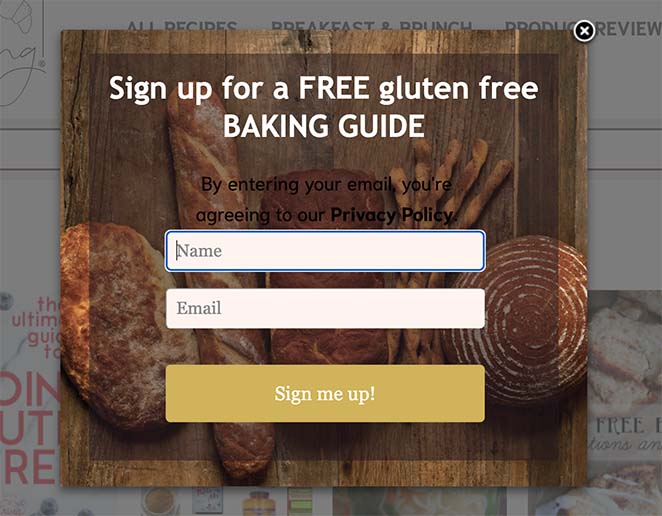
Adapta el formato a tu audiencia y tema. Un poco de planificación ahora significa más suscriptores que realmente descargan y usan lo que les das.
Paso 3. Diseña y formatea tu lead magnet
Un diseño llamativo hace que la gente sea más propensa a descargar y usar tu lead magnet. No necesitas experiencia en diseño para crear algo que parezca profesional. Herramientas como Canva y Adobe Express tienen plantillas gratuitas que puedes personalizar en minutos.
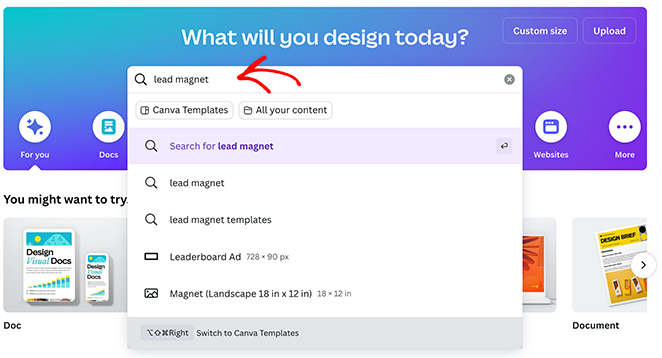
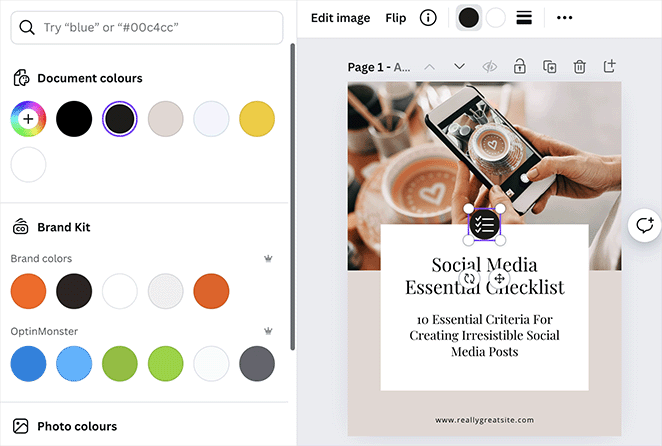
En Canva, busca tu tipo de lead magnet (o simplemente escribe “lead magnet”) para encontrar cientos de plantillas listas para usar.
Explora las opciones y elige una que se ajuste a tu marca y tipo de lead magnet.
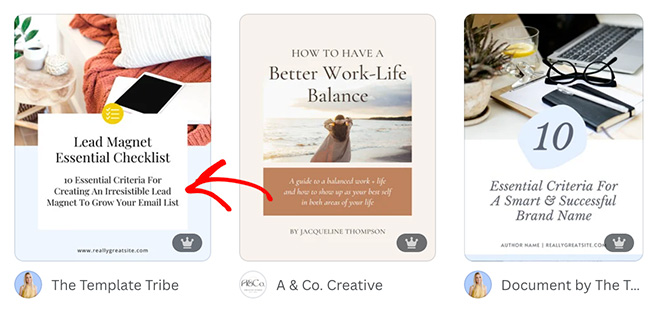
Sustituye los colores, fuentes y logotipo de tu marca. Divide el texto con imágenes, gráficos o texturas de fondo relevantes para mantenerlo visualmente interesante.
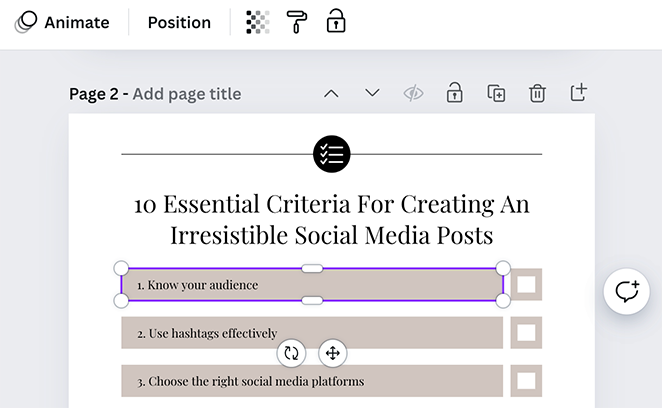
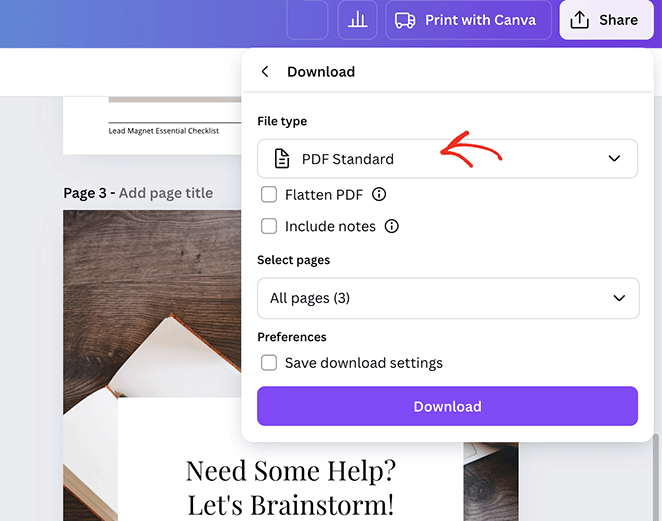
Cuando estés satisfecho con el diseño, descárgalo como PDF. Esto mantiene el formato consistente sin importar el dispositivo en el que lo vean tus suscriptores.
Mantén el diseño limpio. Usa el espacio en blanco generosamente y elige fuentes que sean fáciles de leer de un vistazo.
Canva tiene sus propias guías de diseño detalladas si quieres profundizar.
Paso 4. Añade tu Lead Magnet a WordPress
Ahora que has creado tu lead magnet, asegúrate de que la entrega de tu contenido gratuito en WordPress funcione de manera fluida y segura. Primero, añadamos el archivo del lead magnet a tu sitio web.
Desde tu panel de WordPress, navega a Medios » Biblioteca y haz clic en el botón “Añadir nuevo archivo multimedia”.
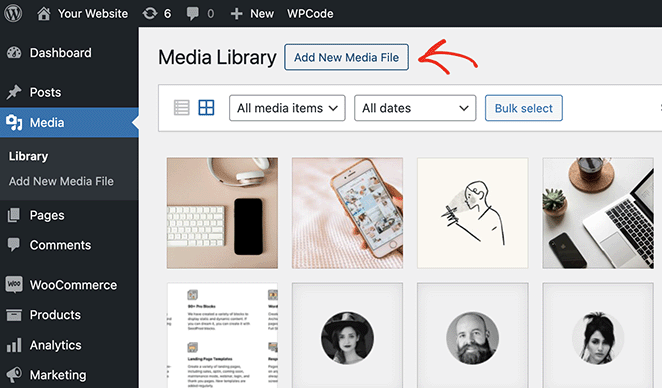
Sube tu archivo PDF y copia la “URL del archivo”. La necesitarás más adelante.
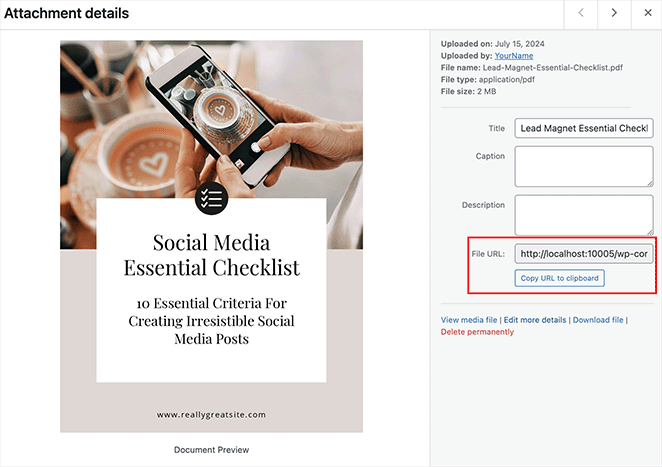
No indexar tu Lead Magnet
También recomiendo asegurarme de que la gente no pueda encontrar tu PDF en los motores de búsqueda. Lo último que quieres es que la gente pueda acceder a tu lead magnet sin registrarse para obtenerlo.
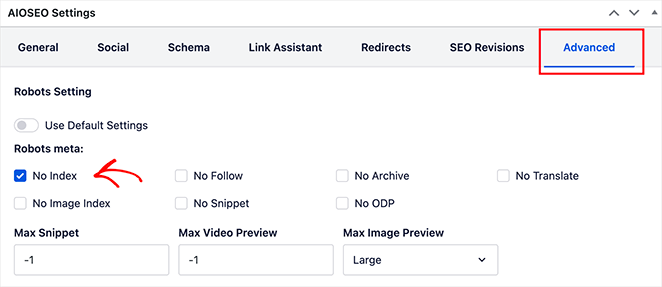
Una de las mejores maneras de hacerlo es no indexar la página del archivo multimedia con un plugin de SEO de WordPress. En este ejemplo, usaré All in One SEO.
Desde tu archivo multimedia, haz clic en el enlace “Editar más detalles”.
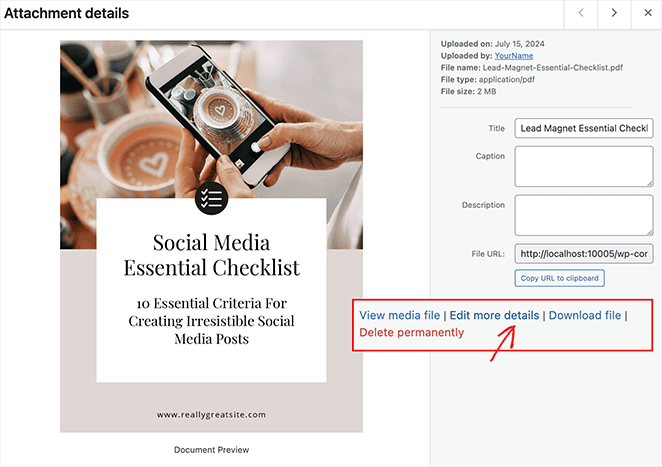
En la siguiente página, desplázate hasta el cuadro de configuración de AIOSEO y haz clic en la pestaña Avanzado. Aquí, desactiva “Usar configuración predeterminada”, marca la casilla “No indexar” y luego actualiza la página.
Paso 5. Crea una página de agradecimiento para tu lead magnet
Ahora, vamos a crear una página donde los usuarios puedan descargar tu lead magnet después de registrarse.
En lugar de mostrar un mensaje genérico de “gracias por registrarte”, prefiero crear una página dedicada de “Gracias”. No solo permite a los usuarios descargar su regalo al instante, sino que también parece más profesional que un enlace aleatorio de entrega de archivos.
Puedes crear fácilmente una página de agradecimiento usando el editor de bloques de WordPress. Sin embargo, para esta guía, usaré SeedProd, una herramienta que facilita mucho que tu página tenga un buen aspecto.

SeedProd es el mejor constructor de sitios web de WordPress de arrastrar y soltar, que potencia más de 1 millón de sitios web. Puedes usarlo para crear sitios web y páginas de destino atractivos en menos de 10 minutos. Y lo mejor es que no necesitarás escribir una sola línea de código.
Simplemente instala el plugin, elige una plantilla de página de agradecimiento y personalízala con el editor visual.
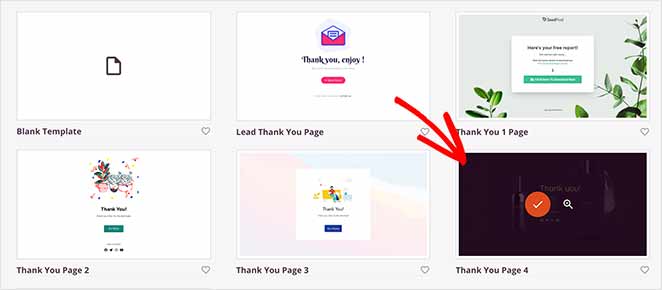
Para todos los pasos, consulta mi guía sobre cómo configurar una página de agradecimiento en WordPress.
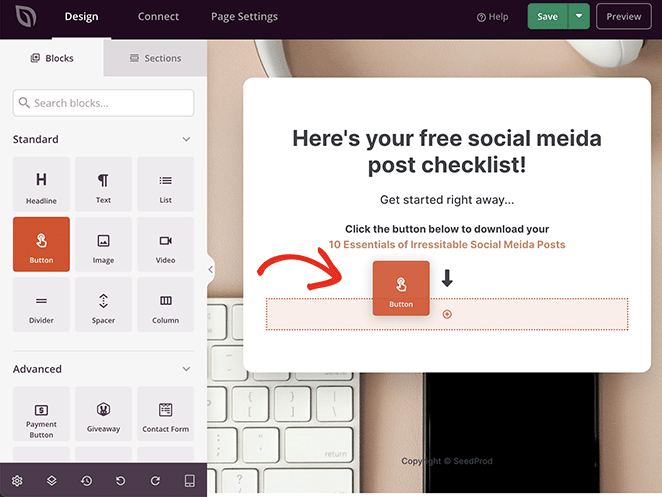
Al personalizar tu página de agradecimiento, añade un botón en el que los usuarios puedan hacer clic para descargar el lead magnet. Simplemente arrastra el bloque de botón del panel izquierdo y suéltalo en la página.
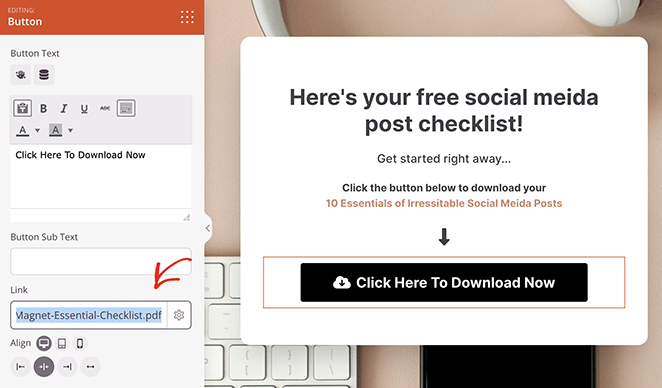
Ahora abre la configuración del bloque de botón y encuentra el campo “Enlace”. Aquí, pega la URL del archivo que copiaste anteriormente (desde la biblioteca de medios) y guarda tus cambios.
También es fundamental asegurarse de que las personas no puedan encontrar tu página de agradecimiento en los motores de búsqueda. Dado que SeedProd se integra perfectamente con AIOSEO, solo se necesitan unos pocos clics para hacerlo.
Simplemente haz clic en la pestaña Configuración de página en la parte superior del constructor de páginas y selecciona SEO.
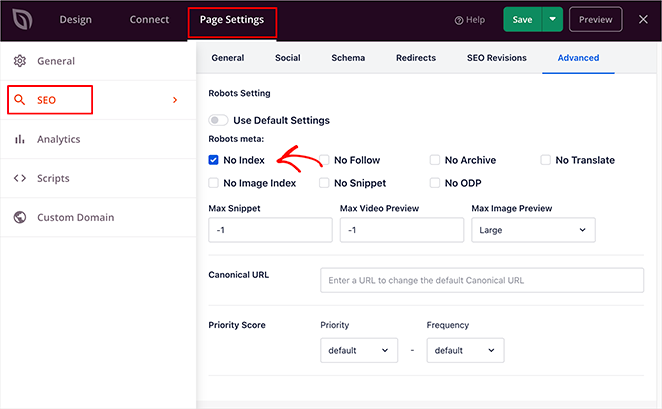
Luego, en el panel derecho, haz clic en Avanzado, desactiva “Usar configuración predeterminada” y marca la casilla “No indexar”.
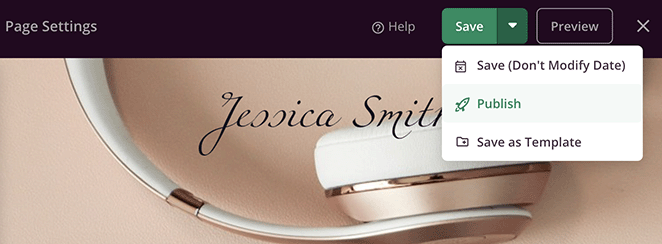
Finalmente, haz clic en el botón guardar y selecciona Publicar.
Ahora, cuando las personas sean dirigidas a esta página, podrán hacer clic en el botón e ir directamente a tu archivo PDF. Pero para obtener tu página de agradecimiento, necesitan un lugar donde registrarse. Esto es lo que abordaremos a continuación.
Paso 6. Crea la página de destino de tu lead magnet
Una página de destino de lead magnet es una página dedicada donde puedes promocionar tu lead magnet y capturar leads. Normalmente tiene un formulario de registro que anima a los visitantes a introducir una dirección de correo electrónico para descargar el archivo gratuito.
Con SeedProd, puedes crear páginas de destino atractivas y de alta conversión como la que utilizaste para tu página de agradecimiento.
Comienza con una plantilla de página de destino de la biblioteca. Para aumentar los registros, busca diseños que incluyan formularios de registro como las plantillas de página de captura.
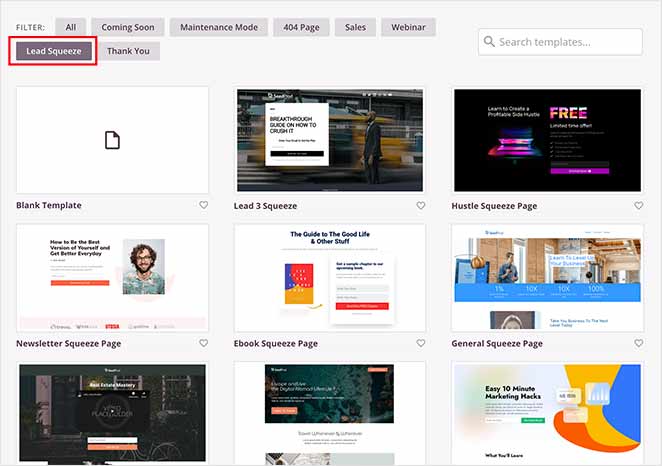
A continuación, personaliza la página para que coincida con tu marca. Incluso puedes subir una foto de tu lead magnet para generar expectación y previsualizar lo que recibirán los suscriptores.
Para un recorrido completo, consulta mi guía sobre cómo crear una página de captura de leads en WordPress.
Si elegiste una plantilla sin formulario de registro, puedes arrastrar y soltar el formulario de suscripción por correo electrónico para WordPress directamente en tu página usando SeedProd. Luego, personaliza los campos (normalmente, el nombre y el correo electrónico son suficientes) y escribe un texto para atraer suscripciones.
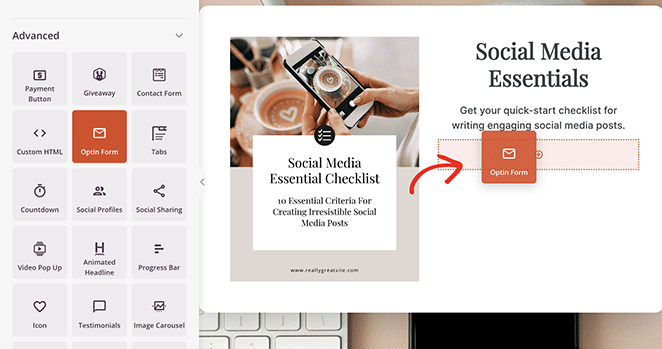
Cuando tu formulario esté listo, abre la configuración del bloque de formulario de suscripción y busca el encabezado "Acción de éxito". Aquí, haz clic en el menú desplegable "Acción a realizar" y selecciona la opción "Redirigir".
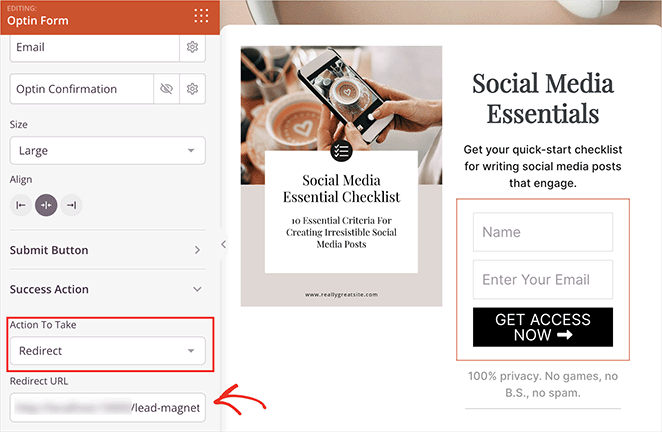
Ahora pega la URL de la página de agradecimiento que creaste anteriormente. Esto asegura que las personas obtengan el lead magnet al instante después de registrarse.
Antes de publicar tu página, integra tu formulario con tu servicio de marketing por correo electrónico para añadir automáticamente nuevos suscriptores a tu lista. SeedProd lo hace muy fácil con sus integraciones incorporadas.
Simplemente haz clic en Conectar en la parte superior del constructor, busca tu integración de marketing por correo electrónico preferida y luego sigue las instrucciones en pantalla para vincular tu cuenta.
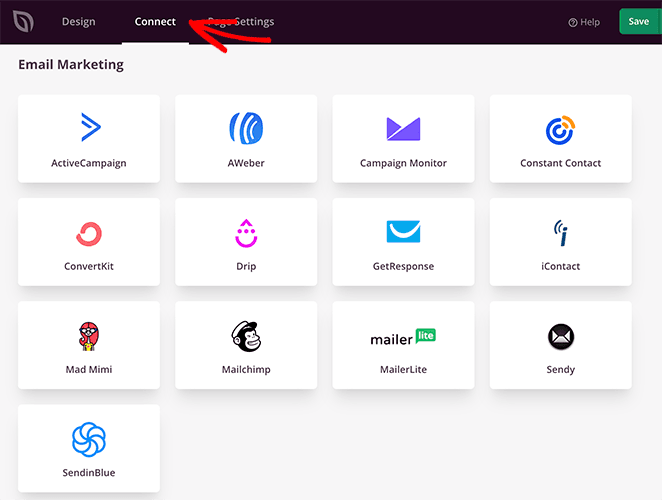
Las instrucciones para cada servicio de marketing por correo electrónico se encuentran en la documentación de integración de correo electrónico de SeedProd.
Finalmente, cuando estés satisfecho con tu página de destino de lead magnet, haz clic en guardar y luego en Publicar.
Ahora que está en vivo, te recomiendo completar los pasos de registro tú mismo para asegurarte de que todo funcione correctamente.

Y eso es todo. Con unos pocos clics, has creado una potente página de destino para promocionar tu lead magnet y hacer crecer tu lista de correo electrónico.
Paso 7. Corre la voz sobre tu lead magnet
Publicar tu página de destino no es lo mismo que conseguir suscripciones. La mayor parte del trabajo ocurre en la promoción. Aquí tienes los canales que generan suscripciones de forma fiable para los lead magnets.
Mejoras de contenido en publicaciones de blog
Añade una llamada a la acción dirigida dentro de tus publicaciones de blog más leídas. Una mejora de contenido es un lead magnet que amplía directamente lo que cubre la publicación, como una versión de lista de verificación de una guía práctica. Estas convierten mejor que los pop-ups genéricos porque coinciden exactamente con la intención del lector.
Pop-ups de intención de salida y widgets de barra lateral
Un plugin de WordPress para lead magnets como OptinMonster puede mostrar mensajes dirigidos promocionando tu lead magnet. Los pop-ups de intención de salida aparecen cuando un visitante está a punto de abandonar tu sitio, capturando a personas que de otro modo se lo habrían perdido. Los widgets de barra lateral mantienen la oferta visible durante toda la experiencia de lectura.
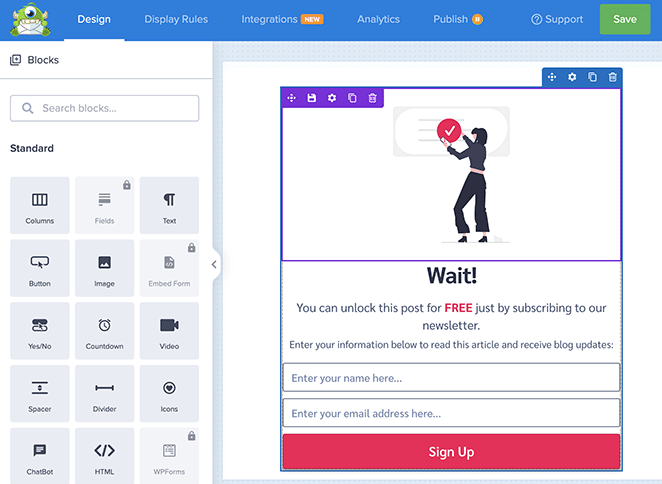
Redes sociales
Promociona tu lead magnet en tus canales sociales. En Facebook e Instagram, puedes ejecutar anuncios dirigidos que llegan a personas que aún no han visitado tu sitio. Las publicaciones orgánicas también funcionan, especialmente cuando adelantas una idea específica del interior del lead magnet para crear curiosidad.
Tu lista de correo electrónico existente
Incluye tu nuevo lead magnet en tu próxima newsletter para anunciarlo a tus suscriptores de correo electrónico. Esto genera descargas rápidamente, lo que también puede mejorar tus métricas de interacción por correo electrónico.
Publicaciones de invitado y promociones de socios
Si publicas como invitado en otros sitios, añade una mención de tu lead magnet en la biografía del autor o, donde esté permitido, dentro de la propia publicación. La promoción cruzada con negocios complementarios de tu nicho, donde cada uno promociona el lead magnet del otro, es otra forma de llegar a nuevas audiencias sin anuncios de pago.
SEO y blogging
Escribe publicaciones de blog informativas relacionadas con el tema de tu lead magnet e incluye una llamada a la acción natural que anime a los lectores a descargarlo. Utiliza la optimización de motores de búsqueda para ayudar a las personas que buscan ese tema a encontrarte orgánicamente.
Ejemplos reales de lead magnets que funcionan
La mejor manera de entender qué hace que un lead magnet sea efectivo es observar ejemplos reales de lead magnets y comprender el razonamiento detrás de ellos. Cada uno de estos funciona por una razón específica, no solo porque es gratis.
OptinMonster
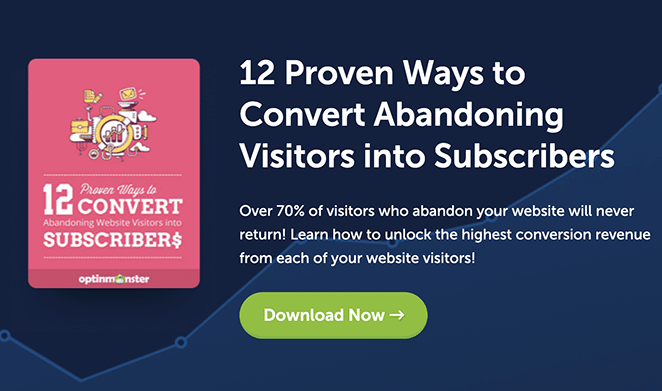
OptinMonster ofrece un recurso gratuito con consejos prácticos para reducir el abandono de boletines por correo electrónico. Su público son los profesionales del marketing por correo electrónico, por lo que saben que sus lectores ya tienen una lista de correo electrónico pero están frustrados con la baja participación. Ese punto de dolor específico es lo que el lead magnet aborda directamente.
Me gusta cómo se posiciona la CTA al final de su publicación de blog. Los lectores que terminan un artículo ya están lo suficientemente interesados como para leer hasta el final, lo que los hace más propensos a convertir. Capturarlos en ese momento es una sincronización inteligente.
La conclusión: Coloca la CTA de tu lead magnet donde la intención del lector sea mayor, no solo donde sea más visible.
NP Digital
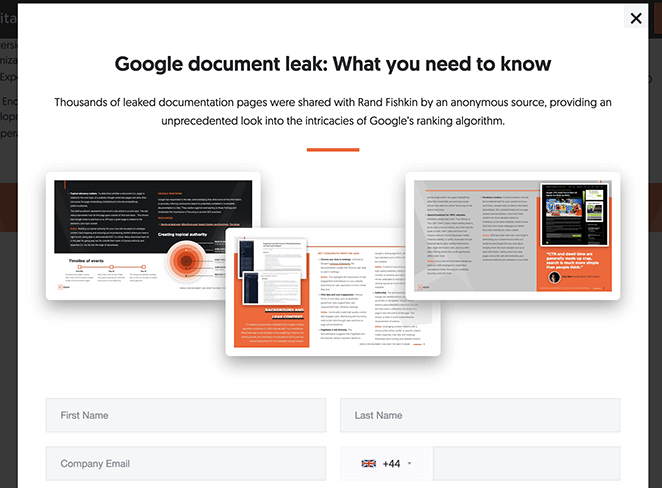
La agencia de Neil Patel ofrece una ventana emergente con un "Informe de filtración de documentos de Google". Juega directamente con el miedo a perderse información importante de la industria, un poderoso motivador para los profesionales del marketing que necesitan mantenerse actualizados. El lead magnet no solo promete valor; crea urgencia en torno a un evento específico.
La conclusión: Vincular tu lead magnet a un evento oportuno o al miedo a perderse algo puede mejorar drásticamente las tasas de conversión, especialmente para audiencias en industrias que cambian rápidamente.
Syed Balkhi

Syed Balkhi, fundador de WPBeginner, ofrece un "Kit de herramientas de crecimiento" con recursos para emprendedores. Su audiencia no busca consejos comerciales genéricos; quieren herramientas específicas que les ayuden a crecer. El formato del kit de herramientas funciona porque agrupa varios recursos bajo una promesa clara.
La conclusión: Una biblioteca de recursos o un kit de herramientas funciona mejor cuando tu audiencia confía en ti lo suficiente como para querer más de una cosa de tu parte. Es un formato que recompensa una relación establecida.
Preguntas frecuentes sobre la creación de un lead magnet para WordPress
¿Funcionan realmente los lead magnets?
Sí. Los lead magnets funcionan porque intercambian valor por información de contacto en lugar de pedir a los visitantes que se registren sin nada a cambio. Una página de destino de lead magnet bien dirigida convierte entre el 25% y el 50%, en comparación con el 1% al 5% de un formulario de registro de correo electrónico estándar.
La clave es la especificidad: un recurso estrecho y accionable que resuelve un problema para una audiencia de manera consistente supera una oferta amplia y genérica.
¿Cuál es el mejor imán de leads para una pequeña empresa?
Para la mayoría de las pequeñas empresas, una lista de verificación o una plantilla es el mejor punto de partida. Ambos formatos son rápidos de crear, fáciles de consumir y resuelven un problema específico de inmediato.
Un negocio de servicios (coach, consultor, autónomo) suele ver buenos resultados con una hoja de trabajo o una miniguía que previsualiza su proceso. Un negocio de productos a menudo convierte mejor con un código de descuento o una muestra gratuita. Adapta el formato a lo que tus clientes intentan decidir antes de comprarte.
¿Cómo se promociona un imán de leads?
Los canales más efectivos son las mejoras de contenido dentro de las publicaciones de blog, las ventanas emergentes de intención de salida en páginas de alto tráfico, las redes sociales (orgánicas y de pago), tu lista de correo electrónico existente y las llamadas a la acción en publicaciones de invitados. Las mejoras de contenido, que son imanes de leads que amplían lo que cubre una publicación de blog específica, tienden a tener las tasas de conversión más altas porque coinciden con la intención del lector.
Para la promoción de pago, los anuncios de Facebook e Instagram te permiten dirigirte a personas que aún no han visitado tu sitio basándose en intereses y comportamientos.
¿Cuántos imanes de leads deberías tener?
Empieza con uno y hazlo bien. Un solo imán de leads bien dirigido superará a tres genéricos.
Una vez que tu primer imán de leads esté convirtiendo, puedes crear otros adicionales para diferentes segmentos de audiencia o etapas del recorrido del comprador. Por ejemplo, un imán de leads para personas que recién descubren tu tema y otro diferente para personas listas para comprar.
La mayoría de las empresas ven rendimientos decrecientes después de tres a cinco imanes de leads activos.
¿Puedo entregar un imán de leads en WordPress sin software de correo electrónico?
Sí. Puedes entregar un imán de leads redirigiendo a los usuarios a una página de agradecimiento con un enlace de descarga después de que envíen un formulario. Sin embargo, sin software de correo electrónico, no podrás hacer seguimiento, nutrir suscriptores ni crear una lista para futuras comunicaciones.
Para cualquiera que se tome en serio el crecimiento de una lista de correo electrónico, conectar con un servicio de marketing por correo electrónico vale la pena desde el principio.
Crea tu imán de leads hoy mismo
Ahora tienes todo lo que necesitas para configurar un imán de leads en WordPress, desde elegir el formato adecuado para tu audiencia hasta crear la página de destino y la página de agradecimiento con SeedProd, conectar tu servicio de correo electrónico y promocionarlo a través de los canales que generan registros reales.
Si quieres crecer más rápido, la creación de listas de correo electrónico en WordPress comienza con un imán de leads sólido y una ruta de entrega clara.
¡Gracias por leer! Nos encantaría conocer tu opinión, así que únete a la conversación en YouTube, X y Facebook para obtener más consejos y contenido útil para hacer crecer tu negocio.



