
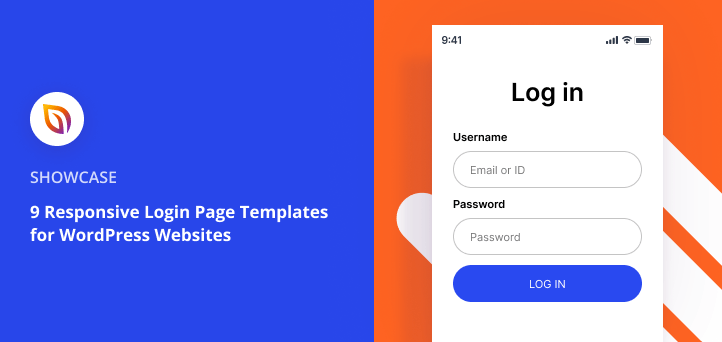

When someone visits your site’s login page, it’s often the first real touchpoint with your brand. A plain WordPress login screen feels outdated and can even confuse visitors.
That’s why I use login page templates for WordPress. They give me a professional design I can publish in minutes, with no HTML, CSS, or PHP required.
In this post, I’ll share 9 SeedProd login page templates you can use right away, plus the fastest way to get one live.
| Template | Style | Best For |
|---|---|---|
| Blank | Blank canvas | Starting from scratch with a custom design |
| Cyber | Dark, split-screen | SaaS products and tech companies |
| Minimal | Clean, single-column | Professional portals and membership sites |
| Greenery | Split-screen, lifestyle | Wellness brands and lifestyle sites |
| Geo | Geometric, modern | Creative agencies and design portfolios |
| Peekaboo | Split-screen with image panel | Online communities and membership portals |
| Flight | Full-width background | Travel and lifestyle brands |
| Simple | Single-column, minimal | Blogs and small business sites |
| Welcome | Full-screen photo, split layout | Online communities and course platforms |
How I Chose These Login Page Templates
I went through SeedProd’s full login template library and narrowed it down to nine. I was looking for designs that work across different industries and brand styles, not just ones that look good in a product screenshot.
- Mobile layout quality. A login form that’s cramped on a phone loses users before they’re in. I checked that each template’s form stacks cleanly on small screens and doesn’t get overwhelmed by the background image.
- Form placement had to be obvious. The username and password fields should be visible without scrolling. Templates where the form gets buried under a large hero area didn’t make the cut.
- Form labels needed to be editable. Not every site should say “Username” and “Password.” A membership portal might use “Email.” A community site might use “Member Name.” A login page you can relabel in a few clicks beats one with hardcoded text.
- Brand customization had to be quick. I looked for templates where changing your brand color updated the whole design, not just one element. If getting it on-brand meant editing a dozen individual blocks, it didn’t make the list.
- Visual weight had to match the use case. A dark, graphic-heavy template suits a SaaS app. A minimal single-column template suits a membership site or blog. I picked a range so you can match your site’s tone without forcing a style that doesn’t fit.
SeedProd has more login templates available. These are the nine I’d put in front of a client.
How to Create a Login Screen in WordPress
The fastest way to build a custom login page is with SeedProd.

I use SeedProd for login pages specifically because it replaces wp-login.php with a full page you design. Most login customizer plugins just restyle the existing form — change the logo, adjust the background color. SeedProd gives you a complete page builder instead, so you control the layout, not just the styling.
That means you can add blocks that no other login plugin supports: a countdown timer, WooCommerce elements, social icons, an email signup form, even a RafflePress giveaway. Every template is responsive, and you publish without writing a single line of code.
Here’s how to set it up:
- Install and activate SeedProd Pro.
- Go to SeedProd » Pages and select Login Page.
- Choose a template from the library.
- Customize it in the drag-and-drop builder.
- Click Publish to replace the default WordPress login screen.
Keep in mind that SeedProd’s login templates require the SeedProd plugin. If you’re already using a different page builder, a dedicated login page plugin may be a better fit for basic style changes.
Want more detail? Follow our step-by-step tutorial on how to customize the WordPress login page with SeedProd.
9 Responsive WordPress Login Page Templates
You now know how to create a custom login page in WordPress with SeedProd. All that’s left is to find the right WordPress login page template for your site.
Below are 9 SeedProd designs that cover a range of styles, from minimal to bold to split-screen.
- 1. SeedProd Blank: Best for Starting from Scratch (Free)
- 2. Cyber: Best for SaaS and Tech Companies
- 3. Minimal: Best for Clean, Professional Portals
- 4. Greenery: Best for Lifestyle and Wellness Brands
- 5. Geo: Best for Creative Agencies and Modern Brands
- 6. Peekaboo: Best for Community and Membership Sites
- 7. Flight: Best for Travel and Lifestyle Brands
- 8. Simple: Best for Small Business Sites
- 9. Welcome: Best for Online Communities and Courses
- FAQs About Login Pages
1. SeedProd Blank: Best for Starting from Scratch (Free)
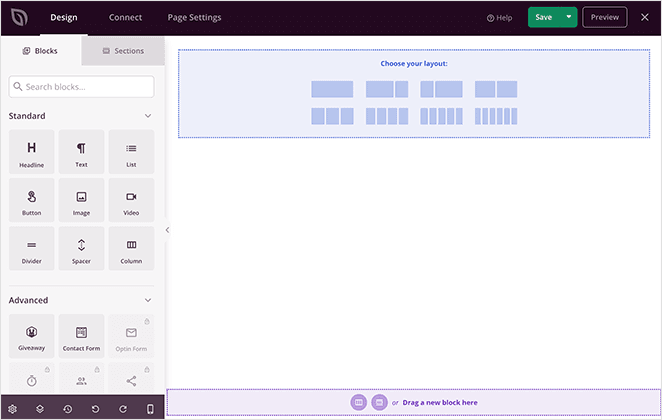
The Blank template is a clean slate you can shape any way you like. It opens in SeedProd’s drag-and-drop editor, where you can add blocks, sections, and styling to create a fully custom login page without code.
| Style: Blank canvas, build-your-own |
| Includes: Empty layout ready for login form, blocks, and sections |
| Best for: Designers, agencies, custom branding needs |
| Time to publish: ~5 minutes with SeedProd |
| Customize: Fonts, colors, placeholders, signup forms, email integrations |
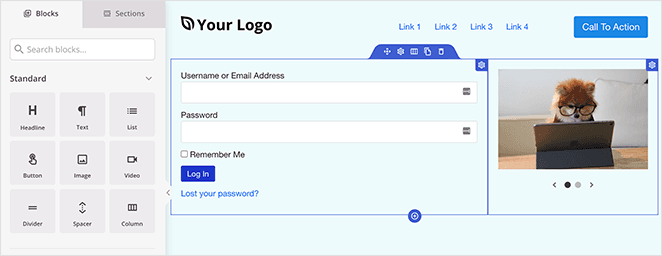
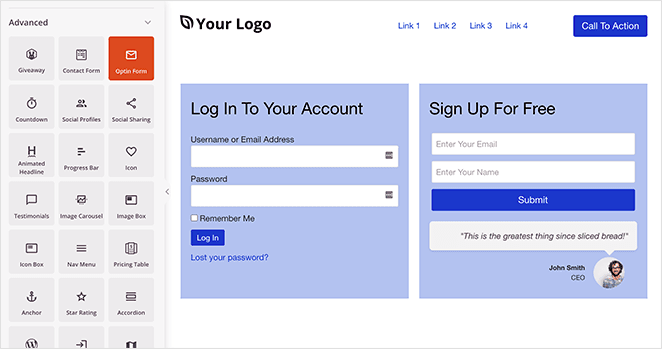
You can even connect a signup form block to your favorite email marketing service for instant lead capture.
Pros
- Free with any SeedProd plan
- Full control over layout from the start
- No pre-set colors or styles to override
Cons
- Requires design work to look polished
- Blank canvas can be paralyzing without a vision
Verdict: Best for designers or anyone with a specific brand vision who wants to build without constraints. If you want something live in minutes, start with a pre-designed template instead.
2. Cyber: Best for SaaS and Tech Companies
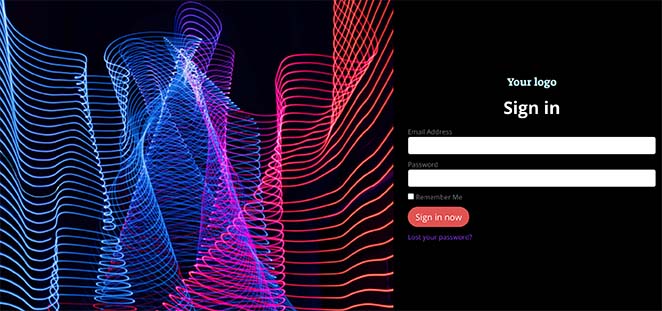
The Cyber template features a dark split-screen layout with a futuristic gradient background. Its clean login form and responsive design make it a great fit for SaaS, tech startups, and creative brands.
| Style: Split-screen, dark theme |
| Includes: Login form, responsive layout, image background |
| Best for: Tech companies, SaaS apps, creative portfolios |
| Time to publish: ~5 minutes in SeedProd |
| Customize: Background image, colors, social icons, extra links |
You can enhance this design by adding social icons, a Facebook feed, or quick links to your most popular pages.
Pros
- Dark theme matches SaaS and tech product aesthetics
- Strong visual identity out of the box
- Communicates security and professionalism
Cons
- Dark backgrounds need careful contrast checking for accessibility
- Doesn’t suit light, lifestyle, or consumer brands
Verdict: Best for SaaS products, tech tools, and developer-focused platforms. The dark design signals a product-grade login experience. Use it if your audience expects a modern app aesthetic.
3. Minimal: Best for Clean, Professional Portals
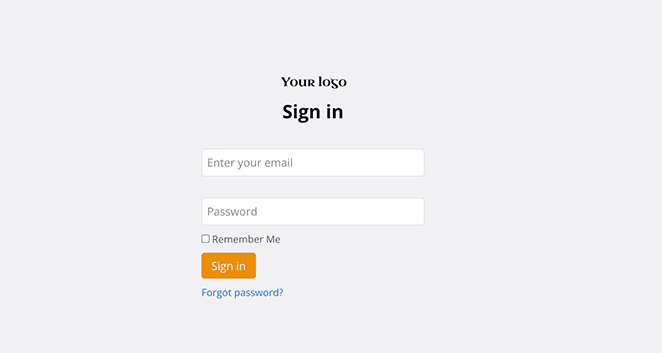
The Minimal template offers a clean, modern login screen with no distractions. It includes only your logo, a login form, and a solid background color — ideal for professional sites that value simplicity.
| Style: Minimal, one-column layout |
| Includes: Logo block, login form, solid background |
| Best for: Agencies, membership sites, business portals |
| Time to publish: ~3–5 minutes in SeedProd |
| Customize: Logo, form settings, colors, fonts |
Just swap in your logo, adjust the form settings, and click publish and your login page is ready to go.
Pros
- Clean layout keeps focus on the login form
- Fast to customize with fewer elements to adjust
- Works well for professional and corporate sites
Cons
- May feel plain for visual brands
- Limited visual personality out of the box
Verdict: The right choice for membership sites, professional portals, or any site where the login page is functional rather than expressive. Quick to set up and easy to match to any brand palette.
4. Greenery: Best for Lifestyle and Wellness Brands
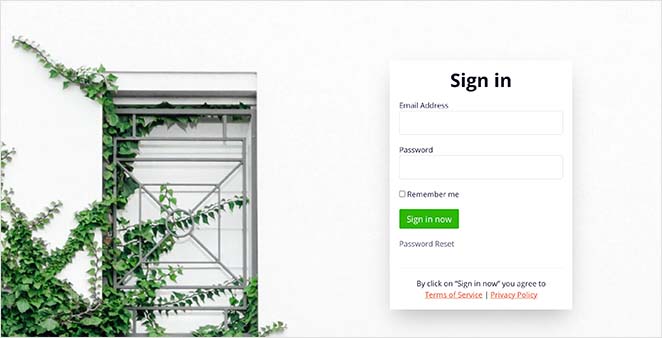
The Greenery template offers a fresh split-screen layout with a modern background image. It is a strong fit for lifestyle brands, health websites, and online stores that want a clean and welcoming design.
| Style: Split-screen with photo background |
| Includes: Login form, image panel, responsive layout |
| Best for: Lifestyle brands, wellness sites, eCommerce stores |
| Time to publish: ~5 minutes in SeedProd |
| Customize: Background image, colors, text, CTAs |
You can also boost conversions by offering a discount, adding a countdown timer, or including add-to-cart buttons for quick purchases.
Pros
- Split-screen layout adds visual interest
- Strong hero image area for brand photography
- Good for sites with a strong visual identity
Cons
- Lifestyle feel is narrow and won’t suit every brand
- Needs a quality brand image to work well
Verdict: Best for wellness, health, and lifestyle brands with on-brand photography. The split-screen design makes the login page feel like part of the site, not an afterthought.
5. Geo: Best for Creative Agencies and Modern Brands
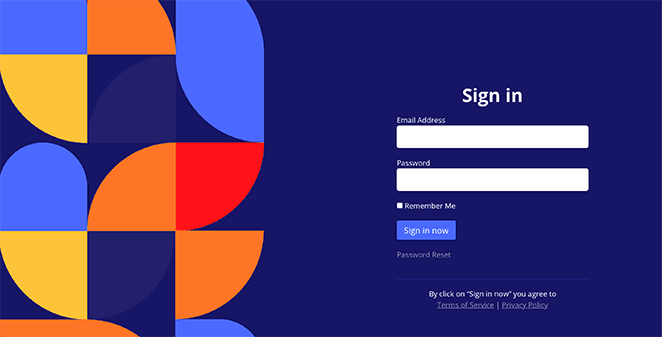
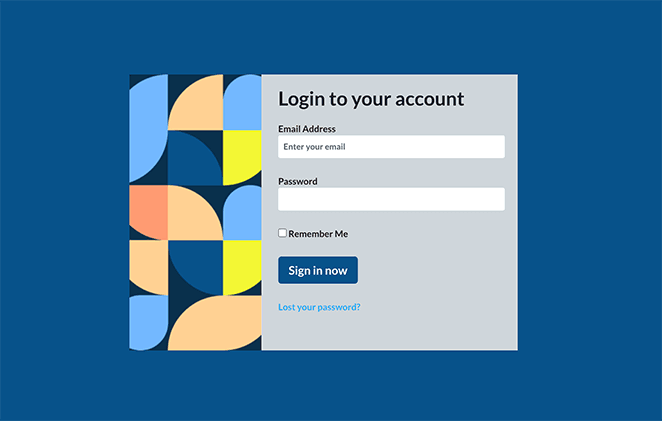
The Geo template features a bold geometric background paired with a clean login form on the right. It works well for agencies, small businesses, and creative brands that want a striking first impression.
| Style: Split-screen with geometric background |
| Includes: Login form, responsive layout, boxed version available |
| Best for: Agencies, small businesses, creative industries |
| Time to publish: ~5 minutes in SeedProd |
| Customize: Background, colors, Google Maps, event embeds |
You can make this template more interactive by adding Google Maps or showcasing upcoming Facebook events. If you prefer a simpler layout, Geo also comes in a compact boxed style:
Pros
- Modern geometric design stands out
- Comes in both full split-screen and compact boxed styles
- Appeals to creative and tech-adjacent audiences
Cons
- Bold style may clash with traditional or corporate brands
- Requires color customization to avoid the default palette
Verdict: A good fit for creative agencies, design studios, or modern brands that want a login page reflecting their aesthetic. Swap in brand colors and it feels intentional rather than templated.
6. Peekaboo: Best for Community and Membership Sites
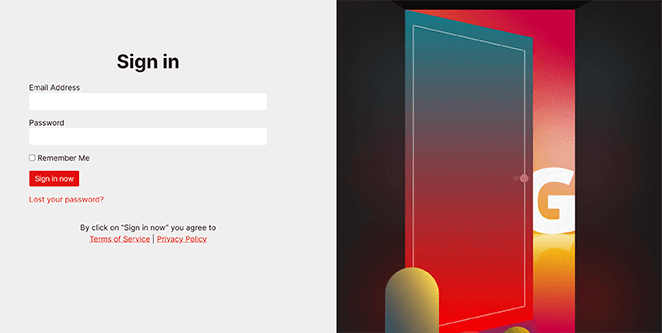
The Peekaboo template creates a welcoming first impression with a split-screen design. The login form sits neatly on the left, while the right side features a warm background image that feels inviting.
| Style: Split-screen with background image |
| Includes: Login form, responsive layout, visual space for branding |
| Best for: Community sites, online courses, membership portals |
| Time to publish: ~5 minutes in SeedProd |
| Customize: Background, text, CTAs, exclusive content previews |
You can use the right-hand panel to showcase exclusive content or add a call-to-action that encourages visitors to sign up for an account.
Pros
- Welcoming split-screen design reduces login friction
- Right-side panel is flexible for CTA, previews, or offers
- Sets a warm tone before users even log in
Cons
- Requires compelling photography to work well
- Can feel heavy if the background image isn’t optimized
Verdict: Best for online communities, course platforms, and membership sites where the login experience should feel like an invitation. Use it when your users log in to participate, not just access.
7. Flight: Best for Travel and Lifestyle Brands
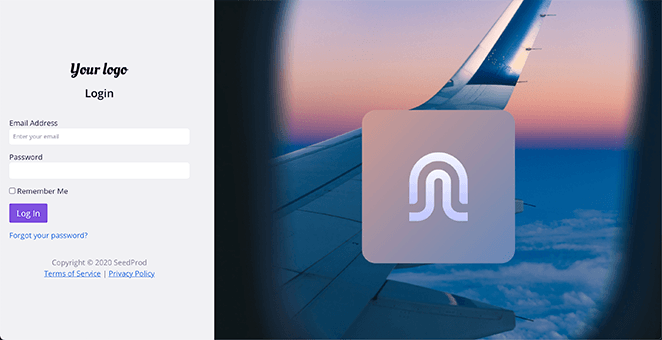
The Flight template uses an inspiring background image paired with a clean login form. It is perfect for travel websites, hotels, and booking platforms that want to highlight destinations.
| Style: Full-width background with login form |
| Includes: Login form, responsive layout, visual content space |
| Best for: Travel sites, hotels, booking businesses |
| Time to publish: ~5 minutes in SeedProd |
| Customize: Background image, text, image carousel, CTAs |
You can showcase new destinations with an image carousel or highlight promotions with a call-to-action button.
For more inspiration, explore these login page examples.
Pros
- Light, airy feel is easy to read on any screen
- Works across a wide range of brand styles
- Approachable and welcoming visual tone
Cons
- Neutral palette may need more brand color injection
- Less distinctive than bolder designs
Verdict: A versatile option for travel, lifestyle, or service brands that want a clean, inviting login experience. The light palette pairs well with most color schemes and is easy to customize.
8. Simple: Best for Small Business Sites
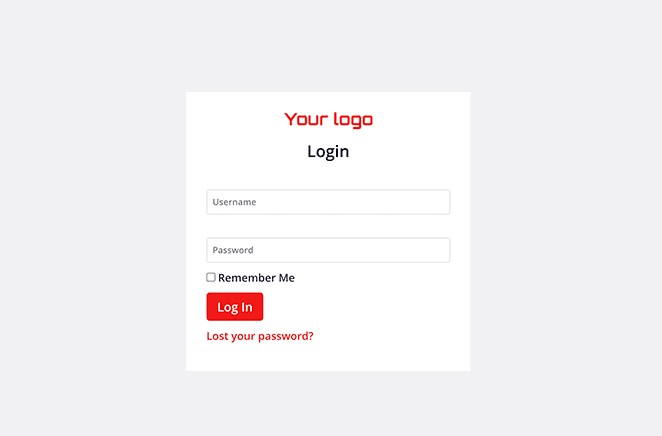
The Simple template keeps things straightforward with a one-column design and a clean red-and-white color scheme. It includes just the essentials, making it quick to set up and easy for users to navigate.
| Style: Single-column, minimal layout |
| Includes: Headline, logo, login form, background |
| Best for: Client portals, internal tools, small business sites |
| Time to publish: ~3 minutes in SeedProd |
| Customize: Colors, fonts, navigation menus, footer links |
If you want to keep your login page focused, this template is an excellent choice. You can still expand it with elements like a navigation menu or footer links using SeedProd’s ready-made blocks.
Pros
- Immediately functional with minimal setup
- No distractions from the login form
- Fast loading due to minimal design elements
Cons
- Little visual personality without brand elements added
- Can look bare without a logo and custom colors
Verdict: The fastest path from template to live login page. Best for blogs, small business sites, or anywhere the login page is secondary to the main experience. Add your logo and brand color and you’re done.
9. Welcome: Best for Online Communities and Courses
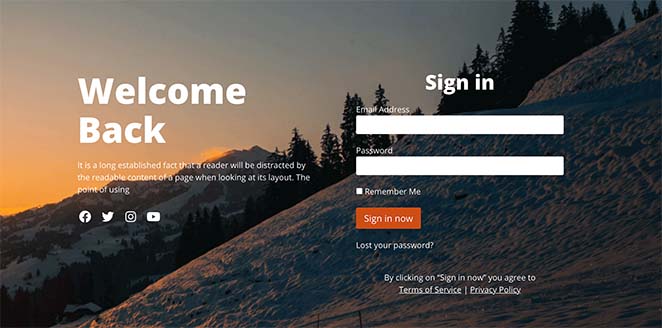
The Welcome template is a bold, eye-catching design that uses a full-screen background and split-screen layout. It is perfect for creating a strong first impression while keeping the login form clear and accessible.
| Style: Full-screen photo with split-screen layout |
| Includes: Headline, short description, login form, CTA button, social icons |
| Best for: Lifestyle brands, online communities, membership sites |
| Time to publish: ~5 minutes in SeedProd |
| Customize: Background image, text, button styles, giveaways |
You can make this design even more engaging by adding an incentive such as a giveaway. With SeedProd’s RafflePress giveaway block, you can embed a contest directly on the welcome screen and reward users for logging in or registering.
Pros
- Warm, community-focused tone reduces login friction
- Good for course platforms and member communities
- Sets a positive tone before users even log in
Cons
- The welcoming tone won’t suit every brand’s voice
- May feel informal for B2B or enterprise products
Verdict: Best for online communities, course platforms, and membership sites where the login experience should feel like an invitation. Use it when your users log in to participate, not just access.
FAQs About Login Pages
Do I need to know how to code to use these login page templates?
No. SeedProd’s login page templates work with a visual drag-and-drop editor. You click to edit text, swap in your logo, change colors, and publish without touching any code. The templates handle the HTML and CSS for you.
Will these login page templates work on mobile?
Yes. All SeedProd login page templates are responsive by default and adjust to fit any screen size. You can preview the mobile layout inside the SeedProd editor before publishing to make sure your design looks right.
Can I use these templates with WooCommerce?
Yes. SeedProd works with WooCommerce. You can create a custom login page for your store using these templates and replace the default WooCommerce login screen with your branded design.
What makes a good login page design?
A good login page keeps the form the most visible element. Users shouldn’t have to hunt for the username and password fields. It should include your logo, a “forgot password” link, and a clear call to action. On mobile, the form should be easy to tap without zooming. SeedProd’s templates are built with all of these in mind.
All of the templates we covered are available in SeedProd. Pick the one that fits your site’s tone, edit it visually, and launch it.
Keep exploring:
- How to Change the WordPress Admin Login URL
- How to Create a Client Login Page in WordPress
- How to Find Your WordPress Login Page URL
Thanks for reading. Please follow us on Twitter, Facebook, and YouTube for more helpful content to grow your business.



