



TL;DR I tested 6 WordPress team member plugins across different sites and setups. Here’s what I found:
- Best overall: SeedProd — works with any WordPress theme, drag-and-drop, no code needed.
- Best free option: AWSM Team or Team Members — both have solid free versions with grid layouts.
- Best for sliders: Team Showcase and Slider — the easiest way to display your team in a carousel layout.
- Best for Elementor users: Team (by RadiusTheme) or WP Team Member — both have native Elementor widget support.
- Team page vs. staff directory: If you need category filtering and searchable profiles, AWSM Team or Team handle it; SeedProd is better for design-focused team sections.
When I first tried to build a team page in WordPress, I spent way too long fighting with columns, images, and shortcodes that didn’t line up. What I really needed was a WordPress team plugin that just worked — something easy to use, flexible, and clean on mobile.
If you’re in the same spot, this list will save you time. I’ve tested each plugin myself and picked out the ones that make it simple to show off your team without writing a single line of code.
Overview of the Best WordPress Team Plugins
| # | Plugin | Best For | Pricing | Free Version | Popup Profile |
|---|---|---|---|---|---|
| 🥇 | SeedProd Team Members Block | Drag-and-drop pages | From $79/year | ✅ | No |
| 🥈 | Team Showcase and Slider | Customizable sliders | From $49 | ✅ | No |
| 🥉 | Team Members | Employee showcases | From $19/year | ✅ | No |
| 4 | AWSM Team | Stylish displays | From $29 | ✅ | No |
| 5 | Team | Mobile-friendly layouts | From $27/year | ✅ | Yes (Pro) |
| 6 | WP Team Member | Versatile team sections | From $59/year | ✅ | No |
How I Test and Review WordPress Team Plugins
I tested 6 team member plugins across different WordPress themes and setups. Here’s what I evaluated:
- Ease of installation: How quickly can you get a team section live from a fresh install?
- Layout options: Does it support grid, slider, card, and list formats?
- Free vs. paid feature split: Is the free version genuinely useful, or does it lock core features behind a paywall?
- Theme compatibility: Does it work cleanly across different WordPress themes without breaking layouts?
- Elementor and Gutenberg integration: Can you place team sections using your preferred editor?
- Mobile responsiveness: Does the team layout look clean on phones and tablets without extra tweaking?
What Is a WordPress Team Member Plugin?
A WordPress team member plugin is a tool that adds a professional team section to your site. For instance it allows you to show off staff photos, bios, job titles, and social links without requiring any code.
These plugins come with built-in layouts so you can display your team in a grid, list, or slider format, and they make it easy to add or update team members without touching your theme files.
Best WordPress Team Member Plugins
Here’s what I found after testing each one — what they’re actually good at and where they fall short.
1. SeedProd Team Members Block — Best for Drag-and-Drop Team Pages Without Code

| Rating: 5/5 Stars |
| Pricing: Pro version starts at $79/year |
| Standout Features: |
| 🔹 Drag-and-drop visual builder 🔹 Unlimited team members 🔹 Mobile responsive layouts 🔹 Point-and-click styling 🔹 Social media profile links |
| Best For: Drag-and-drop team pages without code |
First up is SeedProd, one of the best drag-and-drop website builders for WordPress. With over 1 million users, I’ve found it’s the easiest way to build flexible landing pages and WordPress layouts without code.
In fact, you won’t need any coding experience with SeedProd. Instead, it uses a block-based visual editor, so you can point, click, drag, and drop until you have a layout you love.
Plus, with the Team Members block, you can make different layouts to highlight unlimited teams. When testing this plugin, I was able to design a simple “our team” section on my homepage, as well as a dedicated team members page with extra information.
When I built the team section on my own site, I used the card layout with circular headshots — it’s the fastest to customize and looks clean on mobile.
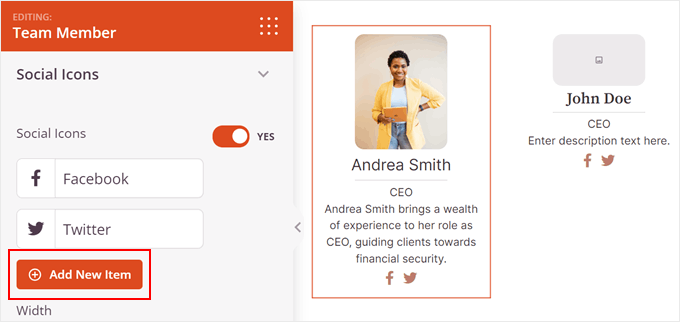
You can add team members in just a few clicks:

Customizing the styling is similarly easy. With point-and-click settings, you can change the team member’s headshot thumbnail image size, name, position, and description and choose from unlimited color choices and background colors.
What I really liked is that you can add each team member’s social profiles to increase your reach on popular social media networks. Plus, everything you make with SeedProd is 100% mobile responsive, so it will adapt to any screen size.

⏵ Pros
- Easy drag-and-drop interface
- No coding required
- Flexible add a new team member layout
- Mobile-responsive team members showcase
- Integrates with email and SEO tools
⏵ Cons
- Requires premium plan for Team block access
- Free version doesn’t include the Team Members block — you’ll need a paid plan (starting at $79/year) for that
Pricing: SeedProd offers a free version to try the plugin. The free version doesn’t include the Team Members block — you’ll need a paid plan starting at $79/year for that.
My Take: SeedProd is the pick if you want full layout control without code — the card layout is the fastest to set up and holds up on mobile. It’s not the right fit if you need category filtering or searchable team profiles.
2. Team Showcase and Slider Plugin for WordPress — Best for Carousel Layouts

| Rating: 4.5/5 Stars |
| Pricing: Pro version starts at $49 |
| Standout Features: |
| 🔹 Custom post types for teams 🔹 Slider layouts and templates 🔹 Shortcode support 🔹 Drag-and-drop member ordering 🔹 Category filtering options |
| Best For: Creating team sliders and carousel layouts |
Team Showcase and Slider is a free WordPress team members showcase plugin that lets you create and display a slider of team member profiles on your website. It offers various features that make it easy to customize the slider design and manage and organize your team members.
The plugin includes custom post types for team members, allowing you to add more information, such as the team member’s name, title, bio, and social media links. You can also use shortcodes to display a creative team showcase on any page or post on your website.
During my testing, I liked how it offered various customization options, including slider templates with different styles, custom colors and fonts, and the ability to add my own custom CSS.

Additionally, I found the drag-and-drop interface made it easy to order team members, as well as the ability to filter by category.
⏵ Pros
- Free version available
- Easy-to-use slider feature
- Customizable designs
- Drag-and-drop member ordering
- Category filtering option
⏵ Cons
- Limited layout choices compared to full page builders
- May require CSS knowledge for advanced customization
- Slider-focused, which might not suit all website styles
Pricing: Team Showcase and Slider is free to download from the WordPress.org plugin repository. The Pro plugin is available as part of a bundle starting from $49.
My Take: A solid choice if you want to display your team in a clean, space-saving slider layout. It’s slider-focused, so if your design calls for a static grid or card view, look elsewhere.
3. Team Members — Best for Simple Grid Layouts with Shortcodes

| Rating: 4/5 Stars |
| Pricing: Pro version starts at $19/year |
| Standout Features: |
| 🔹 Customizable team grids 🔹 Shortcode generator 🔹 Hover photo effects (Pro) 🔹 Import/export option (Pro) 🔹 Color and font settings |
| Best For: Simple grid layouts with shortcodes |
Team Members is another free WordPress team member plugin that lets you easily showcase your employees and staff list on your website. It adds a “teams” section to your site where you can quickly add their picture, name, title, bio, and social media links.
On my test website, I was able to re-order the grid layout and display it anywhere with the shortcode generator. I could also choose from several custom color and typography choices.

While the free version of this plugin isn’t limited, the Pro version has additional features, including:
- Hover photos
- Color per member
- Import/export
- Picture positions and filters
- Hide specific members
- More social links & info
⏵ Pros
- Free version with core features
- Easy to add and manage team members
- Customizable grid layout
- Shortcode generator for flexible placement
- Color and typography options
⏵ Cons
- Limited layout choices in free version
- Advanced features require Pro upgrade
- No built-in slider functionality
Pricing: The Pro version of Team Members starts from $19/year for a single site.
My Take: Ideal for small teams that want a simple grid layout and easy shortcode placement. The Pro version is affordable at $19/year, making it one of the best value upgrades in this category.
4. AWSM Team — Best for Quick Team Sections Using Gutenberg
| Rating: 4/5 Stars |
| Pricing: Pro version starts at $29 |
| Standout Features: |
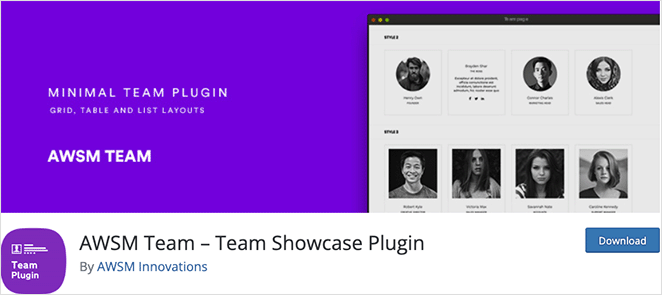
| 🔹 3 layout presets: card, list, table 🔹 Works with the WordPress block editor 🔹 Responsive and touch-enabled 🔹 Simple shortcode publishing 🔹 Easy to add photos and bios |
| Best For: Quick team sections using Gutenberg |
AWSM Team is a WordPress team showcase plugin that lets you display team member profiles easily on your business website. The free version comes with 3 presets (card, list, and table) and various style choices, allowing you to make a professional-looking team section in minutes.
I liked how this plugin allowed me to use the default WordPress block (Gutenberg) editor to add new members from the backend of my site. From there, I could add the member’s photo, description, designation, social links, and more.

Publishing your team is as simple as pasting a simple shortcode into any post or page. Additionally, the plugin is responsive and touch enabled.
⏵ Pros
- Free version available
- 3 preset layouts (card, list, table)
- Uses familiar Gutenberg editor
- Responsive and touch-enabled
- Easy shortcode implementation
⏵ Cons
- Limited customization in free version
- May lack advanced features of premium alternatives
- Relies on WordPress block editor, which some users might not prefer
Pricing: AWSM Lite is free to download. The premium plugin starts from $29.
My Take: AWSM Team is the fastest way to add a team section if you’re already using the Gutenberg editor. The Pro version also supports category filtering, which makes it a good fit for organizations that need to group members by department.
5. Team — Best for Mobile-Friendly Grids with Elementor Support
| Rating: 4/5 Stars |
| Pricing: Pro version starts at $27/year |
| Standout Features: |
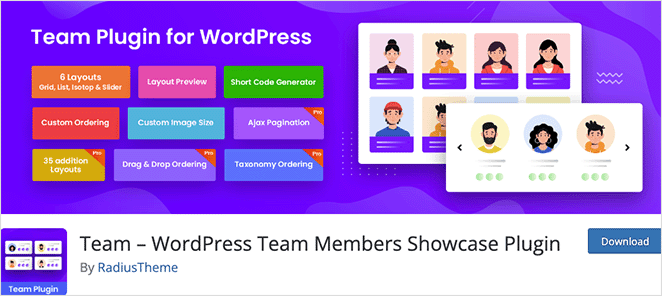
| 🔹 5 grid and isotope layouts 🔹 Widget thumbnail controls 🔹 RTL and Elementor support 🔹 Mobile-friendly design 🔹 Shortcode + Elementor widget |
| Best For: Mobile-friendly grids with Elementor support |
Team is yet another of the free team showcase plugins for WordPress I enjoyed testing. It’s a mobile-friendly plugin that lets you showcase team members anywhere on your website.
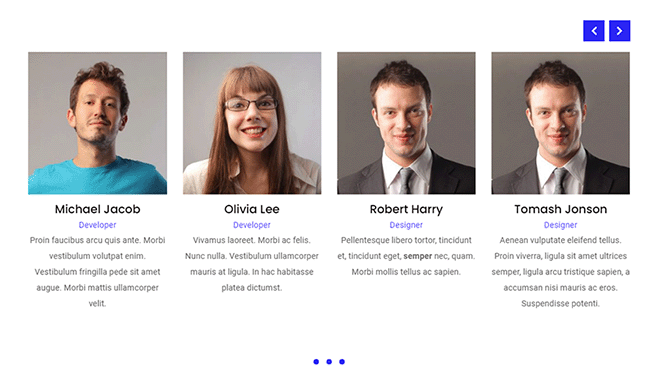
I was able to choose from 5 different grid and isotope layouts and customize the widget thumbnails to display rounded or square images or hide the thumbnail completely. The WordPress plugin is fully customizable, offering easy control over the layouts with additional pagination and link detail controls.
I especially liked how Team supports RTL for multilingual sites, and I could display team member widgets with the shortcode generator or Elementor page builder addons.
⏵ Pros
- Free version available
- 5 different grid and isotope layouts
- Customizable widget thumbnails
- Mobile-friendly design
- Multilingual ready
- Integrates with Elementor
⏵ Cons
- May have a learning curve for beginners
- Advanced features require Pro version
- Could be overwhelming for those needing simple plugins
Pricing: Team is a free WordPress team plugin. Team Pro starts from $27/year for a single site and includes features like modal popup, slide-in side panel, AJAX loading, and more.
My Take: Team works well for Elementor users who want multiple layout choices without paying a premium. The RTL support makes it a strong pick for multilingual sites, and the Pro version’s modal popup feature is useful if you want click-through profiles.
6. WP Team Member — Best for Flexible Team Sections with Feature Toggles
| Rating: 4/5 Stars |
| Pricing: Premium bundle starts at $59/year |
| Standout Features: |
| 🔹 5 custom layout styles 🔹 Elementor and WPBakery integration 🔹 Flexible feature toggles 🔹 Slider + pagination options 🔹 Widget support for team sections |
| Best For: Flexible team sections with feature toggles |
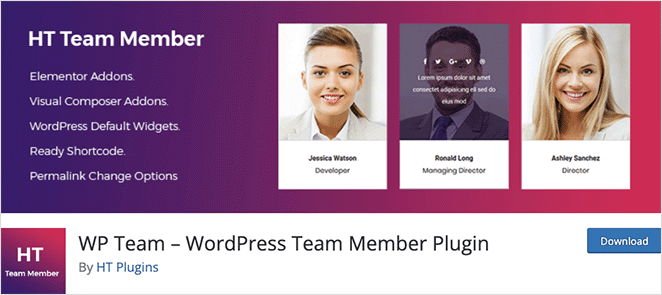
WP Team Member is a free and versatile team builder plugin that allows you to create custom team sections and widgets on your WordPress website. It offers 5 custom layout styles with unlimited color variations and several options to tailor your team widget to suit your needs.
For example, I was able to enable and disable the following features:
- Team slider
- Name and designation
- Bio text
- Social media links
- Slider arrow and pagination
Additionally, this plugin offers a WordPress widget and addons for Elementor and the WPBakery page builder.

⏵ Pros
- Free version available
- 5 custom layout styles
- Unlimited color variations
- Flexible feature toggling
- Integrates with Elementor and WPBakery
- Includes WordPress widget
⏵ Cons
- Some advanced features may require premium version
- Multiple builder integrations could be confusing for beginners
- Might have performance impact with too many features enabled
Pricing: WP Team Member is free. However, you can get a bundle of premium plugins from this company starting from $59/year.
My Take: WP Team Member is a good choice if you want fine-tuned control over what features show in each team section, and you’re already using Elementor or WPBakery. The toggle system means you can strip it down or build it up without touching code.
How to Choose the Right WordPress Team Plugin
If you need a searchable staff directory with filter controls rather than a simple team display, the plugins with category filtering (AWSM Team, Team) are better fits than a page builder approach.
If you’re still not sure which WordPress team plugin to choose, here’s how I’d break it down based on what matters most.
| Need | Best Plugin |
|---|---|
| Lowest cost (free options) | Team Members or AWSM Team |
| Most design control | SeedProd or WP Team Member |
| Best for sliders | Team Showcase and Slider |
| Simplest setup | AWSM Team |
| Elementor support | Team or WP Team Member |
| Gutenberg/block editor user | SeedProd or AWSM Team |
| Searchable/filterable roster | AWSM Team or Team (RadiusTheme) |
| Staff directory with departments | AWSM Team or Team (RadiusTheme) |
I personally lean toward SeedProd if you want full layout control without needing code. But if you just need something fast and lightweight, Team Members or AWSM Team are great places to start.
All 6 plugins here work with most WordPress themes. The main exception is SeedProd — if you use it for full site building, it replaces your active theme. But the Team Members block works alongside any theme.
What Is the Best Team Plugin for WordPress?
SeedProd is the pick if you want full layout control without code — everything else is a tradeoff on price or flexibility.
Ready to make a team member section without code?
How to Create a Team Page in WordPress
Once you’ve picked a WordPress team plugin, setting up your page is simple. You can use these tools to create anything from a small “meet the team” section to a full staff directory or team showcase with photos, bios, and links.
For example, with SeedProd you can add the Team Members block to any page. Just drag it into place, upload your team photos, and fill in details like job titles, social profiles, and bios. In minutes, you’ll have a clean, mobile-friendly layout that looks great on any device.
Other plugins work in a similar way. Some act like a lightweight team manager, letting you organize staff into departments, while others focus on stylish grid or slider layouts. If you’d like a full tutorial, check out my step-by-step guide on how to add a Meet the Team page in WordPress.
Other Options Worth Considering
If none of the 6 plugins above quite fit your needs, here are a few more worth looking at.
- WP Team (by ShapedPlugin): Free plugin with carousel layouts and multiple display styles. Good if you want carousel layouts without paying for Team Showcase Pro.
- GS Team Member: SEO-focused team plugin with schema markup built in. Worth considering if search visibility for individual team members matters.
- Team Builder (WPShopSmart): Offers 6 CSS templates and is one of the lighter plugins in this category.
- Employee Spotlight: Designed for larger teams and staff profile management, with more field options per member than most plugins here.
- Smart Team (getwpteam.com): Supports 10 layout types including accordion and mosaic, which you won’t find in most team plugins.
Frequently Asked Questions
Can I add a team page to WordPress without a plugin?
Yes, you can build a basic team page in WordPress without a plugin using the default block editor. You’d use a combination of Columns, Image, Heading, and Paragraph blocks to lay out each team member manually.
The downside is that it’s slow to build, hard to keep consistent, and tricky to update later. A dedicated WordPress team plugin handles all of that for you with ready-made layouts and a single place to manage all your team members.
Which WordPress team plugin works best with Elementor?
Team (by RadiusTheme) and WP Team Member both have native Elementor widget support, making them the most natural fit if you’re already building with Elementor.
Team supports 5 grid and isotope layouts and includes an Elementor widget out of the box. WP Team Member also integrates with WPBakery if you use both builders. Either plugin drops into Elementor without needing a separate addon.
Is there a free WordPress team plugin that doesn’t require a premium plan?
Yes, several plugins on this list have genuinely useful free versions. AWSM Team’s free tier includes 3 layout presets (card, list, table) and shortcode support. Team Members’ free version covers grids, custom colors, and typography.
Team (by RadiusTheme) is also free with 5 layout types and Elementor support. The main thing you give up without a Pro plan is advanced styling options, hover effects, and in some cases, category filtering.
Can I add popup profiles to my WordPress team page?
Yes, but only Team (by RadiusTheme) in this list supports modal popup profiles natively — it’s a Pro feature starting at $27/year. The popup shows extended team member details when a visitor clicks a profile card.
Most other plugins in this list (SeedProd, AWSM Team, Team Members, Team Showcase and Slider, WP Team Member) don’t include modal popup functionality as a built-in feature.
How do I organize team members by department in WordPress?
AWSM Team and Team (by RadiusTheme) both support category filtering, which lets you group members by department. You can display a specific department using a shortcode parameter.
SeedProd’s Team Members block doesn’t have built-in category filtering. For department-based organization, AWSM Team or Team are the better-suited options from this list.
I hope you enjoyed this article, and it helped you find the best WordPress team plugin for your business site. Before you leave, you might also find the following top WordPress plugins helpful:
- How to Set Up a Multi Author Blog
- Best WordPress FAQ Plugins
- Best WordPress Email Subscription Popup Plugins
- Best ChatGPT WordPress Plugins
- Best Content Locker WordPress Plugins
- Best WordPress Cookie Consent Plugins
- Best WordPress Video Plugins
- Best WordPress Maintenance Mode Plugins
Thanks for reading! We’d love to hear your thoughts, so please feel free to join the conversation on YouTube, X and Facebook for more helpful advice and content to grow your business.




