
If you’ve come to this guide looking for a side-by-side comparison of SeedProd vs Wix, I hate to disappoint you. They’re two very different website building tools and comparing them like for like would do neither of them justice.
SeedProd is a WordPress plugin that makes it easy to build and customize a website on WordPress, the self-hosted content management system (CMS). Whereas, Wix is a self-contained, hosted website builder with everything built into its own web-based platform.
But what you’re still probably wondering is whether Wix or SeedProd is genuinely the right choice for building your website. Well that, I can help you answer.
I’ve spent the best part of 2 days building the same site on Wix and SeedProd so I can give you a fair overview of what’s possible.
Before we start:
I know what you’re thinking, another ‘review’ from a brand that puts its own product first. This isn’t that kind of post.
Yes, I love SeedProd and built my own website with it. But it’s genuinely not the best choice for everyone.
So, I won’t soften the details and will give you a fair verdict, even if it shows SeedProd as lacking in some areas compared to Wix.
How SeedProd Works
To understand how SeedProd works, you first need a brief introduction to WordPress.
WordPress is a free, open source CMS that lets you build and manage websites with or without coding. You install it on hosting you pay for separately along with a custom domain name.
The design, colors, and fonts of your site are handled by WordPress themes. WordPress plugins let you add features like online stores, forms, and security.
Where SeedProd fits, is as a drag-and-drop website and landing page builder for WordPress. It’s a plugin that lets you design custom pages and complete WordPress themes with drag-and-drop.

With SeedProd and a few well-chosen plugins, you can build a custom website yourself instead of paying a fortune in developer fees.
How Wix Works
On the flip side, Wix is a hosted cloud-based website builder that lets you create a professional website all in one place.
“All in one” is close to literal, because you get hosting, design, forms, SEO tools, a blog and a domain for one price tag.
With Wix, there’s nothing to install and no hosting company to choose. You simply sign up in a browser and you’re building.

While that may sound simple, there’s a trade-off to consider. Wix owns the software and the servers, so a site you build there can’t be hosted anywhere else. That’s straight from Wix’s own help pages.
Your content is a different matter. Wix says that belongs to you, and you can copy it out. It’s the site itself that can’t leave.
How to Build Your Website With SeedProd vs Wix
Both SeedProd and Wix give you two ways to start. Either pick a template, or describe what you want and let AI build it. They’re not equally good at either, so it’s worth taking them one at a time.
Starting From a Template
With SeedProd, you choose one of its theme template kits and then make it yours by dragging blocks around. You’re starting from a design that already works, and you change what you don’t like.
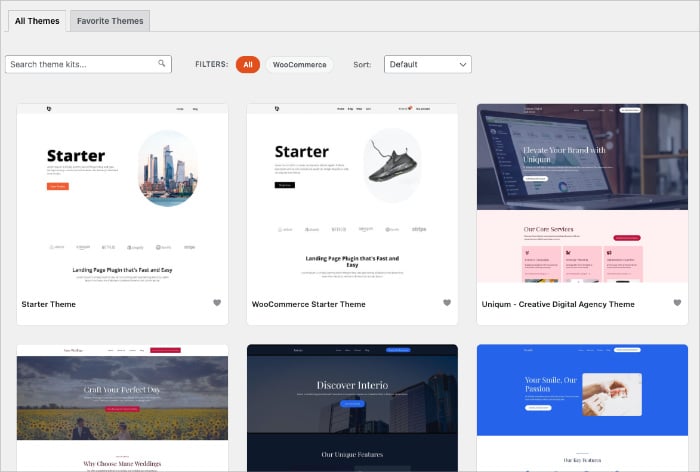
Because the design is a WordPress theme, you can swap it for something completely different in a year and keep your content exactly where it is.
Wix’s template library is far bigger, with over 2,000 designs, free on any plan and sorted by trade.
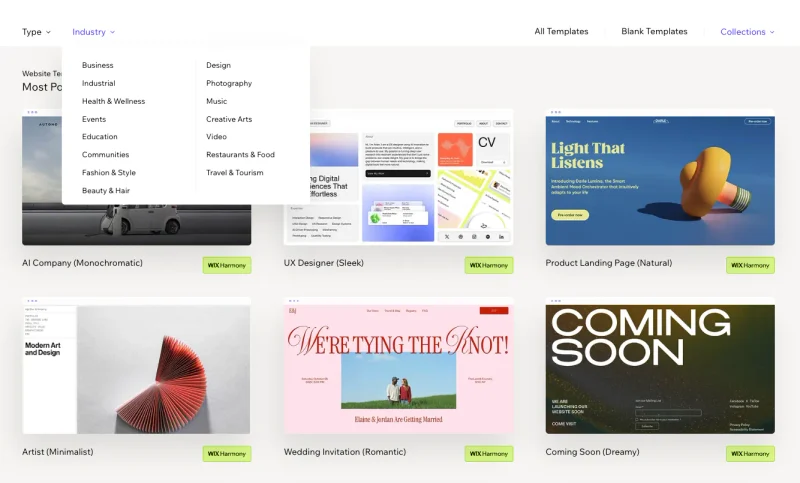
SeedProd has roughly 300 on the Pro tier and about 50 on Basic, plus around 200 full website kits on Plus and above that give you matched headers, footers and pages rather than single designs.
On volume Wix wins comfortably, and that genuinely helps when you’re browsing for something that already looks like your kind of business.
The catch is buried in Wix’s own support pages. You can’t switch templates once your site exists. So the design you pick in your first ten minutes is the one you keep, and changing your mind later means rebuilding.
Wix gives you more choice up front, and SeedProd lets you change your mind afterwards.
Starting With AI
Both builders will generate a site from a description of your business, and both did a decent job of it when I tried.

SeedProd’s AI builds you a whole multi-page site, not just a page. What it hands you at the end is a theme file, which you download and then import into a WordPress site that already has SeedProd installed.
That’s worth being clear about, because it means the site isn’t editable where it was generated. You see it as a preview first, and it becomes a real site once you’ve moved the file across.
Wix’s version is Aria, its AI assistant. You describe your business, wait a few minutes, and it drops you straight into the editor on the site you’ll actually publish.
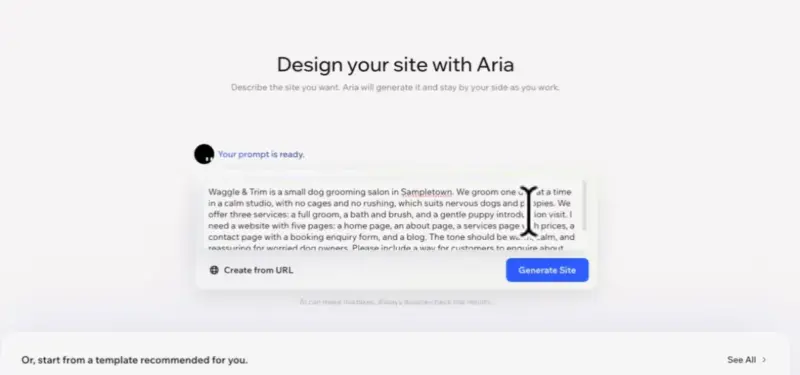
Wix wins this one as there’s no file to move and nothing to install. You go from a description to editing your real site without a step in between.
For the test I invented a business called Waggle & Trim, a small dog grooming studio. It isn’t real, and every contact detail on both sites is deliberately fake, which becomes relevant once you see what each AI made up on its own.
Both builders got the same description of it, so here’s a look at what came back.
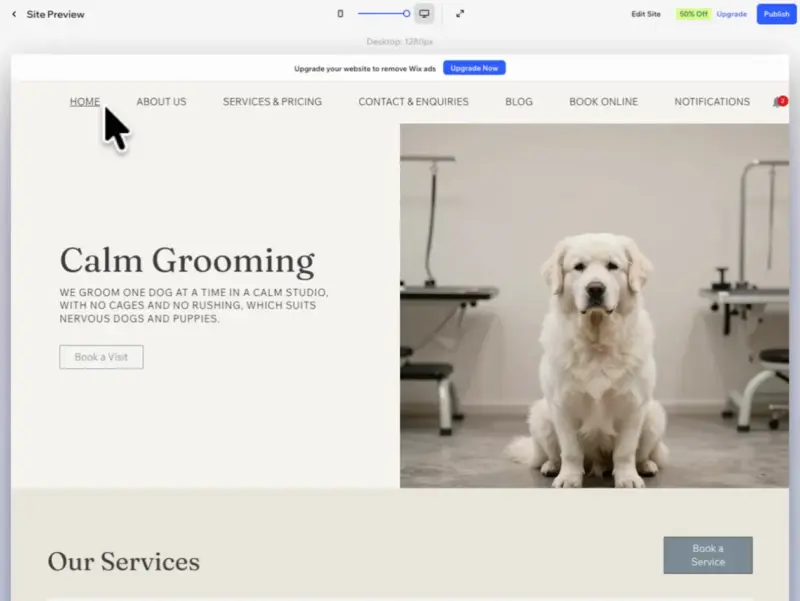
Wix took about five minutes and gave me a lot: all five pages, a working inquiry form and three complete blog posts. The design was consistent, in cream and slate, though every image was AI generated and it shows.
It also gave me plenty I hadn’t asked for. My five-page brief came back as nineteen pages, because Wix had installed its Bookings app and a Members Area behind the scenes, and two of them landed in the public menu.
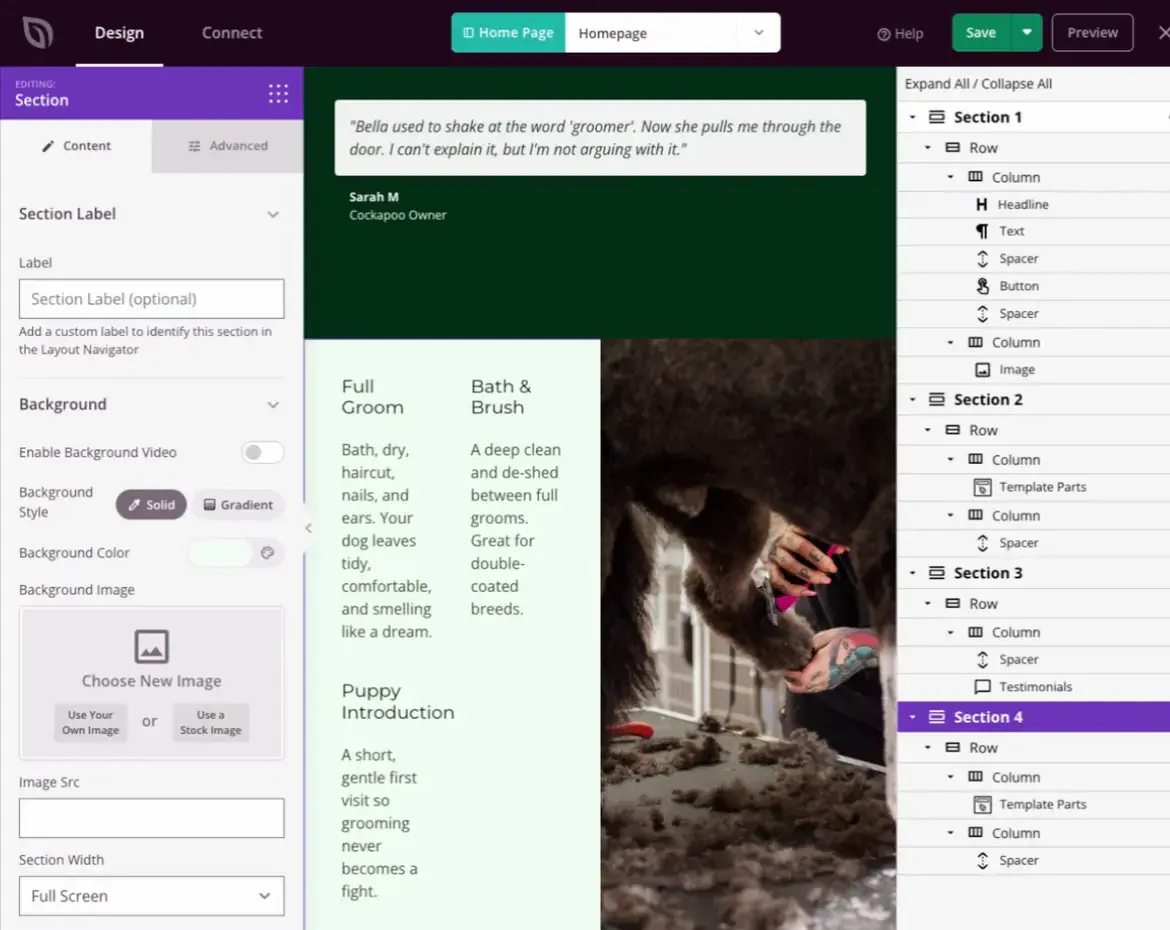
SeedProd generated in 22.5 seconds, and it’s aiming at something different. It hands you a foundation to build on rather than a finished site, so the blog was still waiting for its first post and the contact details came through as generic placeholders. It never asks you for them.
What it did build looked better, in mint and dark green, with real photography rather than generated. It did skip two things I’d asked for directly though, a services page and an inquiry form, and the four testimonials it invented would need deleting before anyone saw them.

Customizing Your Website With SeedProd vs Wix
To test the customization options, I gave myself a strict brief:
- Five pages: home, about, services, contact, and a blog with one post
- A homepage with a set headline, subhead, three service blurbs, one testimonial and a “Book a Groom” button
- An about page with a set heading, two paragraphs and a founder profile
- A services page headed “Grooming Prices”, with a pricing table
- A contact page with exactly five form fields, one of them a dropdown for the dog’s breed
- One blog post, around 250 words with a subheading and a list
- The same six images used on both sites
Customizing With the SeedProd Editor
With SeedProd, I customized everything by hand. I typed each heading, placed each image, and dragged the sections into the order I wanted.
Now, you might be wondering why I didn’t use AI here, when I used it to generate the site. SeedProd’s builder does have AI, and it will happily write your text and generate images for you.
What it doesn’t have is an assistant you can keep talking to about the page itself, so there’s nothing here that will assemble a layout for you.
Most of what slowed me down wasn’t things going wrong, it was things that simply weren’t there.
SeedProd doesn’t have a built-in contact form builder, so my form had to come from a separate plugin. I also had to build the services page myself, because the AI hadn’t made one.
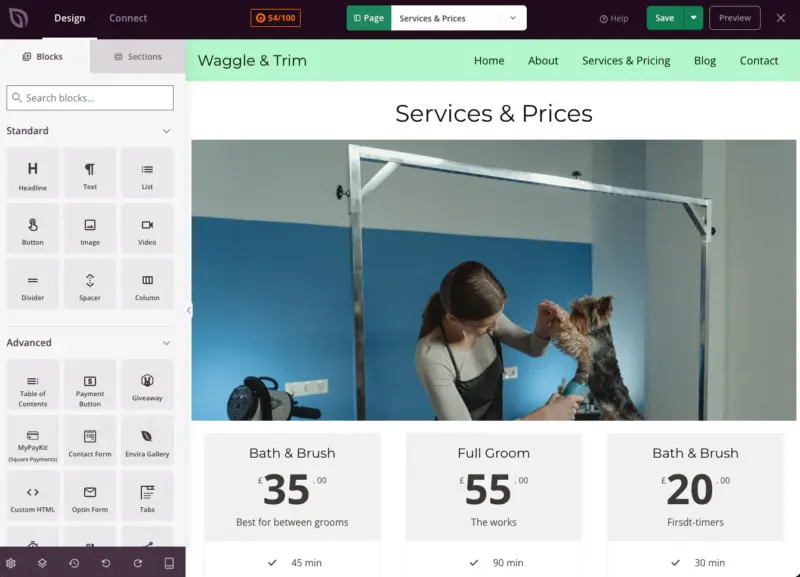
What is worth mentioning, though, is that nothing asked me to upgrade at any point. Every bit of friction I hit was structural, not a paywall.
Customizing With Wix’s Aria
On Wix, I mostly just asked. I still edited text and images directly where that was quicker, but anything structural went through Aria.
While it built me a proper comparison table in about a minute, it broke one cell of that same table and published it like that.
What I hadn’t expected was how much of my time would go on waiting. Every time I asked Aria to swap an image, it rebuilt the whole section, and a message appeared telling me not to leave the tab while my design was being generated.
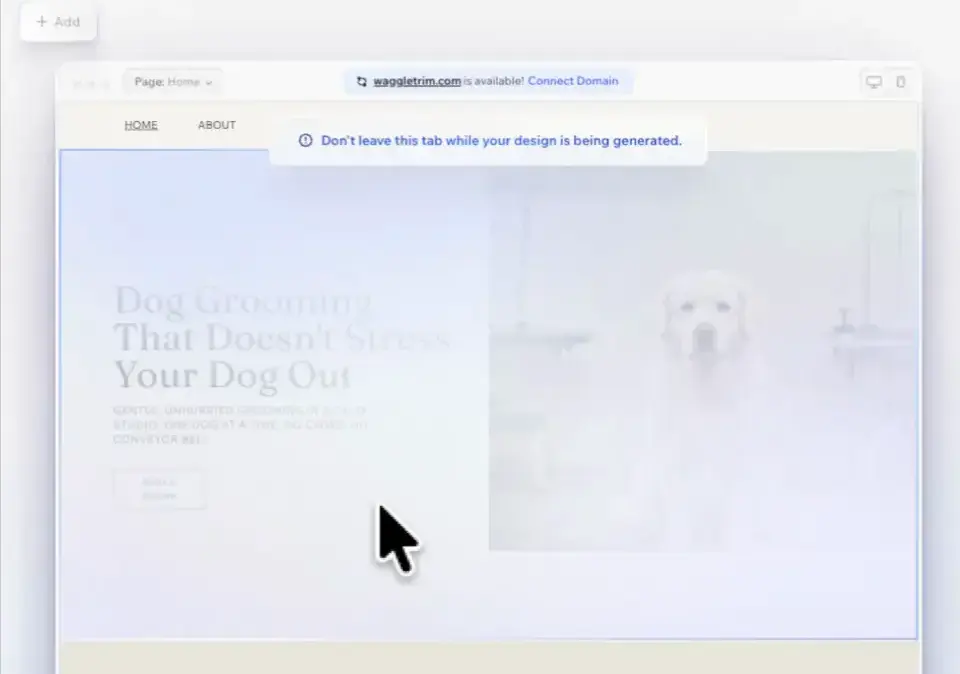
The page would blank out for 30 to 60 seconds at a time, and most of my time on Wix went on watching that happen.
The mistakes you have to go looking for are what I’d worry about more. Two different email addresses were live on the site, and Aria had invented one of them.
None of this hit a paywall, though. Everything my brief asked for was reachable on Wix’s free plan.
Overall, editing to that brief took 31 minutes 47 on SeedProd and 34 minutes 41 on Wix. SeedProd was three minutes faster by hand, having started with no services page, no pricing table and no form.
Two caveats: my SeedProd clock assumes WordPress and the plugins were already installed, and I never published that site publicly.
Blogging With SeedProd vs Wix
This is where the apples-to-oranges problem shows up most clearly, because SeedProd isn’t a blogging tool at all.
On WordPress, writing happens in WordPress. SeedProd’s job is what your blog looks like. Its theme builder gives you templates for the blog listing and for individual posts. So this part of the comparison is really WordPress against Wix, with SeedProd handling the design.
Blogging With SeedProd and WordPress
What the AI gave me here was nothing at all. My generated site arrived with an empty blog, still carrying WordPress’s default “Hello world!” post and its stock welcome text, sitting there for any visitor to read.
Then when I imported the theme into WordPress, even that didn’t come across, so I started from a completely empty blog.
Writing the post itself was the easy part. I used the standard WordPress editor, the same one most blogs on the internet are written in, and had my post and its featured image published in a little over two minutes.

It also went live at a web address that matched its title, which turns out to matter more than it sounds.
As for what you get as a blogger, publishing is what WordPress was built for and all of it is free. Categories, tags, scheduling, revisions, and multiple authors with their own permissions are all core, with no tier where the writing gets better.
Where I should be straight, though, is that SeedProd gives you the blog’s design rather than the writing tools, and those blog templates need its Theme Builder, which starts at the Plus tier.
Blogging With Wix
Aria wrote me three complete posts without being asked: images, subheadings, bullet lists, conclusions, each about a five minute read. Next to an empty blog with “Hello world!” on it, that’s a real win.
I only needed one, so I sent two to the trash and rewrote the third to match my brief.
And that’s where it caught me out. The post I rewrote kept the web address it had as the old post, so my article titled “How Often Should You Groom Your Dog?” is live at an address about the benefits of one-dog-at-a-time grooming. Two different subjects, one URL, and it’s still like that now.
Wix’s blog is a proper piece of software too, which I hadn’t expected. You get categories, up to ten a post, and up to thirty tags.
You can schedule posts, add other people as writers or editors with their own permissions, and put posts behind a paid membership if you want to charge for them.
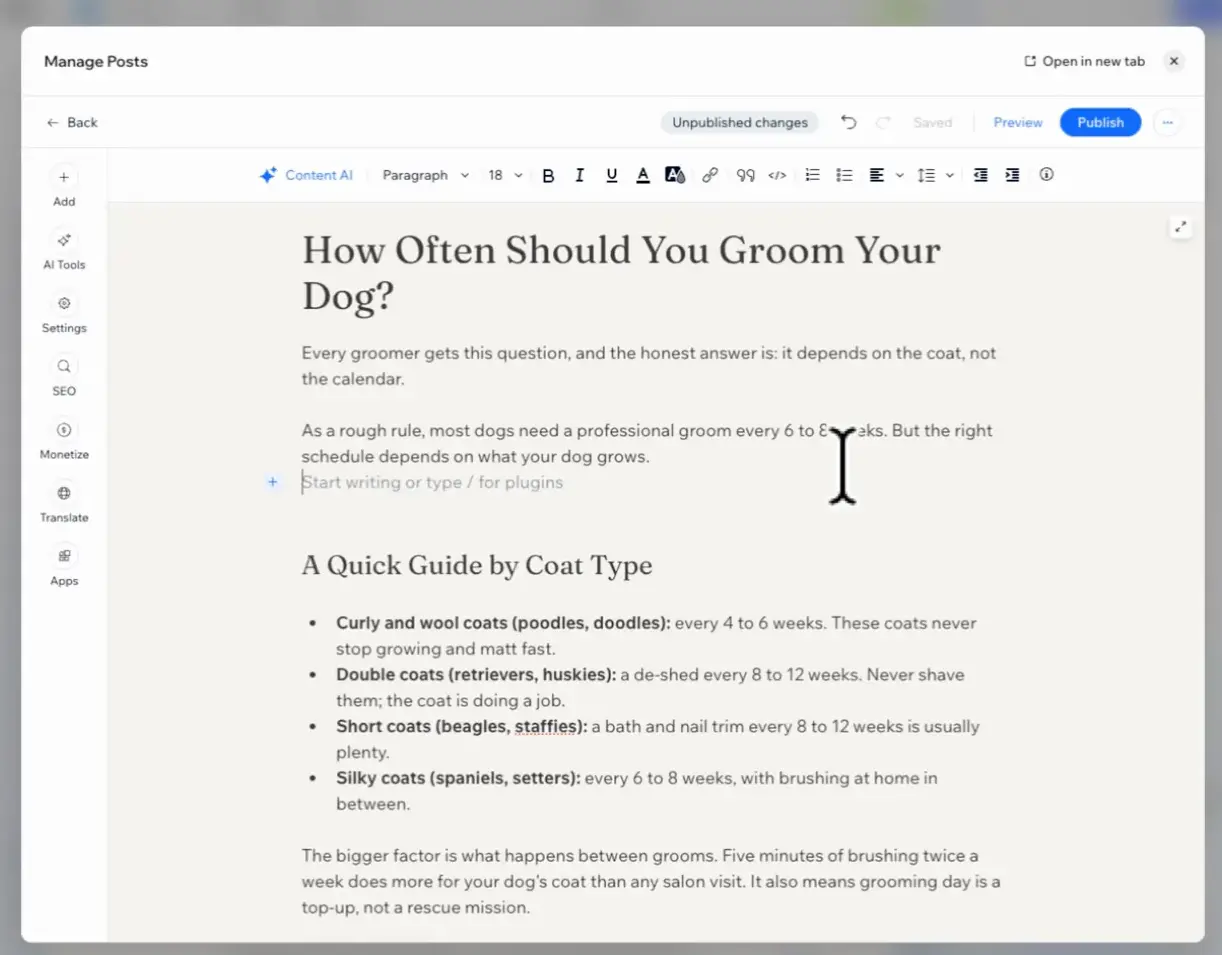
One thing worth clearing up, because I’ve seen it claimed and it isn’t true: Wix’s blog isn’t a paid feature. I created, published, rewrote and republished a post on a free account and never hit a wall at any point.
Wix does have a section for making money from a blog, which may well be paid, but that’s a different thing and I didn’t test it.
SEO With SeedProd vs Wix
It’s worth saying upfront that the SEO tools here don’t come from SeedProd, they come from a plugin. So this comparison is, again, WordPress against Wix. What SeedProd does is bring that plugin’s controls inside its own builder, which turned out to matter more than I expected.
SEO With SeedProd and WordPress
Because SeedProd doesn’t handle SEO, you install a plugin that does. I used All in One SEO, which is free, and worked through its seven-step setup wizard.
The free version covers what most small sites need, including:
- Page titles
- Meta descriptions
- Editable web address
- Switch to hide a page from Google
- Preview of how your page will look in search results
- Focus keyword with a score out of 100
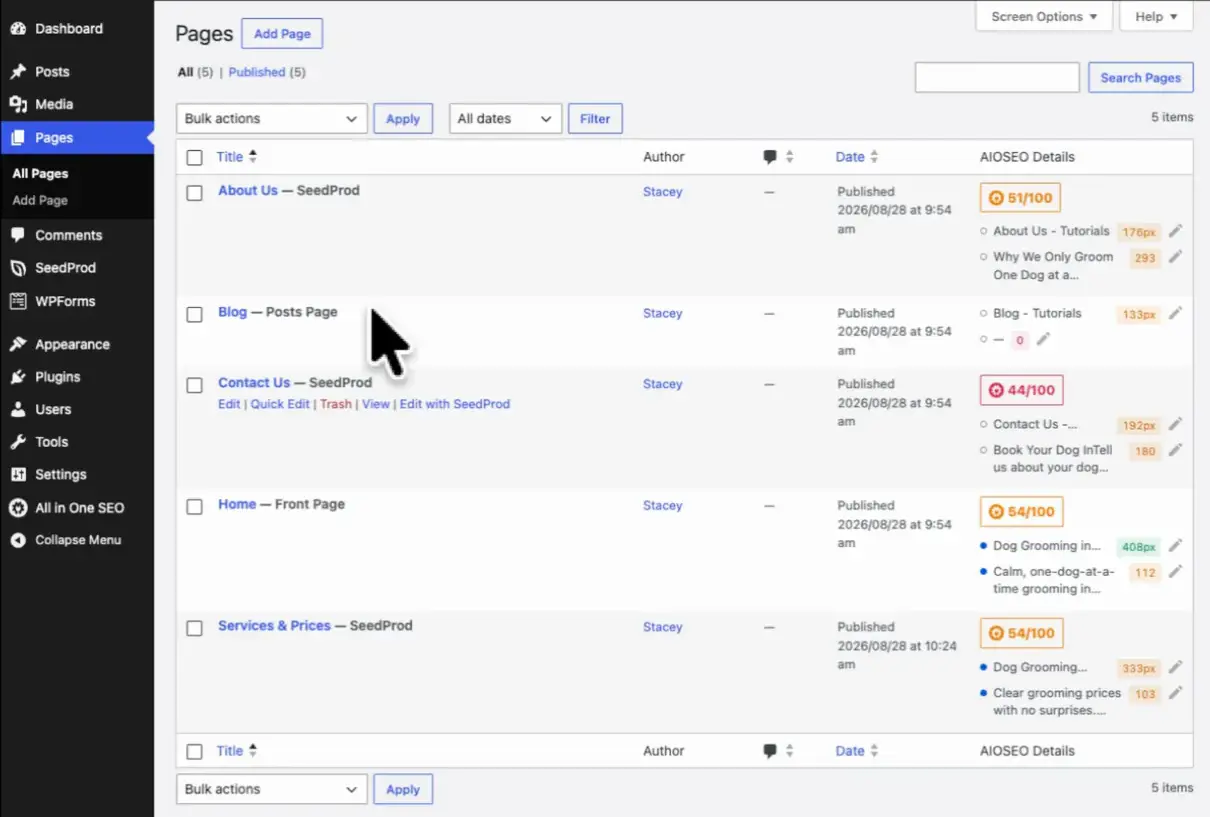
You can also verify your site with eight different services, Google and Bing among them, and set defaults that apply across the whole site.
Five things sit behind the paid version: image SEO, author SEO, local SEO, and video and news sitemaps. Custom schema is paid too.
One thing worth knowing, because I expected the opposite. I assumed I would be setting my SEO in the WordPress editor and doing my design in SeedProd, in two separate places.
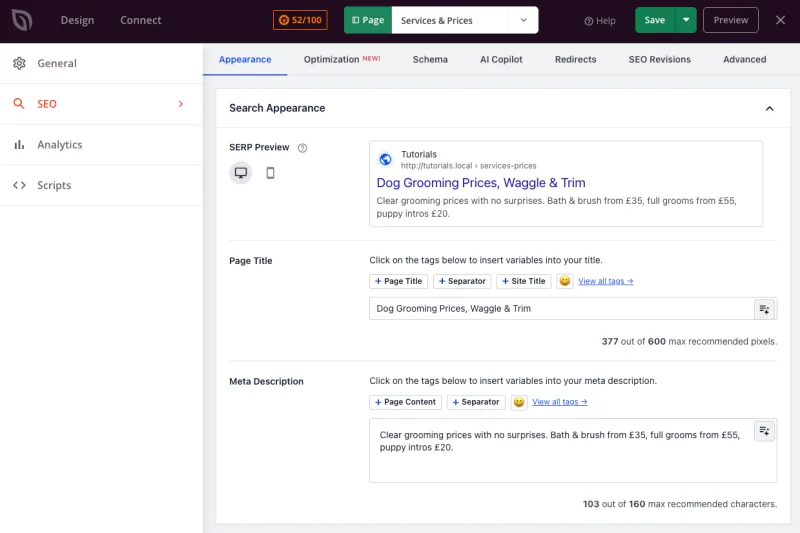
In fact All in One SEO’s panel sits inside the SeedProd builder, with an SEO score in the toolbar as you work and tabs covering search appearance, schema, redirects and revisions. The Google preview and both fields are right there, so you can write a page and set how it appears in search without leaving the builder.
SEO With Wix
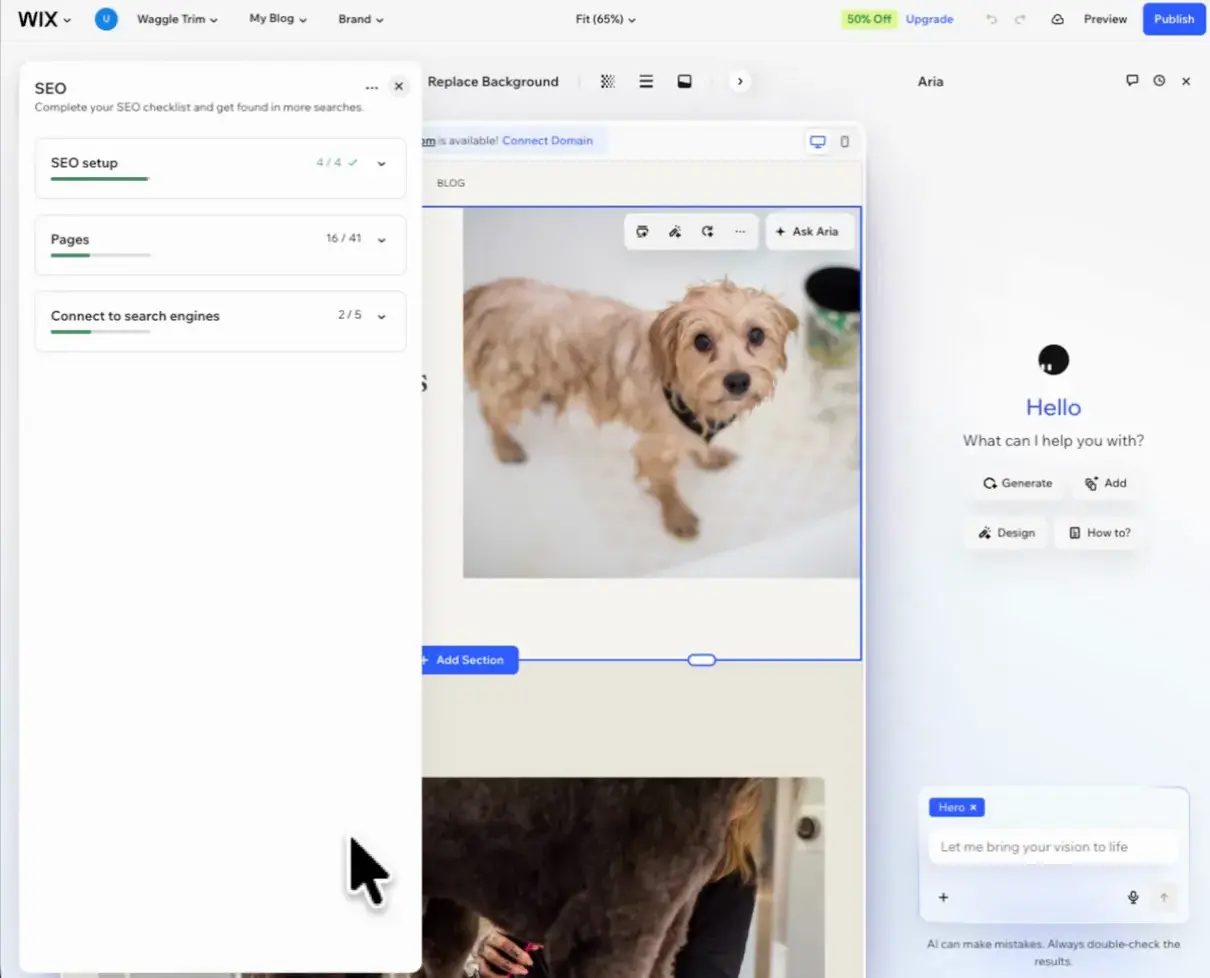
Wix builds all of its SEO in, so there’s nothing to install.
It starts you with a guided setup, then gives every page its own checklist of SEO tasks with a completion score. It’ll also analyze your headings page by page and flag problems, which is something the WordPress side didn’t offer me anywhere in this test.
You get the same essentials:
- Editable web address
- Search-results preview
- Switch to hide a page from Google
- Defaults you can set across all your blog posts at once
Then there’s an advanced panel, and it’s more thorough than I expected.
You can edit the canonical tag, give search engines a full set of instructions about how to treat a page, paste in your own structured data, and add any meta tag you like.
Wix’s own description of the custom schema feature mentions helping tools like ChatGPT understand your content, so they’re clearly thinking about AI search already.
It also has a table showing every page’s title, description, web address and index status in one view, with editing in place.
One thing Wix charges for, and it’s the one most people would reach for first, is the focus keyword. That’s a premium feature, and All in One SEO gives it away free.
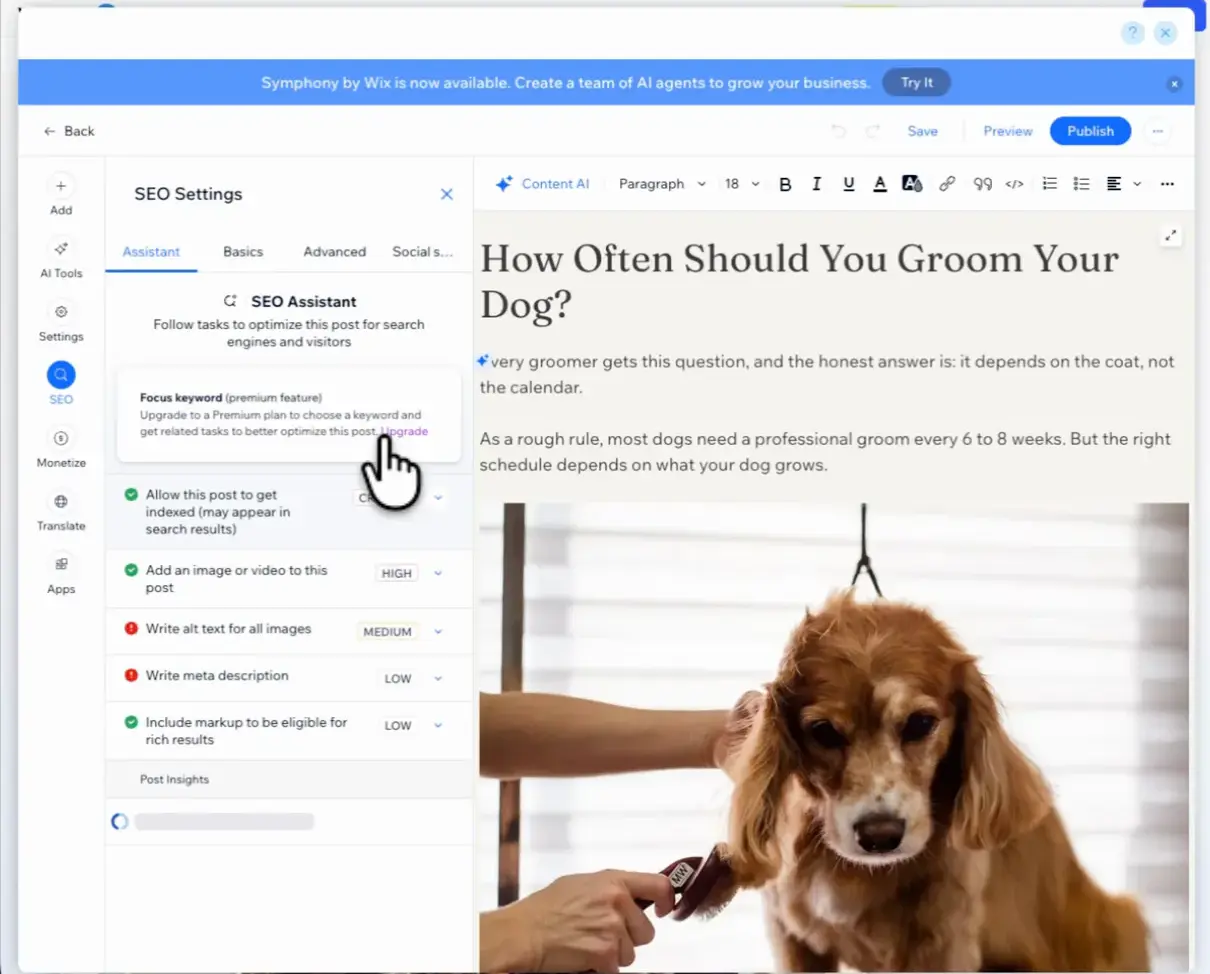
Overall, Wix isn’t weak on SEO, and on custom schema it beats the free WordPress setup outright. WordPress is the higher ceiling, but that comes from a plugin rather than the builder.
Contact Forms With SeedProd vs Wix
This follows the same pattern as the blog and SEO, because SeedProd doesn’t build contact forms either. So once again, it’s really WordPress against Wix.
Contact Forms With SeedProd and WordPress
On WordPress you add a form with a plugin, and SeedProd points you towards WPForms.
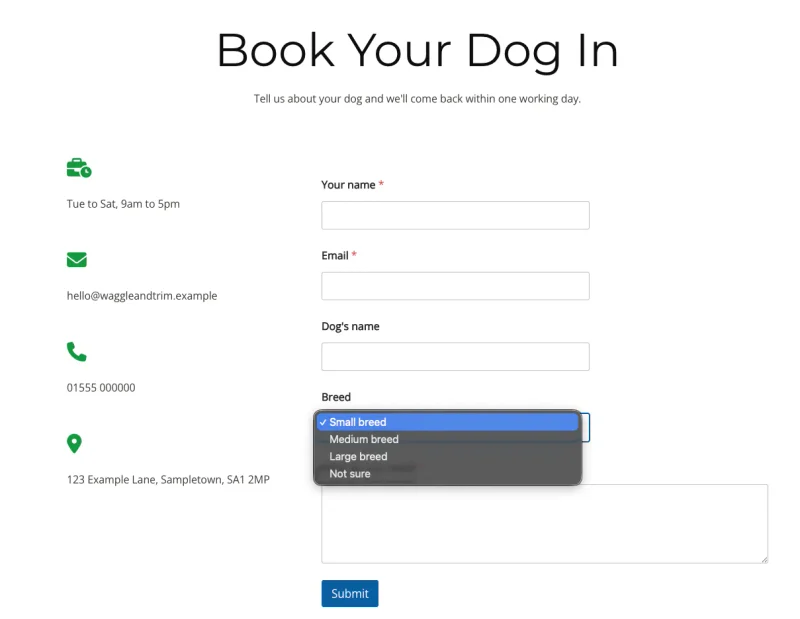
That took me three goes before I had a single field on the page. First it asked me to install the plugin, then WPForms asked me to install an addon, and then I searched its templates for anything dog grooming related and got nothing back.
What rescued it was WPForms’ own AI. I pasted my list of fields into it and it built the exact five-field form in one go, including the breed dropdown.
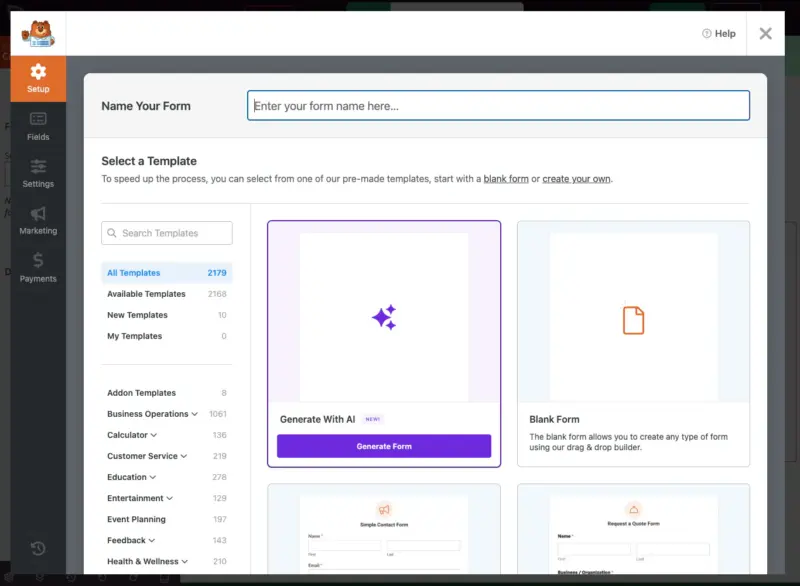
One thing worth knowing before you rely on it, though, is what the free version doesn’t do. WPForms Lite won’t store your inquiries at all, so the notification email is your only copy, and if you delete it the inquiry has gone.
Pay for it and every inquiry is stored, searchable and exportable as a spreadsheet, with far more control over the emails than Wix will give you.
Contact Forms With Wix
Wix built my form as part of the site without me asking for it, and it did the job well.
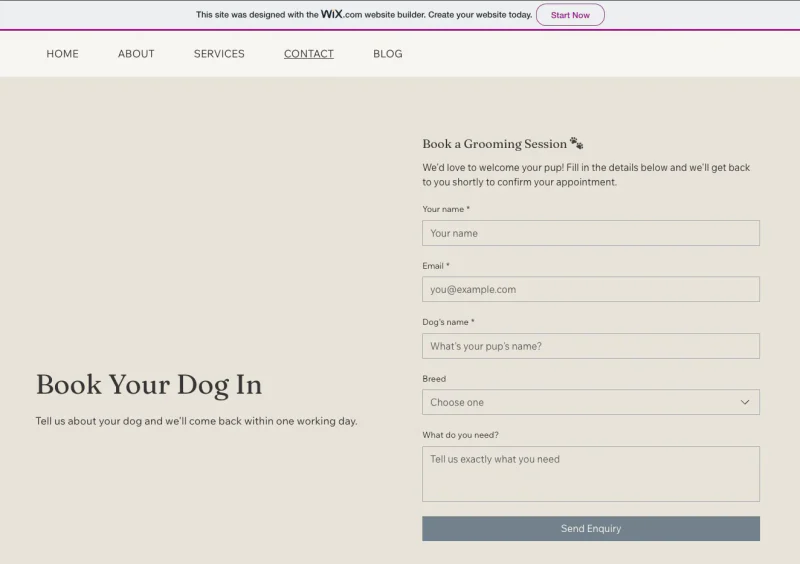
It caught a badly typed email address, and it stored every submission in the dashboard while creating a contact record with a timeline alongside it. All of it exports.
It also emailed each inquiry straight to me with no setup at all, with the sender’s address already in the reply field so I could answer without copying anything out.

There were two costs, though. Wix Forms opens as a separate app rather than inside the editor, so editing my form meant leaving the page I was working on. And the form I rebuilt there drifted from my brief on two of the fields.
Overall, free against free, Wix wins this one outright. It keeps a record of every inquiry and WPForms Lite doesn’t, and for a small business losing an inquiry because you deleted an email is a real problem rather than a spec-sheet difference.
Pay for WPForms and the WordPress side pulls ahead on notifications and exports, but you do have to pay to get there.
Selling and Adding Features With SeedProd vs Wix
I didn’t build a shop in this test, and I didn’t lean on either platform’s add-ons, so this section works differently from the ones above. It’s what each one offers rather than how each one performed. I’ve included it because both of these change what you end up paying.
Building an Online Store
With Wix, a store is part of the plans. You turn it on and start adding products, and for a small shop that’s the simpler and cheaper way in.

On WordPress, selling comes from WooCommerce, which is a separate free plugin and the most widely used ecommerce software on the web. It will take you considerably further than Wix’s store will, but there’s more to set up before you sell anything.

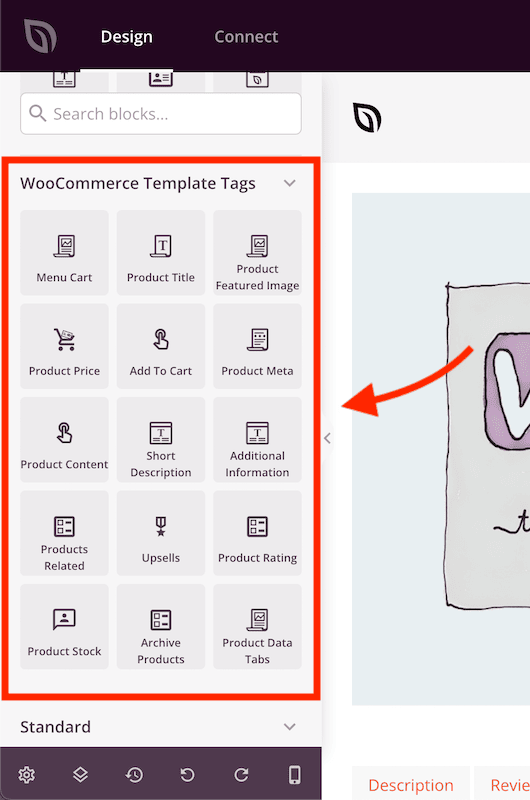
SeedProd includes WooCommerce template kits and WooCommerce blocks.They let you build a custom WooCommerce theme and customize your shop and product pages. However, this feature is on the Elite plan, which is one higher than the plan I used for my test.
So if a shop is the main reason you’re choosing, Wix is the easier start, and this comparison isn’t really the one that should decide it for you. That’s a different question and it deserves its own answer.
Adding Other Website Features
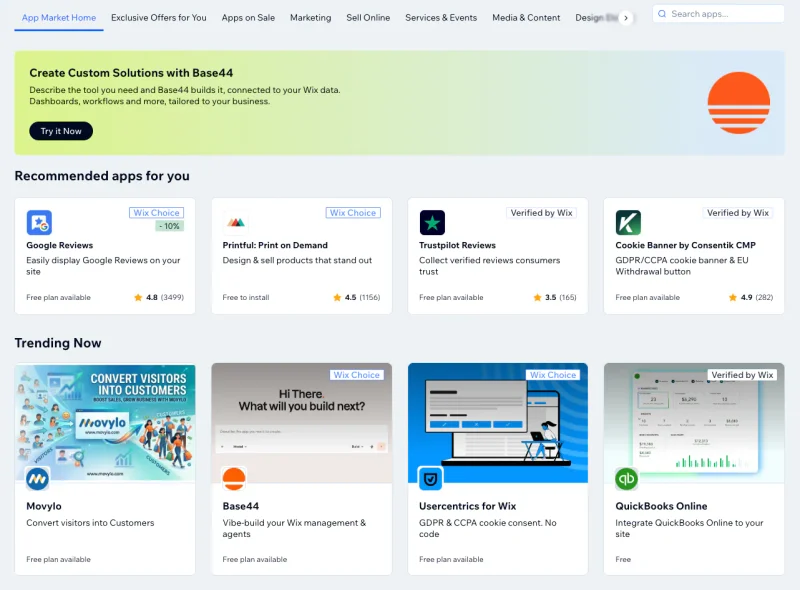
Wix has an App Market, where you pick from the apps Wix has approved. It’s tidy, and everything in there is built to work with Wix.
WordPress has tens of thousands of plugins, and you can replace any part of your site with a different one, including SeedProd itself. That’s more freedom and more decisions.
I did get a first-hand look at how Wix’s app layer behaves, though. When Aria generated my site, it quietly installed its Bookings app and a Members Area, and that’s where eleven of my nineteen pages came from.
When I went to delete them, I found they weren’t pages I could remove from the pages list at all. I had to go into the Apps dashboard and uninstall the apps underneath them.
Essentially, Wix’s version is neater and someone else is curating it, while WordPress’s is bigger and entirely yours to change.
Page Size With SeedProd vs Wix
I can’t tell you which site loads faster for a real visitor, because that depends almost entirely on the hosting company you choose. Racing my server against Wix’s would only have told you about my server, so there’s no speed score here on purpose.
What I could measure is how much work each builder hands your visitor’s browser.
| Measured on the home page | SeedProd | Wix |
|---|---|---|
| Separate files the browser has to fetch | 17 | 163 |
| The page’s own code | 42 KB | 1.3 MB |
| Everything the page loads, in total | 0.8 MB | 6.2 MB |
And before you ask, that isn’t the free plan’s tracking. Wix’s analytics account for about nineteen of those files and almost no weight. Take every one of them out and Wix still asks for 144.
Wix does win one line, though. Nothing in a Wix page has to finish loading before your visitor sees something, whereas my SeedProd page had seven stylesheets that did.
Overall, SeedProd hands the browser far less work, roughly seven times less to download. How quickly that turns into a loaded page still depends on the host you pick, and with Wix you don’t get to pick.
Ownership and Export With SeedProd vs Wix
Earlier I mentioned that a Wix site can’t be hosted anywhere else. In this section I tried to move both of my sites, so you can see what that means when you actually attempt it.
Ownership and Export With SeedProd and WordPress
There are two separate parts to getting a WordPress site out, and you need both of them.
The first is your design, which comes from SeedProd.
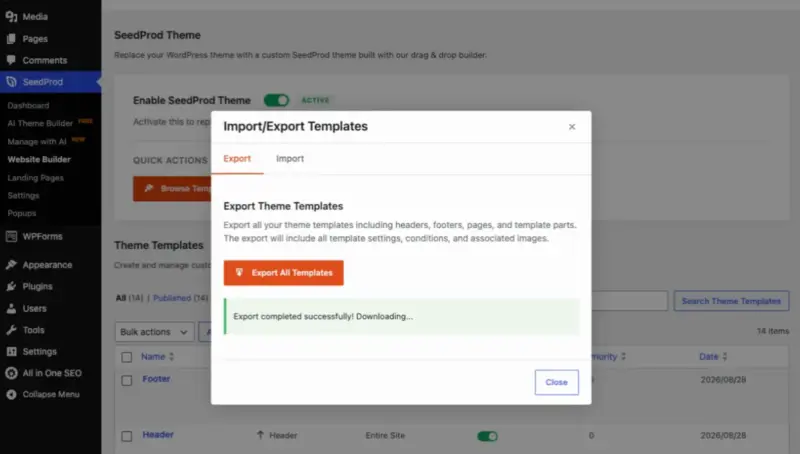
Under Website Builder there’s an Import and Export screen, and choosing Export All Templates gives you a zip file containing every template on your site, including your headers, footers and pages. Mine came to 84 KB.
The second is your content, which comes from WordPress itself.
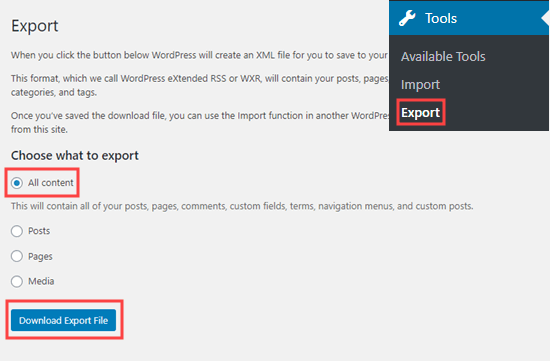
Under Tools you’ll find Export, which gives you a file holding all your pages and posts, and that file will import into any other WordPress site.
Now, one thing I do need to correct, because SeedProd’s own wording oversells it.
The export dialog tells you the file includes your associated images. I opened the zip to check, and it doesn’t. What’s inside is a single file holding your layouts, and every image in it is simply a link back to the site you exported from.
That matters less in practice than it sounds, because on a real move your images would come across with WordPress’s own export instead. But it does mean the design file on its own isn’t your whole website, and the dialog shouldn’t imply that it is.
Ownership and Export With Wix
There wasn’t anything for me to test on the Wix side, because Wix doesn’t offer an export at all, on any plan. According to its own documentation, that’s deliberate rather than an oversight.
Wix is clear that your content belongs to you and that you’re free to copy it out. What you can’t do is move the website itself, because there’s no file to take and nowhere else you could host it.
I should also say that I didn’t try any of the third-party tools that offer to move a Wix site to WordPress, so I can’t tell you how well those work. Wix itself doesn’t provide one.
Overall, WordPress wins this one outright, and for me it’s the reason to choose it. Your design comes out in a zip file, your content comes out in a separate file, and both will import into any WordPress site you like.
A site you build on Wix stays on Wix.
SeedProd vs Wix Pricing
This is the section I found hardest to write honestly, because the two don’t price the same way at all.
Wix charges you one amount and it stays there. The WordPress side is four separate bills, and what you pay depends on choices you make, including whether you keep paying at all.
So rather than give you one number for each, here’s everything, and you can put together whichever version fits you. All from their own US pricing pages in August 2026.
What Wix Costs
| Plan | Per month | Per year | Every year after |
|---|---|---|---|
| Light | $19 | $228 | $228 |
| Core | $29 | $348 | $348 |
| Business | $39 | $468 | $468 |
| Business Elite | $159 | $1,908 | $1,908 |
Light is the cheapest one that matches what I built, because it removes Wix’s advertising from your pages and gives you a custom domain. So $228 a year is the realistic Wix starting point rather than the free plan.
Business Elite is built for far bigger operations than a five-page business site. It allows for a hundred collaborators, which tells you who it’s for, so realistically you’re choosing between Light and Business. That’s $228 to $468 a year.
What the WordPress Side Costs
Here you’re buying four separate things, and two of them have choices attached.
| What you’re paying for | Your options | Year one | Every year after |
| Shared hosting | Three-year term | $47.88 | $119.88 |
| One-year term | $59.88 | $143.88 | |
| Month to month | $191.88 | Higher again | |
| SeedProd Pro | $159.60 | $399.00 | |
| WPForms | Lite, but it won’t store your inquiries | Free | Free |
| Basic | $49.50 | $99.00 | |
| All in One SEO | Free version was enough for this site | Free | Free |
There isn’t one answer here, which is why I’ve listed the options.
Wix stays at whatever you pick, between $228 and $468 a year. My WordPress site came to $269 in the first year and $642 after that, on a one-year hosting term with WPForms Basic and everything kept up to date.
And this is the honest trade. Wix’s price is fixed because you can’t change anything about it, and the WordPress one moves with the choices you make.
So Should You Use SeedProd or Wix?
Wix won more of the sections above than I expected when I started.
- Its AI followed my brief more closely
- Its editing felt genuinely modern, because you can simply ask for things
- Its SEO tools are better out of the box than I’d assumed
- On custom schema its free plan beats the free WordPress setup
- And from year two, it’s cheaper by a long way
So why would I still build on WordPress?
Everything I built on Wix lives on Wix and always will, by Wix’s own documentation. My WordPress site comes out as two files and goes into any host I choose.
My SeedProd site was also the more accurate of the two. Every web address matched its page, nothing contradicted anything else, and the form matched my brief. Wix published two different email addresses, a blog post at the wrong address, and a form that had quietly drifted.
None of which makes WordPress right for everyone. The decision depends on whether you’d rather rent something that works, or own something you look after.
FAQs About SeedProd vs Wix
Do I need to know how to code?
No, not for either of them. I built both of these sites without writing a line of code, and most of the work was typing into boxes and dragging things around. WordPress has a reputation for being technical, and installing it is the only part that ever really feels that way.
Is SeedProd free?
There’s a free version, and its AI site builder will generate up to three sites for nothing. The paid tiers are what I used here, and they’re where the full theme builder and most of the blocks live.
Can I move a Wix site to WordPress?
Not the site itself. Wix’s own help pages say a Wix site can’t be hosted anywhere else, and there’s no export to give you. Your content does belong to you and you can copy it out by hand, and there are third-party tools that offer to do the move for you, though I didn’t test any of them.
What happens to my site if I stop paying?
On WordPress your site stays online for as long as you’re paying for hosting, and a lapsed SeedProd license means you stop getting updates rather than losing the site. I wouldn’t run a site without updates, but it’s worth knowing the site is yours either way. I didn’t test what Wix does when a plan lapses.
What I’d Do Next
After two days of building the same site twice, what decided it for me wasn’t on either feature list. Wix is better than I expected at nearly everything I measured. It just won’t let you take the site with you.
If you’re still weighing it up, build the same page on both. Wix publishes on its free plan and SeedProd’s AI builder generates a site for nothing, and a couple of hours will tell you more than any comparison will, including this one.
Whichever way you lean, answer the ownership question before you spend anything. It’s the only part you can’t undo.
If you land where I did, SeedProd is where I’d start, and the beginner walkthrough covers the WordPress setup first if you’re new to it.
Related reading: the best AI website builders for WordPress, the best on-page SEO tools, and WordPress website examples if you want ideas before you start.
Thanks for reading! We’d love to hear your thoughts, so please feel free to join the conversation on YouTube, X and Facebook for more helpful advice and content to grow your business.