

Elementor vs WPBakery es una decisión que muchos usuarios de WordPress se encuentran al elegir un page builder.
Después de usar ambos en sitios reales, mi opinión es simple: Elementor es la mejor opción para la mayoría de las personas. Tiene un editor visual moderno, una salida más limpia y un soporte de plugins más sólido. WPBakery todavía funciona, pero su sistema basado en shortcodes y su flujo de trabajo anticuado hacen que sea más difícil de justificar para nuevos proyectos.
En esta guía, comparo Elementor y WPBakery en cuanto a facilidad de uso, plantillas, flexibilidad, rendimiento, SEO, precios y bloqueo a largo plazo. También explico por qué a menudo recomiendo una alternativa más simple y rápida que mucha gente pasa por alto: SeedProd.
Resumen rápido:
| Característica | Elementor | WPBakery |
|---|---|---|
| Facilidad de uso | Arrastrar y soltar fácil para principiantes con vista previa en vivo | Editores de backend y frontend, curva de aprendizaje más pronunciada |
| Plantillas | Más de 300 plantillas y kits de sitios web completos | Más de 150 plantillas, diseños anticuados |
| Rendimiento | Código más limpio, cargas de página ligeramente más rápidas | Salida más pesada basada en shortcodes |
| Soporte de Plugins SEO | Integración en el editor con Yoast y Rank Math | Sin panel SEO en el editor |
| Desactivación | Deja HTML limpio | Deja shortcodes rotos en todas las páginas |
| Plan gratuito | Sí | No |
| Precios | Desde 59 $/año (1 sitio) | Desde 69 $ pago único (1 sitio) |
| Mejor para | Principiantes, diseñadores y tiendas WooCommerce | Desarrolladores y usuarios cuyo tema lo incluye |
Veredicto: Elementor gana la comparación directa. Pero si quieres algo aún más rápido y simple, salta a por qué recomiendo SeedProd en su lugar.
- Cómo comparé Elementor y WPBakery
- Descripción general de Elementor
- Descripción general de WPBakery
- Facilidad de uso: Elementor vs WPBakery
- Plantillas y Biblioteca de Diseño
- Flexibilidad y Elementos de Página
- Rendimiento y Velocidad
- SEO y Compatibilidad de Plugins
- ¿Qué sucede si desactivas el plugin?
- ¿Puedes cambiar de WPBakery a Elementor?
- Precios: Elementor vs WPBakery
- Pros y contras: Elementor vs WPBakery
- ¿Cuál deberías elegir?
- Una mejor alternativa: Por qué recomiendo SeedProd
- Preguntas frecuentes (FAQs)
- Veredicto final: Elementor vs WPBakery
Cómo comparé Elementor y WPBakery
Cuando comparo constructores de páginas de WordPress, me fijo en lo que realmente te ayuda a construir un sitio real. He usado Elementor y WPBakery en diferentes proyectos, así que sé dónde destaca cada uno y dónde se queda corto.
Para este análisis, me centré en los factores que más importan en la práctica:
- Facilidad de uso: Qué tan rápido puedes empezar a construir sin sentirte perdido.
- Plantillas: La calidad y variedad de diseños que están listos para usar.
- Flexibilidad: Si el constructor tiene los bloques e integraciones que necesitas sin sobrecargarlo.
- Rendimiento: Cómo afecta cada constructor a la velocidad de la página y a las Core Web Vitals.
- Soporte de plugins SEO: Qué tan bien funciona cada constructor con herramientas como Yoast y Rank Math.
- Precios: No solo el coste, sino el valor real por lo que obtienes.
- Pros y contras: Los pequeños detalles que solo notas después de usar un constructor durante un tiempo.
Descripción general de Elementor
| Precios: A partir de $49/año |
| Plan gratuito / Prueba: Sí, versión gratuita disponible |
| Funciones destacadas: |
| 🔹 Editor en vivo de arrastrar y soltar 🔹 Amplia biblioteca de plantillas 🔹 Constructor de popups y temas 🔹 Constructor de WooCommerce |
| Calificación: B+ |
| Ideal para: Usuarios que desean mucha flexibilidad de diseño y no les importan las opciones adicionales |
Usé Elementor por primera vez cuando necesité una forma rápida de construir un sitio web completo sin tocar código. Su editor en vivo de arrastrar y soltar facilitó ver los cambios al instante, y el plan gratuito me dio lo suficiente para empezar.
Con el tiempo, descubrí que la gran cantidad de widgets y configuraciones era potente, pero también un poco abrumadora si solo necesitas algo simple como una página de destino.
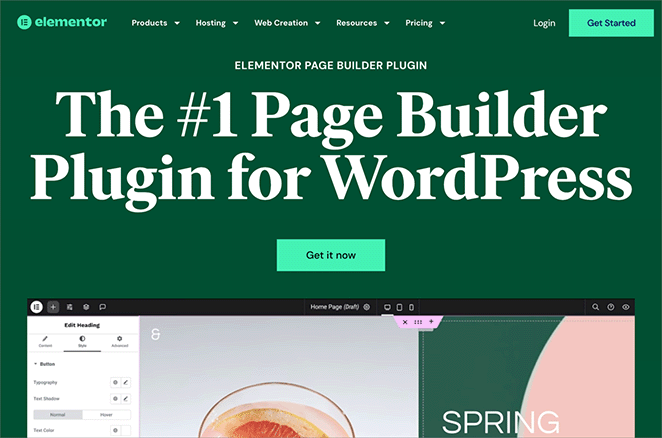
Elementor funciona mejor si quieres libertad de diseño y no te importa una curva de aprendizaje más pronunciada. Para una mirada más profunda, consulta nuestra reseña completa de Elementor.
Descripción general de WPBakery
| Precios: Pago único desde 45 $ |
| Plan Gratuito / Prueba: No |
| Funciones destacadas: |
| 🔹 Editores de backend y frontend 🔹 Gran biblioteca de elementos 🔹 Constructor de cuadrículas 🔹 Shortcodes de WooCommerce |
| Valoración: C+ |
| Ideal para: Usuarios cómodos con shortcodes que desean una compra única en lugar de tarifas recurrentes |
Cuando probé WPBakery, la mayor ventaja fue su pago único. Para algunos usuarios, eso es atractivo en comparación con las suscripciones anuales.
También tiene un editor de backend y un editor visual de frontend, lo que te da dos formas de construir. Pero en la práctica, la vista de backend se sentía anticuada, mostrando bloques de shortcodes en lugar de una vista previa en vivo real.
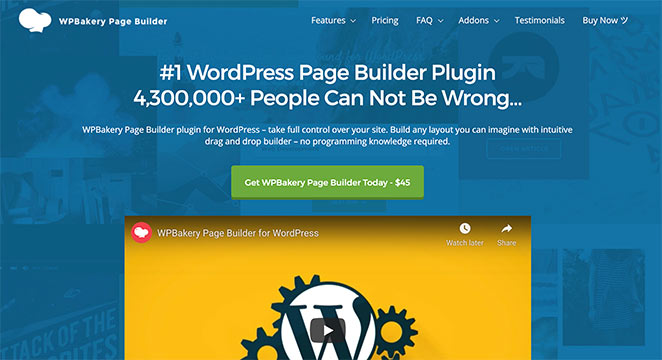
El mayor inconveniente que encontré es el bloqueo de shortcodes. Si alguna vez cambias de WPBakery, deja código desordenado que rompe tus diseños. Para mí, eso hace que sea más difícil recomendarlo a largo plazo, aunque pueda hacer el trabajo para sitios simples ahora mismo.
Para más información, consulta nuestra reseña de WPBakery.
Facilidad de uso: Elementor vs WPBakery
Elementor es más fácil de aprender y más rápido de construir. WPBakery tiene una curva de aprendizaje más pronunciada debido a su configuración de doble editor y su backend basado en shortcodes.
Facilidad de uso de Elementor
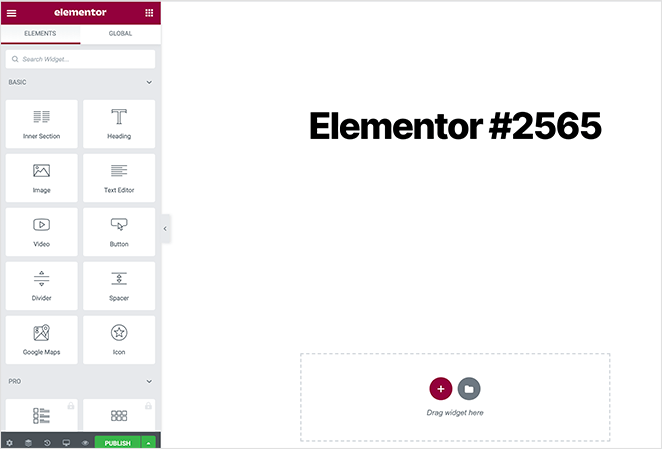
Cuando lancé Elementor por primera vez, me gustó lo fácil que era empezar a construir. Haces clic en “Editar con Elementor” y la interfaz se divide en dos columnas: widgets a la izquierda, vista previa en vivo a la derecha.
Es una configuración clara, pero el panel se llena rápidamente de opciones, lo que puede ser abrumador si solo quieres crear una página de destino sencilla.
Facilidad de uso de WPBakery
WPBakery ofrece tanto un editor de backend como un editor visual de frontend. En teoría, eso suena flexible. En la práctica, el editor de backend solo muestra shortcodes en lugar de una vista previa real, y los clics adicionales para cambiar al modo frontend ralentizan las cosas.
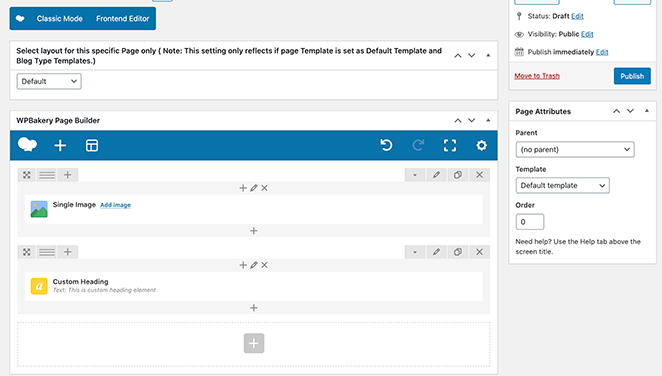
Para los principiantes, eso hace que WPBakery sea más difícil de aprender en comparación con Elementor.
Veredicto: Si no tienes experiencia en codificación, Elementor es la elección clara. Los editores duales de WPBakery añaden complejidad sin aportar mucho beneficio práctico.
Plantillas y Biblioteca de Diseño
Elementor tiene una biblioteca de plantillas más grande y moderna. WPBakery también ofrece plantillas, pero los diseños se sienten menos pulidos y la navegación es más torpe.
Plantillas de Elementor
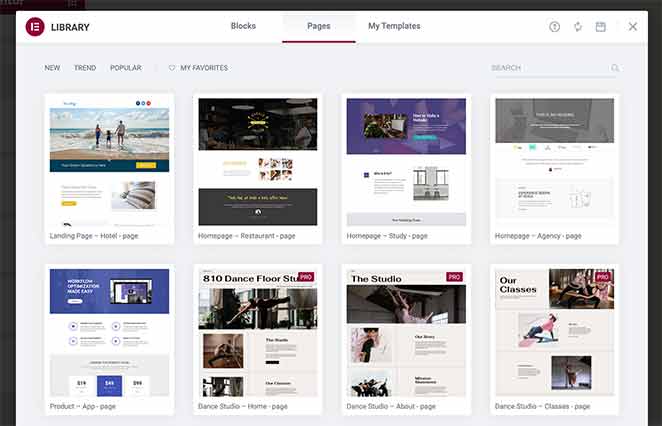
La biblioteca de plantillas de Elementor es grande y variada, con kits de sitios web completos y bloques de secciones. Cuando la usé por primera vez, me gustó lo rápido que pude importar un diseño.
El principal inconveniente es la compatibilidad. Muchas plantillas solo se muestran correctamente si usas la configuración “Ancho completo de Elementor”, lo que añade un paso adicional para que las cosas se vean bien.
Plantillas de WPBakery
WPBakery incluye una amplia selección de plantillas, y puedes guardar las tuyas para usarlas más tarde. Pero encontré la navegación torpe y los diseños menos modernos en comparación con Elementor.
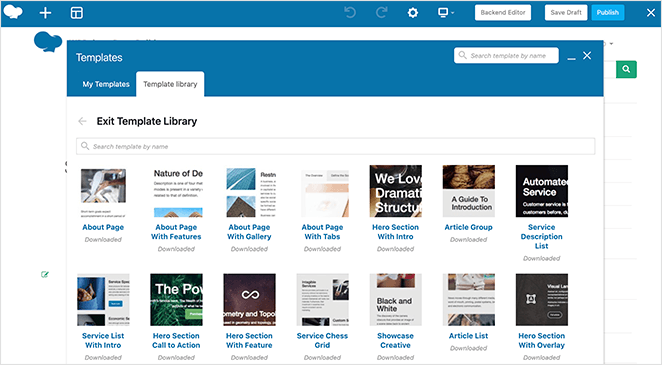
Veredicto: Elementor gana en calidad, cantidad y facilidad de importación de plantillas. La biblioteca de WPBakery es funcional pero se siente anticuada en comparación.
Flexibilidad y Elementos de Página
Elementor ofrece más widgets y un control de diseño más profundo. WPBakery tiene una amplia gama de elementos, pero su sistema de shortcodes y la falta de bloques de marketing nativos lo frenan.
Flexibilidad de Elementor
Cuando necesito mucho control de diseño, Elementor cumple. Obtienes widgets Básicos, Pro, Generales, de Sitio y Únicos, además de constructores de Temas/Popups/WooCommerce.
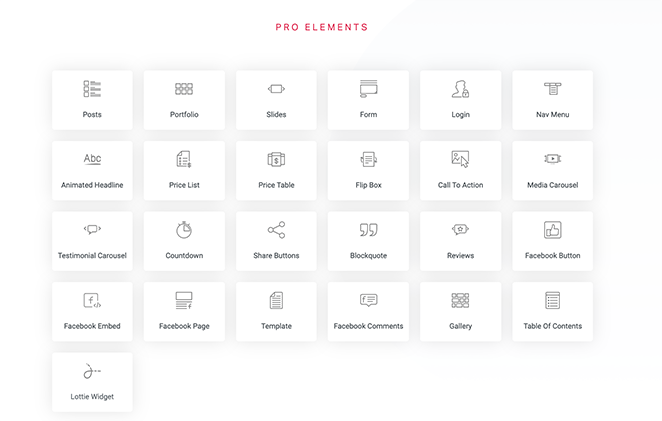
- Fortalezas: amplio conjunto de widgets, partes de temas, constructor de popups, herramientas de WooCommerce.
- Compromisos: interfaz de usuario más pesada, más configuraciones para gestionar embudos básicos.
Flexibilidad de WPBakery
WPBakery incluye muchos elementos de contenido y diseño y admite complementos de terceros. En la práctica, echo de menos bloques nativos de opt-in y formularios, y depender de shortcodes hace que cambiar más tarde sea doloroso.
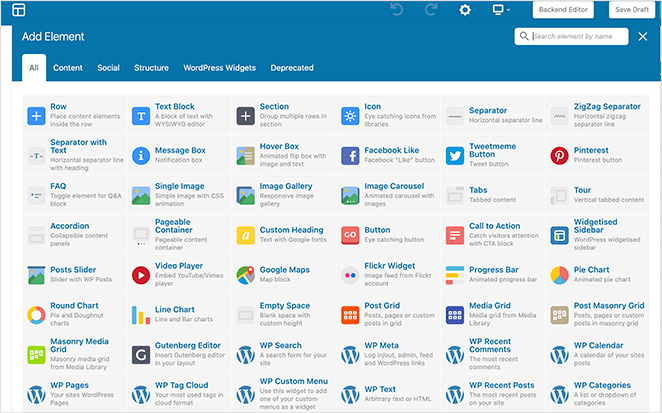
- Fortalezas: muchos elementos, constructor de cuadrículas, soporte de widgets.
- Lagunas: sin bloques nativos de opt-in/contacto, riesgo de bloqueo por shortcodes.
Veredicto: Elementor te ofrece más herramientas de diseño listas para usar, especialmente para WooCommerce y popups. WPBakery tiene variedad pero carece de elementos de marketing integrados y ata tu contenido a shortcodes.
Rendimiento y Velocidad
Elementor produce código ligeramente más limpio y generalmente carga más rápido. La salida de WPBakery es más pesada, especialmente en páginas complejas. La diferencia es pequeña en pruebas básicas, pero aumenta a medida que aumenta la complejidad de la página.
En pruebas de velocidad independientes, ambos constructores rinden de forma similar en páginas sencillas. Las puntuaciones de Google PageSpeed Insights rondan el 79-81/100 para ambos en móvil. Los tiempos de carga completa de página se sitúan cerca de los 3,5 segundos para cada uno.
Donde difieren es en los detalles. Elementor tiende a producir una mejor puntuación de Cumulative Layout Shift (CLS), lo que significa menos saltos de diseño inesperados. El Largest Contentful Paint (LCP) de WPBakery puede ser ligeramente más rápido en algunas pruebas, pero su salida de código general es más pesada y añade más elementos DOM. En páginas complejas, ese peso adicional se acumula.
Veredicto: Elementor tiene una ligera ventaja en limpieza de código y estabilidad del diseño. WPBakery es utilizable pero más pesado internamente. Para la mayoría de los sitios, la diferencia de velocidad bruta es pequeña, pero Elementor escala mejor en páginas con mucho contenido.
SEO y Compatibilidad de Plugins
Elementor se integra directamente con los plugins SEO más populares dentro de su editor. WPBakery funciona con plugins SEO a un nivel básico, pero pierdes la comodidad dentro del editor y corres el riesgo de código roto si lo desactivas.
| Función SEO | Elementor | WPBakery |
|---|---|---|
| Soporte Yoast SEO | Panel en el editor, integración completa | Compatibilidad básica, sin panel en el editor |
| Soporte Rank Math | Panel en el editor + ajustes SEO globales para plantillas | Compatibilidad básica, sin panel en el editor |
| Escaneo de plugins SEO | Acceso completo al contenido de la página | La capa de shortcode puede bloquear el escaneo completo |
| Código al desactivar | HTML limpio, todavía rastreable | Etiquetas de shortcode rotas, no rastreable |
Veredicto: Elementor te ofrece un flujo de trabajo SEO más fluido y código a largo plazo más seguro. WPBakery funciona, pero la falta de herramientas SEO en el editor y el riesgo de los shortcodes lo dejan atrás.
¿Qué sucede si desactivas el plugin?
Elementor deja tu contenido intacto como HTML legible. WPBakery deja etiquetas de shortcode rotas en cada página, haciendo que tu sitio sea inutilizable sin una limpieza manual.
| Qué sucede al desactivar… | Elementor | WPBakery |
|---|---|---|
| ¿Contenido visible? | Sí, el texto, las imágenes y los enlaces permanecen | No, reemplazado por etiquetas de shortcode sin procesar |
| ¿Estilos conservados? | No, se pierden el diseño y los estilos | No, el diseño está completamente roto |
| ¿Motores de búsqueda pueden rastrear? | Sí | No, los shortcodes no son legibles |
| ¿Limpieza requerida? | Mínima, solo reestilizar o reconstruir el diseño | Mayor, se deben eliminar manualmente los shortcodes de cada página |
Esto es lo que significa el "bloqueo por shortcode" en la práctica. Una vez que construyes con WPBakery, estás atado a él a menos que estés dispuesto a hacer un trabajo de limpieza significativo.
Veredicto: Elementor te ofrece una vía de salida limpia. WPBakery te bloquea. Si existe alguna posibilidad de que cambies de constructor en el futuro, esta diferencia por sí sola es una razón para elegir Elementor sobre WPBakery.
¿Puedes cambiar de WPBakery a Elementor?
Sí, pero no hay una herramienta de migración automatizada. Los shortcodes de WPBakery no se convierten al formato de Elementor, por lo que la única forma de cambiar es reconstruir cada página desde cero en Elementor haciendo referencia a tu diseño existente.
Antes de empezar, haz una copia de seguridad completa de tu sitio y utiliza un entorno de staging. Nunca migres en un sitio en vivo. Prueba cada página después de reconstruirla para asegurarte de que no falte nada.
También deberías revisar tu tema de WordPress. Muchos temas premium de ThemeForest incluyen WPBakery y construyen sus demos en torno a él. Si tu tema depende de WPBakery para su diseño, es posible que también necesites cambiar de tema. Temas ligeros como Astra o Hello Elementor funcionan bien como reemplazos.
El esfuerzo depende del tamaño del sitio. Un sitio web de negocios simple de 5 páginas es manejable. Un sitio más grande con docenas de diseños personalizados requerirá significativamente más trabajo.
Veredicto: La migración es factible pero requiere mucho trabajo. Si actualmente usas WPBakery y no estás satisfecho con él, el cambio vale la pena planificarlo. Pero si estás eligiendo un constructor por primera vez, elige el correcto ahora para evitar este problema por completo.
Precios: Elementor vs WPBakery
Elementor utiliza suscripciones anuales con un plan gratuito para empezar. WPBakery cobra una tarifa única sin versión gratuita. La mejor oferta depende de cuántos sitios gestiones y cuánto tiempo planees usar el constructor.
Precios de Elementor
Elementor todavía ofrece una versión gratuita, pero la mayoría de las funciones avanzadas, como el constructor de temas, el constructor de popups y los widgets de WooCommerce, requieren un plan Pro. Los precios actualizados son:
- Essential: 59 $/año para 1 sitio web
- Advanced: 99 $/año para 3 sitios web
- Expert: 199 $/año para 25 sitios web
- Agency: 399 $/año para 1000 sitios web
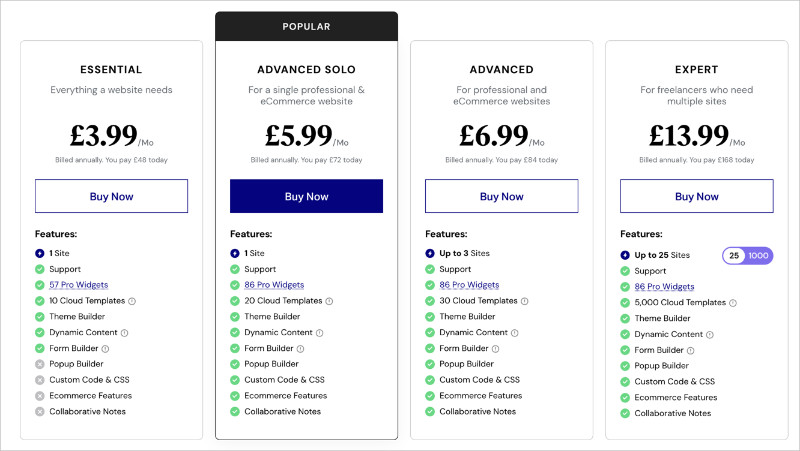
Elementor es flexible, pero los costos se acumulan rápidamente si gestionas varios sitios. La versión gratuita es útil para probar, pero la mayoría de los proyectos serios necesitarán Elementor Pro.
Precios de WPBakery
WPBakery no ofrece una versión gratuita, pero utiliza una licencia vitalicia única en lugar de tarifas anuales. Los precios actuales son:
- Regular: 69 $ vitalicio para un sitio
- 5 Sitios: 256 $ vitalicio
- 10 Sitios: 499 $ vitalicio
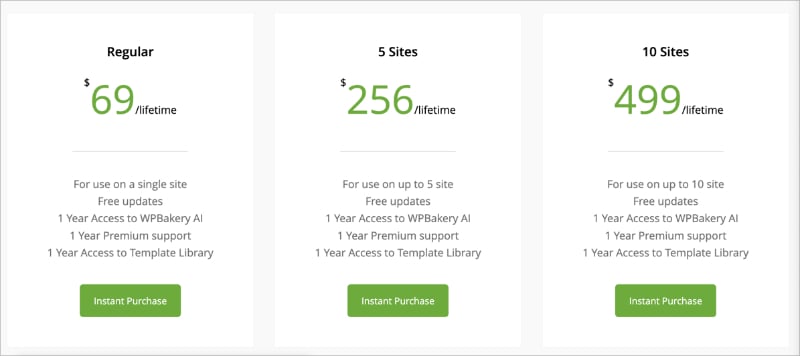
Cada licencia incluye actualizaciones gratuitas, un año de soporte premium, acceso a la herramienta de IA de WPBakery y un año de acceso a la biblioteca de plantillas. El modelo vitalicio parece atractivo, pero ten en cuenta que el soporte y el acceso a las plantillas solo se incluyen durante el primer año.
Veredicto: Si solo necesita un sitio y planea mantener su constructor durante años, el precio único de WPBakery ahorra dinero con el tiempo. Para múltiples sitios o si valora un plan gratuito para probar primero, Elementor ofrece más flexibilidad. La trampa son los costos de cambio. Si alguna vez necesita mudarse a un constructor diferente, los ahorros únicos de WPBakery pueden desaparecer rápidamente.
Pros y contras: Elementor vs WPBakery
Elementor ofrece más funciones, mejor soporte de plugins y una interfaz moderna. El precio único de WPBakery y su editor de backend atraen a una audiencia más pequeña, pero su dependencia de los shortcodes es un inconveniente importante a largo plazo.
Pros y contras de Elementor
- Pros: Gran biblioteca de plantillas, opciones de diseño flexibles, plan gratuito, herramientas de WooCommerce, soporte de plugins SEO dentro del editor, código limpio al desactivar.
- Contras: Puede ralentizar los sitios con demasiados elementos, interfaz desordenada, funciones avanzadas bloqueadas detrás de planes superiores.
Pros y contras de WPBakery
- Pros: Compra única, muchos elementos, editores de backend y frontend, incluido con temas premium populares, soporte multilingüe.
- Contras: Sin versión gratuita, bloqueo de shortcodes, rendimiento más lento, interfaz anticuada, sin soporte de plugins SEO dentro del editor.
Veredicto: El precio único de WPBakery es su mayor ventaja, pero el bloqueo y el editor anticuado son difíciles de pasar por alto.
¿Cuál deberías elegir?
Su elección depende de sus prioridades, su presupuesto y si ya tiene WPBakery instalado a través de su tema.
Elija Elementor si:
- Desea un editor moderno de arrastrar y soltar con una vista previa en vivo.
- Necesita un plan gratuito para empezar antes de comprometerse.
- Desea un constructor de WooCommerce, un constructor de popups o un constructor de temas incorporado.
- La integración de plugins SEO dentro del editor le importa.
- Desea una salida limpia si alguna vez cambia de constructor.
Elija WPBakery si:
- Su tema de WordPress ya incluye WPBakery y su sitio está construido a su alrededor.
- Prefiere un pago único a una suscripción anual.
- Se siente cómodo trabajando con editores de backend y shortcodes.
- Gestiona un sitio simple que no necesita cambios de diseño frecuentes.
Si ninguno de los constructores le parece la opción adecuada, hay una tercera opción que vale la pena considerar.
Una mejor alternativa: Por qué recomiendo SeedProd
Si desea algo más rápido, más simple y más enfocado en conversiones que Elementor o WPBakery, SeedProd es el constructor que recomiendo.
| Precios: A partir de 39,50 $/año |
| Plan gratuito / Prueba: Sí, versión gratuita disponible |
| Funciones destacadas: |
| 🔹 Constructor de páginas de destino y temas de arrastrar y soltar 🔹 Más de 150 plantillas 🔹 Modos de página integrados (Próximamente, Mantenimiento, Inicio de sesión, 404) 🔹 Integración con WooCommerce |
| Calificación: A |
| Ideal para: Principiantes y especialistas en marketing que desean páginas rápidas y enfocadas en la conversión sin plugins adicionales |
Uso SeedProd la mayor parte del tiempo cuando necesito una página de destino o un tema que simplemente funcione sin ralentizar mi sitio. El constructor es limpio, los bloques son fáciles de editar en línea y no tengo que lidiar con shortcodes o configuraciones complicadas.

Aquí explico por qué creo que SeedProd es una mejor opción que Elementor y WPBakery:
- Ligero y rápido. SeedProd no depende de códigos cortos ni carga una pesada biblioteca de widgets. Las páginas cargan rápidamente y el constructor se mantiene receptivo incluso con diseños complejos.
- Modos de página integrados. Las páginas de Próximamente, Mantenimiento, Inicio de sesión y 404 están incluidas de serie. Con Elementor o WPBakery, necesitas plugins adicionales para estas.
- Bloques enfocados en la conversión. Formularios de suscripción, temporizadores de cuenta atrás, testimonios, tablas de precios y valoraciones de estrellas están integrados. No necesitas complementos de terceros para crear páginas que conviertan.
- WooCommerce sin el peso. SeedProd incluye bloques de WooCommerce que se integran limpiamente sin añadir la sobrecarga que el constructor de WooCommerce de Elementor puede introducir.
- Sin ataduras. SeedProd no deja códigos cortos desordenados. Si lo desactivas, tus páginas de destino dejan de mostrarse pero tu sitio permanece limpio.
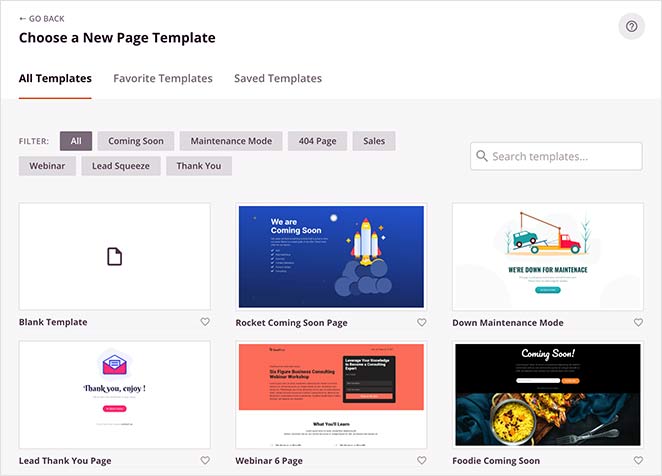
Las plantillas de SeedProd cubren todos los casos de uso comunes: páginas de ventas, webinars, próximas y de agradecimiento. Cargan instantáneamente y no dependen de tu tema de WordPress, por lo que puedes usar cualquier tema que desees.
Precios de SeedProd
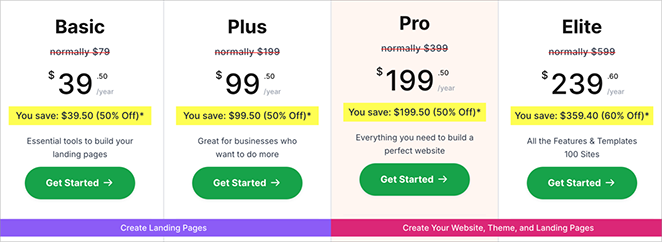
SeedProd ofrece una versión gratuita que es suficiente para crear páginas de destino sencillas. La actualización a Pro desbloquea el constructor de temas, bloques premium, mapeo de dominios y más.
Los planes de pago comienzan en 39,50 $/año para un sitio y escalan hasta 239,50 $/año para sitios ilimitados. La combinación de un plan gratuito y niveles de pago asequibles hace que SeedProd ofrezca el mejor valor general en comparación con Elementor y WPBakery.
Pros y contras de SeedProd
- Pros: Fácil de usar, ligero, plan gratuito disponible, plantillas enfocadas en la conversión, modos de página integrados (Próximamente, Mantenimiento, Inicio de sesión, 404).
- Contras: Menos widgets de diseño avanzados que Elementor, herramientas de WooCommerce solo en planes superiores.
Si tu prioridad es crear páginas de destino de alta conversión o un tema personalizado sin sobrecarga, SeedProd es la opción más fácil y fiable.
Preguntas frecuentes (FAQs)
Veredicto final: Elementor vs WPBakery
Entre los dos, Elementor es el mejor constructor de páginas para la mayoría de los usuarios de WordPress. WPBakery sigue teniendo sentido si tu tema lo incluye y prefieres un pago único, pero para nuevos proyectos, Elementor gana en todos los demás aspectos.
Dicho esto, mi principal recomendación es SeedProd. Es más rápido, más simple y está diseñado específicamente para páginas de destino y conversiones sin la sobrecarga que conllevan los otros dos constructores.
¿Listo para construir tu próximo sitio? SeedProd facilita la creación de páginas atractivas y enfocadas en la conversión en minutos.
Si encontraste útil esta comparación, también te pueden interesar estas guías:
- Los Mejores Plugins de Páginas de Destino para WordPress
- Divi vs Beaver Builder vs SeedProd
- Los mejores constructores de sitios web para WordPress
- Cómo crear una página de destino en WordPress
¡Gracias por leer! Nos encantaría conocer tu opinión, así que únete a la conversación en YouTube, X y Facebook para obtener más consejos y contenido útil para hacer crecer tu negocio.



