


Most WordPress site owners spend hours doing keyword research manually, then wonder why the results don’t improve. If you run a bakery, a freelance site, or a food blog, AI can cut that work down significantly.
I’ve been writing about WordPress for 13 years and use AIOSEO and LowFruits on my own site every day. Here’s how to put AI to work on your SEO.
TL;DR: How to Use AI for SEO AI tools can handle the time-consuming parts of SEO, from keyword research to schema markup, so you can focus on growing your site.
- Find content ideas – Use ChatGPT to brainstorm topics based on your niche and audience.
- Research keywords – Use LowFruits or SEMrush to find low-competition keywords you can actually rank for.
- Write and optimize content – Use SEOBoost and AIOSEO to improve quality and on-page SEO.
- Add schema markup – Use AIOSEO to add structured data so search engines understand your pages.
- Optimize for AI search – Add question-phrased headings and structured data to appear in AI-driven results.
Quick Summary: AI Tools That Help With SEO
| SEO Task | AI Tool Example | What It Helps With |
|---|---|---|
| Topic Ideation | ChatGPT | Brainstorming content ideas |
| Keyword Research | LowFruits, SEMrush | Finding long-tail and easy-to-rank keywords |
| Content Writing | SeedProd AI, AIOSEO | Creating headlines, meta descriptions, and page copy |
| On-Page Optimization | SEOBoost | Improving keyword use, readability, and structure |
| Image Creation | SeedProd AI Image Tool | Generating visuals with alt text for SEO |
| Schema Markup | ChatGPT, AIOSEO | Creating structured data like FAQ or HowTo schema |
| Analytics Insights | MonsterInsights | Understanding traffic trends and conversion behavior |
| Internal Linking | AIOSEO Link Assistant | Finding related content and orphaned pages |
What Is AI for SEO (and Why Does It Matter)?
AI for SEO means using machine learning and natural language processing tools to handle the parts of SEO that take the most time, like keyword research, writing meta descriptions, and finding content gaps.
Search engines like Google have used AI for years to understand what searchers mean, not just the words they type. Your content needs to match that intent, and AI tools help you figure out what that looks like in practice.
I use AI on my own site daily to cut research time and catch optimization gaps I might otherwise miss. It won’t replace your judgment on strategy, but it handles the tedious work so you can focus on what matters.
The same approach works on articles that have already dropped in rankings, not just new content you’re building from scratch.
Paste a declining post into ChatGPT or SEOBoost and ask it to identify what competitors cover that you don’t. Then prioritize those gaps in your next update.
How to Use AI SEO to Improve Search Engine Rankings
Now that you understand more about AI SEO, let’s see how to use it to boost your rankings.
- How Do I Find Content Ideas with AI?
- How Can AI Help with Keyword Research?
- How Do I Write SEO Content Using AI?
- Can AI Create Images for My Website?
- How Do I Optimize Existing Content with AI?
- How Do I Optimize for Voice Search with AI?
- How Can AI Help Me Build Internal Links?
- How Do I Generate Schema Markup with AI?
- How Do I Analyze SEO Data with AI?
- How Do I Optimize My WordPress Site for AI Search Engines?
- What AI Can't Do for Your SEO
- Frequently Asked Questions About Using AI for SEO
- Improve Your Website with AI SEO
How Do I Find Content Ideas with AI?
Creating a list of topic ideas is a great place to start when you’re new to SEO. But thinking up ideas on your own can be tricky. AI can help by giving you solid ideas in just a few minutes.
Let’s say you have a recipe blog. A tool like ChatGPT can help you brainstorm ideas. Just type in something like, “Give me fun content ideas about healthy desserts.”
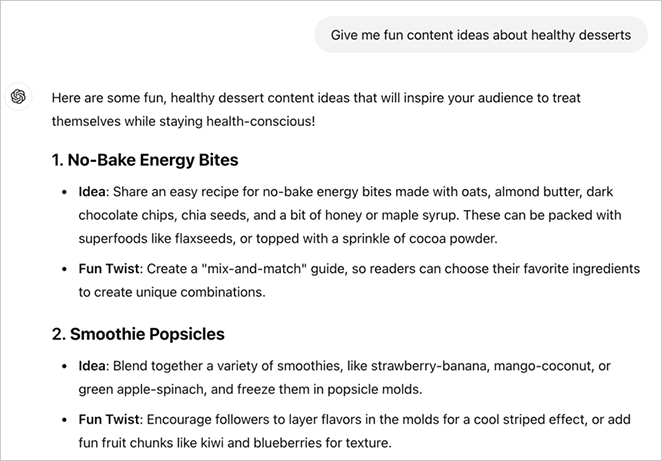
In no time, you’ll get a list of ideas that you can potentially use, like:
- “Quick Healthy Desserts You Can Make in 5 Minutes”
- “Yummy No-Bake Desserts for Hot Summer Days”
- “Healthy Desserts Using Old-Fashioned Grains”
- “Vegan Desserts That Everyone Will Love”
These AI ideas are a great start, but they’re not the whole story. Tools like ChatGPT don’t know about the latest keyword trends. So, use these ideas as a jumping-off point for more research.
How Can AI Help with Keyword Research?
Now that you have topic ideas let’s dive into keyword research. AI tools can make this job much easier and more effective.
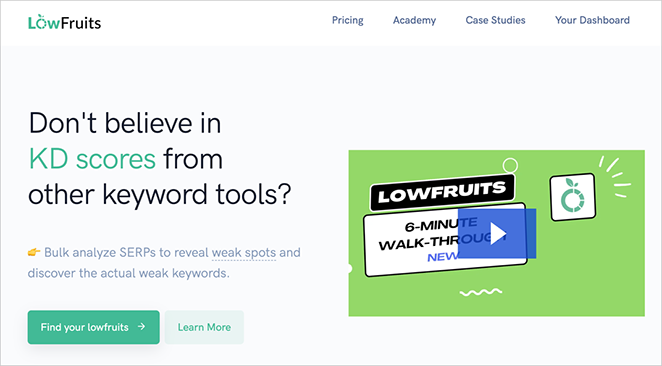
One really useful tool is LowFruits. It’s designed to find “low-hanging fruit” – keywords that are easier to rank for but still get decent traffic.
For example, it might show you that “low sodium apple crisp recipe” is easier to rank for than just “apple crisp recipe.”
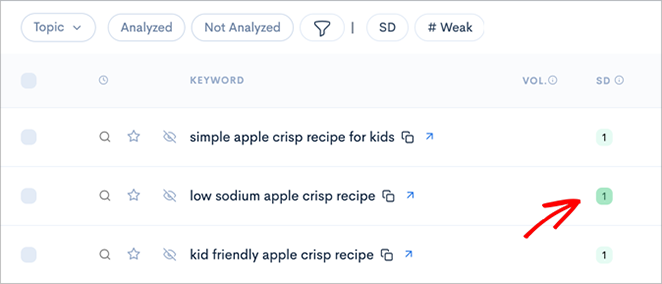
LowFruits is also great at finding long-tail keywords. These are longer, more specific phrases that people search for. They might get fewer searches, but they’re often less competitive.
The tool doesn’t just find keywords – it also tells you how hard it might be to rank for them. This helps you choose keywords you have a good chance of ranking for.
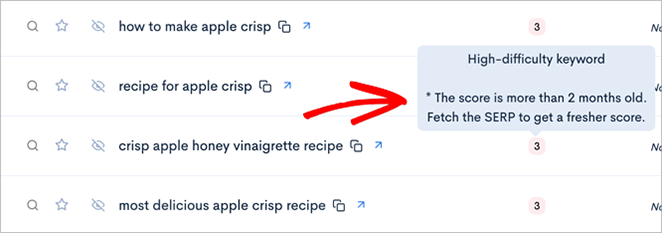
While LowFruits focuses on finding easier keywords, other AI tools can help with different aspects of keyword research.
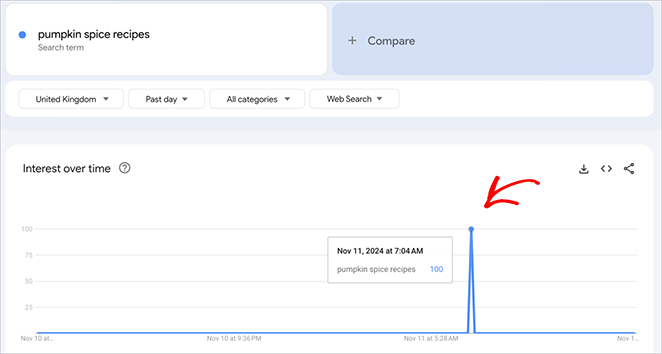
Google Trends, for instance, can predict seasonal trends. For example, it shows that searches for “pumpkin spice recipes” spike every fall. This is super helpful for planning your content calendar.
Tools like SEMrush or Ahrefs use AI to group related keywords together.
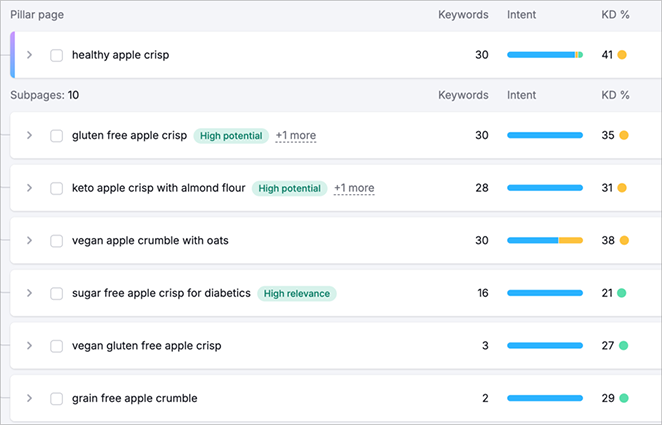
They might show you that “healthy apple desserts,” “low-sugar apple recipes,” and “diabetic-friendly apple treats” are all related. This tells you that one article could target all these keywords at once.
How Do I Write SEO Content Using AI?
Once you’ve researched keywords, it’s time for content creation. AI can help here, too, making your writing more SEO-friendly.
Let’s start with titles and meta descriptions. These are super important for SEO because they tell search engines what your content is about, but writing good ones is often tricky.
That’s where All in One SEO, the best WordPress SEO plugin, can help. With its AI title and meta description generator, you can create catchy titles and descriptions that include your keywords.
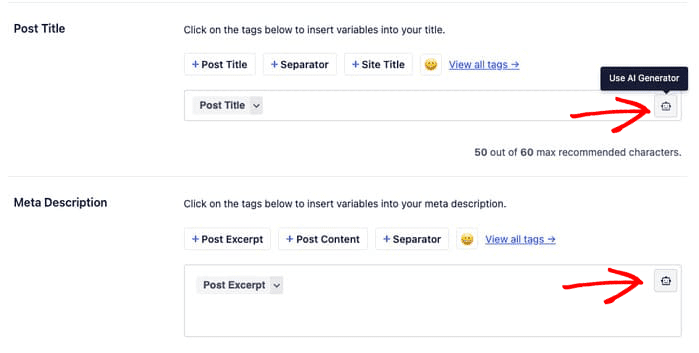
Using AI for this job saves time, helps you include important keywords naturally, and can even suggest ideas you might have yet to think of.
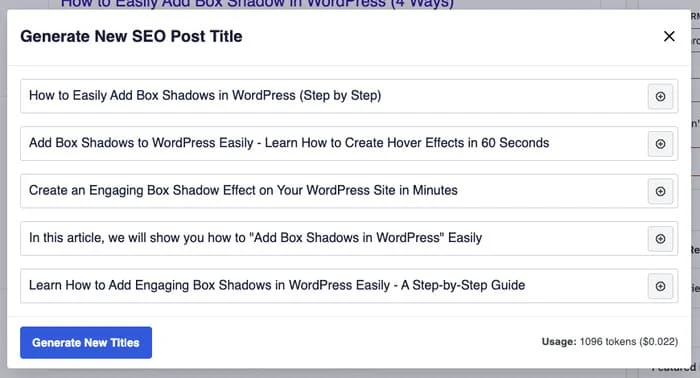
Plus, it’s trained on what works well in search results, so it can help your content stand out.
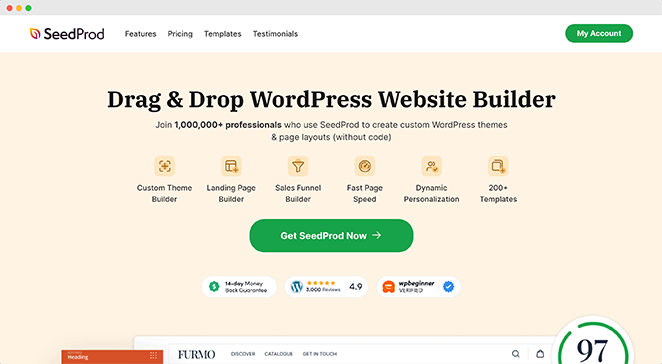
SeedProd AI is another powerful choice for creating copy for landing pages and websites.
Its AI writing assistant can help you craft compelling headlines, write persuasive product descriptions, and even generate entire written sections of your website.
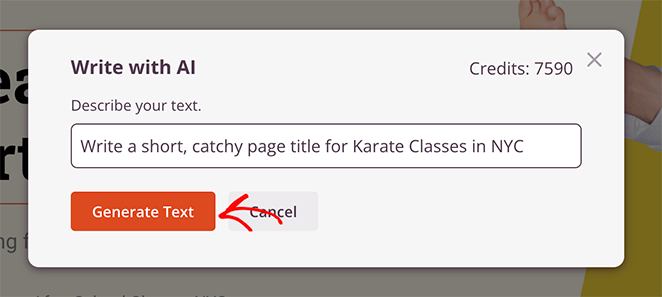
This is a huge time-saver when you’re stuck or need fresh ideas for your site’s content. For a full walkthrough, see our guide on how to use AI to write content for your website.
When using AI to help write your content, remember a few best practices:
- Always start with a clear outline or brief. The more guidance you give the AI, the better its output will be.
- Use AI-generated content as a starting point, not the final product. Always review and edit what the AI produces.
- Include your target keywords naturally. Don’t stuff keywords just because the AI suggests them.
Can AI Create Images for My Website?
Images are essential for making your content look good and rank well. And this is another area where AI can help.
There are some excellent AI tools out there that can make images for you, like DALL-E, Midjourney, and Stable Diffusion. You just tell them what you want, and they create it.
But if you’re working on your website, SeedProd’s AI image tool is really handy. It’s made just for websites, so it knows how to create images that look great on your pages.
You just describe what you want, and it produces images that fit your site perfectly.
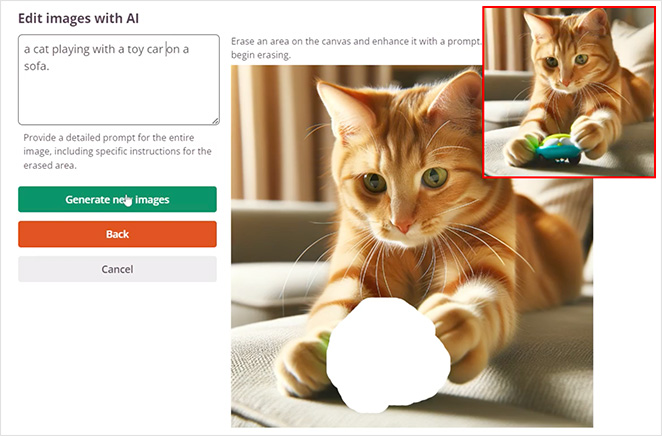
See our guide on how to use AI to generate images for all the details.
AI-made images can give your SEO a boost in a couple of ways.
They can make your content more eye-catching, which could keep visitors on your page longer. Plus, you can create images that perfectly match your content, helping to drive home your keywords visually.
Don’t forget about alt text – it’s a key player in image SEO. This short description helps search engines understand what’s in your images. It’s also super helpful for people using screen readers.
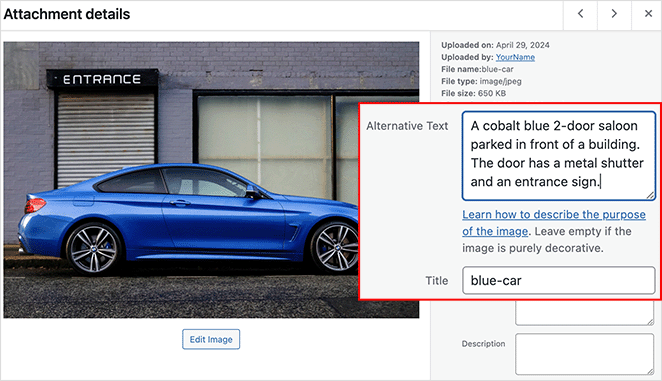
You can even get AI to write this for you too. Simply upload a version of your image and ask the chatbot to describe it.
When writing alt text, be clear and try to include your keyword if you can naturally.
How Do I Optimize Existing Content with AI?
AI isn’t just for creating new content,it can also help you improve your existing content with on-page optimization.
For example, AI SEO tools can look at your content and suggest ways to improve it for SEO. This might include adding certain keywords, tweaking your headings, or adjusting your content length.
For a full content audit, SEOBoost is a great tool to try. After adding a URL and keyword, it generates a report with suggestions on areas to improve.
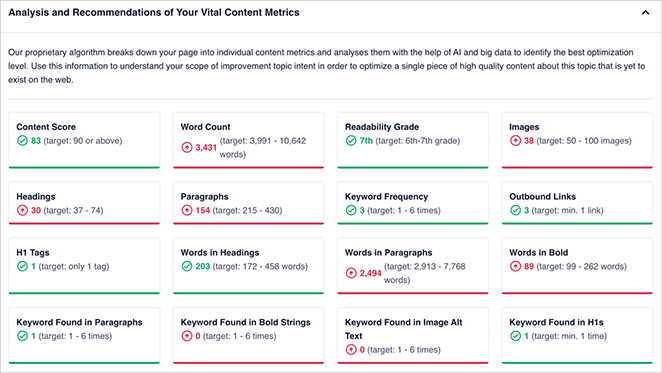
The report will detail the ideal keyword frequency, meta description length, and even the number of images to aim for.
SEOBoost can also help make your content more readable and engaging. It might suggest using more paragraphs, adding subheadings, or using simpler language.
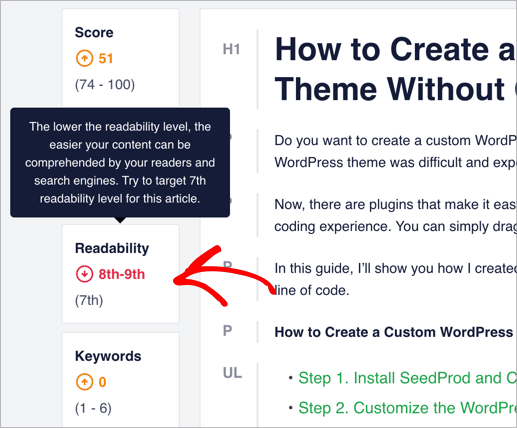
These changes can keep visitors on your page longer, which is good for SEO.
How Do I Optimize for Voice Search with AI?
More and more people are using voice search these days. In fact, 30% of internet users between 16 and 64 years old use voice assistants every week. That’s a lot of folks asking their phones and smart speakers questions.
When people use voice search, they talk differently than when they type. They ask full questions. For example, instead of typing “apple crisp recipe,” they might say, “Hey Siri, what’s the best recipe for apple crisp?”
To make your content good for voice search, you want it to sound natural. AI can help you rewrite your content to sound more like how people talk.
FAQ-style content works well for voice search. You can use tools like ChatGPT to come up with questions people might ask about your topic. Then, you can write clear, short answers on your website.
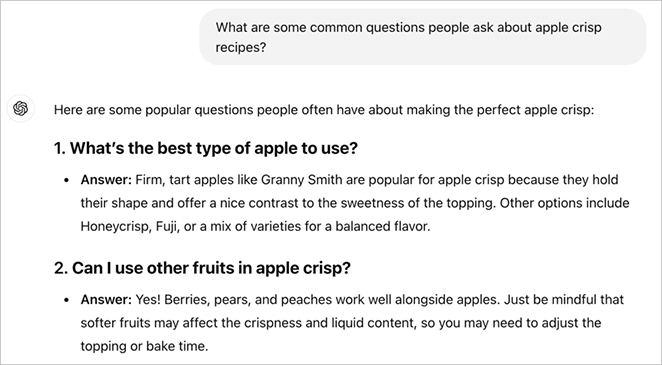
For help with this, you can see our guide on how to make a FAQ page in WordPress.
Don’t forget about featured snippets. These are the quick answers you sometimes see at the top of Google search results.
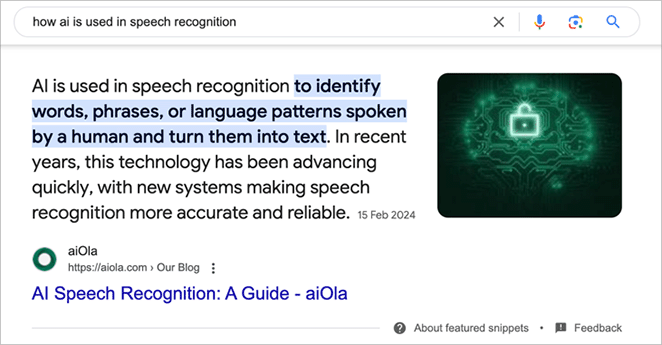
Voice assistants often read these out as answers. AI can help you set up your information so it’s more likely to be chosen as a featured snippet.
How Can AI Help Me Build Internal Links?
Internal links help search engines understand your site structure, spread link equity around your site, and make it easier for visitors to find more of your content. But figuring out where to put these links can be tricky, which is where AI can help again.
AIOSEO has an excellent internal linking tool that uses AI to suggest where to add links to your content.
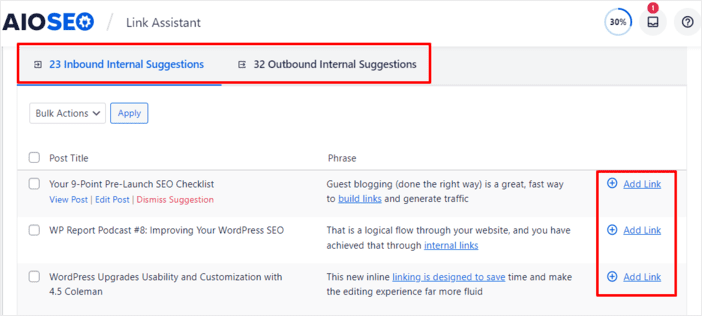
It looks at what you’ve written and finds related pages on your site. Then, it tells you where to add links to those pages.
It can also show you which pages have lots of internal links pointing to them and which ones need more love.
One really useful thing it can do is find “orphaned” content – pages that don’t have any other pages linking to them.
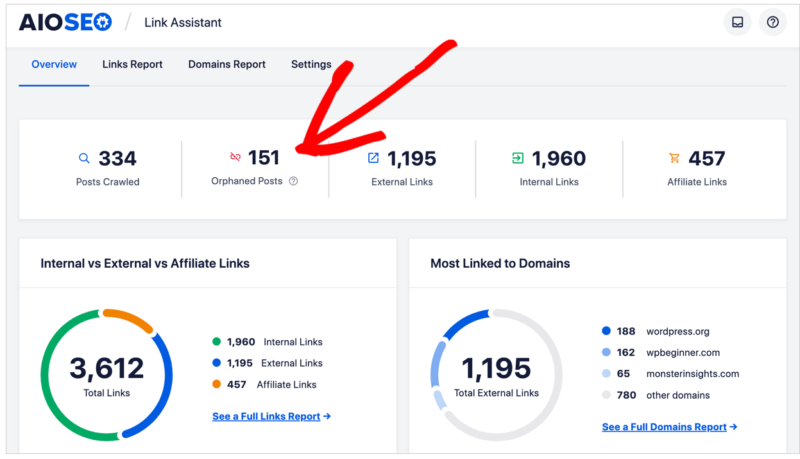
These pages can be hard for both users and search engines to find. AIOSEO can spot these pages and suggest where to add links to them.
How Do I Generate Schema Markup with AI?
Schema markup helps search engines understand your content better. It’s important for SEO because it can help your site show up in rich results, which are those eye-catching search results with extra information.
Luckily, you don’t need to know much about code to add schema to your site. You can actually ask AI chatbots to generate it for you. Simply ask it to create the type of schema you want, then add the code to your website.
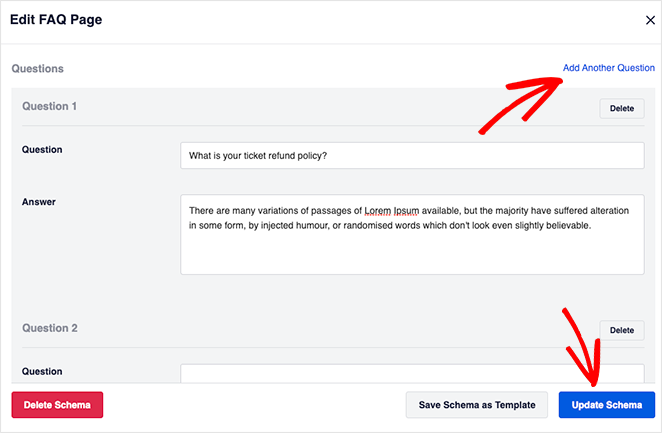
If you’re using WordPress, AIOSEO is a great tool for automatically generating schema markup. Just fill in some details about your content, and it will create and add the appropriate schema, making the process even easier.
Here are some types of schema that it can help you create:
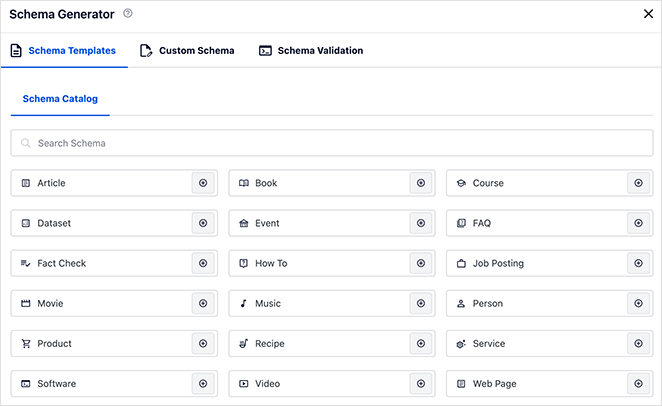
- Article schema for blog posts and news articles.
- Product schema for online stores.
- Recipe schema for food bloggers.
- FAQ schema for frequently asked questions.
- Local Business schema for physical stores or offices.
- Review schema to display star ratings in search results.
- Event schema for websites that list events
How Do I Analyze SEO Data with AI?
When it comes to SEO, there’s a ton of data to sort through. Website traffic, bounce rates, time on page, conversion rates – it can get overwhelming fast.
With AI, you can quickly sift through mountains of data and spot important patterns. It can analyze way more information than a human could in the same amount of time and find connections that might not be obvious at first glance.
For example, AI might notice that people visiting your site from a particular social media platform tend to stay longer and make more purchases. Or it could spot a sudden drop in traffic to a specific page you have missed.
One tool that makes great use of AI for data analysis is MonsterInsights, the best WordPress Google Analytics plugin.
Its AI Insights Report is designed to make quick sense of your website data. The report looks at your website stats and provides clear, actionable information.
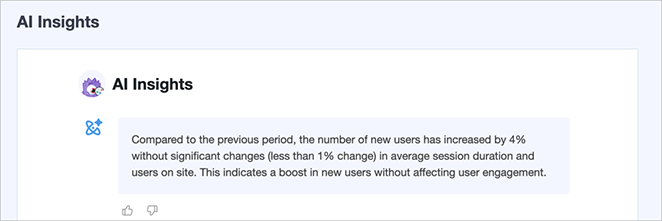
It might tell you things like:
- Which of your blog posts are most popular
- Where most of your visitors are coming from
- What times of day your site gets the most traffic
- Which products are selling best (if you have an online store)
This information can help you make smarter decisions about your content, marketing strategies, and SEO efforts. Instead of guessing what’s working, you’ll have AI-powered insights to guide you.
How Do I Optimize My WordPress Site for AI Search Engines?
AI search engines like ChatGPT, Perplexity, and Google’s AI Overviews now answer questions directly, pulling content from sites they can easily read and cite. If your site isn’t set up for these crawlers, you’re missing a growing share of search traffic.
Start by checking whether your robots.txt is accidentally blocking LLM crawlers. Many sites do this through broad crawl-blocking rules set up before AI search was a consideration.
Next, phrase your headings as questions. AI systems prefer content that directly answers what people ask, which is why question-style headings outperform label-style headings for AI citation.
Use AIOSEO to add FAQPage and HowTo schema markup. This gives AI systems a machine-readable version of your content to pull from when generating answers.
Site speed also matters. AI crawlers favor clean, fast-loading HTML over JavaScript-heavy pages that are slow to parse.
SeedProd builds WordPress sites with minimal JavaScript, and in my testing, pages load in under 600ms. That lean output is what AI parsers prefer when scanning for citable content.
What AI Can’t Do for Your SEO
Before you go all-in on AI tools, here’s what they won’t do for you.
AI doesn’t build backlinks. Links from other sites are still one of the strongest ranking signals, and no AI tool can earn those for you.
AI can’t replace your strategy. It surfaces data and generates suggestions, but deciding what to prioritize still requires someone who understands your business and audience.
AI may also produce facts that need verification. I always check AI-generated stats before publishing, because a wrong statistic hurts credibility more than no statistic at all.
AI speeds up execution. Your strategy, your expertise, and your links still matter.
Frequently Asked Questions About Using AI for SEO
Is SEO dead or evolving in 2026?
SEO is evolving, not dying. Google, ChatGPT, and Perplexity now answer questions directly from web content, which means the opportunity is to be the source they cite. Sites with clear, well-structured, expert content will benefit from AI-driven search, not lose out to it.
How do AI search engines decide what content to show?
AI search engines look for content that directly answers questions, has structured data like schema markup, and comes from sites with clear topical authority. Phrasing your headings as questions and adding FAQPage schema via AIOSEO makes your content easier for AI to parse and cite.
Can I use AI to write SEO content for my WordPress site?
Yes. Tools like ChatGPT can generate drafts, suggest titles, and identify content gaps based on what competitors cover. AIOSEO uses AI to write and optimize title tags and meta descriptions directly inside the WordPress editor. Treat AI as a drafting tool, then edit for accuracy before publishing.
How do I use AI to refresh content that’s dropped in rankings?
Paste the underperforming article into ChatGPT or SEOBoost and ask it to identify what competitors cover that you don’t. Prioritize those gaps in your update. Tools like LowFruits can surface related questions your article is missing. This is usually faster than writing a new article from scratch.
What AI tools work best with WordPress for SEO?
AIOSEO handles title tags, meta descriptions, schema markup, and internal linking suggestions directly inside WordPress. LowFruits is best for keyword research. SEOBoost analyzes your content against top competitors for the same keyword. MonsterInsights brings your Google Analytics data into the WordPress dashboard so you can track what’s working without leaving your site.
Improve Your Website with AI SEO
You now have practical AI tools and techniques to help your WordPress site rank higher, from finding low-competition keywords to optimizing for AI-driven search results.
The fastest way to put this into practice is to start with a site that’s already built for speed and search. SeedProd builds a fast, SEO-ready WordPress site in minutes, without code.
You may also find the following guides helpful:
- How to Build a WordPress Website with AI
- WordPress Search Engine Optimization: A Guide to Better Rankings
- Best WordPress AI Image Generator Plugins
- Best AI WordPress Builders (+ Content Tools)
- How to Create an AI Landing Page in WordPress
- Best ChatGPT WordPress Plugins for Productivity
Thanks for reading! We’d love to hear your thoughts, so please feel free to join the conversation on YouTube, X and Facebook for more helpful advice and content to grow your business.



