



The best voting plugins for WordPress make it easy to add polls, surveys, ratings, and voting forms that get visitors involved and give you real feedback.
If you want to run voting contests or polls tied to giveaways, RafflePress is the best option. For building voting forms and surveys, WPForms is the easiest tool to use. And if you just need a simple, no-frills polling plugin, WP-Polls is a solid free choice.
I’ve tested each voting plugin in this guide with real WordPress sites in mind, focusing on ease of setup, flexibility, and how well each plugin encourages participation.
Whether you want quick thumbs up and down feedback, detailed surveys, star ratings, or interactive voting campaigns, this list will help you choose the right voting plugin for your site.
Quick Summary of the Best Voting Plugins for WordPress
If you’re short on time, the table below shows how the top WordPress voting plugins compare at a glance.
| # | Tool / Product | Best For | Free Plan | Starting Price |
|---|---|---|---|---|
| 🥇 | RafflePress | Giveaways with voting | ✅ | From $39.50/year |
| 🥈 | WPForms | Polls and surveys | ✅ | From $199.50/year |
| 🥉 | WP-Polls | Simple free polls | ✅ | Free |
| 4 | Thrive Quiz Builder | Interactive quizzes | ❌ | Check pricing |
| 5 | UserFeedback | Quick visitor feedback | ✅ | From $49.50/year |
| 6 | Heroic Knowledge Base | Helpful article votes | ❌ | From $129/year |
| 7 | kk Star Ratings | Simple star ratings | ✅ | Free |
What Is a WordPress Voting Plugin?
A WordPress voting plugin lets you add voting features to your website so visitors can share their opinions or give feedback.
Depending on the plugin, this can include polls, surveys, quizzes, star ratings, thumbs up or down buttons, or voting forms.
These plugins work by collecting votes directly on your site and storing the results in your WordPress dashboard, where you can view responses, spot trends, and understand what your audience prefers.
Many voting plugins also include tools to prevent duplicate votes, display results visually, and limit who can vote, which helps keep feedback fair and useful.
How I Tested the Best Voting Plugins for WordPress
I tested these voting plugins on real WordPress sites, focusing on how easy they are to set up and how well they encourage visitors to participate.
Rather than looking for the most advanced features, I prioritized plugins that work well for small businesses, bloggers, and content sites.
- How quickly I could create and publish a poll or voting form
- Ease of use for non-technical WordPress users
- The types of voting supported, such as polls, surveys, or ratings
- Controls for limiting votes and preventing spam
- How clearly results and feedback were displayed
Only plugins that felt reliable, beginner-friendly, and useful in real scenarios made it onto this list.
Why Use a WordPress Voting Plugin?
A WordPress voting plugin gives your visitors an easy way to interact with your content instead of just reading it.
Whether it’s a poll, survey, rating, or quiz, voting tools encourage people to take part, which can increase engagement and time on site.
Voting plugins also help you understand your audience better. Seeing how people vote shows what topics resonate, which ideas perform best, and where you may need to make improvements.
Many plugins include features like vote limits, analytics, and visual results, making it easy to collect useful feedback without managing responses manually.
In short, a voting plugin helps you boost interaction, gather insights, and make smarter content or business decisions based on real user input.
Below, I’ll look at the best voting plugins for basic thumbs-up/down ratings all the way up to extensive surveys.
1. RafflePress

| Pricing: Starts at $39.50/year |
| Free Plan / Trial: Free plan available |
| Standout Features: |
| 🔹 Built-in polls and surveys for voting contests 🔹 Drag-and-drop giveaway builder with templates 🔹 Anti-fraud protections and bonus entry actions |
| Rating: A |
| Best For: WordPress sites running giveaways with voting or polls |
RafflePress is a WordPress giveaway plugin that lets you run contests with built-in polls and surveys to drive engagement.
You create a giveaway from your WordPress dashboard, choose a template, and add actions like voting, answering a question, or completing tasks for bonus entries.
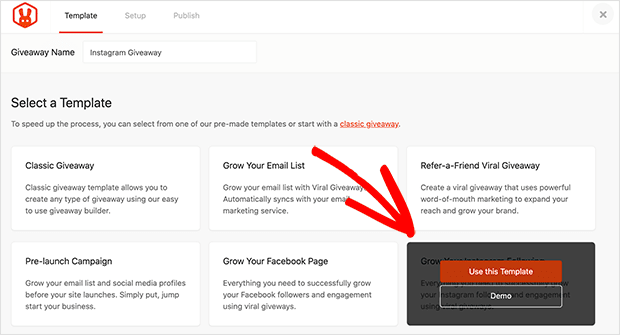
I personally use RafflePress for all my giveaways because the setup is fast and doesn’t require any custom code. The templates handle most of the layout work, and adding a polls and surveys action takes just a few clicks.
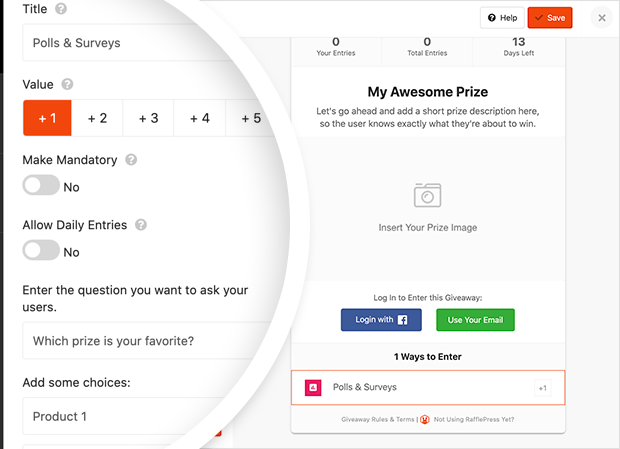
I also like how entries are automatically tracked and protected against repeat or fake submissions. Embedding the giveaway on a page or using a dedicated giveaway landing page keeps everything focused and easy to share.
Pros
- Built-in polls and surveys for voting-style giveaways.
- Beginner-friendly drag-and-drop builder.
- Pre-made templates speed up campaign setup.
- Anti-fraud protections help keep voting fair.
Cons
- Polls and surveys require a paid plan.
- Focused on giveaways, not standalone polling.
- Advanced features are locked behind higher tiers.
My Verdict: RafflePress is my top pick if you want to combine giveaways with voting or polls on WordPress, just expect to upgrade if you need advanced engagement features.
2. WPForms

| Pricing: Starts at $199.50/year |
| Free Plan / Trial: Free plan available |
| Standout Features: |
| 🔹 Surveys and Polls addon for voting forms 🔹 Drag-and-drop builder with templates 🔹 Built-in reports with charts and graphs |
| Rating: A |
| Best For: Sites that need polls, surveys, and feedback forms |
WPForms is a drag-and-drop WordPress form builder you can use to create voting polls, surveys, and feedback forms.
You build forms visually, choose from hundreds of templates, and enable advanced features like polls and surveys with the Surveys & Polls addon.
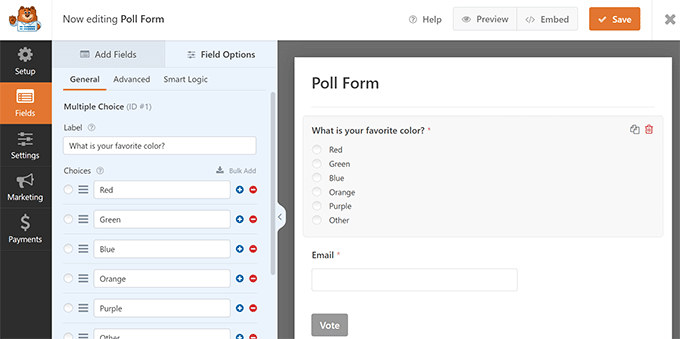
In my testing, WPForms was one of the easiest tools to use for creating voting forms. Adding multiple-choice questions, Likert scales, or open-ended responses felt intuitive and fast.
I also liked how responses were displayed in clear charts and graphs inside the dashboard. Embedding forms into posts, pages, or widgets worked reliably and didn’t affect site performance.
Pros
- Very beginner-friendly drag-and-drop builder.
- Surveys and polls support multiple question types.
- Built-in reports with visual charts.
- Easy to embed forms anywhere on your site.
Cons
- Surveys and Polls addon requires the Pro plan.
- Not designed for large-scale public voting contests.
- Advanced features can get expensive for small sites.
My Verdict: WPForms is the best choice if you want clean, reliable polls and surveys inside WordPress, but it’s better for feedback and voting forms than viral contests.
For more information, please see our WPForms review.
3. WP-Polls
| Pricing: Free |
| Free Plan / Trial: Yes, fully free |
| Standout Features: |
| 🔹 Simple single or multiple-choice polls 🔹 Live poll results display 🔹 Shortcodes and widgets for easy embedding |
| Rating: B+ |
| Best For: Basic WordPress polls on a tight budget |
WP-Polls is a free WordPress voting plugin designed for simple polls without advanced features or setup.
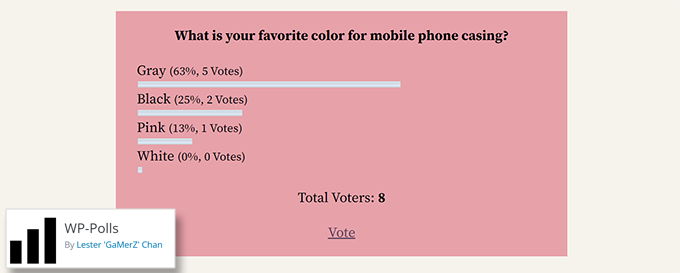
You create a question, add answer choices, and choose whether users can select one or multiple options, then embed the poll using a widget or shortcode.
When I tested WP-Polls, the setup felt very straightforward and old-school in a good way. There’s no builder or templates, but creating a poll took only a few minutes.
I liked seeing results update live as votes came in, but styling options were limited unless you’re comfortable with CSS. It works best when you want function over polish.
Pros
- Completely free to use.
- Very simple and lightweight.
- Supports single and multiple-choice voting.
- Live poll results update instantly.
Cons
- Limited design and styling options.
- No built-in analytics or reports.
- Lacks modern UI and advanced features.
My Verdict: WP-Polls is a solid free option if you just need basic voting on WordPress, but it’s not the right fit if you want modern design or detailed insights.
4. Thrive Quiz Builder
| Pricing: Starts at $99 |
| Free Plan / Trial: No |
| Standout Features: |
| 🔹 Multiple quiz types with branching logic 🔹 Visual quiz builder with templates 🔹 Built-in analytics and A/B testing |
| Rating: A- |
| Best For: Interactive quizzes for engagement and lead generation |
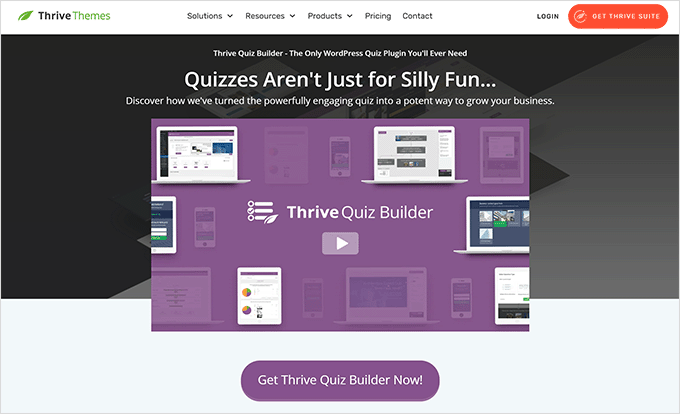
Thrive Quiz Builder is a WordPress quiz plugin designed to create interactive quizzes that let users vote, answer questions, and see personalized results.
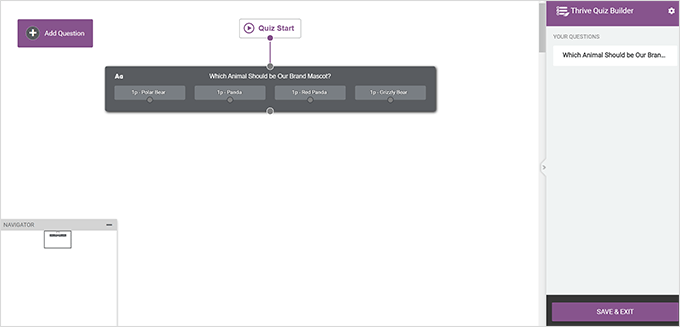
You choose a quiz type, customize questions visually, and set up branching logic so each answer controls what users see next.
When I tested it, the visual editor made quiz creation feel guided and structured. Building personality-style quizzes with branching questions was much easier than doing the same thing with forms.
I also liked how results pages and social sharing were built in by default. The analytics and A/B testing tools helped spot which quiz versions performed better without extra plugins.
Pros
- Supports multiple quiz types and branching logic.
- Visual editor is easy to learn and use.
- Built-in analytics and A/B testing.
- Designed to encourage social sharing.
Cons
- No free version available.
- Overkill for simple one-question polls.
- Best features are part of the Thrive ecosystem.
My Verdict: Thrive Quiz Builder is ideal if you want advanced, interactive quizzes with voting and personalization, but it’s more than you need for basic polls.
5. UserFeedback

| Pricing: Starts at $49.50/year |
| Free Plan / Trial: Free plan available |
| Standout Features: |
| 🔹 Multiple question types for feedback and polls 🔹 On-site widgets you can place anywhere 🔹 Built-in reports and response analysis |
| Rating: A- |
| Best For: Collecting quick feedback and opinions from visitors |
UserFeedback is a WordPress feedback plugin that helps you collect votes, opinions, and insights directly from your site visitors.
You build short feedback forms using rating scales, multiple-choice, or open-ended questions, then display them as widgets, popups, or embedded forms.
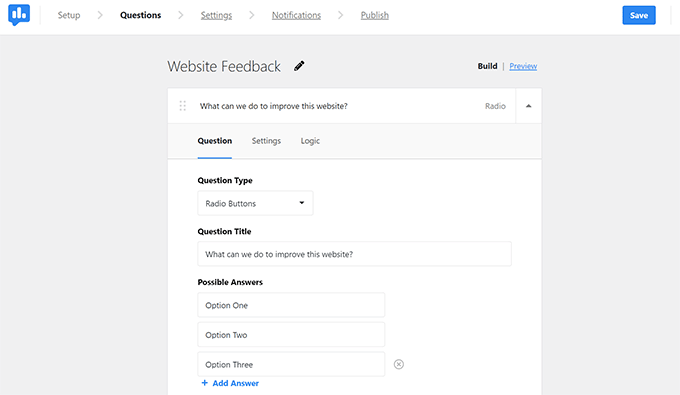
When I tested UserFeedback, the setup felt fast and beginner-friendly. Creating a simple poll or question took just a few minutes, with no complicated settings to slow things down.
I also liked how well the forms blended into the site design. The built-in reports made it easy to spot trends without exporting data or using extra analytics tools.
Pros
- Very easy to set up and use.
- Supports multiple feedback and poll question types.
- Flexible placement options across your site.
- Clear reports for reviewing responses.
Cons
- Not built for large public voting contests.
- Advanced features require a paid plan.
- Limited customization compared to full form builders.
My Verdict: UserFeedback is a great choice if you want quick, low-friction polls and feedback from visitors, but it’s better for insights than competitive voting.
6. Heroic Knowledge Base

| Pricing: Starts at $129/year |
| Free Plan / Trial: No |
| Standout Features: |
| 🔹 Article up/down voting system 🔹 Dashboard voting analytics 🔹 “Was this helpful?” feedback prompts |
| Rating: B+ |
| Best For: Knowledge bases that need simple article feedback |
Heroic Knowledge Base is a WordPress documentation plugin that includes built-in voting so visitors can rate whether articles are helpful.
You publish knowledge base articles, and users vote them up or down using a simple “Was this helpful?” prompt shown at the end of each article.
When I tested it, the voting feature worked quietly in the background without distracting from the content. Users were more likely to click a quick yes or no than fill out a full survey.
I found the dashboard stats useful for spotting weak articles fast. It’s not a polling tool, but it does a great job highlighting what documentation actually helps users.
Pros
- Very low-friction voting for users.
- Clear article performance stats.
- Built specifically for documentation sites.
- No extra setup for voting features.
Cons
- Not designed for polls or contests.
- No free version available.
- Voting is limited to helpful or not helpful.
My Verdict: Heroic Knowledge Base is a smart choice if you want simple voting on help articles, but it’s only useful if you already run a documentation site.
7. kk Star Ratings

| Pricing: Free |
| Free Plan / Trial: Yes, fully free |
| Standout Features: |
| 🔹 Star ratings for posts and pages 🔹 Built-in schema.org markup 🔹 Shortcodes for flexible placement |
| Rating: B |
| Best For: Adding simple star ratings to content |
kk Star Ratings is a free WordPress rating plugin that lets visitors rate your posts and pages using star icons.
You enable ratings for specific content types, adjust the appearance, and place the stars automatically or with shortcodes.
When I tested it, setup was quick and didn’t require touching theme files. Turning ratings on for blog posts took just a few settings changes.
I liked that schema markup was included by default, which helps ratings appear in search results. The downside is that ratings are limited to stars only, with no alternative voting styles.
Pros
- Completely free to use.
- Built-in schema markup for SEO.
- No custom code required.
- Easy shortcode placement.
Cons
- Only supports star-based ratings.
- Limited analytics and reporting.
- Basic design customization options.
My Verdict: kk Star Ratings is a solid free option if you want simple star ratings with SEO benefits, but it’s not flexible enough for advanced voting needs.
What Is the Best Voting Plugin for WordPress?
After testing and comparing the voting plugins in this guide, two tools stand out for different use cases.
RafflePress is the best option if you want to run voting contests or polls tied to giveaways. It’s designed to encourage participation, prevent fraud, and keep everything easy to manage inside WordPress.
WPForms is the best choice for adding voting forms, surveys, and feedback polls to your website. It’s ideal when you want structured responses, clean reports, and flexible question types without running a public contest.
If you need simple ratings or lightweight polls, tools like WP-Polls or kk Star Ratings may be enough. But for most WordPress sites, RafflePress and WPForms cover the most common voting needs.
WordPress Voting Plugin FAQs
Some tools focus on structured responses, while others are designed for giveaways or lightweight content feedback.
If you’re running public voting or contests, it’s important to choose a plugin with built-in anti-fraud controls rather than relying on simple forms.
In most cases, you can embed voting elements into posts or pages using blocks, shortcodes, or widgets.
The right option depends on whether you want quick feedback, deeper insights, or simple content validation.
To avoid performance issues, it’s best to limit unnecessary scripts, use caching, and choose plugins that are actively maintained.
SeedProd has dedicated building blocks for RafflePress and contact forms. This means you can build your voting campaign with RafflePress or WPForms and add them to a custom page with SeedProd tailored perfectly to your needs.
I hope this guide helped you find the best voting plugins for WordPress. By choosing a solution from this list, you’ll make your site more engaging while collecting valuable feedback from your target audience.
You might also find the following guides helpful for learning about your readers:
- 7 Best WordPress Review Plugins for Google, Yelp & More
- How to Embed Google Reviews in WordPress (+ Yelp Reviews)
- How To Add A Survey To Your WordPress Website (Step by Step)
Thanks for reading! We’d love to hear your thoughts, so please feel free to join the conversation on YouTube, X and Facebook for more helpful advice and content to grow your business.



