

If your WordPress site isn’t ready for visitors yet, a coming soon page gives you a professional placeholder while you finish building. It keeps your unfinished site hidden and lets you start collecting email subscribers before you launch.
You can set one up in about 10 minutes with a page builder plugin and a template. In this guide, I’ll show you how to create a custom coming soon page in WordPress using SeedProd.
You’ll learn how to customize it with headlines, forms, and countdowns, and publish it so visitors see it across your site. I’ll also show you how to turn it off once your site is live.
- Why Add a Coming Soon Page to WordPress?
- How to Create a Coming Soon Page in WordPress
- What You'll Need
- Step 1. Install SeedProd
- Step 2. Choose a Coming Soon Page Template in WordPress
- Step 3. Customize Your WordPress Coming Soon Page
- Step 4. Configure Page Settings for Your Coming Soon Page
- Step 5. Publish and Put a Coming Soon Page on WordPress
- How to Remove a Coming Soon Page in WordPress Once You’re Live
- WordPress Coming Soon Page Examples
- Best Practices for a Custom Coming Soon Page in WordPress
- FAQs About Coming Soon Pages in WordPress
Why Add a Coming Soon Page to WordPress?
A coming soon page helps you grow your audience before your full site is live. Instead of showing a blank screen or an error, you can put up a professional placeholder that works for you.
I’ve seen the benefits firsthand. For example, the WordPress agency Mustard Seed eCommerce Inc used SeedProd to launch custom coming soon pages for client sites in less than 30 minutes. By replacing basic “under construction” pages, they gave clients a polished look and a way to capture leads immediately, even before the main site was ready.
- Collect email subscribers: Add a form so visitors can join your list before launch.
- Build excitement: Use headlines, images, and a countdown timer to create buzz.
- Look professional: A custom coming soon page in WordPress makes your brand feel ready from day one.
- Control access: Keep your site private while giving clients, team members, or testers a bypass link.
- Test your message: Try different offers and headlines to see what resonates with your audience before launch.
When you create a coming soon page in WordPress with a tool like SeedProd, you can set everything up in minutes and start building momentum for your launch right away.
How to Create a Coming Soon Page in WordPress
The fastest way to add a coming soon page to WordPress is with SeedProd (a drag-and-drop WordPress plugin for creating landing pages and custom site themes). It’s the plugin I use for all my landing pages because it lets you create a custom coming soon page in just a few clicks, without coding.

With SeedProd, you can make your WordPress coming soon page look professional and conversion-ready. The drag-and-drop editor makes it easy to add headlines, signup forms, countdown timers, and social proof that actually drive sign-ups.

You don’t need to start from scratch. SeedProd includes over 320+ templates, and you can pick one that fits your brand and then customize it with 90+ content blocks. That means you can put a coming soon page on WordPress that feels unique to your site in minutes.
Note: SeedProd also has a free version. You can make a simple coming soon page with it, but in this tutorial I’m using the Pro version for more templates and advanced features.
If you want to see it in action, here’s a quick video tutorial on how to create a coming soon page in WordPress with SeedProd:
For the full step-by-step walkthrough, keep reading below.
What You’ll Need
- A WordPress website (any theme)
- SeedProd plugin installed (the free version works for a basic page)
- About 10 minutes
Step 1. Install SeedProd
The first step is to add SeedProd to your WordPress website. This is the foundation for building a coming soon page that actually gets results.
- Download the SeedProd plugin file from your account.
- Upload it in your WordPress dashboard under Plugins » Add New.
- Activate the plugin and enter your license key to unlock the Pro features.
Once it’s active, you’re ready to start building your coming soon page.
If you need help with this step, you can see our guide on installing the SeedProd plugin.
Step 2. Choose a Coming Soon Page Template in WordPress
After activating SeedProd, navigate to SeedProd » Landing Pages from your WordPress dashboard. Here, you’ll first see the different page modes you can activate on your website.
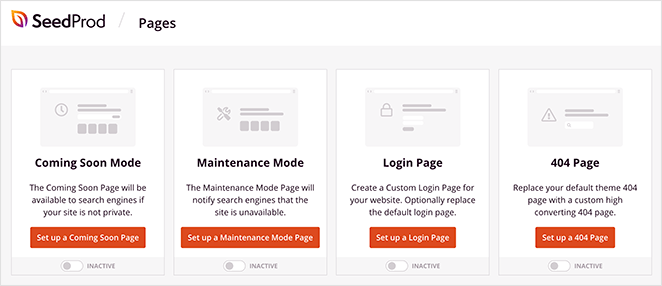
These page modes allow you to set up a coming soon page, build a maintenance mode page, create a login page, and make a 404 page.
You can also create standalone landing pages in the area below the page mode sections.
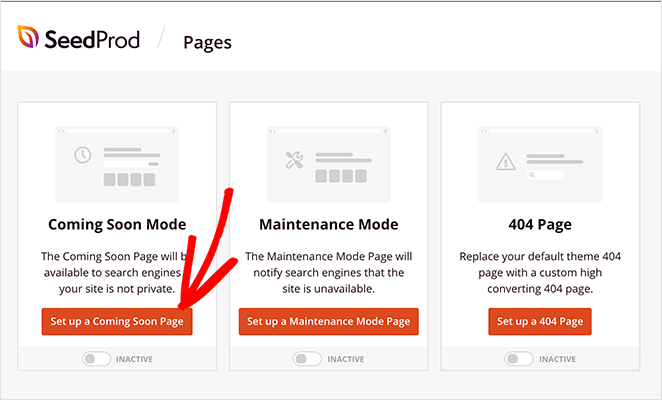
To make your coming soon page, click the Set up a Coming Soon Page button. We recommend the ‘Coming Soon’ mode over ‘Maintenance Mode’ because it sends the correct SEO signal (200 status code), allowing Google to index your site while it’s being built.
You’ll then be asked to choose a coming soon page template. Pick one that includes space for the essential elements we discussed earlier: a strong headline, simple sign-up form, countdown timer, and social proof.
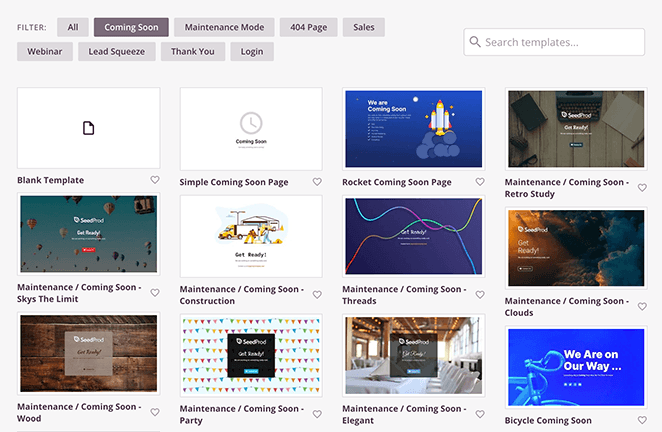
The templates cover various designs and industries and are fully customizable. You can pick any design and make it your own without writing HTML or CSS code.
If you’re building a WooCommerce store, pick the WooCommerce coming soon template. It includes a product preview and email signup designed for shop launches.
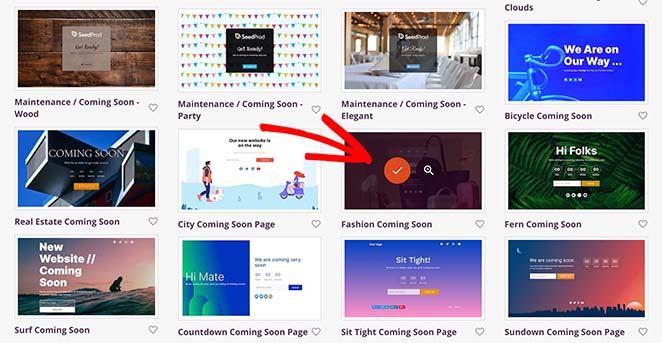
To choose your template, hover your mouse over its thumbnail and click the tick icon.
Step 3. Customize Your WordPress Coming Soon Page
On the next screen is SeedProd’s visual editor, where you can add all the elements we know get results. You’ll see your page preview on the right, and all your customization options on the left.
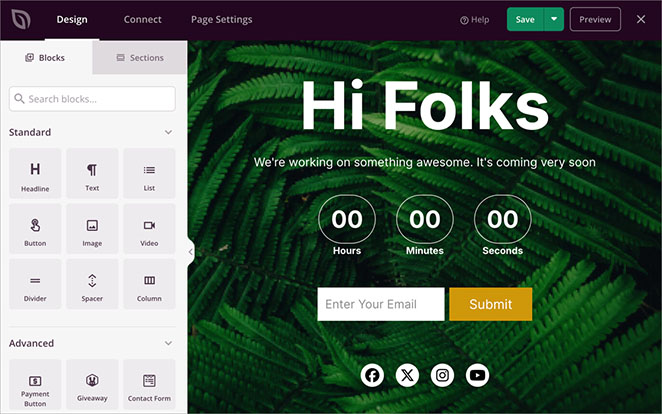
The page blocks are divided between Standard blocks and Advanced blocks. With the Standard landing page blocks, you can add the basics like headlines and bullet points.
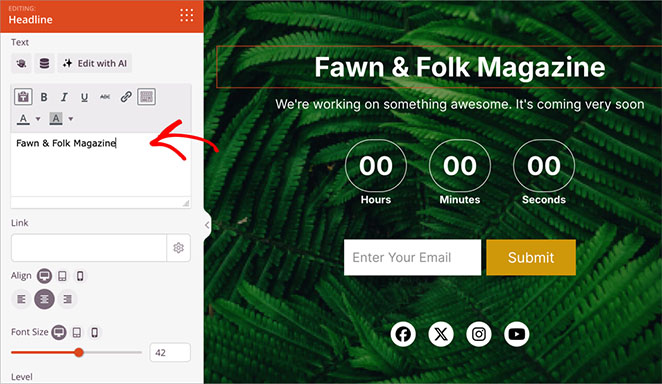
For example, click the Headline to change the text to something that reflects your brand and what you’re launching.
But the real power comes from the Advanced blocks – these are what turn visitors into subscribers.
The Advanced blocks let you add:
- A countdown timer to create urgency
- Email forms that actually get sign-ups
- Social proof elements
- Contact forms
- And more
Let’s start with one of the most important elements – the countdown timer. This shows visitors exactly when you’re launching and creates urgency to sign up now.
If your template doesn’t already have one, find the ‘Countdown’ block in the left sidebar and drag and drop it onto your page preview.
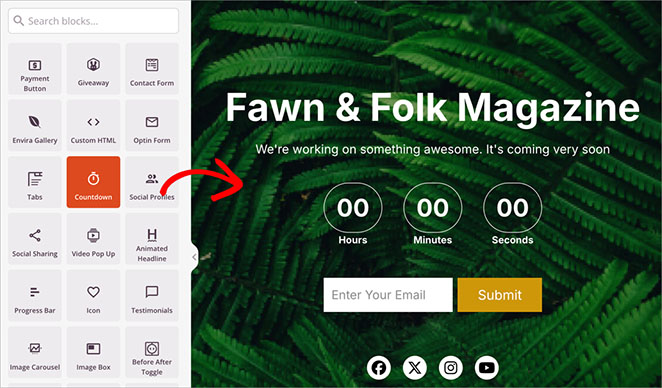
Next, select the Countdown block in your layout.
In the left-hand sidebar, set your exact launch date and time. Remember, having a real date works better than “coming soon” – it shows visitors you’re serious about launching.
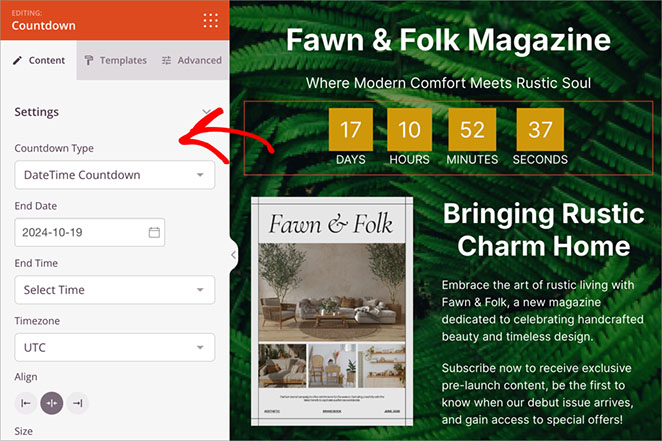
The countdown block will show the day, hours, minutes, and seconds until your website goes live. This allows you to build excitement around your site’s official launch date.
Now go ahead and add more blocks to your WordPress coming soon page, following the same process as above. You can also read these guides if you need help building your page:
- How to Build a Landing Page with a Form
- How to Add Custom Social Media Icons to WordPress
- How to Create Text Animations in WordPress
- How to Add a Number Count Animations in WordPress
- How to Add a Login Form to WordPress
Step 4. Configure Page Settings for Your Coming Soon Page
Once your page looks good, let’s set up the features that will help it perform better.
Click the Page Settings tab at the top of your screen.
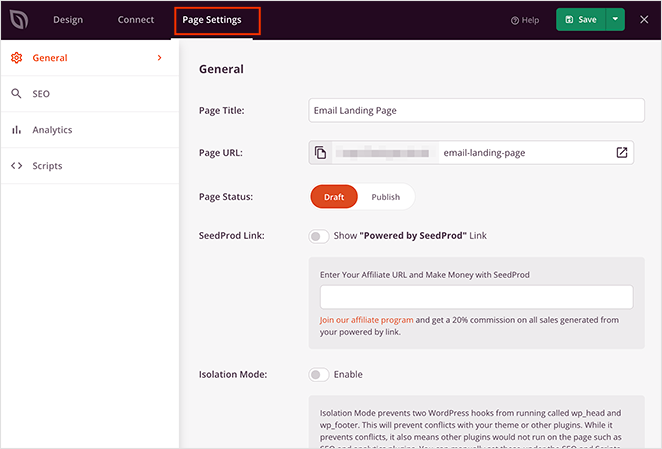
Here’s where you can set up:
- Analytics to track your results
- SEO settings to get found
- Email integration to capture leads
- Access controls for testing
The Access Control features are particularly useful for getting feedback before going public. You can share a private link with friends or clients to test your page’s effectiveness. For example, in an agency workflow, you can use the secret bypass URL to get client approval before the page goes public.
Whether it’s based on user roles, specific IP addresses, or a secret link you share with VIPs, you have the power to grant early access.
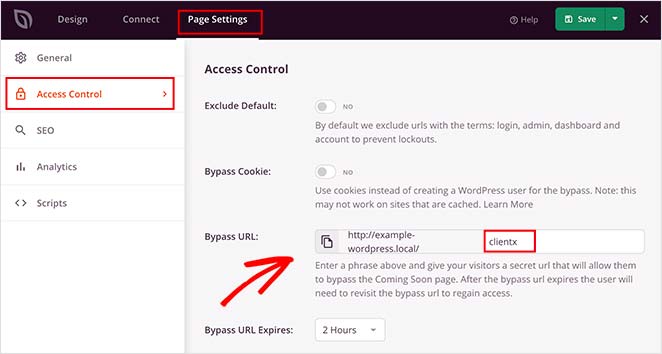
All you need to do is create a secret password. Then, you can copy the bypass URL and give it to anyone you wish to grant access to. You can also click an option to hide the landing page from logged-in users, such as website admins.
Want to show coming soon mode only on certain parts of your site? Just add the URLs where you want to show the coming soon page in the Include/Exclude URLs section.
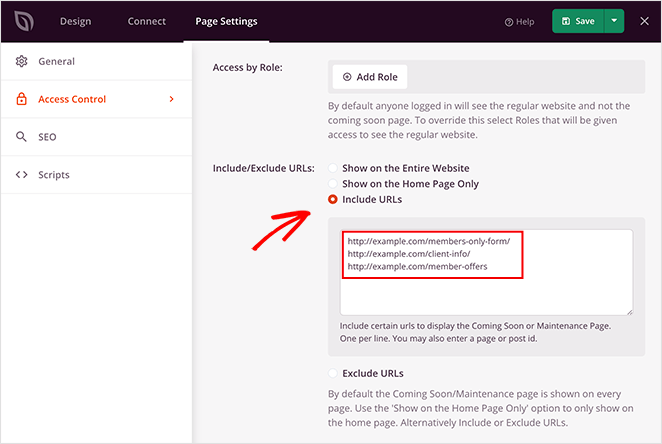
The other page settings allow you to connect with top WordPress plugins for SEO and Analytics. You can easily integrate with tools like All in One SEO (AIOSEO) and MonsterInsights to track performance and optimize your coming soon page for search engines.
For instructions, please see our page settings guide.
Step 5. Publish and Put a Coming Soon Page on WordPress
When you’ve configured all your settings in the SeedProd page editor, click the Save button to make your coming soon page live.
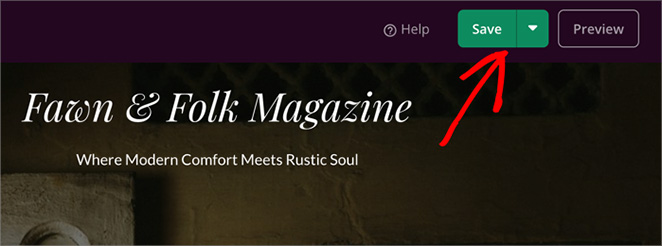
When you’ve published your coming soon page, you’ll need to enable coming soon mode, so your visitors will see that page across your website.
To do this, click the “X” icon in the top-left corner to close the page editor and head back to the SeedProd dashboard.
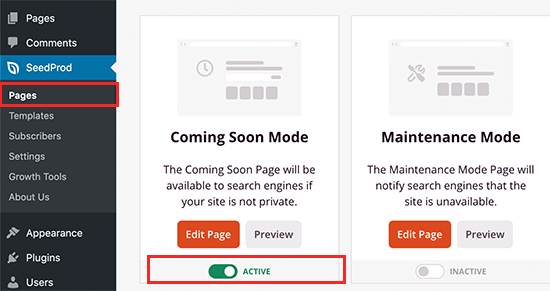
You can then activate your coming soon page by going to the Coming Soon Mode section and turning the toggle from Inactive to Active.
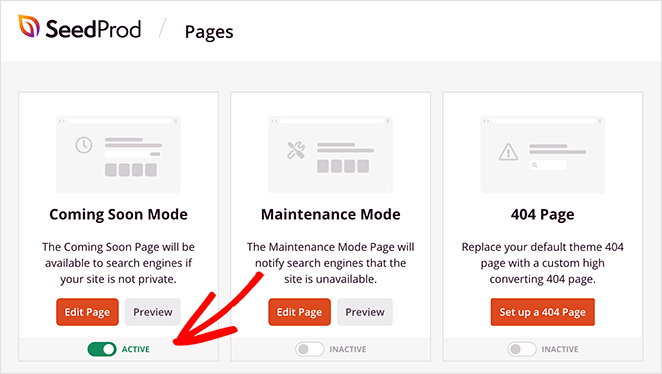
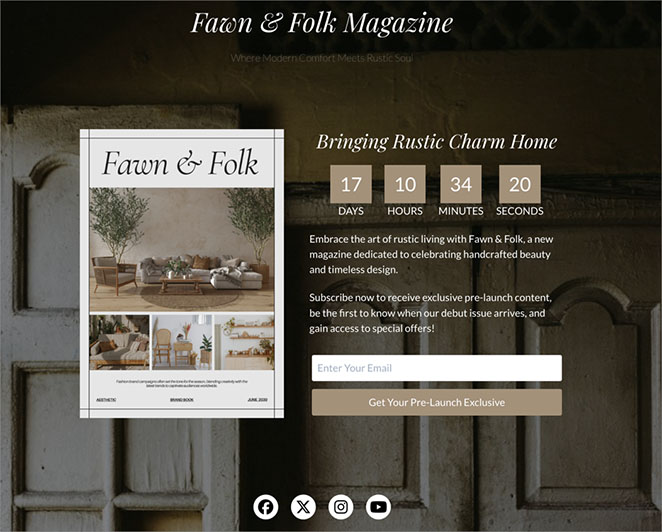
Important Note: If you are logged into WordPress, you will still see your normal website. To view the coming soon page as a regular visitor, you must log out or use an Incognito browser window.
How to Remove a Coming Soon Page in WordPress Once You’re Live
When you’re ready to publish your WordPress website, you’ll need to turn off the coming soon page. That will allow website visitors to see your entire site instead of your coming soon landing page.
To turn the page off, go to SeedProd » Pages and click the ‘Active’ toggle under the Coming Soon Mode box to the ‘Inactive’ position.
That’s it! You’ve now created and published a custom coming soon page in WordPress. Visitors will see your new page while you continue building your site in the background.
WordPress Coming Soon Page Examples
Looking at successful coming soon page examples can help you design a high-converting pre-launch experience. Each example below highlights different ways to build excitement, capture leads, and showcase your brand before your site goes live.
| Example | Key Features | Main Takeaway |
|---|---|---|
Fixers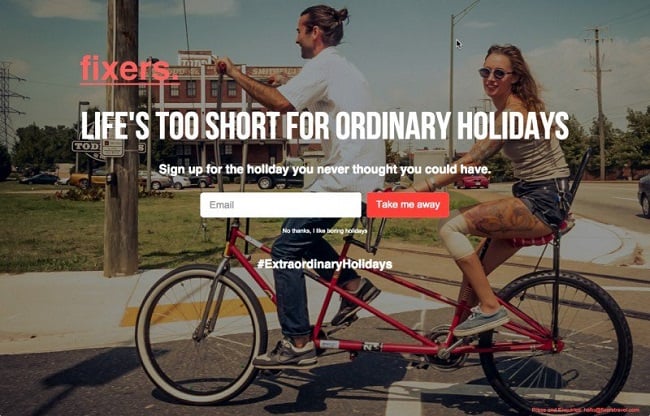
|
| Use striking visuals and confident messaging to make your coming soon page memorable and action-focused. |
Lab Petite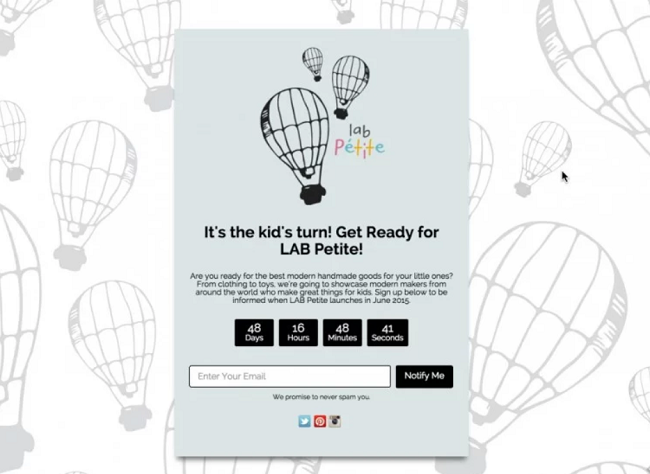
|
| Match your coming soon design to your audience. Keep it fun and visually aligned with your brand personality. |
WiseJack
|
| Keep your offer simple and relevant. Use visuals that connect emotionally with your target audience. |
Each of these coming soon pages focuses on one goal—getting visitors excited to subscribe before launch. Whether you use visuals, countdowns, or brand storytelling, the key is keeping your message clear and your design simple.
For more ideas, check out our roundup of the best coming soon page examples.
Best Practices for a Custom Coming Soon Page in WordPress
I’ve tested a lot of coming soon pages over the years, and the ones that convert have a few things in common.
Use a headline that says what you’re launching, not something generic like “Coming Soon.” For example, “New online store opening March 15” tells visitors exactly what to expect and when.
Keep your signup form to one field. Ask for email only, not name, not phone. Single-field forms consistently outperform multi-field forms on coming soon pages.
Set your countdown timer to your real launch date. I’ve found that pages with actual deadlines get more signups than ones with arbitrary countdowns.
Add one trust signal. A logo, a brief “About this site” sentence, or a social media link. Visitors who see a real brand name are more likely to hand over their email.
Check it on your phone. More than half your visitors will see the mobile version first. SeedProd templates are mobile responsive out of the box, but it’s worth previewing before you go live.
FAQs About Coming Soon Pages in WordPress
How long should I keep a coming soon page up?
Most coming soon pages run for 2 to 4 weeks before launch. That’s enough time to build an email list and create anticipation without losing momentum. If your site won’t be ready for months, update the page periodically so it doesn’t look abandoned.
Can I show my coming soon page only on certain pages?
Yes. In SeedProd, you can use the Include/Exclude URLs setting to control which pages show the coming soon page. This is useful if you want to keep a blog or specific landing page visible while the rest of your site is hidden.
Will a coming soon page hurt my SEO?
No. A coming soon page won’t hurt your SEO as long as you remove it when your site launches. Search engines understand temporary placeholders. SeedProd also lets you add meta descriptions and SEO titles to your coming soon page through AIOSEO so you can start building search visibility early.
Do I need a coming soon page if I’m redesigning an existing site?
For a redesign, maintenance mode is usually a better fit. A coming soon page is designed for new sites that haven’t launched yet. Maintenance mode tells returning visitors you’re making updates and will be back soon. SeedProd lets you switch between both from the same dashboard.
Next, Get Ready for a Successful Launch
You now know how to create a WordPress coming soon page that turns visitors into subscribers before your site even launches.
Want to make your launch even more successful? Check out these guides:
- How to Create a New Website Launch Marketing Plan
- How to Market Your Website Before Launch
- How to Promote Your Blog
Thanks for reading! We’d love to hear your thoughts, so please feel free to join the conversation on YouTube, X and Facebook for more helpful advice and content to grow your business.




