


Die besten E-Commerce WordPress-Themes können zwei Dinge gut: Sie lassen Ihre Produkte großartig aussehen und machen den Kauf einfach. Wenn Sie eines davon falsch machen, verlieren Sie Verkäufe, ohne es zu merken.
Ich habe im Laufe der Jahre Dutzende von WordPress-Themes getestet und damit Shops erstellt, und die Unterschiede zeigen sich schnell. Für die meisten Shop-Betreiber sind meine Top-Picks SeedProd für die vollständige Designkontrolle, Astra für die Geschwindigkeit und Storefront als kostenlose, native WooCommerce-Option.
Unten sind meine 14 Favoriten mit ehrlichen Vor- und Nachteilen und für wen jedes Theme am besten geeignet ist.
E-Commerce WordPress-Themes im Überblick
Hier ist die vollständige Liste, beginnend mit dem Theme, das ich selbst verwende.
| Theme | Preis | Am besten für | Kostenlose Version | Typ |
|---|---|---|---|---|
| SeedProd | Kostenlos / Pro ab 39,50 $/Jahr | Vollständige Designkontrolle ohne Code | Ja | Theme-Builder |
| Sydney | Kostenlos / Pro ab 63 $/Jahr | Geschäftsseiten, die auch Produkte verkaufen | Ja | Mehrzweck-Theme |
| Divi | 89 $/Jahr oder 249 $ lebenslang | Visuelle Builder für die Verwaltung mehrerer Websites | Nein | Theme + Builder |
| Astra | Kostenlos / Pro ab 49 $/Jahr | Geschwindigkeitsbewusste Shops und Anfänger | Ja | Leichtgewicht Theme |
| Storefront | Kostenlos | Garantierte WooCommerce-Kompatibilität | Ja (vollständig kostenlos) | WooCommerce Theme |
| OceanWP | Kostenlos / Pro ab 35 $/Jahr | Budgetbewusste Shop-Betreiber | Ja | Mehrzweck-Theme |
| Botiga | Kostenlos / Pro ab 69 $/Jahr | Saubere, moderne produktorientierte Shops | Ja | E-Commerce Theme |
| Neve | Kostenlos / Pro ab 69 $/Jahr | Shops mit hauptsächlich mobilem Traffic | Ja | Leichtgewicht Theme |
| Flatsome | 59 $ einmalig | Schlüsselfertige Premium-Shop-Einrichtung | Nein | E-Commerce Theme |
| Shoptimizer | Ab $49 | Konversionsorientierte Shops | Nein | E-Commerce Theme |
| Ultra | Ab 59 $ | Schnelle, polierte Shop-Launches | Nein | Mehrzweck-Theme |
| Kadence | Kostenlos / Pro ab 149 $/Jahr | Block-Editor-Shops, zukunftssichere Builds | Ja | Block-Theme |
| Shoppe | Ab 59 $ | Allgemeine Shops, die Layout-Vielfalt wünschen | Nein | E-Commerce Theme |
| Essence Pro | Ab 360 $/Jahr | Inhaltsreiche Websites auf dem Genesis-Framework | Nein | Genesis Child Theme |
Wie ich die besten E-Commerce-WordPress-Themes ausgewählt habe
Ich habe mich auf das konzentriert, was wichtig ist, wenn Sie einen echten Shop aufbauen, nicht darauf, was in einer Theme-Demo gut aussieht.
- Ich habe jedes Theme selbst installiert und eingerichtet. Ich habe während der Einrichtung und der grundlegenden WooCommerce-Konfiguration nach Reibungspunkten gesucht.
- Ich habe die Leistung bei sauberen Installationen überprüft. E-Commerce-Themes können Bloat hinzufügen, daher habe ich Themes bevorzugt, die leicht bleiben. Ich habe GTmetrix und Query Monitor verwendet, um Ladezeiten, HTTP-Anfragen, Speichernutzung und Datenbankabfragen zu messen.
- Ich habe WooCommerce-Shop-Layouts erstellt. Dazu gehörten Produktseiten, Warenkorb, Kasse, Shop-Archive und Produktkategorieseiten.
- Ich habe Wert und Support verglichen. Ich habe mir angesehen, was man kostenlos vs. kostenpflichtig bekommt, wie hilfreich die Dokumentation ist und ob das Preismodell langfristig tragfähig ist.
- Ich habe die Abdeckung der Konkurrenz überprüft. Wenn ein Theme auf den meisten „Besten E-Commerce-Theme“-Listen erscheint, habe ich sichergestellt, dass ich es teste und aufnehme, damit Sie sich nicht fragen, warum es fehlt.
Diese Liste konzentriert sich auf Qualität statt Quantität. Jedes Theme hat seinen Platz verdient.
Beste E-Commerce-WordPress-Themes
Hier ist die vollständige Liste, beginnend mit dem Theme, das ich selbst verwende.
- 1. SeedProd: Bester No-Code-Theme-Builder für WooCommerce
- 2. Sydney: Bestes kostenloses Business-Theme mit einem Shop
- 3. Divi: Bester visueller Builder für Shop-Besitzer, die die volle Kontrolle wünschen
- 4. Astra: Bestes leichtgewichtiges Theme für schnelle Shops
- 5. Storefront: Bestes kostenloses WooCommerce-natives Theme
- 6. OceanWP: Bestes kostenloses Mehrzweck-Theme für E-Commerce
- 7. Botiga: Bestes minimalistisches E-Commerce-Theme
- 8. Neve: Bestes Mobile-First-Theme für Online-Shops
- 9. Flatsome: Bestes WooCommerce-Theme mit Einmalzahlung
- 10. Shoptimizer: Bestes Conversion-fokussiertes E-Commerce-Theme
- 11. Ultra: Bestes Mehrzweck-Theme mit One-Click-Shop-Skins
- 12. Kadence: Bestes Block-Editor-Theme für WooCommerce
- 13. Shoppe: Bestes Allzweck-WooCommerce-Theme
- 14. Essence Pro: Bestes Genesis Framework Theme für E-Commerce
1. SeedProd: Bester No-Code-Theme-Builder für WooCommerce

| Merkmal | Details |
|---|---|
| Preise | Kostenlos / Pro ab 39,50 $/Jahr |
| Kostenloser Plan | Ja (eingeschränkt) |
| Herausragende Funktionen | • Drag-and-Drop Theme Builder • WooCommerce-Blöcke für Warenkorb, Kasse, Produktseiten • Über 30 vorgefertigte E-Commerce-Website-Kits • Integration von Easy Digital Downloads • KI-Website-Builder |
| Bewertung | A+ |
| Am besten für | Vollständige Designkontrolle ohne Code |
SeedProd ist kein traditionelles Theme. Es ist ein Drag-and-Drop-Website-Builder, mit dem Sie ein benutzerdefiniertes WordPress-Theme erstellen können, ohne Code für jeden Shop-Typ schreiben zu müssen.
Meine Erfahrung
Ich verwende SeedProd auf meinen eigenen Websites, daher kenne ich es gut. In meinen GTmetrix-Tests lud es in 556 ms mit nur 16 HTTP-Anfragen. Das ist 3,4x schneller als Elementor und die Hälfte der Serveranfragen.
Auf der Backend-Seite verbrauchte es 4,3 MB Speicher und 34 Datenbankabfragen, was für einen visuellen Builder wenig ist.
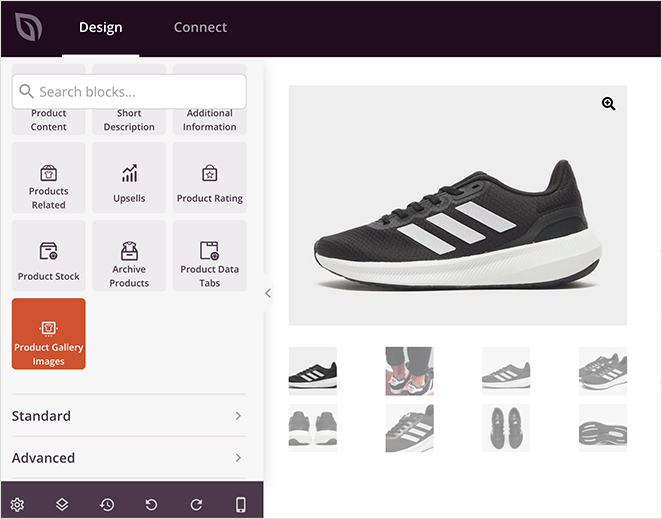
Die WooCommerce-Integration umfasst Produktgalerien, Warenkörbe, Checkout-Flows und benutzerdefinierte Shop-Seiten. Sie ziehen Blöcke hinein und passen sie visuell an, anstatt durch Einstellungsmenüs zu wühlen.
Eine Sache, die man wissen sollte: Die WooCommerce-Unterstützung erfordert den Elite-Plan (239,60 $/Jahr), also berücksichtigen Sie dies in Ihrem Budget.
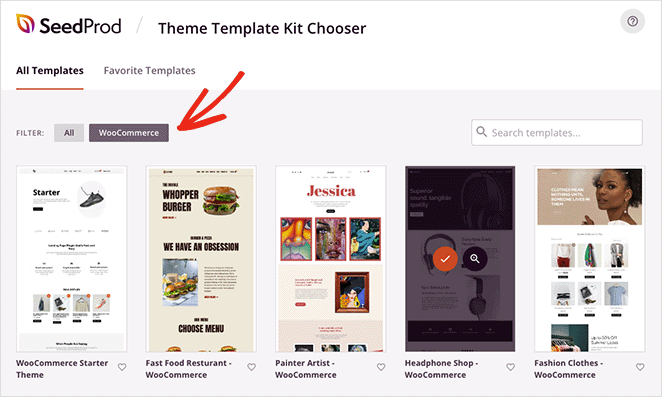
Wenn Sie nicht bei Null anfangen möchten, gibt es über 30 vorgefertigte E-Commerce-Website-Kits für Mode, Lebensmittel, Möbel, Hochzeiten und Schmuck und mehr. Sie werden in Sekundenschnelle importiert.
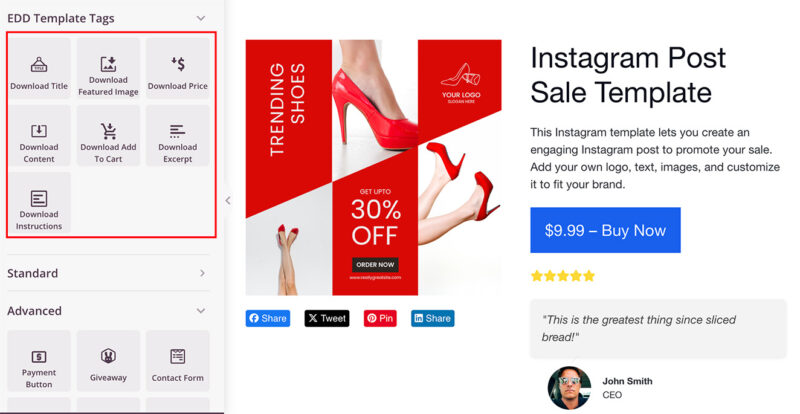
SeedProd unterstützt auch Easy Digital Downloads, wenn Sie digitale Produkte anstelle von physischen verkaufen.
| Vorteile | Nachteile |
|---|---|
| Vollständige visuelle Kontrolle über jede Shop-Seite | WooCommerce-Unterstützung erfordert Elite-Plan (239,60 $/Jahr) |
| 556 ms Ladezeit, 3,4x schneller als Elementor im Test | Mehr anfängliche Einrichtung als ein vorgefertigtes Theme |
| Über 30 fertige E-Commerce-Kits in Sekundenschnelle importiert | |
| Funktioniert sowohl mit WooCommerce als auch mit Easy Digital Downloads |
Fazit: SeedProd ist meine Top-Wahl, wenn Sie die volle Designkontrolle über Ihren Shop wünschen, ohne einen Entwickler beauftragen zu müssen. Die Elite-Plan-Anforderung für WooCommerce ist mit echten Kosten verbunden, aber die Leistung und Flexibilität zahlen sich aus, wenn Ihr Shop wächst.
Starten Sie noch heute mit SeedProd
Sie können auch in Sekundenschnelle einen benutzerdefinierten Shop mit SeedProd's KI-Website-Builder starten, der ein vollständig benutzerdefiniertes Theme aus einer kurzen Beschreibung generiert.
2. Sydney: Bestes kostenloses Business-Theme mit einem Shop
| Merkmal | Details |
|---|---|
| Preise | Kostenlos / Pro ab 63 $/Jahr |
| Kostenloser Plan | Ja |
| Herausragende Funktionen | • Pro WooCommerce-Modul (Wunschliste, Swatches, mehrstufiger Checkout) • Funktioniert mit Elementor und Block-Editor • Professionelle Design-Standards out of the box |
| Bewertung | A |
| Am besten für | Kleine Unternehmen, die Produkte neben Dienstleistungen verkaufen |
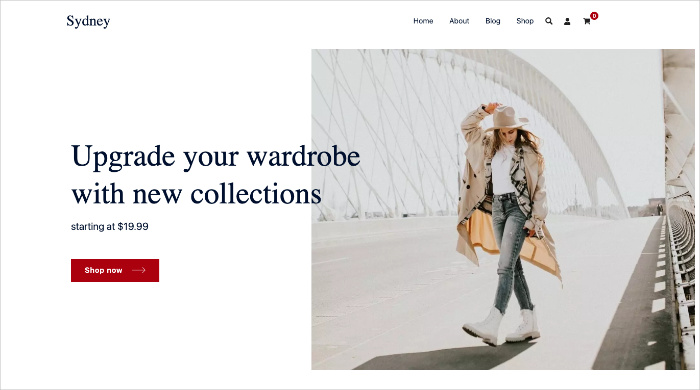
Sydney ist ein poliertes Business-Theme, das auch als Shop dient. Die kostenlose Version auf WordPress.org ist für eine professionelle Website wirklich brauchbar, was für kostenlose Themes selten ist.
Meine Erfahrung
Ich habe Sydney für ein Hybridszenario eingerichtet: eine Geschäftswebsite, die Service-Seiten und einen Produktshop auf derselben Domain benötigt.
Die meisten Themes tendieren in die eine oder andere Richtung. Sydney bewältigt beides, ohne sich wie ein Kompromiss anzufühlen, und die Design-Standardeinstellungen sehen professionell aus, ohne Farben, Schriftarten oder Abstände anpassen zu müssen.
Die Pro-Version (63 $/Jahr) enthält die WooCommerce-Funktionen: Wunschliste, Produktvarianten, mehrstufige Kaufabwicklung, Sticky-Add-to-Cart und AJAX-Produktsuche. Das ersetzt 2-3 separate Plugins, die Sie sonst installieren und warten müssten.
Es funktioniert sowohl mit Elementor als auch mit dem Block-Editor, sodass Sie nicht an einen Page Builder gebunden sind.
| Vorteile | Nachteile |
|---|---|
| Die kostenlose Version ist stark genug, um eine echte Website zu starten | Vollständige WooCommerce-Funktionen erfordern Pro (63 $/Jahr) |
| Das Pro WooCommerce-Modul ersetzt 2-3 separate Plugins | Basiert auf Elementor für die vollständige Layoutkontrolle |
| Professionelle Design-Standardeinstellungen erfordern minimale Anpassung | Die jährlichen Preise summieren sich im Vergleich zu Themes mit Einmalzahlung |
| Funktioniert mit Elementor und dem Block-Editor |
Fazit: Sydney ist eine gute Wahl, wenn Sie ein Unternehmen betreiben, das Produkte neben Dienstleistungen verkauft. Die kostenlose Version bietet einen guten Einstieg, und das Pro WooCommerce-Modul lohnt sich, wenn Sie sonst separate Plugins stapeln müssten.
3. Divi: Bester visueller Builder für Shop-Besitzer, die die volle Kontrolle wünschen
| Merkmal | Details |
|---|---|
| Preise | 89 $/Jahr oder 249 $ lebenslang |
| Kostenloser Plan | Nein |
| Herausragende Funktionen | • Integrierter Divi Builder für visuelle Bearbeitung • WooCommerce-Produkt-, Warenkorb- und Checkout-Vorlagen • 249 $-Lebenszeitlizenz für unbegrenzte Websites • Riesige Vorlagenbibliothek und aktive Community |
| Bewertung | A- |
| Am besten für | Visuelle Builder, die mehrere Shop-Websites verwalten |
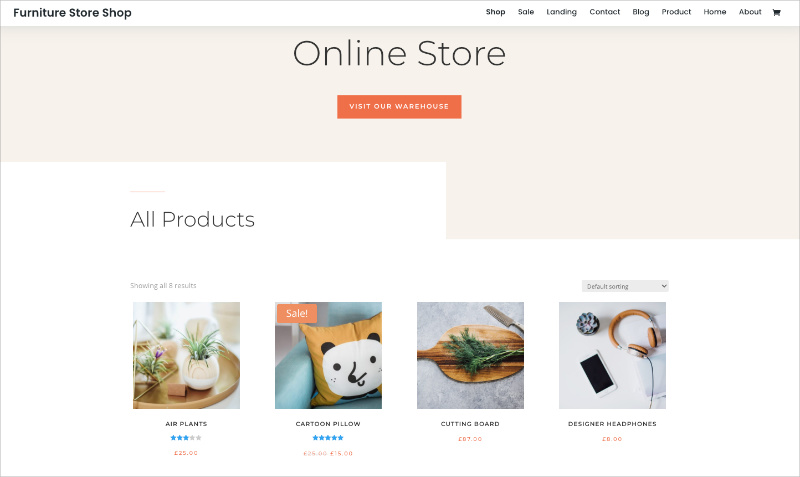
Divi ist eines der am weitesten verbreiteten WordPress-Themes, und der Grund dafür ist der Builder. Der Divi Builder bietet Ihnen visuelle Drag-and-Drop-Bearbeitung für jeden Teil Ihres Shops, einschließlich Produktseiten, Warenkorb und Kasse.
Meine Erfahrung
Die Ressourcennutzung von Divi ist das Erste, was erwähnenswert ist. In meinen Query Monitor-Tests verbrauchte es 13 MB Speicher und 86 Datenbankabfragen im Vergleich zu den 4,3 MB und 34 Abfragen von SeedProd. Das werden Sie auf günstigen Shared-Hosting-Plänen spüren, aber auf anständigem Hosting läuft es gut.
Der Builder selbst ist leistungsstark und ermöglicht es Ihnen, WooCommerce-Produktvorlagen visuell zu bearbeiten, was die meisten traditionellen Themes nicht zulassen.
Das lebenslange Angebot für 249 $ deckt unbegrenzte Websites ab, was es zu einem der besseren langfristigen Werte auf dieser Liste macht. Sie erhalten auch das Extra-Theme und andere Plugins mit derselben Lizenz.
Die Lernkurve ist jedoch real. Divi hat viele Optionen, und die Benutzeroberfläche kann anfangs überwältigend wirken.
| Vorteile | Nachteile |
|---|---|
| Visueller Builder deckt jeden Seitentyp ab, einschließlich WooCommerce-Vorlagen | Keine kostenlose Version zum Testen vor dem Kauf |
| 249 $-Lebenszeitlizenz für unbegrenzte Websites | 13 MB Speicher und 86 DB-Abfragen im Test, mehr als die meisten |
| Riesige Vorlagenbibliothek und aktive Community | Die Builder-Oberfläche kann für Anfänger überwältigend sein |
| Enthält Extra-Theme und andere Plugins in derselben Lizenz |
Fazit: Divi ist eine starke Wahl, wenn Sie die volle visuelle Kontrolle wünschen und mehrere Websites verwalten. Das lebenslange Angebot ist schwer zu schlagen, aber planen Sie die höhere Ressourcennutzung auf Ihrem Hosting ein.
4. Astra: Bestes leichtgewichtiges Theme für schnelle Shops
| Merkmal | Details |
|---|---|
| Preise | Kostenlos / Pro ab 49 $/Jahr |
| Kostenloser Plan | Ja |
| Herausragende Funktionen | • Frontend-Fußabdruck unter 50 KB • Vorgefertigte WooCommerce-Startervorlagen • Funktioniert mit Elementor, Beaver Builder und Block-Editor • Designkontrollen basierend auf dem Customizer |
| Bewertung | A |
| Am besten für | Geschäftsinhaber und Anfänger, die Wert auf Geschwindigkeit legen |
Astra ist ein leichtgewichtiges, kostenloses E-Commerce-Theme, das auf Geschwindigkeit ausgelegt ist. Sein Frontend-Fußabdruck liegt unter 50 KB, was bedeutet, dass Ihr Shop schnell lädt, ohne dass Optimierungs-Plugins die Hauptarbeit leisten müssen.
Meine Erfahrung
Das Erste, was mir an Astra auffiel, war, wie wenig es im Weg steht. Das Theme lädt schnell, die Customizer-Steuerelemente sind logisch, und man verbringt keine Zeit damit, Funktionen zu deaktivieren, die man nicht angefordert hat.
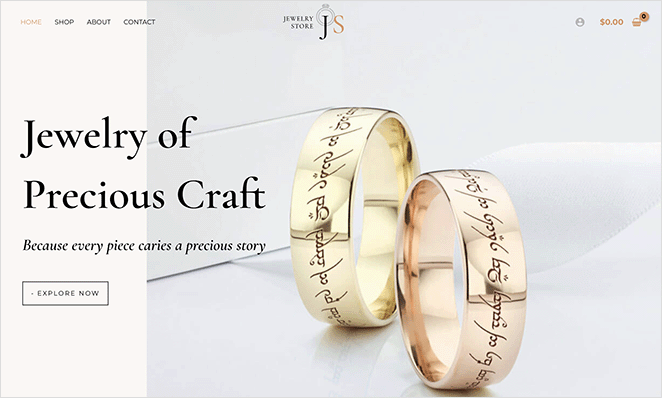
Die vorgefertigten Startervorlagen decken mehrere Branchen ab und funktionieren mit beliebten Page Buildern wie Elementor und Beaver Builder sowie dem WordPress Block-Editor.
Für Suchmaschinenoptimierung ist die leichtgewichtige Codebasis ein echter Vorteil. Weniger Ressourcen bedeuten schnellere Seitenladezeiten, was Google bei der Rangfolge berücksichtigt.
Das Pro-Upgrade (49 $/Jahr) fügt tiefere WooCommerce-Steuerelemente hinzu, wie z. B. Produkt-Schnellansicht, Off-Canvas-Warenkorb und Checkout-Anpassung.
| Vorteile | Nachteile |
|---|---|
| Frontend-Fußabdruck unter 50 KB, wirklich schnell | Erweiterte WooCommerce-Funktionen erfordern Pro (49 $/Jahr) |
| Kostenlose Version ist für einen einfachen Shop voll funktionsfähig | Das Design kann ohne Anpassung generisch wirken |
| Funktioniert mit allen wichtigen Seitenerstellern | Weniger voreingenommenes Design bedeutet mehr Arbeit, um aufzufallen |
| Vorgefertigte Startervorlagen für eine schnelle Einrichtung |
Fazit: Astra ist meine Empfehlung, wenn die Seitenladezeit Ihre oberste Priorität hat. Es ist das am einfachsten zu bedienende Theme auf dieser Liste, um einen schnellen, sauberen Shop zu betreiben, besonders für Anfänger.
5. Storefront: Bestes kostenloses WooCommerce-natives Theme
| Merkmal | Details |
|---|---|
| Preise | Kostenlos |
| Kostenloser Plan | Ja (vollständig kostenlos, keine Pro-Stufe) |
| Herausragende Funktionen | • Erstellt und gepflegt vom WooCommerce-Team • Tiefe WooCommerce-Integration out of the box • Sauberes, unvoreingenommenes Design • Erstklassige Kompatibilität mit allen WooCommerce-Erweiterungen |
| Bewertung | A- |
| Am besten für | Shop-Besitzer, die garantierte WooCommerce-Kompatibilität wünschen |
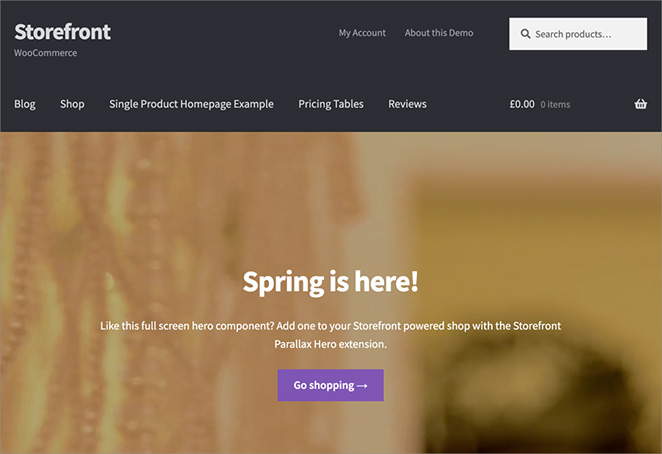
Storefront ist das offizielle Theme, das vom WooCommerce-Team bei Automattic erstellt und gepflegt wird. Das bedeutet, dass jedes WooCommerce-Update zuerst gegen Storefront getestet wird, was Ihnen ein Maß an Kompatibilität bietet, das kein Drittanbieter-Theme erreichen kann.
Meine Erfahrung
Ich habe Storefront als Basis verwendet, als ich andere Themes auf dieser Liste verglichen habe. Es ist das einzige Theme, bei dem WooCommerce-Funktionen genau wie dokumentiert funktionieren, da dasselbe Team beides entwickelt. Keine Plugin-Konflikte, keine Layout-Probleme nach Updates.
Es funktioniert auch sauber mit den eigenen Erweiterungen von WooCommerce (Produktpakete, Abonnements, Mitgliedschaften) ohne die Kompatibilitätsprobleme, auf die ich bei anderen Themes gestoßen bin.
Das Design ist bewusst minimalistisch gehalten. Es gibt keine Pro-Version, keine Upsells und keine vorgefertigten Vorlagen. Das ist ein Vorteil, wenn Sie garantierte Kompatibilität bei einem knappen Budget wünschen, aber es bedeutet, dass Sie ein Child-Theme oder zusätzliches CSS benötigen, um es unverwechselbar aussehen zu lassen.
Standardmäßig sehen Storefront-Shops tendenziell ähnlich aus.
| Vorteile | Nachteile |
|---|---|
| Vom WooCommerce-Team erstellt, garantierte Kompatibilität | Minimalistisches Design erfordert zusätzliche Arbeit, um unverwechselbar auszusehen |
| Komplett kostenlos ohne Upsells | Keine vorgefertigten Startervorlagen oder Demo-Importe |
| First-Party-Support für alle WooCommerce-Erweiterungen | Kein integrierter Seitenersteller oder erweiterte Layout-Optionen |
| Standardmäßig leichtgewichtig und schnell |
Fazit: Storefront ist die sicherste Wahl, wenn die WooCommerce-Kompatibilität Ihre oberste Priorität hat. Es ist nicht das schönste Theme von Haus aus, aber es ist das einzige Theme, bei dem WooCommerce nach einem Update nie kaputtgeht.
6. OceanWP: Bestes kostenloses Mehrzweck-Theme für E-Commerce
| Merkmal | Details |
|---|---|
| Preise | Kostenlos / Pro ab 35 $/Jahr |
| Kostenloser Plan | Ja |
| Herausragende Funktionen | • Integrierter Warenkorb und WooCommerce-Integration • Live-Anpasser für Header, Farben und Layouts • Vorlagen für benutzerdefinierte Landing Pages • Mobilfreundlich auf allen Geräten |
| Bewertung | B+ |
| Am besten für | Budgetbewusste Shop-Besitzer, die Flexibilität wünschen |
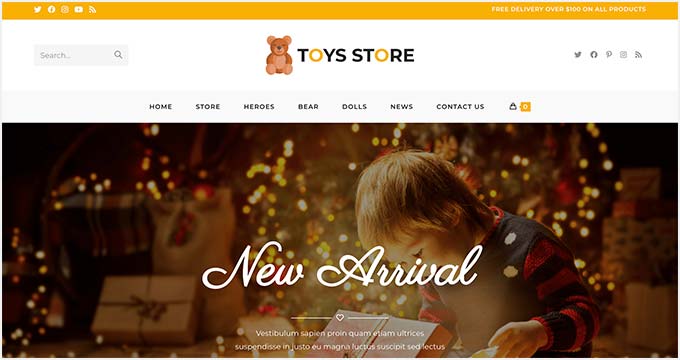
OceanWP ist ein beliebtes, kostenloses Mehrzweck-Theme mit starken E-Commerce-Funktionen. Es bietet WooCommerce-Integration, einen integrierten Warenkorb und genügend Designoptionen, um einen gut aussehenden Shop zu erstellen, ohne für Pro bezahlen zu müssen.
Meine Erfahrung
Die kostenlose Version geht weiter als die meisten kostenlosen Themes. Sie erhalten Header-Stile, Farbsteuerungen, Navigationsmenüs und Hintergrundoptionen über den Live-Anpasser, ohne Code schreiben zu müssen. Produktgitter passten sich gut an Desktop-, Tablet- und Mobile-Breakpoints an, was bei günstigeren Themes oft falsch gemacht wird.
OceanWP bietet auch Landingpage-Vorlagen für Werbeaktionen und saisonale Kampagnen. Die Pro-Version (35 $/Jahr) ist das günstigste Upgrade auf dieser Liste.
Der Nachteil ist, dass OceanWP versucht, alles zu machen, daher ist es nicht so eng auf E-Commerce optimiert wie speziell dafür entwickelte Themes wie Shoptimizer oder Botiga.
| Vorteile | Nachteile |
|---|---|
| Kostenlose Version hat echte WooCommerce-Funktionen | Mehrzweck-Design ist nicht so E-Commerce-fokussiert wie dedizierte Themes |
| Pro-Upgrade kostet nur 35 $/Jahr, das Günstigste auf dieser Liste | Kann aufgebläht wirken, wenn zu viele Optionen aktiviert werden |
| Live-Anpasser erleichtert Designänderungen | Vorlagenbibliothek ist nicht so poliert wie die von Astra |
| Gute mobile Reaktionsfähigkeit von Haus aus |
Fazit: OceanWP ist eine solide Wahl, wenn Sie ein flexibles kostenloses Theme wünschen, das WooCommerce handhaben kann, ohne karg zu wirken. Das Pro-Upgrade für 35 $/Jahr ist leicht zu rechtfertigen, wenn Sie mehr Shop-Funktionen benötigen.
7. Botiga: Bestes minimalistisches E-Commerce-Theme
| Merkmal | Details |
|---|---|
| Preise | Kostenlos / Pro ab 69 $/Jahr |
| Kostenloser Plan | Ja |
| Herausragende Funktionen | • Speziell für WooCommerce-Shops entwickelt • Produktgalerie-Layouts, Variations-Swatches, Warenkorb-Stile • Starter-Sites für verschiedene Branchen • Funktioniert mit beliebten Seitenerstellern |
| Bewertung | B+ |
| Am besten für | Saubere, moderne Shops, die Produkte für sich sprechen lassen |
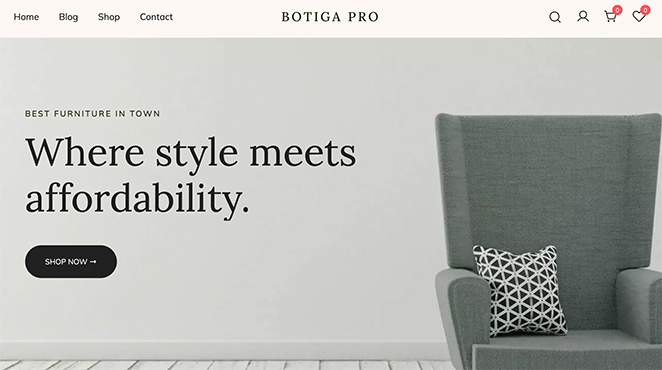
Botiga ist ein WordPress-E-Commerce-Theme, das speziell für WooCommerce-Shops entwickelt wurde. Das Design ist minimalistisch und sauber, wodurch der Fokus auf Ihre Produkte und nicht auf das Theme selbst gelegt wird.
Meine Erfahrung
Botiga stammt von aThemes, demselben Team hinter Sydney, und der E-Commerce-Fokus ist sofort erkennbar. Wo Sydney ein Business-Theme ist, das Shop-Funktionen hinzufügt, ist Botiga von Grund auf ein Shop-Theme.
Die kostenlose Version enthält Produktgalerie-Layouts, Warenkorb-Seitenstile, Produktkarten-Designs und Variations-Swatches. Die meisten Themes sperren diese hinter einer Paywall.
Das neutrale, minimalistische Design bedeutet, dass jeder Produkttyp gut zur Geltung kommt, von Kleidung über Elektronik bis hin zu handgefertigten Waren.
Die Pro-Version (69 $/Jahr) fügt erweiterte Funktionen hinzu, aber wenn Sie Botiga mit Astra für einen dedizierten Shop vergleichen, ist Botiga von Haus aus stärker auf E-Commerce ausgerichtet.
| Vorteile | Nachteile |
|---|---|
| Von Grund auf für E-Commerce entwickelt | Pro für erweiterte WooCommerce-Funktionen erforderlich (69 $/Jahr) |
| Kostenlose Version enthält Funktionen, die andere hinter Pro sperren | Kleinere Community und weniger Tutorials als Astra oder OceanWP |
| Minimalistisches Design passt für jede Produktkategorie | Weniger Starter-Vorlagen als Mehrzweck-Themes |
| Dasselbe Team wie Sydney (aThemes) |
Fazit: Botiga ist meine Wahl, wenn Sie ein sauberes, zweckgebundenes E-Commerce-Theme wünschen, das nicht versucht, alles andere auch zu tun. Die kostenlose Version ist großzügig genug, um einen echten Shop zu starten.
8. Neve: Bestes Mobile-First-Theme für Online-Shops

| Merkmal | Details |
|---|---|
| Preise | Kostenlos / Pro ab 69 $/Jahr |
| Kostenloser Plan | Ja |
| Herausragende Funktionen | • Mobile-First-Responsive-Design • Schnelle Ansicht, schwebender Warenkorb, Off-Canvas-Shop-Filter • Starter-Websites für Online-Shops • Funktioniert mit wichtigen Page Buildern und dem Block-Editor |
| Bewertung | B+ |
| Am besten für | Shops, bei denen der meiste Traffic von Mobilgeräten kommt |
Neve ist ein Mobile-First-E-Commerce-Theme von ThemeIsle. Es ist leicht, anfängerfreundlich und so konzipiert, dass Ihr Shop zuerst auf dem Handy gut aussieht und dann auf dem Desktop skaliert wird.
Meine Erfahrung
Der Mobile-First-Ansatz macht hier einen echten Unterschied. Produktgitter, Navigation und Checkout fühlten sich auf dem Handy-Bildschirm nativ an, nicht wie ein Desktop-Layout, das in ein kleineres Fenster gequetscht wurde. Schnelle Ansicht, schwebender Warenkorb und Off-Canvas-Filter reduzieren die Reibung für Käufer, die mobil surfen.
Die kostenlose Version ist solide für einen einfachen Shop, aber die Pro-Funktionen (69 $/Jahr) sind es, wo der eigentliche WooCommerce-Wert liegt. Wenn mobiler Traffic ein großer Teil Ihres Geschäfts ist, sind die optimierten Checkout-Layouts allein das Upgrade wert. Neve funktioniert mit allen wichtigen Page Buildern plus dem Block-Editor.
| Vorteile | Nachteile |
|---|---|
| Mobile-First-Design fühlt sich auf Handys nativ an | Beste WooCommerce-Funktionen erfordern Pro (69 $/Jahr) |
| Schnelle Ansicht, schwebender Warenkorb und Off-Canvas-Filter enthalten | Desktop-Layouts können einfacher wirken als bei der Konkurrenz |
| Leicht und schnell ladend | Starter-Websites sind im Vergleich zur Astra-Bibliothek begrenzt |
| Funktioniert mit allen wichtigen Seitenerstellern |
Fazit: Neve ist die richtige Wahl, wenn die meisten Ihrer Käufer mobil surfen. Der Mobile-First-Ansatz ist hier kein Marketing-Claim. Er zeigt sich in den Produktgittern, Filtern und dem Checkout-Flow.
9. Flatsome: Bestes WooCommerce-Theme mit Einmalzahlung
| Merkmal | Details |
|---|---|
| Preise | 59 $ einmalig |
| Kostenloser Plan | Nein |
| Herausragende Funktionen | • Integrierter UX Builder für Shop-Layouts • Vorgefertigte Shop-Seiten-Vorlagen • Einmalzahlung mit lebenslangen Updates |
| Bewertung | B+ |
| Am besten für | Shop-Besitzer, die eine schlüsselfertige Einrichtung ohne wiederkehrende Gebühren wünschen |
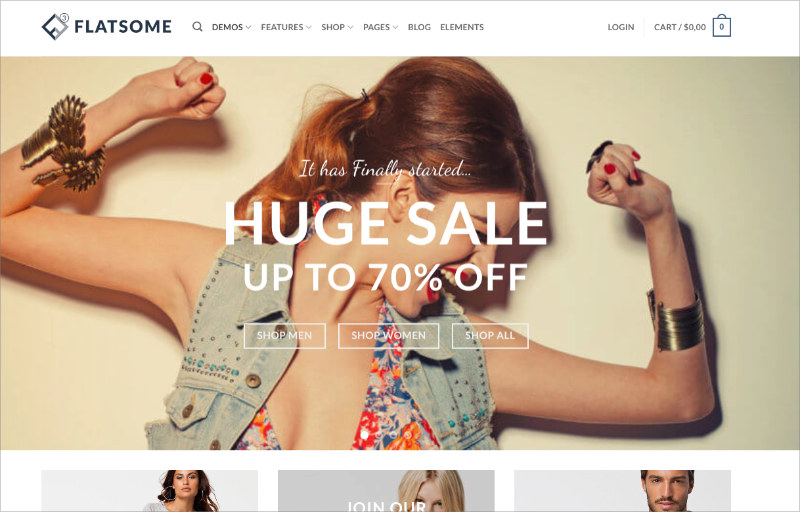
Flatsome ist das meistverkaufte WooCommerce-Theme auf ThemeForest. Der integrierte UX Builder bietet Ihnen visuelles Drag-and-Drop-Editing, das speziell für Shop-Layouts entwickelt wurde, ohne dass Sie Elementor oder einen anderen Page Builder benötigen.
Meine Erfahrung
Die vorgefertigten Shop-Layouts ermöglichten es, in wenigen Minuten einen funktionierenden Shop einzurichten. Der einmalige Preis von 59 $ mit lebenslangen Updates ist ein starkes Verkaufsargument, wenn Sie wiederkehrende Theme-Kosten stören.
Der Kompromiss ist das ThemeForest-Ökosystem: Updates und Support laufen über Envato, und das Theme ist schwerer als leichte Optionen wie Astra.
| Vorteile | Nachteile |
|---|---|
| 59 $ einmalig mit lebenslangen Updates | Schwerer als leichte Themes wie Astra |
| Integrierter UX Builder, kein zusätzlicher Page Builder erforderlich | Support und Updates erfolgen über ThemeForest/Envato |
| Vorgefertigte Shop-Layouts für schnelle Einrichtung | Keine kostenlose Version zum Testen vor dem Kauf |
Fazit: Flatsome ist das beste Preis-Leistungs-Verhältnis, wenn Sie ein Premium-E-Commerce-Theme ohne wiederkehrende Kosten wünschen. Der UX Builder ist leistungsfähig, aber Sie kaufen sich in das ThemeForest-Ökosystem ein.
10. Shoptimizer: Bestes Conversion-fokussiertes E-Commerce-Theme
| Merkmal | Details |
|---|---|
| Preise | Ab $49 |
| Kostenloser Plan | Nein |
| Herausragende Funktionen | • Sticky Produktleisten und FOMO-Timer • Vertrauensabzeichen und Benachrichtigungen über Verkäufe • Optimiert für die Checkout-Konversion |
| Bewertung | B+ |
| Am besten für | Shops, bei denen die Konversionsrate wichtiger ist als die Designflexibilität |
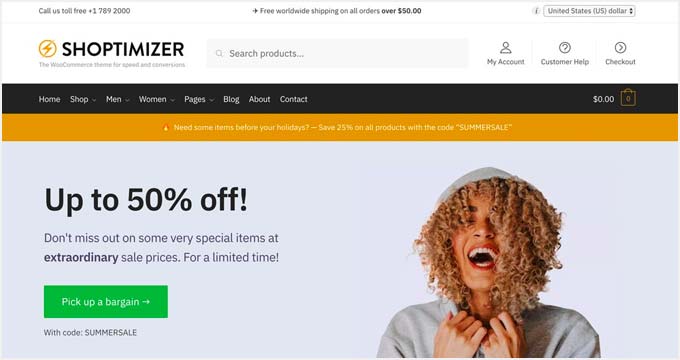
Shoptimizer ist auf ein Ziel ausgerichtet: mehr Besucher sollen einen Kauf abschließen. Jede Funktion ist darauf ausgelegt, Reibungsverluste zu reduzieren und Konversionen an der Kasse zu erhöhen.
Meine Erfahrung
Sticky Produktleisten folgen den Käufern beim Scrollen. FOMO-Countdown-Timer erzeugen Dringlichkeit. Vertrauensabzeichen erscheinen, wenn Zögern auftritt. Die einblendbaren Verkaufsbenachrichtigungen fügen Social Proof hinzu, ohne dass ein separates Plugin benötigt wird.
Für 49 US-Dollar ist es fokussiert und preisgünstig, aber es hat keinen visuellen Builder, sodass Sie innerhalb der Layout-Optionen des Themes arbeiten.
| Vorteile | Nachteile |
|---|---|
| Integrierte Konversions-Tools ersetzen 2-3 Plugins | Kein visueller Builder für benutzerdefinierte Layouts |
| Sticky-Leisten, Vertrauensabzeichen und FOMO-Timer inklusive | Weniger Designflexibilität als bei Mehrzweck-Themes |
| Preisgünstig für 49 US-Dollar | Enger Fokus bedeutet weniger Funktionen außerhalb des Shops |
Fazit: Shoptimizer ist die richtige Wahl, wenn Ihnen Checkout-Konversionen wichtiger sind als Designfreiheit. Die integrierten Konversions-Tools ersparen Ihnen das Stapeln von Plugins.
11. Ultra: Bestes Mehrzweck-Theme mit One-Click-Shop-Skins

| Merkmal | Details |
|---|---|
| Preise | Ab 59 $ |
| Kostenloser Plan | Nein |
| Herausragende Funktionen | • Vorgefertigte Skins für den Ein-Klick-Shop-Start • Mega-Menü mit Kategoriebildern • Themify Drag-and-Drop-Builder enthalten |
| Bewertung | B |
| Am besten für | Shop-Betreiber, die schnell ein poliertes Design wünschen |
Ultra ist ein Mehrzweck-Theme von Themify mit vorgefertigten Skins, mit denen Sie mit einem Klick einen professionell aussehenden Shop starten können. Es enthält den Themify Drag-and-Drop-Builder zur Anpassung von Layouts nach dem Import.
Meine Erfahrung
Die Mega-Menü-Funktion sticht für Shops mit vielen Produktkategorien hervor und zeigt ein Vollbild-Dropdown mit Kategoriebildern. Ultra lädt schneller als erwartet für ein Theme mit so vielen Funktionen.
Der Kompromiss ist die Ökosystembindung: Sie sind an den Themify-Builder gebunden, der eine kleinere Community als Elementor oder Gutenberg hat.
| Vorteile | Nachteile |
|---|---|
| Ein-Klick-Skins bringen einen Shop schnell online | An den Themify-Builder-Ökosystem gebunden |
| Mega-Menü ist großartig für große Produktkataloge | Kleinere Community und weniger Drittanbieter-Ressourcen |
| Schneller als erwartet für ein funktionsreiches Theme | Builder wirkt im Vergleich zu neueren Optionen veraltet |
Fazit: Ultra eignet sich gut, wenn Sie ein poliertes Shop-Design wünschen, ohne bei Null anfangen zu müssen. Das Mega-Menü ist ein herausragendes Merkmal, aber das Themify-Ökosystem ist die Verpflichtung, die Sie eingehen.
12. Kadence: Bestes Block-Editor-Theme für WooCommerce
| Merkmal | Details |
|---|---|
| Preise | Kostenlos / Pro ab 149 $/Jahr |
| Kostenloser Plan | Ja |
| Herausragende Funktionen | • Auf den WordPress Block-Editor aufgebaut • Kostenloser Header/Footer-Builder und Kadence Blocks Plugin • Vollständige Website-Bearbeitungsunterstützung für zukunftssichere Builds |
| Bewertung | B+ |
| Am besten für | Shop-Betreiber, die mit Gutenberg bauen und langfristige Kompatibilität wünschen |
Kadence ist ein Block-Theme, das um den WordPress-Block-Editor herum entwickelt wurde. Wenn Sie Gutenberg gegenüber Drittanbieter-Page-Buildern bevorzugen, gibt Ihnen Kadence mehr Kontrolle über Ihr Shop-Layout als fast jedes andere Theme.
Meine Erfahrung
Das kostenlose Kadence Blocks Plugin fügt benutzerdefinierte Blöcke für Produktgitter, Testimonials und erweiterte Layouts hinzu. Der Header- und Footer-Builder ist ebenfalls kostenlos, wofür die meisten Themes Geld verlangen.
Kadence ist eine der zukunftssichersten Optionen auf dieser Liste, da sich WordPress in Richtung Full Site Editing bewegt. Die Pro-Version (149 $/Jahr) ist jedoch teurer als die meisten Konkurrenten.
| Vorteile | Nachteile |
|---|---|
| Die zukunftssicherste Option, da sich WordPress in Richtung Full Site Editing bewegt | Pro-Version (149 $/Jahr) ist teurer als die Konkurrenz |
| Kostenloser Header-/Footer-Builder und Kadence Blocks Plugin | Lernkurve des Block-Editors, wenn Sie an Page Builder gewöhnt sind |
| Starke WooCommerce-Integration im Block-Editor | Weniger vorgefertigte Vorlagen als Astra |
Fazit: Kadence ist die beste Wahl, wenn Sie mit dem Block-Editor erstellen und ein Theme wünschen, das mit WordPress wächst. Der höhere Pro-Preis ist die Haupthürde.
13. Shoppe: Bestes Allzweck-WooCommerce-Theme
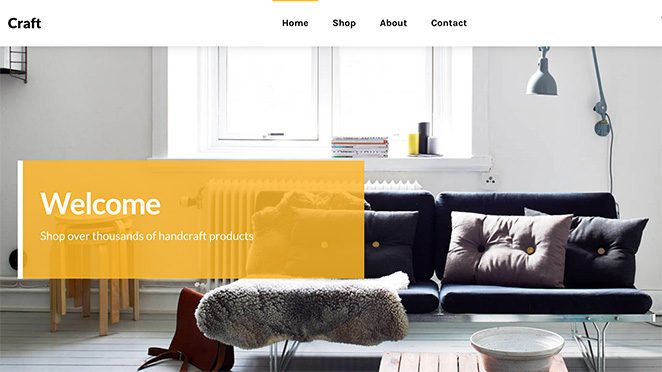
| Merkmal | Details |
|---|---|
| Preise | Ab 59 $ |
| Kostenloser Plan | Nein |
| Herausragende Funktionen | • 14 Header-, 9 Archiv- und 6 Footer-Layouts • Produktbild-Zoom, Ajax-Warenkorb, Wunschliste • One-Click-Demo-Import |
| Bewertung | B |
| Am besten für | Allgemeine Online-Shops, die Layout-Vielfalt ohne Programmierung wünschen |
Shoppe ist ein WooCommerce-Theme von Themify, das für jeden Online-Shop-Typ entwickelt wurde. Es deckt die Grundlagen gut ab: Produktbild-Zoom, Ajax-Warenkorb, Wunschliste und flexible Layout-Optionen.
Meine Erfahrung
Mit 14 Header-Layouts, 9 Archiv-Layouts und 6 Footer-Layouts können Sie Ihrem Shop ein unverwechselbares Aussehen verleihen, ohne benutzerdefinierten Code zu verwenden. Der One-Click-Demo-Import ermöglicht einen schnellen Start.
Wie bei Ultra sind Sie an das Themify Builder-Ökosystem gebunden, was Ihre Optionen einschränkt, wenn Sie später wechseln möchten.
| Vorteile | Nachteile |
|---|---|
| Große Vielfalt an Header-, Archiv- und Footer-Layouts | An den Themify-Builder-Ökosystem gebunden |
| One-Click-Demo-Import für schnelle Einrichtung | Keine kostenlose Version verfügbar |
| Integrierte Wunschliste und Ajax-Warenkorb | Überschneidet sich mit Ultra, wenn Sie bereits in der Themify-Reihe sind |
Fazit: Shoppe ist ein solides Allzweck-Shop-Theme, wenn Sie sofort Layout-Vielfalt wünschen. Es ist eine gute Option innerhalb des Themify-Ökosystems, aber erwägen Sie Ultra, wenn Sie mehr als nur E-Commerce benötigen.
14. Essence Pro: Bestes Genesis Framework Theme für E-Commerce

| Merkmal | Details |
|---|---|
| Preise | Ab 360 $/Jahr (Genesis Pro) |
| Kostenloser Plan | Nein |
| Herausragende Funktionen | • Basiert auf dem Genesis-Framework (sauberer Code, starke Sicherheit) • Vorgefertigte WooCommerce-Shop-Vorlagen • Unterstützung für den Block-Editor |
| Bewertung | B |
| Am besten für | Inhaltsreiche Websites, die bereits auf Genesis laufen und einen Shop hinzufügen möchten |
Essence Pro ist ein WordPress-Theme, das auf dem Genesis-Framework von StudioPress basiert. Genesis priorisiert sauberen Code und Leistung, was zu schnellen Seitenladezeiten und starker Sicherheit out-of-the-box führt.
Meine Erfahrung
Das Theme enthält vorgefertigte Vorlagen für WooCommerce-Shops und unterstützt den WordPress-Block-Editor. Es wurde für Gesundheits- und Wellness-Websites entwickelt, lässt sich aber auch an andere Nischen anpassen.
Der Genesis Pro-Preis von 360 $/Jahr ist die Haupthürde. Wenn Sie nicht bereits im Genesis-Ökosystem sind, bieten günstigere Themes vergleichbare Geschwindigkeit.
| Vorteile | Nachteile |
|---|---|
| Genesis-Framework bedeutet sauberen Code und schnelle Ladezeiten | 360 $/Jahr ist die teuerste Option auf dieser Liste |
| Starke Sicherheitsbilanz | Entwickelt für Gesundheit/Wellness, muss für andere Nischen angepasst werden |
| Block-Editor-Unterstützung | Günstigere Themes erreichen seine Geschwindigkeit ohne den Genesis-Preis |
Fazit: Essence Pro ist sinnvoll, wenn Sie bereits in das Genesis-Ökosystem investiert sind und einen Shop hinzufügen möchten. Für alle anderen ist der Preis von 360 $/Jahr schwer zu rechtfertigen, wenn Astra oder Botiga eine ähnliche Leistung zu geringeren Kosten bieten.
FAQs zu E-Commerce-WordPress-Themes
Was ist das schnellste WooCommerce-Theme?
Astra ist das schnellste WooCommerce-Theme, das ich getestet habe. Es hält seinen Frontend-Fußabdruck unter 50 KB und lädt auf den meisten Hostings in weniger als einer halben Sekunde. SeedProd ist mit 556 ms und nur 16 HTTP-Anfragen in meinen GTmetrix-Tests ebenfalls schnell, was 3,4x schneller ist als Elementor-basierte Setups. Wenn rohe Geschwindigkeit Ihre Priorität ist, beginnen Sie mit Astra oder SeedProd.
Kann ich jedes WordPress-Theme für WooCommerce verwenden?
Technisch ja, aber das sollten Sie nicht. WooCommerce funktioniert mit den meisten WordPress-Themes, aber Themes, die nicht für E-Commerce entwickelt wurden, haben oft Layout-Probleme auf Produktseiten, im Warenkorb und beim Checkout. Storefront ist die sicherste Wahl, da das WooCommerce-Team es entwickelt und testet. Speziell für E-Commerce entwickelte Themes wie Botiga und Shoptimizer handhaben Store-Layouts viel besser als generische Themes.
Ist WordPress gut für E-Commerce?
Ja. WordPress betreibt über 40 % aller Websites, und WooCommerce ist die am weitesten verbreitete E-Commerce-Plattform der Welt. Sie erhalten die volle Kontrolle über Ihren Shop, keine Transaktionsgebühren von der Plattform und Tausende von Plugins für Zahlungen, Versand und Marketing. Der Nachteil ist, dass Sie Ihr eigenes Hosting und Ihre Updates verwalten müssen, was Plattformen wie Shopify für Sie übernehmen.
Das richtige E-Commerce-Theme hängt von der Größe Ihres Shops, Ihrem Budget und dem gewünschten Design-Kontrollgrad ab. Wenn Sie nicht sicher sind, wo Sie anfangen sollen, bietet Ihnen SeedProd die größte Flexibilität und Astra die beste Geschwindigkeit.
Die meisten kostenlosen Themes auf dieser Liste sind stark genug, um damit zu starten. Sie können immer ein Upgrade durchführen, sobald Ihr Shop sie übertrifft.
Expertenleitfäden für den Aufbau Ihres Online-Shops
Wenn Sie Ihren WooCommerce-Shop einrichten, helfen Ihnen diese Anleitungen:
- So erstellen Sie eine E-Commerce-Website mit WordPress
- So erstellen Sie ein benutzerdefiniertes WordPress-Theme ohne Code
- Die besten WordPress-Seitenersteller im Vergleich
- Die besten Website-Builder für Kleinunternehmen
Danke fürs Lesen! Wir würden uns freuen, Ihre Gedanken zu hören. Treten Sie also gerne der Unterhaltung auf YouTube, X und Facebook bei, um weitere hilfreiche Ratschläge und Inhalte für das Wachstum Ihres Unternehmens zu erhalten.



