


A multipurpose WordPress theme is a flexible theme built to support many different types of websites from one setup. I use them when I want a single theme that can handle blogs, business sites, landing pages, and online stores without switching themes later.
If you build sites for yourself or clients, changing themes as requirements evolve quickly slows projects down. I’ve used multipurpose themes for portfolios, product launches, and membership sites, all without starting from scratch.
In this guide, I’ll share the multipurpose WordPress themes I actually recommend, based on real use, design flexibility, and how well they adapt as a site grows.
Comparison of the Best Multipurpose WordPress Themes
| Theme | Best For | Price | Builder | Rating | Performance |
|---|---|---|---|---|---|
| SeedProd | Full custom design | $199/year | Built-in | ⭐⭐⭐⭐⭐ | Good |
| Sydney | Budget business | Free | Elementor | ⭐⭐⭐⭐ | Good |
| Divi | Design flexibility | $89/year | Built-in | ⭐⭐⭐⭐ | ⚠️ Slow |
| Neve | Speed/simplicity | Free | Multiple | ⭐⭐⭐⭐ | ⭐ Elite |
| OceanWP | WooCommerce | Free | Elementor | ⭐⭐⭐⭐ | ⚠️ Slow |
| Ultra | Agencies | $59/year | Built-in | ⭐⭐⭐⭐ | ⚠️ Very Heavy |
| Blocksy | Gutenberg | Free | Native | ⭐⭐⭐⭐ | ⭐ Elite |
| Indigo | Modular | $129/year | Built-in | ⭐⭐⭐⭐ | Not tested |
| Kadence WP | Performance | Free | Gutenberg | ⭐⭐⭐⭐ | ⭐ Elite |
| Inspiro | Portfolios | Free | Elementor | ⭐⭐⭐⭐ | Good |
What Is a Multipurpose WordPress Theme?
A multipurpose WordPress theme is a flexible theme you can use to build different kinds of websites, without having to switch templates every time your goals change.
Unlike niche themes that are designed just for one purpose, like photography or blogging, a multipurpose theme works for everything. You can create landing pages, portfolios, ecommerce shops, service pages, and more using the same core design tools.
That flexibility matters, especially if you:
- Build sites for clients and need reusable tools
- Want to test different layouts or business ideas
- Don’t want to rely on dozens of separate plugins
Most multipurpose themes also come with built-in templates, drag-and-drop builders, and customizer options, so you’re not stuck with a single layout or style.
You can use them for:
- Lead generation sites
- Business websites
- Online stores
- Personal blogs
- Sales pages
- Portfolios
How I Tested These Multipurpose WordPress Themes
I didn’t just install these themes and write about them. I built real test sites and measured actual performance data.
My testing process:
- Built complete sites – Created client portfolios, product pages, service business sites, and WooCommerce stores with each theme
- Measured performance – Used Chrome DevTools to capture real load times, resource usage, and Core Web Vitals
- Tested mobile responsiveness – Checked layouts on different devices and screen sizes
- Evaluated customization – Spent 3-4 hours with each theme’s settings and builder
- Checked plugin compatibility – Tested with WooCommerce, contact forms, and common plugins
- Assessed ease of use – Noted what requires coding knowledge vs. what works without code
All performance tests ran on the same local environment with cache disabled to ensure accurate, comparable results.
What I measured:
- Load time and speed metrics
- Data transferred (smaller = faster sites)
- Core Web Vitals (LCP and CLS scores)
- Processing efficiency
- Number of HTTP requests
The performance data you’ll see in each review comes from these real tests, not estimates or assumptions.
Performance Test Results: Speed Rankings
I tested each theme’s actual performance using Chrome DevTools. Here’s what the data shows:
| Theme | Load Time | LCP | Data Transfer | Performance Tier |
|---|---|---|---|---|
| Kadence WP | 613ms | 0.55s | 671 kB | 🥇 Elite |
| Blocksy | 669ms | 0.58s | 692 kB | 🥇 Elite |
| Neve | 653ms | 0.63s | 595 kB | 🥇 Elite |
| Sydney | 642ms | 0.61s | 733 kB | 🥈 Good |
| SeedProd | 862ms | 0.59s | 1,128 kB | 🥈 Good |
| Inspiro | 853ms | Not measured | 884 kB | 🥈 Good |
| Ultra | 1,140ms | 0.70s | 2,607 kB | ⚠️ Slow |
| Divi | 944ms | 0.85s | 812 kB | ⚠️ Slow |
| OceanWP | 850ms | 0.80s | 1,185 kB | ⚠️ Slow |
| Indigo | Not tested | Not tested | Not tested | – |
The Best Multipurpose WordPress Themes (Ranked)
I ranked these themes based on how they performed during real testing. Each one is strong in different areas depending on the type of site you’re building.
You’ll see a clear breakdown of what each theme is best for, along with screenshots, pros and cons, and my verdict to help you pick the right one.
- 1. SeedProd: Best for Total Design Control
- 2. Sydney: Best Free Theme with Business Style
- 3. Divi: Best for Visual Design Flexibility
- 4. Neve: Best for Speed and Simplicity
- 5. OceanWP: Best for Feature-Rich Customization
- 6. Ultra: Best for Designers and Agencies
- 7. Blocksy: Best for Gutenberg Users
- 8. Indigo: Best for Modular Site Building
- 9. Kadence WP: Best for Lightweight Custom Design
- 10. Inspiro: Best for Image and Video Portfolios
1. SeedProd: Best for Total Design Control

| Rating: 5/5 Stars |
| Pricing: Pro version starts at $199/year |
| Performance Data (My Tests): Load: 862ms | LCP: 0.59s | Data: 1,128 kB | CLS: 0 |
| Standout Features: |
| 🔹 Drag-and-drop Theme Builder for full site control 🔹 Pre-made theme kits and section templates 🔹 WooCommerce and Easy Digital Downloads support 🔹 Customizable headers, footers, archives, and single posts 🔹 AI-powered assistant for faster setup |
SeedProd is a powerful WordPress website builder that gives you complete control over your site’s design, layout, and structure, no coding required. You can build custom themes from scratch using its full-featured Theme Builder, or start with one of the included theme kits and tweak everything to match your brand.
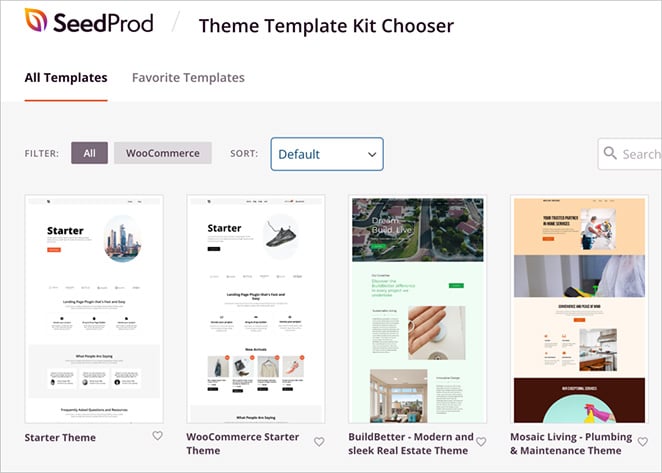
It’s more than a page builder. With SeedProd, you can design the entire WordPress experience, including headers, footers, blog layouts, product pages, and more, all from one place.
My Experience
I use SeedProd for my personal website because it gives me full control over every part of the design, not just individual pages. The Theme Builder lets me create custom headers, footers, blog templates, and product pages without touching PHP or CSS.
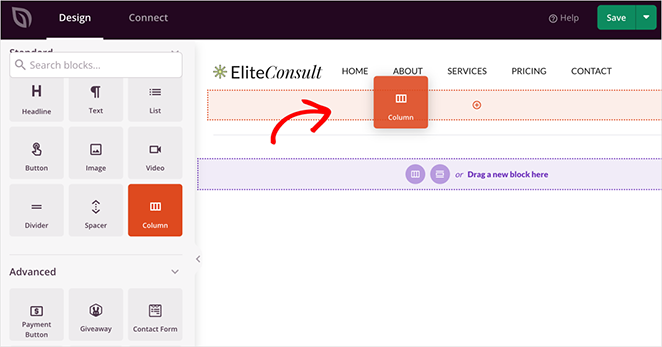
I’ve also used it to build complete client sites from scratch. It’s fast, easy to work with, and doesn’t lock me into a single layout or style. If I want to redesign something later, I can do it without switching themes or redoing the entire site.
Pros
- Full visual control of your entire theme
- No coding needed
- Great for ecommerce, blogs, and business sites
- Excellent support and detailed tutorials
Cons
- Theme Builder is only available on Pro plans
- WooCommerce support only available on Elite plans
- Needs a separate SEO plugin
My Verdict
If you want to build a custom WordPress site without code, SeedProd is the best tool I’ve used. I trust it for both personal projects and client work, especially when I want a clean design workflow with no plugin clutter.
2. Sydney: Best Free Theme with Business Style

| Rating: 4.5/5 Stars |
| Pricing: Free (Pro version $69/year) |
| Performance Data (My Tests): Load: 642ms | LCP: 0.61s | Data: 733 kB | CLS: 0 |
| Standout Features: |
| 🔹 Free WordPress theme with professional business styling 🔹 Elementor-compatible with starter templates 🔹 WooCommerce-ready for online stores 🔹 Header and footer customizer 🔹 Mobile-responsive design |
Sydney is a free WordPress theme built for business websites, service providers, and freelancers who want a clean, professional look without paying for a premium theme. It comes with starter templates, full Elementor support, and just enough customization options to make it your own.
It’s a solid starting point if you’re launching a site on a budget or want something that works well with the free version of Elementor.
My Experience
I tested Sydney on a staging site to see how well the free version handled a typical small business layout. I used one of the starter templates and built a simple homepage with Elementor. Setup was quick, and everything felt stable and easy to work with.
The theme covers the basics well. I was able to add service sections, testimonials, and a contact form without needing extra plugins. It doesn’t give you full design freedom, but for a free theme, it performs better than most I’ve tested.
Pros
- Free version is generous
- Polished business-style templates
- Easy to set up with Elementor
- Good performance on mobile and desktop
Cons
- Limited customization without Elementor Pro
- Fewer layout controls compared to full theme builders
- Header and footer editing is locked to the Pro version
My Verdict
Sydney is a strong choice if you want a free theme that looks professional and works well with Elementor. It’s best for smaller business sites where you don’t need deep customization but still want a solid design foundation.
3. Divi: Best for Visual Design Flexibility
| Rating: 4.3/5 Stars |
| Pricing: $89/year or $249 lifetime |
| Performance Data (My Tests): Load: 944ms (Slowest) | LCP: 0.85s | Data: 812 kB | CLS: 0.16 |
| Standout Features: |
| 🔹 Visual drag-and-drop builder with 2,000+ layouts 🔹 Built-in A/B split testing 🔹 Dynamic content support 🔹 Theme Builder for complete design control 🔹 Massive template library |
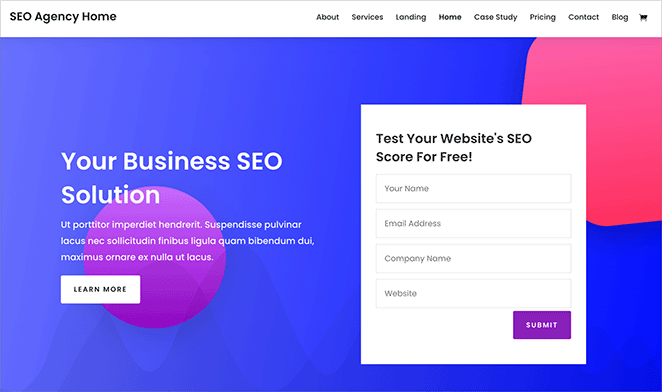
Divi is a premium WordPress theme and page builder known for its highly customizable interface and massive library of design modules. It comes with its own front-end editor, layout packs, and built-in split testing, giving you tons of flexibility if you like designing directly on the page.
It’s a good choice if you want a theme that blends advanced styling tools with a visual workflow, especially for marketing-focused sites.
My Experience
I tested Divi to see how well it handled complex page layouts and global styling. The builder is packed with features, and it’s easy to move fast once you understand how the visual editor works.
It’s not as lightweight as some other themes, but it gives you a ton of design freedom. I was able to recreate marketing-style landing pages, custom service sections, and dynamic layouts without touching any CSS. The split testing and design controls are helpful if you’re building for conversions.
Pros
- Extremely flexible visual builder
- Massive template library
- Built-in marketing tools like A/B testing
- Fine-grain control over design and spacing
Cons
- Can feel bloated on slower hosts
- Learning curve for new users
- Locked into the Divi ecosystem (harder to switch later)
My Verdict
Divi is a strong option if you want a theme that prioritizes design freedom and page-level control. It’s ideal for freelancers, agencies, or marketers who care about layout precision and don’t mind a bit of a learning curve.
4. Neve: Best for Speed and Simplicity
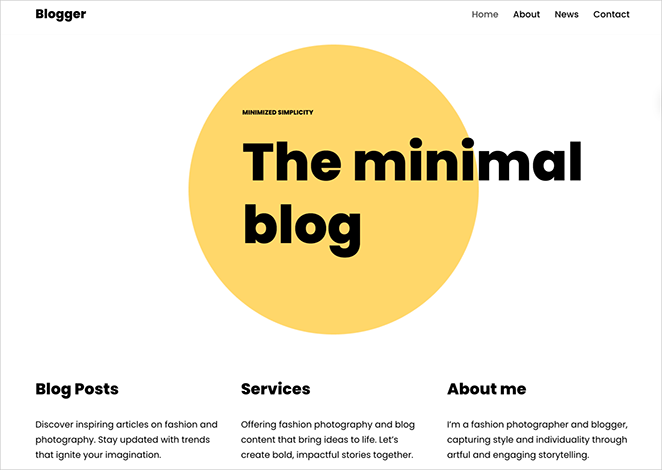
| Rating: 4.6/5 Stars |
| Pricing: Free (Pro version $69/year) |
| Performance Data (My Tests): Load: 653ms | LCP: 0.63s | Data: 595 kB (Lightest) | CLS: 0 |
| Standout Features: |
| 🔹 Lightweight design with excellent load times 🔹 Multiple page builder compatibility 🔹 Strong starter site library 🔹 Mobile-first responsive design 🔹 WooCommerce integration |
Neve is a lightweight WordPress theme built for fast loading times and easy customization. It works with popular page builders like Elementor, Beaver Builder, and Gutenberg, and includes dozens of starter sites to help you launch quickly.
If you want something minimal that plays nicely with your favorite plugins and doesn’t slow down your site, Neve is a reliable choice.
My Experience
What stood out right away with Neve was how fast it loaded, even before I touched any performance settings. I ran a test site with no caching or optimizations and still got a snappy front page. That’s rare for a theme that works with so many page builders.
I also liked how straightforward the setup was. I could drop in a starter template, swap out the content, and have a working layout within minutes. It didn’t try to control every design decision, which made it feel more flexible than some of the heavier themes.
Pros
- Excellent performance with minimal setup
- Works with almost every major page builder
- Easy to use and configure
- Clean, modern templates
Cons
- Customization options are more limited in the free version
- Some starter templates require Pro
- Lacks built-in advanced marketing features
My Verdict
Neve is a solid pick for bloggers, freelancers, or small business owners who want a fast, clean foundation without a lot of extras. It’s one of the few themes that stays lean even after customization.
5. OceanWP: Best for Feature-Rich Customization
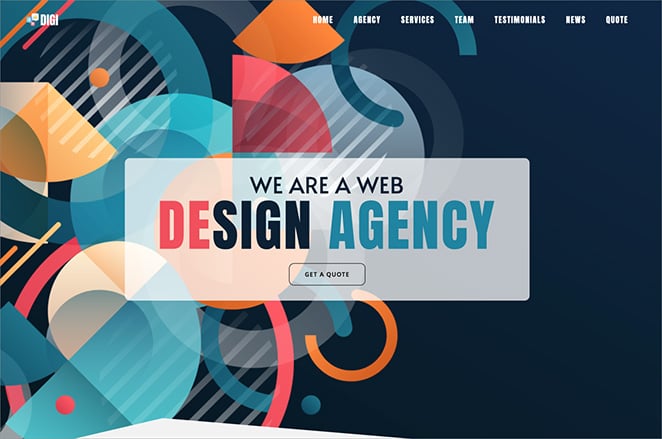
| Rating: 4.4/5 Stars |
| Pricing: Free (Extensions from $54/year) |
| Performance Data (My Tests): Load: 850ms | LCP: 0.80s | Data: 1,185 kB (Heavy) | CLS: 0 |
| Standout Features: |
| 🔹 Advanced theme customization options 🔹 Deep WooCommerce integration 🔹 Custom post types support 🔹 Powerful free version 🔹 Granular control settings |
OceanWP is a highly customizable WordPress theme packed with options for layout control, integrations, and page builder support. It includes a powerful theme panel, custom widgets, and deep WooCommerce features for store owners who need more than a basic setup.
If you like having lots of settings to fine-tune every part of your site, OceanWP gives you more control than most free themes.
My Experience
OceanWP took a bit more time to configure than the others I tested, but that’s because it gives you so many options. I spent time adjusting layout widths, disabling features I didn’t need, and experimenting with the header and footer settings.
It’s a theme I’d use when the design needs to be more custom, but I still want the flexibility of using Elementor. It also stood out in my WooCommerce testing. The built-in cart features, quick view, and product styling options are much stronger than most free themes.
Pros
- Powerful free version with lots of features
- Advanced WooCommerce controls
- Works well with major page builders
- Granular layout and design settings
Cons
- Slightly heavier than other lightweight themes
- Can be overwhelming for beginners
- Some premium extensions feel essential
My Verdict
OceanWP is a good match for users who want more built-in control and don’t mind spending a little extra time on setup. It’s especially useful if you’re building an online store or want to control layout details without writing code.
Here are some other WordPress ecommerce themes you may find helpful.
6. Ultra: Best for Designers and Agencies
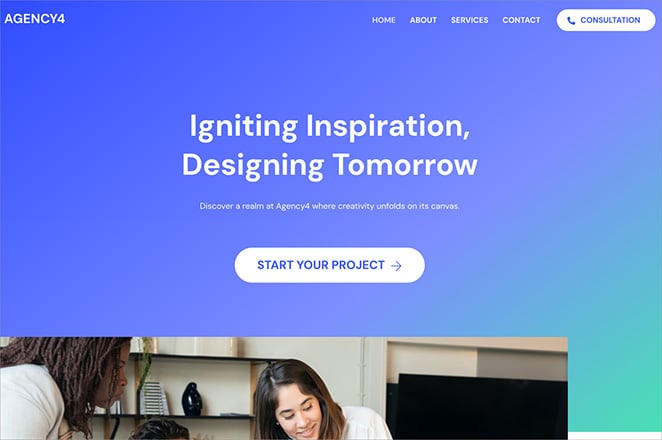
| Rating: 4.2/5 Stars |
| Pricing: $59/year |
| Performance Data (My Tests): Load: 1,140ms | LCP: 0.70s | Data: 2,607 kB (Heaviest – 4.4x Neve) | CLS: 0 |
| Standout Features: |
| 🔹 Themify drag-and-drop builder included 🔹 60+ pre-designed layouts 🔹 Industry-specific skins 🔹 Animation effects 🔹 Agency-friendly workflow |
Ultra is a flexible WordPress theme by Themify that’s built for designers who want more control over layouts, animations, and page structure. It comes with a drag-and-drop builder, pre-designed skins, and detailed styling tools that make it ideal for client work.
If you build a lot of sites and need reusable design tools that still look original, Ultra gives you a solid framework.
My Experience
I used Ultra to test how well it handled client-style layouts across different industries. Instead of starting from a blank canvas, I loaded one of the pre-built skins and quickly adjusted it to match a mock brand.
The builder was intuitive once I got used to the Themify interface, and I liked having access to advanced animation and layout settings without needing add-ons. It felt geared toward designers who want more than just drag and drop blocks.
Pros
- Includes industry-specific skins and templates
- Good balance of visual builder and advanced settings
- Smooth workflow for designers building client sites
- Strong layout control
Cons
- Builder interface takes some getting used to
- Not as fast out of the box as other lightweight themes
- Fewer third-party integrations compared to bigger builders
My Verdict
Ultra is a solid choice if you’re designing multiple sites and want variety without building everything from scratch. It works well for agencies or solo designers who want to deliver polished sites fast without getting locked into a rigid layout system.
7. Blocksy: Best for Gutenberg Users
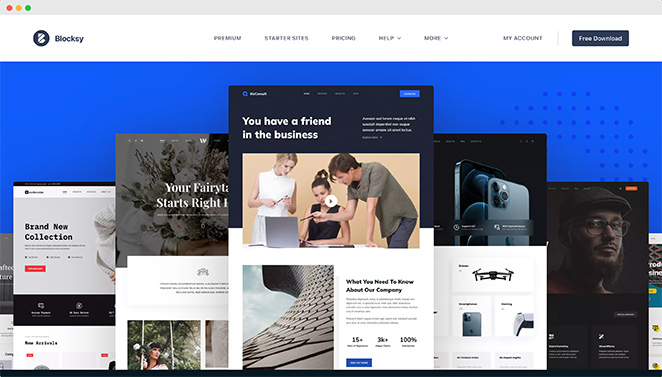
| Rating: 4.7/5 Stars |
| Pricing: Free (Pro version $49/year) |
| Performance Data (My Tests): Load: 669ms | LCP: 0.58s (3rd best) | Data: 692 kB | CLS: 0 |
| Standout Features: |
| 🔹 Native Gutenberg block editor support 🔹 FSE (Full Site Editing) compatibility 🔹 Live customizer with header/footer builder 🔹 Fast performance focus 🔹 Modern design approach |
Blocksy is a modern, performance-focused WordPress theme built specifically to work with the Gutenberg block editor. It offers advanced layout options, live preview controls, and smart integration with popular plugins like WooCommerce and WPForms.
If you prefer building with native WordPress blocks instead of third-party page builders, Blocksy gives you the flexibility you need without slowing things down.
My Experience
While testing Blocksy, I focused on how well it worked with the block editor alone. I didn’t install any builders — just Gutenberg and a few common plugins. The layout controls, global styling, and responsive previews all felt polished and fast.
It stood out for how smooth the workflow was without needing anything extra. The free version includes features you’d usually only find in premium themes, like header layout controls and post templates. It’s one of the few themes that makes Gutenberg feel like a full design tool.
Pros
- Native block editor support
- Free version is packed with features
- Clean, fast front-end performance
- Modern UI with advanced layout settings
Cons
- Learning curve if you’re used to a page builder
- Some premium starter sites require Pro
- Fewer templates than major builder-based themes
My Verdict
Blocksy is a great choice if you want to stick with Gutenberg and still have full control over your design. It’s ideal for developers, bloggers, and site owners who want a clean, fast theme that doesn’t rely on third-party builders.
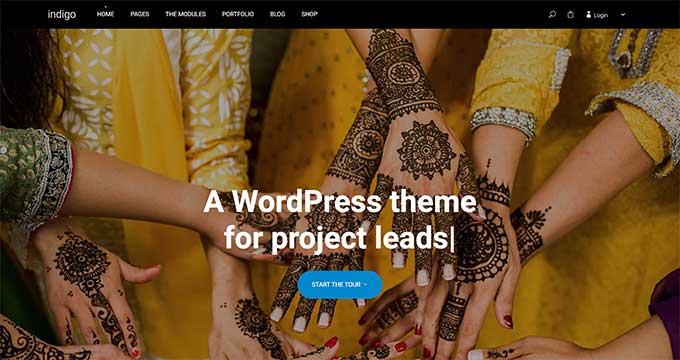
8. Indigo: Best for Modular Site Building
| Rating: 4.1/5 Stars |
| Pricing: $129/year |
| Performance Data: Not tested |
| Standout Features: |
| 🔹 Modular section-based building system 🔹 No page builder plugin required 🔹 Curated design-first approach 🔹 Minimal aesthetic 🔹 Professional templates |
Indigo is a premium WordPress theme by Artisan Themes that uses a block-based module system for building custom layouts. It’s designed for users who want design flexibility without the bulk of a full page builder plugin.
Instead of relying on one huge template, you can build your site using drag-and-drop modules that cover specific page sections, like testimonials, portfolios, pricing tables, and more.
My Experience
I tested Indigo by building a mock portfolio site using just the built-in modules. I didn’t install a page builder or extra layout plugins — everything I needed was already included.
What I liked most was how easy it was to swap out sections and adjust the layout without starting over. It felt different from most themes I’ve tested, with a more curated and design-first approach. It’s not as flexible as a full theme builder, but it’s great for getting a professional look quickly.
Pros
- Simple drag-and-drop section editor
- Well-designed, modern modules
- No extra builder plugins required
- Fast and easy setup for polished pages
Cons
- Less flexible than full theme builders
- Premium-only, no free version
- Smaller ecosystem and fewer templates
My Verdict
Indigo is a good pick if you want an easy way to build good-looking pages without touching code or installing bulky page builders. It’s especially useful for creatives, coaches, and small businesses that want a polished site with minimal setup.
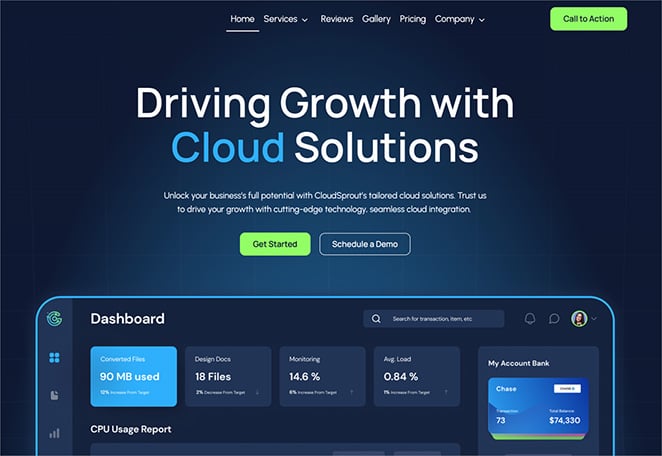
9. Kadence WP: Best for Lightweight Custom Design
| Rating: 4.6/5 Stars |
| Pricing: Free (Pro version $79/year) |
| Performance Data (My Tests): Load: 613ms (2nd fastest) | LCP: 0.55s (Best) | Data: 671 kB | CLS: 0 |
| Standout Features: |
| 🔹 Visual header/footer builder included 🔹 Starter templates with one-click import 🔹 Global styling controls 🔹 Fast-loading and accessibility-focused 🔹 Gutenberg-optimized |
KadenceWP is a flexible, performance-focused WordPress theme built for speed, accessibility, and design control. It includes a header and footer builder, global design settings, and a library of starter templates for blogs, businesses, and online stores.
Kadence is a strong option if you want a fast-loading theme that still gives you room to customize layouts and style without using a bloated page builder.
My Experience
When I tested Kadence, I wanted to see how much I could do without installing extra design tools. I built a service page using just the Kadence blocks and customizer, and I was impressed by how much control I had over spacing, fonts, and layout.
It felt like a theme made for power users who still want a simple interface. I didn’t run into performance issues or bloat, and the default styles looked clean without needing much tweaking.
Pros
- Fast-loading and accessibility focused
- Strong layout and style controls
- Generous free version
- Clean starter templates
Cons
- Some advanced design options locked behind Pro
- Smaller starter template library than others
- Not built around visual page editing
My Verdict
Kadence is a great choice if you care about speed and accessibility but still want detailed control over your site’s design. It’s ideal for freelancers, consultants, or anyone building a site without relying on a page builder.
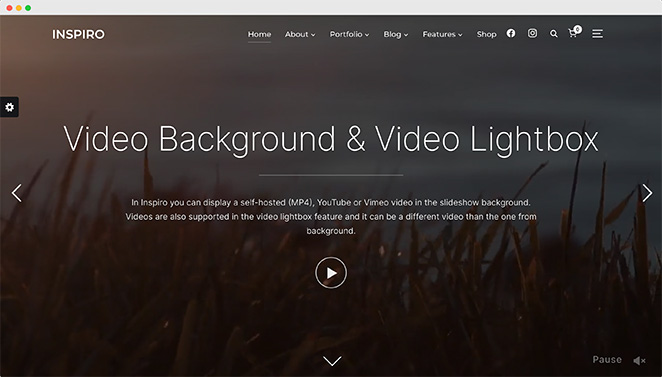
10. Inspiro: Best for Image and Video Portfolios
| Rating: 4.3/5 Stars |
| Pricing: Free (Pro version $69/year) |
| Performance Data (My Tests): Load: 853ms | LCP: Not measured | Data: 884 kB | CLS: 0 |
| Standout Features: |
| 🔹 Fullscreen video header support 🔹 Portfolio post types 🔹 Media gallery integration 🔹 Elementor and WooCommerce compatible 🔹 Optimized for visual-heavy content |
Inspiro is a creative WordPress theme built for photographers, videographers, and agencies that rely heavily on visual content. It features fullscreen video backgrounds, gallery sliders, and portfolio templates designed to highlight high-quality media.
If your site is built around visuals instead of text, Inspiro gives you the tools to make your work stand out.
My Experience
For Inspiro, I focused on testing media display features. I uploaded a sample video header and built a basic portfolio layout using the built-in content blocks. The full-width visuals looked sharp, and the loading performance stayed smooth even with high-res content.
It’s clearly designed for creators who want to show work, not just talk about it. I didn’t need extra gallery plugins or custom styling to get something polished. If media is the focus of your site, it does a lot of the heavy lifting for you.
Pros
- Clean design focused on visual storytelling
- Video background and slider support
- Easy-to-use portfolio tools
- Works well with Elementor and WooCommerce
Cons
- Less flexible for text-heavy sites
- Most design options are in the Pro version
- Not ideal for large content blogs
My Verdict
Inspiro is a great pick for creative professionals who want to showcase photos or videos without complicated setup. It’s not for everyone, but if visuals are your brand, this theme makes them the star.
You may also like these top portfolio WordPress themes for inspiration.
FAQs About Multipurpose WordPress Themes
Final Recommendation: Which Multipurpose Theme Should You Choose?
After testing all 10 themes with real performance data, here’s what I recommend:
- Best Overall: SeedProd — Complete design control without code. Good performance (0.59s LCP) with maximum flexibility.
- Best for Speed: Kadence WP — Fastest theme tested (0.55s LCP) and it’s free. Perfect for bloggers and small businesses who prioritize performance.
- Best Free Option: Neve — Lightest theme at 595 kB with solid speed. Simple, clean, and fast.
- Avoid for Performance: Ultra, Divi, and OceanWP — These themes scored poorly in tests. Ultra is extremely heavy (2,607 kB), Divi has layout shift issues, and OceanWP is slow to process.
Choose based on what matters most to you—design flexibility, speed, ease of use, or budget. My performance data gives you real numbers to make that decision.
If you’re looking for more help creating your WordPress website, you’ll find these guides useful:
- How to Create a Real Estate Website in WordPress
- How to Make a Travel Website in WordPress
- How to Build a Personal Trainer Website in WordPress
- How to Make a Wedding Website in WordPress Step-by-Step
- How to Build a Church Website in WordPress Without Tech Skills
- How to Design a Restaurant Website Step-by-Step
- How to Create a Photography Website in WordPress
Thanks for reading! We’d love to hear your thoughts, so please feel free to join the conversation on YouTube, X and Facebook for more helpful advice and content to grow your business.



