

Magazine WordPress themes are built for content-heavy sites that publish across multiple categories. They use grids, featured sections, and category layouts so readers can find content quickly.
In this guide, I’ve narrowed it down to 11 magazine themes for different budgets and skill levels, plus what to look for before you choose one.
Summary: Best WordPress Magazine Themes
| # | Theme | Best For | Free Plan | Starting Price |
|---|---|---|---|---|
| 🥇 | SeedProd | No-code custom magazine design | ✅ | From $39.50/year |
| 🥈 | Sydney | Business and editorial sites | ✅ | From $69/year |
| 🥉 | Divi | One builder for many sites | ❌ | From $89/year |
| 4 | Astra | Fast load times and SEO | ✅ | From $59/year |
| 5 | Neve | Lightweight news site starter | ✅ | From $99/year |
| 6 | Soledad | Huge demo and style choices | ❌ | From $59 one-time |
| 7 | Kadence Theme | Flexible layouts without builders | ✅ | From $69/year |
| 8 | OceanWP | Budget-friendly fast foundation | ✅ | From $35/year |
| 9 | Organic Themes Magazine | Clean and readable layouts | ❌ | From $59/year |
| 10 | Bucket | Visual long-form storytelling | ❌ | From $69/year |
| 11 | ColorMag | Free magazine-style homepage | ✅ | From $69/year |
What Makes a Magazine Theme Different From a Blog Theme?
A magazine theme uses grid-based layouts to show many posts across categories at once. A blog theme usually shows posts in a simple chronological list.
You’ll get the most value from a magazine theme if you publish high volumes of content across multiple categories, like news sites, niche publications, or multi-author sites.
How I Chose the Best Magazine WordPress Themes
I focused on what actually matters when you’re running a content-heavy site, not what looks good in a demo.
- I focused on real setup, performance, and how well each theme handles magazine-style layouts.
- I installed and set up each theme myself. I looked for friction points during setup and basic configuration.
- I checked performance on clean installs. Magazine themes can add bloat, so I favored themes that stay light.
- I built magazine layouts. That included post grids, category sections, and featured content areas.
- I compared value and support. I looked at what you get for free vs paid and how helpful the docs are.
This isn’t a complete list of every magazine theme available. It’s a shortlist of themes I’d feel comfortable recommending based on hands-on use.
Best Magazine WordPress Themes for News and Publications
- 1. SeedProd: Best for Building a Custom Magazine Theme Without Code
- 2. Sydney: Best for Business + Editorial Hybrid Sites
- 3. Divi: Best Multipurpose Theme for Magazines
- 4. Astra: Best for Speed and SEO
- 5. Neve: Best Lightweight Starter for News Sites
- 6. Soledad: Best for Design Variety
- 7. Kadence Theme: Best for Flexible Editorial Layouts
- 8. OceanWP: Best Lightweight Free Option
- 9. Organic Themes Magazine: Best for Clean Editorial Layouts
- 10. Bucket: Best for Visual Storytelling and Editorial Blogs
- 11. ColorMag: Best Free Magazine Theme
1. SeedProd: Best for Building a Custom Magazine Theme Without Code
| Pricing: Starts at $39.50/year (Plus plan) |
| Free Plan / Trial: Limited free version available |
| Standout Features: |
|
🔹 Drag-and-drop theme builder 🔹 300+ starter templates 🔹 AI theme generator 🔹 Full site editing (headers, footers, archives) 🔹 No coding required |
| Rating: A+ |
| Best For: Users who want complete design control without hiring a developer |
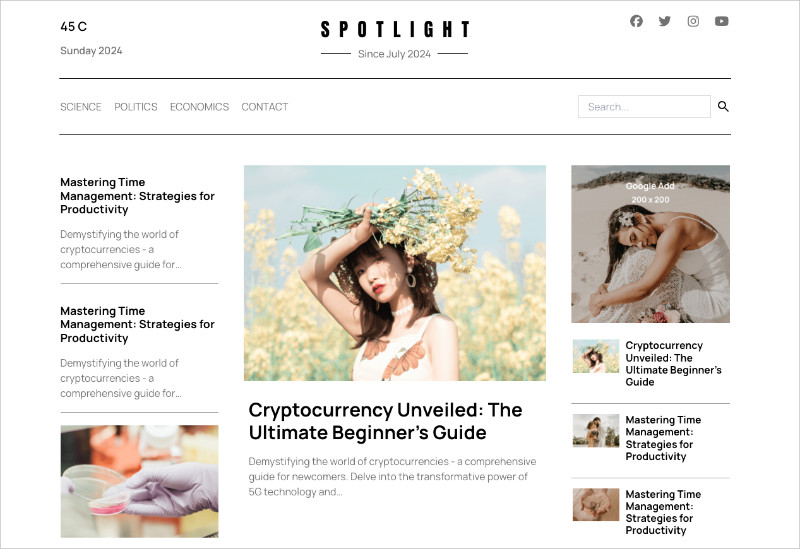
SeedProd isn’t a traditional theme. It’s a drag-and-drop WordPress website builder that lets you create a custom magazine layout, including your homepage, headers, footers, and templates, without touching code.
You control everything visually, so what you see in the editor is what visitors see on the site.
My Experience
I use SeedProd regularly, and its speed stood out early on. I was able to build a magazine-style homepage with featured posts, category sections, and a sidebar without fighting predefined layouts.
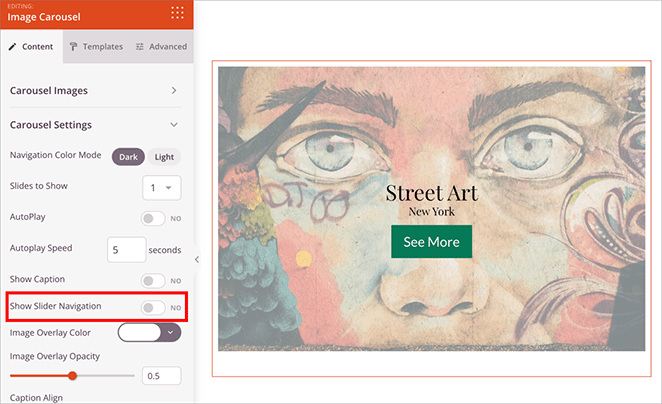
What I find most useful is control over archive pages. Instead of accepting default category layouts, I designed custom archive templates that matched the rest of the site.
The AI theme builder is helpful when starting from scratch. It generates a full site structure that gives you a solid base to refine.

Pros and Cons
| Pros | Cons |
|---|---|
| Complete design freedom without code | Requires Plus plan for theme building |
| 300+ professional templates | Learning curve for first-time users |
| AI-powered theme generation | More hands-on than pre-built themes |
| Full control over every template | |
| Regular updates and responsive support |
Verdict: SeedProd is my top choice if you want a custom magazine design without hiring a developer. Setup takes more effort than a pre-built theme, but the flexibility pays off once your site starts growing.
2. Sydney: Best for Business + Editorial Hybrid Sites
| Pricing: Free; Pro from $69/year |
| Free Plan / Trial: Yes |
| Standout Features: |
|
🔹 Flexible front-page layout 🔹 Elementor integration 🔹 Clean typography 🔹 Business and editorial sections 🔹 Header and footer customization |
| Rating: B |
| Best For: Sites that need both business branding and editorial content |
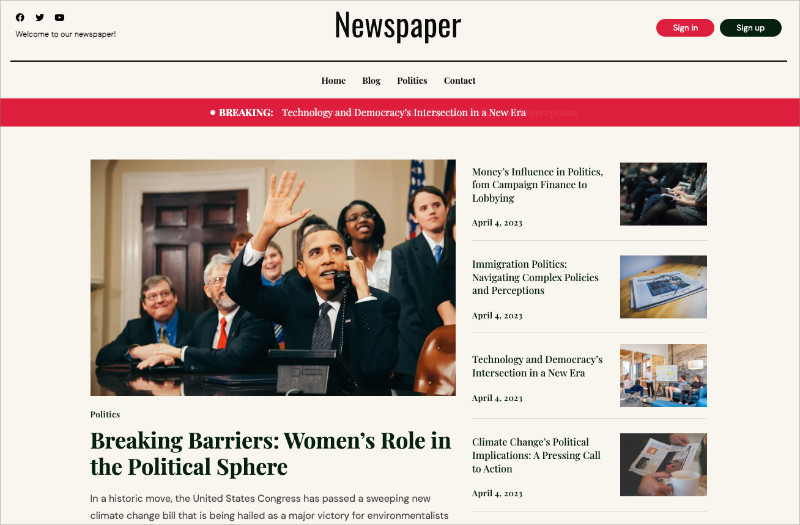
Sydney is a flexible theme designed for sites that need strong business branding alongside editorial content. It works well with Elementor for building magazine-style layouts.
The design focuses on clean typography and structured layouts, which helps content stay readable without feeling overly blog-like.
My Experience
I tested Sydney for a hybrid site that needed a professional homepage with a clear business message, followed by editorial content. The layout flowed naturally and didn’t feel like two different site styles stitched together.
Sydney isn’t a magazine-first theme, so layouts require Elementor or the block editor. That extra setup is worth it if your site serves multiple roles beyond publishing.
Pros and Cons
| Pros | Cons |
|---|---|
| Works well for business and editorial sites | Not a purpose-built magazine theme |
| Strong Elementor integration | Editorial layouts need customization |
| Clean, professional design | Fewer magazine-specific features |
| Free version available |
Verdict: Sydney is a solid choice for hybrid sites that need business credibility and editorial flexibility. It takes more layout work than a dedicated magazine theme, but it handles mixed-use sites well.
3. Divi: Best Multipurpose Theme for Magazines
| Pricing: $89/year or $249 lifetime |
| Free Plan / Trial: No |
| Standout Features: |
|
🔹 Built-in Divi Builder 🔹 2,000+ pre-made layouts 🔹 Visual drag-and-drop editing 🔹 Theme builder for templates 🔹 Lifetime license option |
| Rating: B+ |
| Best For: Users who want one theme and builder for multiple projects |
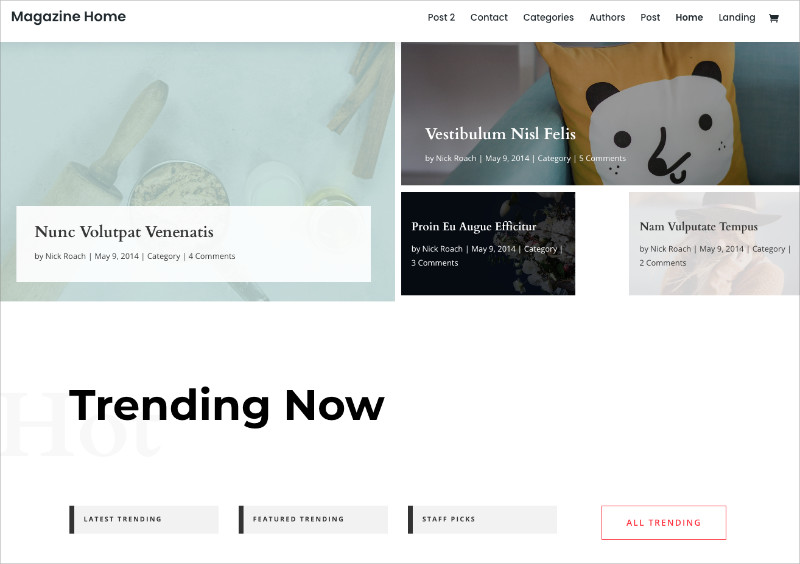
Divi includes its own visual builder, which lets you design magazine-style grids, featured sections, and templates without code.
It isn’t a magazine-first theme, but its flexibility makes it popular with agencies and freelancers who want one tool for many site types.
My Experience
I tested Divi on both magazine and business layouts using the same install. The editor is intuitive, and editing content directly on the page feels natural once you learn the interface.
The tradeoff is performance. Divi generates more code than lighter themes, which can affect load times on content-heavy magazine sites. If speed is your top priority, a lighter theme may be a better fit.
Pros and Cons
| Pros | Cons |
|---|---|
| Powerful visual builder included | Generates more code than lightweight themes |
| 2,000+ pre-made layouts | Not optimized specifically for magazines |
| Lifetime license option | Can impact page speed |
| Large community and resources | Learning curve for the builder |
Verdict: Divi is a strong option if you want one theme and builder for multiple projects. It’s less ideal for performance-first magazine sites, but its flexibility makes it appealing if you already work with Divi.
4. Astra: Best for Speed and SEO
| Pricing: Free; Pro from $59/year |
| Free Plan / Trial: Yes, fully functional free version |
| Standout Features: |
|
🔹 Lightweight core 🔹 Magazine starter templates 🔹 Deep Elementor integration 🔹 Built-in schema markup 🔹 Customizer-based editing |
| Rating: A |
| Best For: Performance-focused sites that need fast load times |
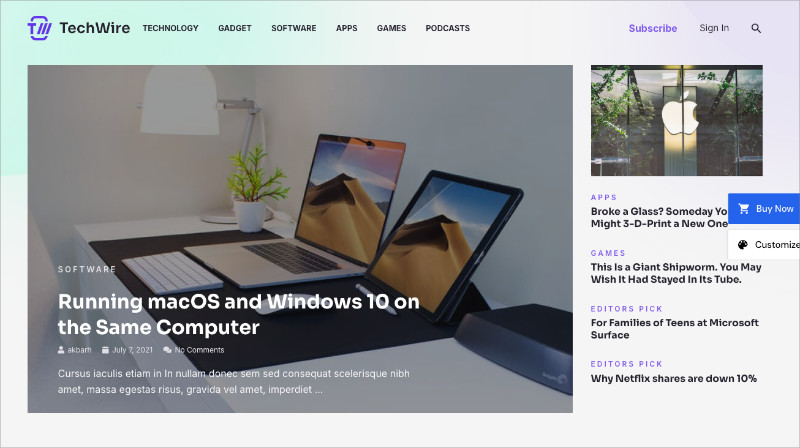
Astra is a lightweight WordPress theme built for speed. Its small footprint helps pages load quickly, even on content-heavy magazine sites.
Magazine starter templates give you a working layout that you can customize with Elementor, the block editor, or other page builders.
My Experience
I tested Astra by switching a site from a heavier multipurpose theme, and the speed improvement was noticeable right away. The theme provides a fast foundation without unnecessary features.
Astra isn’t magazine-specific, so layouts are built using blocks or a page builder. The free version works well for basic magazine homepages, while Pro adds more control over headers, colors, and starter templates.
Pros and Cons
| Pros | Cons |
|---|---|
| Excellent page speed | Magazine layouts need a page builder or Pro |
| Strong SEO foundation | Less magazine-specific than dedicated themes |
| Works with all major page builders | Starter templates require extra plugin |
| Free version is genuinely useful | |
| Large user community |
Verdict: Astra is a strong choice when speed and SEO matter most. It takes extra setup to create magazine layouts, but the performance benefits make it worth the effort.
5. Neve: Best Lightweight Starter for News Sites

| Pricing: Free; Pro from $99/year |
| Free Plan / Trial: Yes, with news starter sites |
| Standout Features: |
|
🔹 Mobile-first design 🔹 News and magazine starter sites 🔹 Header and footer builder 🔹 Block editor optimized 🔹 Fast performance |
| Rating: A |
| Best For: New publications that want a clean, fast starting point |
Neve is a fast, mobile-first theme with ready-made news and magazine starter sites. It performs well on phones and tablets without extra configuration.
You can customize layouts using the block editor or popular page builders, which makes Neve a solid foundation for SEO-focused publications.
My Experience
I set up a test news site using a Neve starter template, and the import process was smooth. Swapping in content and adjusting layouts was straightforward.
Neve stands out on mobile. Navigation, images, and text scaled cleanly across devices, which is important since Google indexes the mobile version of your site.
The free version works for basic layouts, but more advanced magazine features, like enhanced headers and layout controls, require Neve Pro.
Pros and Cons
| Pros | Cons |
|---|---|
| Fast, mobile-first design | Some magazine layouts require Pro |
| Clean structure for SEO | Fewer demos than design-heavy themes |
| Works with block editor and page builders | Header customization limited in free version |
| Good starter site library |
Verdict: Neve is a strong option if you’re launching a new publication and want speed with minimal setup. The free version covers basics, but Pro is needed for more complex magazine layouts.
6. Soledad: Best for Design Variety
| Pricing: $59 one-time (ThemeForest) |
| Free Plan / Trial: No |
| Standout Features: |
|
🔹 6,000+ homepage demos 🔹 230+ pre-built templates 🔹 AMP support 🔹 Dark mode 🔹 Niche-specific designs |
| Rating: A- |
| Best For: Sites that want a specific visual style from a large template library |
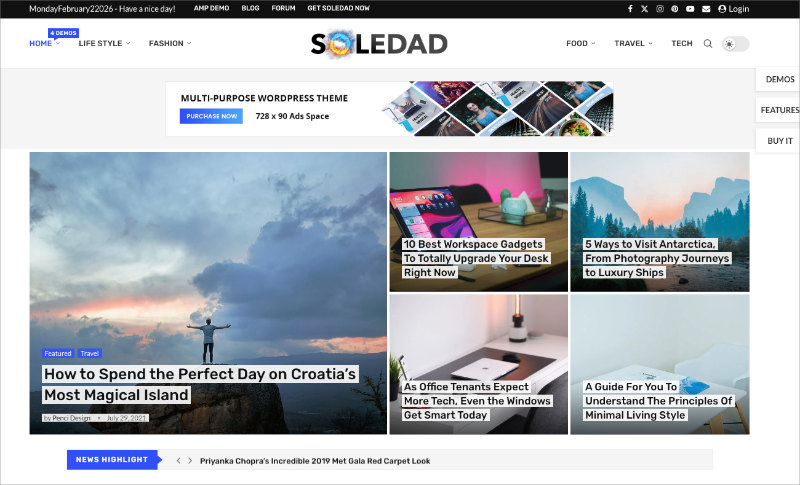
Soledad offers thousands of homepage demos and pre-built templates across niches like tech, food, lifestyle, and news. If you have a specific magazine style in mind, there’s usually a demo close to it.
The theme also includes AMP support and dark mode for readers who prefer alternative viewing options.
My Experience
When testing Soledad, I consistently found demos that matched most of what I needed, which made setup fast. From there, customization was mostly limited to colors, fonts, and content.
The tradeoff is bloat. Demo imports include plugins and styling you may not need, so cleanup is important if you want to keep performance under control.
Pricing is attractive for a one-time purchase, but major updates may require repurchasing depending on ThemeForest terms.
Pros and Cons
| Pros | Cons |
|---|---|
| Massive template library | Demo imports can add bloat |
| Niche-specific designs | Requires cleanup after import |
| AMP and dark mode included | One-time purchase may not cover major updates |
| Actively maintained | Can feel overwhelming at first |
Verdict: Soledad is a strong choice if you want a specific magazine design without building from scratch. Just plan to remove unused elements after import to keep your site fast.
7. Kadence Theme: Best for Flexible Editorial Layouts
| Pricing: Free; Pro from $69/year |
| Free Plan / Trial: Yes, with header/footer builder |
| Standout Features: |
|
🔹 Built-in header and footer builder 🔹 Kadence Blocks integration 🔹 Magazine starter templates 🔹 Strong accessibility defaults 🔹 Conditional header controls |
| Rating: A |
| Best For: Publishers who want layout control without a separate page builder |
Kadence includes layout, header, and footer builders directly in the theme, so you don’t need a separate page builder to control site structure.
Magazine starter templates and strong accessibility defaults make it a solid foundation for editorial sites.
My Experience
I was impressed by how much Kadence includes in the free version. The header builder alone replaces plugins that other themes charge for.
Kadence Blocks is where magazine layouts come together. The Posts block makes it easy to build category grids and featured sections without compatibility issues.
The Pro version adds conditional headers and footers, which is useful for larger sites. For most magazine setups, though, the free version covers the essentials.
Pros and Cons
| Pros | Cons |
|---|---|
| Built-in header and footer builder | Pro version is pricier than alternatives |
| Kadence Blocks works seamlessly | Magazine features rely on blocks |
| Good performance defaults | Fewer pre-built magazine demos |
| Strong accessibility out of the box |
Verdict: Kadence is a strong choice if you want editorial flexibility without stacking plugins. Start with the free version and upgrade only if you need conditional layouts.
8. OceanWP: Best Lightweight Free Option
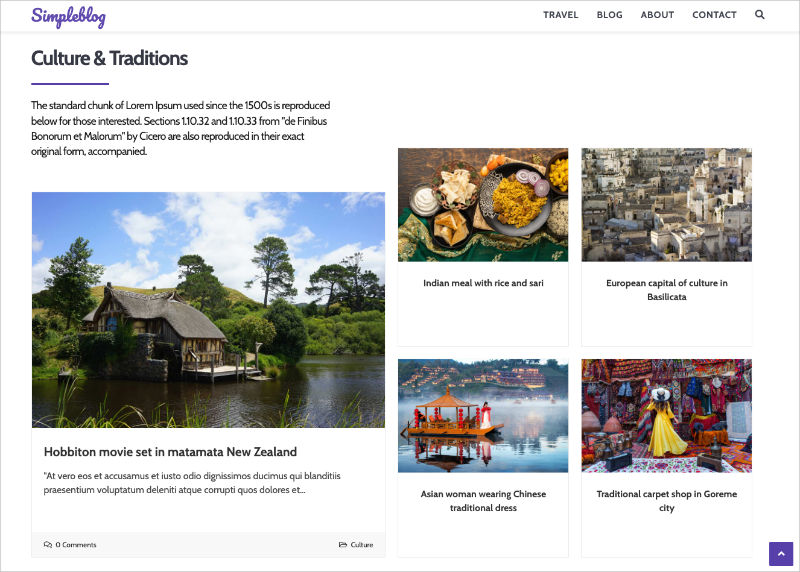
| Pricing: Free; Pro bundle from $35/year |
| Free Plan / Trial: Yes, with magazine demo |
| Standout Features: |
|
🔹 Lightweight code 🔹 Magazine demo included 🔹 Works with major page builders 🔹 Modular extensions 🔹 Fast performance |
| Rating: B |
| Best For: Budget-conscious users who prioritize performance |
OceanWP is a lightweight theme with a free magazine demo and strong page builder compatibility. It keeps performance high by avoiding unnecessary bloat.
It works with Elementor, Beaver Builder, and the block editor. Optional extensions start at $35/year if you need extra features.
My Experience
I’ve used OceanWP as a fast foundation for multiple sites. It delivers solid performance without the complexity of heavier multipurpose themes.
The magazine demo provides a starting point, but most layouts are built with a page builder. OceanWP works best as a flexible base rather than a fully opinionated magazine theme.
The modular extension model keeps costs down. You only pay for features you actually need, instead of buying a full bundle.
Pros and Cons
| Pros | Cons |
|---|---|
| Fast, lightweight code | Magazine features require extensions |
| Free magazine demo | Full functionality needs paid add-ons |
| Works with major page builders | Fewer magazine templates than Soledad |
| Modular pricing model |
Verdict: OceanWP is a good fit if you want a fast, free starting point with the option to add features later. It’s flexible, budget-friendly, and performs well when kept lean.
9. Organic Themes Magazine: Best for Clean Editorial Layouts
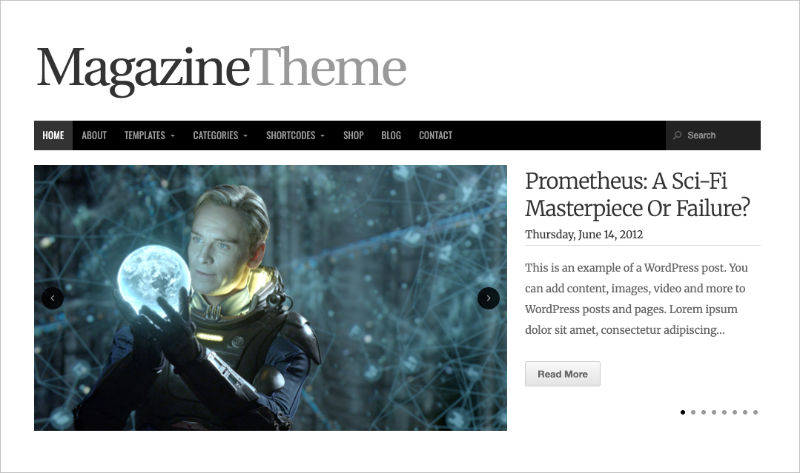
| Pricing: $59/year (Organic Themes membership) |
| Free Plan / Trial: No |
| Standout Features: |
|
🔹 Clean, content-first layout 🔹 Block editor focused 🔹 Lightweight and fast 🔹 Strong typography and spacing 🔹 No feature bloat |
| Rating: B+ |
| Best For: Publishers who want a simple, readable magazine layout |
Organic Themes Magazine is a minimalist theme built around readability and content hierarchy. It skips sliders, animations, and bundled plugins in favor of clean grids and clear sections.
The theme is designed for the block editor, which keeps layouts predictable and easy to maintain over time.
My Experience
Setup was quick because there’s very little configuration. You choose a layout, assign categories, and start publishing.
It feels closer to a traditional editorial site than a modern multipurpose theme. The focus stays on the writing, not design controls.
Performance stayed consistent during testing because the theme avoids demo imports and extra plugins. What you install is what you use.
Pros and Cons
| Pros | Cons |
|---|---|
| Clean, readable editorial layout | Limited visual customization |
| Lightweight and fast | No built-in ad management |
| Block editor friendly | Not suited for complex layouts |
| Easy to maintain long term |
Verdict: Organic Themes Magazine is a good fit if you want a calm, content-first magazine site. It’s not flashy, but it’s readable, fast, and easy to maintain.
10. Bucket: Best for Visual Storytelling and Editorial Blogs
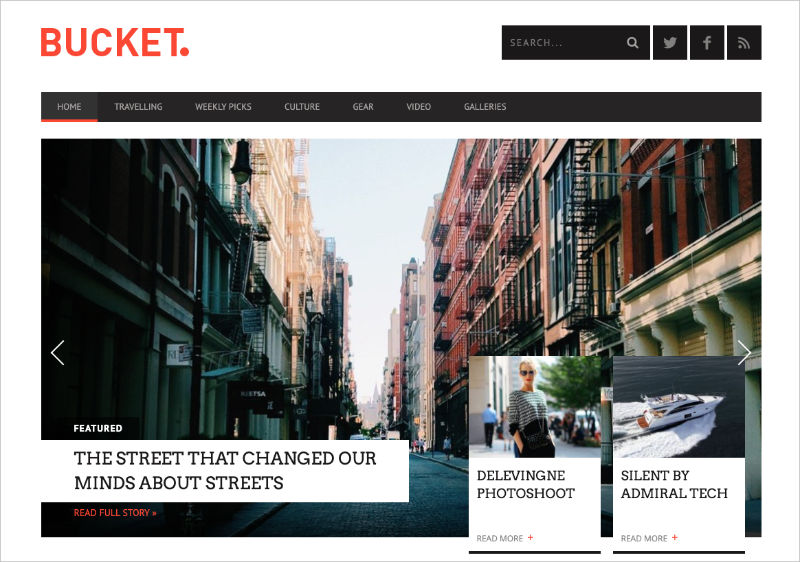
| Pricing: $69/year (Pixelgrade) |
| Free Plan / Trial: No |
| Standout Features: |
|
🔹 Large featured images 🔹 Clean editorial layouts 🔹 Strong typography focus 🔹 Block editor friendly 🔹 Minimal design aesthetic |
| Rating: B+ |
| Best For: Writers and publishers who want a visual, story-first magazine layout |
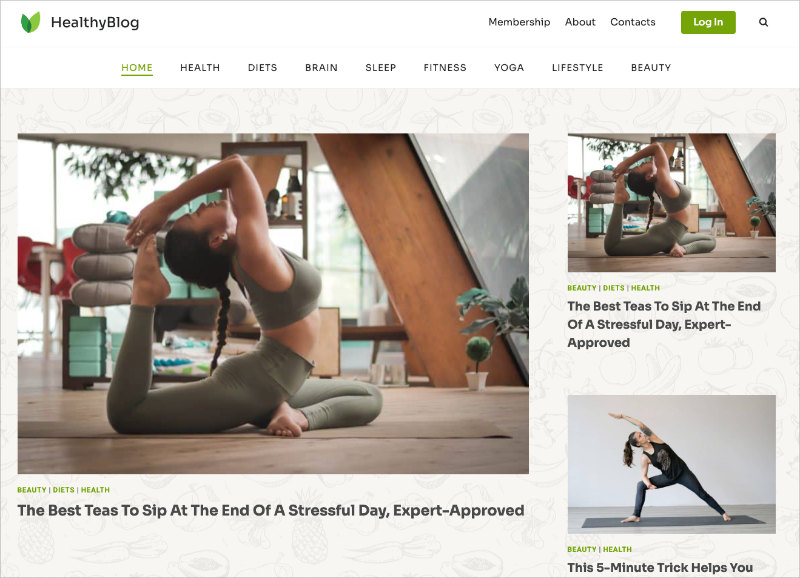
Bucket is an editorial-style WordPress theme designed for visual storytelling. It emphasizes large featured images, clear typography, and simple layouts that keep attention on the content.
While it’s often positioned as a blogging theme, the layout works well for smaller magazine sites that publish long-form articles or photo-driven stories.
My Experience
I tested Bucket to see how it handles content-first publishing without heavy grids or complex homepages. Setup was quick, and the default layouts already looked polished.
The theme shines when posts are image-led. Featured images feel intentional rather than decorative, and long articles remain easy to read thanks to generous spacing and font choices.
Bucket doesn’t try to do everything. There are no elaborate homepage builders or ad systems. That simplicity keeps performance predictable and maintenance low.
Pros and Cons
| Pros | Cons |
|---|---|
| Beautiful editorial presentation | Limited homepage layout options |
| Excellent typography and spacing | Not designed for high-volume news sites |
| Strong focus on long-form content | No built-in monetization tools |
| Easy to set up and maintain |
Verdict: Bucket is a great option if your magazine site is story-driven and visually led. It works best for writers, editors, and small publications that value presentation and readability over complex layouts.
11. ColorMag: Best Free Magazine Theme
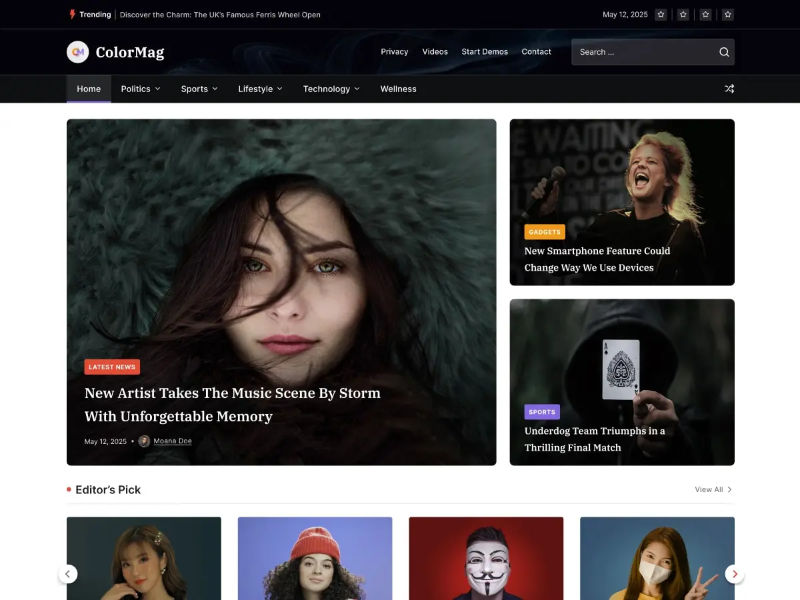
| Pricing: Free; Pro from $69/year |
| Free Plan / Trial: Yes, fully featured free version |
| Standout Features: |
|
🔹 Magazine-specific widgets 🔹 70,000+ active installs 🔹 Widget-based homepage builder 🔹 Elementor compatible 🔹 Breaking news ticker |
| Rating: B+ |
| Best For: Budget-conscious publishers who want a proven free option |
ColorMag powers over 70,000 active sites and includes custom widgets designed specifically for magazine-style homepages.
You can use it on its own with WordPress widgets or pair it with Elementor for more layout control. The Pro upgrade adds more widgets, layouts, and priority support.
My Experience
I tested ColorMag to see what’s possible with zero budget. Using only the free version and built-in widgets, I was able to create a functional magazine homepage.
The widget-based system is straightforward. If you’re comfortable with WordPress widgets, there’s no page builder learning curve.
The downside is design age. While it’s actively maintained, ColorMag doesn’t have the modern polish of newer themes like Kadence or Neve.
Pros and Cons
| Pros | Cons |
|---|---|
| Genuinely useful free version | Design feels dated |
| Proven with 70,000+ active sites | Fewer modern layout options |
| Magazine-specific widgets | Some features require Pro |
| Works with Elementor |
Verdict: ColorMag is a solid free option if you want a working magazine layout without spending anything. It’s not modern or flexible, but it’s reliable and easy to set up.
How to Set Up a Magazine WordPress Theme
Most magazine themes take under an hour to set up because you start with a demo import, then adjust the homepage, menus, and ads.
- Install and activate the theme: Go to Appearance » Themes » Add New, upload or install the theme, then click Activate.
- Import demo content: Use the theme’s setup wizard or demo importer, then pick a demo that matches your layout goals.
- Customize the homepage layout: Use the Customizer, widgets, blocks, or the theme’s homepage builder to set featured posts, category sections, and sidebars.
- Set up menus and navigation: Create menus in Appearance > Menus, then enable features like mega menus if your theme supports them.
- Configure monetization: Add ad slots using the theme’s ad settings or an ad plugin, then place them where they get visibility without breaking reading flow.
- If you use SeedProd instead: Skip the traditional theme and build your homepage, headers, footers, archives, and single post templates with drag-and-drop.
Follow our guide to create a custom WordPress theme from scratch with SeedProd.
Frequently Asked Questions
What is a magazine WordPress theme?
A magazine WordPress theme is a design template built for content-heavy sites that need to display many posts across multiple categories on a single page. It uses grid layouts, featured content areas, and category sections instead of a simple chronological blog list.
Are there free magazine WordPress themes?
Yes. ColorMag, OceanWP, and Neve all offer free versions. Free themes work well for smaller sites, but premium versions usually add more layout options and dedicated support.
What is the most popular magazine WordPress theme?
SeedProd and Sydney are commonly chosen because of their flexibility and large user bases. Astra and Neve are popular lightweight alternatives.
Do magazine themes work with page builders like Elementor?
Most modern magazine themes are compatible with Elementor, the WordPress block editor, or their own built-in page builder. Always check compatibility before purchasing.
Can I build a magazine site without a traditional theme?
Yes. Theme builders like SeedProd let you create every part of your site visually, including the homepage, headers, footers, and archive pages, without installing a separate theme.
Choosing the Right Magazine Theme
The best magazine WordPress theme depends on how much content you publish, how much control you want, and how comfortable you are customizing layouts.
If you want full design control without writing code, SeedProd lets you build a custom magazine layout from scratch. You’re not locked into predefined templates, which makes it a good fit for unique or growing publications.
If performance and SEO matter most, lightweight themes like Astra, Neve, and Kadence provide fast foundations that work well with the block editor or page builders.
There isn’t one “best” magazine theme for every site. Start with the theme that matches your goal today, then customize or upgrade as your publication grows.
You may also find the following theme roundups helpful:
- Highest Rated WordPress Themes
- Best Portfolio WordPress Themes to Showcase Your Work
- Best eCommerce WordPress Themes for Online Stores
- Best Real Estate WordPress Themes for Property Listings
Thanks for reading! We’d love to hear your thoughts, so please feel free to join the conversation on YouTube, X and Facebook for more helpful advice and content to grow your business.




