



Finding a WordPress portfolio theme that actually looks good without breaking your site or taking days to set up is harder than it should be. Most themes are either too bloated, too basic, or built for developers rather than people who just want to show off their work.
I tested over a dozen portfolio themes across page speed, ease of customization, and fit for different portfolio types. Below are my top picks, with honest notes on who each one is best for.
| Theme | Starting Price | Free Plan | Best For | Rating |
|---|---|---|---|---|
| SeedProd | From $79.50/yr | No | Custom portfolio design | A+ |
| Astra | Free / Pro from $59/yr | Yes | Speed + page builder flexibility | A+ |
| Neve | Free / Pro from $69/yr | Yes | Minimalist fast-loading portfolios | A |
| OceanWP | Free / Pro from $69/yr | Yes | Budget portfolios with e-commerce | A |
| Divi | $89/yr or $249 lifetime | No | All-in-one visual design | A |
| Ultra | From $59 | No | Bold, unconventional layouts | B+ |
| Hestia Pro | Free + Pro | Yes | Quick one-page portfolio setup | B+ |
| Inspiro Pro | $69/yr | Free version | Photography portfolios | B+ |
| Nikkon | Free | Yes | Simple free multipurpose portfolio | B |
| Pixgraphy | Free | Yes | Free photography portfolio | B |
How I Chose These Portfolio WordPress Themes
I focused on real-world use, not demo performance.
- Setup from scratch. I installed each theme fresh to find where the process adds friction.
- Performance, not promises. Portfolio sites load large images; I tested base theme weight on clean installs.
- Portfolio features, not just the label. Some themes call themselves “portfolio themes” but only offer a standard grid without post types or filtering.
- Active maintenance. I skipped themes where the developer had gone quiet or pivoted to another product.
- Honest free vs. paid. Free options are labeled, and paid-only features are called out upfront.
This isn’t every portfolio theme available. It’s the ones I’d recommend to a real person building a real site.
Best Portfolio WordPress Themes
- 1. SeedProd: Best for Custom Portfolio Design
- 2. Astra: Best for Speed and Page Builder Flexibility
- 3. Neve: Best for Minimalist, Fast-Loading Portfolios
- 4. OceanWP: Best for Budget Portfolios with E-Commerce
- 5. Divi: Best for All-in-One Visual Design
- 6. Ultra: Best for Bold, Unconventional Layouts
- 7. Hestia Pro: Best for Quick One-Page Portfolio Setup
- 8. Inspiro Pro: Best for Photography Portfolios
- 9. Nikkon: Best Free Multipurpose Portfolio Theme
- 10. Pixgraphy: Best Free Theme for Photography Portfolios
1. SeedProd: Best for Custom Portfolio Design
| Feature | Details |
|---|---|
| Pricing | From $79.50/yr |
| Free Plan | No |
| Standout Features | • Drag-and-drop theme builder • 150+ portfolio template kits • 556ms GTmetrix load time, 16 HTTP requests |
| Rating | A+ |
| Best For | Creatives who want total design control without code |
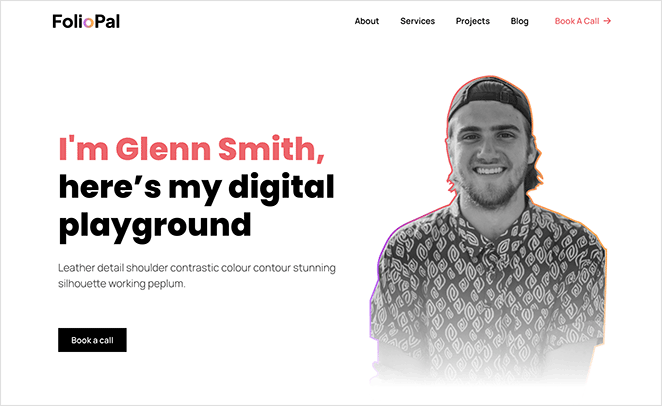
SeedProd isn’t a traditional portfolio theme. It’s a drag-and-drop WordPress website builder that lets you design a custom portfolio layout without touching code.
Unlike pre-built themes, you control every section of the design. That includes the header, footer, individual project pages, and any custom layouts in between.
I use SeedProd on my own sites, and speed was the first thing I noticed in real use. In my GTmetrix testing, SeedProd loaded in 556ms with just 16 HTTP requests.
I started with the photography portfolio template kit and had a working structure in under 20 minutes. The editor gave me control over every section without fighting predefined layouts.
The honest trade-off: there’s no free version for theme building, and the setup works differently from a standard WordPress theme install. If you want to activate a theme and be done, a traditional pre-built theme is the simpler path.
| Pros | Cons |
|---|---|
| 556ms load time in GTmetrix testing | Paid subscription required from $79.50/yr |
| 150+ portfolio template kits | Steeper setup than pre-built themes |
| Total design control without code | Not ideal for a traditional install-and-go experience |
| 1M+ users, strong support team | |
| Builds complete custom themes, not just pages |
Verdict: SeedProd is my top pick for creatives who want a portfolio that looks nothing like a standard WordPress theme. The setup takes more effort upfront, but you get complete control over the result.
2. Astra: Best for Speed and Page Builder Flexibility
| Feature | Details |
|---|---|
| Pricing | Free / Pro from $59/yr |
| Free Plan | Yes |
| Standout Features | • Works with Elementor, Beaver Builder, and Gutenberg • Lightweight base theme with minimal bloat • Large starter template library |
| Rating | A+ |
| Best For | Creatives who already use a page builder and want a fast, neutral base |
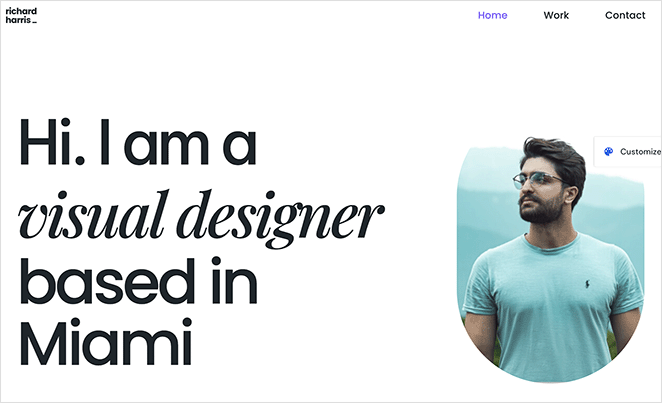
Astra is a lightweight WordPress theme with over 1 million active installs. It pairs with your page builder of choice and adds almost no overhead on its own.
My test was a client scenario: a graphic designer who needed a fast-loading grid portfolio on a shared host. I paired Astra with the Gutenberg editor and had a working site in about an hour using a starter template.
I found the free version held up for portfolio use without needing the Pro upgrade. Astra’s base theme adds almost no bloat, which matters when your hero section loads several large images.
The catch is that Astra doesn’t include portfolio post types or filtering out of the box. You add those through a page builder or a separate portfolio plugin.
| Pros | Cons |
|---|---|
| Genuinely lightweight base theme | No built-in portfolio post type or filtering |
| Works with Elementor, Beaver Builder, and Gutenberg natively | Needs a page builder for real design flexibility |
| Free version is functional without limitations | Some advanced templates require the Pro upgrade |
| Large starter template library |
Verdict: Astra is the right pick if you already use a page builder and want a fast, neutral base to build on. The free version handles basic portfolios; upgrade when you need advanced typography or custom layout controls.
3. Neve: Best for Minimalist, Fast-Loading Portfolios
| Feature | Details |
|---|---|
| Pricing | Free / Pro from $69/yr |
| Free Plan | Yes |
| Standout Features | • Under 50KB base theme size • One-click starter site import • Native support for all major page builders |
| Rating | A |
| Best For | Beginners who want a fast, clean portfolio without a steep setup |
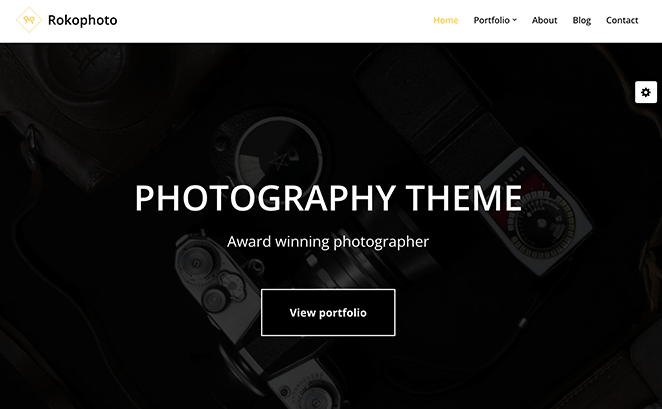
Neve is a lightweight WordPress theme from ThemeIsle built around speed and simplicity. It works natively with Gutenberg, Elementor, Beaver Builder, and Brizy.
The use case I went deepest on was setup time from a fresh WordPress install. Neve’s one-click starter site import ran without compatibility issues, and I had a portfolio demo up in minutes.
I also focused on mobile rendering, because portfolio images hit hard on smaller screens. Neve handled it cleanly without any extra optimization work on my part.
| Pros | Cons |
|---|---|
| One of the smallest theme base sizes available | Free version has limited styling options |
| Starter site import works reliably | Needs a page builder for full design control |
| Free version supports all major page builders | Less photography-specific than Inspiro Pro |
| Smooth mobile rendering out of the box |
Verdict: Neve is the best free minimalist option for portfolios that don’t need photography-specific features. The free version is enough to launch; upgrade when you need custom header and footer layouts.
4. OceanWP: Best for Budget Portfolios with E-Commerce
| Feature | Details |
|---|---|
| Pricing | Free / Pro from $69/yr |
| Free Plan | Yes |
| Standout Features | • Portfolio extension with filtering and lightbox • Solid WooCommerce integration • Responsive layouts with popup support |
| Rating | A |
| Best For | Creatives who sell work directly from their portfolio |
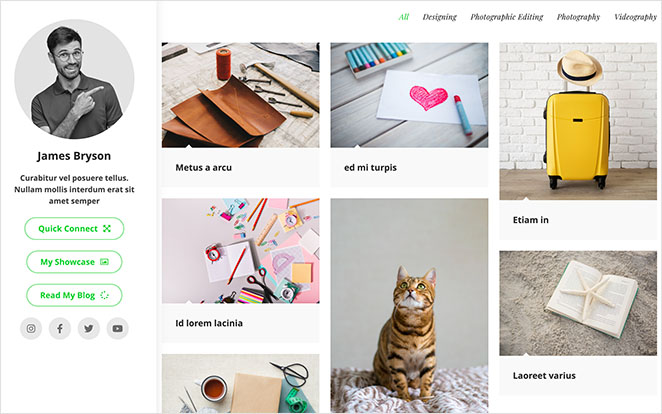
OceanWP is a free WordPress theme with strong WooCommerce support and an optional portfolio extension. It’s a good fit for creatives who need a shop and a portfolio in the same site.
I ran OceanWP against Neve for a client who needed to sell prints directly from their portfolio. The WooCommerce integration handled the shop-plus-portfolio setup without stacking extra plugins.
I found the free base theme solid for basic layouts. The portfolio-specific features (lightbox, project filtering) are behind paid extensions, so budget for those if you need the full feature set.
| Pros | Cons |
|---|---|
| Solid WooCommerce integration for selling work | Portfolio filtering and lightbox need paid extensions |
| Portfolio extension adds filtering and lightbox | Extensions can add up in cost |
| Free version is usable for basic layouts | Heavier default install than Neve or Astra |
| Actively maintained with regular updates |
Verdict: OceanWP makes the most sense if you’re selling work directly from your portfolio site. Budget for the extensions if you want filtering and lightbox; the free base theme alone won’t give you a full portfolio feature set. If your main goal is the shop itself, see our roundup of the best eCommerce WordPress themes.
5. Divi: Best for All-in-One Visual Design
| Feature | Details |
|---|---|
| Pricing | $89/yr or $249 lifetime |
| Free Plan | No |
| Standout Features | • Visual drag-and-drop builder included • 200+ layout packs including portfolio designs • Global design controls and A/B testing |
| Rating | A |
| Best For | Designers building multiple sites who want one tool for everything |
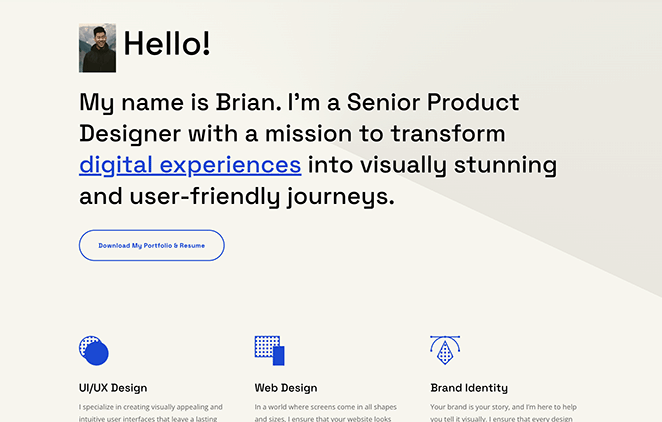
Divi is a WordPress theme and visual page builder from Elegant Themes combined into one product. You get a full design tool without needing a separate page builder plugin.
I went deepest on Divi for a multi-section portfolio with project case study pages and a team section. Everything was in one product: the theme, the builder, and global design controls.
I measured Divi’s resource usage with Query Monitor: 13.0 MB of memory and 86 database queries per page. SeedProd used 4.3 MB and 34 queries in the same test environment, so the overhead difference is real on shared hosting.
The community and documentation are extensive. Finding answers to setup questions was faster with Divi than with smaller theme options.
| Pros | Cons |
|---|---|
| Theme and page builder in one product | 13.0 MB memory and 86 DB queries per page |
| 200+ layout packs including portfolio designs | No free version |
| Lifetime pricing option at $249 | Locks you into the Divi ecosystem |
| Large, active community and documentation | Higher resource usage on shared hosting |
Verdict: Divi is worth the investment if you’re building multiple sites and want one consistent tool for all of them. The resource usage is higher than lighter options, so it performs better on managed or dedicated hosting.
6. Ultra: Best for Bold, Unconventional Layouts
| Feature | Details |
|---|---|
| Pricing | From $59 |
| Free Plan | No |
| Standout Features | • Themify builder included • 60+ pre-built portfolio layouts • Advanced row and column styling options |
| Rating | B+ |
| Best For | Designers who want a creative look without Elementor or Beaver Builder |
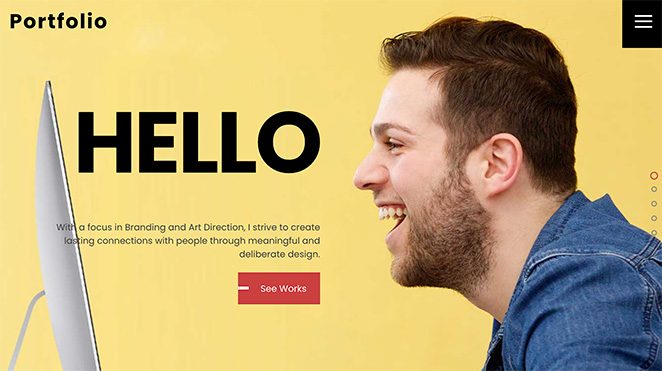
Ultra is a premium WordPress theme from Themify that includes the Themify Builder. It’s designed for creatives who want layouts that stand out from standard WordPress grids.
I built a portfolio page in Ultra to see how the Themify builder handled image-heavy sections. The pre-built demos are genuinely distinctive; the layout options look different from Astra or Neve out of the box.
Getting the layout to match my vision took more time than with page builder-compatible themes. I found troubleshooting slower than expected because the Themify builder has fewer tutorials and community resources than Elementor.
| Pros | Cons |
|---|---|
| Creative pre-built portfolio layouts | Themify builder has fewer tutorials than Elementor |
| Builder included, no separate plugin needed | Higher learning curve than page builder-compatible themes |
| One-time pricing option available | Smaller community than Astra or Divi |
| Responsive design with advanced layout controls |
Verdict: Ultra suits designers who want an unconventional look and don’t mind a steeper setup curve. If you’re comfortable learning a less-documented builder, the layout options are genuinely different from anything on this list.
7. Hestia Pro: Best for Quick One-Page Portfolio Setup
| Feature | Details |
|---|---|
| Pricing | Free + Pro |
| Free Plan | Yes (Hestia on WordPress.org) |
| Standout Features | • One-page section layout • Material Design styling out of the box • WooCommerce support |
| Rating | B+ |
| Best For | Freelancers who need a simple one-page portfolio up quickly |
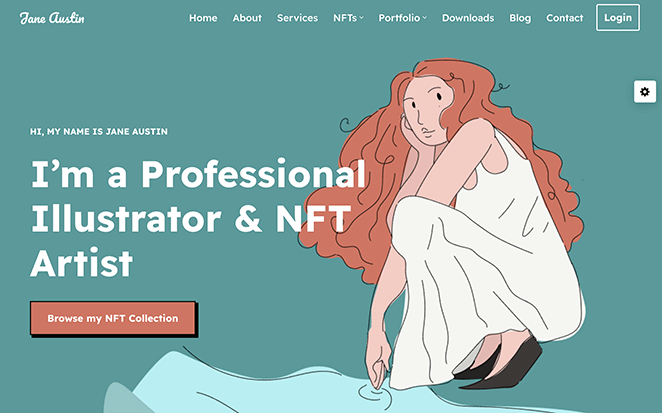
Hestia Pro is a one-page WordPress theme from ThemeIsle. The free version, Hestia, has 100,000+ active installs on WordPress.org and works well as a starting point.
I tested Hestia for a common freelancer scenario: a single-page portfolio covering work samples, services, and a contact section in one scroll. The layout maps well to this without extra configuration.
I found the free version on WordPress.org more capable than its install count suggests. Visitors see your work, your background, and how to hire you without navigating to separate pages.
| Pros | Cons |
|---|---|
| Free version on WordPress.org with 100,000+ installs | One-page format limits how you display many projects |
| One-page layout suits simple creative portfolios | Pro pricing through ThemeIsle bundles (verify before buying) |
| Professional Material Design styling | Less flexible than Neve for multi-page portfolios |
| Quick to set up for first-time users |
Verdict: Hestia Pro works if your portfolio is simple: a handful of featured projects, a short bio, and a contact form. It doesn’t scale well to deep project case study pages.
8. Inspiro Pro: Best for Photography Portfolios
| Feature | Details |
|---|---|
| Pricing | $69/yr (WPZoom) |
| Free Plan | Yes (Inspiro on WordPress.org) |
| Standout Features | • Fullscreen project pages and video backgrounds • Category filtering built in • 45+ starter sites across photography and creative niches |
| Rating | B+ |
| Best For | Photographers who want a purpose-built theme without building from scratch |
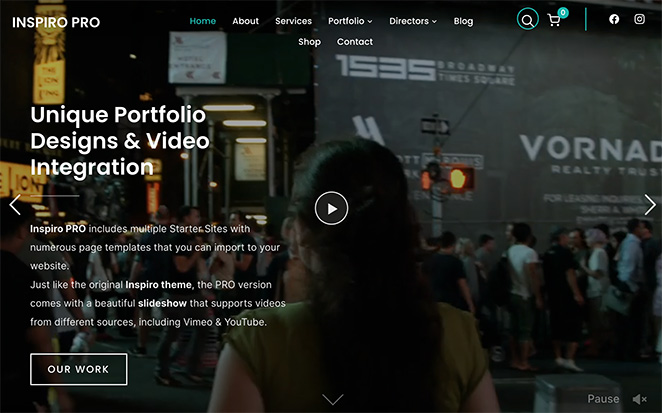
Inspiro Pro is a photography-focused WordPress theme from WPZoom. It includes fullscreen image layouts, project filtering, and video background support as core features. If you also need a standalone gallery plugin, see our list of best photo gallery WordPress plugins.
I set up a photography portfolio test with 50+ images across 6 categories. The grid layout and filtering worked cleanly, and fullscreen project pages gave images room without extra CSS work.
I started with the free Inspiro version on WordPress.org before upgrading. Video backgrounds and fullscreen layouts are Pro-only features, which is where the $69/yr earns its keep for photographers.
| Pros | Cons |
|---|---|
| Designed specifically for visual portfolios | More photography-focused than design or UX portfolios |
| Fullscreen project pages display images cleanly | Full features require the Pro upgrade |
| Portfolio filtering built in | Less flexible for non-standard layouts |
| 45+ starter sites for quick setup |
Verdict: Inspiro Pro is the clearest choice for photographers who want a purpose-built theme without building from scratch. The Pro features are worth the upgrade if photography is your primary work.
9. Nikkon: Best Free Multipurpose Portfolio Theme
| Feature | Details |
|---|---|
| Pricing | Free |
| Free Plan | Yes |
| Standout Features | • Works with WordPress Customizer • WooCommerce compatible • Clean minimal design for multiple creative types |
| Rating | B |
| Best For | Beginners who want a free starting point without extra setup |
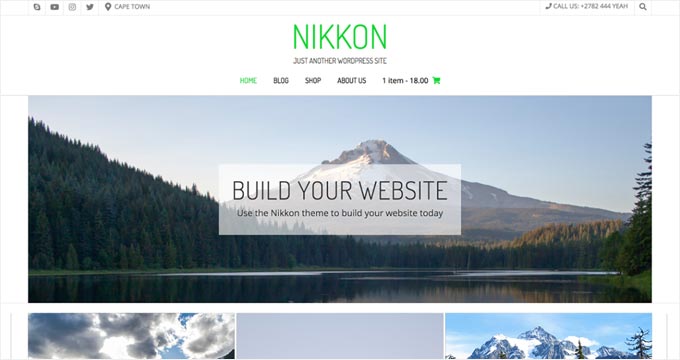
Nikkon is a free WordPress theme with a clean, minimal design that works for multiple creative types. It uses the standard WordPress Customizer for setup.
I installed Nikkon on a fresh WordPress site to see how far the free version takes a beginner. The Customizer options cover colors, fonts, and a featured image without touching code.
Nikkon doesn’t have built-in portfolio post types, so I used Gutenberg blocks to display project pages. For a beginner’s first site, that’s manageable; just don’t expect built-in filtering.
| Pros | Cons |
|---|---|
| Free with no paid tier | No built-in portfolio post type or filtering |
| Clean minimal design for multiple creative types | Very basic customization compared to premium themes |
| WooCommerce compatible | Limited page layout choices |
| Works with Gutenberg blocks |
Verdict: Nikkon works for a beginner who needs a free starting point without paying for a premium theme right away. Move to a more capable option when your project count grows or you need portfolio filtering.
10. Pixgraphy: Best Free Theme for Photography Portfolios
| Feature | Details |
|---|---|
| Pricing | Free |
| Free Plan | Yes |
| Standout Features | • Built-in gallery and lightbox • Photography-optimized layouts • Contact Form 7 compatible |
| Rating | B |
| Best For | Photographers who want a gallery and lightbox without extra plugins |
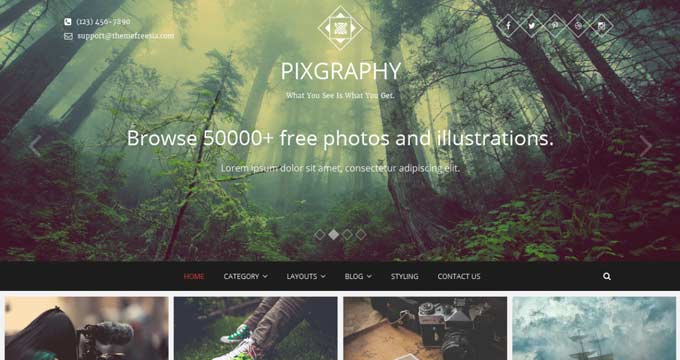
Pixgraphy is a free WordPress theme designed for photography portfolios. It includes gallery display and lightbox functionality without needing a separate plugin.
I installed Pixgraphy to compare it against Nikkon on the same set of portfolio images. The gallery and lightbox worked without any additional plugins, which is a genuine advantage for a free theme.
The limitation is customization. You’re working within a fixed layout, and changing fonts or colors requires CSS or a child theme.
| Pros | Cons |
|---|---|
| Free with lightbox built in | Very limited customization without CSS |
| Gallery layouts optimized for photography | Fixed layout options |
| Clean design that keeps focus on images | No portfolio post type filtering |
| Contact Form 7 compatible |
Verdict: Pixgraphy is the best free option if you’re a photographer who wants a working gallery without extra plugins. Pair it with a contact form plugin and you have everything you need to launch.
Frequently Asked Questions
Can I build a WordPress portfolio without a special portfolio theme?
Yes. Any WordPress theme that supports a page builder can display portfolio-style content. Dedicated portfolio themes include project post types, image filtering, and lightbox support built in, so you don’t need to configure those features separately.
Which portfolio WordPress themes have a free version?
Astra, Neve, OceanWP, Hestia, Inspiro (basic), Nikkon, and Pixgraphy all have free versions on WordPress.org. The free versions are usable, though some features like category filtering or fullscreen layouts may require the paid upgrade.
How much does a portfolio WordPress theme cost?
Free options exist and work well for basic portfolios. Premium portfolio themes start at around $59 to $89 per year. SeedProd, which gives you full design control with a drag-and-drop builder, starts at $79.50 per year.
Is Astra a good theme for a photography portfolio?
Astra works well for photography when paired with Elementor or Beaver Builder. The base theme is fast, but it doesn’t include built-in portfolio post types or filtering. For photography-specific features without a page builder, Inspiro Pro is the better fit.
Which Portfolio WordPress Theme Is Right for You?
The right theme depends on what you’re showing and how much control you want over the design.
Starting from scratch with no budget: Neve or Astra both have free versions that hold up for simple portfolios. Pair either one with the Gutenberg editor and you can launch without spending anything.
Want a portfolio that looks completely custom: SeedProd lets you design every section from scratch without hiring a developer. The setup takes more time, but the result looks nothing like a default WordPress theme.
Most themes here have free versions or live demos. Install the one that matches your situation, add your actual project pages, and test it with real content before committing to a paid plan.
You might also find these guides useful:
- How to Create a Custom WordPress Theme Without Code
- How to Change WordPress Theme Without Losing Content
- How Much Does a Custom WordPress Theme Cost?
- Best Multipurpose WordPress Themes (Free and Paid)
- Best Blog WordPress Themes for Bloggers + Writers
Thanks for reading! We’d love to hear your thoughts, so please feel free to join the conversation on YouTube, X and Facebook for more helpful advice and content to grow your business.



