


Finding the best website builder for a service based business comes down to one critical decision: are you building a permanent asset or just renting space?
It’s easy to get distracted by flashy templates or “free” trials when you’re just starting out. But many business owners make a mistake early on by choosing platforms that act like landlords. You build your house on their land, and if they change the rules or raise the rent, you’re stuck.
In this post, I’m going to compare the top builders so you can spot the difference between a monthly liability and a digital asset that actually adds value to your company.
Best Website Builders for Service Based Businesses at a Glance:
| # | Tool / Product | Best For | Free Plan | Starting Price |
|---|---|---|---|---|
| 🥇 | SeedProd | Service business growth | ✅ | From $39.50/year |
| 🥈 | WordPress.org | Long term ownership | ✅ | From $0 |
| 🥉 | Wix | Testing business ideas | ✅ | From $17/month |
| 4 | Squarespace | Visual portfolios | ❌ | From $16/month |
| 5 | Shopify | Selling products | ❌ | From $29/month |
Why ‘Renting’ Your Website is a Bad Idea
When you use a closed platform, you are essentially a tenant in your own business. If the subscription price doubles next month, you have two choices: pay the higher rate or lose your online presence entirely.
This creates what many users describe as a “hostage” situation. For instance, platforms like Wix have historically increased subscription tiers. This impacts long-term costs for users who cannot easily migrate their data.
You cannot export your code or design to another host. To move, you have to copy-paste every single page and rebuild from scratch, making it incredibly expensive to switch.
How I Chose the Best Website Builders for Service Businesses
When you’re running a service business, your website has a very different job than an online store. You aren’t trying to get someone to “Add to Cart”; you’re trying to get them to pick up the phone or book an appointment.
So, I tested the most popular options, both the “owned” platforms and the “rented” ones, and evaluated them on what actually matters for your bottom line:
- Asset vs. Liability: I looked at whether the platform allows you to own your content or if it locks you into a permanent rental agreement.
- Lead Focus: It needs to be easy to add “Call Now” buttons and contact forms. If a builder makes it hard for a client to reach you, it loses points.
- Local SEO: To get clients, you need to show up in local searches. I checked if these tools allow you to easily edit the settings needed to rank in your specific city.
- Scalability: I checked what happens when you grow. Does the price skyrocket just because you want to add a booking calendar or accept payments?
With this criteria in mind, let’s look at which service website builders made the cut.
1. WordPress.org (The Industry Standard)

| Pricing: Free (Open Source) |
| Free Plan / Trial: N/A (Software is free) |
| Standout Features: |
| 🔹 100% Asset Ownership 🔹 59,000+ Plugins 🔹 Uncapped Scalability 🔹 Universal Compatibility |
| Rating: A+ |
| Best For: Business owners who plan to scale and want total control. |
If you’re asking “What is the best website builder for a service business?”, the real answer isn’t a “builder”—it’s a platform. WordPress powers over 62% of all websites built with a CMS for one reason: it’s the only option where you truly own the result.
My Experience
I view WordPress as the concrete foundation of a house. On its own, it’s the sturdy infrastructure that ensures your business stays standing. Because it is open-source, you have access to a massive ecosystem of lead generation tools that solve specific service business problems.
Need a complex booking calendar that syncs with Google Calendar? There’s a plugin for that. Need a secure client portal? There’s a plugin for that.
Unlike closed platforms where you have to wait for the company to release a feature, on WordPress, the solution usually already exists.
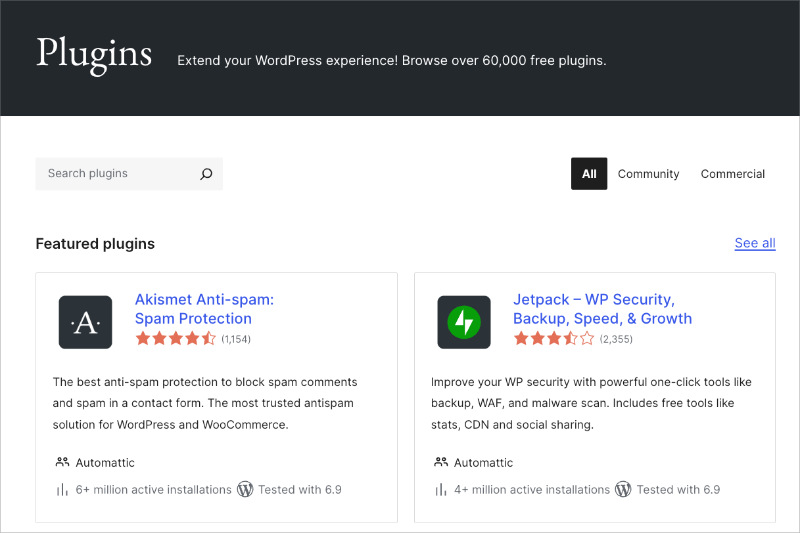
A lot of people avoid WordPress because they think it’s “too technical.” That used to be true, but today, the landscape has changed.
You simply install WordPress to own the data, and then add a WordPress page builder (like the one I’ll mention next) to design the site. It gives you the power of a developer without the cost.
Pros
- Total Freedom: You own your data. Nobody can shut down your site or hike the price on the software.
- Infinite Scalability: You can start small and grow into a massive enterprise site without switching platforms.
- Cost Effective: The software itself is free; you only pay for hosting.
Cons
- Maintenance: You are responsible for clicking “update” on plugins (or paying a host to do it).
- Setup: It requires a hosting account, which takes about 5 minutes to set up.
My Verdict: WordPress is the industry standard for a reason. If you plan to be in business for more than a year, it is the smartest foundation to build on.
2. SeedProd (Best for Ownership & Growth)

| Pricing: Starts at $39.50/year |
| Free Plan / Trial: Free version available |
| Standout Features: |
| 🔹 Visual Drag-and-Drop Builder 🔹 Built-in Maintenance Mode 🔹 AI Website Building 🔹 Local SEO Control |
| Rating: A+ |
| Best For: Service businesses that want an asset they own. |
If you want the best website builder for a service based business, SeedProd is the top contender. It operates directly on top of WordPress, giving you the power of the industry standard with a much easier interface.
This setup solves the “rent vs. buy” problem. You get the ease of a visual builder like Wix. But since it runs on WordPress, you actually own your “digital asset.”
My Experience
I use SeedProd on my own websites because it completely removes the need for a developer. Unlike standard “page builders” that just edit the content area, SeedProd is a full Website Builder. I use it to design my headers, footers, and entire WordPress theme visually, which saves me hours of frustration.
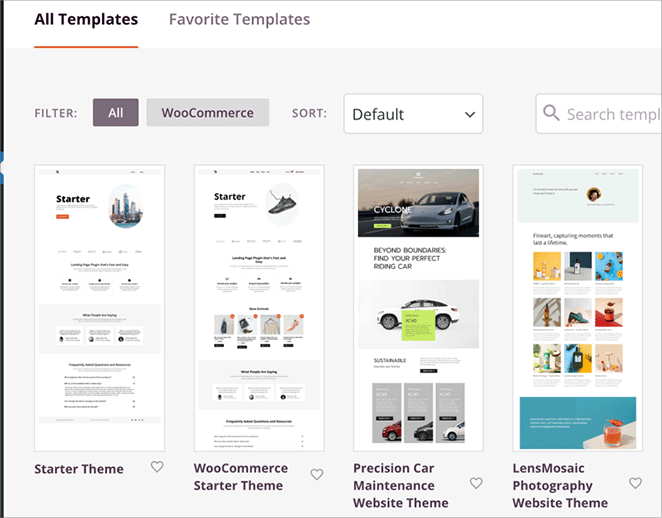
The biggest win for me is the ability to build a “Service Funnel.” This is critical for structuring your service pages to pre-qualify leads.
I can easily whip up a specific landing page for a new service offer that looks completely different from the rest of my site, tailoring the message to that specific customer.

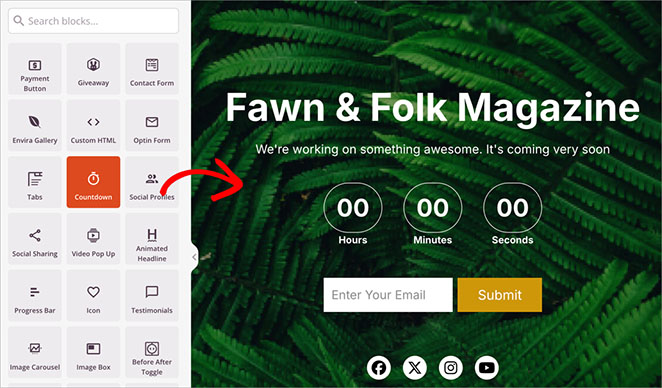
I also rely heavily on the built-in Maintenance Mode and Coming Soon pages. When I’m working on a new design or fixing something, I can just flip a switch to show a professional “Coming Soon” page. It lets me work on the mess privately while still collecting leads on the front end.
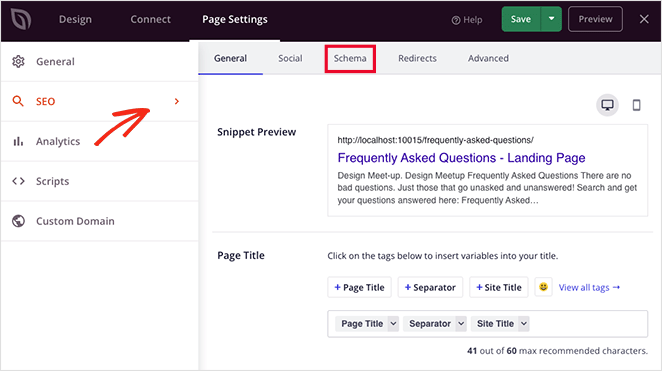
Finally, having control over my SEO is a dealbreaker. SeedProd pairs perfectly with All in One SEO (AIOSEO), one of the most popular WordPress SEO plugins. This integration ensures that while SeedProd handles the design, AIOSEO handles the technical schema and sitemaps, making sure my site actually ranks in Google Maps.
Pros
- True Ownership: You build on WordPress, so you own your code and content.
- No Coding Needed: Drag-and-drop interface is beginner-friendly.
- Lead Focus: Designed for conversions (calls/emails), not just pretty pictures.
- Coming Soon/Maintenance Mode: Hides your site while you build, protecting your brand.
Cons
- Hosting Required: Since it’s WordPress, you need your own hosting (unlike Wix), but this is better for long-term ownership.
- Premium Features: The full theme builder requires the Pro plan.
My Verdict: SeedProd is my #1 choice for building a service based website. It combines the speed of a hosted builder with the security and value of owning your own platform.
3. Wix (Best for Hobbyists)
| Pricing: Starts at ~$17/month |
| Free Plan / Trial: Free plan available (with ads) |
| Standout Features: |
| 🔹 True Drag-and-Drop Editor 🔹 Built-in Booking App 🔹 Massive Template Library 🔹 AI Text Creator |
| Rating: B |
| Best For: Hobbyists or solo entrepreneurs testing an idea. |
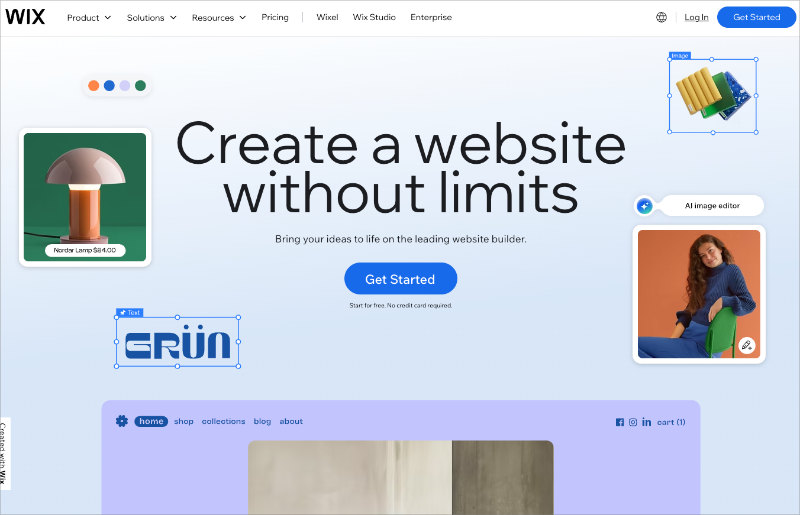
Wix is arguably the most famous website builder on the market, and for good reason. It’s excellent for hobbyists or temporary projects because it removes every technical barrier. However, its “closed ecosystem” creates significant risks for serious service businesses looking to scale.
My Experience
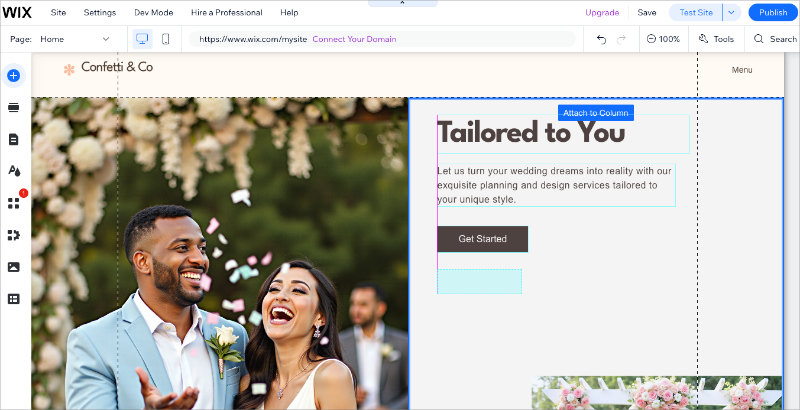
I have to give credit where it’s due: Wix’s visual editor is impressive. Unlike WordPress, which follows a grid structure, Wix uses an “unstructured” editor.
You can literally drag a button to any pixel on the screen, and it stays there. For a DIYer with no design skills, this feels like magic.
But here is the trap. Once I built a site on Wix, I realized that moving away is a nightmare. While it’s technically possible to migrate, you can’t just export your design or code.
You can export your blog posts, but your actual page layouts are stuck there. If you ever want to switch to a more powerful platform, you are essentially forced to rebuild the entire site from scratch.
Also, the pricing is deceptive for service businesses. The entry plan looks cheap, but once you need to add the “Wix Bookings” app to accept appointments, the monthly cost jumps significantly. You end up paying a premium for convenience.
Pros
- Easiest Visual Editor: If you can use PowerPoint, you can use Wix.
- All-in-One: Hosting, security, and maintenance are handled for you.
- Good Templates: Hundreds of modern designs for specific niches (e.g., Dentist, Consultant).
Cons
- Migration Difficulty: You can’t export your design or template. Moving away usually means rebuilding.
- Cost Scaling: Essential service features (like bookings) require expensive plan upgrades.
- SEO Limitations: While better than it used to be, it still lags behind WordPress in technical SEO control.
My Verdict: Wix is great if you need a website up today to test a business idea. But if you plan to be in business for the next 5 years, starting on a platform that is difficult to leave is a risky move.
4. Squarespace (Best for Visual Portfolios)
| Pricing: Starts at ~$16/month |
| Free Plan / Trial: 14-day free trial |
| Standout Features: |
| 🔹 Award-Winning Design Templates 🔹 Fluid Engine (Drag-and-Drop) Editor 🔹 Integrated Email Marketing 🔹 Built-in Acuity Scheduling |
| Rating: B+ |
| Best For: Photographers, Architects, and Creative Agencies. |
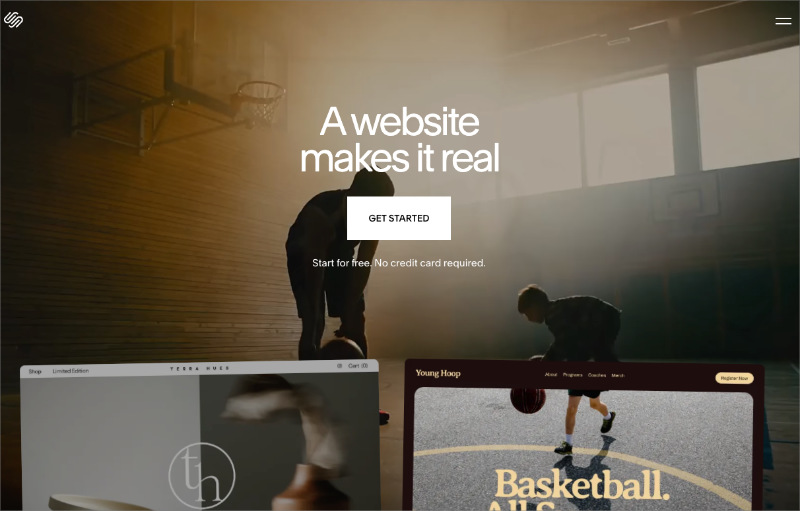
If you watch YouTube, you’ve heard of Squarespace. It markets itself as the platform for “beautiful” websites, and honestly, they aren’t lying. If you are an architect, photographer, or interior designer, this is likely your best bet because the templates are stunning right out of the box.
My Experience
I often describe Squarespace as the “Apple” of website builders. Everything is sleek, curated, and works smoothly, as long as you stay within their ecosystem.
I’ve set up portfolios on Squarespace in under an hour that looked like they cost $5,000. You almost can’t make a Squarespace site look bad because the design guardrails are so strong.
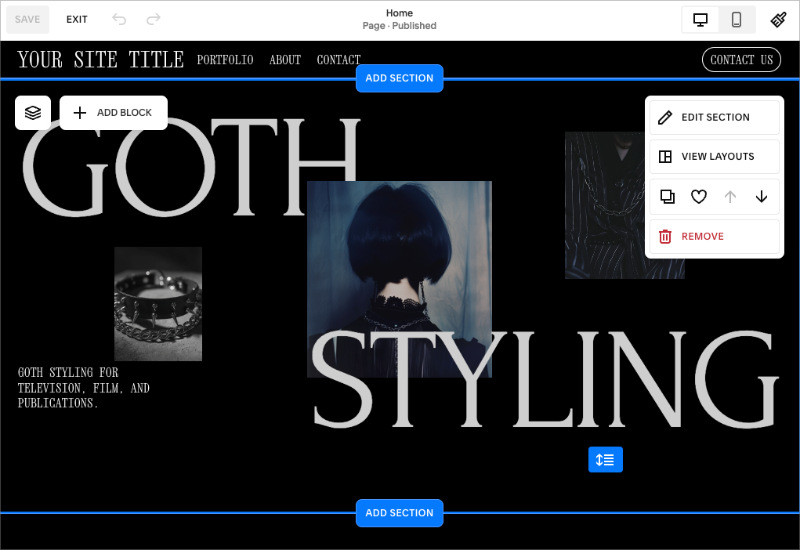
However, for a service business that needs specific functionality, those guardrails can feel like a cage. I found that as soon as I wanted to do something unique, like add a custom cost calculator for a renovation project or a specific lead filtering step, I hit a wall.
You can’t just plug in a third-party tool easily like you can with WordPress.
On the positive side, they own “Acuity Scheduling,” which is one of the best booking tools on the market. It integrates perfectly, but be warned: it’s an extra cost on top of your website subscription, making your monthly bill climb higher than you might expect.
Pros
- Design Quality: The templates are unmatched. They look expensive and professional immediately.
- Fluid Engine: Their new editor is much more flexible than the old block system, allowing for decent creative control.
- All-in-One: You don’t need to worry about plugins, updates, or security patches.
Cons
- Rigid Structure: It is very difficult to customize the backend logic or checkout flows.
- Speed: These sites can be heavy on code, which sometimes hurts load times compared to a lean WordPress site.
- Expensive Add-ons: Features like email marketing and scheduling are separate, paid add-ons.
My Verdict: Squarespace is the winner for visual service businesses. If your work sells itself through images (like a wedding photographer), use this. If your business relies on local SEO and complex lead funnels (like a plumber), stick with WordPress.
5. Shopify (Best for Selling Products)

| Pricing: Starts at ~$29/month |
| Free Plan / Trial: 3-day free trial |
| Standout Features: |
| 🔹 Best-in-class Checkout 🔹 Inventory Management 🔹 Point of Sale (POS) System 🔹 Huge App Ecosystem |
| Rating: C (For Services) / A+ (For Products) |
| Best For: Service businesses that also sell physical goods (e.g., Salons). |
You might be wondering why an e-commerce platform is on a list of service business builders. I included it because I see people make this mistake all the time. Shopify is the absolute king of selling physical products, but it is structurally wrong for a pure service-based business.
My Experience
I’ve tried to force Shopify to work for a service client before, and it felt like trying to hammer a square peg into a round hole. The entire system is built around “Products,” “Inventory,” and “Shipping.”
If you sell consulting hours or plumbing services, you don’t have “inventory” or “shipping weight.” You’ll find yourself fighting the platform constantly. For example, changing the “Add to Cart” button to a “Request a Quote” button often requires installing a paid app or editing the theme code. It’s messy.
However, there is one exception. If you run a hybrid business, like a hair salon that makes 40% of its revenue selling shampoos and conditioners online, then Shopify is a viable option. Its Point of Sale (POS) system is fantastic for syncing your in-store inventory with your online store.
Pros
- World-Class Checkout: If you sell physical goods, nothing beats Shopify’s checkout conversion rate.
- POS Integration: Perfect for brick-and-mortar shops that sell products.
- App Store: Huge ecosystem of apps (though many are paid).
Cons
- Wrong Architecture: Built for SKUs, not services. You’ll fight the interface.
- Cost: Monthly fees + transaction fees add up quickly.
- Weak Content Tools: The blogging and page building tools are very basic compared to WordPress or SeedProd.
My Verdict: If you sell time (services), avoid Shopify. Only use this if you sell physical products alongside your services.
What’s the Best Website Builder for Service Based Businesses?
After testing the top options on the market, the answer depends on your long-term goals.
If you want a Digital Asset that you own, control, and can grow without limits, the clear winner is WordPress + SeedProd. It gives you the power of the world’s best platform with the ease of a drag-and-drop builder. You get professional features like Maintenance Mode, local SEO control, and high-converting landing pages without needing a developer.
If you are a Hobbyist just testing an idea, Wix is a decent starting point. Just be aware that moving away later will be difficult.
If you are a Visual Creative (Photographer/Architect), Squarespace offers the best aesthetic out of the box, though it lacks the backend power of WordPress.
My final advice: Don’t build your business on rented land. Start with WordPress and SeedProd so you never have to worry about outgrowing your platform.
FAQs About Service Business Websites
Final Verdict: Own Your Business
Your website is likely the first employee your customers interact with. Don’t hire a temp; build a permanent asset.
Building on “rented land” might seem easier today, but it often leads to expensive headaches tomorrow. If you want total control, lower long-term costs, and a website you can actually sell one day, the choice is clear: WordPress + SeedProd.
It’s time to stop renting and start owning your online presence.
If you’re ready to build a site that works as hard as you do, check out these helpful guides:
- How to Create a WordPress Website for Beginners
- Must-Have WordPress Plugins for Business Websites
- How to Convert Website Visitors into Customers
Thanks for reading! We’d love to hear your thoughts, so please feel free to join the conversation on YouTube, X and Facebook for more helpful advice and content to grow your business.




