


TL;DR: You make a custom WordPress website unique by starting from a template and then changing the parts everyone else leaves on default. No code needed.
- Customize the template: Strip what you don’t need and reorder what’s left.
- Pick your own colors: Break away from the default palette your theme ships with.
- Choose distinct fonts: Move past Open Sans and Roboto.
- Rework the layout: Drop the hero-then-three-columns pattern.
- Add interactive blocks: Carousels, counters, and hotspots over plain text.
- Design a custom header and conversion points: Treat both as part of the brand, not boilerplate.
I hate to break it to you, but your website probably looks just like thousands of others.
According to recent studies, over 800 million websites use WordPress, and a staggering portion of them use the same handful of popular themes and templates. This creates what I call the “template tsunami,” a wave of lookalike websites that all look similar.
But the problem isn’t just about how your site looks. When your website looks like everyone else’s, you’re wearing camouflage in a world where standing out is the whole point.
In this guide, I’ll show you why a unique website matters and how to turn yours into a custom WordPress website that actually stands out.
Why Do So Many Websites Look Alike?
Most websites look alike because they start from the same place: a popular template, a default color palette, and a layout almost everyone reuses.
The newest driver is AI. AI site generators and one-click builders now spit out near-identical layouts in seconds, so a fresh wave of sites all share the same structure and styling.
It’s the single most common complaint I see raised in web design communities right now. People build something with AI, then realize it looks exactly like the other sites built the same way.
Have you noticed how certain layouts follow the same pattern? Hero image at the top, three feature boxes below, testimonials section, and a contact form at the bottom.
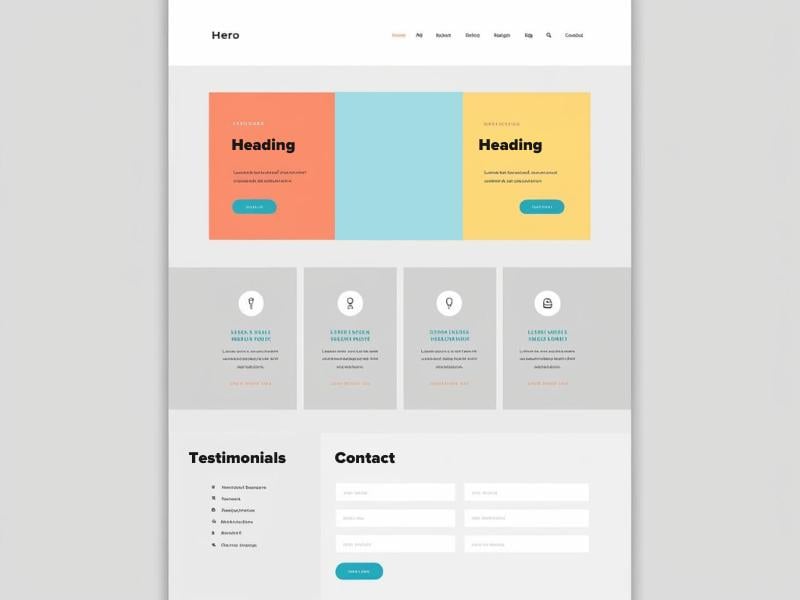
None of this is a coincidence. Frameworks like Bootstrap, and now AI builders, make professional-looking sites fast and cheap to produce.
That’s mostly a good thing, but it has an unexpected side effect: visual monotony across the internet.
Time and budget constraints play a role too. I’ve worked with several people who needed their websites up and running yesterday, with minimal investment.
The easiest path is to grab a popular WordPress theme and make minor tweaks. The problem with that approach is it can cost you money in the long run.
What Does a Generic Website Cost Your Business?
A generic website costs you memorability, and that has a direct effect on revenue. When your site looks like the competition, customers have nothing to remember you by.
Think about it: would you remember one penguin in a crowd of thousands?

Design is a big part of that first impression. A reported 75% of people judge whether a brand is trustworthy based on its website design alone.
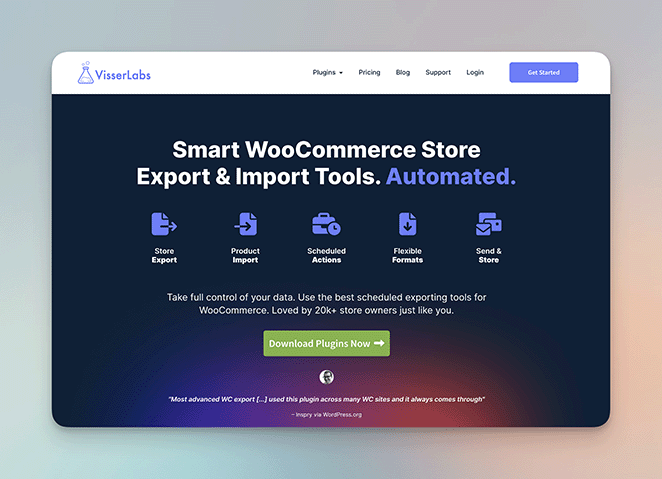
The clearest proof is in the conversion numbers. Take Visser Labs, whose web design was outdated, slow, and struggling to convert.
After a custom redesign focused on branding and speed, they saw a 10% increase in pricing page conversions. A site that stands out and works well can move the numbers that matter.
As one Reddit user put it:
“Think of it like a storefront. If your business looks like it was last maintained in the 1970s and smells like burned coffee and cigarette smoke… who’s going to want to go there?”

You have about 50 milliseconds to make that first impression count. A unique design makes those milliseconds work in your favor.
Standing out with a unique web design pays off in a few concrete ways:
- People remember your brand more easily
- Visitors spend more time on your site and interact with it more
- More visitors become customers
- Your site can show up higher in Google search results
- People share your site and tell their friends about it
- Visitors perceive your products or services as worth more
So how do you know if your own site has slipped into generic territory? A few patterns give it away.
- An oversized logo: A giant logo in the header signals a template that was never adjusted.
- A single system font: Default fonts everywhere read as untouched defaults.
- Stock-photo overload: The same smiling-team and handshake photos appear on thousands of sites.
- Too many colors: Most sites I see don’t have a color problem, they have a too-many-colors problem.
- The same predictable layout: Hero, three columns, testimonials, footer, in that exact order.
If you spot two or three of these on your own site, the next section is for you. Studying real WordPress website examples by site type also makes it easier to see what standout sites do differently.
7 Ways to Build a Custom WordPress Website That Stands Out (Without Code)
Now that you know why being unique matters, here’s how to actually do it. All of this happens inside WordPress with a drag-and-drop builder, so you don’t need to touch theme code or CSS.

I like to use SeedProd to make truly custom WordPress websites. It’s fast, and you don’t need to hire developers or wrestle with code.
SeedProd’s AI builder can generate a first draft for you in minutes, which is a genuinely useful head start. But an AI draft is still a starting point, not a finished site.
That draft will look like every other AI-generated site until you make it yours. The seven techniques below are how you turn a generic starting point into a custom WordPress website that feels like your brand.
You don’t need to redesign everything at once. Start with your header, then work through the rest as you go.
1. Customize a Starter Template
When choosing a template from SeedProd’s library of over 300+ designs, look for one with a clean layout, structure, and functionality. You don’t want to reinvent the wheel, just modify it to meet your needs.
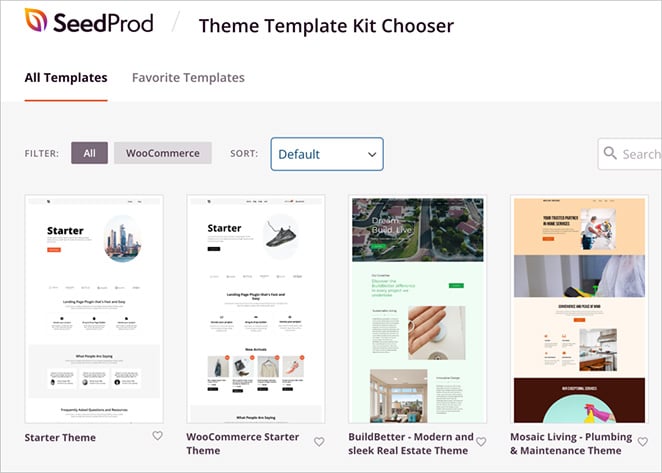
When I’m customizing a template, I start by removing anything I don’t need. Just because a template comes with a beautiful gallery doesn’t mean I have to keep it if I won’t use it.
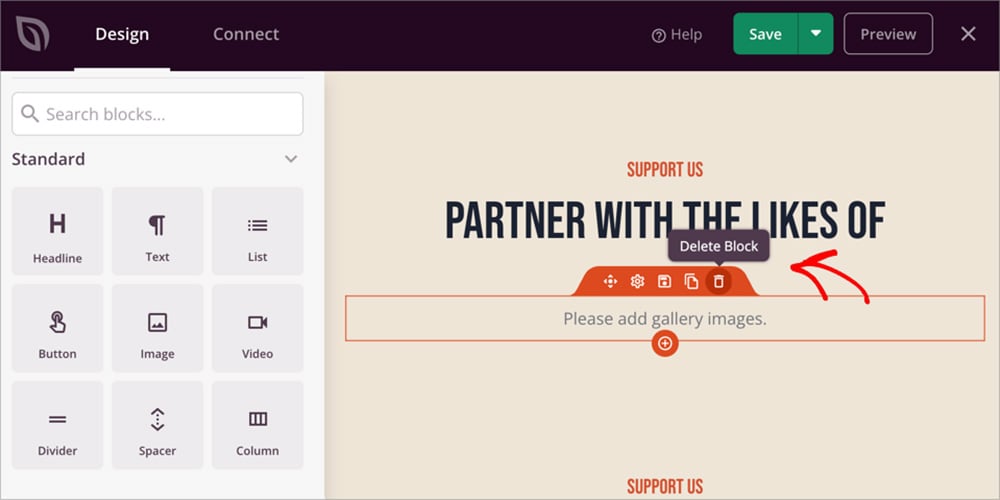
After stripping away the excess, I reorganize what’s left to create a unique flow. In your case, that might mean moving your call-to-action button higher, or reordering content to tell your brand’s story.
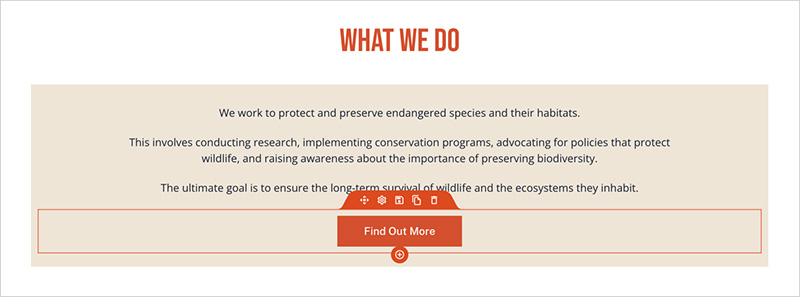
Now comes the fun part: adding special touches that highlight your brand. This is how you truly make the template your own.
Maybe you want a unique portfolio, or a pricing table that’s more engaging than the standard three columns.
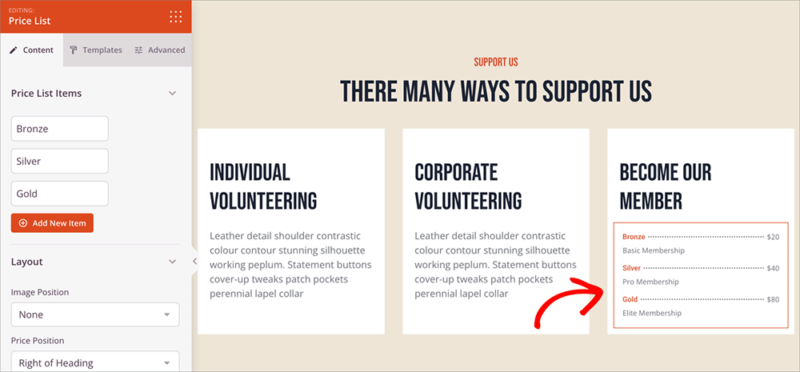
Finally, adjust the spacing and sizes of different elements to make it visually interesting. Even small changes to the space around text and images make a site feel unique.
For more help customizing your website’s elements, see these easy guides:
- How to Add a Box Shadow in WordPress
- How to Change Margins in WordPress
- How to Make a Page Full Width in WordPress
- How to Add Text on an Image in WordPress
2. Personalize Your Color Scheme
Many WordPress templates use similar color palettes that follow basic color practices. Green for nature and growth, or purple for luxury. If you want your website to stand out, break that mold.
An excellent example is Monzo. Instead of the blue typical of finance, they used coral orange. Orange suggests change, so it fits a disruptive brand like Monzo.
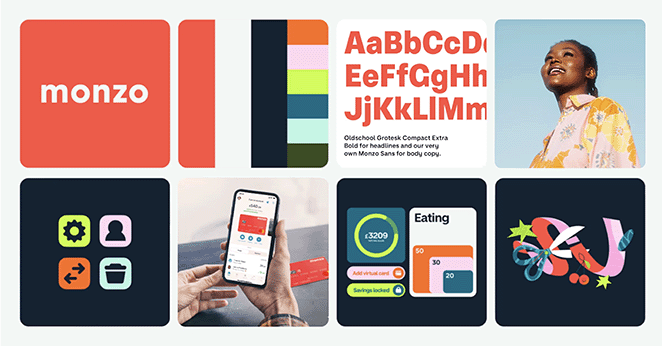
Think about how your brand can shake things up with more unique website colors.
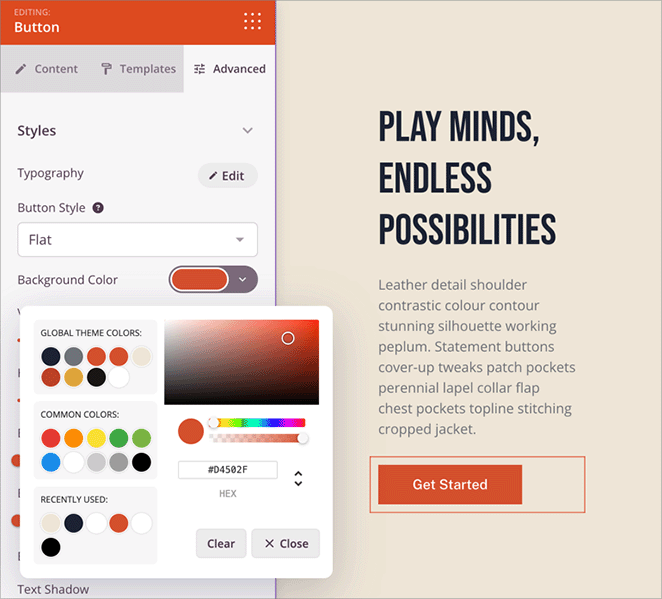
A good place to start is with SeedProd’s custom color palettes. Each one has five colors that work together for a clean, professional look.
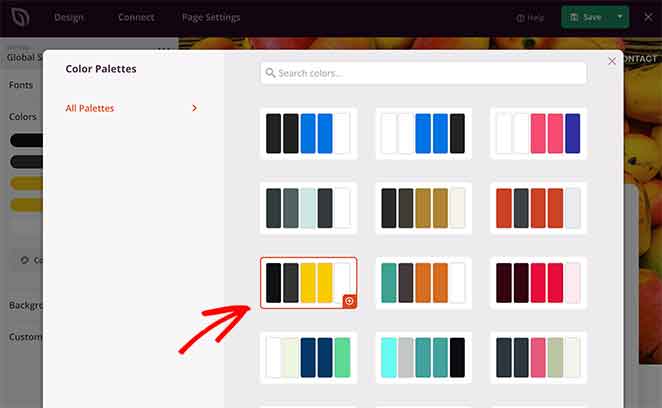
You can edit these with the color picker to create and apply colors across your whole website.
You can also change the color of any element on the page, including backgrounds, text, buttons, and links. The picker lets you choose any shade, or enter exact codes if you have brand colors in mind.
3. Make Typography Your Own
Typography in web design seems like a small detail, but it can make or break your site’s personality. Most WordPress sites stick to basic fonts like Open Sans or Roboto. They’re fine fonts, but they’re everywhere.
Take Mailchimp, for example. They use a font called Graphik that gives their brand a friendly, approachable feel.

It’s different from what you’d expect from a tech company, and that’s exactly why it works.
SeedProd makes it easy to break away from typical WordPress fonts. You can start with pre-set font combinations that pair headings and body text that work well together.
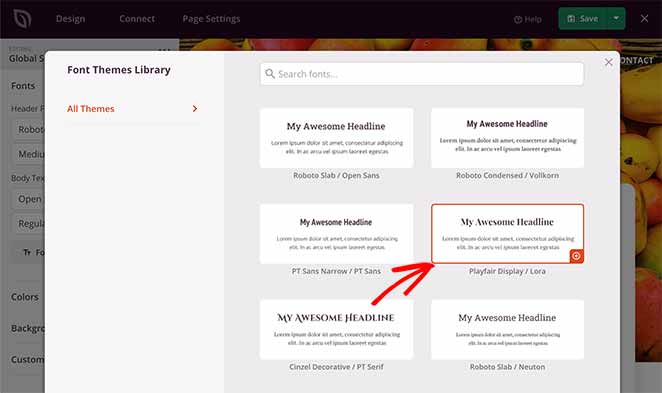
Don’t stop there, though. Customize these to create your own look.
Try changing your heading styles. Make them bigger, bolder, or mix different fonts.

Just keep your body text easy to read. Standing out doesn’t matter if people can’t read your content.
You can adjust the typography for any element on your page, from headlines to buttons to menu items.
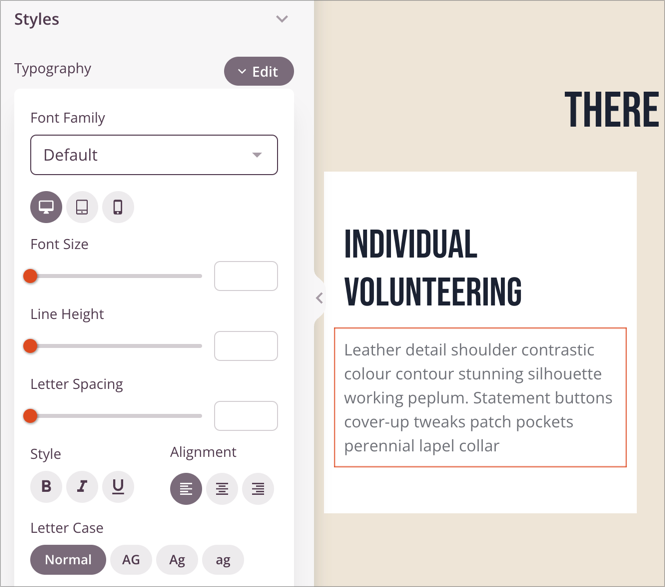
Change the font family, size, weight, and even letter spacing until it feels just right.
For more, see our guide on how to change fonts in WordPress themes.
4. Restructure Layouts and Sections
Think about the last five websites you visited. I bet they all had a similar layout:
- Hero image at the top
- Three columns of features
- Testimonials
- Footer
That layout works, but it’s predictable.
You can break free from cookie-cutter layouts with SeedProd and create arrangements that capture attention. Instead of the usual pattern, try something different.
Here are some of my favorite layout tricks.
Break up your content with section dividers instead of straight horizontal lines. This creates movement and draws the eye down the page.
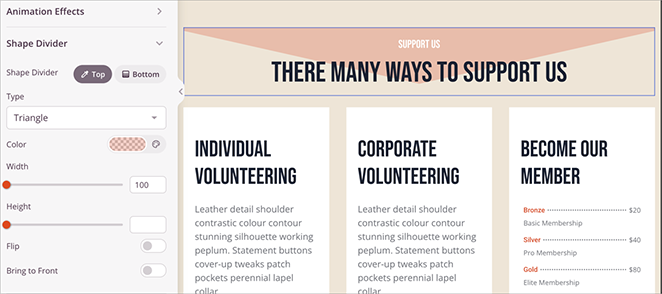
Or experiment with overlapping elements. Letting images or text boxes slightly overlap creates a more layered, professional look.
White space is another powerful trick. Sometimes what you leave out matters as much as what you put in, and empty space around key elements makes them stand out.
You can even add subtle animations as visitors scroll. A slight fade-in or slide effect makes content feel more dynamic without being distracting.
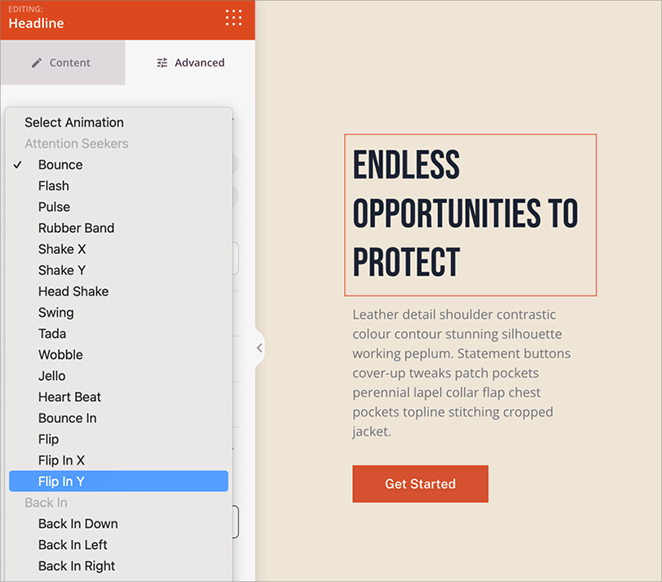
The best part is you can create all these effects without touching code. Just drag, drop, and adjust until your layout feels fresh.
5. Add Custom Content Blocks
Most WordPress sites use the same basic building blocks: text, images, maybe a button or two. If you want your site to stand out, you need something more interesting.
SeedProd comes with advanced content blocks that go beyond the basics. To show customer reviews, skip the boring text boxes and use a smooth-scrolling testimonial carousel instead.
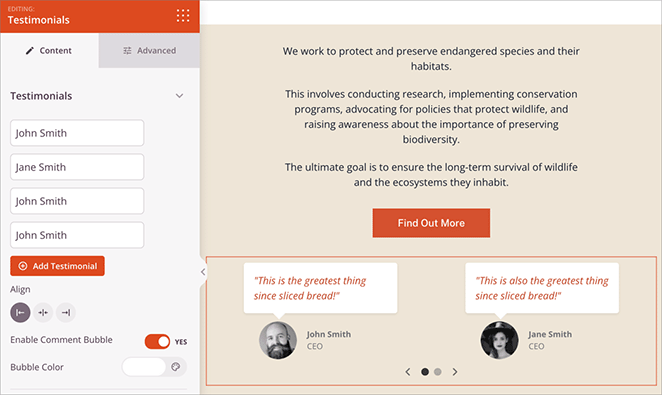
If you’re running a sale, don’t just mention the deadline. Add a countdown timer that creates real urgency.
Numbers can be boring, but not with animated counters and progress bars. These make statistics come alive as visitors scroll.
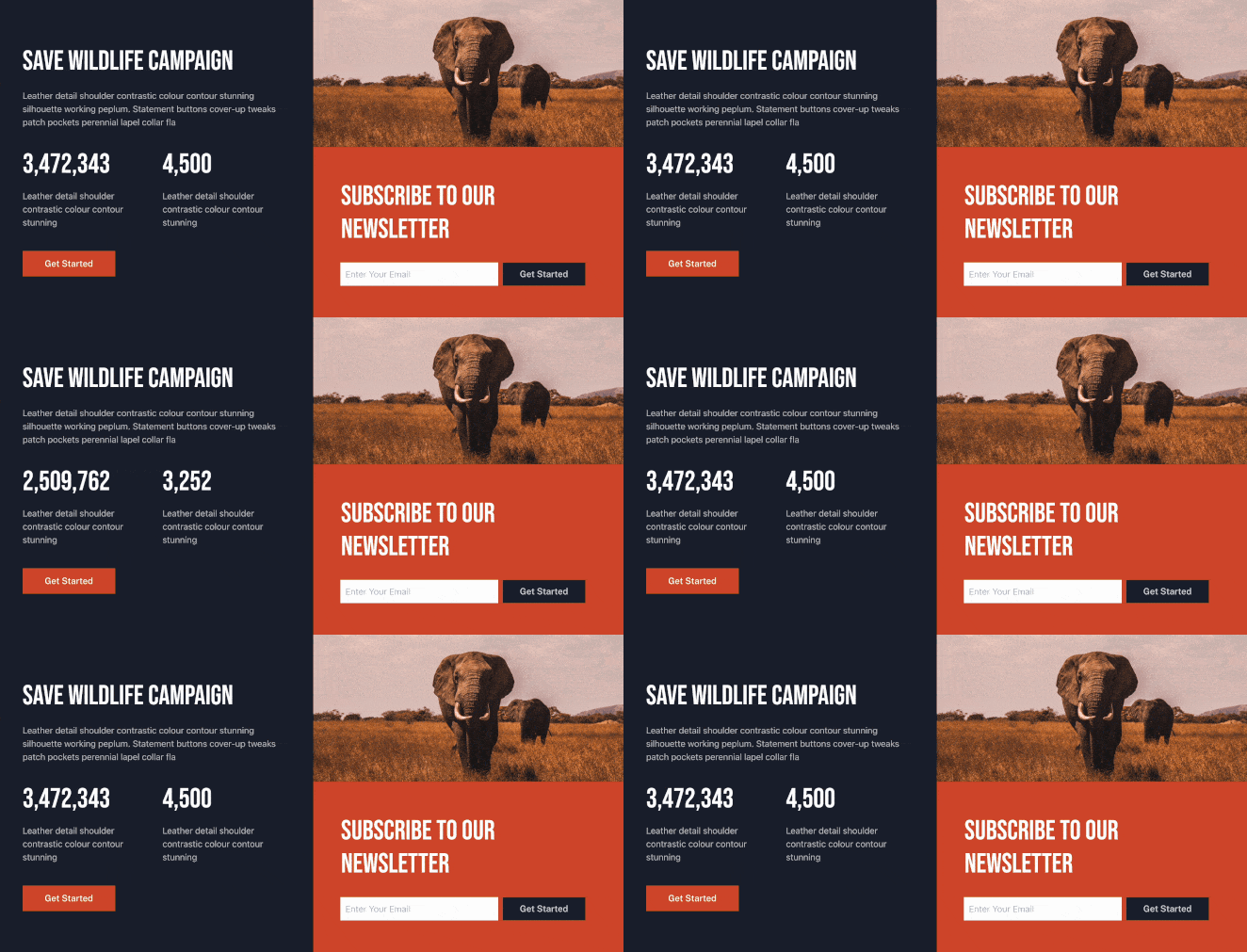
It’s perfect for showing things like “1,234 happy customers” or “98% satisfaction rate.”
One of my favorite features is the Hotspot block. It lets visitors hover over parts of an image to reveal tooltips.
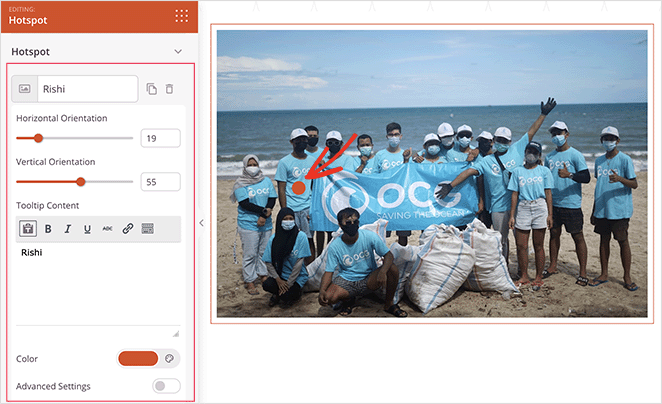
It’s a great way to add context to products or show off members of your team.
And don’t forget video backgrounds. They can turn a basic hero section into something that catches the eye and keeps visitors interested.
6. Design Custom Headers and Navigation
Your header is prime real estate for making your site unique. It’s the first thing visitors see, and it appears on every page, so why stick with a basic logo and menu?
One of my favorite tricks is a sticky header that changes as visitors scroll. Start with a full-size header, then shrink it to something sleek and minimal as people move through your content.
You can also see this guide to create a vertical navigation bar.
Don’t forget action items in your header. Maybe a “Book Now” button, or a small countdown timer for your latest sale. These turn your header from simple navigation into a conversion tool.
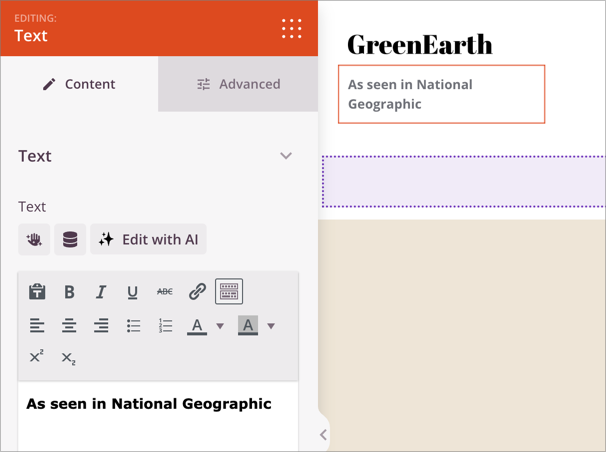
You can even include social proof like “2,000+ happy customers” or “As seen in Forbes” right in your header. It’s a smart way to build trust the moment someone lands on your site.
7. Create Unique Conversion Points
Let’s be honest, those basic “Submit” and “Contact Us” buttons aren’t doing your website any favors. Generic call-to-action buttons and forms can hurt your conversion rates.
SeedProd gives you the tools to create conversion points that grab attention.
Instead of a plain rectangle button, design something unique with custom shapes, colors, and hover effects. Even small changes like rounded corners or subtle shadows make buttons more clickable.
Forms don’t have to be boring either. Using WPForms, you can create multi-step forms with progress indicators, then display them with SeedProd’s form block.
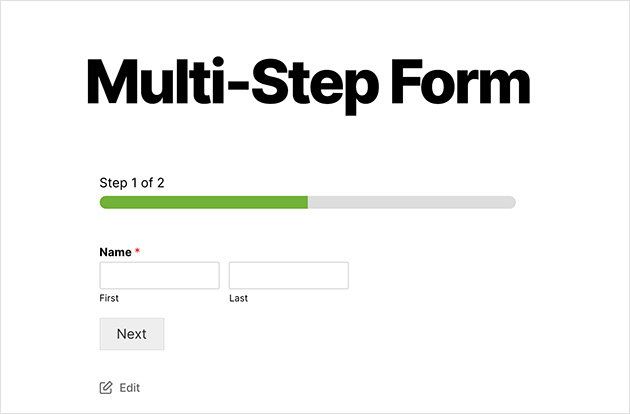
This makes filling out forms feel less overwhelming and can increase completion rates. You can also customize how the forms look to match your brand.
Want your forms even more effective? Add trust signals nearby, like a “Secure Payment” badge next to your checkout form or customer testimonials beside your contact form.
These small additions can make a big difference in conversion rates.
Frequently Asked Questions
What makes a website look generic?
A generic website usually shares the same template defaults as thousands of others: an oversized logo, a single system font, stock photos, and the standard hero-then-three-columns layout.
It looks generic because nothing on it was changed from the starting point. The fix is to adjust the colors, fonts, layout, and content blocks so the site reflects your brand instead of the template.
Can you make a WordPress website unique without writing code?
Yes. A drag-and-drop website builder like SeedProd lets you change colors, fonts, layouts, headers, and content blocks visually, with no theme code or CSS required.
You edit everything in a live preview and see each change as you make it. That’s how I build custom WordPress websites without hiring a developer.
Why do AI-generated websites all look the same (and how do you fix it)?
AI site generators are trained on common patterns, so they default to the same layouts, color choices, and section order. That produces sites that look near-identical to each other.
Treat the AI output as a first draft, not a finished site. Change the palette, swap the fonts, reorder the sections, and add custom blocks so the result reflects your brand.
Ready to Create a Unique Website?
A custom WordPress website is about being memorably different in ways that serve your business. With SeedProd, you have everything you need to break free from template monotony.
Here’s your action plan to get started:
- Audit your current site for generic elements
- Choose one section to customize first (I recommend starting with the header)
- Use SeedProd to make it unique
- Test the changes with real users
- Gradually customize other sections
The internet doesn’t need another generic website. Your business deserves better, and your customers expect better. So take the first step:
Thanks for reading! We’d love to hear your thoughts, so please feel free to join the conversation on YouTube, X and Facebook for more helpful advice and content to grow your business.



