

TL;DR: How to Start a Podcast with WordPress Starting a podcast with WordPress takes 10 steps, from defining your niche to distributing on Apple Podcasts and Spotify. Here’s the process:
- Define your niche and format – Narrow your topic and decide on solo, co-hosted, or interview format.
- Set up your WordPress site – Get hosting and a domain, install WordPress, and choose a theme.
- Choose dedicated podcast hosting – Use a media host like Blubrry, Buzzsprout, or Castos for your audio files and RSS feed.
- Pick your equipment – A USB mic and headphones are enough to start; upgrade as your show grows.
- Plan, record, and upload – Script your episodes, record in Audacity or GarageBand, and upload to your podcast host.
- Publish and distribute – Add a podcast plugin to WordPress, then submit your RSS feed to Apple Podcasts, Spotify, and other directories.
You’ve got something worth saying. But between choosing equipment, figuring out RSS feeds, and getting listed on Spotify, starting a podcast can feel like a technical maze before you’ve recorded a single word.
Over 460 million people listen to podcasts worldwide, and 63% have bought something promoted in a show. In this guide, I’ll walk you through how to start a podcast with WordPress in 10 steps, from choosing your niche and equipment to publishing episodes and growing your audience.
Steps to start a podcast on WordPress:
- Step 1: Define Your Podcast Niche and Format
- Step 2: Set Up Your Podcast Website with WordPress
- Step 3: Choose a Podcast Hosting Service
- Step 4: Pick Your Podcasting Equipment
- Step 5: Plan and Script Your Episodes
- Step 6: Record and Edit Your Podcast
- Step 7: Upload Your Files to Your Hosting Service
- Step 8: Publish Your Podcast in WordPress
- Step 9: Distribute Your Podcast on Listening Apps
- Step 10: Promote and Grow Your Podcast Audience
- FAQs on Starting a Podcast in WordPress
Step 1: Define Your Podcast Niche and Format
Before you set up your podcast website, you need a clear niche and format. With thousands of shows available, this helps you stand out and attract the right listeners.
Start by asking yourself these questions:
- What will your podcast be called?
- Who is your target audience?
- What topics will you cover?
- How is your show different from others?
- Will it be solo, co-hosted, or interview-based?
- What style will you use: conversational, storytelling, or educational?
For example, instead of a broad “personal development” podcast, you might focus on productivity for remote workers or leadership tips for small teams. Narrowing down helps you create focused episodes that keep listeners coming back.
Remember: your unique voice is your biggest asset. Even if others cover a similar topic, your perspective and authenticity will make your show stand out.
Step 2: Set Up Your Podcast Website with WordPress
To publish your podcast and grow an audience, you’ll need a website. A site gives you a home base for episodes, show notes, and promotion.
WordPress.org is the best platform for podcasters because it comes with built-in RSS feeds, works with powerful plugins, and lets you fully monetize your content. Unlike WordPress.com, you’re free to run ads, add sponsors, and use affiliate links.
Here’s what you’ll need to get started:
- Domain name – Your website’s address (example: mypodcast.com).
- Web hosting – Where your site files are stored online.
Most hosts cost around $7-10 per month, with domains starting at about $15 per year. You can get both in one place through providers like Bluehost, which is officially recommended by WordPress.
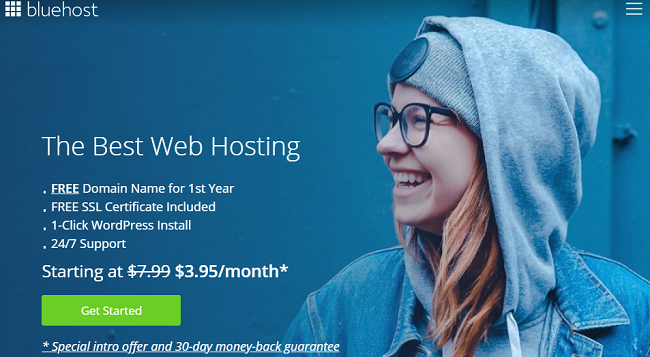
Once WordPress is installed, you can customize your site with WordPress plugins and WordPress themes.
If you want a quick, professional look for your podcast website, SeedProd makes it easy to design a custom WordPress theme without coding.
Step 3: Choose a Podcast Hosting Service
Your WordPress web host isn’t built to stream large audio files to thousands of listeners at once. A dedicated podcast hosting service handles that, storing your episodes and generating the RSS feed that apps like Apple Podcasts and Spotify use to deliver your show.
The professional setup keeps your audio on a media host and your website on WordPress for the feed, show notes, and branding. This is what it means to “own your RSS feed” — you control it, not the platform.
Here are some popular podcast hosting services for WordPress users:
| Blubrry | Best for WordPress integration (PowerPress plugin, detailed analytics) |
| Buzzsprout | Beginner-friendly with automatic episode optimization |
| Castos | Advanced features plus a dedicated WordPress plugin (Seriously Simple Podcasting) |
| Spotify for Podcasters | Free option with direct distribution to Spotify and other platforms |
If you want deep WordPress integration, Blubrry is a solid choice. If you’re just starting out, Buzzsprout is simple to set up and includes a free plan. For scaling, Castos offers growth features like private subscribers and video podcast hosting.
Once you sign up, your host will give you a podcast RSS feed link. This feed is what you’ll submit to directories later and connect to WordPress to display your episodes.
Step 4: Pick Your Podcasting Equipment
You don’t need a full studio to start a podcast. A good USB microphone and headphones are often enough to get going. Clear audio is critical — if your podcast sounds poor, listeners may not come back.
Here are some beginner-friendly microphones podcasters love:
| Microphone | Best For | Pros | Cons | Price |
| Samson Go | Budget setup | Portable Easy to use | Switching modes can be tricky | $39 |
| Blue Yeti | Most versatile | 4 pickup patterns Solid build XLR + USB | Bulky on desks | $118 |
| HyperX QuadCast | USB convenience | Plug-and-play Mute button Great design | Can boost “s” sounds | $134 |
| Blue Ember | Studio setups | Professional sound Good off-axis rejection | Needs phantom power Pop filter recommended | $99 |
Alongside a mic, you may also want:
- Pop filter – reduces “p” and “s” sounds
- Shock mount – prevents desk vibrations
- Mic arm – saves desk space
- Closed-back headphones – for clear monitoring
Start simple and upgrade later as your podcast grows. Many successful shows began with just one reliable USB mic and free editing software.
Step 5: Plan and Script Your Episodes

Before you hit record, take time to plan your episodes. A little preparation makes your show flow better and keeps listeners engaged.
Here are the key things to decide for your first episodes:
- Content: Outline the main talking points for each episode so you don’t drift off track.
- Length: Most podcasts run 20-40 minutes, but it depends on your audience. Aim for quality over time limits.
- Extra media: Add intro/outro music or sound effects to make your show feel polished. Free sources include Free Music Archive, YouTube Audio Library, and Pixabay Music.
- Script/Storyboard: Write a simple script or bullet points. This keeps the flow natural but professional.
Step 6: Record and Edit Your Podcast
Once you’ve planned your episodes, it’s time to record. You’ll need recording software to capture your voice and editing tools to polish the audio.
Here are some popular choices:
- Audacity (free, Windows/Mac/Linux) – Open-source and beginner-friendly
- GarageBand (free on Mac) – Simple for Apple users
- Adobe Audition (paid) – Professional features for advanced editing
- Hindenburg (paid) – Popular among journalists and podcasters
For beginners, Audacity is a solid choice. Install it, create a new project, and hit the red button to start recording. When you’re done, export the file as MP3 for the best balance of quality and small file size.
Here’s a quick video walkthrough if you need help:
Pro tip: name your files consistently, such as episode-01.mp3, episode-02.mp3, and so on. This keeps your podcast library organized.
Once you’ve edited and saved your first episodes, you’re ready to upload them to your podcast hosting platform.
Step 7: Upload Your Files to Your Hosting Service
After recording, upload your podcast episodes to your podcast hosting platform. This creates the feed that podcast apps use to deliver your show.
The process is similar across most hosts: log in to your hosting dashboard, find the episode upload section, add your MP3 file with a title and description, then save to generate the episode link.
Other hosts like Buzzsprout and Castos follow almost the same steps, with options to schedule episodes for later release.
Before submitting to directories: you’ll need a podcast cover image. Apple Podcasts and Spotify both require a 3000x3000px JPG or PNG file. Prepare this before moving to Step 9.
Once uploaded, your hosting service will generate a podcast RSS feed. This feed is what you’ll connect to WordPress and later submit to directories like Apple Podcasts and Spotify.
Step 8: Publish Your Podcast in WordPress
With your episodes uploaded to a podcast host, it’s time to publish them on your WordPress site. This is where plugins come in — they connect your feed and display a podcast player for visitors.
Three of the most popular podcast plugins for WordPress are:
- PowerPress by Blubrry – Free, robust features, integrates directly with Blubrry hosting
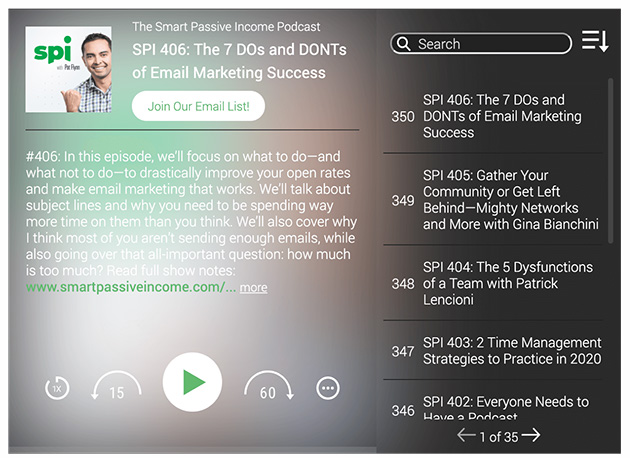
- Fusebox Player – Stylish, mobile-friendly player with both free and pro options
- Seriously Simple Podcasting – Free plugin from Castos that auto-creates episode posts and integrates directly with Castos hosting
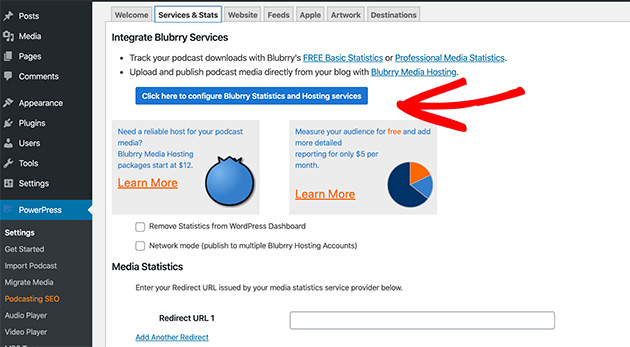
If you’re hosting with Blubrry, install PowerPress to link your account. Go to PowerPress » Settings and enter your Blubrry details to sync your feed. Once connected, you can add episodes directly to posts or pages.
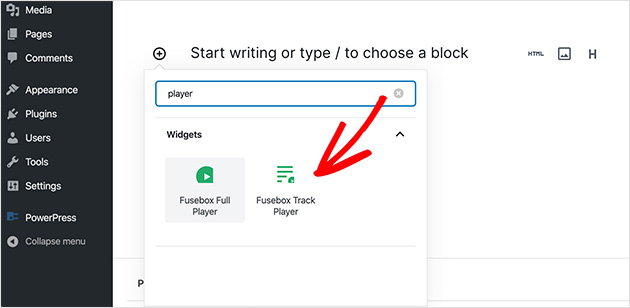
If you prefer a customizable player, install the Fusebox Player.
After activation, go to Settings » Fusebox Player, paste your feed URL, and adjust the design (light/dark mode, colors, and button styles).
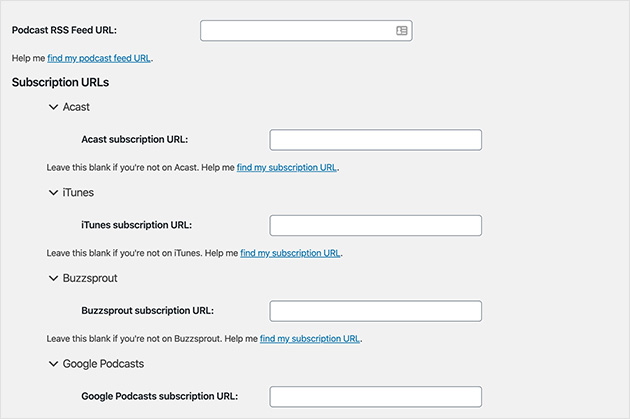
Fusebox lets you embed full podcast feeds or single episodes with a shortcode.
Pro tip: Create a dedicated Podcast category in WordPress so your episodes stay separate from blog content. This also gives you a clean archive page for all episodes.
Step 9: Distribute Your Podcast on Listening Apps
Publishing your podcast on WordPress is just the start. To reach a wider audience, submit your show to the major podcast directories where listeners spend their time.
Here are the most popular platforms to submit your podcast:
- Apple Podcasts – The largest directory, essential for reaching iPhone users
- Spotify for Podcasters – Free hosting option with direct access to Spotify listeners
- YouTube Podcasts – Reach video-first audiences on the world’s second-largest search engine
- Amazon Music & Audible – Growing directory for voice-activated listening
- iHeartRadio – Popular U.S. radio network and podcast hub
- Pandora – Expands reach to music-first audiences
Each platform will ask for your podcast’s RSS feed (provided by your hosting service). Once approved, new episodes you publish in WordPress will automatically appear in these apps.
Tip: Approval can take a few days. Submit to multiple directories early so your podcast is available everywhere by the time you promote your first episodes.
Step 10: Promote and Grow Your Podcast Audience
Launching your podcast is only the first step. To build a loyal audience, you’ll need to promote your episodes consistently.
Here are some proven ways to grow your podcast:
- Create a podcast landing page: A single page with your show description, subscribe buttons, and latest episodes. Learn how to build a podcast landing page here.
- Build an email list: Add signup forms to your site so listeners never miss an episode.
- Share on social media: Turn highlights into short clips, audiograms, or reels to boost reach.
- Cross-promote: Appear on other podcasts or invite guests with their own audiences.
- Encourage reviews: Ask listeners to leave ratings on Apple Podcasts and Spotify to improve visibility.
With consistent promotion, your podcast can become a powerful channel to attract new customers, build authority, and grow your brand.
How to Make Money from Your Podcast
Once your show has a consistent audience, there are three realistic monetization paths.
- Listener memberships – Offer early access or bonus episodes for a monthly fee. Platforms like Castos integrate directly with membership tools, so the setup is straightforward.
- Sponsorships – Niche shows with engaged listeners can attract sponsors even at a few hundred downloads per episode. Engagement matters more than raw download numbers.
- Email list – Build a list of subscribers who trust you, then promote your own products, services, or digital downloads directly to them.
A dedicated podcast landing page is the foundation for all three. It’s where sponsors evaluate your show, where visitors subscribe, and where you capture emails from listeners who want more.
SeedProd makes it easy to build that page without coding. You can add subscribe buttons, embed your latest episodes, and include a signup form to start growing your email list from day one.
FAQs on Starting a Podcast in WordPress
Do I need podcast hosting if I already have a WordPress site?
Yes. Web hosting and podcast hosting serve different purposes. Your WordPress host powers your website, but a dedicated podcast host stores large audio files and generates your RSS feed for distribution. Hosting audio directly on your WordPress server can slow your site and eat through your bandwidth. Services like Blubrry, Buzzsprout, and Castos handle storage and feed generation so your WordPress site stays fast.
What’s the best podcast plugin for WordPress?
It depends on your setup. PowerPress by Blubrry integrates directly with Blubrry hosting and includes detailed analytics. Fusebox Player is stylish and easy to embed in posts. Seriously Simple Podcasting (from Castos) automatically creates episode posts and integrates with Castos hosting. All three are free to start and work with any podcast hosting service.
How do I create a podcast page in WordPress?
The easiest way is to use a drag-and-drop visual website builder like SeedProd to build a dedicated podcast landing page. You can add your show description, episode player, subscribe links, and an email opt-in form. Alternatively, create a WordPress category called “Podcast” and let your podcast plugin auto-generate an archive page with all your episodes.
Can I host my podcast audio files directly on WordPress?
Technically yes, but it’s not recommended. WordPress hosting isn’t built to stream large audio files to many listeners at once. Direct hosting can slow your site, spike your server load, and exhaust your bandwidth limits quickly. A dedicated podcast host like Blubrry or Buzzsprout is purpose-built for this and keeps your WordPress site performing well.
How do I make money from my podcast?
The three most common paths are listener memberships (early access or bonus episodes), sponsorships (paid mentions in episodes), and email marketing (promoting your own products or services to subscribers). A podcast landing page built with SeedProd gives you the foundation for all three — it captures emails, showcases episodes, and gives sponsors a professional home to evaluate your show.
You’ve now seen how to start a podcast with WordPress, from choosing your niche and equipment to publishing episodes and sharing them on platforms like Apple Podcasts and Spotify. With these steps, you can launch your show confidently and start building a loyal audience.
Remember, the key is consistency. Keep publishing episodes, stay authentic, and promote your podcast so more people discover it.
If you’re ready to grow faster, create a podcast landing page with SeedProd. In just a few clicks, you can showcase your episodes, add subscribe buttons, and capture emails to turn listeners into fans.
You may also find the following guides helpful:
- How to Write a Welcome Page for Your Website
- How to Create a New Website Launch Marketing Plan
- How to Create an Affiliate Program in WordPress
- Social Media Lead Generation Strategies You Need to Try
Thanks for reading! We’d love to hear your thoughts, so please feel free to join the conversation on YouTube, X and Facebook for more helpful advice and content to grow your business.




