



A WordPress review plugin lets you collect and display customer reviews on your site. It helps you build trust, improve your SEO, and make your business look more credible fast.
If you run an online store, restaurant, or service business, adding real customer feedback can increase conversions and help new visitors feel confident choosing you.
In this guide, I’ll walk you through the best WordPress review plugins to help you collect feedback, improve SEO, and display reviews from platforms like Google and Yelp.
Quick Summary: Top WordPress Review Plugins
| # | Tool / Product | Best For | Free Plan | Starting Price |
|---|---|---|---|---|
| 🥇 | SeedProd Business Reviews Block | Easy drag-and-drop reviews | ✅ | From $39.50/year |
| 🥈 | Smash Balloon Reviews Feed | Multi-platform review feeds | ❌ | From $49/year |
| 🥉 | UserFeedback | Quick on-site surveys | ❌ | From $49.50/year |
| 4 | WP Review Pro | Deep product review boxes | ❌ | From $67/year |
| 5 | All in One SEO | Better review SEO | ✅ | From $49.60/year |
| 6 | WP Customer Reviews | Simple free reviews | ✅ | Free |
| 7 | Site Reviews | Amazon-style reviews | ✅ | From €89/year |
| 8 | Customer Reviews for WooCommerce | Stronger WooCommerce reviews | ✅ | From $49.99/year |
Why Use WordPress Review Plugins?
A review plugin makes it easy to collect, manage, and display customer feedback in a way that builds trust and improves your site’s visibility.
Here are the main benefits:
- Boosts credibility: Showing real customer reviews can increase conversions by up to 270%, according to research from the Spiegel Research Center.
- Improves SEO: User-generated content can help your pages rank higher, especially when paired with SEO best practices.
- Increases engagement: Adding reviews and testimonials encourages users to interact with your site.
- Gives you insights: Reviews tell you what customers like, dislike, and want more of.
- Helps you stand out: A strong reviews section can separate your business from similar competitors.
Overall, a review plugin gives you an easy way to show real experiences from real customers, which is one of the strongest trust signals you can add to your website.
How I Tested These WordPress Review Plugins
Each plugin was tested on a clean WordPress site to check how easy it was to set up, how well it displayed real reviews, and how smoothly it fitted into a normal workflow.
- Installed the plugin on a fresh WordPress setup and walked through the onboarding process.
- Added sample pages and WooCommerce products to see how reviews appeared in different layouts.
- Connected Google and Yelp accounts where supported to check how reliably reviews imported.
- Explored block settings, design controls, and shortcode options to test flexibility without custom CSS.
- Checked moderation tools, schema options, and any limits in the free versions.
These checks made it clear which tools are easiest to use, most flexible, and best suited for different kinds of WordPress sites.
Best WordPress Review Plugins Compared
Choosing the right review plugin can be confusing when each one promises similar features. The tools below stood out for ease of use, clear review displays, and smooth setup.
I compared how they handled imports, design controls, schema, and overall flexibility so you can see which one fits your site best.
Here’s how each plugin performed.
1. SeedProd Business Reviews Block

| Pricing: From $39.50/year |
| Free Plan / Trial: Free plan available |
| Standout Features: |
| 🔹 Drag-and-drop reviews block 🔹 Google and Yelp review import 🔹 Layout, colors, and carousel customization |
| Rating: A |
| Best For: WordPress users who want flexible, branded review sections |
SeedProd is a visual WordPress website builder that includes a Business Reviews block to help you display Google and Yelp reviews anywhere on your site. It gives you an easy way to pull in social proof without touching code.
The block works by connecting your Google Places or Yelp account, then letting you drag the reviews widget into any page or template. You can adjust colors, fonts, layouts, and even turn reviews into a carousel to match your brand.
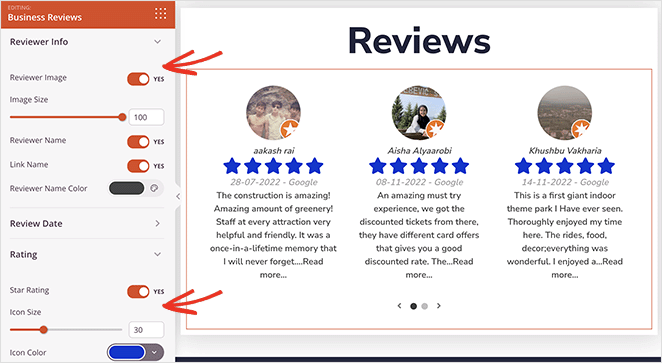
In my testing, the biggest win was speed. I placed a reviews section on a landing page in minutes, and the live preview made styling changes easy. I also liked that I could pair the Business Reviews block with SeedProd’s Star Rating and Testimonials blocks for a more complete social proof section.
It also works smoothly with WooCommerce, which made customizing product review layouts simple. If you want a branded and flexible reviews display, this block fits well into SeedProd’s existing drag-and-drop workflow.
Pros
- Easy drag-and-drop placement anywhere on your site
- Pulls reviews directly from Google Places and Yelp
- Strong design controls, including colors, fonts, and layouts
- Works with WooCommerce for product review customization
Cons
- Google and Yelp integrations require API setup
- Advanced design options require the premium version
- No built-in way to reply to reviews from WordPress
My Verdict: SeedProd’s Business Reviews block is the best fit if you want an easy, visual way to place branded review sections across your site, though the most powerful customization features are in the paid plans.
2. Smash Balloon Reviews Feed

| Pricing: From $49/year |
| Free Plan / Trial: No |
| Standout Features: |
| 🔹 Google, Yelp, TripAdvisor, Facebook reviews 🔹 Layouts like list, carousel, masonry 🔹 Advanced filtering and moderation |
| Rating: A |
| Best For: Sites pulling reviews from multiple platforms |
Smash Balloon Reviews Feed is a dedicated plugin for displaying reviews from Google, Yelp, TripAdvisor, and Facebook in clean, customizable feeds. It’s designed to give you a hands-off way to stream fresh social proof to your website.
You set it up by connecting your review platforms, choosing a layout, and dropping the feed anywhere with a block or shortcode. It offers helpful options like list, grid, masonry, and carousel layouts, all without touching code.
When I tested the plugin, the filtering stood out the most. I could hide low-star reviews, pin great ones to the top, and control exactly what appeared. The feed styling also felt intuitive, with quick tools for colors, spacing, and typography.

The biggest benefit for me was automation. New reviews pulled in automatically, so the website always looked fresh. If you collect reviews across several platforms, this plugin removes the need to manage them manually.
Pros
- Supports Google, Facebook, Yelp, and TripAdvisor
- Multiple layout styles with no coding needed
- Advanced filters to hide or highlight specific reviews
- Fully responsive across devices
Cons
- Requires API setup for some platforms
- No free version for basic use
- Deep styling options can feel overwhelming for beginners
My Verdict: Smash Balloon Reviews Feed is the best choice if you want a hands-free, multi-platform review display that updates automatically, though the lack of a free plan may limit very small sites.
For more details, see our Smash Balloon review.
3. UserFeedback

| Pricing: From $49.50/year |
| Free Plan / Trial: No |
| Standout Features: |
| 🔹 Popup surveys and feedback prompts 🔹 Pre-made templates (NPS, engagement, eCommerce) 🔹 Targeting rules and shortcode embeds |
| Rating: A |
| Best For: Collecting on-site feedback and quick customer sentiment |
UserFeedback helps you collect on-site feedback with popup surveys and quick questions. It doesn’t pull in Google or Yelp reviews. Instead, it lets you gather internal insights from your visitors so you can improve your website or product.
You start by choosing a template, customizing the questions, and deciding when the survey should appear. The targeting rules make it easy to show surveys only to specific users, pages, or behaviors, and you can embed forms with a shortcode if you prefer a static placement.
When I tested it, the setup wizard saved a lot of time. I launched an NPS survey in minutes, and the real-time responses made it simple to spot what users liked or disliked. The templates were also helpful because I didn’t have to write questions from scratch.
I also liked that the surveys didn’t feel intrusive. The triggers were smooth, and I could control exactly when prompts appeared. If you need quick insights without deep analytics tools, UserFeedback is a lightweight and effective solution.
Pros
- Easy setup with templates for common survey types
- Flexible targeting rules for behavior-based triggers
- Shortcode support for embedded forms
- Great for collecting quick, focused feedback
Cons
- No free version available
- Not ideal for large, multi-step survey projects
- Requires another analytics tool if you want long-term trend tracking
My Verdict: UserFeedback is the best option for quick, targeted onsite surveys that help you understand visitor intent fast, though it’s not built for complex multi-page research studies.
4. WP Review Pro

| Pricing: From $67/year |
| Free Plan / Trial: No |
| Standout Features: |
| 🔹 Multiple rating systems (stars, points, percentages) 🔹 Google rich snippets support 🔹 Custom review templates and criteria |
| Rating: B+ |
| Best For: Bloggers and product reviewers needing structured review boxes |
WP Review Pro is a review-focused WordPress plugin that lets you create detailed product and service reviews with customizable rating systems and rich snippets. It’s built for sites that publish structured, standalone reviews.
You can pick from several rating types like stars, percentages, or points, then adjust the review layout and add custom criteria. The plugin also includes templates that help you build a consistent review format across your site.
In my tests, the rich snippets support worked smoothly. Adding schema markup helped my review posts stand out in search results, and the review box looked clean without requiring design skills. The ability to insert affiliate links into the review fields was a helpful touch for monetized blogs.
The interface is simple, but I found that styling options vary a lot between templates. Some themes integrate better than others, so you may need minor adjustments to match your site’s design. Still, it’s one of the better plugins for deep review formatting.
Pros
- Rich snippets help reviews stand out in Google results
- Supports multiple rating formats and custom criteria
- Useful templates for consistent review layouts
- Built-in option to include affiliate links inside reviews
Cons
- No free version available
- Template styling depends on theme compatibility
- May feel heavy if you only need simple star ratings
My Verdict: WP Review Pro is a strong fit for review-heavy blogs that need clear rating boxes and Google-rich snippets, though it’s more than you need for simple testimonials or basic star ratings.
5. All in One SEO
| Pricing: Free plan, Premium from $49.60/year |
| Free Plan / Trial: Yes |
| Standout Features: |
| 🔹 Product review schema 🔹 Title and meta tools 🔹 XML sitemaps and social metadata |
| Rating: A |
| Best For: Improving SEO visibility for review-rich content |
All in One SEO is a full SEO toolkit for WordPress that includes built-in product review schema features to help your reviews appear correctly in Google. It’s ideal if your goal is to boost search visibility rather than display reviews on the front end.
You can enable review schema directly inside the post editor, and AIOSEO auto-detects the right type based on your content. It lets you enter product details, ratings, and review metadata so search engines can index your content more accurately.
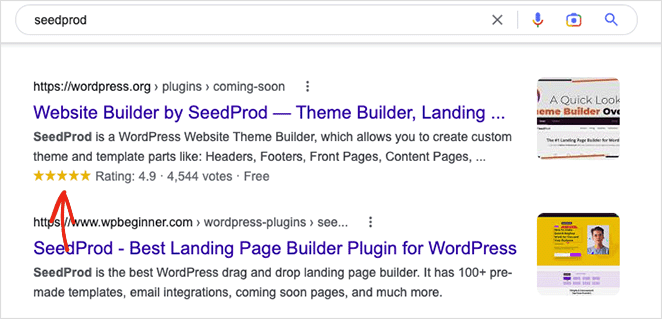
In my testing, the schema setup was quick and reliable. Google picked up the structured data within a couple of days, and the star-rating snippets noticeably improved click-through rates. AIOSEO also gives clear guidance on missing fields so you don’t accidentally publish incomplete schema.
The plugin is also handy if you want an all-in-one SEO solution. Beyond schema, I used its title editor, sitemap tools, and social metadata settings to keep review posts optimized without juggling multiple plugins.
Pros
- Easy built-in product review schema
- Improves visibility for review-heavy content
- Includes full SEO suite beyond schema
- Clear guidance for required schema fields
Cons
- Premium upgrade required for advanced schema types
- Does not display reviews on the front end
- Feature set can feel overwhelming for beginners
My Verdict: All in One SEO is perfect if you already publish reviews and want them to rank better on Google, but it’s not meant for collecting or displaying reviews onsite.
6. WP Customer Reviews

| Pricing: Free |
| Free Plan / Trial: Yes |
| Standout Features: |
| 🔹 Custom review submission forms 🔹 Shortcode-based display options 🔹 Moderation and anti-spam tools |
| Rating: B+ |
| Best For: Simple onsite reviews without extra costs |
WP Customer Reviews is a free plugin that lets you collect and display customer reviews on any page or post. It focuses on simplicity, giving you clean forms and basic layouts without needing a premium upgrade.
The plugin works by adding a customizable review submission form to your site via shortcode. You can enable custom fields, rating scales, and form styling so the review section matches your branding. It also supports schema markup to improve search appearance.
When I tested it, I liked how lightweight it felt. The moderation queue kept spam out, and Google reCAPTCHA helped filter bot submissions. It also played nicely with caching plugins, which isn’t always true for form-based tools.
The design options are limited compared to paid plugins, and the layout can look minimal unless you apply custom CSS. Still, for a free solution that’s stable and simple to use, it performs well.
Pros
- Completely free with no paid upgrades
- Customizable review submission forms
- Moderation tools help prevent spam
- Supports review schema for better SEO visibility
Cons
- Design customization is limited
- Relies on shortcodes rather than visual blocks
- No integration with third-party review platforms
My Verdict: WP Customer Reviews is a solid free option for collecting basic onsite reviews, best suited for simple sites that don’t need advanced styling or multi-platform integrations.
7. Site Reviews

| Pricing: Free, Premium addons from €89 |
| Free Plan / Trial: Yes |
| Standout Features: |
| 🔹 Custom review forms 🔹 Blocks, shortcodes, and widgets 🔹 Category and assignment options (products, pages, posts) |
| Rating: A- |
| Best For: Sites needing flexible, Amazon-style review sections |
Site Reviews is a powerful free plugin that lets you collect and display reviews across different parts of your website, including products, pages, posts, and custom post types. It works similarly to Amazon-style review systems with star ratings and structured review boxes.
You can build a custom review form using its block or shortcode, then display reviews anywhere with widgets or Gutenberg blocks. The settings panel gives you control over review criteria, submission rules, and how reviews are grouped or assigned.
When I tested it, I found the interface clean and the options easy to navigate. The form builder was flexible, and the ability to assign reviews to specific pages or products made the system feel more organized than many free plugins. It also integrates well with popular page builders, which made placement simple.
The only thing to note is that advanced features, like review notifications and enhanced widgets, require premium addons. Still, the free plugin is generous and covers most needs for small business sites and review-heavy blogs.
Pros
- Customizable review forms that work with Gutenberg and shortcodes
- Lets users review specific pages, products, or posts
- Clean interface with organized review management
- Works with popular page builders like Elementor
Cons
- Premium features require paid addons
- Styling flexibility is limited without custom CSS
- Setup can feel deeper than needed for very simple sites
My Verdict: Site Reviews is one of the best free review plugins for sites needing flexible review placement and structured layouts, especially if you want a system that feels more like Amazon or Yelp.
8. Customer Reviews for WooCommerce

| Pricing: Free, Pro from $49.99/year |
| Free Plan / Trial: Yes |
| Standout Features: |
| 🔹 Enhanced WooCommerce product reviews 🔹 Image upload for UGC 🔹 Q&A section like Amazon |
| Rating: A- |
| Best For: WooCommerce stores wanting stronger social proof |
Customer Reviews for WooCommerce is a reviews plugin built specifically for online stores. It enhances WooCommerce’s native review system with richer features like verified reviews, photo uploads, and a full Q&A section for shoppers.
The plugin adds customizable review forms to your product pages, letting customers upload images, vote on reviews, and leave detailed ratings. You can also send automated follow-up emails after purchases to encourage more reviews.
During testing, the photo upload feature made a big difference. User-generated images instantly built trust, especially for products where visuals matter. The Amazon-style Q&A box also helped answer common questions without relying on support tickets.
The free version is strong, but the Pro add-on unlocks advanced automation and coupon incentives. If your store relies heavily on reviews to drive conversions, the upgrade is worth considering.
Pros
- Adds rich review features to WooCommerce product pages
- Supports customer photo uploads for stronger social proof
- Includes an Amazon-style Q&A section
- Automated review reminder emails and coupons available in Pro
Cons
- Some of the best features require the Pro version
- Design depends heavily on your WooCommerce theme
- Setup includes several configuration screens
My Verdict: Customer Reviews for WooCommerce is the top choice for WooCommerce stores that want richer, more trustworthy product reviews, especially if you want photo uploads and a Q&A section.
Which WordPress Review Plugin is Best?
The best WordPress review plugin depends on your specific business needs. However, our favorite solutions are a combination of SeedProd for its drag-and-drop builder, Smash Balloon for multiple review feeds, and All in One SEO for its product schema markup.
FAQs About WordPress Review Plugins
I hope you’ve enjoyed this article and it helped you find the best WordPress review plugin for your website. You might also like the following WordPress tutorials to help grow your business:
- How to duplicate a page in WordPress
- Best image Hotspot plugins for WordPress
- How to create landing page with payment gateway
Thanks for reading! We’d love to hear your thoughts, so please feel free to join the conversation on YouTube, X and Facebook for more helpful advice and content to grow your business.



