

When I first tried WPBakery, it was one of the only WordPress page builders available. But a lot has changed since then, and in this updated WPBakery review, I’ll show you exactly how it holds up in 2026.
I installed it on a test site, built pages from scratch and from templates, and tested it against alternatives I use every day. Here’s what I found.
- What Is WPBakery Page Builder?
- WPBakery Features and Functionality
- Overview: WPBakery in Action
- Should You Still Use WPBakery in 2026?
- Pricing: WPBakery Review
- What Do Customers Say About WPBakery?
- WPBakery Review: How It Compares to Other Page Builders
- WPBakery Review: Final Verdict
- Frequently Asked Questions (FAQs) About WPBakery
Quick Summary: WPBakery is a functional but outdated page builder that made sense in 2015 and still works for maintaining sites where it’s already installed. If you’re starting fresh or care about page speed and flexibility, modern alternatives like SeedProd or Elementor are easier to use, faster, and won’t lock you into shortcodes you’ll have to clean up later.
Overall rating: 4/5 | Based on hands-on testing
What Is WPBakery Page Builder?
WPBakery, formerly Visual Composer, is a drag-and-drop page builder plugin for WordPress websites. It lets you create custom page layouts, content elements, and more without needing any programming knowledge.
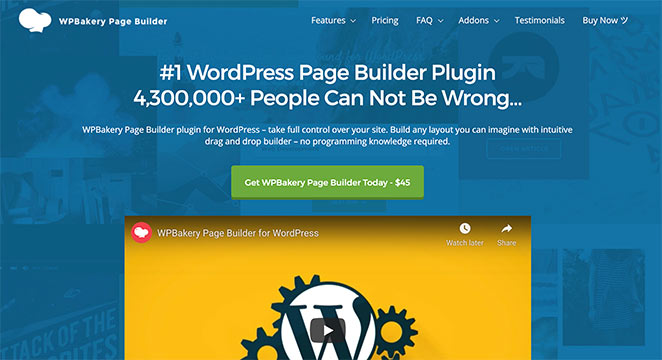
This popular page builder rebranded to WPBakery in 2017, while Visual Composer is now a separate web design project called Visual Composer Website Builder. Essentially, WPBakery is now a page builder, and Visual Composer is a website builder.
It’s a widely adopted plugin and comes bundled with many Themeforest and Codecanyon themes to make customizing them easier.
Once activated on your website, WPBakery turns the WordPress page editor into a visual design tool. You can add, edit, and arrange various elements on your page using a drag-and-drop interface to customize everything without code.
How I Tested WPBakery for This Review
To give you a fair and honest WPBakery review, I installed the plugin on my own test site. I wanted to see how it performs in real-world situations, just like you might use it.
Here’s what I did to test WPBakery thoroughly:
- Setup: I installed it on a fresh WordPress test site to see how easy it is to get started.
- Ease of Use: I tried both the backend and frontend editors to see how user-friendly they are.
- Building Pages: I created pages from scratch using drag-and-drop, pre-made templates, and checked how they look on different devices.
- Elements: I played with various page elements to see what’s possible.
- Online Stores: I built product pages to test how well it works with WooCommerce.
- Speed: I kept an eye on how fast pages load.
- Extra Features: I tried out some add-ons to see what else you can do.
- Mobile-Friendly: I made sure pages look good on phones and tablets.
By testing all these things, I got a good idea of what WPBakery does well and where it falls short. I also drew on years of cleaning up sites that clients had built with WPBakery, and that real-world experience shaped how I evaluate the lock-in risk.
WPBakery Features and Functionality
WPBakery comes with many features that made it popular. Here’s a look at what’s included and how each part held up in my testing.
The Drag-and-Drop Interface
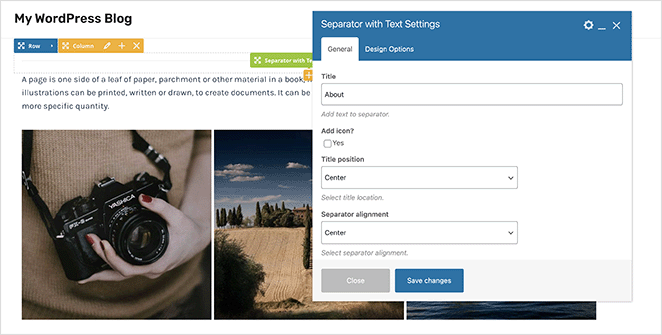
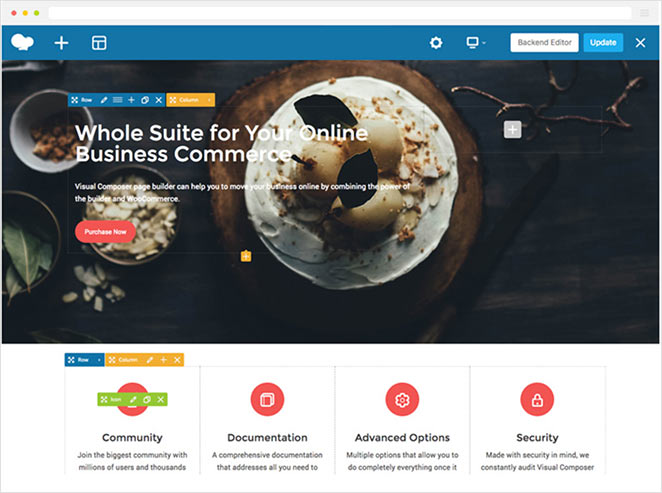
WPBakery’s most notable feature is the drag-and-drop builder. It allows you to select any element, drag it to your preferred spot on the page, and drop it. This meant I was able to construct an entire webpage without touching a single line of code.
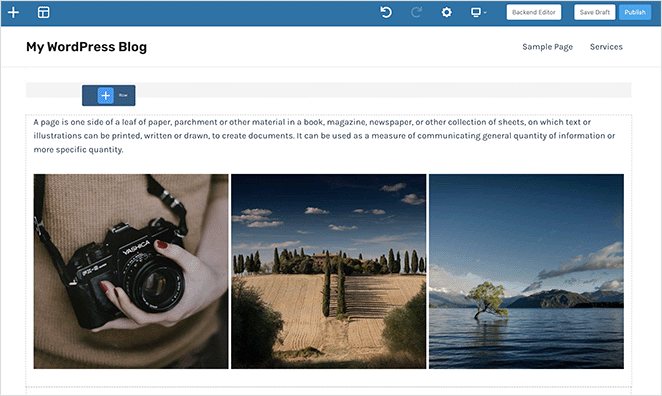
Once placed, I could resize, reposition, and customize elements with just a few clicks.
I was able to see a real-time preview, allowing me to see the changes I made instantly. That said, the interface feels heavier than what you’d get with modern builders: more clicks to do simple things, and less visual clarity about where you are in the layout.
Pre-designed Layouts and Elements
For those who need inspiration or are in a hurry, WPBakery offers a library of pre-designed layouts and elements. From headers, footers, and sidebars, to sliders and galleries, I was able to find a design that fits almost every need.
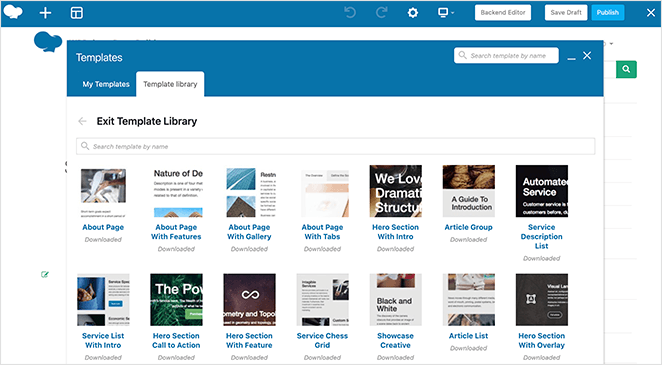
I found the template library an ideal starting point for my page design. These pre-made designs cover various industries and purposes, including business, ecommerce, portfolio, blog, and more, using the latest design trends.
Each template is fully customizable using the drag-and-drop builder. I could even add my own custom CSS for more unique styling options.
WPBakery’s Element Library
In addition to templates, WPBakery also has plenty of elements to enhance your web page functionality. When I was building my page, I was able to include text blocks, buttons, icons, image galleries, progress bars, testimonials, parallax, counters, accordions, widgets, and more.
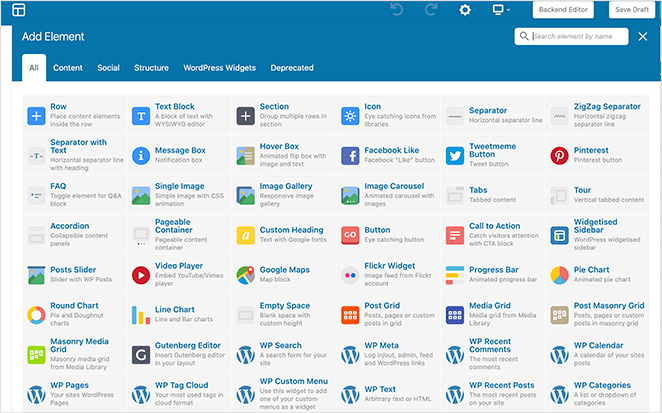
You can mix and match different modules and templates, customize colors and typography, and experiment with combinations to make a unique and personalized design. WPBakery’s drag-and-drop interface seamlessly integrates with the templates and elements, allowing you to customize them to suit your needs easily.
Advanced Features and Add-ons
WPBakery also boasts several advanced features and add-ons for more functionality.
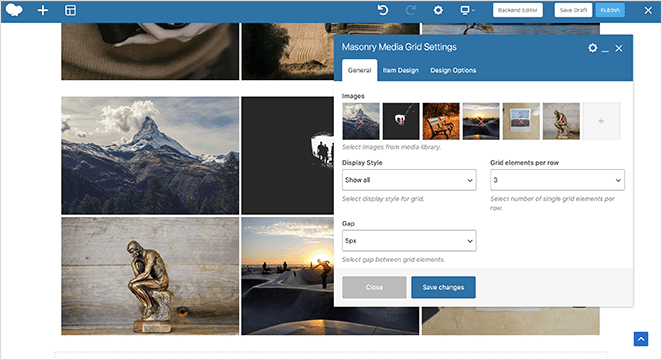
What I particularly liked were the grid design options. Grid layouts are popular for organizing content, especially for portfolios, product showcases, or blog posts.
With Grid layouts, I was able to customize the number of columns, adjust the spacing between elements, make the grid full-width, and fine-tune the grid appearance.
WPBakery also offers seamless compatibility with WooCommerce, the leading eCommerce plugin for WordPress. This allows you to create online stores using its easy drag-and-drop interface.
For example, I could design product pages, show featured products, create custom layouts for shopping carts and checkout pages, and fully customize my test store’s overall look and feel.
Additionally, WPBakery supports various third-party extensions, plugins, and add-ons.
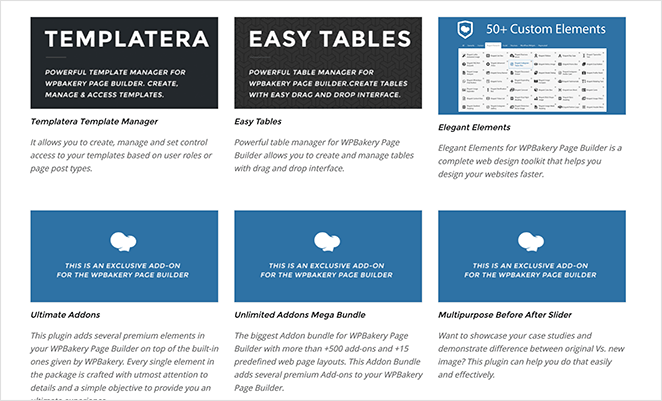
They provide additional design elements, integrations with popular WordPress plugins, and enhanced customization options, including:
- Template Manager
- Easy Tables
- Ultimate Add-ons
- Before After Slider
- Social Media Share
- Testimonials
- Contact Forms
- Post Types
- Animation Effects
- And more
WPBakery and Responsiveness
WPBakery understands the importance of mobile responsiveness and provides features to ensure your site is optimized for mobile devices.
With its responsive design settings, it was easy to change my site’s appearance on different screen sizes and devices, ensuring a consistent and user-friendly experience across desktops, tablets, and smartphones.
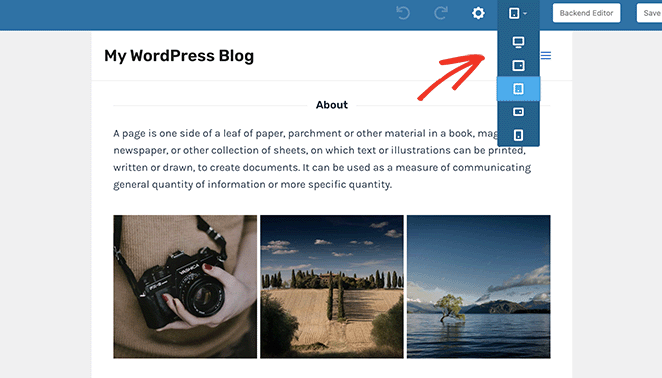
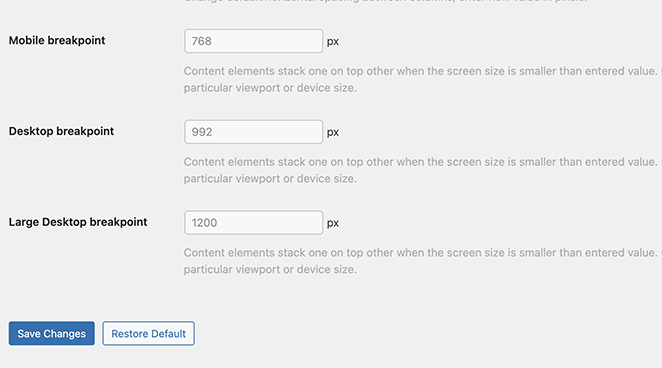
The design options also allowed me to control the behavior of elements on different devices. For instance, I could set custom breakpoints where layout or element appearance changes occur by screen size.
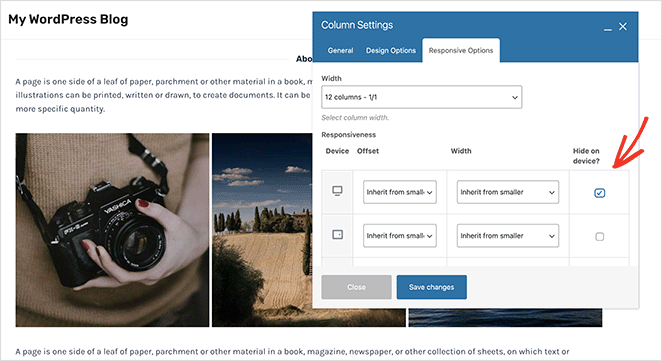
To further enhance mobile responsiveness, WPBakery lets you hide some aspects for specific mobile devices or modify their appearance.
Mobile responsiveness is crucial for search engine optimization (SEO). With these mobile responsive features, you can build websites that meet mobile optimization standards, improving your chances of higher search rankings.
WPBakery Page Builder in Action
Setting up WPBakery is a breeze. After installing and activating the plugin, I could start building my pages immediately. Let’s look at how to do this next.
Creating a Page from Scratch
To create a new page with WPBakery, go to Pages » Add New from your WordPress admin dashboard and click the WPBakery Page Builder button.
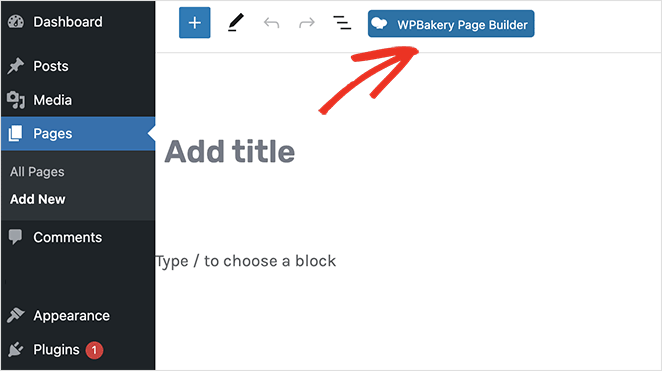
On the next screen, you’ll see 2 different options: Backend Editor and Frontend Editor.
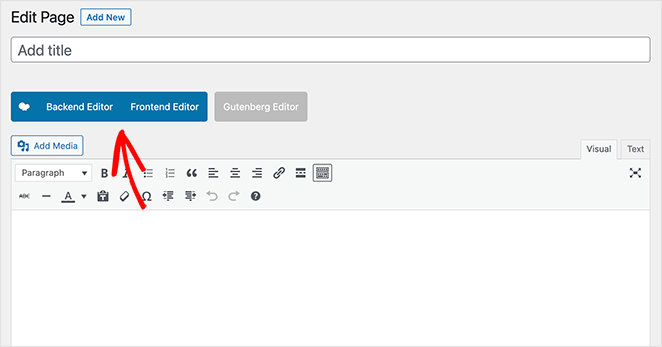
With the backend editor, you can add the same elements to your page as the frontend editor. The only difference is you’re working in your website dashboard, which won’t show a live preview of your changes.
You can still open the elements library, customize sections, rows, and columns, and drag and drop elements to rearrange their position.
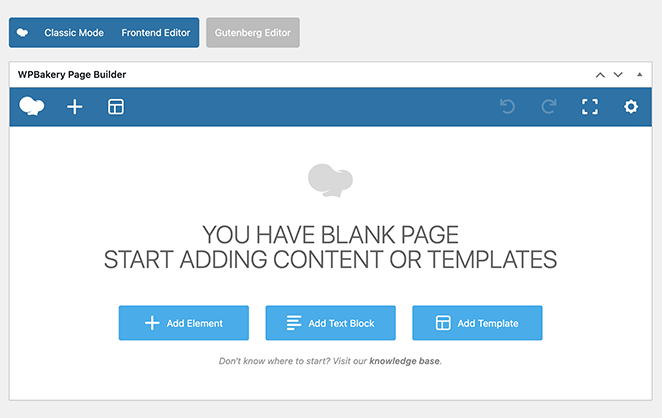
If at any time you want to switch to the frontend, simply click the Frontend Editor button. From there, you can customize your new page in real time.
Customizing Pre-designed Templates
If you prefer to start with a pre-designed template, you can do so easily. Simply create a new page using WPBakery, click the template library icon, and click a template to add it automatically to your design.
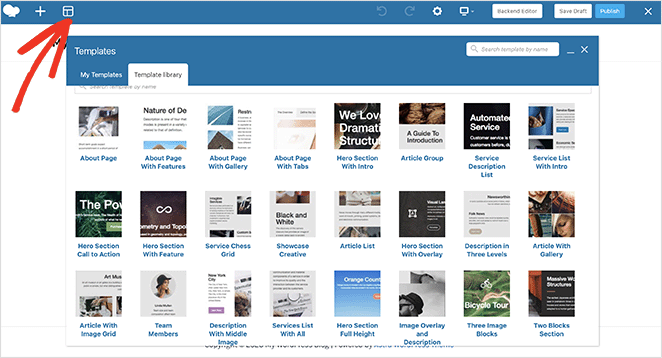
From there, you can edit the template colors, fonts, images, content, and elements, to make the design your own.
What You Should Know Before Choosing WPBakery
Here’s what I’ve found from using WPBakery across different projects, and from cleaning up messes left behind by clients who used it in the past.
Some parts of WPBakery still hold up, but others feel stuck in the past.
✅ Great for theme-bundled sites: If your WordPress theme came with WPBakery pre-installed, it’ll usually work well out of the box. Users who already have it running and aren’t planning to switch have the least to worry about.
❌ Not ideal for beginners: WPBakery has two separate editors (backend and frontend), which adds confusion right from the start. Most beginners find tools like SeedProd or Elementor easier to learn from day one.
❌ Not so great for switching: If you change themes or decide to try a different page builder later, WPBakery leaves shortcode clutter in your content that requires manual cleanup. I’ve spent more hours than I’d like helping clients deal with exactly that.
❌ Visual editing feels clunky: Compared to modern builders like SeedProd or Elementor, WPBakery’s interface takes more clicks to do simple things.
A Quick Note About Shortcodes (and Why It Matters)
If you ever decide to deactivate WPBakery, you won’t just lose your layout. You’ll be left with a page full of shortcodes like [vc_row][vc_column] scattered through every post and page. You’ll have to manually clean them up or rebuild everything from scratch in another tool.
WPBakery vs. the WordPress Block Editor
A question I hear a lot in 2026: if WPBakery came bundled with my theme, do I actually need to use it? Can I just use the WordPress block editor (Gutenberg) instead?
In many cases, yes. If you’re building straightforward content pages, blog posts, or basic layouts, Gutenberg handles this well and it’s already built into WordPress at no extra cost.
WPBakery still has an edge when you need complex multi-column layouts, custom row/column spacing, or specific add-ons that your theme was designed around. If the theme came pre-configured with WPBakery page templates, switching to blocks mid-project can break those layouts.
My rule of thumb: if the site is already built with WPBakery and the layouts are working, stay on it. If you’re starting a new site or a new page and your theme doesn’t depend on WPBakery for its layout, use the block editor or a modern builder instead. You’ll thank yourself when it’s time to make changes later.
How to Migrate Away from WPBakery
If you’re already using WPBakery and want to move to a different builder, the short answer is: it takes work, but it’s doable.
When you deactivate WPBakery, every page it touched will display raw shortcodes instead of your layout. Nothing breaks permanently, but nothing looks right either. Here’s what the cleanup typically involves:
- Audit your pages: Use a plugin like WP Migrate or a site search to find all pages with
[vc_row]shortcodes. - Rebuild layouts: You’ll need to recreate each page in your new builder. There’s no automatic converter that works reliably.
- Clean up leftover shortcodes: After rebuilding, run a search-and-replace to remove any stray WPBakery shortcodes from the database.
- Test on staging: Always do this on a staging site before touching your live site.
For large sites with dozens of custom pages, this is a significant project. For smaller sites (under 10 pages), most people can complete it in a day. I’ve done this for clients and the main time sink is always the page rebuilding, not the shortcode cleanup itself.
Should You Still Use WPBakery in 2026?
WPBakery is still a functional tool, but it isn’t the right choice for everyone in 2026. Here’s how to think about it:
✅ Best for: Users who already have WPBakery bundled with their WordPress theme, developers maintaining older sites, and anyone who isn’t planning to switch builders any time soon.
❌ Not ideal for: Beginners looking for an easy visual builder, site owners who care about page speed, and people who want long-term flexibility and clean output when they eventually switch.
If you’re starting a new website, or you care about faster page speeds and easier editing, WPBakery probably isn’t your best option anymore. Tools like SeedProd or Elementor offer smoother interfaces, built-in theme builders, and AI tools without the shortcode lock-in risk.
See how WPBakery stacks up against the alternatives in the comparison table below.
WPBakery Review: Pricing
WPBakery has 3 pricing plans available for different budgets and use cases.
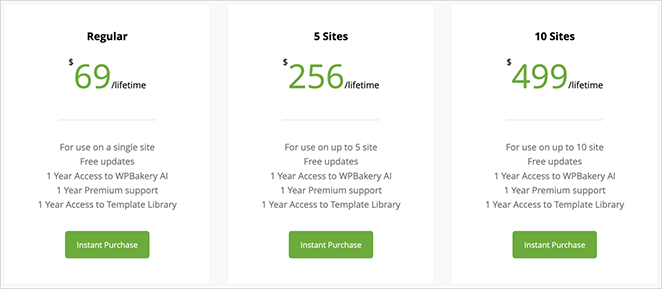
The Regular license is a one-time payment of $69 for a single website with premium support and access to the template library. From there, the pricing scales to $256 for 5 websites and $499 for 10 websites.
There’s no free version or trial. Unlike Elementor and SeedProd, which both offer free plans, WPBakery requires a purchase upfront.
The pricing for any WPBakery add-ons can vary and are separate from the primary plugin price.
What Do Customers Say About WPBakery?
While testing WPBakery myself was helpful, I wanted to see what other users think too. So I dug into comments from real users across the web, and I have to say, people have pretty mixed feelings about it.
WPBakery has been around for a while, and that history came up often. As one developer wrote on Reddit:
“It was one of the first page builders for WordPress and got popular because theme developers included it in their themes. It worked well back then, but there are better tools now.” — Reddit, r/WordPress
Some users still actively work with WPBakery and find it manageable. One web developer on Reddit shared their experience:
“I still have +40 sites using WP Bakery. Using The7 & Bridge themes. Relatively easy to figure out. A bit clunky and not terribly fast.”
A third perspective offers the most useful framing for anyone evaluating it now. As another experienced developer wrote on Reddit in a balanced view:
“It varies. I’ve seen some sites where WPBakery was awful to use, but I’ve also seen others where it worked great because it was set up properly. It really comes down to how well someone has used it.”
That last quote matches what I’ve seen in practice. WPBakery performs best when it’s set up as the theme developer intended. The problems usually start when people try to use it in ways it wasn’t designed for, or when it’s time to move on.
WPBakery Review: How It Compares to Other Page Builders
So how does WPBakery compare to other page builders like SeedProd, Elementor Pro, Divi Builder, and Beaver Builder? The truth is, it could be better.
WPBakery lacks features that its competitors do well.

For example, SeedProd has a built-in WordPress theme builder, allowing you to create custom WordPress themes alongside landing pages. It also has many of WPBakery’s add-on features built into the core plugin, including before and after sliders, testimonials, WooCommerce products, team members, animations, pricing tables, and more.

SeedProd works independently of your WordPress theme, ensuring it works seamlessly with any design. Plus, if you decide to use a different page builder, it won’t leave messy shortcodes behind to impact your page speed.
WPBakery Alternatives
| Feature | WPBakery | SeedProd | Elementor | Divi Builder |
|---|---|---|---|---|
| Theme Builder | ❌ Not included | ✅ Built-in | ✅ Built-in | ✅ Built-in |
| Drag-and-Drop Editor | ⚠️ Less intuitive | ✅ Beginner-friendly | ✅ Popular choice | ⚠️ Can be overwhelming |
| Speed | ⚠️ Slower on heavy sites | ✅ Lightweight & fast | ⚠️ Medium speed | ⚠️ Medium speed |
| Shortcode-Free | ❌ Leaves shortcodes | ✅ Clean output | ✅ Clean output | ❌ Leaves shortcodes |
| Free Version Available | ❌ No | ✅ Yes | ✅ Yes | ❌ No |
| AI Features | ❌ None | ✅ Built-in AI text & image tools | ✅ AI tools (Pro only) | ❌ None |
| Easy to Switch Later | ❌ Leaves shortcode mess | ✅ Clean HTML output | ✅ No shortcode lock-in | ❌ Leaves shortcode mess |
| Best Use Case | Bundled themes | Custom landing pages | Design flexibility | All-in-one designs |
To compare the alternatives, you may find the following WordPress page builder reviews helpful:
WPBakery Review: Final Verdict
After testing it hands-on for this WPBakery review, I can say the builder still works,but it’s showing its age. The drag-and-drop interface feels clunky compared to modern builders, and the shortcode lock-in is a real downside if you ever want to switch tools.
If you’re maintaining a site that already uses WPBakery, or your theme came bundled with it, it might be fine to stick with it for now. But if you’re building something new, I’d strongly recommend choosing a faster, more flexible page builder that won’t slow you down or box you in later.
In short: WPBakery isn’t the worst option, but in 2026, it’s no longer the best.
Frequently Asked Questions (FAQs) About WPBakery
There you have it!
I hope you found this in-depth WPBakery review helpful.
You might also like our comparison of Leadpages vs Instapage vs SeedProd, or see exactly how Elementor vs WPBakery vs SeedProd stack up head to head.
If you’re weighing the top modern builders, our Beaver Builder vs Elementor vs SeedProd comparison covers all three.
You may also find our guide on how to choose the best WordPress hosting helpful.
Thanks for reading! We’d love to hear your thoughts, so please feel free to join the conversation on YouTube, X and Facebook for more helpful advice and content to grow your business.




