



En resumen: Cómo crear páginas de destino personalizadas en WordPress
La sustitución de texto dinámico de SeedProd te permite cambiar titulares, llamadas a la acción y ofertas según la fuente, la ubicación o el término de búsqueda de cada visitante. La configuración tarda unos 30 minutos desde la instalación hasta la publicación.
- Instala SeedProd Pro, necesario para la sustitución de texto dinámico.
- Elige una plantilla, más de 300 plantillas de páginas de destino para empezar.
- Añade elementos de personalización, usa texto dinámico de fecha o consulta para que coincida con el contexto del visitante.
- Configura los ajustes, conecta tu lista de correo, establece un dominio personalizado si es necesario.
- Prueba en móvil y publica, la vista previa móvil de SeedProd comprueba la visualización adaptable antes de publicar.
Añadí páginas de destino personalizadas a mi sitio de WordPress después de notar que las páginas genéricas no convertían bien. El cambio fue inmediato: los visitantes hacían clic en mi llamada a la acción con más frecuencia porque la página hablaba directamente de sus necesidades.
Si quieres crear páginas de destino personalizadas en WordPress, esta guía te muestra cómo. Te guiaré a través de los pasos para personalizar páginas para diferentes visitantes, aumentar las conversiones y crearlas rápidamente sin necesidad de código.
Pasos rápidos para crear páginas de destino personalizadas en WordPress:
- ¿Por qué las páginas de destino personalizadas convierten mejor?
- ¿Cómo se utilizan las páginas de destino personalizadas?
- ¿Qué puedes personalizar en una página de destino?
- Ejemplos de páginas de destino personalizadas
- ¿Por qué usar SeedProd para crear páginas de destino personalizadas?
- Cómo crear páginas de destino personalizadas en WordPress
¿Por qué las páginas de destino personalizadas convierten mejor?
¿Qué es una página de destino personalizada?
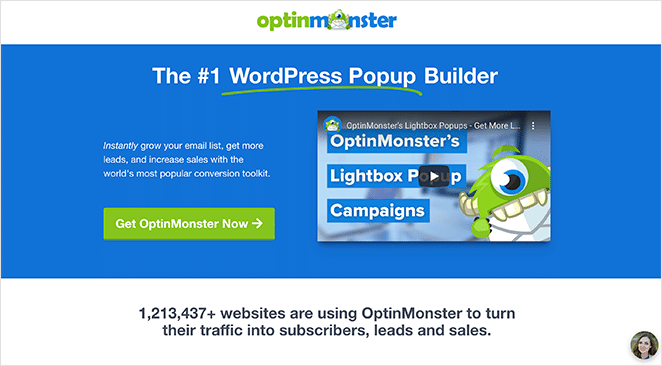
Una página de destino personalizada adapta su titular, oferta o llamada a la acción para que coincida con la fuente, la ubicación o el término de búsqueda de cada visitante. OptinMonster utilizó este enfoque con SeedProd y redujo el coste por adquisición en un 47 %.
Según lo que informan los especialistas en marketing, las páginas de destino genéricas suelen convertir entre un 3 y un 7 %. Las páginas de destino específicas bien optimizadas con contenido personalizado pueden alcanzar entre un 20 y un 25 %.
En lugar de mostrar a todo el mundo el mismo contenido genérico, puedes saludar a las personas con mensajes, ofertas y elementos visuales que parezcan hechos para ellas.
En mi propio sitio, cambiar de una página de destino única a varias personalizadas marcó una clara diferencia. Los visitantes permanecieron más tiempo, hicieron más clics y capturé más clientes potenciales sin aumentar el tráfico.
Ese es el verdadero poder de la personalización: mismo tráfico, mejores resultados.
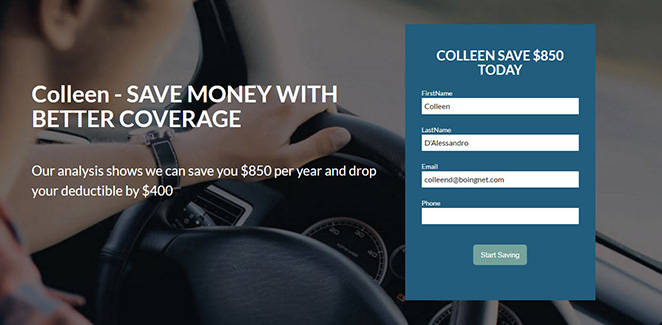
| Página de destino genérica | Página de destino personalizada |
|---|---|
| Mensajes de talla única | El contenido coincide con la ubicación, el interés o el comportamiento del visitante |
| Menor interacción y conversiones | Mayores conversiones porque se siente relevante |
| Más difícil destacar entre la competencia | Crea una experiencia única y memorable |
Con tantas distracciones en línea, la personalización ayuda a cortar el ruido. Reconoce la situación de cada visitante y les da una razón para actuar, ya sea suscribirse, reservar una demostración o comprar un producto.
¿Cómo se utilizan las páginas de destino personalizadas?
Hay muchas maneras de personalizar una página de destino dependiendo de quién la visita, de dónde vino y qué ha hecho antes. Aquí están los casos de uso más comunes, agrupados para que pueda ver cómo aplicarlos a su sitio.
1. Basado en el comportamiento
- Historial de compras: Muestre productos relacionados o complementarios a los clientes recurrentes de comercio electrónico.
- Carritos abandonados: Recuerde a los visitantes los artículos que dejaron y agregue un descuento para fomentar el pago.
- Ofertas por tiempo limitado: Muestre promociones que coincidan con un día festivo, evento o temporada actual.
2. Basado en la demografía
- Edad o género: Destaque productos que coincidan con un segmento de audiencia específico (cuidado de la piel por grupo de edad, por ejemplo). Este tipo de segmentación de visitantes funciona especialmente bien cuando el tráfico proviene de campañas publicitarias muy específicas.
- Idioma: Detecte el idioma del navegador del visitante y muestre la página en su idioma preferido.
3. Basado en el contexto
- Geolocalización: Muestre servicios locales, ofertas específicas de la ciudad o eventos cercanos según la ubicación.
- Fuente de referencia: Reconozca de dónde provino el visitante (redes sociales, correo electrónico o un sitio asociado) y ajuste el mensaje en consecuencia.
- Anuncios de pago por clic (PPC): Alinee el titular y el texto de la página de destino con la redacción exacta del anuncio en el que hicieron clic. La coincidencia de mensajes entre el anuncio y la página de destino es uno de los cambios de mayor impacto que puede realizar.
- Reemplazo de texto dinámico: Intercambie palabras clave o frases según lo que buscó el visitante. Esto ofrece contenido dinámico sin crear páginas separadas para cada campaña.
La clave es empezar poco a poco. Incluso una sola página de destino específica con titulares diferentes para el tráfico de correo electrónico frente al de anuncios puede resultar más relevante y aumentar las conversiones.
¿Qué puedes personalizar en una página de destino?
La mayoría de la personalización se centra en el titular, pero hay cinco elementos en los que el intercambio de contenido según el contexto del visitante puede mover las conversiones.
| Elemento | Qué personalizar | Ejemplo |
|---|---|---|
| Titular y subtítulos | Intercambiar según la fuente de tráfico, el grupo de anuncios o la consulta de búsqueda | El tráfico de anuncios de "Prueba gratuita" ve "Comience su prueba gratuita hoy"; el tráfico de correo electrónico ve "Bienvenido de nuevo, esto es lo nuevo". |
| Imagen principal | Haga coincidir la imagen visual con el contexto o la industria del visitante | Un servicio de entrega de comida muestra una cena familiar para el tráfico de Facebook, un almuerzo rápido en solitario para el tráfico de búsqueda de Google. |
| Texto del botón de llamada a la acción (CTA) | Refleje el objetivo del visitante en la etiqueta del botón | "Comience su prueba gratuita" para visitantes de PPC; "Obtener mi demostración" para clientes potenciales de un correo electrónico de seguimiento de seminarios web. |
| Prueba social | Mostrar testimonios o logotipos específicos de la industria | Los visitantes del sector minorista ven una reseña de un minorista; los visitantes de atención médica ven una reseña de una clínica. |
| Campos del formulario | Menos campos para tráfico frío; más para clientes potenciales cálidos | Tráfico PPC frío: solo nombre y correo electrónico. Tráfico de correo electrónico de reactivación: agregue el tamaño de la empresa o el puesto. |
Para los usuarios de WordPress, SeedProd hace posible todo esto sin necesidad de código.
Ejemplos de páginas de destino personalizadas
Continuidad de anuncios PPC
Cuando ejecutas anuncios de pago, la coincidencia de mensajes entre el anuncio y la página de destino es la palanca más importante para reducir el coste por clic.
OptinMonster creó páginas de destino dedicadas en SeedProd para cada grupo de anuncios, alineando el titular y la oferta con el texto del anuncio que generó el clic. Como resultado, redujeron el coste por adquisición en un 47 %.
Segmentación de correo electrónico
Diferentes segmentos de correo electrónico ven diferentes mensajes. Un correo electrónico de bienvenida enlaza a una página con "¿Nuevo aquí? Empieza con nuestra guía", mientras que un correo electrónico de reactivación enlaza a una página que dice "Hemos añadido nuevas funciones desde tu última visita".
Ambos envían al mismo producto, pero el mensaje coincide con la etapa del embudo en la que se encuentra cada visitante.
Personalización basada en la ubicación
Las empresas de servicios pueden utilizar la segmentación de visitantes para mostrar páginas específicas de la ciudad. Una autoescuela establece el titular predeterminado en "Instructores de conducción cerca de ti" en SeedProd, y luego lo cambia a "Instructores de conducción en Florida" cuando los visitantes llegan desde un anuncio específico de la ubicación.
Los tres son posibles en SeedProd sin tocar código.
¿Por qué usar SeedProd para crear páginas de destino personalizadas?
SeedProd facilita la creación de páginas de destino personalizadas en WordPress sin código. Puedes adaptar titulares, ofertas y llamadas a la acción a cada visitante y lanzar páginas rápidamente.
| Precios: A partir de 39,50 $/año |
| Plan gratuito / Prueba: Sí (limitado) |
| Funciones destacadas: |
| 🔹 Creador de arrastrar y soltar 🔹 Reemplazo dinámico de texto (fecha + consulta) 🔹 Más de 300 plantillas y secciones 🔹 Integraciones de correo electrónico, CRM y análisis 🔹 Dominios personalizados y controles de acceso |
| Calificación: A |
| Mejor para: Usuarios de WordPress que desean personalización sin código y publicación rápida |
Cómo ayuda: puedes hacer coincidir el mensaje de la página de destino con cada grupo de anuncios, ubicación o fuente de referencia. Eso mantiene a los visitantes en la página y hace que más de ellos hagan clic.
Ejemplo real
OptinMonster redujo el coste por adquisición en un 47 % utilizando una página de destino de SeedProd que alineaba el titular y la oferta con su tráfico de pago. La página cargaba rápido, coincidía con la intención del anuncio y, como resultado, convertía mejor.
Cómo crear páginas de destino personalizadas en WordPress
Sigue los pasos a continuación para crear una página de destino personalizada en WordPress utilizando el creador de sitios web de arrastrar y soltar de SeedProd.
Paso 1. Instalar y Activar SeedProd
Para empezar, deberás descargar e instalar el plugin SeedProd en tu sitio web de WordPress. Para esta guía, estamos utilizando SeedProd Pro por su función de reemplazo dinámico de texto.
Si necesitas ayuda con esto, puedes seguir nuestra documentación sobre cómo instalar el plugin SeedProd Pro.
Paso 2. Elige una plantilla de página de destino
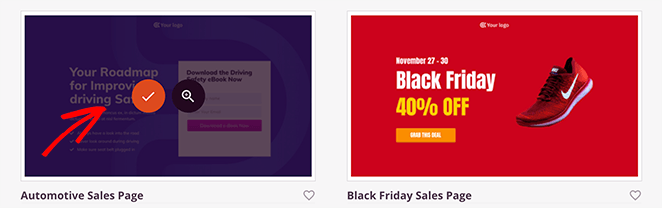
Una vez que hayas instalado SeedProd, navega a SeedProd » Landing Pages desde tu panel de WordPress y haz clic en el botón Añadir nueva página de destino.
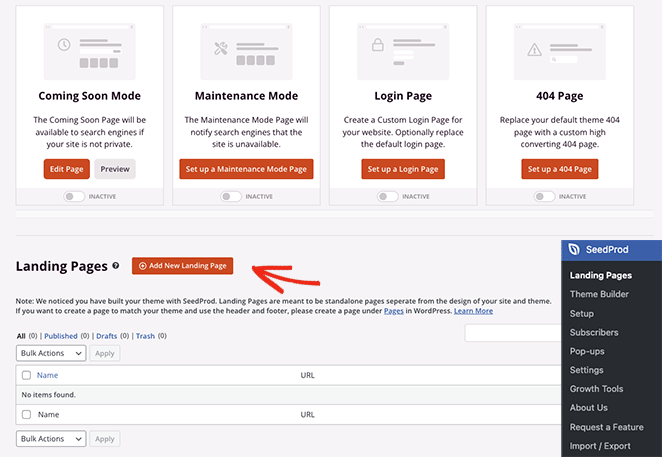
En la siguiente pantalla, puedes elegir entre cientos de plantillas de páginas de destino prediseñadas. Puedes personalizar completamente cada plantilla para satisfacer las necesidades de tu estrategia de marketing o campaña publicitaria.
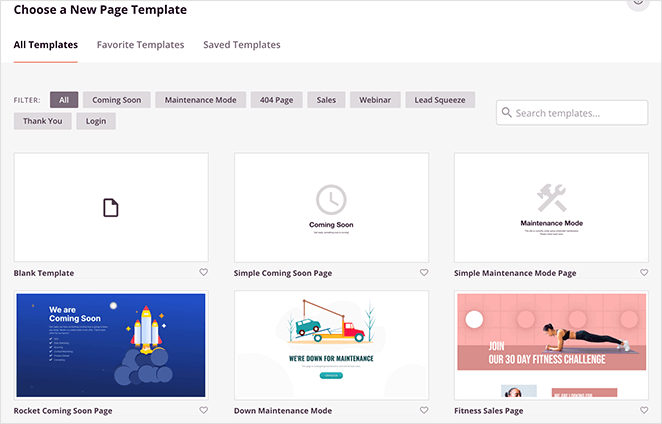
Haz clic en las pestañas de la parte superior para acotar tu búsqueda por un objetivo específico. Por ejemplo, si estás creando una página de webinar personalizada, puedes hacer clic en la pestaña Webinar para ver plantillas con esas características de diseño.
Después de encontrar una plantilla que le guste, pase el cursor sobre ella y haga clic en el icono de marca de verificación.
Ahora verás una ventana emergente donde puedes introducir un nombre y una URL para la página. SeedProd creará automáticamente un slug para tu página, pero puedes cambiarlo más tarde en la configuración de la página.
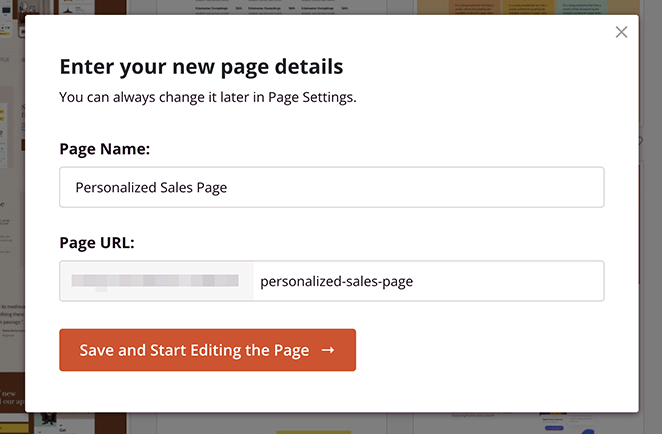
Después de introducir los detalles de tu página, haz clic en el botón Guardar y empezar a editar la página.
Paso 3. Personaliza tu Página de Destino
En la siguiente pantalla, verás el creador visual de páginas de destino de SeedProd. Tiene bloques y secciones para añadir nuevos elementos a la izquierda y una vista previa en tiempo real a la derecha.
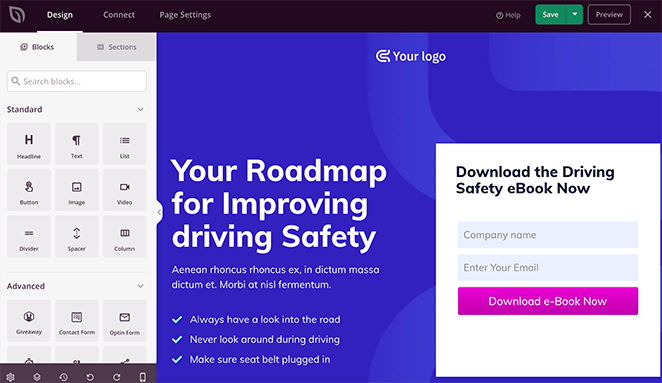
Ahora puedes empezar a personalizar la página para adaptarla a tus necesidades.
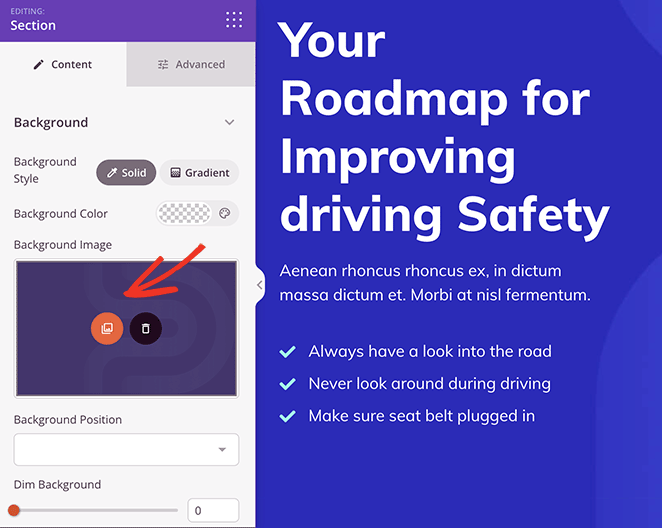
Por ejemplo, para reemplazar la imagen de fondo, haz clic en ella en el panel izquierdo y selecciona el icono de la galería. Esto te permite elegir una nueva foto de tu ordenador o de la biblioteca de medios de WordPress.
Si deseas personalizar los colores o las fuentes de toda tu página de destino, haz clic en el icono de engranaje en la esquina inferior de tu pantalla.
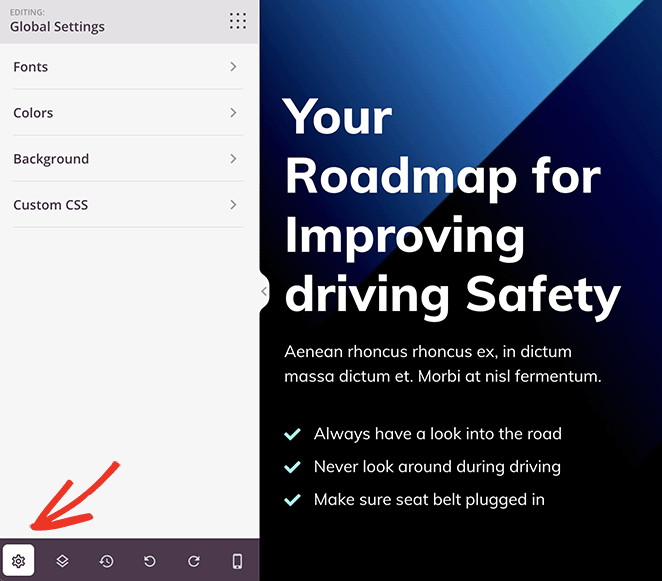
Ahora expande las diferentes pestañas para establecer tu paleta de colores personalizada para tu texto, botones de llamada a la acción, fondos y más.
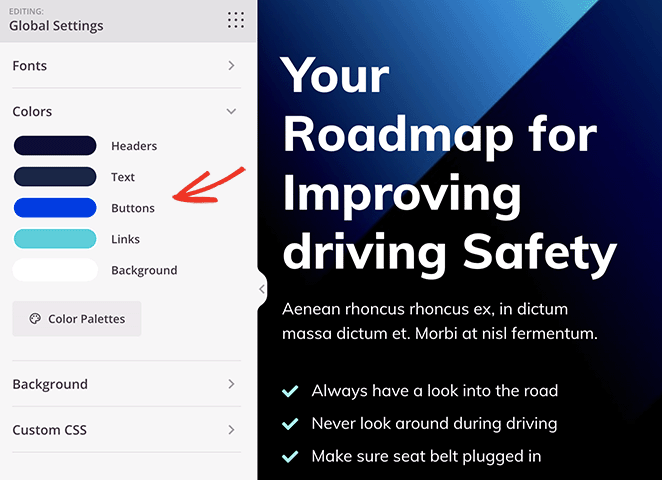
Incluso puedes añadir CSS personalizado en esta sección para personalizaciones más detalladas.
Una vez que estés satisfecho con estas personalizaciones básicas, puedes personalizar la página de destino para diferentes audiencias.
Paso 4. Añadir elementos de personalización
Una de las características más potentes de SeedProd es la capacidad de personalizar prácticamente cualquier parte de tu página de destino.
Nuestra herramienta favorita es la función de Reemplazo Dinámico de Texto. Con ella, puedes personalizar tu página basándote en 2 escenarios diferentes:
1. Fecha
Esto te permite mostrar dinámicamente fechas en tu página.
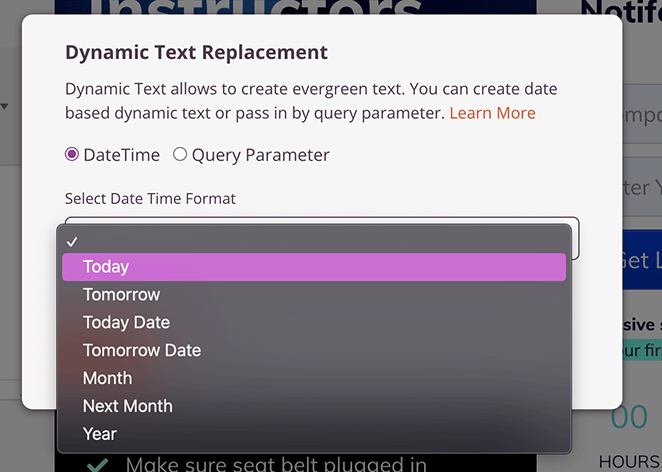
Por ejemplo, podrías crear un titular que diga: "Nuestra oferta termina el [#hoy :%A]" si estás ejecutando una oferta. Cuando el código de texto dinámico se reemplace, mostrará el día actual, como "Nuestra oferta termina el martes" o el día que sea para el usuario.
2. Consulta
Esto te permite adaptar tu contenido basándote en la consulta que los usuarios están buscando.
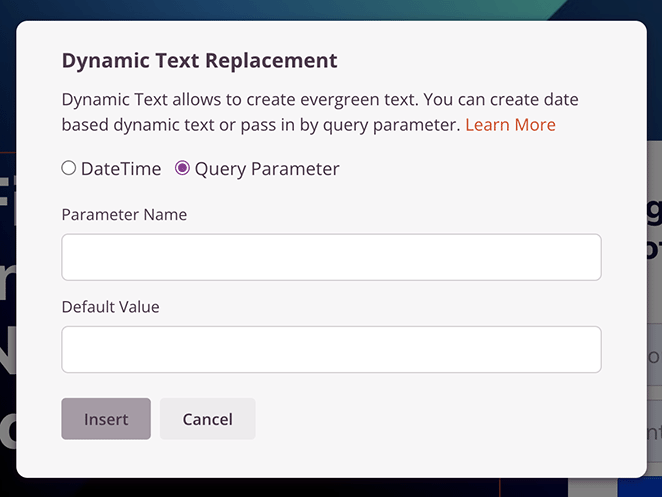
Por ejemplo, si tienes un titular con el parámetro de consulta "Hola [q:fname=ahí]" los usuarios verían su nombre, como "Hola Stacey". Sin embargo, sin el parámetro, los usuarios verían "Hola ahí".
Para añadir texto dinámico, haz clic en el titular que deseas personalizar y selecciona el botón Insertar texto dinámico.
Para este ejemplo, elegiremos el tipo de parámetro de Consulta. Con esta opción, puedes introducir un nombre de parámetro, como 'ubicación', y añadir un valor predeterminado, como 'Tú'.
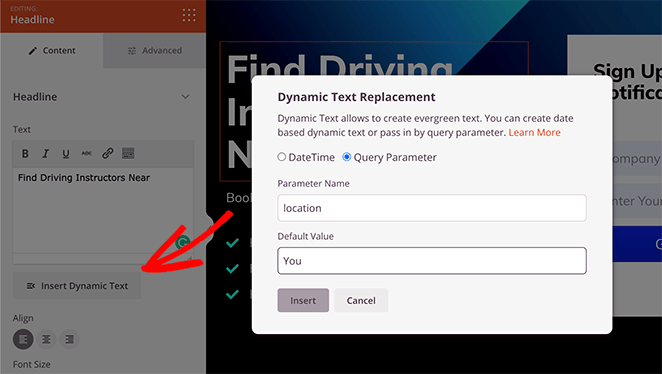
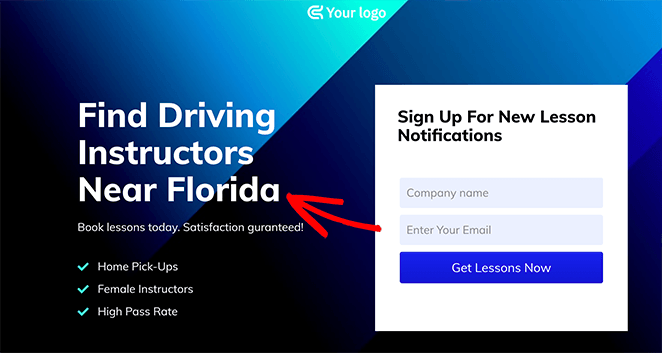
Por defecto, el titular diría ‘Instructores de conducción cerca de ti’. Pero si la ubicación se incluye en el parámetro de URL, como location=Florida, el titular cambiaría a ‘Instructores de conducción cerca de Florida’.
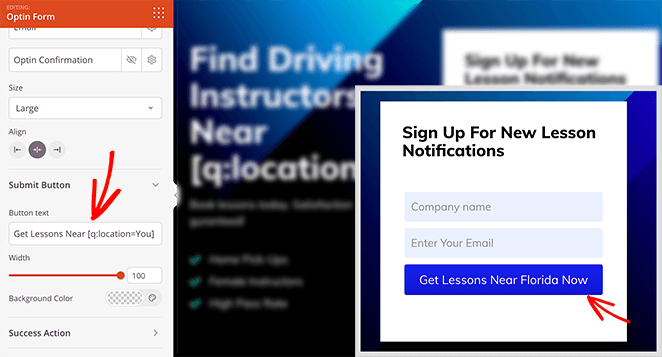
Incluso puedes usar esta función para personalizar los botones de llamada a la acción (CTA).
Haz clic en cualquier botón CTA y, en la configuración del botón, pega el código de texto dinámico como este:
Si deseas mostrar una oferta sensible al tiempo de forma dinámica, puedes usar el tipo de texto dinámico Fecha.
Simplemente personaliza cualquier elemento de texto o titular con la opción DateTime y elige la fecha que deseas mostrar a los visitantes.
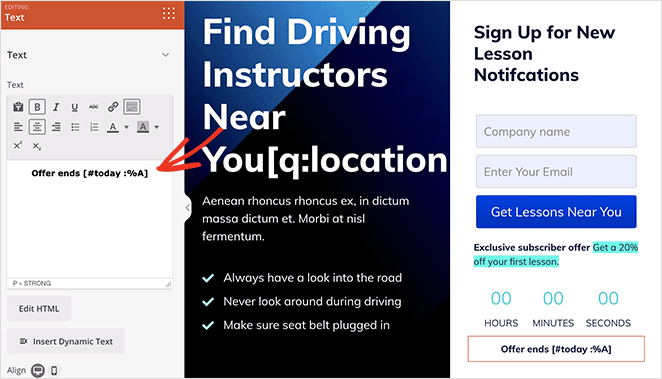
Incluso puedes combinar esto con el bloque Temporizador de cuenta atrás de SeedProd para crear una sensación de urgencia.
Continúa personalizando tu página de destino hasta que estés satisfecho con su personalización. Luego, asegúrate de hacer clic en el botón Guardar para guardar tus cambios.
Paso 5. Configura los ajustes de tu página de destino
Si deseas recopilar direcciones de correo electrónico en tu página de destino, querrás conectar tu servicio de automatización de marketing por correo electrónico. Para hacerlo, haz clic en la pestaña Conectar en la parte superior del constructor de páginas.
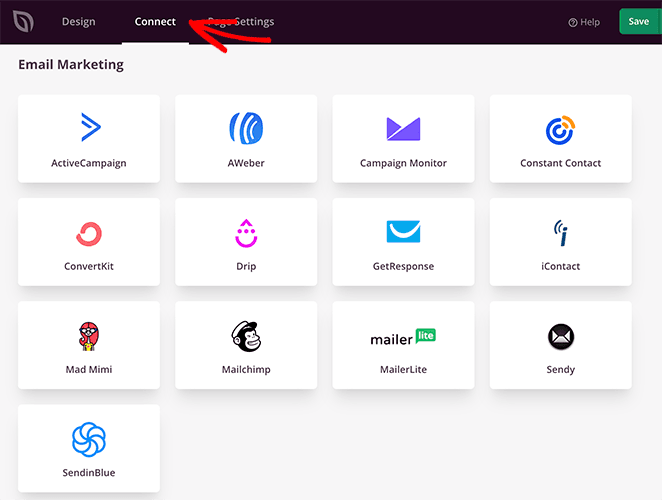
Aquí, verás una lista de integraciones directas para SeedProd, incluidos proveedores de marketing por correo electrónico, Google Analytics y protección contra spam Recaptcha. También puedes usar la conexión Zapier para integrarte con otras aplicaciones y CRM, como Hubspot.
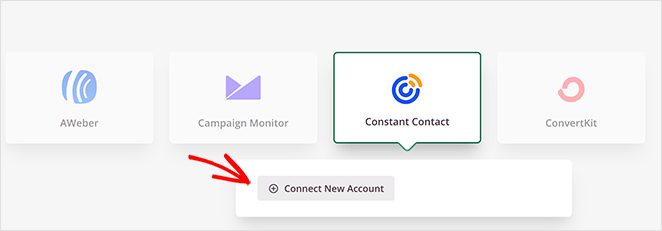
Una vez que encuentres tu integración, haz clic en el botón Conectar para vincular tu lista de correo electrónico y sigue las instrucciones en pantalla.
Ahora, hagamos clic en la pestaña Configuración de página para configurar más ajustes.
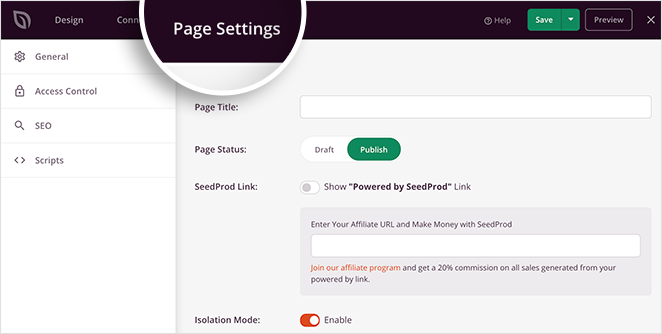
En esta página, puedes introducir un nuevo nombre y URL para la página de destino, añadir scripts de seguimiento personalizados e incluso realizar optimización de motores de búsqueda en la página instalando AIOSEO, el mejor plugin SEO de WordPress.
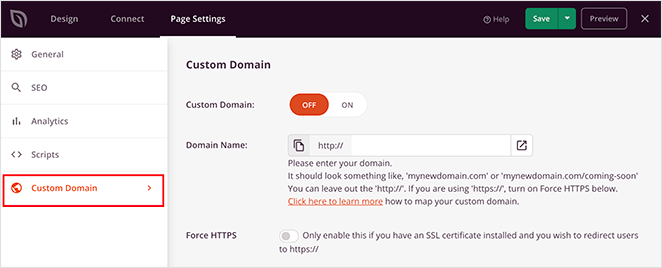
Otra de nuestras configuraciones favoritas en esta página es la opción Dominio personalizado. Con esto, puedes asignar un nombre de dominio a tu página de destino completamente diferente al de tu sitio web principal.
Paso 6. Publicar tu página de destino personalizada
Antes de publicar tu página de destino, es una buena idea probarla en dispositivos móviles. Si es adaptable a móviles, se verá y funcionará mejor en pantallas más pequeñas como tabletas y teléfonos inteligentes, evitando que pierdas clientes potenciales cualificados.
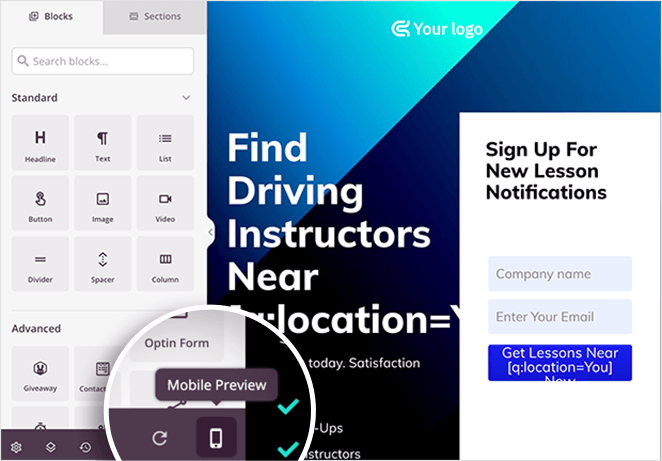
La buena noticia es que la opción de vista previa móvil de SeedProd te permite ver tu página en dispositivos móviles. Simplemente haz clic en el icono del teléfono móvil en la parte inferior de tu pantalla.
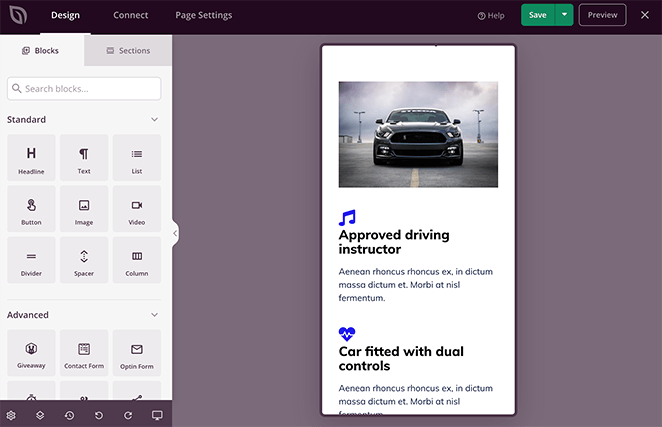
Ahora puedes ver cómo se muestra tu página en el móvil y ajustar cualquier cosa que no se vea o funcione correctamente.
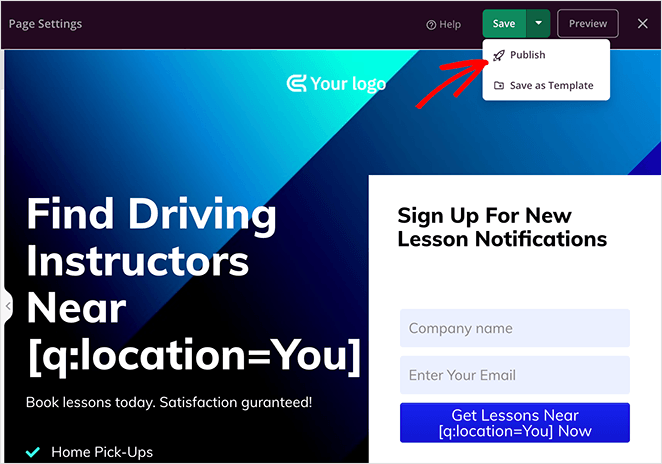
Cuando estés satisfecho con tu página de destino personalizada, selecciona la flecha hacia abajo en el botón de guardar y haz clic en Publicar.
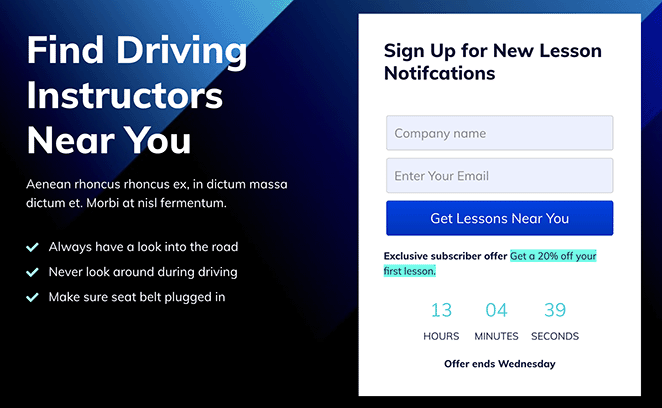
Ahora puedes visitar tu nueva página para ver cómo se ve en tiempo real.
Preguntas frecuentes sobre páginas de destino personalizadas
¿Las páginas de destino personalizadas realmente aumentan las conversiones?
Lo hacen, cuando la personalización coincide con la intención real del visitante. Los especialistas en marketing informan que las páginas genéricas convierten entre un 3% y un 7%, mientras que las páginas bien personalizadas pueden alcanzar entre un 20% y un 25%. Incluso un solo cambio, como cambiar el titular para diferentes fuentes de tráfico, puede marcar una diferencia notable.
¿Puedes crear páginas de destino personalizadas sin programar?
Sí. El constructor de arrastrar y soltar de SeedProd te permite configurar el reemplazo dinámico de texto, que cambia titulares, CTAs y otros elementos basándose en parámetros de URL. Lo configuras completamente en el editor sin necesidad de código personalizado.
¿Cómo personalizas las páginas de destino para campañas de PPC?
Crea una página de destino dedicada para cada grupo de anuncios y utiliza el reemplazo dinámico de texto de SeedProd para que el titular coincida con el texto del anuncio. La coincidencia del mensaje entre el anuncio y la página de destino es la forma más directa de reducir el coste por adquisición del tráfico de pago.
¿Cuál es la diferencia entre una página de destino personalizada y una página de destino dinámica?
Una página de destino dinámica es un método de personalización. Utiliza parámetros de URL o cadenas de consulta para cambiar el texto de la página automáticamente. Una página de destino personalizada es el objetivo más amplio, y el reemplazo dinámico de texto es una técnica para lograrlo. La guía de páginas de destino dinámicas de SeedProd cubre ambos enfoques.
¿Cómo pruebas si la personalización de la página de destino está funcionando?
Observa la tasa de conversión por fuente de tráfico, el CTR por segmento y los cambios en la tasa de rebote después de la puesta en marcha. Ejecuta una prueba A/B con la página original como control para validar si la personalización está mejorando los resultados. La caída del 47% en el coste por adquisición de OptinMonster es un punto de referencia útil hacia el que trabajar.
Espero que esta guía te haya ayudado a aprender cómo crear páginas de destino personalizadas en WordPress. SeedProd hace que la personalización de tu página de destino sea sencilla sin necesidad de contratar a un desarrollador.
¿Por qué no intentarlo tú mismo?
También te pueden interesar las siguientes guías útiles sobre páginas de destino:
- Cómo crear una página de destino de encuestas en WordPress
- Cómo crear una página de destino dinámica
- Página de destino vs. Página de ventas: ¿Cuál es la adecuada para ti?
- Cómo Crear una Página de Destino Rápida para Probar Ideas
- Página de destino frente a micrositio: ¿Cuál es mejor para tu marca?
- Cómo crear una página de destino con pasarela de pago
- 23+ Fórmulas de Titulares para Páginas de Destino que Impulsan las Tasas de Conversión
¡Gracias por leer! Nos encantaría conocer tu opinión, así que únete a la conversación en YouTube, X y Facebook para obtener más consejos y contenido útil para hacer crecer tu negocio.



