

Selling workout programs online starts with having the right website setup, and most trainers lose money every month because they don’t have one.
I’ve built WordPress sites for over 15 years, and the question I hear most from fitness professionals is always the same: how do I sell my programs from my own site instead of paying a platform to do it for me?
In this guide, I’ll show you how to choose what to sell, set your prices, and build your membership site using SeedProd and MemberPress so you can keep more of what you earn.
- Why Sell Workout Programs Online?
- Decide What You'll Sell
- Identify Your Audience and Niche
- Pick a Business Model
- Set Your Pricing
- Choose a Platform to Sell From
- Build Your Fitness Website with SeedProd
- Set Up Memberships with MemberPress
- Market Your Workout Programs
- FAQs About Selling Workout Programs Online
Why Sell Workout Programs Online?
The online fitness market is worth about $33 billion in 2025 and growing at over 30% per year. For trainers, it solves a real problem: you can only see so many clients in person each day.
Selling workout programs from your own website lets you reach people you’d never meet at the gym. You set the price, own the content, and keep the revenue. No platform taking a cut of every sale.
The membership model works especially well here. You combine free content to attract new visitors with paid memberships for your premium programs. That’s recurring revenue, not one-off sales.
You can also offer different membership tiers at different price points. A basic plan for beginners, a premium plan with video coaching, and a VIP plan with direct feedback.
MemberPress makes setting up these tiers straightforward.
Decide What You’ll Sell
Before you build anything, figure out what format your programs will take. This decision shapes everything, from your pricing to how you set up your site.
Here are the most common formats that work for fitness creators:
- Written workout plans (PDFs) are the easiest to start with. Create 4, 8, or 12-week training plans with sets, reps, and progression notes. Deliver them as downloadable files.
- Video-based programs work well for movement-heavy content like yoga, HIIT, or strength training. Members watch and follow along. These take more effort upfront but have higher perceived value.
- Full courses combine videos, written guides, and meal plans into a structured curriculum. Think of it as a complete transformation program, not just workouts.
- Membership libraries give members access to your entire catalog. You add new content each month, and members stay subscribed to keep access.
- Live coaching adds personal interaction. You can bundle group calls or form reviews with a membership for premium pricing.
Written plans and membership libraries are the easiest to start with. You can always add video content as you grow.
One thing to consider is your format affects your site structure. PDF plans need a simple download page. Video programs need a content library with categories.
When I build membership sites, I plan the page layout around the content format before touching any design tools.
Identify Your Audience and Niche
Generic workout programs don’t sell well online because the market is too crowded. What works is picking a specific audience and building for them.
The fitness sites I’ve helped build that perform best are the ones with a clear niche. Some examples include:
- Busy professionals who need 30-minute home workouts
- New moms returning to fitness postpartum
- Seniors focused on mobility and balance
- Athletes training for a specific sport or event
- Beginners who are intimidated by gym culture
- People with specific goals like marathon training or powerlifting
Your niche shapes everything on your site. A program for corporate executives needs a clean, professional design. A program for college athletes needs energy and bold visuals.
Pick the audience you already know best. If you’ve trained new moms for years, that’s your starting point. Your experience with that group is your biggest advantage online.
Pick a Business Model
How you charge matters as much as what you charge. There are three main models, and each has trade-offs.
| Model | How It Works | Am besten für | Trade-Off |
|---|---|---|---|
| One-time purchase | Customers pay once for a specific program (PDF, course, or bundle) | Trainers with a few signature programs | You need to keep selling to new customers. No recurring income. |
| Monthly subscription | Members pay monthly for ongoing access to your content library | Trainers who publish new content regularly | Requires consistent content creation. Fitness memberships see about 30% annual churn on average. |
| Hybrid | Sell standalone programs and offer a membership tier | Most fitness businesses once they’re established | More complex to set up and manage. |
Subscriptions build predictable income, while one-time purchases are simpler to start.
I’d recommend subscriptions if you can commit to new content at least monthly. If you have a few signature programs and don’t plan to publish regularly, one-time purchases work fine.
MemberPress supports all three models, so you can switch or combine them as your business grows.
Set Your Pricing
Pricing depends on your niche, your content format, and what your audience can afford. Here are the typical ranges in the fitness space:
| Product Type | Typical Price Range | Notizen |
|---|---|---|
| Single workout plan (PDF) | $15 to $49 | Lower barrier to entry. Good for building your email list. |
| Multi-week program bundle | $47 to $197 | Higher perceived value. Works well as a one-time purchase. |
| Monthly membership | $19 to $99/month | Recurring revenue. Content library access model. |
| Premium coaching membership | $99 to $299/month | Includes live calls, form reviews, or direct messaging. |
Many trainers begin with a basic membership around $29/month and a premium tier at $79/month. Test and adjust based on what your audience responds to.
Factor in your costs too. You’ll need WordPress hosting (about $3 to $10/month), a domain name (about $15/year), and a MemberPress license (starting at $199.50/year for the Launch plan).
Choose a Platform to Sell From
You have several options for where to sell your programs. I recommend WordPress because it gives you the most control. But here’s how the main platforms compare:
| Plattform | Ab Preis | You Own Your Content | Transaction Fees | Am besten für |
|---|---|---|---|---|
| WordPress + SeedProd + MemberPress | $199.50/year (MemberPress) | Ja | None (just payment processor fees) | Full control over design, content, and member data. |
| Teachable | $39/month | Eingeschränkt | 5% on free plan | Course-focused sellers who want a simple setup. |
| Kajabi | $149/month | Eingeschränkt | Keine | All-in-one for established creators. Pricey for beginners. |
| Gumroad | Free to start | Eingeschränkt | 10% per sale | Quick start for selling PDFs or simple digital products. |
The big difference is ownership. With WordPress, you control your site, your member data, and your content. If you ever want to switch tools or redesign, everything stays yours.
With hosted platforms like Teachable or Kajabi, you’re building on rented land.
And the common concern about WordPress being harder to design? That’s where SeedProd‘s website builder helps.

Used by over 1 million professionals, It gives you the same drag-and-drop simplicity of Wix, but on WordPress.
SeedProd has theme kits designed for fitness professionals with premade pages for your homepage, services, testimonials, and contact page. You customize the layout visually, no code needed.
Build Your Fitness Website with SeedProd
Your website is the first thing potential members see. It needs to look professional, load fast, and make it easy to sign up. That’s the job I use SeedProd for.
If you don’t have a WordPress site yet, follow this guide on starting a WordPress site first.
Once WordPress is ready, install SeedProd and choose a fitness theme kit.
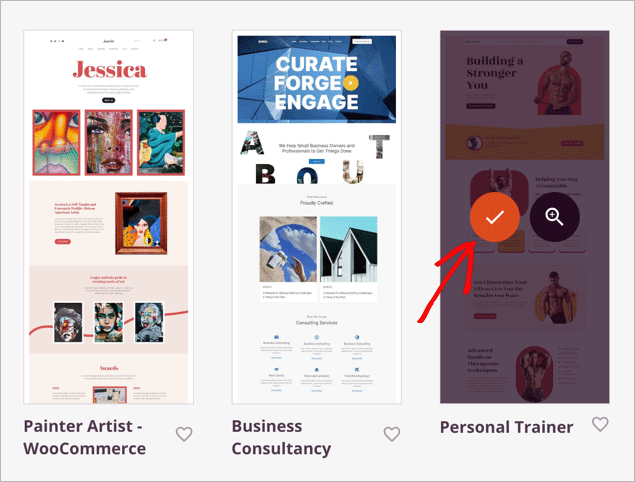
These kits include premade pages for your homepage, about page, services, testimonials, and contact page. You can customize everything with drag-and-drop.
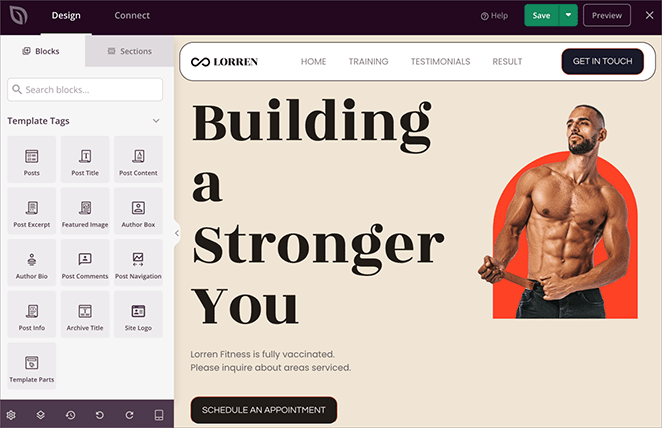
Here are the key pages you’ll want to build for your fitness business:
- Homepage with a clear headline, your value proposition, and a call-to-action button pointing to your pricing page
- Programs or services page showing what you offer at each membership tier
- About page with your credentials, training philosophy, and a personal photo. This is an important trust signal for potential members.
- Testimonials page featuring client results and transformation stories. SeedProd has a testimonials block that makes these easy to display.
- Pricing page with a clear comparison of your membership tiers. SeedProd’s pricing table blocks let you highlight your recommended plan.
I use SeedProd myself to build my own website, and the fitness theme kits are some of the most complete ones available. You can have a professional-looking trainer site ready in an afternoon.
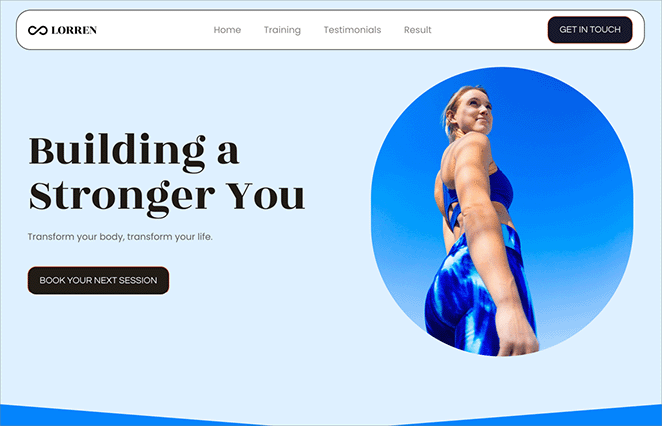
For a full walkthrough of building each page, see our guide on how to build a personal trainer website with SeedProd.
Set Up Memberships with MemberPress
With your site design handled by SeedProd, the next step is adding membership functionality. That’s where MemberPress comes in. It’s a WordPress membership plugin that handles content restriction, subscriptions, and payments.
I’ve tested several WordPress membership plugins, and MemberPress covers the most common fitness business needs without extra plugins. Plans start at $199.50/year.
Step 1: Install MemberPress
Install and activate MemberPress on your WordPress site. If you need help, here’s a guide on how to install a WordPress plugin.
Once activated, go to MemberPress » Settings and enter your license key.
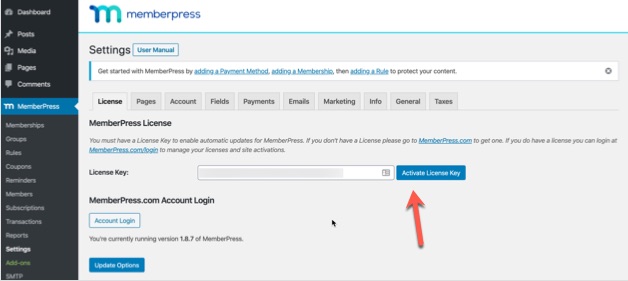
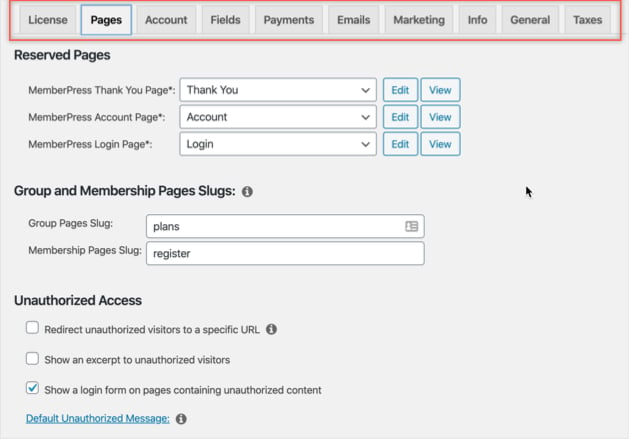
After activation, configure the settings using the tabs along the top of the settings page.
Step 2: Add Payment Methods
Click the Payments tab in the MemberPress settings. Then click the plus icon to see the available payment gateways:
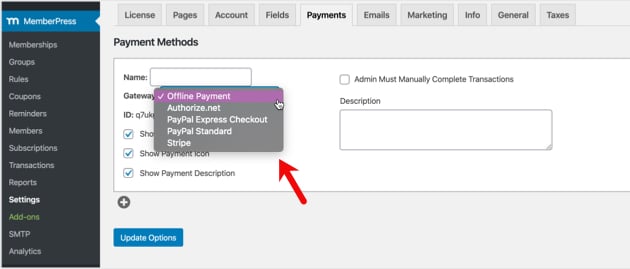
I recommend starting with Stripe. It handles credit card payments with the least friction for your members.
You can add PayPal as a secondary option. Add as many payment gateways as you like, then click Update Options to save.
Step 3: Create Membership Tiers
Membership tiers let you offer different pricing and content for different levels. For example, a Bronze plan with basic workouts at a lower price and a Gold plan with premium programs and coaching.
Go to MemberPress » Memberships and click Add New.
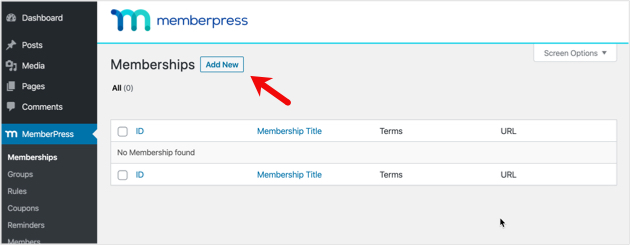
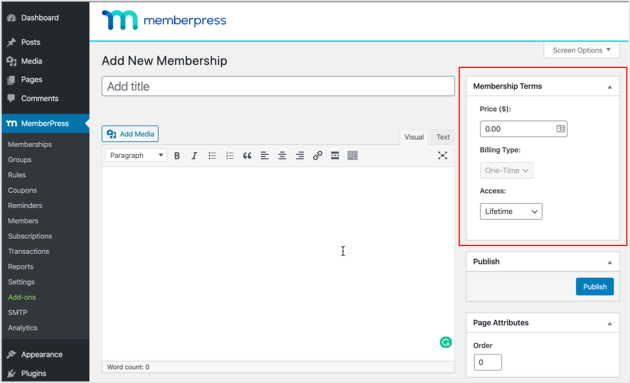
Set a title and description. Then configure the price, billing type, and access duration under Membership Terms.
Scroll down to Membership Options for additional settings.
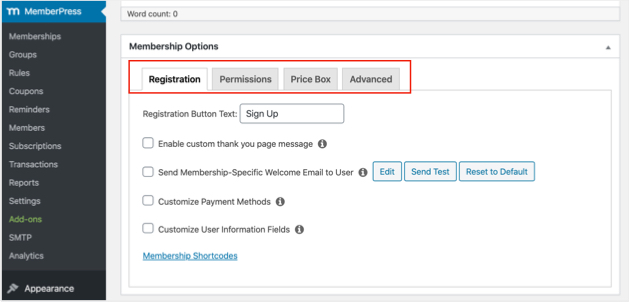
The tabs at the top let you configure:
- Registration for button text, thank you pages, and welcome emails
- Permissions for who can purchase each membership type
- Price Box for how the pricing displays to visitors
- Advanced for member URLs, pricing terms, and custom login pages
Click Publish when done. Repeat for each tier you want to offer.
Step 4: Set Access Rules for Premium Content
Access rules control who can see what. This is how you lock premium workouts behind a membership.
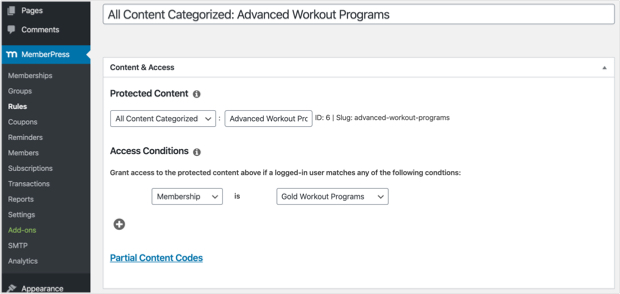
Go to MemberPress » Rules and click Add New.
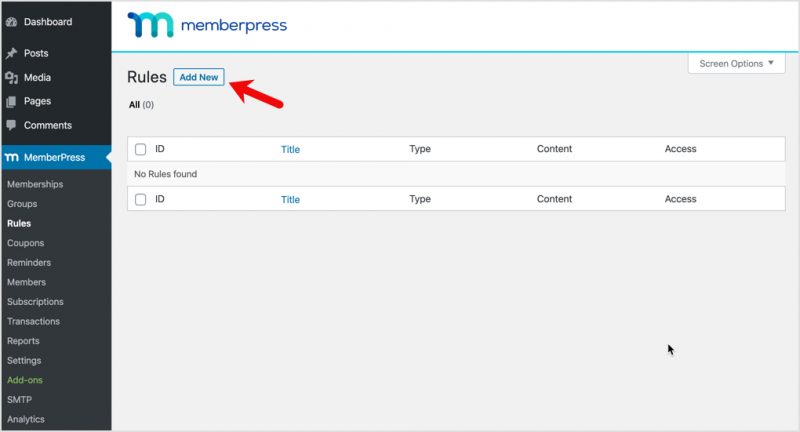
Link specific content to specific membership levels. In this example, all content in the Advanced Workout Programs category is set to Gold members only.
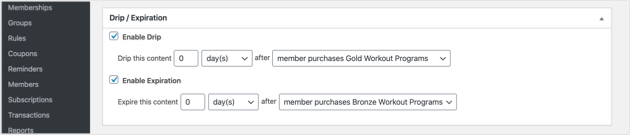
Scroll down to the Drip/Expiration settings. Drip lets you release content gradually over time, which works well for multi-week programs. Expiration sets when content access ends.
Save your rules when everything looks right.
Step 5: Upload Your Workout Programs
Now add the content your members will pay for. You can create workout programs as:
- WordPress blog posts with written content
- Standalone pages with written content and videos
- PDFs that members can download for offline use
- Other digital downloads like ebooks and video files
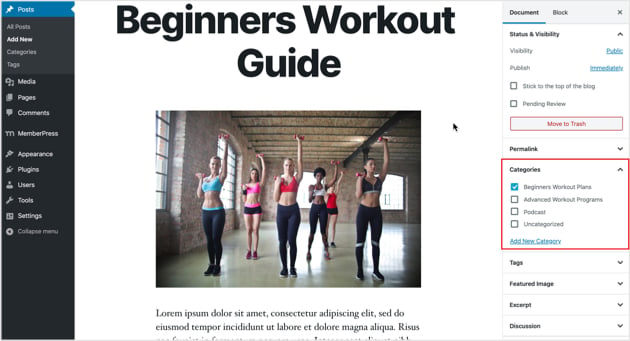
Go to Posts » Add New and add your workout program. Assign it to the right category so your access rules apply.
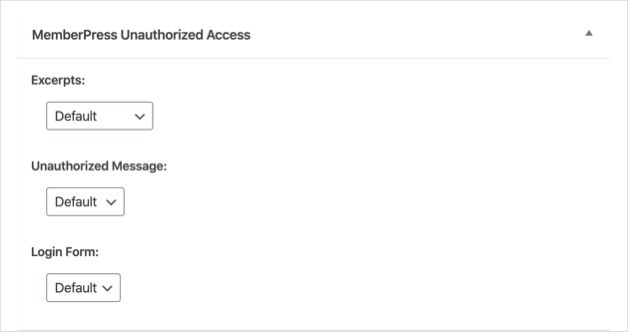
Scroll down to the MemberPress Unauthorized Access area. This controls what non-members see when they try to view this content.
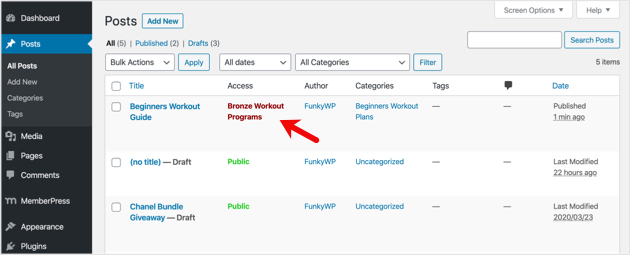
Publish the post. Under Posts » All Posts, you can confirm the content is locked to the correct membership levels.
Step 6: Build a Pricing Page
A pricing page shows visitors what each membership includes so they can pick the right plan. You have two options here.
MemberPress has a built-in Groups feature that auto-generates a basic pricing page. For more design control, you can build the page with SeedProd’s pricing table blocks and membership landing page templates. I prefer the SeedProd route because you get full control over the layout, colors, and call-to-action buttons.
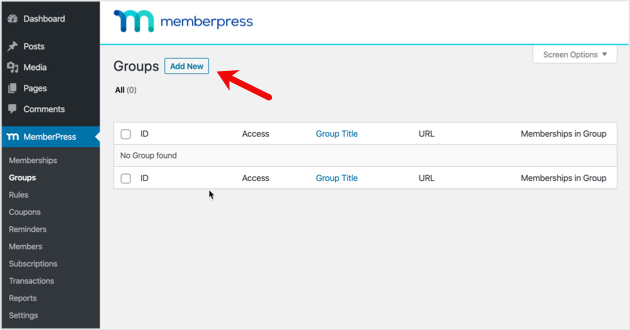
For the MemberPress method, go to MemberPress » Groups and click Add New.
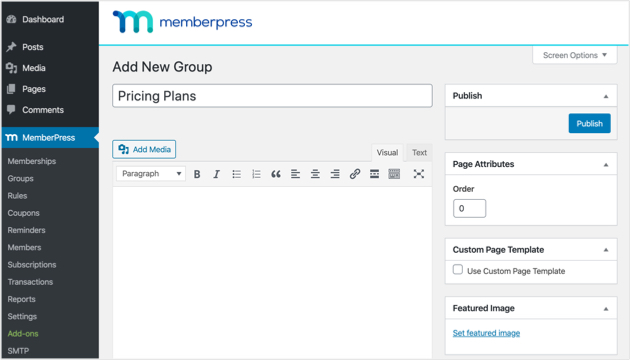
Name it something clear like “Pricing Plans.”
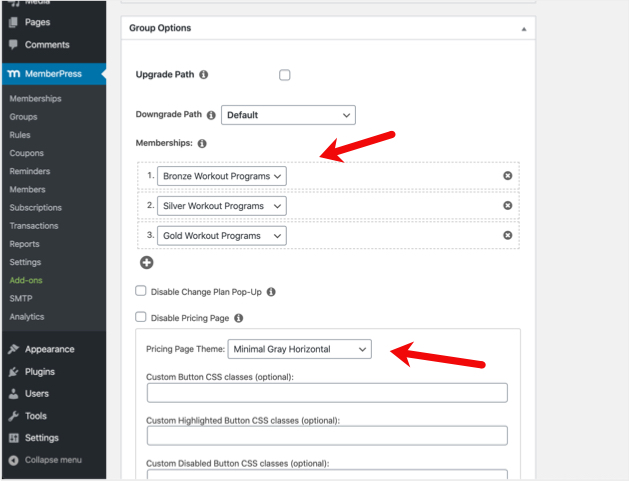
In Group Options, add the memberships you want to display. You can also change the theme for the pricing layout.
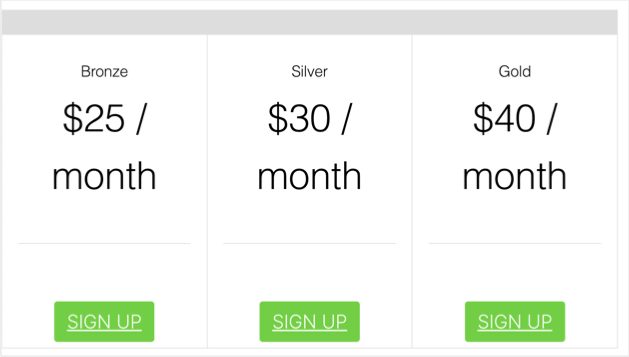
Publish and preview. Here’s what a pricing page using the Clean theme looks like:
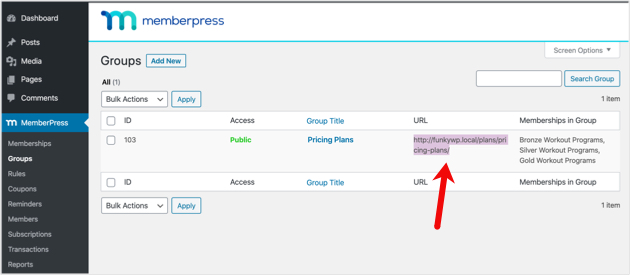
To send non-members to this pricing page when they try to access locked content, copy the group URL from MemberPress » Groups.
Then go to MemberPress » Settings » Pages tab. Under Unauthorized Access, check Redirect unauthorized visitors to a specific URL and paste your pricing page URL.
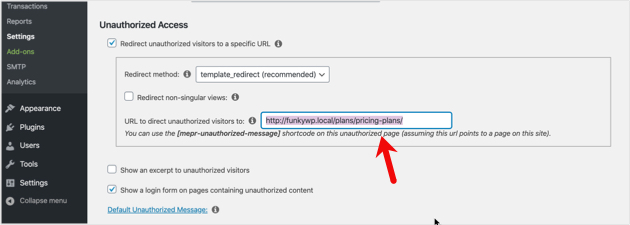
Click Update Options to save.
Step 7: Add Login and Sign-Up Forms
The last setup step is adding login and registration forms so members can access their content.
Go to Appearance » Widgets and add the MemberPress Login block to a widget area.
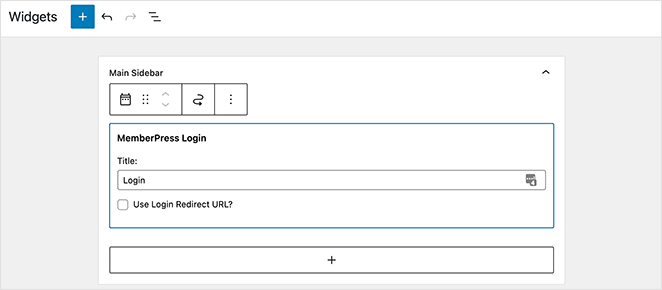
Then add your pricing page to your site’s navigation menu. Go to Appearance » Menus, select your pricing page under Groups, and click Add to Menu.
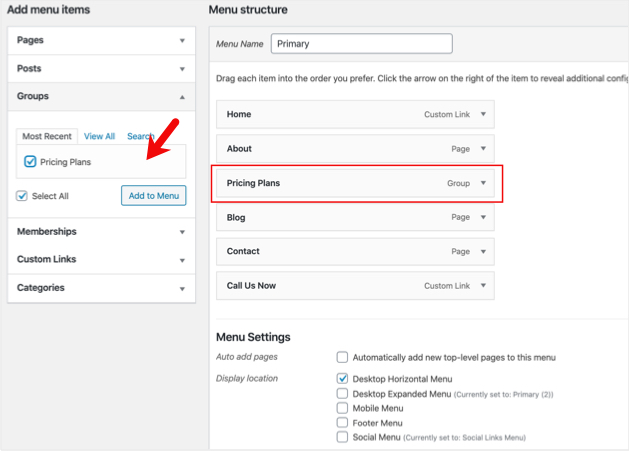
Drag to reorder it wherever you want it to appear in your menu.
Market Your Workout Programs
Your site is built and your memberships are set up. Now you need to get people through the door.
Marketing is where most fitness businesses succeed or stall. It’s worth getting this right from the start.
Build a Free Content Funnel
The most effective approach is giving away your best short-form content to attract people who’ll pay for the full programs. Think of it as a sample, not a giveaway.
MemberPress makes this easy. Set up a free membership tier that gives visitors access to a few introductory workouts. About 24% of free trial users convert to paid subscribers on average, and the number is even higher when you require a card upfront.
You can also create free blog posts and workout tips on your WordPress site. Each post is a chance to rank in search results and bring in new visitors who’ve never heard of you.
Use Social Media to Drive Traffic
Instagram, YouTube, and TikTok are where fitness audiences spend time. But the goal isn’t to build a social media business. It’s to move people from social platforms to your website.
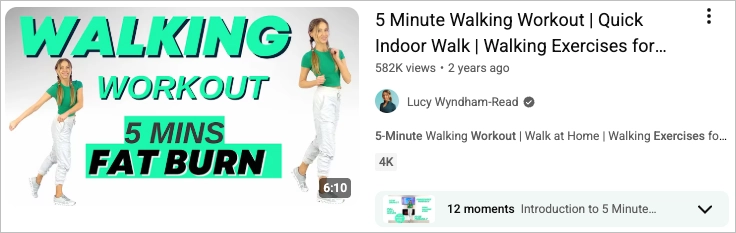
Post short workout clips, exercise form tips, or quick training advice. Then direct viewers to your site for the full programs. A strong bio link and consistent calls to action in your posts do the work.
YouTube is especially valuable because workout videos rank well in search. A 5-minute “beginner HIIT workout” video can drive traffic to your membership site for years.
Start an Email List Early
Email marketing returns about $36 for every $1 spent on average. It’s still the highest-converting channel for digital products. Start collecting addresses from day one.
Offer a free workout plan, a fitness checklist, or a sample week as a lead magnet. In exchange, visitors give you their email address. You can set this up with a simple landing page in SeedProd and connect it to your email marketing tool.
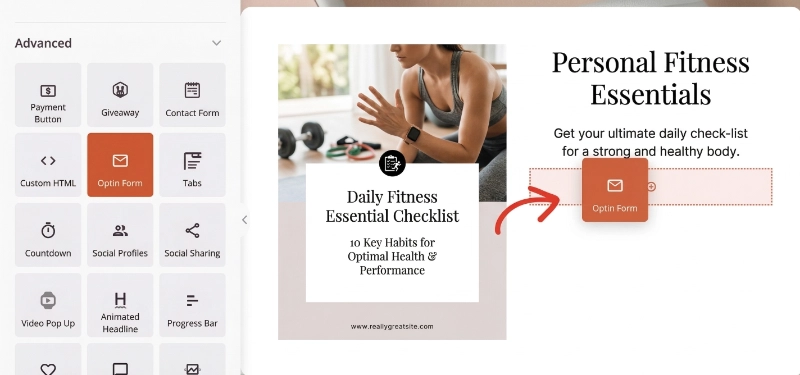
Then send a welcome sequence: introduce yourself, share a few free tips, and present your paid membership as the next step. Welcome sequences average about a 3% conversion rate, which adds up fast as your list grows.
Collect Testimonials and Transformations
Nothing sells a workout program like proof it works. Ask your best clients for a short testimonial or a before-and-after photo.
Display these on your homepage, your pricing page, and a dedicated testimonial page. SeedProd has a testimonials block that makes it easy to add quotes with photos and names.
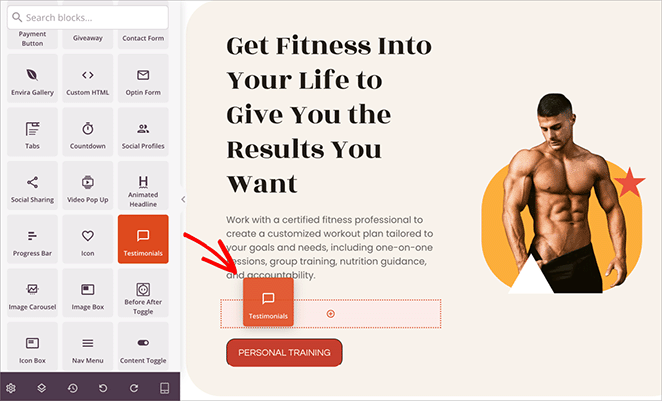
Real results from real people build more trust than any sales copy.
FAQs About Selling Workout Programs Online
Do you need certification to sell workout programs online?
No legal requirement exists in most countries. However, a certification from a recognized organization like ACE, NASM, or ISSA builds trust with potential customers. It also helps with liability insurance. If you have real training experience, that matters more to buyers than a specific credential.
How much money can you make selling workout programs online?
It varies widely. A trainer with 100 members paying $29/month earns about $2,900/month in recurring revenue. Some fitness creators earn six figures annually from online programs alone. Your income depends on your niche, pricing, content quality, and how consistently you market.
What’s the best platform to sell fitness programs?
WordPress with SeedProd and MemberPress gives you the most control over your design, content, and member data. Hosted platforms like Teachable or Kajabi are simpler to start with but charge higher fees and limit customization. For trainers who want to own their business long-term, WordPress is the stronger choice.
Can I sell workout programs without being on camera?
Yes. Many successful fitness programs are PDF-based workout plans with written instructions, diagrams, and photos. You can also use screen recordings to walk through exercise form using existing demo videos. Video helps, but it’s not required to get started.
Should I offer free workout content alongside paid programs?
Yes. Free content builds trust and brings in new visitors. Share workout tips or a sample program at no cost, then offer full programs as paid memberships. MemberPress lets you set different access rules so some content stays free while premium workouts are locked.
How do I price my online workout programs?
Monthly memberships typically range from $19 to $99 depending on content depth and niche. One-time program purchases usually run $47 to $197. Start with one or two price points and adjust based on sign-ups. Check what similar trainers in your niche charge as a starting reference.
Selling workout programs online is one of the best ways to grow your fitness business beyond the gym. With SeedProd for your site design and MemberPress for memberships, you can build a professional fitness website and start accepting payments without touching code.
Once your site is live, set up tracking with Google Analytics so you can see which programs convert best. And if you want to improve your checkout flow, here’s a guide to creating a WordPress checkout page.
Want more tips for building your fitness business with WordPress? These guides can help:
- Best Ecommerce WordPress Themes for Online Sales
- How to Sell Videos Online in WordPress (Step-by-Step)
If you found this article helpful, follow us on Twitter and Facebook for more WordPress content.




