
If your site includes a search form, you can create a Search Results template in the SeedProd Website Builder to fully customize the layout and design of the page visitors see when they perform a search.
Step 1: Add a New Search Results Template
In your WordPress admin, go to SeedProd > Website Builder and click Add New Template.
Step 2: Configure the Template Settings
In the New Theme Template popup, configure the following settings before creating the template:
- Type: Select Search Results from the dropdown.
- Name: Enter a name to identify this template.
- Conditions: Set the display conditions. For a search results template, set this to Include | Search Results to apply the template to all search result pages.
- Priority: Set a priority number to manage which template applies when conditions overlap. A higher number takes precedence over a lower one.
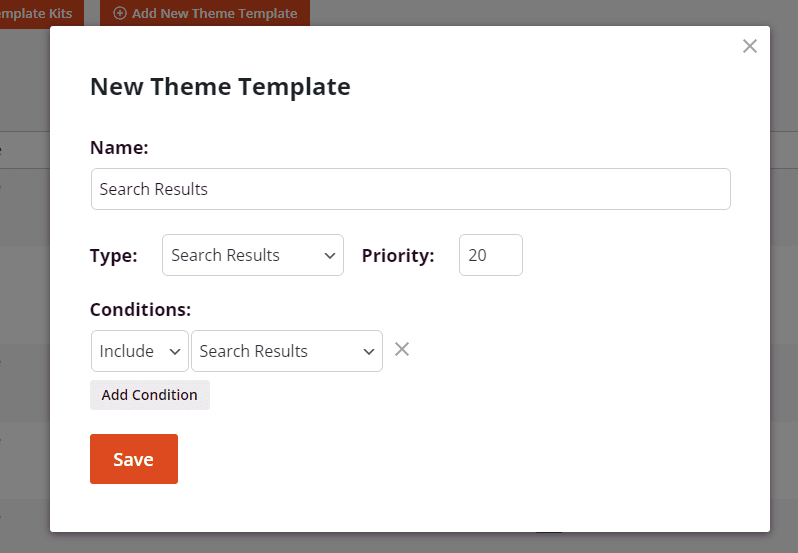
Click Save to open the template in the SeedProd builder.
Step 3: Design Your Search Results Template
Inside the builder, design your search results layout. Two blocks are essential for this template:
- Archive Title — displays the current search query, for example “Search Results for: wordpress”.
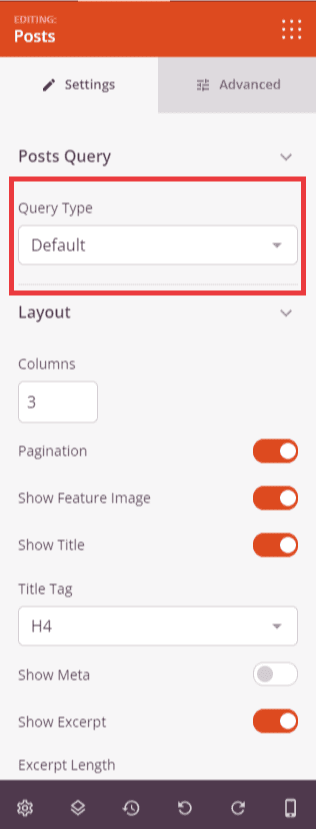
- Posts block — displays the list of posts matching the search query. This block is required. Make sure its Query Type is set to Default so it automatically shows the results for the current search.
Step 4: Publish the Template
When your design is complete, click the dropdown arrow on the Save button and select Publish. Your Search Results template will immediately begin applying to search result pages on your site.
Your Search Results template is now live. Visitors who use the search form on your site will see your custom layout when results are displayed. You can return to SeedProd > Website Builder at any time to edit the template or adjust its conditions.