
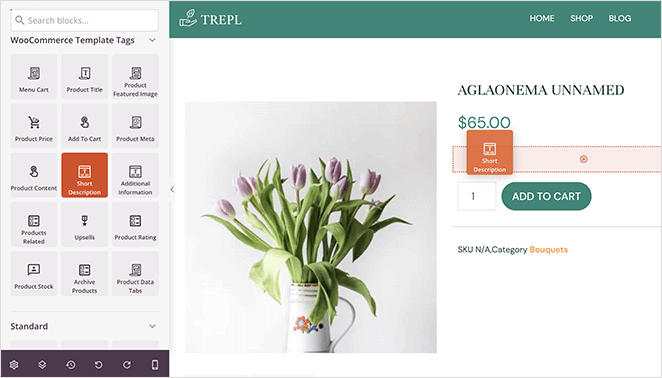
The Short Description block dynamically pulls and displays the short description from each WooCommerce product on your Single Product Templates. Instead of writing a static description, this block uses a shortcode to automatically fetch the correct short description for every product in your catalog, keeping your templates accurate without any manual effort.
This block is designed exclusively for use on Single Product Templates. The short description typically appears near the product title and price, giving shoppers a concise overview of the product before they read further. You can supplement the shortcode with custom text, adjust alignment and font size per device, and apply typography and color styles to make the description fit your brand perfectly.
Adding the Short Description Block to Your Pages
Follow these steps to add a Short Description block to your SeedProd Single Product Template:
Step 1: Add the Block
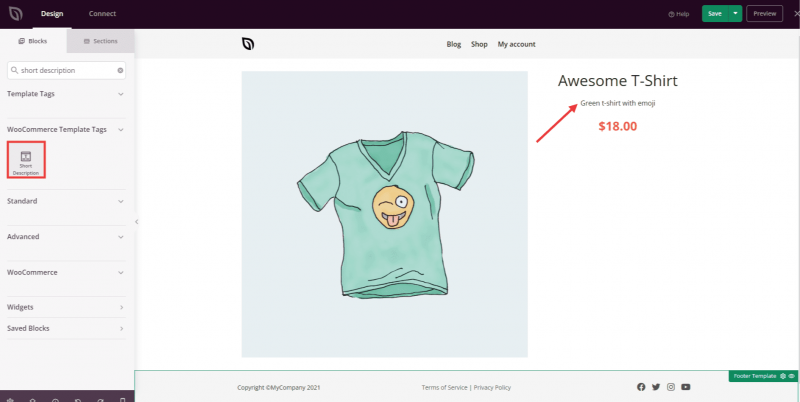
Under Design > Blocks > WooCommerce Template Tags, drag and drop the Short Description block into the desired section of your Single Product Template.
Step 2: Configure Content Settings
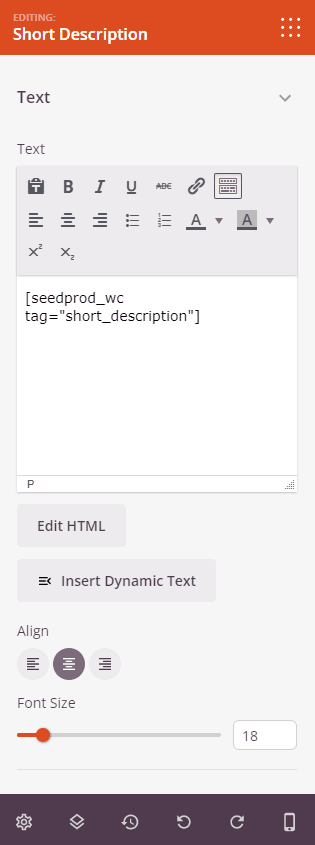
Once added, click on the Short Description block to open its settings. In the Content tab, the Text section contains the shortcode field and display options for the product short description.
- Text: The content field is pre-populated with the
shortcode, which automatically fetches the short description from WooCommerce for each product. You can add custom text before or after the shortcode if needed. Toggle between the Visual Editor (rich text) and Edit HTML (code) modes using the button beneath the field. - Alignment: Set the horizontal alignment of the description text — Left, Center, or Right. Supports per-device alignment for desktop, tablet, and mobile.
- Font Size: Set the font size of the description text using the slider (10–72px). Supports per-device sizing for desktop, tablet, and mobile.
Step 3: Customize the Design
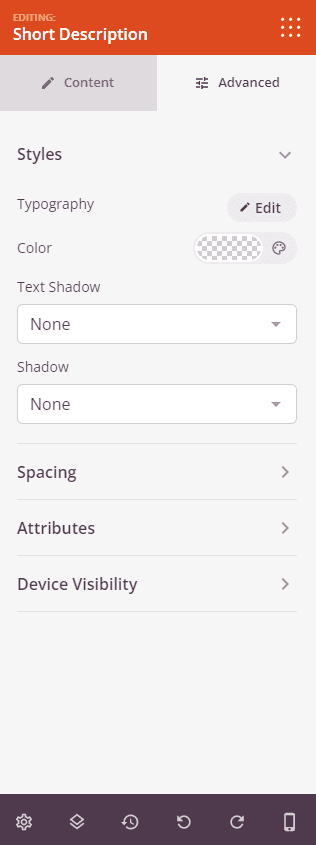
In the Advanced tab, you can style the description text’s appearance and control its visibility across devices.
Styles:
- Typography: Set the font family, weight, line height, letter spacing, and text transform for the short description text, giving you fine-grained control beyond the Content tab’s Font Size slider.
- Color: Set the text color of the short description.
- Text Shadow: Add a shadow effect directly to the description text. Choose from preset sizes (None, Hairline, Small, Medium, Large, X Large, 2X Large) to add depth or emphasis to the copy.
- Shadow: Add a box shadow to the overall block element to lift it visually from the surrounding page content.
Spacing:
- Margin: Control the outer spacing around your Short Description block (Top, Right, Bottom, Left). This determines how much space appears between the description and surrounding elements such as the product title or add-to-cart button.
- Padding: Adjust the inner spacing within your Short Description block (Top, Right, Bottom, Left). This creates breathing room between the description text and the block edges.
Attributes:
- CSS ID: Displays the auto-generated unique identifier for your Short Description block. This ID is created automatically by SeedProd for custom styling or JavaScript targeting.
- Custom Class: Add custom CSS classes to apply specific styles from your theme or custom CSS.
- Custom Attributes: Add any HTML attributes to the block wrapper element. Enter each attribute on a new line using the format: attribute-name|value (e.g., data-description|short).
Device Visibility:
- Hide on Desktop: Hide the Short Description block on desktop screens.
- Hide on Tablet: Hide the Short Description block on tablet devices.
- Hide on Mobile: Hide the Short Description block on mobile devices.
Animation Effects:
- Entrance Animation: Choose from various animation effects that play when the Short Description block scrolls into view. Options include Bounce, Fade In, Zoom In, Rotate In, and many more.
Step 4: Save Your Changes
Once you have finished configuring the Short Description block and customizing its appearance, make sure to save your work.
You’ve successfully added a Short Description block to your Single Product Template! The block automatically displays the correct short description for every product in your WooCommerce store, saving you time and ensuring consistency across your catalog. Experiment with typography, text color, and per-device alignment to present your product descriptions in a way that guides shoppers toward a purchase.