
The Headline block allows you to add styled headings to any SeedProd page. Whether you need a bold H1 for your hero section or a smaller H4 to introduce a content section, the Headline block gives you full control over the text, HTML level, link, and typography settings.
Unlike plain text, headlines created with this block support rich text formatting, optional links, dynamic text variables, and per-device font size and alignment controls — making it one of the most versatile blocks for building well-structured, SEO-friendly pages.
Adding the Headline Block to Your Pages
Follow these steps to add a Headline block to your SeedProd page:
Step 1: Add the Block
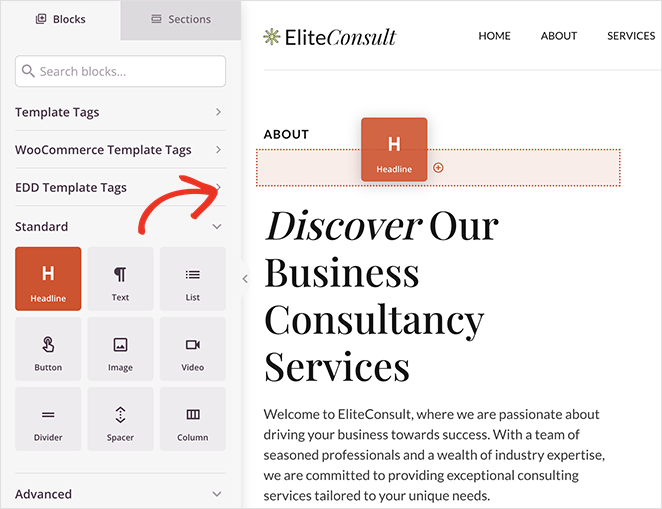
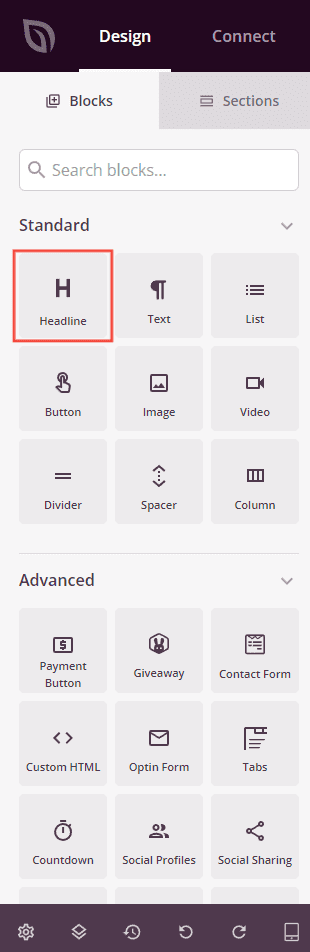
Under Design > Blocks, drag and drop the Headline block into the desired section of your page.
Step 2: Configure Content Settings
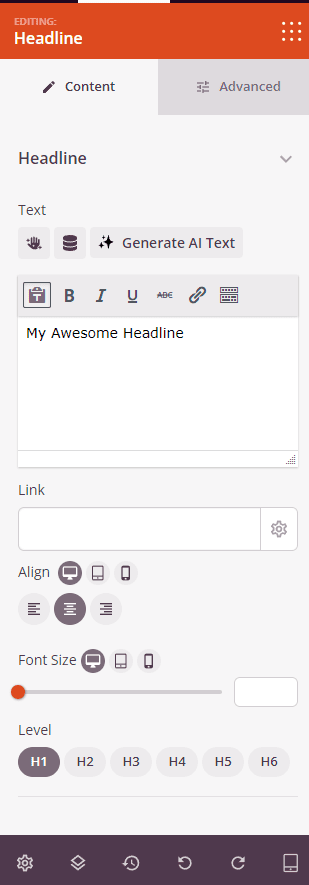
Once added, click on the Headline block to open its settings. In the Content tab, configure the headline text, link, and layout.
Headline:
- Text: Enter your headline text using the rich text editor. Supports bold, italic, underline, strikethrough, and inline color formatting. You can also insert Dynamic Text variables or use the AI text generation tool to generate and refine your headline copy.
- Link: Optionally add a URL to make the headline a clickable link. Click the settings icon next to the link field to reveal additional link options.
- Open In New Window: Check this option to open the linked URL in a new browser tab.
- No Follow: Check this option to add a
rel="nofollow"attribute to the link, telling search engines not to pass link equity to the destination. - Alignment: Set the text alignment — Left, Center, or Right. Supports per-device values for desktop, tablet, and mobile.
- Font Size: Set the font size of the headline text. Supports per-device values for desktop, tablet, and mobile.
- Level: Choose the HTML heading tag for your headline — H1, H2, H3, H4, H5, or H6. Use H1 for your main page title, and lower levels for subheadings to maintain proper document structure.
Step 3: Customize the Design
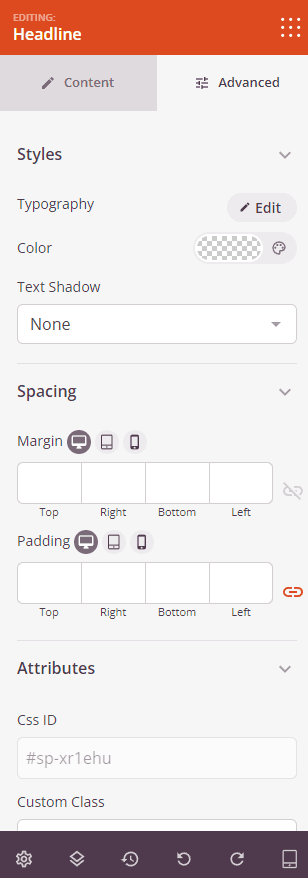
In the Advanced tab, you can customize the typography, color, and spacing of your Headline block.
Styles:
- Typography: Fine-tune the headline’s font family, font weight, line height, letter spacing, and text transform. Supports per-device values for desktop, tablet, and mobile.
- Color: Set the text color for the headline using the color picker.
- Text Shadow: Add a shadow effect to the headline text. Choose from None, Hairline, Small, Medium, Large, X Large, or 2X Large to add depth and emphasis to your heading.
Spacing:
- Margin: Control the outer spacing around your Headline block (Top, Right, Bottom, Left). Supports per-device values for desktop, tablet, and mobile.
- Padding: Adjust the inner spacing within your Headline block (Top, Right, Bottom, Left). Supports per-device values for desktop, tablet, and mobile.
Attributes:
- CSS ID: Displays the auto-generated unique identifier for your Headline block, created automatically by SeedProd for custom styling or JavaScript targeting.
- Custom Class: Add custom CSS classes to apply specific styles from your theme or custom CSS.
- Custom Attributes: Add any HTML attributes to the block wrapper element. Enter each attribute on a new line using the format: attribute-name|value.
Device Visibility:
- Hide on Desktop: Hide the Headline block on desktop screens.
- Hide on Tablet: Hide the Headline block on tablet devices.
- Hide on Mobile: Hide the Headline block on mobile devices.
Animation Effects:
- Entrance Animation: Choose an animation effect that plays when the Headline block scrolls into view, such as Bounce, Fade In, Zoom In, Rotate In, and many more.
Step 4: Save Your Changes
Once you have finished configuring the Headline block and customizing its appearance, make sure to save your work.
You’ve successfully added a Headline block to your page! Well-crafted headlines guide your visitors through your content, reinforce your message, and improve page structure for both readers and search engines. Experiment with heading levels, typography settings, and animations to create headlines that capture attention and match your brand style.