


Cuando intenté configurar Google Analytics en un sitio de WordPress por primera vez, recuerdo que me quedé mirando fragmentos de código preguntándome por dónde empezar. Quería saber cómo me encontraba la gente en mi sitio, qué páginas visitaban más y qué funcionaba realmente. Pero el proceso me pareció demasiado técnico.
Fue entonces cuando encontré MonsterInsights, y sinceramente, cambió la forma en que uso Google Analytics. En esta reseña del plugin MonsterInsights, te explicaré las funciones, lo que hace bien y para quién es más adecuado.
He utilizado MonsterInsights en varios sitios web de WordPress, incluidos blogs, sitios de pequeñas empresas y tiendas en línea. Tanto si eres nuevo en analytics como si solo quieres un acceso más fácil a tus datos, esta reseña te ayudará a decidir si es la herramienta adecuada para ti.
Reseña de MonsterInsights: Mi veredicto
- ⭐️ Puntuación: 4.8/5
- Ideal para: Usuarios de WordPress que desean un acceso claro y sin código a los datos de Google Analytics
- Plan gratuito: Sí
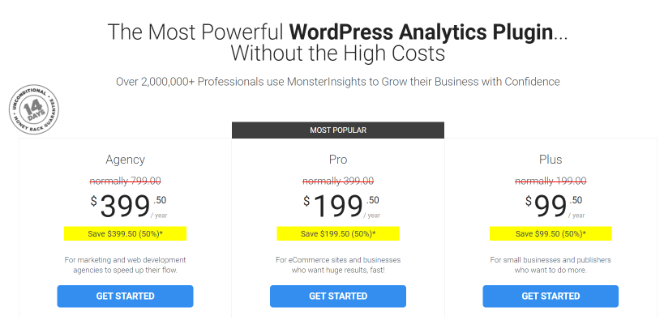
- Planes de pago desde: 99,50 $/año
- Por qué lo recomiendo: MonsterInsights facilita el seguimiento de visitantes, la visualización de informes dentro de WordPress y la comprobación de lo que funciona, sin necesidad de un desarrollador.
¿Qué es MonsterInsights?

MonsterInsights es el mejor plugin de Google Analytics para WordPress. Te ayuda a configurar Google Analytics en solo unos clics, y eso sin editar código. Además, el plugin viene con diferentes funciones de seguimiento avanzadas que se configuran automáticamente al instalarlo.
Con MonsterInsights, ya no tienes que depender de suposiciones para averiguar en qué contenido están interesados tus visitantes o qué estrategias funcionan y generan resultados.
Ayuda a descubrir información sobre tus visitantes, reúne datos esenciales en un solo lugar con informes fáciles de entender y proporciona datos para tomar decisiones comerciales.
Dado que MonsterInsights es tan fácil de usar y ofrece muchísimas funciones, no es de extrañar que MonsterInsights cuente con la confianza de más de 2 millones de usuarios, incluidas marcas como Microsoft, FedEx y PlayStation.
Pero, ¿qué hace de MonsterInsights el mejor plugin de análisis para WordPress?
¿Por qué usar MonsterInsights en tu sitio de WordPress?
Veamos algunas de las funciones que ofrece el plugin y cómo puedes utilizarlas para obtener información sobre el comportamiento de tus visitantes.
- 1. Añadir seguimiento de Google Analytics sin editar código
- 2. Realizar un seguimiento de las actividades de marketing con notas del sitio
- 3. Informes de panel de control fáciles de usar
- 4. Ver estadísticas en tiempo real dentro de WordPress
- 5. Identificar tu contenido de mayor rendimiento
- 6. Centrarse en las palabras clave adecuadas para aumentar el tráfico
- 7. Comprender hasta dónde se desplaza la gente en una página
- 8. Determinar los intereses de tu audiencia
- 9. Averiguar de dónde provienen tus visitantes
- 10. Configura el seguimiento de comercio electrónico con un solo clic
- 11. Automatiza el seguimiento de conversiones de formularios
- 12. Obtén más datos a través de dimensiones personalizadas
- 13. Ve qué archivos descarga la gente con más frecuencia
- 14. Seguimiento de enlaces de afiliados
- 15. Garantiza el cumplimiento del RGPD
- 16. Integraciones Premium
1. Añadir seguimiento de Google Analytics sin editar código
Normalmente, para añadir el seguimiento de Google Analytics a un sitio web de WordPress, tendrías que introducir un código de seguimiento. Esto requiere un poco de conocimiento técnico, ya que tendrás que manipular el código de tu sitio.
Pero ese no es el caso si usas MonsterInsights.
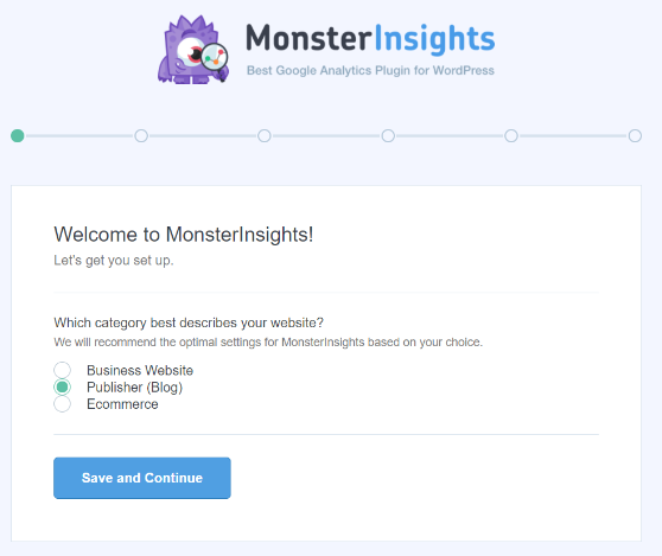
Es el mejor plugin de WordPress para configurar Google Analytics en tu sitio web. Usando su asistente de configuración, cualquiera puede añadir el seguimiento de análisis sin necesidad de editar código o contratar a un profesional.
2. Realizar un seguimiento de las actividades de marketing con notas del sitio
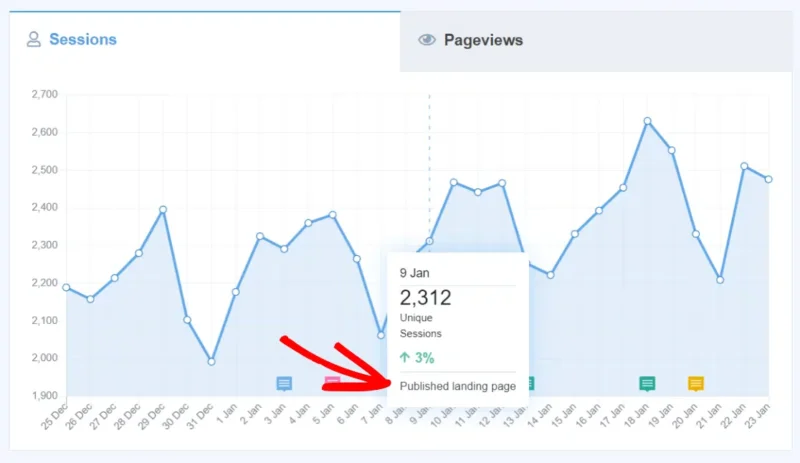
Con la función de anotaciones integrada de Monsterinsights, Site Notes, añadir anotaciones de GA4 a tus datos de análisis es pan comido. Ofrece anotaciones mejoradas de Google Analytics en GA4 y te permite ver fácilmente cómo la actividad impacta en tu sitio.
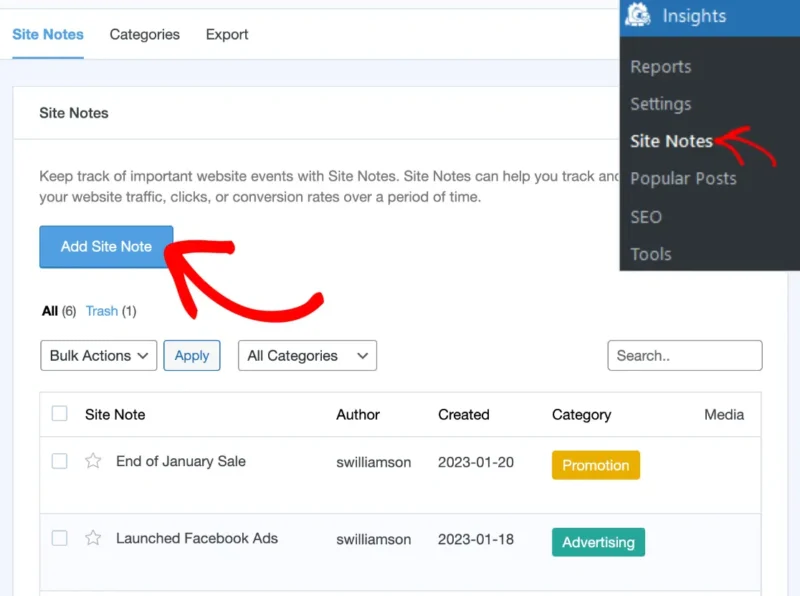
Con las anotaciones ilimitadas de GA4 de Site Notes, puedes mantener a todo tu equipo al día sin límites de usuarios.
3. Informes de panel de control fáciles de usar
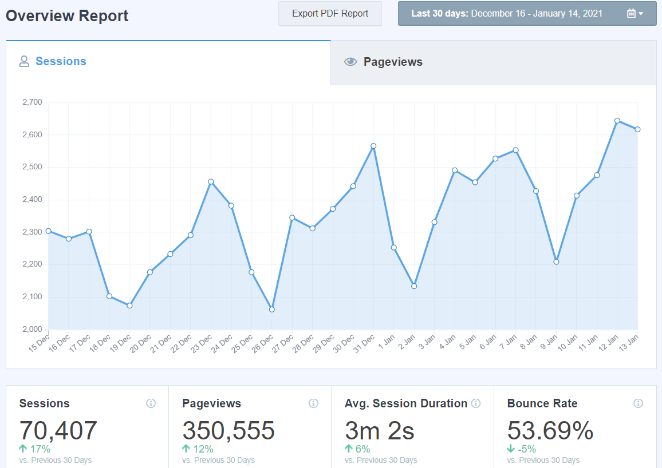
Si bien MonsterInsights facilita enormemente la conexión de tu sitio con Google Analytics, también te ayuda a ver los datos dentro de tu panel de administración de WordPress.
Usando sus informes de panel, puedes ver los informes de Google Analytics sin tener que salir de tu sitio web. Cada informe está cuidadosamente diseñado, para que los usuarios puedan entender fácilmente los datos y encontrar información útil para hacer crecer su negocio.
4. Ver estadísticas en tiempo real dentro de WordPress
¿Ahora te preguntas cuántas personas están activas actualmente en tu sitio web?
Entre los diferentes informes de MonsterInsights, el uso del informe en tiempo real muestra el número de visitantes activos en un sitio web en este preciso momento. Y puedes ver el informe dentro del área de administración de WordPress.
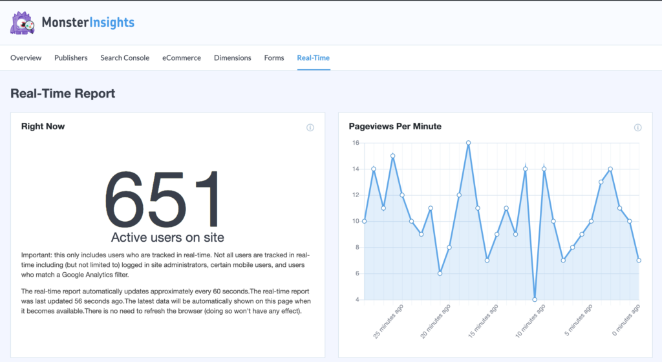
Los datos en tiempo real son muy valiosos. Por ejemplo, ayudan a rastrear el rendimiento de una campaña, encontrar el mejor momento para publicar entradas de blog cuando hay mucha gente activa y ver de dónde son tus visitantes durante el día.
5. Identifica tu contenido de mayor rendimiento
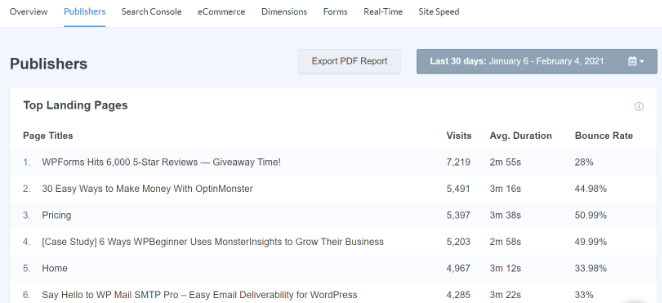
Otro beneficio de usar MonsterInsights es que te ayuda a centrarte en el contenido que importa. Elimina las conjeturas y ayuda a identificar las páginas de destino que reciben mucho tráfico.
Al averiguar qué tipo de contenido le gusta a la gente, podrías optimizarlo para obtener más conversiones. O crear temas similares y aumentar el tráfico web.
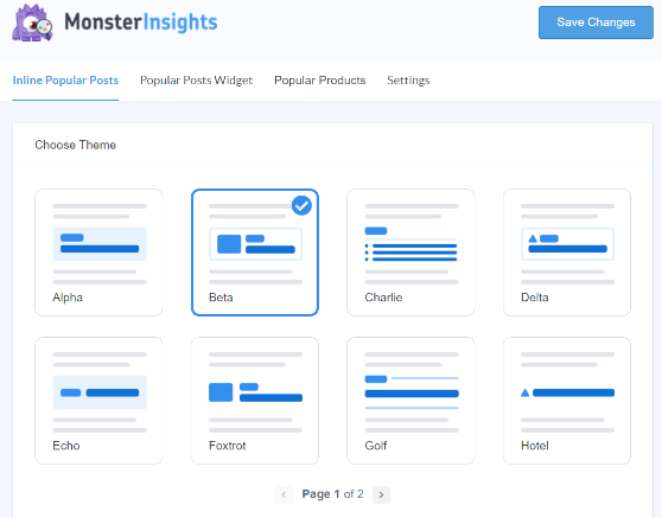
Después de averiguar tus páginas de alto tráfico, puedes promocionarlas en cualquier lugar del sitio web usando la opción de Publicaciones Populares en MonsterInsights. Ayuda a los visitantes a descubrir rápidamente contenido nuevo, aumentar la participación del usuario, reducir las tasas de rebote y mantener a la gente en tu sitio.
Hay varios temas para elegir en la función de Publicaciones Populares. Además, diferentes opciones de personalización te permiten cambiar el estilo y el diseño. Puedes mostrar las publicaciones dentro de una publicación, al final o en la barra lateral.
6. Centrarse en las palabras clave adecuadas para aumentar el tráfico
¿Alguna vez has pensado en qué términos de búsqueda podrían estar usando las personas en los motores de búsqueda para encontrar tu contenido?
MonsterInsights ayuda a ver las principales palabras clave en la búsqueda de Google que obtienen muchos clics y generan tráfico a tu sitio a través de su informe de Google Search Console. Así, puedes encontrar palabras clave similares para optimizar y aumentar tu tráfico orgánico.
Además, el informe también ayuda a identificar las oportunidades más fáciles. Estos son términos de búsqueda que están muy cerca de alcanzar los 10 mejores resultados de búsqueda. Y con un pequeño impulso, podrías mejorar sus rankings y empezar a obtener más visitantes.
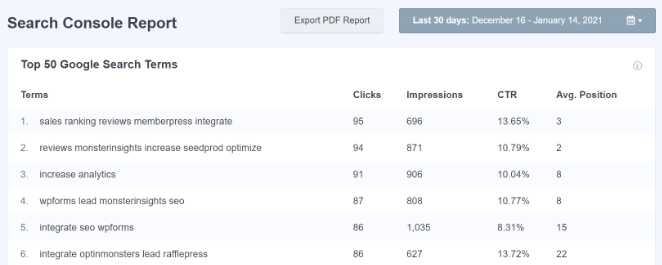
Recuerda que necesitarás conectar Google Search Console con Google Analytics para ver el informe en MonsterInsights.
7. Comprender hasta dónde se desplaza la gente en una página
MonsterInsights también te ayuda a comprender mejor el comportamiento de tus visitantes. Con solo hacer clic en un botón, habilita el seguimiento de desplazamiento y ve hasta dónde llega la gente en una página web.
No es necesario configurar manualmente los eventos de seguimiento de desplazamiento usando Google Tag Manager. MonsterInsights automatiza el proceso y activa eventos a medida que los visitantes se desplazan por una página en un 25%, 50%, 75% o 100%.
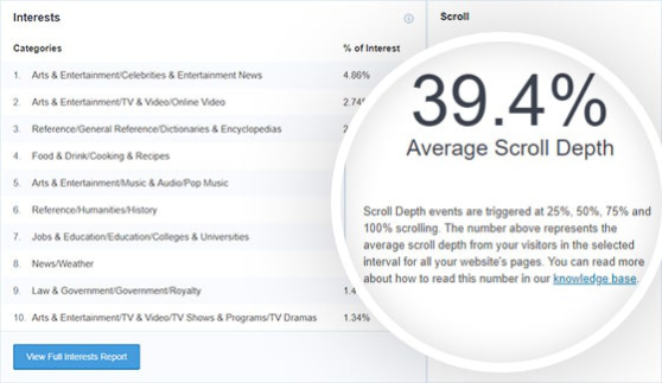
Luego puedes usar estos datos para colocar tus botones de llamada a la acción (CTA) en el lugar correcto y aumentar las conversiones. O ver dónde tus visitantes pierden interés y optimizar la publicación para una máxima participación.
8. Determina los intereses de tu audiencia
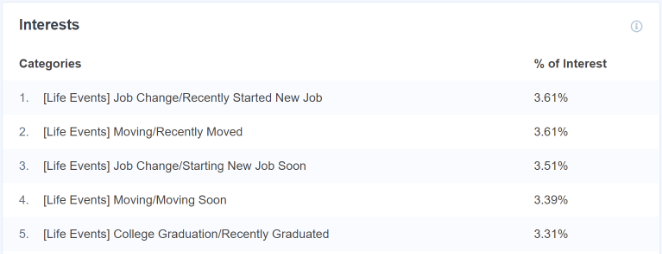
Además del seguimiento de desplazamiento, también puedes descubrir los intereses de tu audiencia a través de MonsterInsights.
Ayuda a descubrir nuevas ideas de contenido, ya que puedes crear artículos, videos, podcasts y otros tipos de contenido basados en lo que le gusta a la gente.
Y si tienes una tienda de comercio electrónico, el informe de Intereses proporciona información sobre qué productos vender a tus clientes.
9. Averiguar de dónde provienen tus visitantes
Si quieres que tu negocio tenga éxito, es importante saber de dónde vienen tus visitantes. Te ayuda a comprender mejor a tu audiencia, agrupar a tus visitantes en diferentes categorías o segmentos y crear mensajes dirigidos.
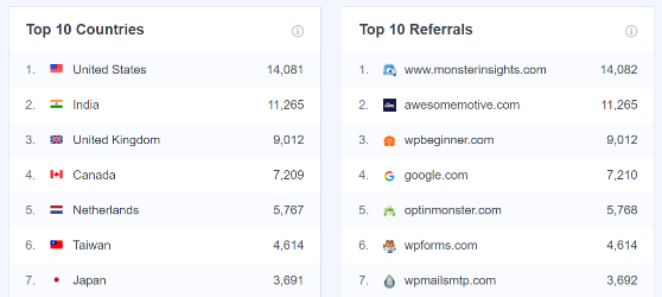
En MonsterInsights, puedes ver el informe de Principales Países y descubrir qué región geográfica genera mucho tráfico. Usando esta información, puedes crear contenido específico de la región, traducir tu sitio a diferentes idiomas y crear campañas para dirigirte a personas de un país en particular.
Eso no es todo. Con la ayuda del plugin, también puedes identificar las principales fuentes de referencia. Estos son visitantes que llegan desde otro sitio web después de hacer clic en un hipervínculo. Puedes usar estos datos para encontrar más fuentes de referencia, crear asociaciones, hacer publicaciones de invitado y obtener backlinks.
Y MonsterInsights es la solución perfecta para ayudarte a determinar tu fuente de tráfico.
10. Configura el seguimiento de comercio electrónico con un solo clic
¿Tienes una tienda de comercio electrónico y quieres saber cómo está funcionando? Tradicionalmente, tendrías que añadir un código de seguimiento de comercio electrónico a tu sitio web. Esto puede ser complicado y difícil para cualquiera que no sepa programar.
Por suerte, MonsterInsights te ayuda a configurar el seguimiento de comercio electrónico en solo unos clics. No necesitas tocar ni una sola línea de código.
Con el complemento de comercio electrónico de MonsterInsights, es más fácil que nunca rastrear los ingresos de tu tienda, las transacciones, el valor promedio del pedido y la tasa de conversión. El plugin también muestra tus productos principales, la cantidad vendida, el porcentaje de ventas y los ingresos totales.
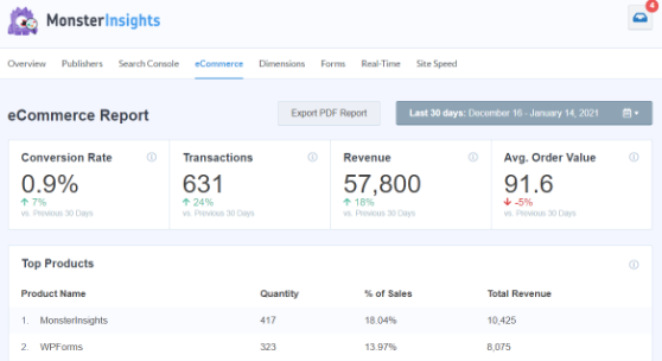
Además de eso, también ayuda a rastrear las principales fuentes de conversión, los carritos añadidos totales, los eliminados del carrito totales, el tiempo hasta la compra y las sesiones hasta la compra. Utilizando los datos del informe de comercio electrónico, puedes aumentar tus ingresos y llevar tu tienda online al siguiente nivel.
11. Automatiza el seguimiento de conversiones de formularios
Ahora, si tienes diferentes formularios en tu sitio de WordPress y quieres saber cómo están convirtiendo, MonsterInsights puede ayudarte.
Configurar manualmente el seguimiento de formularios en Google Analytics puede ser un proceso largo y complicado. Por no mencionar que tendrás que configurar el seguimiento para cada formulario individualmente.
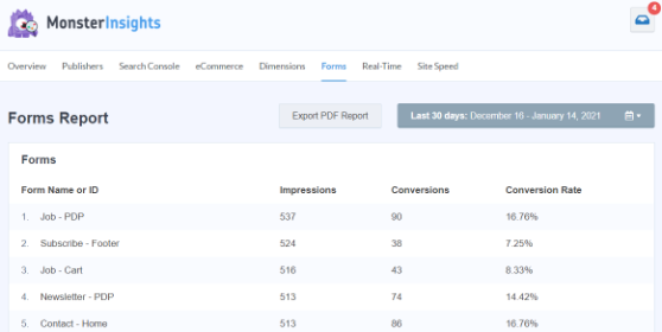
Pero con el complemento de Formularios de MonsterInsights, no necesitas configuración adicional. Rastrea automáticamente todo tipo de formularios de WordPress y muestra un informe dentro de tu área de administrador. En el informe, descubre cuántas impresiones y conversiones obtiene cada formulario.
12. Obtén más datos a través de dimensiones personalizadas
Otra razón para usar MonsterInsights es configurar un seguimiento adicional para obtener más información a través de dimensiones personalizadas. Estas son métricas que Google Analytics no rastrea por defecto.
Pero el complemento de Dimensiones de MonsterInsights ayuda a configurar dimensiones personalizadas sin código ni necesidad de contratar a un experto.
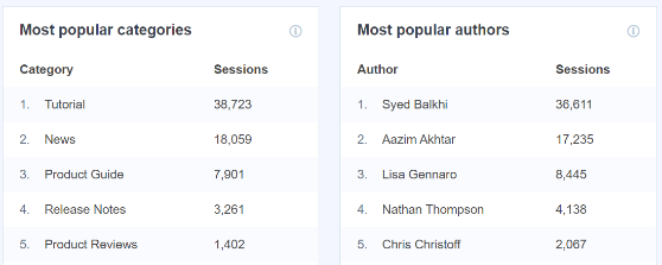
En solo unos clics, puedes encontrar:
- Autores populares en tu sitio
- Tipo de publicación que la gente prefiere más
- Mejor momento para publicar entradas de blog
- Rastrea las actividades de los usuarios conectados
- Encuentra la frase clave principal más popular y la puntuación SEO
- Rastrea las categorías y etiquetas de WordPress que generan tráfico
13. Ve qué archivos descarga la gente con más frecuencia
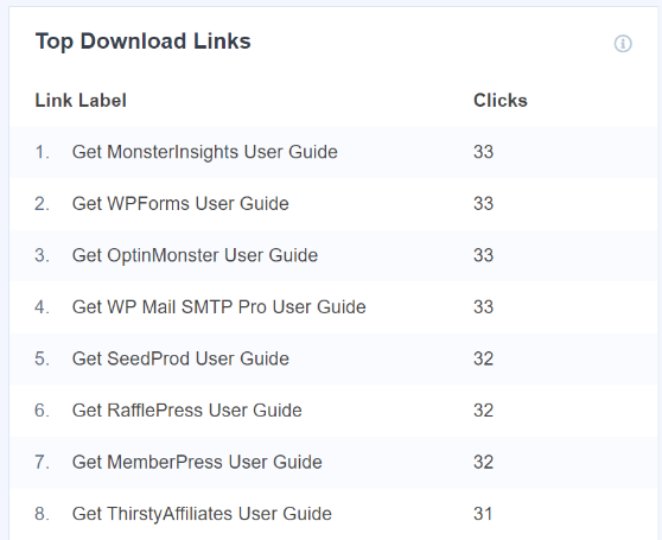
Si ofreces contenido que la gente puede descargar de tu sitio web, como ebooks, videos y PDFs, es importante rastrear el número de descargas en Google Analytics.
MonsterInsights rastrea automáticamente las descargas de archivos por ti. No se requiere configuración manual.
Ayuda a ver qué tipo de contenido la gente prefiere descargar mucho. Así, ofreces contenido similar a tus visitantes, aumentas la participación y haces crecer tu lista de correo.
14. Seguimiento de enlaces de afiliados
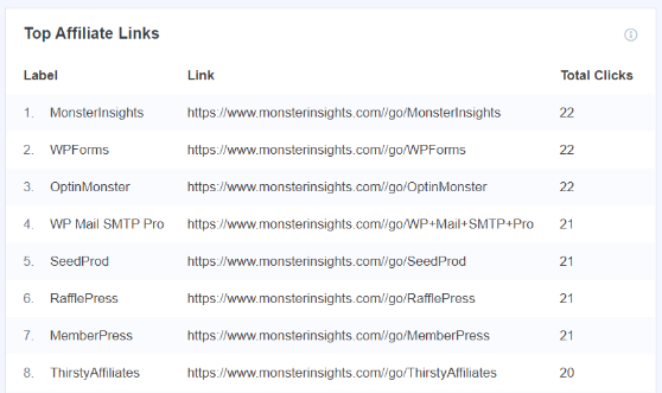
Otra característica que ofrece MonsterInsights es el seguimiento de enlaces de afiliados. Te permite rastrear el rendimiento de cada enlace de afiliado en tu sitio y ver cuántas personas hacen clic en él.
Y lo mejor de todo, rastrea los enlaces de afiliados directamente. Simplemente especifica la etiqueta y la ruta del enlace, y MonsterInsights medirá su rendimiento en Google Analytics.
Puedes ver el informe en la pestaña Publicadores y ver el número de clics de cada enlace de afiliado.
15. Asegura el cumplimiento del RGPD
¿Sabías que MonsterInsights puede ayudarte a automatizar diferentes procesos y cumplir con el RGPD?
El RGPD, o Reglamento General de Protección de Datos, es una ley de la UE que requiere el consentimiento de los usuarios antes de poder recopilar y registrar sus datos en Google Analytics. El incumplimiento del RGPD puede dar lugar a una multa de 20 millones de euros o el 4% de los ingresos anuales, lo que sea mayor.
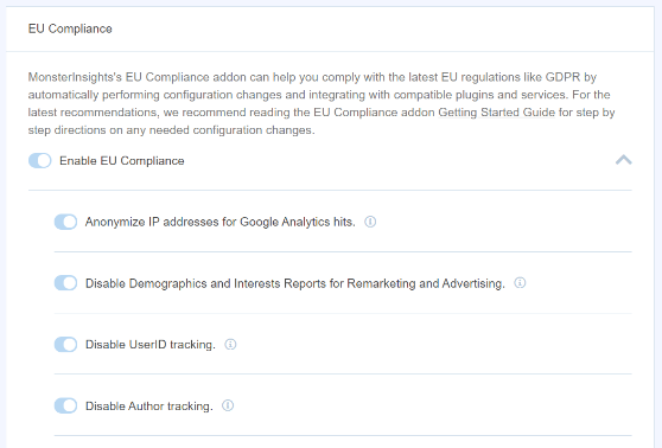
Pero con MonsterInsights a tu lado, solo tienes que usar su complemento de cumplimiento de la UE y garantizar el cumplimiento del RGPD. El complemento te permite deshabilitar automáticamente el seguimiento de UserID, el seguimiento de autores, anonimizar las direcciones IP y otros procesos.
16. Integraciones Premium
Por último, lo que hace de MonsterInsights uno de los plugins de Analytics es que se integra fácilmente con otros plugins populares de WordPress. Por ejemplo, puedes rastrear el rendimiento de tu tienda WooCommerce, tiendas Easy Digital Downloads, MemberPress y sitios LifterLMS. O rastrear conversiones de formularios de WPForms y Formidable Forms.
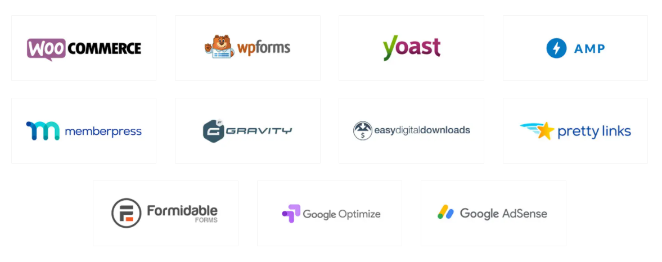
MonsterInsights también funciona a la perfección con diferentes servicios de Google para ampliar tu comprensión de los visitantes. Se integra fácilmente con Google Optimize, para que puedas realizar experimentos y ejecutar pruebas A/B. O rastrear automáticamente los clics en banners de Google AdSense.
¿Cómo se compara MonsterInsights con otros plugins de Analytics?
Hay algunos otros plugins de análisis de WordPress disponibles, por lo que podrías preguntarte cómo se compara MonsterInsights. He probado la mayoría de ellos y esto es lo que encontré.
- Google Site Kit: Gratuito y hecho por Google, pero es bastante limitado. Puedes ver estadísticas básicas de tráfico, pero no obtendrás cosas como seguimiento de formularios, informes de comercio electrónico o información de palabras clave dentro de WordPress.
- ExactMetrics: Muy similar a MonsterInsights (es de la misma empresa), pero no se actualiza tan a menudo. He tenido mejores resultados quedándome con MonsterInsights para soporte a largo plazo.
- OnePageGA: Si solo quieres una forma limpia y sin complicaciones de ver tus estadísticas de GA4 en un solo lugar, OnePageGA es una excelente opción gratuita. No reside dentro de WordPress, pero es fácil de usar para principiantes y súper rápido.
MonsterInsights es el único plugin que he encontrado que reúne todos los datos de seguimiento importantes, como las páginas más visitadas, descargas, formularios e ingresos, en un solo lugar dentro del panel. Para cualquiera que busque el mejor plugin de Google Analytics para WordPress que funcione sin código y ofrezca informes claros, MonsterInsights es difícil de superar.
⏵ Pros de MonsterInsights
- Configuración fácil para principiantes — no se necesita código
- Consulta datos analíticos clave directamente en tu panel de WordPress
- Soporta GA4, comercio electrónico y seguimiento de formularios de forma nativa
- Funciona con WooCommerce, MemberPress, WPForms y más
- Incluye funciones inteligentes como Notas del sitio, seguimiento de desplazamiento e informes de palabras clave
⏵ Contras de MonsterInsights
- Algunas funciones avanzadas requieren una licencia Pro
- Los informes están simplificados — los analistas de datos serios pueden preferir los paneles completos de GA
- No hay mapas de calor ni grabaciones de usuarios nativos (necesitarás otra herramienta para eso)
¿Cuánto cuesta MonsterInsights?
Ahora que conoce algunas de las funciones útiles de MonsterInsights y cómo puede ayudar a hacer crecer su negocio, podría preguntarse cuánto cuesta.
MonsterInsights tiene diferentes planes de precios, y son adecuados para todo tipo de negocios, incluidos editores, propietarios de pequeñas empresas, sitios de comercio electrónico y agencias de marketing. Y cada plan viene con una garantía de devolución de dinero de 14 días.
Reflexiones finales: ¿Vale la pena MonsterInsights?
Si te has estado preguntando “¿vale la pena MonsterInsights?”, creo que la respuesta depende de cuánto valores los datos claros y procesables.
Después de usar MonsterInsights en varios sitios de WordPress, puedo decir honestamente que es una de las formas más fáciles de obtener datos útiles de Google Analytics sin tocar el código. Es especialmente útil si desea respuestas rápidas, como qué contenido funciona mejor, de dónde provienen sus visitantes y cómo están funcionando sus formularios o su tienda.
¿Es perfecto? No exactamente. Necesitará un plan de pago para desbloquear las funciones más avanzadas. Pero para la mayoría de los propietarios de sitios, el tiempo que ahorra (y las información que proporciona) hacen que valga la pena.
Así que si está cansado de adivinar qué funciona en su sitio web, MonsterInsights es una decisión inteligente.
Espero que le haya gustado nuestra reseña de MonsterInsights. También puede consultar nuestra publicación sobre cómo proteger con contraseña páginas en WordPress.
Si este artículo le ha sido útil, síganos en Twitter y Facebook para obtener más contenido útil que le ayude a hacer crecer su negocio.



