



A lead magnet is a free resource you offer website visitors in exchange for their email address. You create the content, upload it to WordPress, build a landing page with a signup form, and connect your email marketing service. That’s the whole process, and this guide walks you through every step.
I’ve set up lead magnets on WordPress many times, and the mechanics are simpler than most tutorials make them look. The harder part is choosing the right format and making sure people actually want what you’re offering.
What is a Lead Magnet
Common lead magnet formats include checklists, ebooks, templates, mini-courses, and discount codes. The best ones solve one specific problem and take under 10 minutes to consume.
Lead magnets work because free has a measurable effect on behavior. As one study from Duke University found, the attractiveness of an offer increases significantly when the price drops to zero.
A well-targeted lead magnet landing page typically converts at 25 to 50%, compared to 1 to 5% for a standard page asking for an email address with no incentive.

What Makes a Good Lead Magnet?
The most common mistake with lead magnets is making them too broad. A “Complete Guide to Marketing” sounds impressive but converts poorly because it promises too much and delivers nothing specific.
The lead magnets that actually build email lists have a few things in common.
| Quality | What It Means | Example |
|---|---|---|
| Solves one specific problem | Narrow scope, high relevance | “5-Minute Morning Routine Checklist” vs. “Health Guide” |
| Delivers quick wins | Value within 10 minutes of downloading | A checklist, not a 50-page ebook |
| Specific to your audience | Speaks to one person’s situation | “Instagram Content Calendar for Food Bloggers” not “Social Media Templates” |
| Previews your paid offer | Creates appetite for more | A free chapter from a paid course |
| Easy to consume | Scannable, actionable, under 10 minutes | 1-page worksheet vs. long video course |
From what I’ve seen, the lead magnets that struggle are the ones that try to be comprehensive. A checklist that solves one problem in two minutes outperforms a 40-page ebook every time, because people actually use it.
How to Create a Lead Magnet That Converts
Here are the steps to set up a lead magnet in WordPress, from choosing your format to getting it in front of the right people.
- Step 1. Figure Out Who You're Talking To
- Step 2. Pick a Lead Magnet Your Audience Wants
- Step 3. Design and Format Your Lead Magnet
- Step 4. Add Your Lead Magnet to WordPress
- Step 5. Create a Lead Magnet Thank You Page
- Step 6. Build Your Lead Magnet Landing Page
- Step 7. Spread the Word About Your Lead Magnet
- Real-Life Examples of Lead Magnets That Work
Step 1. Figure Out Who You’re Talking To
Your lead magnet needs to match your specific audience. A fitness coach’s audience wants a workout checklist, not a business plan template. Before creating anything, get clear on who you’re making it for and what their biggest unsolved problem is.
To learn this, read industry forums, check competitor blogs, or send a quick survey to your existing subscribers. Our guide on creating a survey form in WordPress can help you set one up quickly.
The clearer your picture of who you’re talking to, the easier every other step becomes. A vague audience leads to a vague lead magnet, and a vague lead magnet gets ignored.
Step 2. Pick a Lead Magnet Your Audience Wants
Not all lead magnet formats work equally well for every audience.
Checklists and templates tend to have the highest conversion rates because they deliver immediate, practical value. Longer formats like ebooks and mini-courses work better when your audience is already familiar with your work and trusts your expertise.
| Format | Best For | Effort to Create | Conversion Potential |
|---|---|---|---|
| Checklist | Process-oriented audiences (bloggers, marketers, coaches) | Low | High. Quick value, easy to share. |
| Template | Anyone who does repetitive tasks (designers, writers, business owners) | Low to medium | High. Saves time immediately. |
| Ebook or guide | Audiences researching a decision | High | Medium. Valuable but slower to consume. |
| Worksheet | Coaches, consultants, educators | Low | High. Interactive and actionable. |
| Mini-course (3-5 emails) | Complex topics that need context | Medium | High. Builds trust over multiple touchpoints. |
| Swipe file | Writers, copywriters, marketers | Low | High. Immediately usable. |
| Resource library | Established audiences looking for depth | High | Medium. Strong if you have existing content. |
| Quiz | Any audience with a problem that has multiple answers | Medium | High. Personalization increases relevance. |
| Webinar or training | High-ticket services, complex products | High | Medium to high. Strong trust builder. |
| Discount code or free trial | E-commerce, SaaS, subscription products | Low | Very high. Pure value, zero friction. |
| Case study | B2B audiences, consultants, agencies | Medium | Medium. Strong for decision-stage buyers. |

Match the format to your audience and topic. A little planning now means more subscribers who actually download and use what you give them.
Step 3. Design and Format Your Lead Magnet
An eye-catching design makes people more likely to download and use your lead magnet. You don’t need design experience to make something that looks professional. Tools like Canva and Adobe Express both have free templates you can customize in minutes.
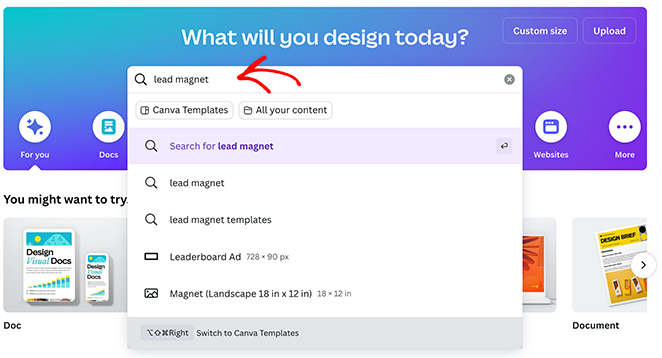
In Canva, search for your lead magnet type (or just type “lead magnet”) to find hundreds of ready-made templates.
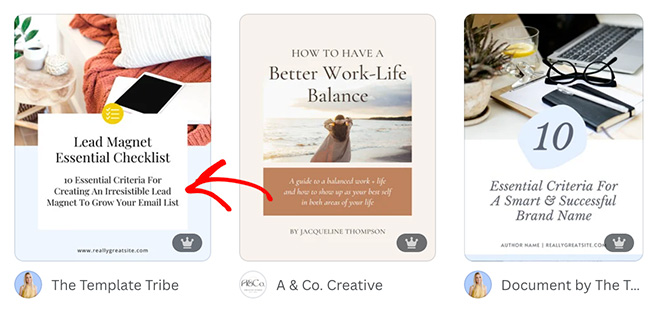
Browse the options and pick one that fits your brand and lead magnet type.
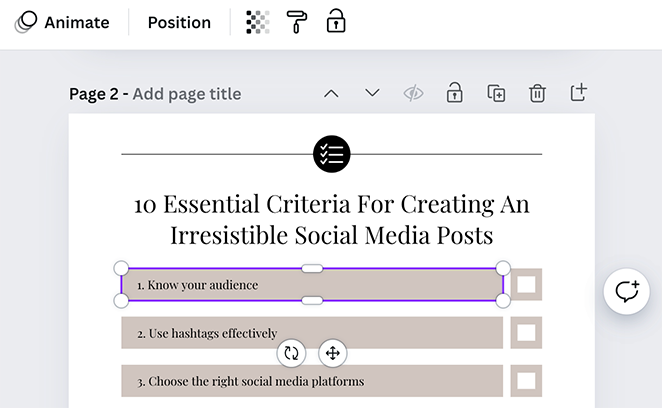
Swap in your brand colors, fonts, and logo. Break up text with relevant images, charts, or background textures to keep it visually interesting.

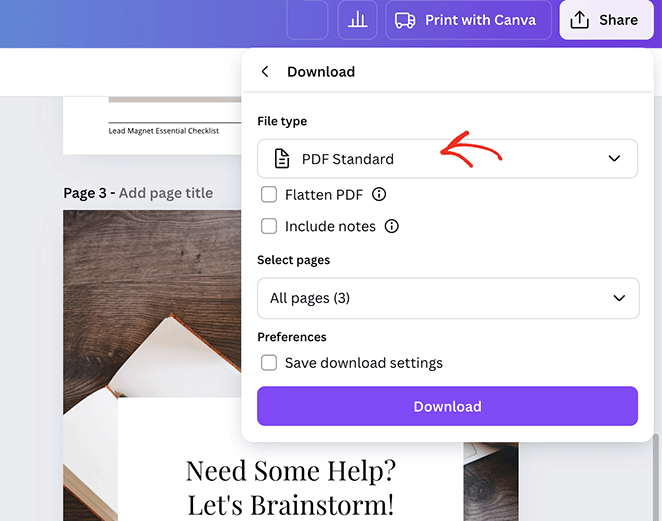
When you’re happy with the design, download it as a PDF. This keeps the formatting consistent no matter what device your subscribers view it on.
Keep the layout clean. Use whitespace generously and choose fonts that are easy to read at a glance.
Canva has its own detailed design guides if you want to go deeper.
Step 4. Add Your Lead Magnet to WordPress
Now that you’ve created your lead magnet, let’s make sure your WordPress freebie delivery works smoothly and securely. First, let’s add the lead magnet file to your website.
From your WordPress dashboard, navigate to Media » Library and click the “Add New Media File” button.
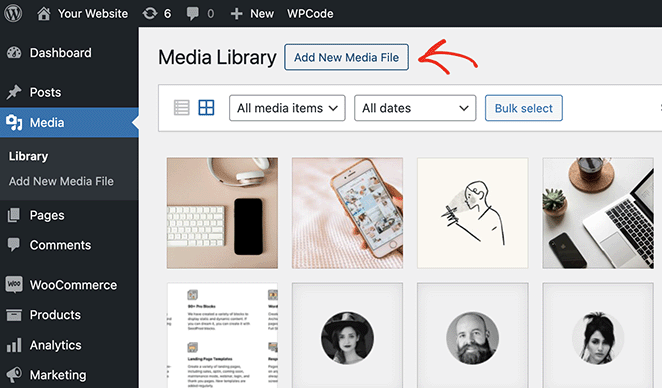
Upload your PDF file and copy the “File URL.” You’ll need this later.
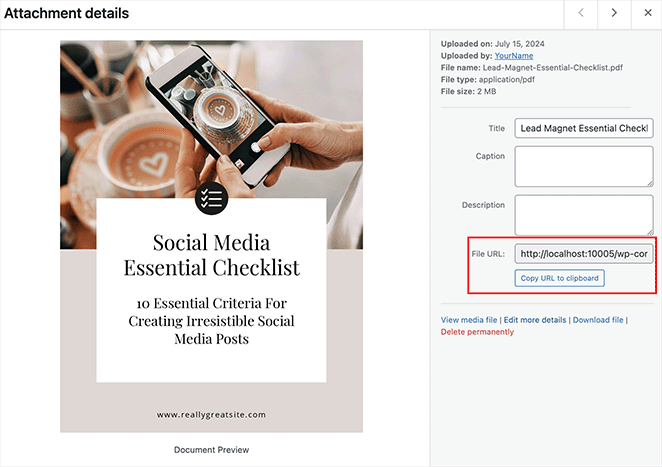
No-Index Your Lead Magnet
I also recommend ensuring people can’t find your PDF in search engines. The last thing you want is for people to be able to access your lead magnet without signing up for it.
One of the best ways to do this is to no-index the media file page with a WordPress SEO plugin. In this example, I’ll use All in One SEO.
From your media file, click the “Edit more details” link.
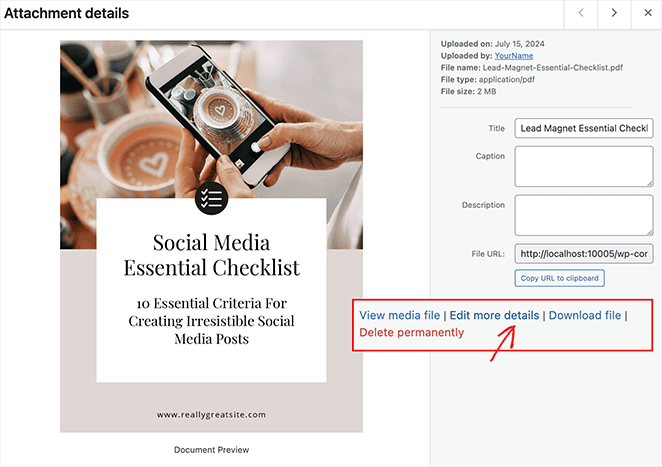
On the next page, scroll to the AIOSEO settings box and click the Advanced tab. Here, un-toggle “Use Default Settings,” click the “No index” checkbox, and then update the page.
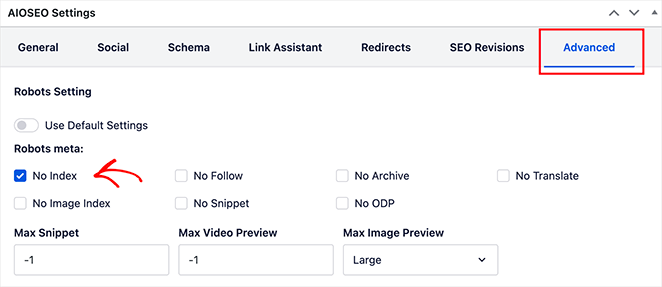
Step 5. Create a Lead Magnet Thank You Page
Now, let’s create a page where users can download your lead magnet after signing up for it.
Instead of showing a generic “thanks for signing up” message, I prefer creating a dedicated “Thank You” page. Not only does it allow users to instantly download their freebie, but it also looks more professional than a random file delivery link.
You can easily create a thank you page using the WordPress block editor. However, for this guide, I’ll use SeedProd, a tool that makes it much easier to get your page looking good.

SeedProd is the best drag-and-drop WordPress website builder, powering over 1 million websites. You can use it to create beautiful websites and landing pages in under 10 minutes. And the best part is you won’t need to write a single line of code.
Just install the plugin, choose a thank you page template, and customize it with the visual editor.
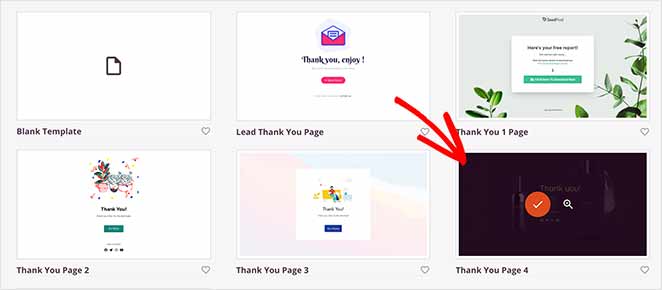
For all the steps, see my guide on how to set up a thank you page in WordPress.
When customizing your thank you page, add a button users can click to download the lead magnet. Simply drag the button block from the left-hand panel and drop it onto the page.
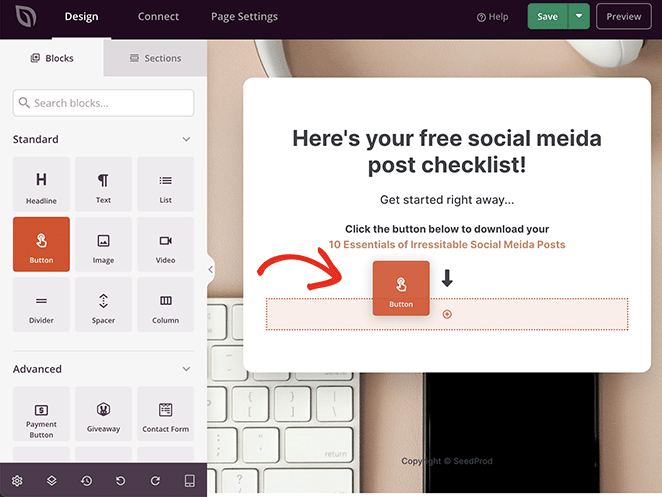
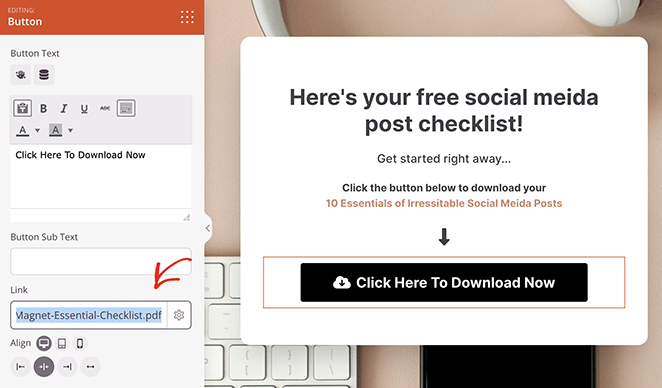
Now open the button block settings and find the “Link” field. Here, paste the file URL you copied earlier (from the media library|) and save your changes.
It’s also vital to ensure people can’t find your thank you page in search engines. Since SeedProd integrates seamlessly with AIOSEO, it only takes a few clicks to do this.
Simply click the Page Settings tab at the top of the page builder and select SEO.
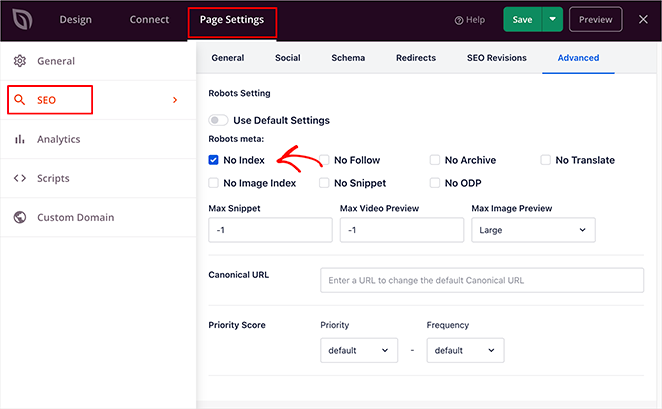
Then, in the right-hand panel, click Advanced, un-toggle “Use Default Settings,” and click the “No-index” checkbox.
Finally, click the save button and select Publish.

Now, when people are directed to this page, they can click the button and go directly to your PDF file. But to get your thank you page, they need a place to sign up. This is what we’ll tackle next.
Step 6. Build Your Lead Magnet Landing Page
A lead magnet landing page is a dedicated page where you can promote your lead magnet and capture leads. It typically has an opt-in form that encourages visitors to enter an email address to download the free file.
With SeedProd, you can build beautiful, high-converting landing pages like the one you used for your thank you page.
Start with a landing page template from the library. To increase signups, look for designs that feature opt-in forms like the Squeeze page templates.
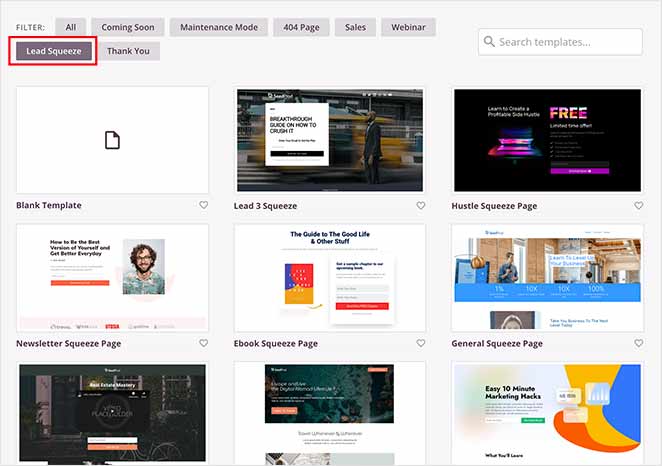
Then, customize the page to match your branding. You can even upload a photo of your lead magnet to encourage excitement and preview what subscribers will get.
For a complete walk-through, please see my guide on how to create a lead capture page in WordPress.
If you chose a template without a sign-up form, you can drag and drop the email opt-in form for WordPress right onto your page using SeedProd. Then, customize the fields (usually, just name and email are enough) and write copy to entice signups.
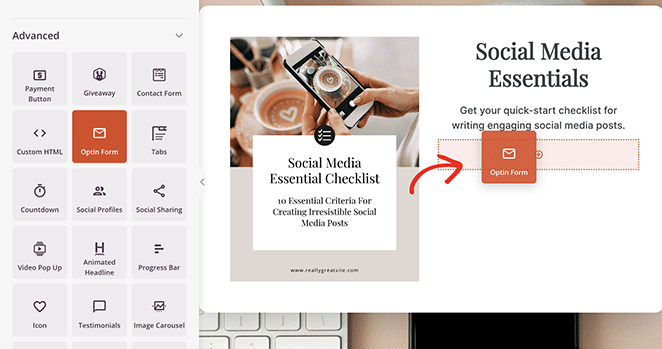
When your form is ready, open the opt-in form block settings and find the “Success Action” heading. Here, click the “Action to Take” dropdown and select the “Redirect” option.
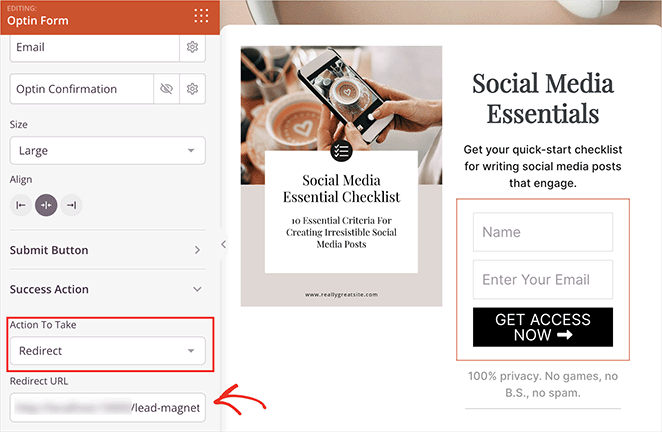
Now paste the URL of the thank you page you created earlier. This ensures that people get the lead magnet instantly after signing up.
Before publishing your page, integrate your form with your email marketing service to automatically add new subscribers to your list. SeedProd makes this super easy with its built-in integrations.
Simply click Connect at the top of the builder, find your preferred email marketing integration, and then follow the on-screen instructions to link your account.
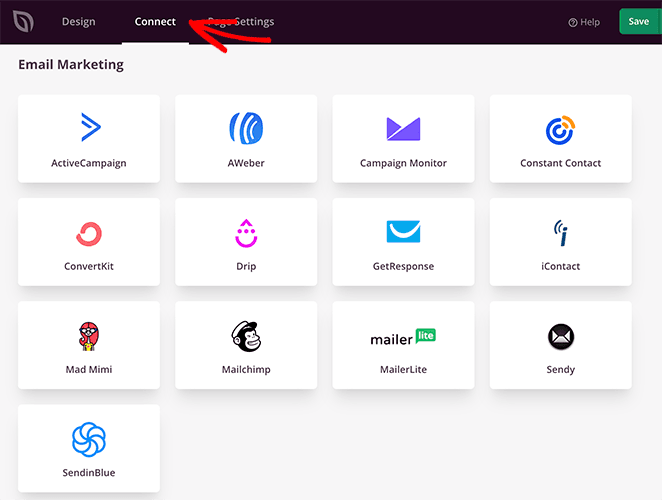
Instructions for each email marketing service are in SeedProd’s email integration documentation.
Finally, when you’re happy with your lead magnet landing page, click save, then Publish.
Now that it’s live, I recommend completing the sign-up steps yourself to ensure everything works correctly.

And that’s it. With a few clicks, you’ve created a powerful landing page to promote your lead magnet and grow your email list.
Step 7. Spread the Word About Your Lead Magnet
Publishing your landing page is not the same as getting signups. Most of the work happens in promotion. Here are the channels that reliably drive signups for lead magnets.
Content upgrades in blog posts
Add a targeted call to action inside your most-read blog posts. A content upgrade is a lead magnet that directly extends what the post covers, like a checklist version of a how-to guide. These convert better than generic popups because they match reader intent exactly.
Exit-intent popups and sidebar widgets
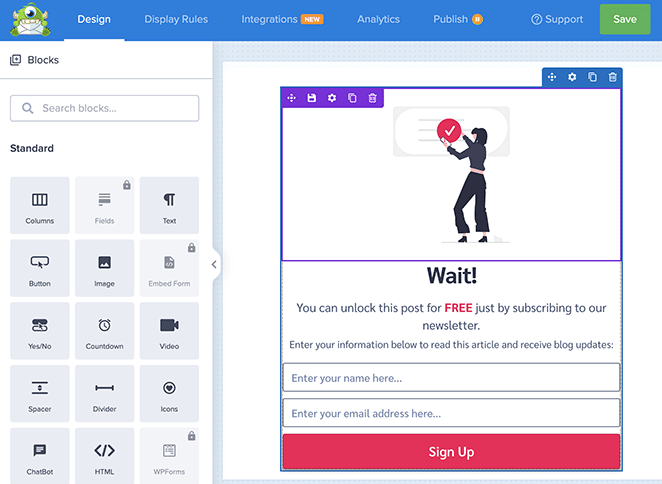
A lead magnet WordPress plugin like OptinMonster can display targeted messages promoting your lead magnet. Exit-intent popups appear as a visitor is about to leave your site, catching people who might have otherwise missed it. Sidebar widgets keep the offer visible throughout the reading experience.
Social media
Promote your lead magnet across your social channels. On Facebook and Instagram, you can run targeted ads that reach people who haven’t visited your site yet. Organic posts work too, especially when you tease a specific insight from inside the lead magnet to create curiosity.
Your existing email list
Include your new lead magnet in your next newsletter to announce it to your email subscribers. This gets downloads fast, which can also improve your email engagement metrics.
Guest posts and partner promotions
If you write guest posts for other sites, add a mention of your lead magnet in the author bio or, where allowed, within the post itself. Cross-promotion with complementary businesses in your niche, where you each promote the other’s lead magnet, is another way to reach new audiences without paid ads.
SEO and blogging
Write informative blog posts related to your lead magnet’s topic and include a natural call to action that encourages readers to download it. Use search engine optimization to help people searching for that topic find you organically.
Real-Life Examples of Lead Magnets That Work
The best way to understand what makes a lead magnet effective is to look at real lead magnet examples and understand the thinking behind them. Each of these works for a specific reason, not just because it’s free.
OptinMonster

OptinMonster offers a free resource with actionable tips to reduce email newsletter abandonment. Their audience is email marketers, so they know their readers already have an email list but are frustrated with low engagement. That specific pain point is what the lead magnet targets directly.
I like how the CTA is positioned at the end of their blog post. Readers who finish an article are already interested enough to read to the end, which makes them the most likely to convert. Catching them at that moment is smart timing.
The takeaway: Place your lead magnet CTA where reader intent is highest, not just where it’s most visible.
NP Digital
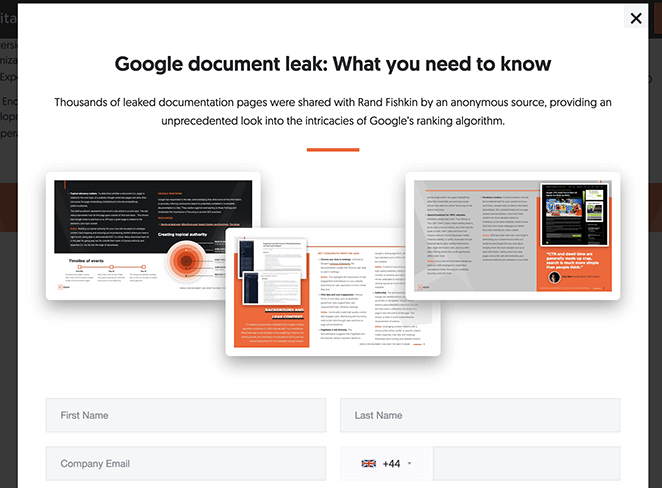
Neil Patel’s agency offers a popup with a “Google Document Leak Report.” It plays directly on the fear of missing important industry information, a powerful motivator for marketing professionals who need to stay current. The lead magnet doesn’t just promise value; it creates urgency around a specific event.
The takeaway: Tying your lead magnet to a timely event or fear of missing out can dramatically improve conversion rates, especially for audiences in fast-moving industries.
Syed Balkhi

Syed Balkhi, founder of WPBeginner, offers a “Growth Toolkit” with resources for entrepreneurs. His audience isn’t looking for generic business advice; they want specific tools that will help them grow. The toolkit format works because it bundles multiple resources under one clear promise.
The takeaway: A resource library or toolkit works best when your audience trusts you enough to want more than one thing from you. It’s a format that rewards an established relationship.
FAQs About Creating a WordPress Lead Magnet
Do lead magnets actually work?
Yes. Lead magnets work because they exchange value for contact information rather than asking visitors to sign up with nothing in return. A well-targeted lead magnet landing page converts at 25 to 50%, compared to 1 to 5% for a standard email signup form.
The key is specificity: a narrow, actionable resource that solves one problem for one audience consistently outperforms a broad, generic offer.
What is the best lead magnet for a small business?
For most small businesses, a checklist or template is the best starting point. Both formats are quick to create, easy to consume, and solve a specific problem immediately.
A service business (coach, consultant, freelancer) typically sees strong results with a worksheet or mini-guide that previews their process. A product business often converts best with a discount code or free sample. Match the format to what your customers are trying to decide before they buy from you.
How do you promote a lead magnet?
The most effective channels are content upgrades within blog posts, exit-intent popups on high-traffic pages, social media (organic and paid), your existing email list, and guest post CTAs. Content upgrades, which are lead magnets that extend what a specific blog post covers, tend to have the highest conversion rates because they match reader intent.
For paid promotion, Facebook and Instagram ads let you target people who haven’t visited your site yet based on interests and behaviors.
How many lead magnets should you have?
Start with one, and make it good. A single well-targeted lead magnet will outperform three generic ones.
Once your first lead magnet is converting, you can create additional ones for different audience segments or stages of the buyer journey. For example, one lead magnet for people just discovering your topic and a different one for people ready to buy.
Most businesses see diminishing returns after three to five active lead magnets.
Can I deliver a lead magnet in WordPress without email software?
Yes. You can deliver a lead magnet by redirecting users to a thank you page with a download link after they submit a form. Without email software, though, you won’t be able to follow up, nurture subscribers, or build a list for future communication.
For anyone serious about growing an email list, connecting to an email marketing service is worth doing from the start.
Create Your Lead Magnet Today
You now have everything you need to set up a lead magnet in WordPress, from choosing the right format for your audience to building the landing page and thank you page with SeedProd, connecting your email service, and promoting it through the channels that drive real signups.
If you want to grow faster, email list building in WordPress starts with a strong lead magnet and a clear delivery path.
Thanks for reading! We’d love to hear your thoughts, so please feel free to join the conversation on YouTube, X and Facebook for more helpful advice and content to grow your business.




