


Beaver Builder vs Elementor ist einer der häufigsten Vergleiche von WordPress-Seitenerstellern, da beide professionelle Websites erstellen können, aber sehr unterschiedliche Kompromisse eingehen. Die richtige Wahl hängt davon ab, was Sie erstellen und wie viel Kontrolle Sie tatsächlich benötigen.
Ich habe beide über 13 Jahre lang für Kunden- und persönliche Projekte verwendet und 2026 frische Tests durchgeführt, um ihre aktuelle Leistung widerzuspiegeln. Ich habe auch SeedProd mit denselben Layouts auf Geschwindigkeit und Konversion getestet, und diese Ergebnisse haben meine Perspektive verschoben, insbesondere für Landing Pages und geschäftliche Websites.
- Wie ich Beaver Builder vs Elementor getestet habe
- Beaver Builder vs Elementor vs SeedProd: Übersicht
- Welcher Seitenersteller hat die einfachste Benutzeroberfläche?
- Vergleich der Inhaltsmodule
- Styling-Optionen: Wer gibt Ihnen mehr Designkontrolle?
- Seiten-Vorlagen und Themes: Welcher Builder gewinnt?
- Welcher Page Builder hat die besten KI-Tools?
- Geschwindigkeits- und Leistungstestergebnisse
- Preise: Was kostet jeder Builder?
- Vergleich Seite an Seite
- Endgültiges Urteil: Der beste Seitenersteller im Jahr 2026
- FAQs zu Beaver Builder vs Elementor
Wie ich Beaver Builder vs Elementor getestet habe
Um die beste Option zu finden, konzentrierte ich mich auf die Funktionen, die für Geschäftsinhaber am wichtigsten sind.
Ich habe die gleiche Testseite in allen drei Buildern auf meiner Live-WordPress-Website erstellt: eine H1-Überschrift, ein Absatz, ein Button und ein Bild.
Ich habe jede Seite dreimal mit GTmetrix getestet und die Medianergebnisse aufgezeichnet. Google Tag Manager war auf allen drei Seiten aktiv, was die rohe Seitengröße gleichmäßig beeinflusst, aber asynchron lädt, sodass das Rendern nicht blockiert wird.
Hier sind die spezifischen Kriterien, die ich für diese Überprüfung verwendet habe:
- Benutzerfreundlichkeit: Ist die Benutzeroberfläche anfängerfreundlich? Können Sie eine Seite ohne Programmierung erstellen?
- Geschwindigkeit: Fügt der Builder Bloat zum Code hinzu? Wie schnell werden die Seiten geladen?
- Funktionen: Enthält er wesentliche Elemente wie Kontaktformulare, CTAs und Countdown-Timer?
- Vorlagen: Gibt es hochwertige Vorlagen für verschiedene Arten von Websites?
- KI-Tools: Verfügt er über native KI für Inhalte oder Design?
- Preise: Was kostet es und was bekommt man auf jeder Stufe?
Beaver Builder vs Elementor vs SeedProd: Übersicht
Hier ist eine einfache Übersicht über diese drei WordPress-Seitenersteller.
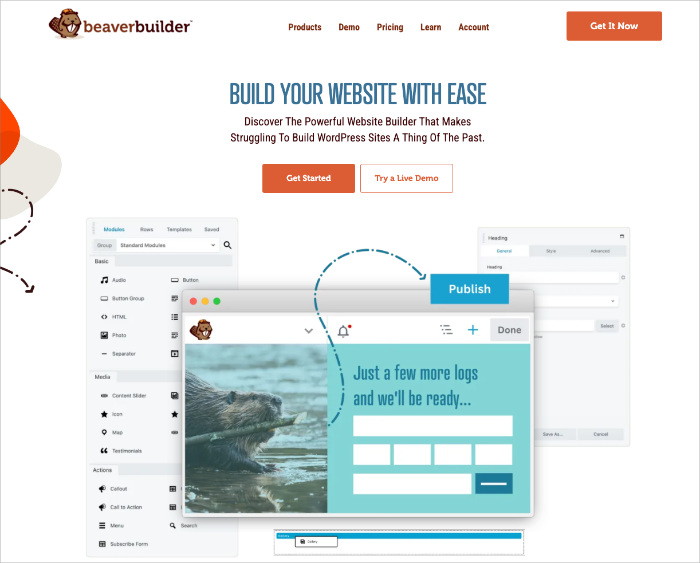
Beaver Builder Übersicht
Bewertung: 4/5 Sterne
Preise: Ab 99 $/Jahr
Herausragende Funktionen:
- Saubere Drag-and-Drop-Oberfläche
- Zuverlässige, stabile Leistung
- Guter Entwickler-Support
- White-Labeling auf höheren Plänen
- Kompatibel mit den meisten Themes
Kostenlose Version: Ja
Beaver Builder ist ein stabiler, einfach zu bedienender Drag-and-Drop-Seitenersteller, der für sauberen Code und konsistente Leistung entwickelt wurde. Er ist ideal für Entwickler und Agenturen, die ein zuverlässiges Werkzeug wünschen, das sich nahtlos in fast jedes WordPress-Theme integriert.
Die Benutzeroberfläche ist minimalistisch und ablenkungsfrei, was das Erlernen schnell und die Erstellung einfacher und komplexer Layouts effizient macht. Ich habe es jahrelang für Kunden-Websites verwendet, da es zwischen den Updates selten Probleme gab.
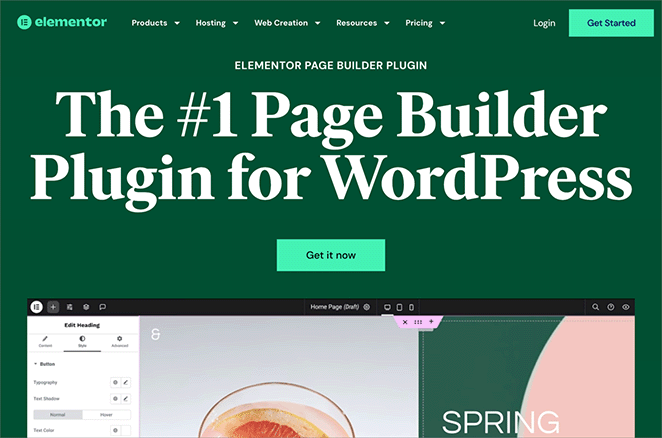
Elementor Übersicht
Bewertung: 4,5/5 Sterne
Preise: Ab 59 $/Jahr
Herausragende Funktionen:
- Riesige Widget- und Vorlagenbibliothek
- Inline-Bearbeitung und erweiterte Stile
- Vollständiger Theme Builder
- KI-Tools für Text und Layout
- Große Community-Unterstützung
Kostenlose Version: Ja
Elementor ist einer der beliebtesten WordPress-Seitenersteller und bietet unübertroffene kreative Flexibilität. Sein Drag-and-Drop-Editor und die große Widget-Bibliothek machen ihn zu einer leistungsstarken Option für die Erstellung von Landing Pages und kompletten Websites.
Mit einem integrierten Theme Builder und KI-Funktionen ist er ideal für Designer, die die volle visuelle Kontrolle wünschen. Der Nachteil ist die Komplexität: Elementor ist leistungsstark, erfordert aber mehr Zeit zum Erlernen und verursacht mehr Overhead auf Ihren Seiten.
SeedProd Übersicht
Beim Vergleich von Beaver Builder und Elementor habe ich SeedProd als dritte Option für alle getestet, denen hauptsächlich Geschwindigkeit, Konversionen und Einfachheit wichtig sind. Es versucht nicht, mit der Anzahl der Widgets zu konkurrieren. Es wurde für Vermarkter und Geschäftsinhaber entwickelt, die schnell ladende und gut konvertierende Seiten benötigen.
Bewertung: 5/5 Sterne
Preise: Ab 39,50 $/Jahr

Herausragende Funktionen:
- Drag-and-Drop-Theme-Builder
- Über 300 Landingpage-Vorlagen
- Integrierte „Coming Soon“- und 404-Modi
- WooCommerce- und KI-Block-Unterstützung
- Schnellste Ladezeiten in Tests
Kostenlose Version: Ja
SeedProd kombiniert einen Drag-and-Drop-Builder mit Conversion-fokussierten Blöcken wie Opt-in-Formularen, Countdown-Timern und Giveaway-Widgets. Es ist das günstigste der drei und in meinen Geschwindigkeitstests mit deutlichem Vorsprung das schnellste.
Eine ehrliche Einschränkung: Wenn Sie komplexe Scroll-Animationen oder Elemente benötigen, die aus mehreren Richtungen einfliegen, ist Elementor die bessere Wahl. SeedProd ist auf Geschwindigkeit und Konversion ausgelegt, daher sind diese schweren Motion-Effekte kein Teil des Toolsets. Das ist ein bewusster Kompromiss, kein Versehen.
Welcher Seitenersteller hat die einfachste Benutzeroberfläche?
Jeder Builder bietet einen visuellen Drag-and-Drop-Editor, aber ihre Layouts und Workflows unterscheiden sich erheblich. Hier ist, was ich herausgefunden habe, nachdem ich dieselbe Seite in allen drei erstellt hatte.
Beaver Builder Benutzeroberfläche Erfahrung
Beaver Builder verwendet einen minimalistischen Arbeitsbereich. Menüs bleiben verborgen, bis sie benötigt werden, wodurch der Bearbeitungsbereich übersichtlich bleibt. Das Hinzufügen von Elementen öffnet kompakte Einstellungsfenster anstelle einer vollständigen Seitenleiste.
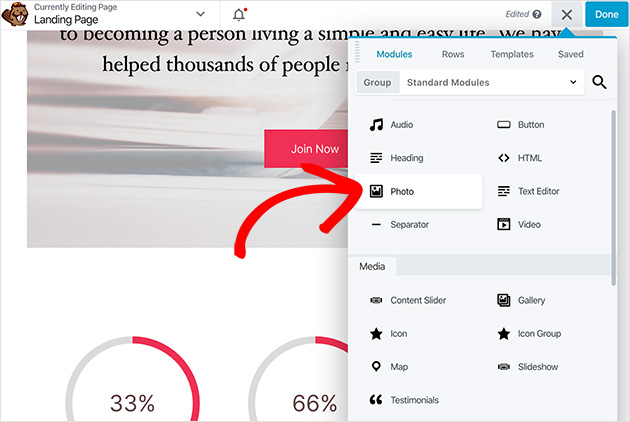
Das Einzige, was mich überraschte: Es gibt keine permanente Seitenleiste. Beaver Builder verwendet stattdessen schwebende Popup-Fenster.
Zuerst wirkte es im Vergleich zur modernen dunklen Benutzeroberfläche von Elementor veraltet. Nachdem ich mich angepasst hatte, war der Workflow schnell. Aber wenn Sie von Elementor kommen, rechnen Sie mit ein paar Minuten „Moment mal, wo ist das hin?“
Es behandelt Spaltenlayouts automatisch, was die Einrichtungszeit verkürzt. Für Entwickler und Benutzer, die sich auf das Layout ohne Ablenkungen konzentrieren möchten, ist dies eine gute Wahl.
Vorteile:
- Effizient und schnell, sobald Sie das Popup-System gelernt haben
- Minimale Unordnung hält Sie konzentriert
- Automatische Spaltenbehandlung reduziert die Einrichtungsschritte
Nachteile:
- Keine permanente Seitenleiste kann Elementor-Benutzer verwirren
- Die Benutzeroberfläche wirkt im Vergleich zu Wettbewerbern veraltet
Elementor Pro Benutzeroberflächen-Erlebnis
Elementor teilt den Arbeitsbereich in zwei Abschnitte: eine Live-Vorschau auf der rechten Seite und ein Seitenleistenfeld für Steuerelemente auf der linken Seite. Das Layout ist intuitiv, sobald Sie es kennen, aber die Tiefe der Seitenleiste kann Sie verlangsamen.
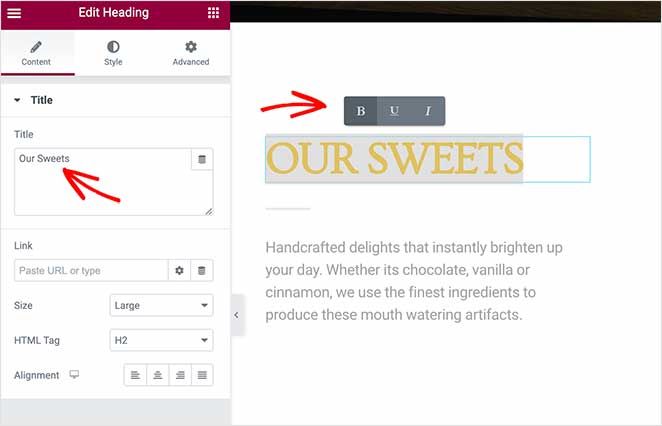
Die spezifische Reibung, auf die ich am häufigsten stoße: Um etwas wie die Hover-Farbe eines Buttons zu ändern, musste ich durch drei Untermenüs in der Seitenleiste navigieren. Dieses Maß an Kontrolle ist für komplexe Designs wirklich nützlich. Aber für einfache Seiten sind es mehr Schritte als nötig.
Elementor unterstützt die Inline-Textbearbeitung und eine breite Palette von Anpassungsoptionen. Das Erstellen von Spalten erfordert manuelle Schritte während der Layout-Einrichtung, was im Vergleich zur automatischen Handhabung von Beaver Builder Zeit kostet.
Vorteile:
- Intuitives Split-Screen-Layout
- Inline-Textbearbeitung ist schnell für Kopieränderungen
- Rechtsklick und Kopieren/Einfügen beschleunigen repetitive Arbeiten
Nachteile:
- Tiefe der Untermenüs verlangsamt einfache Stiländerungen
- Manuelle Spaltenerstellung fügt Schritte hinzu
- Steilere Lernkurve als die beiden anderen
SeedProd Benutzeroberflächen-Erlebnis
SeedProd verwendet ein sauberes Seitenleistenlayout ähnlich dem von Elementor, aber mit weniger Ablenkungen. Alle wesentlichen Werkzeuge sind logisch organisiert, und Theme-Builder-Funktionen sind ohne zusätzliche Einrichtung leicht zugänglich.

In meinen Tests war SeedProd am schnellsten, um eine Seite von Grund auf neu zu erstellen. Die Blöcke sind klar beschriftet und leicht zu finden, und die Seitenleiste erfordert keine Navigation durch Untermenüs für grundlegende Stiländerungen.
Vorteile:
- Schnellste Zeit bis zur ersten Seite von den dreien
- Klare, gut organisierte Seitenleiste
- Keine Untermenü-Navigation für gängige Stiländerungen
Nachteile:
- Weniger Designflexibilität als Elementor für komplexe Layouts
- Keine komplexen Animationssteuerungen
Mein Urteil: Alle drei Builder sind intuitiv, aber sie eignen sich für unterschiedliche Benutzer. Beaver Builder ist am schnellsten für Entwickler, die einen ablenkungsfreien Arbeitsbereich schätzen. Elementor gibt Designern die tiefste Kontrolle. SeedProd ist am schnellsten für die Erstellung von Seiten, die schnell live gehen müssen.
Vergleich der Inhaltsmodule
Seiten-Builder verwenden Module, Elemente oder Blöcke, um Inhalte und Funktionalität zu Ihrer Website hinzuzufügen. Ich habe alle drei anhand der Module verglichen, die Sie tatsächlich beim Erstellen von Seiten für eine Geschäftswebsite verwenden.
Beaver Builder Inhaltsmodule
Beaver Builder konzentriert sich auf Praktikabilität und Stabilität. Es enthält Kernmodule wie Testimonials, Slider und Social-Buttons, die das Wesentliche für die meisten Websites abdecken. Der Modulsatz ist zuverlässig und konsistent über verschiedene WordPress-Themes hinweg.
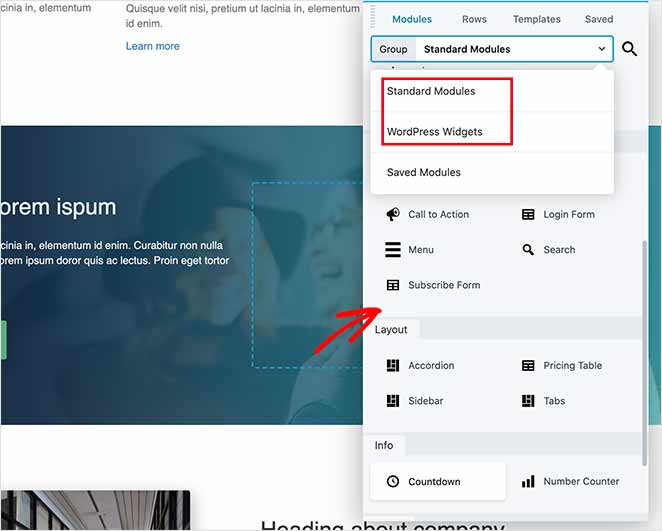
Beaver Builder bietet im Vergleich zu seinen Mitbewerbern weniger spezialisierte Konversions- oder Marketingmodule. Wenn Sie Opt-in-Formulare, Countdown-Timer oder Giveaway-Widgets sofort benötigen, müssen Sie Plugins von Drittanbietern hinzufügen.
Elementor Content Module
Elementor bietet die größte Auswahl an Widgets mit über 100 leistungsstarken Optionen in seiner Pro-Version und vielen weiteren über Add-ons von Drittanbietern. Diese Bandbreite unterstützt alles von einfachen Textlayouts bis hin zu fortschrittlichen Designeffekten.
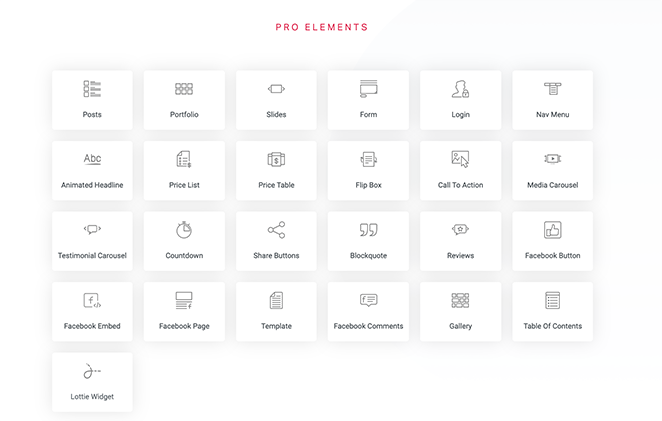
Die große Auswahl bietet Flexibilität, kann aber die Einrichtungszeit verlängern. Das Finden des richtigen Widgets erfordert oft zusätzliches Scrollen. Es eignet sich am besten für Benutzer, die maximale kreative Kontrolle wünschen und keine Zeit in der Bibliothek verbringen möchten.
SeedProd Blöcke und Landingpage-Elemente
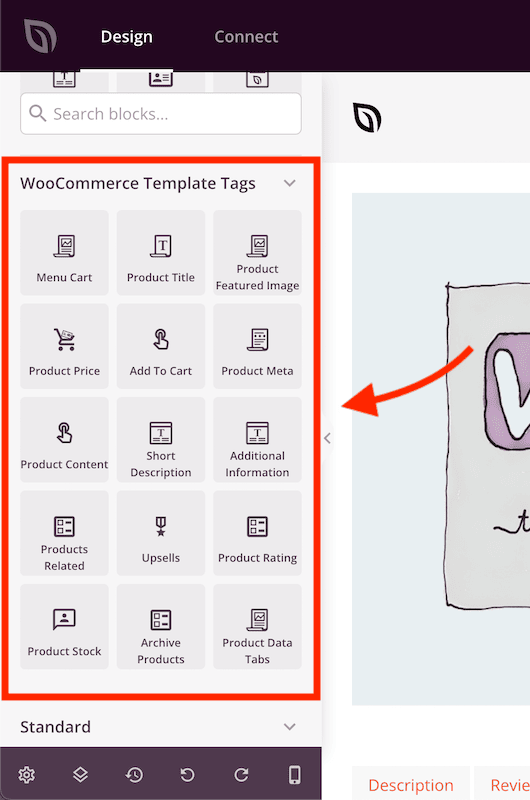
SeedProds Blöcke konzentrieren sich auf Leistung und Konversionen. Es enthält alle wesentlichen Blöcke sowie spezialisierte Marketingelemente wie Opt-in-Formulare, Countdown-Timer und Giveaway-Widgets. Dies macht es besonders effektiv für die Erstellung von hochkonvertierenden Landingpages .

Wenn WooCommerce installiert ist, integrieren sich diese Blöcke direkt in Ihre Produktdaten, sodass Sie benutzerdefinierte Shop-Seiten einfach ohne zusätzliche Plugins gestalten können.
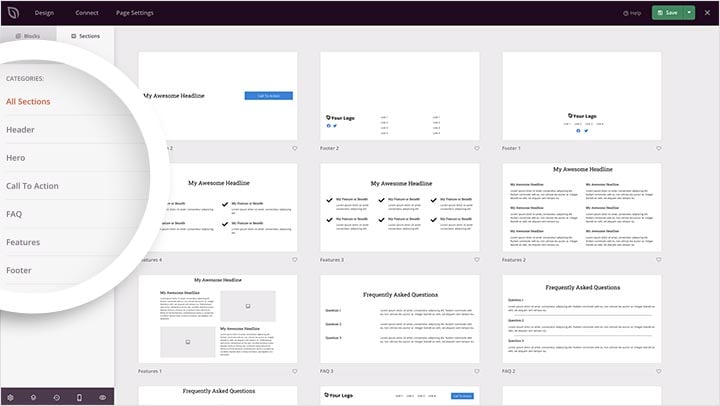
SeedProd enthält auch fertige Abschnitte für Testimonials, Funktionen und Preistabellen, die mit einem Klick eingefügt werden können, um den Erstellungsprozess zu beschleunigen.
Styling-Optionen: Wer gibt Ihnen mehr Designkontrolle?
Die Flexibilität beim Styling bestimmt, wie viel Kontrolle Sie über das Aussehen Ihrer Website haben. Hier ist ein Vergleich aller drei basierend auf meinen Tests.
Styling-Optionen in Beaver Builder
Beaver Builder organisiert Styling-Steuerelemente in drei Tabs: Allgemein, Stil und Erweitert. Dieses Layout ist effizient für präzise Designanpassungen. Es unterstützt benutzerdefinierte Abstände, responsive Sichtbarkeit und bedingte Anzeige für angemeldete Benutzer.
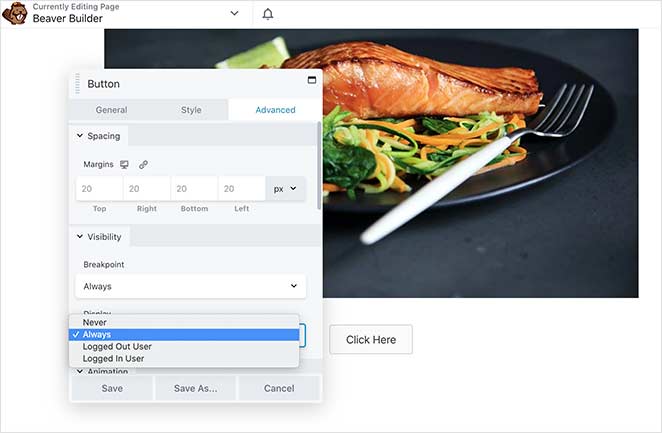
Die Benutzeroberfläche ist stabil und vorhersehbar, was die Konsistenz über Seiten hinweg aufrechterhält. Für Entwickler, die Websites für Kunden erstellen, ist diese Vorhersehbarkeit ein erheblicher Vorteil.
Styling-Optionen in Elementor
Elementor bietet drei Haupt-Styling-Tabs: Inhalt, Stil und Erweitert, mit zusätzlichen Effekten und Animationen. Motion-Effekte, benutzerdefinierte Abstandssteuerungen und Formteiler ermöglichen hochgradig polierte visuelle Designs.
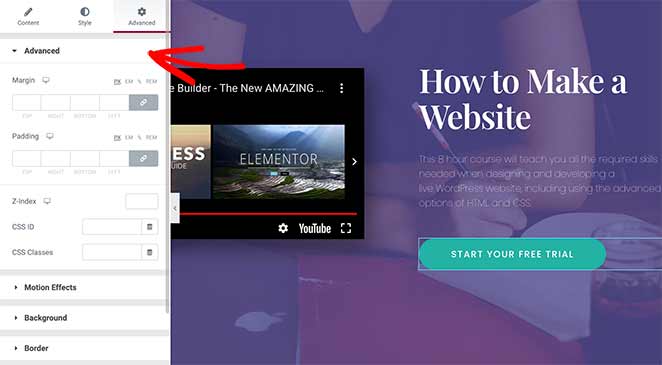
Die Rechtsklick- und Kopier-/Einfügefunktionen rationalisieren repetitive Styling-Arbeiten und sparen Zeit bei großen Projekten. Wenn Sie eine tiefgreifende visuelle Anpassung benötigen, ist Elementor der stärkste der drei.
Styling-Optionen in SeedProd
SeedProd vereinfacht das Styling durch ein System mit Tabs: Inhalt, Vorlagen und Erweitert. Jeder Tab konzentriert sich auf praktische Optionen, von schnellen Schrift- und Farbanpassungen bis hin zu vollständigen Blockdesign-Vorlagen, die sofort aktualisiert werden.
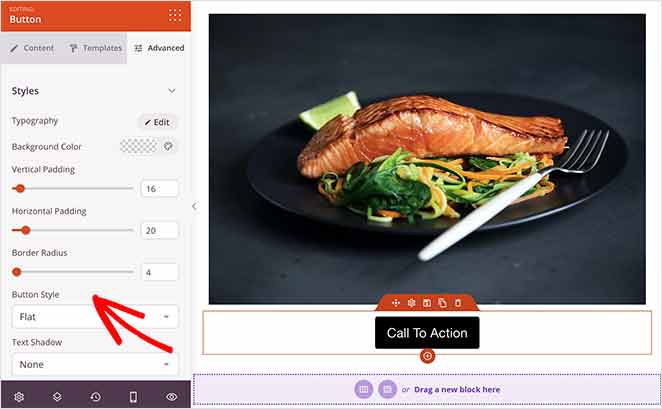
Die Blockvorlagenfunktion ist besonders effizient. Mit einem Klick können Sie vordefinierte Designs auf Abschnitte oder Blöcke anwenden.

Globale Einstellungen ermöglichen es Ihnen, Schriftarten, Farben und Branding auf Ihrer gesamten Website von einem Ort aus anzupassen, was die Konsistenz ohne manuelle Bearbeitung gewährleistet.

Mein Urteil: Elementor gewinnt bei der Designtiefe. Beaver Builder gewinnt bei Stabilität und Vorhersehbarkeit. SeedProd gewinnt bei der Ausführungsgeschwindigkeit für konversionsorientierte Seiten.
Seiten-Vorlagen und Themes: Welcher Builder gewinnt?
Vorlagen sparen Zeit, indem sie Ihnen eine professionelle Designgrundlage zum Anpassen bieten. Hier ist ein Vergleich der Bibliotheken der einzelnen Builder.
Vorlagen in Beaver Builder
Beaver Builder unterteilt seine Vorlagen in Landing Pages und Inhaltsseiten. Sie decken die meisten Geschäftskategorien ab, aber die Auswahl ist kleiner als bei Elementor oder SeedProd.
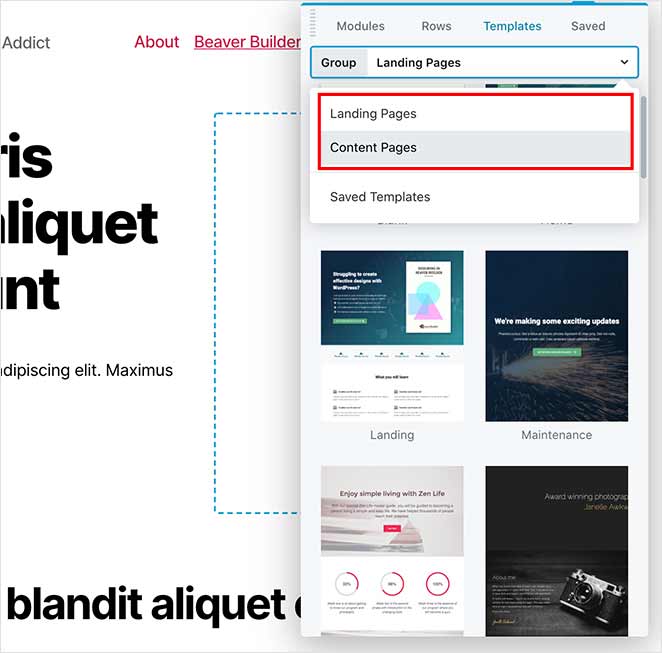
Vorlagen funktionieren am besten mit dem eigenen Theme von Beaver Builder oder jedem Theme, das Full-Width-Layouts bietet. Eine kompatible Einrichtung stellt sicher, dass Designs auf allen Seiten korrekt angezeigt werden.
Vorlagen in Elementor
Elementor bietet eine der größten Vorlagenbibliotheken mit über 300 Seitendesigns und vollständigen Website-Kits. Seine integrierten Filter machen das Finden des richtigen Designs schnell. Viele Vorlagen sind in der kostenlosen Version verfügbar, aber die fortschrittlichsten Optionen erfordern Elementor Pro.
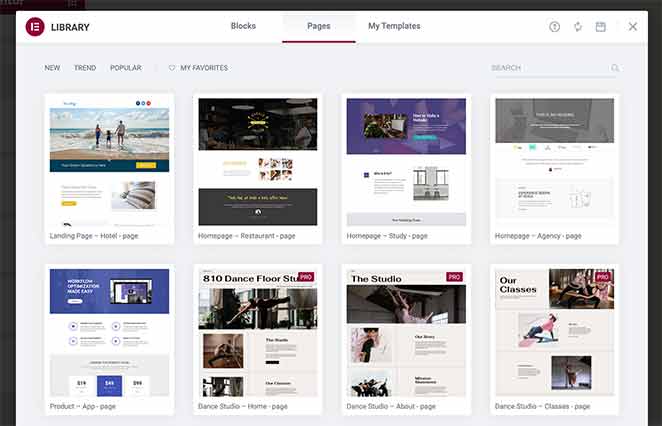
Die Funktion „Website-Kits“ vereinfacht den vollständigen Website-Aufbau, indem sie Header, Footer und Seitenvorlagen zu einem importierbaren Paket bündelt. Für minimale Setups eignet sich das kostenlose Hello-Theme gut als Basis.
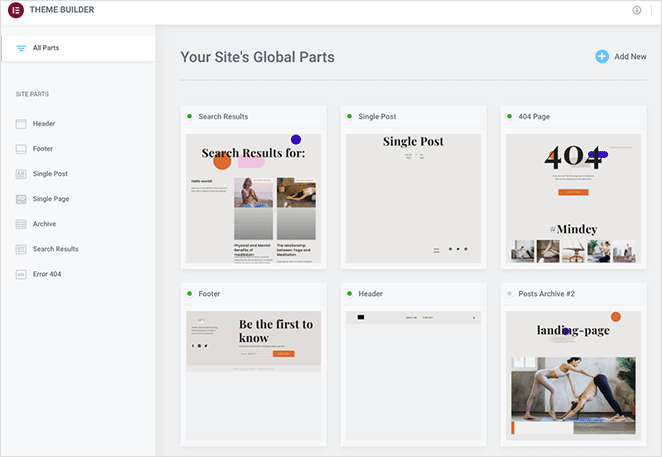
Vorlagen in SeedProd
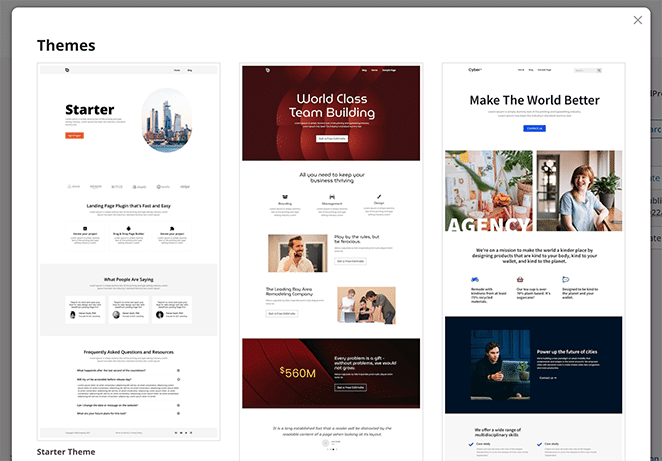
SeedProd enthält über 300 professionell gestaltete Landing-Page-Vorlagen, kategorisiert nach Zielen: Lead-Generierung, Produktverkäufe, Veranstaltungsregistrierung und mehr. Jede Vorlage ist für Conversions und mobile Reaktionsfähigkeit optimiert.
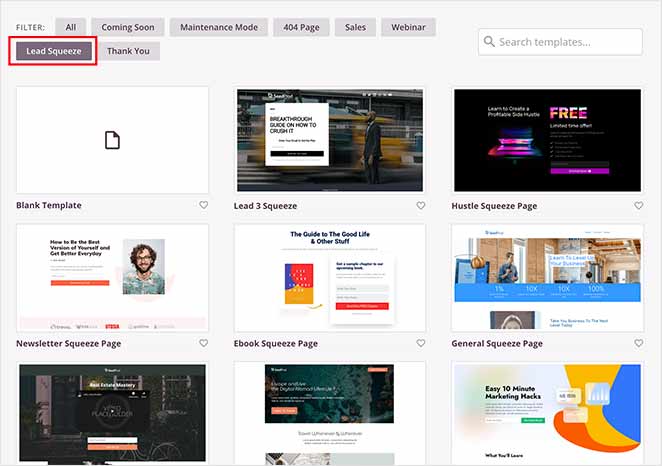
SeedProd bietet auch spezielle Vorlagen für Coming Soon und Wartungsseiten in der kostenlosen Version an, sodass Sie diese nicht von Grund auf neu erstellen müssen. Benutzerdefinierte 404-Seiten erfordern die Pro-Version.
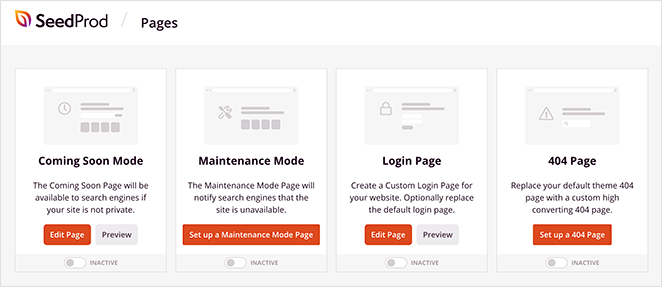
Die Website-Kits-Funktion ermöglicht es Benutzern, vollständige WordPress-Themes ohne Code zu gestalten, indem sie visuelles Bearbeiten mit Theme-Level-Kontrolle kombinieren.
Welcher Page Builder hat die besten KI-Tools?
KI-Tools können die Design- und Inhaltserstellung beschleunigen. Hier ist, was ich beim Testen der neuesten KI-Funktionen in allen drei Buildern herausgefunden habe.
Beaver Builder KI-Tools
Beaver Builder hat derzeit keine native KI-Integration. Es stützt sich ausschließlich auf manuelle Eingaben und Add-ons von Drittanbietern für die Inhalts- oder Designgenerierung. Dies gewährleistet stabile, vorhersehbare Ergebnisse, schränkt jedoch die Automatisierungsoptionen im Vergleich zu Wettbewerbern ein.
Elementor KI-Funktionen
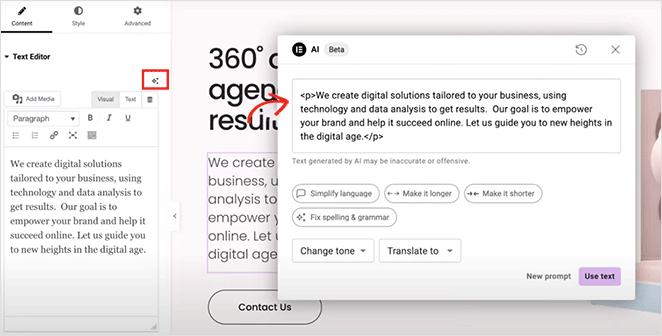
Elementor integriert KI-Tools direkt in seinen Editor. Sie können Text-, CSS- und benutzerdefinierte Code-Snippets generieren und bearbeiten, ohne den Arbeitsbereich zu verlassen. Es schlägt auch automatisch Alt-Texte und Bildunterschriften zur Optimierung der Barrierefreiheit vor.
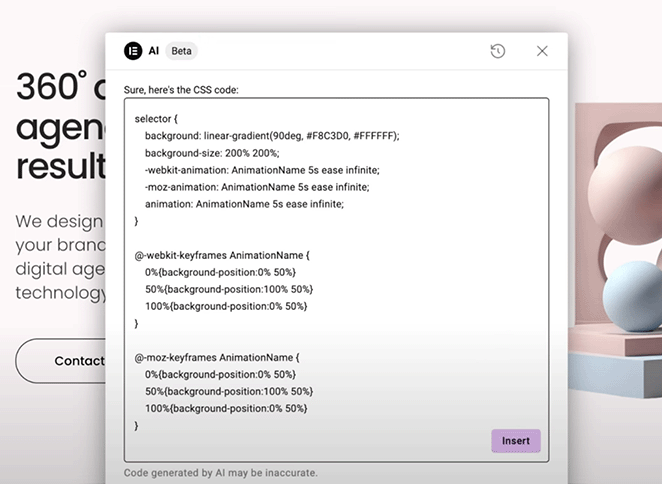
Der KI-Assistent ist hilfreich für kreative Ideenfindung und Texterstellung, funktioniert aber am besten mit spezifischen Prompts anstelle vollständiger Automatisierung. Erweiterte KI-Funktionen erfordern ein separates KI-Abonnement zusätzlich zu Elementor Pro.
SeedProd KI-Funktionen
Der KI-Schreibassistent von SeedProd kann Überschriften, Einleitungen und FAQs aus einem einfachen Prompt generieren. Die Benutzeroberfläche ist intuitiv für die Anpassung von Textlänge und -stil mit minimalem Aufwand.
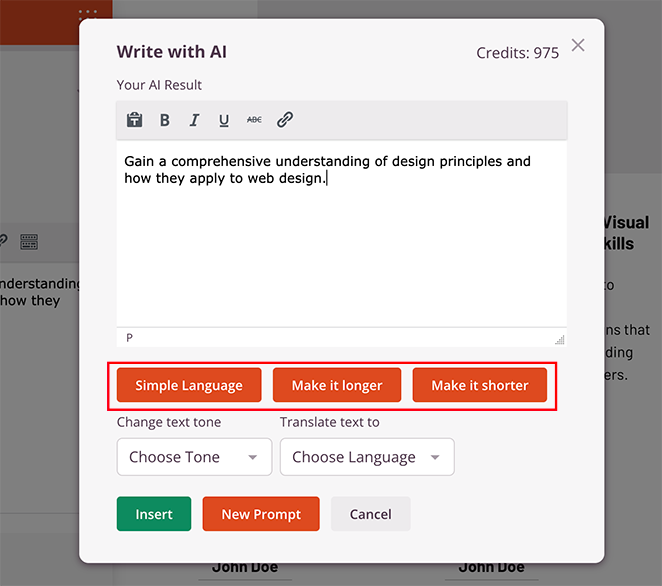
Die KI-Bildgenerierungsfunktion ermöglicht es Ihnen, neue Bilder basierend auf Textbeschreibungen zu erstellen und sie anschließend zu bearbeiten, was bedeutet, dass Sie nicht jedes Mal von vorne beginnen müssen. Beachten Sie, dass die KI-Bildgenerierung Credits verbraucht, sodass sich die Nutzung bei hohem Volumen summiert.

Geschwindigkeits- und Leistungstestergebnisse
Die Seitengeschwindigkeit wirkt sich sowohl auf die Benutzererfahrung als auch auf die SEO-Rankings aus. Ich habe alle drei Builder mit identischen Seiten auf derselben WordPress-Installation getestet und jeden durch GTmetrix laufen lassen.
| Builder | Seitenladezeit | DOM geladen | Seitengröße | Gesamte Anfragen | CSS-Dateien | JS-Dateien | Externe Domains |
|---|---|---|---|---|---|---|---|
| SeedProd | 556ms | 291ms | 2.115 KB* | 16 | 5 | 8 | 1 |
| Beaver Builder | 985ms | 748ms | 1.539 KB | 20 | 6 | 9 | 1 |
| Elementor | 1.882ms | 851ms | 1.857 KB | 32 | 12 | 14 | 3 |
*Die größere Rohseitengröße von SeedProd ist darauf zurückzuführen, dass Google Tag Manager im Hintergrund asynchron geladen wird. GTM blockiert das Rendering nicht, weshalb die Ladezeit immer noch am schnellsten ist.
SeedProd wurde in 556ms geladen. Das ist 1,8x schneller als Beaver Builder und 3,4x schneller als Elementor auf derselben Hardware.
Als ich mir den GTmetrix-Wasserfall ansah, war der Grund klar. Elementor lud 32 Anfragen insgesamt: 12 CSS-Dateien, 14 JavaScript-Dateien und es rief 3 externe Domains auf, darunter Google Fonts (fonts.googleapis.com und fonts.gstatic.com). Jede externe Domain fügt eine DNS-Abfrage hinzu, die sich bei jedem Seitenaufruf stapelt.
Beaver Builder war intelligenter. Es kompiliert Ihr Layout in eine einzige gecachte CSS-Datei und eine einzige gecachte JS-Datei. Weniger Anfragen, weniger Overhead. Deshalb landete es bei 985ms, obwohl es mehr Seiteninhalt als die Testseite von SeedProd lud.
SeedProd lud nur 5 CSS-Dateien und seine eigenen Skripte summierten sich auf 45 KB. Keine externen Schriftart-Domains, keine ungenutzten Widget-Bundles. Die Seite war schlank, weil der Builder schlank konzipiert ist.
Preise: Was kostet jeder Builder?
Alle drei Builder verwenden ein Freemium-Modell. Jeder bietet eine kostenlose Version mit Kernfunktionen und kostenpflichtige Stufen für erweiterte Funktionalität.
Beaver Builder Preise
Die Preise von Beaver Builder sind am besten für Entwickler und Agenturen geeignet, die einen stabilen Builder für unbegrenzte Websites benötigen. Alle kostenpflichtigen Pläne erlauben die Nutzung auf unbegrenzten Websites, was ein erheblicher Vorteil gegenüber Elementor ist, wenn Sie mehrere Kundenprojekte verwalten.
- Kostenlose Version: Grundlegende Drag-and-Drop-Module zum Testen und für kleine Projekte
- Standard: 99 $/Jahr — Premium-Module, Vorlagen, ein Jahr Updates und Support
- Pro: 199 $/Jahr — Enthält das Beaver Builder Theme und Multisite-Unterstützung
- Agentur: 399 $/Jahr — Fügt White-Labeling für Kunden-Websites hinzu
Um die vollständige Theme-Anpassung einschließlich Header und Footer zu erhalten, benötigen Sie den Ultimate-Plan, der die Beaver Themer-Erweiterung hinzufügt.
Elementor-Preise
Elementor bietet flexible Preise für Designer. Eine Sache, die es wert ist, vor dem Kauf zu wissen: Der vollständige Theme Builder ist erst ab der Advanced-Stufe verfügbar. Wenn Sie mit dem 59 $-Essentials-Plan beginnen und erwarten, Header und Footer zu erstellen, stoßen Sie an eine Wand und müssen ein Upgrade durchführen.
- Kostenlose Version: Kern-Widgets und grundlegende Vorlagen für einfache Layouts
- Essentials: 59 $/Jahr — WooCommerce-Widgets und Premium-Vorlagen für eine Website. Theme Builder nicht enthalten.
- Erweitert: 99 $/Jahr — Bis zu drei Websites, Theme Builder inklusive
- Experte: 199 $/Jahr — Bis zu 25 Websites
- Agentur: 399 $/Jahr — Bis zu 1.000 Websites
Das optionale KI-Add-on verursacht zusätzliche Kosten über den Basisplan hinaus. Wenn Sie kreative Automatisierung benötigen, berücksichtigen Sie dies.
SeedProd Preise
SeedProd ist die erschwinglichste Option. Der Pro-Plan ist eine starke Wahl für die meisten Geschäftsinhaber. Er beinhaltet den vollständigen Theme Builder und integrierte KI-Tools zur Generierung von Text und Bildern. Wenn Sie Fragen dazu haben, welcher Plan der richtige für Sie ist, können Sie uns direkt kontaktieren.
- Kostenlose Version: Vorlagen, Landingpage-Builder und essentielle Blöcke
- Basic: 39,50 $/Jahr — Pro-Blöcke, erweiterte Integrationen, Premium-Vorlagen
- Plus: 99,50 $/Jahr — E-Mail-Marketing-Integrationen und "Coming Soon"/Wartungsmodi
- Pro: 199,50 $/Jahr — Vollständiger Theme Builder, WooCommerce-Unterstützung, KI-Text- und Bildwerkzeuge
- Elite: 239,60 $/Jahr — Unbegrenzte Websites
Vergleich Seite an Seite
Hier ist der vollständige Vergleich auf einen Blick.
| Merkmal | Beaver Builder | Elementor | SeedProd |
|---|---|---|---|
| Benutzerfreundlichkeit | Saubere, minimale Oberfläche | Viele Funktionen, steilere Lernkurve | Insgesamt am einfachsten zu bedienen |
| Designflexibilität | Basismodule und Layoutkontrolle | Die meisten Widgets, Effekte und Layout-Tools | Fokussierte Blöcke für Conversions |
| Geschwindigkeit | 985 ms in meinen Tests | 1.882 ms in meinen Tests | 556 ms in meinen Tests |
| KI-Werkzeuge | Keine integrierte KI | KI für Text, Layout und Bilder | Einfache KI für Text und Bilder |
| Vorlagen | Kleinere Bibliothek | Über 300 Seiten, Website-Kits | Über 300 konversionsorientierte Vorlagen |
| Theme-Builder | Nur höhere Pläne (Beaver Themer Add-on) | Erweiterter Plan und höher | Pro-Plan und höher |
| Ab Preis | 99 $/Jahr | 59 $/Jahr | 39,50 $/Jahr |
| Am besten für | Entwickler und Agenturen | Designer, die die volle Kontrolle wünschen | Marketer und Geschäftsinhaber |
Endgültiges Urteil: Der beste Seitenersteller im Jahr 2026
SeedProd ist die beste Wahl für die meisten Geschäftsinhaber und Blogger. Es lud in meinen GTmetrix-Tests in 556 ms, 1,8x schneller als Beaver Builder und 3,4x schneller als Elementor. Es hat den niedrigsten Startpreis, die einfachste Benutzeroberfläche und die stärksten konversionsorientierten Funktionen, ohne dass zusätzliche Plugins erforderlich sind.
- Einfache Einrichtung, die Ihre Website nicht verlangsamt
- Über 300 professionell gestaltete Vorlagen
- Integrierte „Coming Soon“- und Wartungsmodi
- Leistungsstarke Tools zur Verwaltung von Abonnenten
Wählen Sie Beaver Builder , wenn Sie ein Entwickler sind, der komplexe Websites für Kunden erstellt. Es bietet große Stabilität und sauberen Code. Beaver Builder kompiliert Ihre Layouts in zwischengespeicherte Dateien, was die Ausgabe schlank hält. Die Richtlinie für unbegrenzte Websites bei allen kostenpflichtigen Plänen macht es für Agenturen kostengünstig.
Wählen Sie Elementor , wenn Sie maximale Designflexibilität, erweiterte Animationen oder eine große Widget-Bibliothek benötigen und bereit sind, die zusätzliche Komplexität und den Mehraufwand zu bewältigen. Elementor ist für das visuelle Design das leistungsstärkste der drei.
Eine Sache, die es wert ist, beachtet zu werden: Gutenberg, der integrierte Block-Editor von WordPress, hat sich erheblich verbessert und ist kostenlos. Wenn Sie einen einfachen Blog oder eine Inhalts-Website erstellen und keine Landingpages oder einen Theme Builder benötigen, ist es eine Überlegung wert, bevor Sie für einen Premium-Builder bezahlen.
Möchten Sie tiefer gehen? Schauen Sie sich unseren Tutorial-Bereich für Schritt-für-Schritt-Anleitungen zum Erstellen mit SeedProd an oder lesen Sie unsere Anleitung zur Anatomie einer Landingpage , um das Beste aus jedem von Ihnen gewählten Builder herauszuholen.
FAQs zu Beaver Builder vs Elementor
Ist Beaver Builder besser als Elementor für SEO?
Beaver Builder kann für SEO besser sein, wenn Leistung und saubere Codeausgabe Ihre obersten Prioritäten sind. In meinen Tests luden Seiten, die mit Beaver Builder erstellt wurden, in 985 ms im Vergleich zu Elementors 1.882 ms. Schnellere Seiten verbessern die Core Web Vitals-Scores, die ein Google-Rankingfaktor sind. Das heißt, beide Builder können gut ranken, wenn Sie schwere Animationen vermeiden, Layouts einfach halten und Bilder und Caching optimieren.
Ist Elementor es über Beaver Builder wert?
Elementor lohnt sich, wenn Sie maximale Designflexibilität, erweiterte Styling-Optionen und eine große Widget-Bibliothek wünschen, ohne auf benutzerdefinierten Code angewiesen zu sein. Wenn Sie eine einfachere Benutzeroberfläche und schnellere Seiten bevorzugen, sind Beaver Builder oder SeedProd besser geeignet. Elementor wird auch teuer, wenn Sie den Theme Builder benötigen, da dieser den Advanced Plan für 99 $/Jahr erfordert.
Ist Beaver Builder im Jahr 2026 noch gut?
Ja. Beaver Builder ist immer noch eine gute Wahl für Entwickler und Agenturen. Es aktualisiert sich langsamer als Elementor, aber diese Stabilität ist tatsächlich ein Verkaufsargument für Kunden-Websites. Sein Layout-Caching-System hält Seiten schnell, und die Richtlinie für unbegrenzte Websites bei allen kostenpflichtigen Plänen macht es für Agenturen, die mehrere Projekte verwalten, kostengünstig.
Benutzen die Leute immer noch Elementor?
Ja, Elementor ist immer noch einer der am weitesten verbreiteten WordPress Page Builder. Es hat über 12 Millionen aktive Installationen. Der Hauptgrund, warum Leute davon weggehen, sind Seitengeschwindigkeit und Komplexität. Wenn Geschwindigkeit eine Priorität ist, übertreffen Beaver Builder und SeedProd ihn in Ladezeittests.
Kann ich von Beaver Builder zu Elementor wechseln (oder umgekehrt)?
Ja, aber es erfordert, dass Sie Ihre Seiten manuell neu erstellen. Es gibt keinen direkten Migrationspfad zwischen Page Buildern. Ihre Inhalte werden nicht sauber übertragen, da jeder Builder Layoutdaten in seinem eigenen Format speichert. Dies sollten Sie berücksichtigen, bevor Sie sich entscheiden: Welchen Builder Sie auch immer wählen, Sie werden wahrscheinlich langfristig dabei bleiben.
Danke fürs Lesen! Wir würden uns freuen, Ihre Gedanken zu hören. Treten Sie also gerne der Unterhaltung auf YouTube, X und Facebook bei, um weitere hilfreiche Ratschläge und Inhalte für das Wachstum Ihres Unternehmens zu erhalten.




Das ist interessant. Ich benutze Elementor Pro für meine Website und ich habe immer das Gefühl, dass es meine Seiten verlangsamt, egal was ich versuche… Aber die Schwierigkeit wird sein, zu etwas anderem zu wechseln…
Hallo Judith! Leider gibt es keine einfache Möglichkeit, zwischen Page Buildern zu wechseln (da dies die Neuerstellung aller Theme-Vorlagen und Landingpages beinhaltet).
Sie können die in diesem Artikel vorgeschlagenen Empfehlungen ausprobieren, um die Geschwindigkeit Ihrer Website zu verbessern: https://www.wpbeginner.com/wordpress-performance-speed/
Ich hoffe, es hilft!
Gut.
Ich würde gerne dieses MacBook gewinnen. Deshalb hinterlasse ich hier einen Kommentar 😊
Viel Glück, Martin!
Ja, es ist sehr interessant
Danke für die Info
MacBook Air M2 komm nach Hause zu mir!
Das war hilfreich
informative Vergleiche
Ich verstehe das nicht
Hallo John, Sie können uns gerne kontaktieren für eine ausführlichere Erklärung.
Danke für die Info
Hallo,
Gibt es Empfehlungen für Filter-Plugins für diesen Seedprod-Builder?
Danke
Hallo Mas. Möglicherweise finden Sie diesen Leitfaden zu den besten WordPress-Such-Plugins hilfreich.
Danke für die Info
Die Videos waren sehr interessant, informativ und lehrreich. Ich habe es genossen, sie anzusehen und ein paar Dinge gelernt. Die Programme scheinen einfach und leicht umzusetzen zu sein.
Ich habe sogar für Beaver Pro bei der Abstimmung gestimmt und es einfach vom Icon gemocht
guter Rat
Super hilfreicher Artikel!
Schöne Seite!
Wow, ich fand diesen Artikel sehr hilfreich
Danke für den Vergleich. Seedprod scheint ein guter Page Builder zu sein.
Seedprod ist sehr hilfreich.
Ich benutze immer Elementor, um meine Websites zu erstellen.
Tolles Werkzeug!
schön alle Aspekte des Themas beschrieben. sehr informativ
Die kostenlosen Bauoptionen sehen gut aus, um anzufangen. Die kostenpflichtigen Funktionen und Upgrades scheinen preislich fair und einfach zu implementieren, wenn man bereit ist.
Das ist ein ausgezeichneter Ansatz, Edward. Die kostenlosen Versionen sind perfekt, um ein Gefühl dafür zu bekommen, wie alles funktioniert.
Ich brauche das wirklich und halte alle Daumen und Zehen gedrückt
TOLLE SACHE!
Cool
Ausgezeichneter Artikel, danke für das Teilen dieses Tutorials!
Sieht super aus
Ich werde mir all diese Produkte ansehen
Sehr interessanter informativer Artikel.
Die Seite hat ein schönes Gefühl
Ich habe es geliebt, die detaillierten Vergleiche zwischen den 3 zu sehen! Danke fürs Teilen!
Wow, das war so informativ. Danke
So ein guter Vergleich. Danke!
Stupendously Awesome
Sehr klar! Danke für die Mühe.
Fantastisches Werkzeug!
Sie finden sicher die besten Angebote, danke
Danke für die Einblicke!
Tolles Werkzeug.
VIEL GLÜCK AN ALLE!
Früher habe ich Seiten von Hand erstellt. Werkzeuge wie dieses sind großartig und sparen viel Zeit. Danke für diese Bewertung.
Gern geschehen, Jesse. Unser Ziel ist es, das Erstellen von Seiten so einfach zu machen, dass es jeder tun kann :)
Schön
Großartig
Ausgezeichnet ❤️
Danke für die Info. Viel Glück an alle.
Liebe den detaillierten Vergleich – sehr nützlich
VIEL GLÜCK Leute!
Ein freundliches Interface-Design ist wirklich schön zu haben
Nützliche Infos, danke.
Je mehr Angebote, desto besser
Lasst die Angebote weiter sprudeln!!!!!!!!!!!!!!
Dies war ein sehr informativer Beitrag
Ich liebe es
Wirklich hilfreiche Übersicht über die Optionen und Funktionen jedes einzelnen, um ein klareres Bild davon zu bekommen, wie sie zu den eigenen Bedürfnissen passen.
Danke Thomas. Wir freuen uns über Feedback wie dieses und wissen es sehr zu schätzen.
Sehr informativ
Einen schönen Tag noch!
Danke Hugh. Wir hoffen, du auch!
Nachdem ich deinen Artikel gelesen habe, scheint SeedProd benutzerfreundlicher und viel einfacher zu bedienen zu sein als die Konkurrenz. Gute Informationen, danke für den Beitrag.
Gern geschehen, Gina. Wir helfen Ihnen gerne bei allen Fragen oder Rückmeldungen, die Sie haben.
Scheint sehr fortgeschritten zu sein und ich liebe all die Informationen, die wirklich helfen würden, meine Ausbildung zu fördern
Tolle Neuigkeiten Shannon. Vielleicht gefällt Ihnen unser Leitfaden zur Anatomie einer Landingpage, der Ihnen den Einstieg erleichtert.
Überfordert mich... aber dann bin ich alt.
Wir führen Sie gerne durch den gesamten Prozess, Jeane. Füllen Sie einfach unser Kontaktformular aus und wir werden uns umgehend bei Ihnen melden.
Ich habe zum ersten Mal von Seedprod im WPBeginner-Newsletter gehört. Was verfügbar ist, hat sich als hype-würdig erwiesen. Und ich kann es kaum erwarten, dass der Rest der Software veröffentlicht wird.
Vielen Dank für das freundliche Feedback, William.
Dies ist ein großartiger Vergleich und ein großartiges Tutorial.
Sehr hilfreich und äußerst informativ, vielen Dank
Fantastisch !!
Dies ist ein großartiger Vergleich, vielen Dank! Ich habe SeedProd, Beaver Builder und Elementor verwendet.
Es ist definitiv eine interessante Zeit für Seitenersteller. Wenn Sie zusätzliche Tipps benötigen, schauen Sie sich unbedingt unsere Tutorial-Sektion an.
Viel zu bedenken hier. Danke.
Wenn ich das jemals brauche, werde ich das benutzen.
Das freut uns zu hören, Alan. Wenn Sie jemals Hilfe oder Ratschläge benötigen, können Sie sich jederzeit an uns wenden.
Super hilfreich, danke!
Das ist interessant!
So interessant, es zu benutzen
Großartig
Liebe es
Ich liebe die Vergleiche, danke
Wir freuen uns sehr, dass Sie dies hilfreich fanden, Karen.
Gute Informationen, von denen ich vorher nichts wusste.
Das freut mich sehr zu hören, Marty. Wenn Sie Hilfe benötigen, sind wir immer für Sie da :)
Ich wünsche Ihnen ein frohes Erntedankfest und danke für den MacBook-Wettbewerb!
Danke Samuel. Frohes Erntedankfest auch Ihnen.
Ich würde das gerne als Geburtstagsgeschenk gewinnen. Ich brauche einen Laptop.
Sehr hilfreich dieser Artikel!
Detaillierte Informationen werden geschätzt
Sehr aufschlussreicher Artikel. Ich schätze Ihre Bemühungen.
Ich liebe es, wie einfach es ist, Seedprod zu benutzen.
Danke für die Informationen
Schön
SeedProd sieht wie ein ziemlich guter Page Builder aus.
Sehr hilfreicher Artikel, danke, dass Sie so ins Detail gegangen sind!
Ich werde das kaufen und damit herumspielen, als Dank dafür, dass ich Ihre „Coming Soon“- und „Maintenance“-Vorlagen eine ganze Weile kostenlos genutzt habe!
Das ist wunderbar zu hören, Carole. Wenn Sie Hilfe benötigen, können Sie jederzeit ein Support-Ticket eröffnen und wir werden uns umgehend bei Ihnen melden.
Danke für den Vergleich. Übersteigt auch mein Verständnis
Ich bin neu bei SeedProd. Habe bereits zwei Landingpages erstellt. Liebe es bisher. Nicht schwer zu bedienen.
Das freut uns zu hören, Kat. Denken Sie daran, wenn Sie Hilfe benötigen, können Sie sich gerne an uns wenden.
Das war hilfreich
Danke für das Gewinnspiel!
Ich war bisher ziemlich zufrieden mit Seedprod!
Das ist sehr gut zu hören, Shauna.
Danke für die Info
Ich habe mit Beaver Builder angefangen und benutze jetzt die kostenlose Version von Elementor. Ich werde SeedProd in Zukunft im Auge behalten.
Ich habe mir Zeit genommen, mich an die Benutzeroberfläche zu gewöhnen, als ich zu WordPress gewechselt bin, aber diese ausführliche Anleitung wird mir helfen.
Wenn Sie Hilfe benötigen, Ozzie, können Sie sich gerne an uns wenden.
Danke für diesen informativen Artikel.
Ich kann es kaum erwarten, es auszuprobieren :)
Fühlst du dich heute glücklich? Was soll das überhaupt bedeuten? Nun, ich fühle mich nur dann glücklich, wenn ich tatsächlich etwas gewinne. Mal sehen, ob Seedprod mich glücklich machen kann!
Sehr informativ!
Ideal für „Coming Soon“-Seiten
Danke für die Informationen, es ist hilfreich.
Hier ist es!
Vielen Dank für alles
Sie machen gute Arbeit
Weiter so
Hilfreich und danke für die detaillierte Erklärung
Gern geschehen, Stakos!
Einige coole Tools für den Website-Builder!!!
Ich würde dieses MacBook lieben.
Das Erstellen von WordPress-Seiten hat sich seit Beginn stark weiterentwickelt. Neue und moderne Tools und Funktionen haben es recht einfach gemacht, eine anständige Seite einzurichten und gleichzeitig eine E-Mail-Liste aufzubauen.
interessante Lektüre
Danke
Das ist interessant. Ich benutze Elementor, aber ich muss Seedprod vielleicht ausprobieren.
Viel Glück an alle
coole Sache
Das ist ein großartiges Tutorial
Die detaillierten Vergleiche zwischen den einzelnen waren großartig! Jeder hebt die Werkzeuge und Funktionen der einzelnen hervor! Danke fürs Teilen und Zeigen, warum Seedprod!
Gern geschehen, Kyra. Wir hoffen, es hat Ihnen bei Ihrer Entscheidung geholfen.
Ich liebe die Benutzeroberfläche. Und es scheint super einfach zu bedienen.
Danke!
Interessante Infos, danke!
Danke für die Vergleiche, jetzt weiß ich, welches Plugin ich wählen soll :)
Großartig!
In Ordnung!
Ich möchte wirklich gewinnen. Ich weiß, die Chance ist sehr gering, aber man muss es trotzdem versuchen, wenn man gewinnen will.
Das ist der richtige Geist! Wir wünschen Ihnen Glück :)
Die Weiterbildung für meine Tochter und mich hat für mich oberste Priorität und ich spare dafür Geld. Das würde sehr helfen
großartige Leistung
Das war eine völlig neue Erfahrung für mich und ich habe das Video genossen
Danke für die Informationen
Ich würde gerne gewinnen
Das wäre ein wahrer Segen. Unsere Tochter hat sich gerade für die Penn Foster High School eingeschrieben, um bis zum 31. Dezember ihren Abschluss machen zu können. Unser Laptop ist gerade kaputt gegangen und das wäre großartig. Danke für die Chance!
Wir drücken die Daumen für dich, Amanda! Viel Glück :)
Sehr informativ
Es wäre ein wahrer Segen von Gott, das MacBook gewinnen zu können!
Das ist hilfreich, wenn man eine Website hat. Ich würde gerne das Macbook gewinnen.
Wow
Erstaunlich
Sehr hilfreiche Informationen, die klar die Funktionen erklären, auf die man bei einem Page Builder achten sollte und wie man entscheidet, welche Optionen für mich am besten sind!
Klingt intensiv und doch einfach.
Sehr interessant, informativ & lehrreich.
Seedprod ist ein bester Builder-Plugin, sollte einfach zu bedienen sein
Meine Güte! Ich habe so viel zu lernen, aber es ist sehr interessant.
Tolle Informationen! Weiter so.
Danke für den Wettbewerb. Würde gerne ein Macbook gewinnen.
Ich auch!
Der einzige Elementor-Killer
Danke für den Vergleich!
Als Benutzer sind die Drag-and-Drop-Einfachheit und die E-Mail-Integration bahnbrechend. Stressfreie und stilvolle Website-Starts? SeedProd trifft es genau!
Tolle Aufschlüsselung! 👏 Der Artikel vergleicht gründlich Beaver Builder, Elementor und SeedProd und behandelt wesentliche Aspekte wie Benutzeroberfläche, Module, Styling, Vorlagen, Leistung und Preisgestaltung. Die detaillierten Einblicke machen ihn zu einer wertvollen Ressource für die Auswahl des richtigen WordPress-Page-Builders. Hut ab! 🚀
Ich schätze es, dass Sie alle die Verlosung durchführen, ich bin dankbar für Ihre Produkte und Ihre Freundlichkeit!
Das ist das Beste, ja SeedProd übernimmt Elementor
Vielleicht wechsle ich zu diesem
Ich benutze WordPress nicht mehr. Aber ich möchte dieses Macbook gewinnen. Ihr Site Builder sieht interessant aus, aber ich habe derzeit keine Möglichkeit, ihn zu nutzen.
Meine Damen und Herren, ich präsentiere Ihnen – den Gewinnerkommentar! :-)
Danke für die Informationen
Ich liebe die Seite, sie ist einfach und hat keine Fehler ❤️
Es würde mich umhauen, wenn ich das gewinnen würde. Woo hoo!
Ich möchte diese Gelegenheit nutzen, um Page Buildern zu danken, sie machen mein Leben wirklich einfacher und ich habe das Gefühl, dass ich relevante Dinge ohne Programmierung tun kann!
Das freut uns sehr zu hören, Luis. Wir lieben es, dass wir mit Plugins wie SeedProd die Seitenerstellung für alle einfacher machen können.
Erstaunliche Funktion, die ich je gefunden habe, aber einige Funktionen verwirren mich.
Was genau finden Sie verwirrend? Ich würde es Ihnen sehr gerne erklären.
Interessant!
Ich schätze es immer, wenn die Recherche für mich erledigt wird. Danke.
Raffiniert
Man kann wirklich einen Unterschied zwischen einer "Massenware"-Vorlage und einer gut gestalteten Website erkennen. Das scheinen einige großartige Werkzeuge zu sein.
sehr nützlich!
Alles, was mir hilft, einfacher zu erstellen
Erstaunliches Plugin, sehr zu empfehlen
Gute Zeit, mein Mac hat in letzter Zeit angefangen, ein wenig seltsam zu funktionieren.
Diese Jungs haben gerade eine coole Verlosung!
Danke für den Artikel. Ich habe SeedProd für „Coming Soon“-Seiten verwendet, aber ich werde es jetzt für eine ganze Website ausprobieren.
Vielen Dank für die detaillierten Informationen, Vergleiche und visuellen Hilfsmittel.
Erstaunliche Informationen!!! Danke!
Danke für diesen großartigen Artikel.
Das ist einfach großartig!
Danke für die Info!
Wirklich erstaunlich
Danke für die Info :D
Die Website-Kits sind eine ausgezeichnete Lösung für jedermann.