
Latest SeedProd News

WordPress Tutorials, Tips, and Resources to Help Grow Your Business

How to Create a Video Landing Page (+ 5 Templates)

How to Create a Video Landing Page in WordPress Step by Step 

Written By: author avatar Stacey Corrin
author avatar Stacey Corrin
Stacey Corrin is a certified content marketing and search specialist with over 15 years of experience writing about WordPress, SEO, and digital marketing. She manages content for SeedProd and RafflePress, covering tools and strategies she actively uses and tests herself.
    
Reviewed By: reviewer avatar Turner John
reviewer avatar Turner John
John Turner is the co-founder of SeedProd. He has over 20+ years of business and development experience and his plugins have been downloaded over 25 million times.

Want to learn how to create a video landing page for your WordPress website?

Video landing pages are one of the highest-converting page types you can build. When someone lands on your page and sees a well-placed video, they’re far more likely to stay, watch, and take action: signing up, buying, or downloading something.

According to the 2026 HubSpot State of Marketing report, short-form video is the top-performing content type for both B2B and B2C marketers. And researchers at Insivia found that viewers retain 95% of a message delivered by video compared to just 10% when reading text.

In this guide, I’ll show you how to create a video landing page in WordPress using SeedProd, step by step, with screenshots. I’ll also cover the different types of video landing pages, real examples, and best practices to help you get results.

What Is a Video Landing Page?

A video landing page is a standalone web page that puts video front and center. The video communicates your offer, explains your product, and pushes visitors toward a specific action like signing up or making a purchase.

Unlike a regular web page, a landing page has one goal. There’s no navigation menu pulling visitors away. The video does the heavy lifting: it tells your story, builds trust, and gets people to act.

Why Use a Video on a Landing Page?

Video landing pages work because they combine the efficiency of video with the focus of a landing page. Here’s what the research shows:

  • Viewers retain 95% of a video’s message compared to just 10% from reading text.
  • Short-form video is the #1 highest-performing content type for marketers in 2026, outperforming static images and long-form text.
  • Video builds trust faster than copy alone. Seeing a real person or a clear product demo removes doubt in a way that words often can’t.

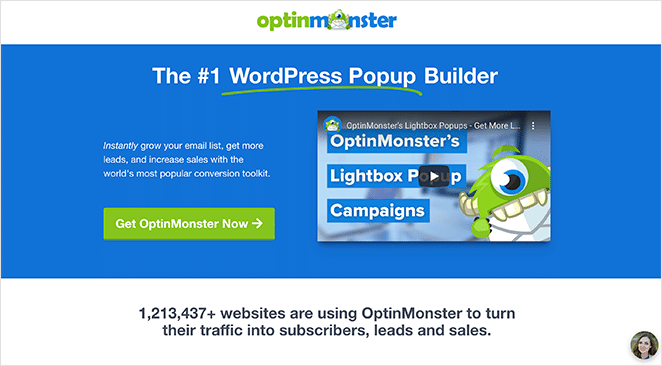
The OptinMonster team put this to the test with a PPC landing page conversion built using SeedProd. Their results: a 13.3% higher click-through rate, 47.2% lower cost per acquisition, and 340% more conversions. That’s not an anomaly. It’s what a well-built video landing page can do.

Types of Video Landing Pages

Not all video landing pages are the same. The right type depends on your goal, your audience, and where the page fits in your funnel.

Background video landing pages

A background video plays automatically behind your headline and copy. It creates atmosphere and instantly communicates your brand’s energy without asking visitors to click play. These work well for lifestyle brands, events, and products where visuals tell the story better than words.

Keep background videos short (10–30 seconds), looping, and silent (or with an optional sound toggle). The video should complement your text, not distract from it.

Hero video landing pages

A hero video replaces the static image at the top of the page. It’s the first thing visitors see. Rather than playing behind everything else, it’s the main event: a product demo, a founder message, or a testimonial reel.

These pages work well when your product needs explanation. If someone can watch a 60-second video and immediately understand the value, you’ve done most of your selling before they’ve even read a line of copy.

Supporting video landing pages

A supporting video landing page uses text and images as the primary content, with a video added to reinforce key points. The video isn’t the star. It’s evidence. You might have a written walkthrough of your product with a demo video embedded partway down the page.

This is the most flexible format and works well for longer pages: sales pages, webinar registrations, and email opt-in campaigns.

Pop-up video landing pages

A pop-up (or lightbox) video page shows the video in an overlay when a visitor clicks a button or thumbnail. It doesn’t appear inline. It opens on demand, which keeps the page clean while still giving curious visitors the full story.

This format works well when you want the page to load fast and the video to feel like a reward for engagement. SeedProd’s Video Popup block makes this straightforward to set up without any coding.

How to Create a Video Landing Page in WordPress

At first, I thought building a video landing page in WordPress would involve a developer and a lot of custom code. Then I found SeedProd.

SeedProd Drag-and-drop WordPress website builder

SeedProd is a drag and drop WordPress page builder used by over 1 million people. It has built-in video blocks, 200+ templates, and everything you need to build a landing page that looks professional and loads fast. No coding required.

Here’s how I build video landing pages with it:

Step 1. Install SeedProd

To get started, download SeedProd and install it on your WordPress site. There’s a free version available, but I’m using the Pro version here because it includes more templates and the Video Popup block.

If you need help, follow these instructions to install a WordPress plugin.

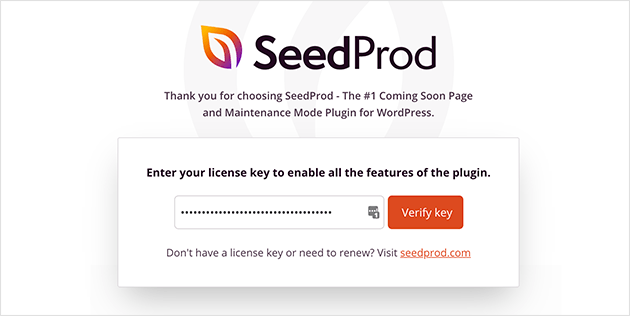
Once activated, you’ll see a welcome screen asking for your license key. Paste it in and click ‘Verify Key’.

Activate the SeedProd plugin with your license key

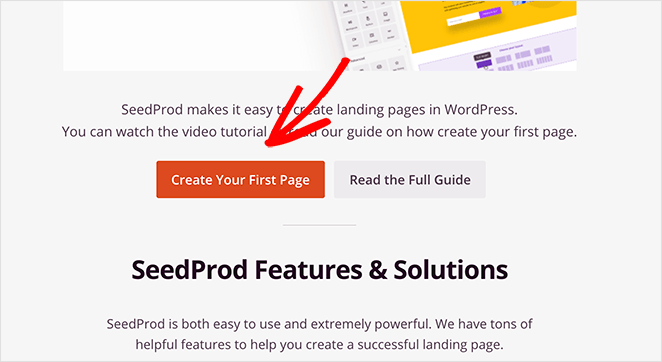
Then scroll down and click ‘Create Your First Page’.

Create your first video landing page

Step 2. Create a New Landing Page

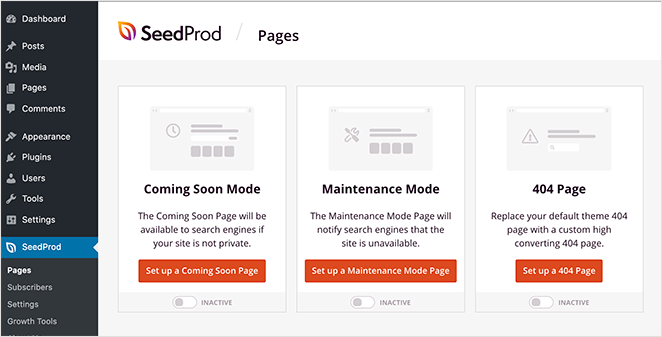
You’ll land on the SeedProd dashboard. At the top, you can enable Coming Soon Mode, Maintenance Mode, or a custom 404 Page.

Overview of the SeedProd dashboard

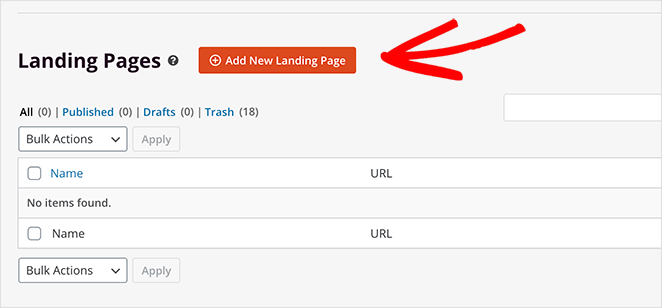
Below that is a list of your landing pages. If it’s your first time, it’ll be empty.

Click ‘Add New Landing Page’ to start.

Create a new landing page in SeedProd

Step 3. Choose a Video Landing Page Template

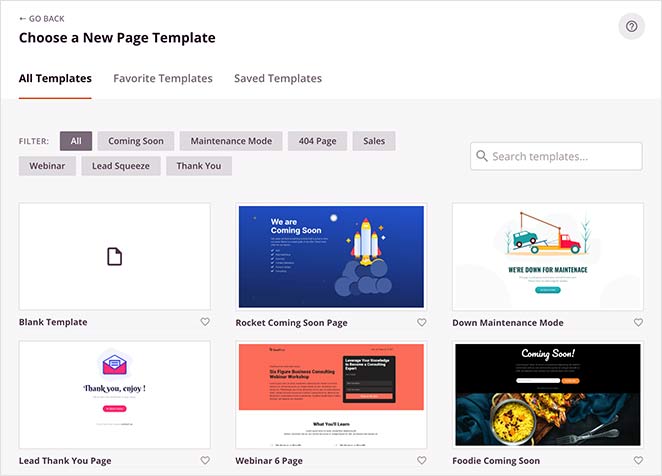
SeedProd will open a template library. You can filter by page type or search for “video” to find templates that already have a video block included.

SeedProd's landing page template library with video templates

Many templates already include a video block positioned above the fold. You can also start from a blank template and add everything yourself. Either way works.

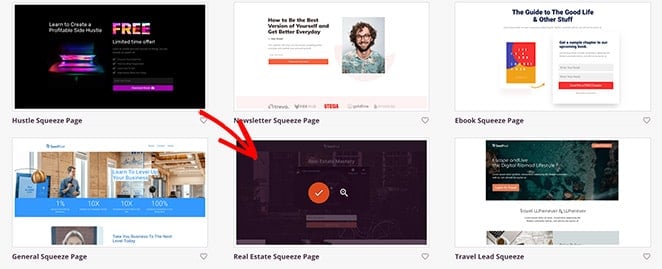
For this tutorial, I’m using the Real Estate Squeeze Page.

Selecting a video landing page template in SeedProd

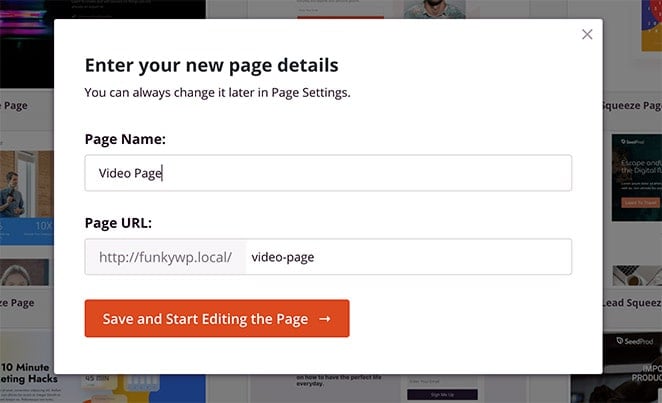
Hover over the template and click the tick icon to select it. Then give your page a name and URL. You can change these later.

Enter your landing page name and URL

Click ‘Save and Start Editing the Page’ to open the editor.

Step 4. Add Your Video Content

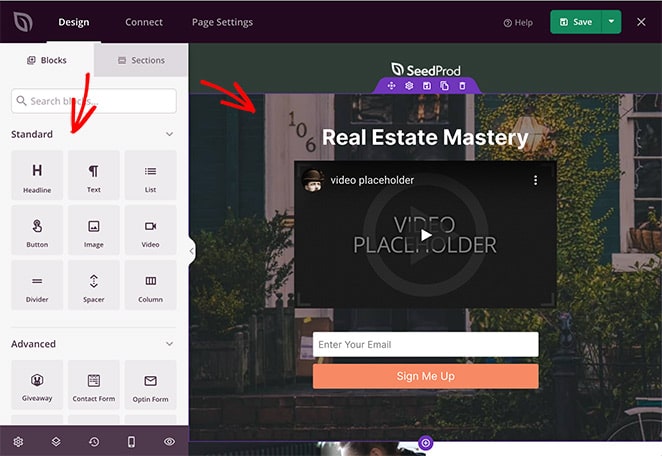
Now you’re in the visual editor. Blocks are on the left, and your page preview is on the right. Drag blocks onto the page to add content.

SeedProd's landing page visual editor

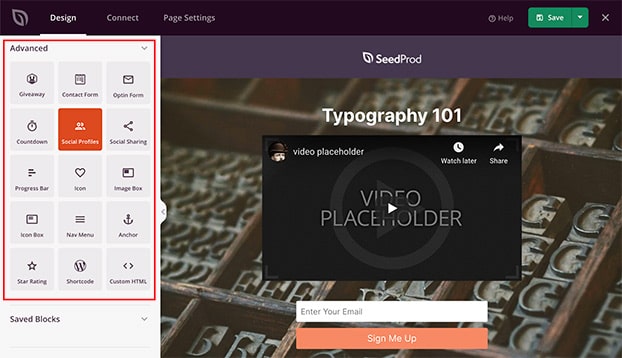
SeedProd has two types of blocks:

  • Standard blocks: Text, images, buttons, columns, and the Video block.
  • Advanced blocks: Forms, countdown timers, testimonials, giveaways, and the Video Popup block.
Advanced blocks in SeedProd's page builder

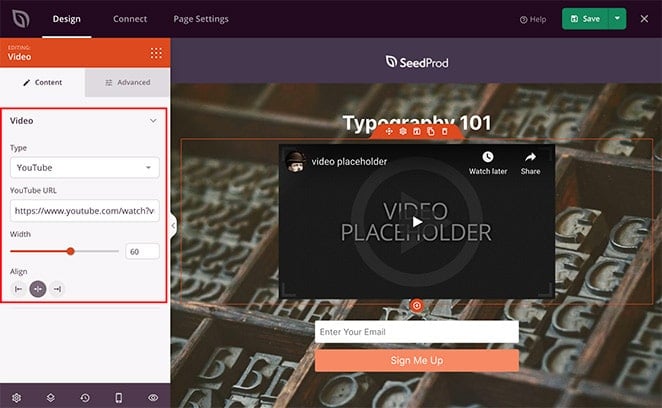
To add a video, drag the ‘Video’ block to where you want it on the page. Click it to open the block settings, then paste in your video URL.

Adding a video block to the landing page

SeedProd supports YouTube, Vimeo, and self-hosted video URLs. If you’re exploring other options, check out the best WordPress video plugins for a wider comparison. Here’s a quick breakdown of the three main choices:

  • YouTube: Free, fast to set up, and your video gets SEO benefit from YouTube’s own search engine. For help, see how to embed a YouTube video in WordPress. The downside is that YouTube shows suggested videos from other creators after your video ends, which can distract visitors.
  • Vimeo: Cleaner player with no ads or competitor suggestions. The Pro plan lets you customize the player to match your brand. Good choice for a polished, distraction-free experience.
  • Self-hosted: Fastest loading option if you use a CDN, with no third-party dependency. Works best for short videos under 2 minutes where file size is manageable.

For most people building their first video landing page, YouTube is the easiest starting point.

You can also control the video size, alignment, and add animation effects. Want a lightbox experience instead? Use the ‘Video Popup’ block. It shows the video in an overlay when a visitor clicks a button, which keeps the page lightweight and loads faster.

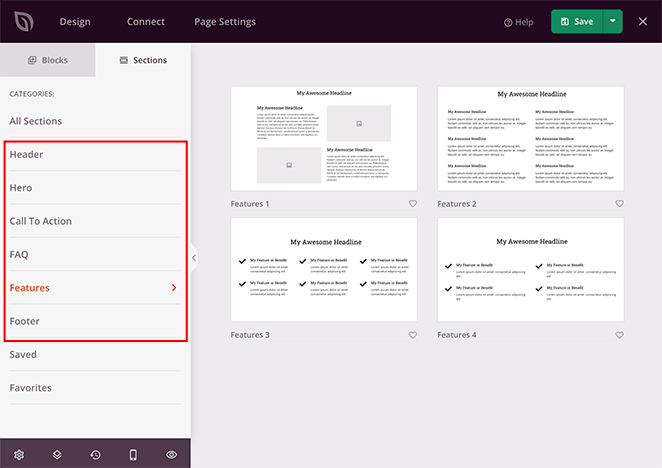
Add a clear call-to-action above or below your video. SeedProd has ready-made sections for CTAs, FAQs, testimonials, and more.

Ready-made sections in SeedProd

Step 5. Customize Your Page Design

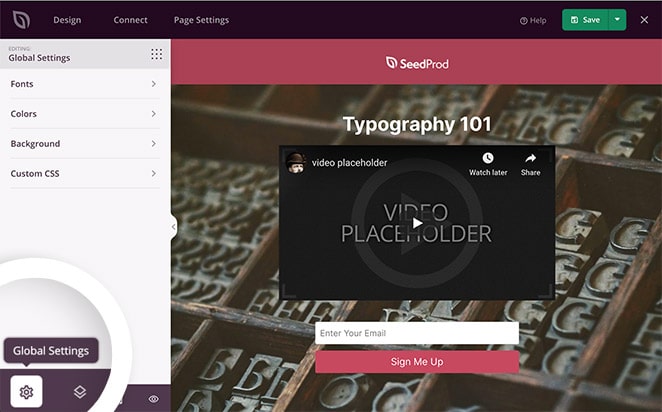
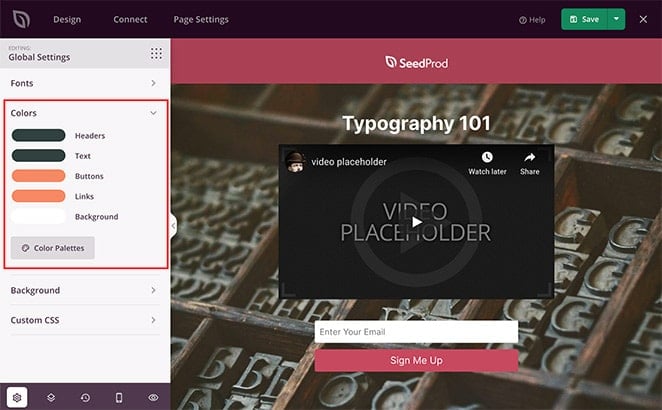
Once you’ve added your content, open Global Settings by clicking the gear icon in the bottom-left corner of the editor.

Global settings icon in SeedProd's editor

From here, you can set:

  • Fonts: Choose a font theme or pick individual Google Font combinations.
  • Colors: Set global colors for headings, text, buttons, and backgrounds. Or choose from 20+ pre-designed color palettes.
  • Backgrounds: Upload a full-screen image, use a gradient, or set a background video for the page itself.
  • Custom CSS: Fine-tune the design if you’re comfortable with CSS.
Color palette settings in SeedProd

These settings apply across the whole page, so you set your brand colors once and everything updates together.

Step 6. Connect Your Email Marketing Service

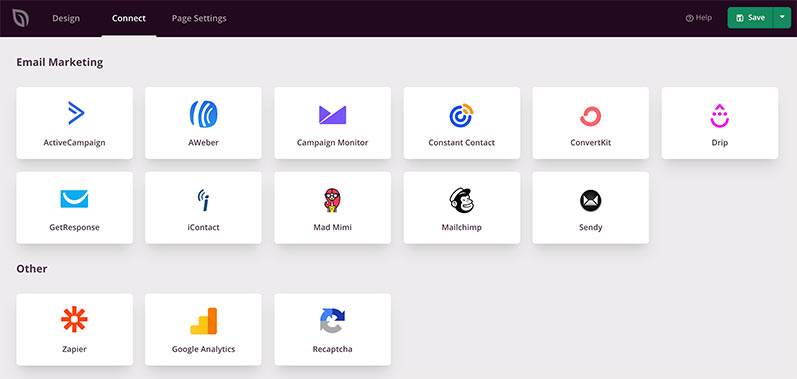
To capture leads from your landing page, click the ‘Connect’ tab and choose your email provider. SeedProd integrates with Mailchimp, ActiveCampaign, ConvertKit, Constant Contact, and more.

SeedProd email marketing integrations

You can also connect Google Analytics, Recaptcha, and Zapier from this same tab.

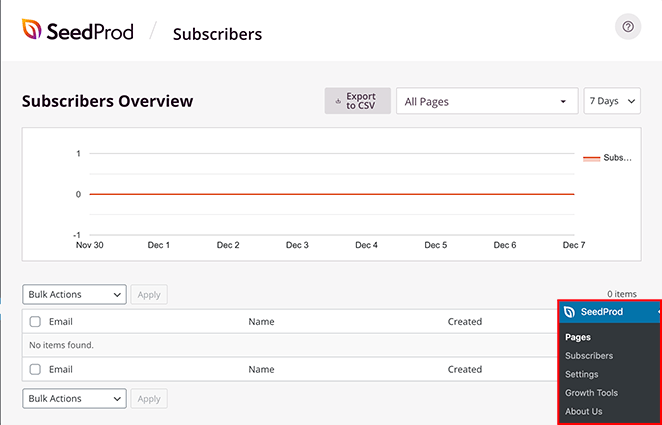
Don’t have an email provider yet? SeedProd stores signups directly in your WordPress dashboard under SeedProd » Subscribers so you don’t lose any leads in the meantime.

SeedProd's subscriber management dashboard

Step 7. Publish Your Page

Before you go live, do two quick checks.

Mobile preview

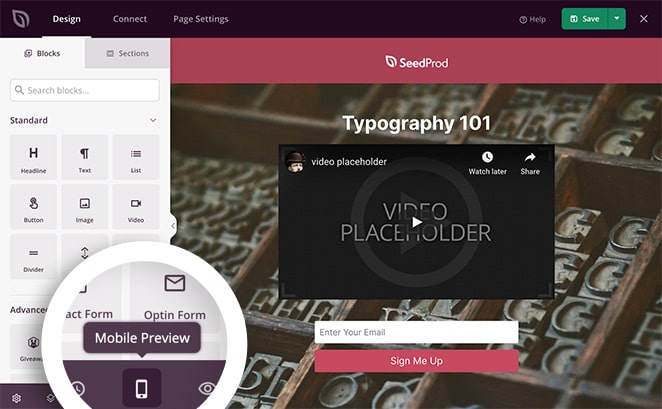
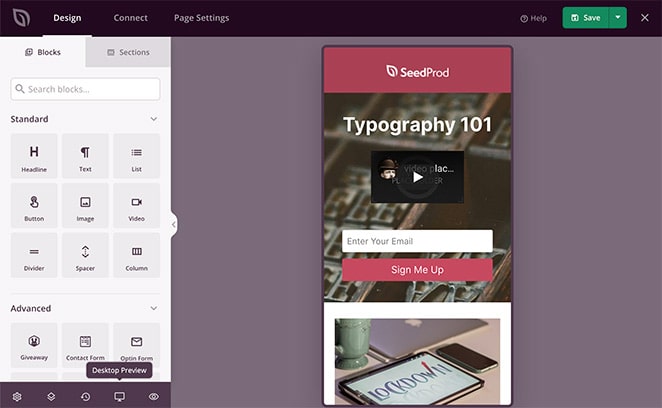
Click the mobile icon at the bottom of the editor to preview your page on phones and tablets.

Mobile preview icon in SeedProd

Adjust anything that looks off. Keeping your video above the fold on mobile is especially important because that’s what most visitors will see first. For more tips, see how to make a mobile landing page.

Mobile preview of the video landing page

Page settings

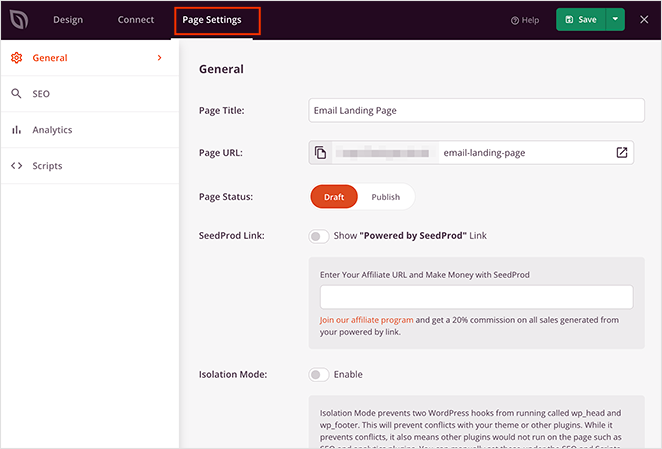
Click the ‘Page Settings’ tab to update the page name and URL, set the status to ‘Published’, enable SeedProd’s Isolation Mode (which removes the header and footer for a distraction-free page), and add SEO meta information or Google Analytics tracking.

SeedProd's page settings panel

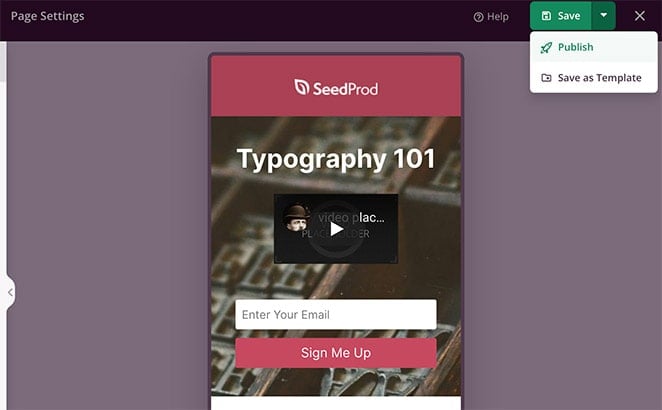
When everything looks right, click the arrow next to ‘Save’, then click ‘Publish’.

Publishing the video landing page in SeedProd

You’ll get a confirmation that your page is live. Click ‘See Live Page’ to check it.

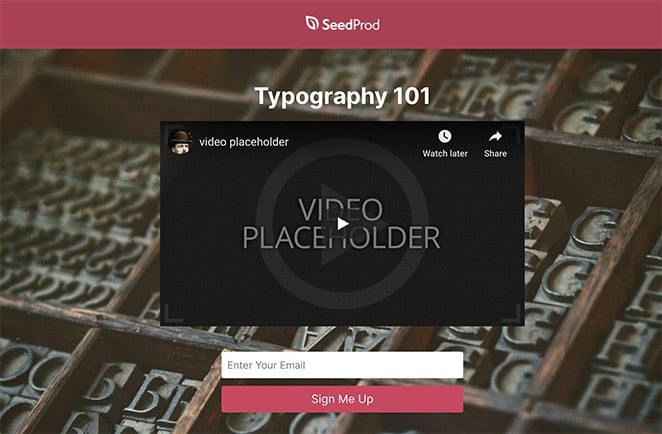
Here’s what the finished page looks like:

Example of a completed video landing page built with SeedProd

Video Landing Page Examples

Here are some examples of video landing pages that show what’s possible.

Welcome video landing page

SeedProd video landing page example

I built this one myself using SeedProd. The video sits prominently above the fold and explains exactly what the product does in under 60 seconds. The layout is intentionally simple: headline, video, and one CTA button. No distractions.

What makes it work: the video does the explaining so the rest of the page can stay lean. Visitors get what they need without having to read walls of text.

OptinMonster PPC video landing page

OptinMonster PPC landing page built with SeedProd

OptinMonster used SeedProd to build a PPC video landing page designed to lower their cost per acquisition. The video explained the product clearly and moved visitors toward conversion faster than a text-only version.

Their results:

  • 13.3% higher click-through rate
  • 47.2% lower cost per acquisition
  • 340% more conversions

Read the full OptinMonster case study for a breakdown of what they built.

Product demo video landing page

Product demo video landing page

A well-built product demo page shows your product in action. The video is short (60–90 seconds), focused on a specific use case, and paired with a headline that promises an outcome rather than listing features. Below the video, social proof (a star rating, a testimonial, or a case study number) to reinforce trust before the CTA.

Video Landing Page Best Practices

Here are the things that make the biggest difference in practice. For a broader overview, see our full guide to landing page best practices.

Keep your video short and focused

Aim for 60–90 seconds. That’s long enough to tell a story and short enough to hold attention. The first 10 seconds matter most, so lead with the problem or the outcome, not with your company name.

Choose your thumbnail carefully

Most visitors won’t click play if the thumbnail looks generic. Use a frame that shows a real person, an expression, or a compelling visual that makes people curious about what happens next.

Think twice before using autoplay

Autoplay videos are often muted by default in browsers and blocked entirely on most mobile devices. When it doesn’t work as expected, it creates a confusing experience. Sometimes autoplay works well for background videos, but for a hero video meant to deliver your pitch, letting visitors choose to press play usually performs better.

Don’t let the video carry the whole page

Some visitors won’t watch. They’re in a quiet place, short on time, or just prefer to read. Back up your video with a clear headline, bullet points, and supporting copy that tells the same story.

Position your video above the fold

Visitors should see the video immediately when the page loads, without scrolling. This maximizes play rates and keeps visitors engaged before they bounce.

Optimize for speed

A video landing page that loads slowly will hurt conversions. Use a CDN, compress images on the page, and test your page speed with Google PageSpeed Insights before and after launching.

A/B test the things that move the needle

Don’t guess, test. The two highest-impact variables on a video landing page are CTA button text and video placement (above vs. below copy). Run one test at a time and give it enough traffic to be statistically meaningful. See our guide to A/B testing for landing pages for a step-by-step walkthrough.

Frequently Asked Questions

How long should a video be on a landing page?

Aim for 60–90 seconds for most landing page videos. This is long enough to explain your offer and build some trust, but short enough that most visitors will watch to the end. If your product is more complex and genuinely needs more explanation, you can go up to 3 minutes, but make sure every second earns its place. Videos that drag on lose viewers fast.

Should videos autoplay on landing pages?

In most cases, no. Autoplay is blocked by default on mobile browsers, and desktop browsers often mute autoplay videos automatically. When autoplay fails silently, visitors may not even realize there’s a video on the page. For hero and supporting videos, let visitors choose to hit play. Autoplay works better for background videos: short, looping, muted, where the video adds atmosphere rather than delivering a message.

Where should you put a video on a landing page?

For most landing pages, put the video above the fold so visitors see it immediately without scrolling. This gets the most plays and keeps people engaged from the start. If you’re running a longer sales page where the video is a testimonial or deep dive, placing it after the headline and main CTA can also work well.

Can I use a YouTube video on a landing page?

Yes. SeedProd’s Video block accepts YouTube URLs, so you can paste any YouTube link and it’ll embed cleanly on your page. YouTube videos load fast and hosting is free. The downside: after the video ends, YouTube shows suggested videos from other channels, which can distract visitors. If that’s a concern, use a Vimeo link instead for a cleaner playback experience.

What is a hero video landing page?

A hero video landing page puts the video in the main content area at the very top of the page, where a headline image or slider would normally appear. The video is the first and most prominent thing visitors see. This format works well when your product needs visual explanation, when you’re running a campaign with a strong brand video, or when your founder’s story is a key part of your pitch.

How do I A/B test a video landing page?

Create two versions of your landing page with one difference between them: a different CTA button, video position, or headline. Send equal traffic to both versions and measure which converts better. SeedProd integrates with Google Optimize and other testing tools via tracking scripts in Page Settings. Start with CTA button text or video placement, since these tend to have the biggest impact on conversion rate.

How big should my video be on a landing page?

Your video should fit the content width of your landing page at a 16:9 aspect ratio, which is the standard for web video. Make sure the video is responsive so it scales correctly on mobile devices. SeedProd’s Video block handles this automatically.

Build Your First Video Landing Page Today

Creating a video landing page doesn’t have to be complicated. With the right tool, you can go from idea to published page in less time than you’d expect.

SeedProd makes it straightforward: choose a template, drag in your video, customize your design, and publish. No developer, no custom code.

If you’re ready to try it, get started with SeedProd. The free version lets you build and publish landing pages, and the Pro version adds more templates, advanced blocks like Video Popup, and email marketing integrations.

A strong video landing page won’t just get visitors to your page. It’ll get them to act.

Thanks for reading! We’d love to hear your thoughts, so please feel free to join the conversation on YouTubeX and Facebook for more helpful advice and content to grow your business.

author avatar
Stacey Corrin Content Marketing Specialist
Stacey Corrin is a certified content marketing and search specialist with over 15 years of experience writing about WordPress, SEO, and digital marketing. She manages content for SeedProd and RafflePress, covering tools and strategies she actively uses and tests herself.

Disclosure: Our content is reader-supported. This means if you click on some of our links, then we may earn a commission. We only recommend products that we believe will add value to our readers.