

Vous comptez sur le bouche-à-oreille pour trouver des clients dans le fitness ? Si vous n’avez pas une forte présence en ligne, vous passez probablement à côté de nombreuses opportunités commerciales.
Considérez ceci : environ 81 % des acheteurs font des recherches en ligne avant de faire un achat. Sans site web, vous rendez difficile la recherche de nouveaux clients et vous perdez probablement des clients au profit de vos concurrents qui ont eux un site web.
La bonne nouvelle, c’est que vous pouvez facilement y remédier. Dans ce guide, je vais vous montrer comment créer un site web pour coach sportif qui attire de nouveaux clients et vous aide à développer votre activité en ligne.
- Un coach sportif doit-il avoir un site web ?
- Quelle est la meilleure plateforme pour un site web de coaching sportif ?
- Quel contenu vous faut-il pour un site web de fitness ?
- Comment créer un site Web de coach personnel avec SeedProd
- Étape 1. Installer et activer le plugin SeedProd
- Étape 2. Choisir un modèle prédéfini
- Étape 3. Personnaliser avec le constructeur par glisser-déposer
- Étape 4. Créer les pages essentielles
- Étape 5. Ajouter des fonctionnalités de réservation et de paiement
- Étape 6. Conseils de base pour l’optimisation SEO
- Étape 7. Prévisualiser et publier
- Promouvoir votre site web de coach sportif
- FAQ sur la création d’un site web pour coach sportif
Un coach sportif doit-il avoir un site web ?
Un coach sportif devrait avoir un site web pour présenter ses services, attirer des clients et établir la confiance, surtout pour une activité de coaching sportif en ligne. Un site web permet de montrer facilement les avis, de laisser les clients réserver des séances et de fournir des conseils utiles. Il aide également plus de personnes à trouver vos services en ligne.
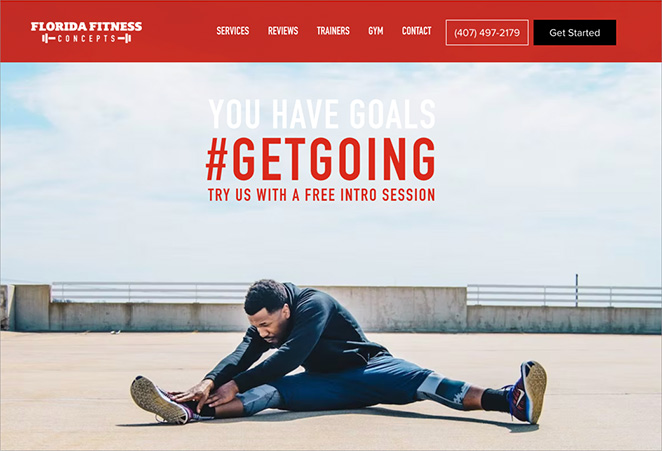
Voici quelques raisons supplémentaires pour lesquelles la création d’un site web est essentielle :
- Établir l’autorité : Présentez vos certifications, les transformations de vos clients et votre expertise en un seul endroit professionnel.
- Automatiser les prospects : Votre site web fonctionne 24h/24 et 7j/7, capturant de nouveaux prospects pendant que vous entraînez d’autres personnes.
Quelle est la meilleure plateforme pour un site web de coaching sportif ?
Lorsque vous commencez à rechercher comment créer un site web pour coach sportif, vous tomberez probablement sur des noms comme Wix, Squarespace et WordPress. Il peut être déroutant de savoir lequel convient le mieux à une entreprise de fitness.
Généralement, vous avez le choix entre deux types de plateformes :
| Fonctionnalité | Hébergées (Wix, Squarespace) | WordPress (Auto-hébergé) |
|---|---|---|
| Coût | Abonnement mensuel (augmente avec les fonctionnalités) | Logiciel gratuit (payez uniquement l’hébergement) |
| Propriété | Vous louez la plateforme | Vous possédez le site web et les données |
| Flexibilité | Limité à leur App Store | Plugins et personnalisation illimités |
| Idéal pour | Hobbyistes ou portfolios simples | Entreprises de fitness en pleine croissance |
Pour les entraîneurs personnels qui veulent développer une marque, je recommande toujours WordPress.
Pourquoi ? Parce qu'une entreprise de fitness évolue. Vous pourriez commencer par simplement afficher votre biographie, mais l'année prochaine, vous pourriez vouloir vendre des guides d'entraînement téléchargeables, des suppléments de protéines ou des cours vidéo. Déplacer un site de Wix vers WordPress plus tard est difficile et peut nuire à votre SEO.
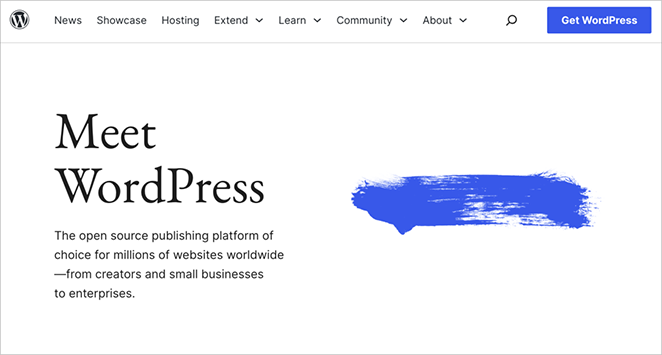
Voici pourquoi WordPress est la norme de l'industrie pour les professionnels du fitness :
- Propriété totale : Vous ne louez pas votre espace commercial ; vous le possédez. Personne ne peut fermer votre compte ni augmenter vos frais de transaction de manière inattendue.
- Évolutivité : Il grandit avec vous. Que vous ayez 5 clients ou 5 000, WordPress peut gérer cela.
- Coût inférieur : Comme le logiciel est gratuit, vos coûts d'exploitation sont généralement inférieurs à ceux des niveaux premium des constructeurs hébergés.
- Liberté de conception : Dans le passé, WordPress nécessitait du codage. Ce n'est plus le cas. Avec des outils comme SeedProd, vous bénéficiez de la même simplicité de glisser-déposer que Wix, mais avec la puissance de WordPress.
Thèmes WordPress préfabriqués vs. Constructeurs de pages
Une fois que vous avez choisi WordPress, vous avez deux façons de concevoir votre site : utiliser un « Thème » standard ou un « Constructeur de pages ». Pour une marque de fitness, la différence est cruciale :
| Fonctionnalité | Thème WordPress standard | Constructeur de pages (SeedProd) |
|---|---|---|
| Contrôle de la conception | Limité (Bloqué par la mise en page du thème) | Contrôle total (Glisser-déposer n'importe quoi) |
| Unicité | Générique (Ressemble à d'autres sites) | Personnalisé (Correspond à votre marque personnelle) |
| Codage requis ? | Souvent oui (pour les ajustements personnalisés) | Non (édition visuelle uniquement) |
Pour créer un site qui se démarque, je recommande d'utiliser SeedProd. Il vous donne la puissance d'un concepteur web professionnel sans écrire une seule ligne de code.
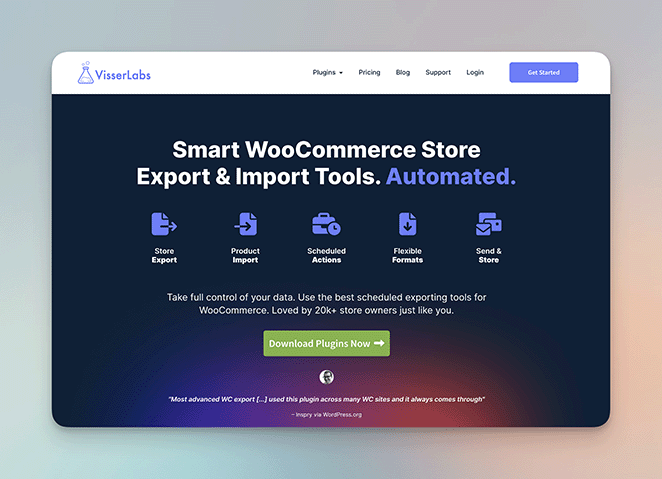
Il est approuvé par plus d'un million d'utilisateurs, y compris de grandes marques comme Duplicator et WPCode. Regardez la qualité professionnelle atteinte par Visser Labs en utilisant SeedProd :
Maintenant, plongeons dans le tutoriel et commençons à construire votre site.
Quel contenu vous faut-il pour un site web de fitness ?
L'une des plus grandes erreurs que font les entraîneurs personnels est d'installer un thème de site Web avant de savoir ce qu'ils veulent dire. Pour accélérer le processus de création et augmenter votre taux de conversion, rassemblez ces quatre éléments avant de commencer :
| Élément essentiel | Meilleure pratique / Action à entreprendre |
|---|---|
| Photographie professionnelle | Évitez les photos de stock. Dans cette industrie, vous êtes le produit. Investissez dans une séance photo ou utilisez un téléphone de haute qualité pour prendre des clichés lumineux de vous entraînant des clients afin d'établir la confiance. |
| Proposition de valeur | Soyez précis. « Je vous aide à être en forme » est trop vague. Essayez un accroche spécifique comme : « J'aide les professionnels occupés à perdre 5 kg en 30 jours sans renoncer aux glucides. » |
| Preuve sociale | Rassemblez des preuves. Collectez des captures d'écran de SMS de clients satisfaits, des avis Google ou des photos avant/après (avec permission). Placez-les près de vos tarifs. |
| Un aimant à prospects | Capturez les e-mails. La plupart des visiteurs n'achèteront pas immédiatement. Offrez un PDF gratuit (par exemple, « Plan de repas de 5 jours ») en échange de leur adresse e-mail afin de pouvoir les contacter plus tard. |
Une fois que vous avez préparé ces éléments, vous êtes prêt à commencer la construction.
Comment créer un site Web de coach personnel avec SeedProd
Avant de commencer, vous devrez choisir un nom de domaine et un hébergement Web.
Si vous n'avez pas encore ces éléments, je vous recommande de consulter mon tutoriel sur la création d'un site Web WordPress pour débutants. Il vous guidera à travers ces premières étapes.
Étape 1. Installer et activer le plugin SeedProd
Maintenant que vous avez les bases de votre site Web configurées, il est temps d'installer et d'activer le plugin SeedProd. Cela vous permet de créer un design de site Web de coaching personnel en ligne réussi visuellement.
Si vous avez besoin d'aide pour cela, consultez notre guide sur l'installation de SeedProd Pro.
Étape 2. Choisir un modèle prédéfini
Prêt à commencer à concevoir votre site Web ? Dans votre tableau de bord WordPress, accédez à SeedProd » Constructeur de thèmes et cliquez sur le bouton « Kits de modèles de thèmes ».
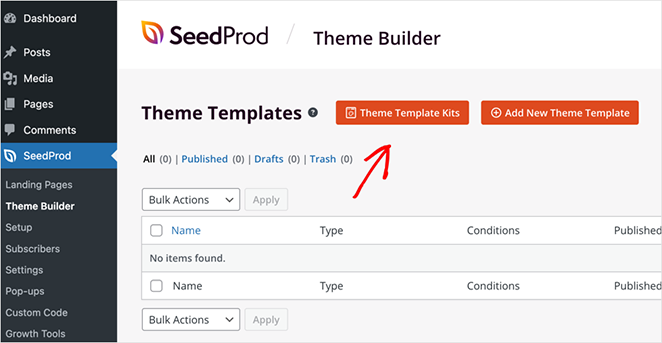
Cela ouvrira une bibliothèque de thèmes de sites Web complets. Vous pouvez importer n'importe lequel de ces thèmes en un seul clic. Ces kits incluent toutes les pages dont vous aurez besoin pour un site Web complet.
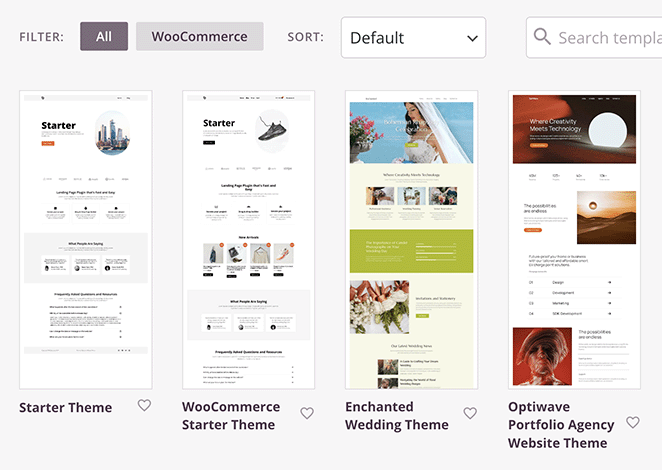
Mieux encore, il existe des kits de thèmes spécialement conçus pour le fitness et les entraîneurs personnels, ce qui facilite le démarrage avec un design professionnel.
Pour choisir un thème, survolez simplement votre souris sur celui que vous aimez et cliquez sur l'icône de coche.
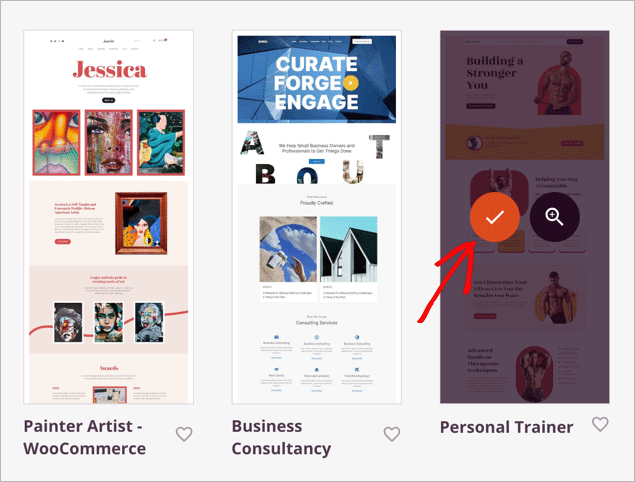
En quelques secondes, SeedProd importera tous les éléments de votre thème choisi. Vous pouvez ensuite personnaliser chaque modèle à l'aide du constructeur par glisser-déposer.
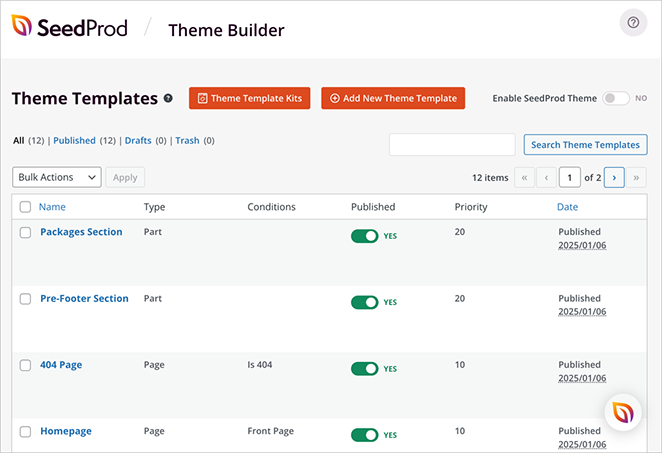
Commençons par modifier la page d'accueil WordPress.
Étape 3. Personnaliser avec le constructeur par glisser-déposer
Survolez le modèle de page d'accueil et cliquez sur le lien « Modifier le design ».
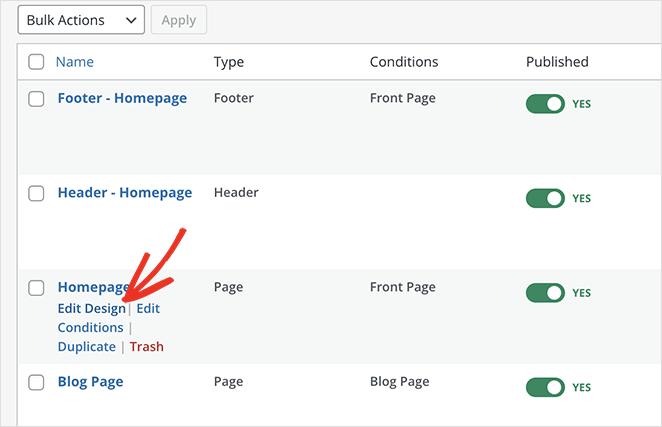
Cela ouvre le modèle dans le constructeur de pages par glisser-déposer de SeedProd.
Vous trouverez le constructeur très facile à utiliser, même si vous débutez. Sur la gauche, vous verrez les blocs et les sections, et sur la droite, un aperçu en direct de votre page.
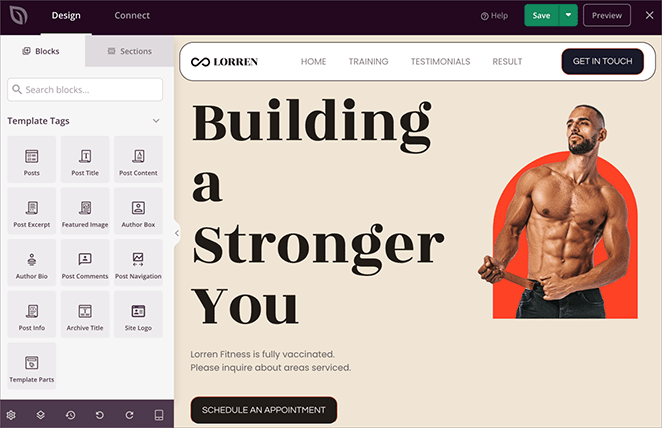
Pour personnaliser quoi que ce soit sur la page, cliquez simplement dessus. La barre latérale gauche vous montrera alors les options pour modifier son contenu.
Par exemple, vous pouvez modifier le texte du site Web en quelques clics simples :
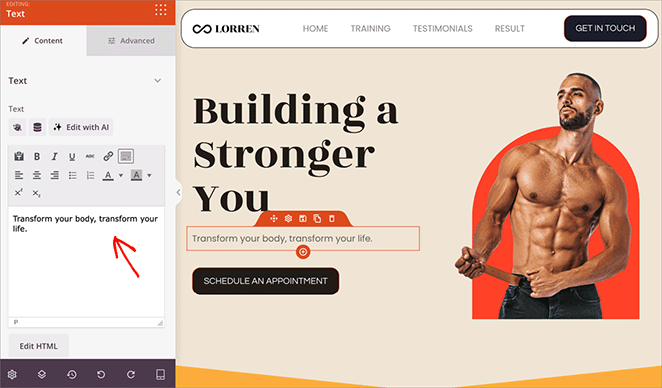
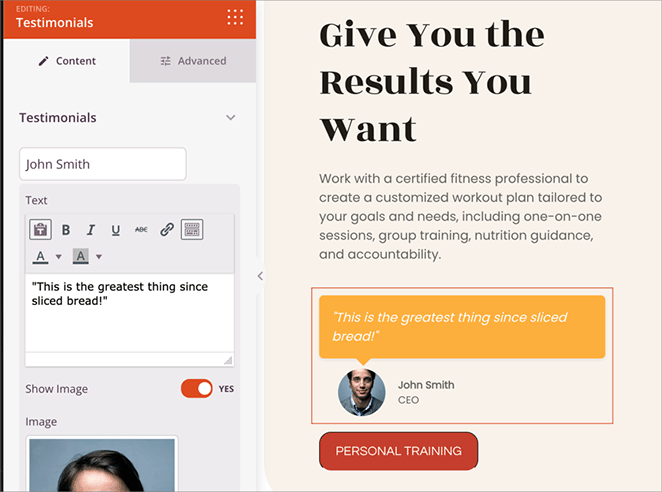
L'ajout de nouveaux éléments est tout aussi simple. Faites simplement glisser des blocs depuis la barre latérale gauche vers votre page. Par exemple, vous pourriez ajouter un bloc de témoignages pour présenter les témoignages et les réussites de vos clients.
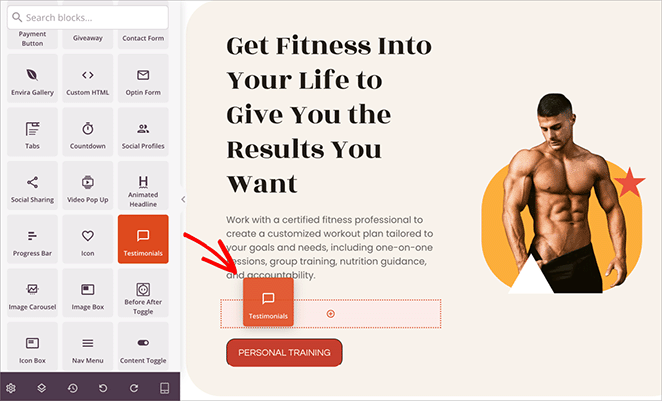
Vous pouvez également personnaliser le bloc pour qu'il corresponde aux couleurs, aux polices et à d'autres éléments de votre marque.
Si vous souhaitez une visite complète de toutes les fonctionnalités, consultez notre guide sur la création d'un thème WordPress personnalisé.
Étape 4. Créer les pages essentielles
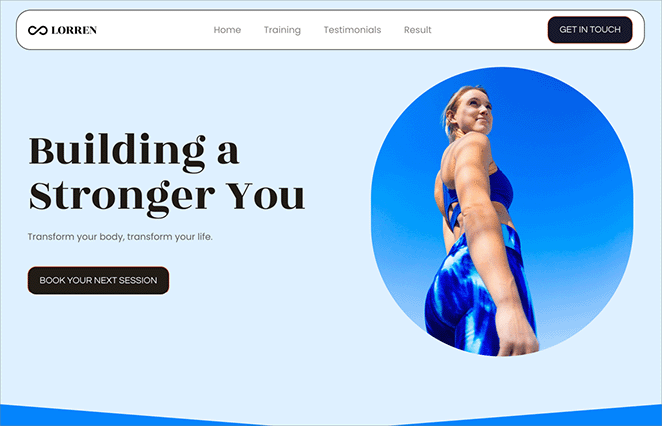
Le modèle que vous avez choisi pour votre site Web a peut-être déjà créé toutes les pages dont vous avez besoin en tant qu'entraîneur personnel. Par exemple, le modèle que j'ai choisi, possède une page d'accueil, des témoignages, des forfaits d'entraînement et des pages de résultats.
S'il manque quelque chose, vous devrez créer ces pages vous-même. Par exemple, vous pourriez avoir besoin de pages « À propos », « Services », « Témoignages », « Contact » et « Blog ».
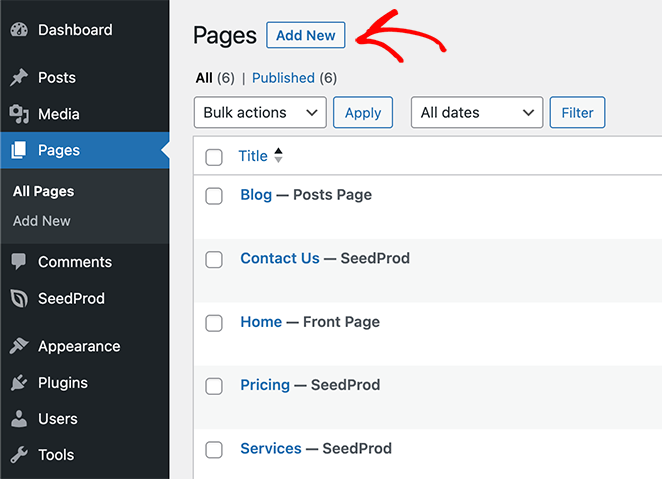
Ne vous inquiétez pas, cette étape est assez simple. Allez simplement dans Pages » Ajouter une nouvelle page dans votre tableau de bord WordPress pour créer une nouvelle page.
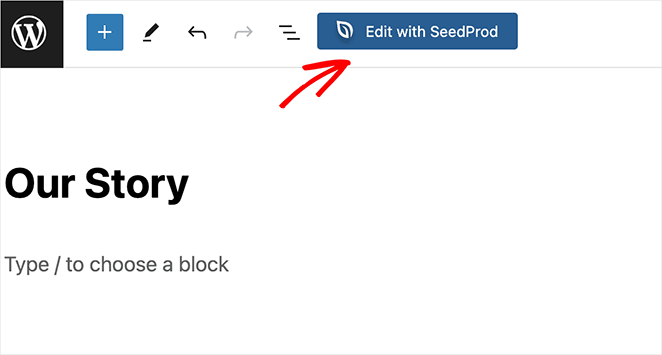
Ensuite, cliquez sur le bouton « Modifier avec SeedProd ». Cela ouvrira le constructeur par glisser-déposer, vous permettant de concevoir votre page.
Pour obtenir de l'aide pour la création de chaque page, consultez ces tutoriels étape par étape :
- Comment créer une page « À propos » dans WordPress
- Comment créer un design de page de services dans WordPress
- Comment ajouter des témoignages aux pages WordPress
- Comment créer une page de blog sur WordPress
- Comment créer un formulaire de contact simple dans WordPress
Étape 5. Ajouter des fonctionnalités de réservation et de paiement
Pour accepter les paiements et les réservations, vous avez besoin des bons outils. Comme WordPress est open-source, vous avez deux excellentes options en fonction de votre modèle économique :
| Si vous avez besoin de... | Utilisez ce plugin |
|---|---|
| Accepter les réservations et inscriptions aux cours | WPForms (Idéal pour les entraîneurs basés sur les services) |
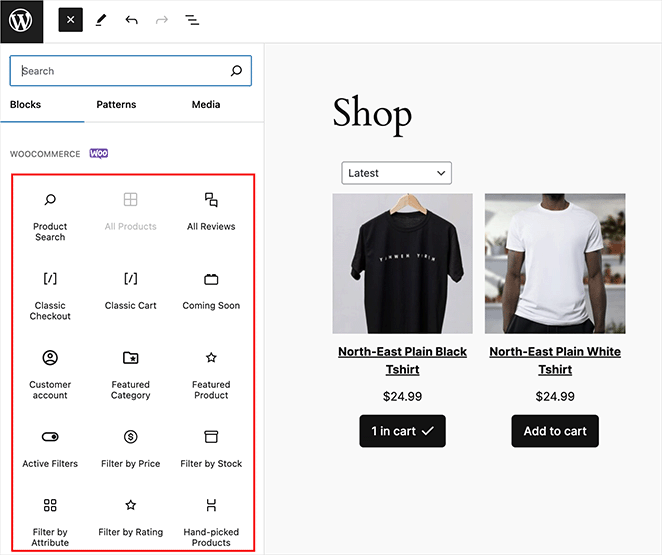
| Vendre des produits dérivés, des vitamines ou de l'équipement | WooCommerce (Idéal pour le commerce électronique) |
Les deux plugins s'intègrent parfaitement à SeedProd, vous permettant de faire glisser et déposer des formulaires de réservation ou des grilles de produits directement sur vos pages.
Étape 6. Conseils de base pour l’optimisation SEO
Pour aider les gens à trouver votre site Web en ligne, vous voudrez utiliser quelques pratiques de base de référencement (optimisation pour les moteurs de recherche). Pour de meilleurs résultats, je recommande d'utiliser un plugin SEO WordPress comme All in One SEO (AIOSEO).
AIOSEO vous aide à optimiser votre site Web pour les moteurs de recherche. Il s'intègre parfaitement à SeedProd, ce qui facilite la gestion de votre référencement.
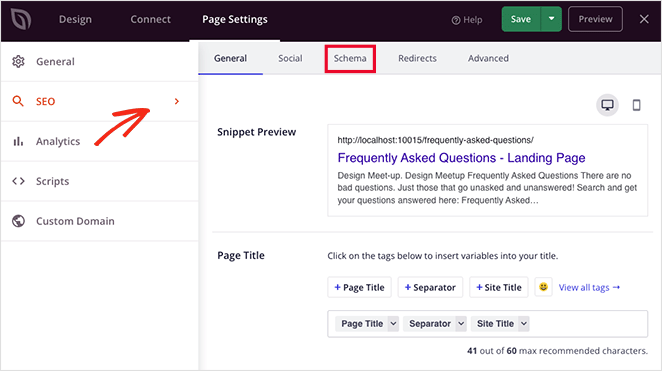
Voici quelques étapes simples pour commencer le référencement de votre site Web :
- Recherche de mots-clés : Découvrez quels termes les gens utilisent lorsqu'ils recherchent un entraîneur personnel comme vous.
- Méta-descriptions : Rédigez des descriptions détaillées pour chaque page de votre site Web.
- Texte alternatif des images : Ajoutez du texte descriptif à vos images pour aider les moteurs de recherche à les comprendre.
Pour plus d'informations détaillées, consultez mon guide sur l'optimisation pour les moteurs de recherche WordPress.
Étape 7. Prévisualiser et publier
Avant de mettre votre site Web en ligne, il est important de vérifier son apparence sur différents appareils. En bas du constructeur de pages, cliquez sur l'icône mobile pour prévisualiser les vues mobile, tablette et ordinateur.
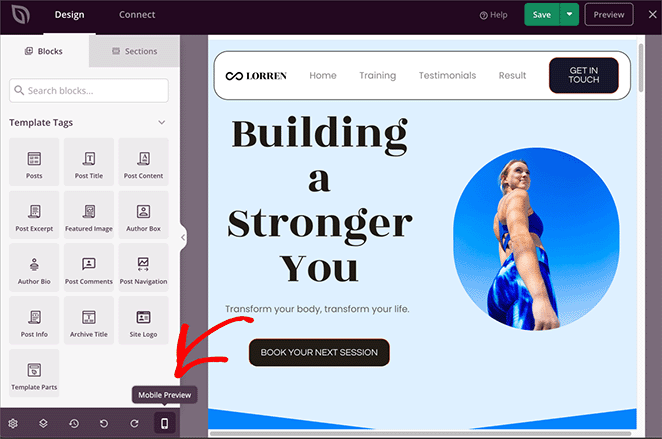
Vous pouvez ensuite modifier chaque vue pour vous assurer d'avoir un design réactif parfait qui s'affiche bien sur n'importe quel appareil.
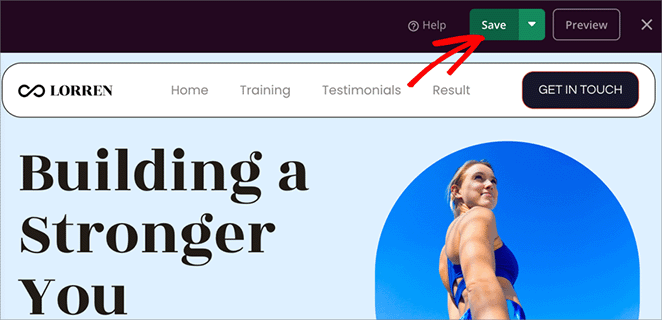
Lorsque vous êtes satisfait de l’apparence de chaque partie de votre site web, n’oubliez pas de sauvegarder vos modifications. Vous pouvez le faire facilement en cliquant sur le bouton Enregistrer dans le coin supérieur droit.
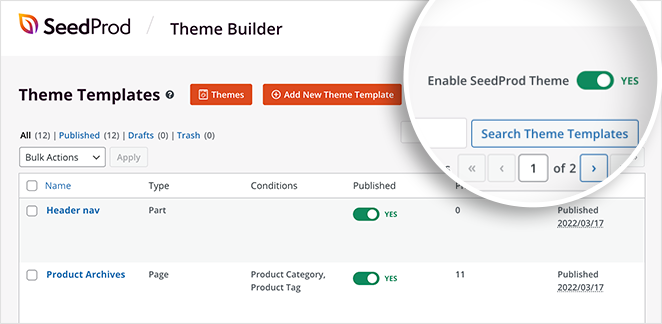
Enfin, pour publier votre site web, allez dans SeedProd » Constructeur de thèmes et activez le bouton « Activer le thème SeedProd ». Cela rendra votre nouveau site web public !
Voici un aperçu rapide du site web de coach personnel que j’ai créé sur mon site de test en suivant ces étapes :
Promouvoir votre site web de coach sportif
Maintenant que votre site web est en ligne, il est temps de commencer à le promouvoir. WordPress vous donne accès à d’excellents outils qui peuvent vous aider à développer votre entreprise.
Voici quelques-uns pour vous aider à démarrer :
- OptinMonster : Une fois que les visiteurs sont sur votre site, vous voudrez les convertir en clients. OptinMonster vous aide à transformer les visiteurs de votre site web en clients payants.
- PushEngage : Cette plateforme vous permet d’envoyer des notifications push ciblées à vos utilisateurs, même lorsqu’ils ne sont pas sur votre site web.
- Smash Balloon : Utilisez Smash Balloon pour développer une forte présence sur les réseaux sociaux grâce à votre site web WordPress, en connectant des plateformes comme Instagram, YouTube et Facebook.
- MonsterInsights : Suivez d’où viennent vos utilisateurs et ce qui fonctionne sur votre site avec MonsterInsights, le meilleur plugin Google Analytics pour WordPress.
Si vous cherchez à travailler avec des marques ou à être présenté dans la presse, vous pouvez créer une page de kit média qui inclut votre biographie, des photos de haute qualité et des statistiques clés.
FAQ sur la création d’un site web pour coach sportif
Combien coûte la création d’un site web de coach personnel ?
Un site web professionnel de coach personnel coûte généralement entre 100 $ et 250 $ pour la configuration initiale. Cela comprend environ 15 $/an pour un nom de domaine, 100 $/an pour l’hébergement web et des coûts optionnels pour des plugins premium comme SeedProd. C’est considérablement moins cher que d’engager un développeur web, qui peut coûter plus de 2 000 $.
Ai-je besoin d’un site web si j’ai une forte présence sur Instagram ?
Oui, vous avez besoin d’un site web même si vous êtes populaire sur les réseaux sociaux. Bien qu’Instagram soit excellent pour l’engagement, vous ne possédez pas cette audience, et l’algorithme peut changer à tout moment. Un site web sert de domicile numérique permanent où vous pouvez collecter des prospects par e-mail, traiter les paiements en toute sécurité et héberger votre propre contenu sans distractions.
Puis-je créer un site web de coach personnel gratuitement ?
Vous pouvez créer un site web gratuitement en utilisant le logiciel WordPress.org, mais vous devrez toujours payer pour l’hébergement web afin de le rendre accessible sur Internet. Nous vous recommandons d’éviter les constructeurs de sites web 100 % gratuits (comme le niveau gratuit de Wix) car ils placent souvent des publicités sur votre site et ne vous permettent pas d’utiliser un nom de domaine personnalisé, ce qui fait peu professionnel.
Combien de temps faut-il pour créer un site web de fitness ?
Si vous utilisez un kit de modèles et un constructeur par glisser-déposer comme SeedProd, vous pouvez créer un site Web de coach personnel entièrement fonctionnel en moins de 2 heures. Cela comprend l'importation du design, la personnalisation du texte et l'ajout de vos formulaires de contact.
Quel est le meilleur nom de domaine pour un coach personnel ?
Le meilleur nom de domaine est généralement VotreNom.com (par exemple, JeanDupontFitness.com). S'il est déjà pris, essayez d'ajouter votre localisation ou votre spécialité (par exemple, JeanDupontParis.com ou JeanDupontYoga.com). Gardez-le court, évitez les chiffres ou les tirets, et assurez-vous qu'il est facile à épeler.
J'espère que ce guide vous a aidé à apprendre comment créer un site Web de coach personnel avec WordPress. Vous pouvez maintenant prendre des mesures pour contacter de nouveaux clients et développer votre entreprise.
Avec WordPress et SeedProd, créer un site Web professionnel est plus facile que vous ne le pensez. SeedProd permet à quiconque de créer facilement un site Web sans avoir à coder.
Prêt à vous lancer ?
Ensuite, vous voudrez peut-être aussi consulter nos guides sur :
- Comment vendre des programmes d'entraînement en ligne
- Exemples de sites Web d'entreprise (Et ce qui les rend géniaux)
- Comment vendre des vidéos en ligne dans WordPress
Merci de votre lecture ! Nous serions ravis d'entendre vos réflexions, alors n'hésitez pas à rejoindre la conversation sur YouTube, X et Facebook pour plus de conseils et de contenu utiles pour développer votre entreprise.



