



Si vous essayez de choisir les meilleurs outils d'analyse Web, le plus difficile est de savoir quelles données comptent réellement. La plupart des outils promettent des informations, mais peu rendent ces données faciles à comprendre et à exploiter.
Les outils d'analyse Web vous aident à voir comment les gens trouvent votre site, ce qu'ils font une fois arrivés, et où les choses se compliquent. Lorsque vous pouvez repérer ces tendances, améliorer le trafic, l'engagement et les conversions devient beaucoup plus simple.
Dans ce guide, je vais vous présenter les meilleurs outils d'analyse Web disponibles aujourd'hui, en incluant à qui ils conviennent le mieux, combien ils coûtent et où ils excellent. Je partagerai également les outils sur lesquels je m'appuie le plus et pourquoi.
Résumé rapide : Meilleurs outils d'analyse Web
Si vous voulez juste la réponse courte, voici les meilleurs outils d'analyse Web basés sur des cas d'utilisation réels.
| # | Outil / Produit | Idéal pour | Plan gratuit | Prix de départ |
|---|---|---|---|---|
| 🥇 | Google Analytics | Suivi détaillé du site | ✅ | Gratuit |
| 🥈 | MonsterInsights | Rapports du tableau de bord WordPress | ✅ | À partir de 99,50 $/an |
| 🥉 | Google Search Console | SEO et santé du site | ✅ | Gratuit |
| 4 | Tout-en-un SEO | Tâches SEO dans WordPress | ✅ | À partir de 49,50 $/an |
| 5 | Crazy Egg | Cartes thermiques et suivi des clics | ❌ | À partir de 24 $/mois |
| 6 | Matomo | Contrôle d'analyse axé sur la confidentialité | ✅ | À partir de 23 $/mois |
| 7 | Mixpanel | Entonnoirs et parcours utilisateur | ✅ | À partir de 20 $/mois |
| 8 | Hotjar | Replays de session et retours | ✅ | À partir de 32 €/mois |
| 9 | HubSpot | Analyses liées au CRM | ✅ | À partir de 50 $/mois |
| 10 | SEMRush | Recherche de concurrents et de mots-clés | ✅ | À partir de 129,95 $/mois |
| 11 | OnePageGA | Tableau de bord GA4 simple | ❌ | À partir de 10 $/mois |
Qu'est-ce qu'un outil d'analyse Web ?
Les outils d'analyse Web collectent et analysent les données sur la façon dont les gens utilisent votre site Web. Ils vous montrent d'où viennent les visiteurs, quelles pages ils consultent, quelles actions ils entreprennent et où ils abandonnent.
Ces données vous aident à comprendre ce qui fonctionne et ce qui nécessite des améliorations, afin que vous puissiez prendre des décisions éclairées au lieu de deviner. Les informations courantes comprennent les sources de trafic, le comportement des utilisateurs, les conversions et les performances du contenu.
Certains outils se concentrent sur le trafic global et les tendances, tandis que d'autres se spécialisent dans le SEO, le comportement des utilisateurs ou le suivi axé sur la confidentialité. Le meilleur outil dépend des questions auxquelles vous souhaitez répondre.
Comment j'ai testé ces outils d'analyse Web
Pour rendre cette liste utile aux propriétaires de sites Web réels, je n'ai pas seulement comparé les listes de fonctionnalités ou les pages de prix. J'ai testé chaque outil d'analyse Web sur des sites en direct et je me suis concentré sur la facilité d'obtention de données claires et exploitables.
Mon processus de test s'est concentré sur les outils qui fonctionnent bien pour les sites WordPress, les petites entreprises et les sites Web en croissance, pas seulement pour les configurations d'entreprise.
- Facilité d'installation et de connexion de l'outil à un site Web
- Clarté des tableaux de bord et des rapports pour les utilisateurs non techniques
- Profondeur des informations sur le trafic, le comportement et les conversions
- Précision et fiabilité des données dans le temps
- Rapport qualité-prix par rapport à ce que vous obtenez réellement
J'ai également pris en compte à qui chaque outil convient le mieux. Certains outils sont idéaux pour les débutants qui souhaitent des réponses rapides, tandis que d'autres sont mieux adaptés aux utilisateurs avancés qui ont besoin d'une analyse plus approfondie.
Cette approche me permet de recommander des outils basés sur des cas d'utilisation réels, pas seulement sur la popularité.
Les meilleurs outils d'analyse Web à essayer
Parmi les nombreuses options disponibles, ce guide vous aidera à trouver facilement un outil d'analyse Web pour votre site. Nous couvrirons certains des outils d'analyse Web les plus populaires du marché, en détaillant leurs fonctionnalités, leurs prix et leur public idéal.
Plongeons.
1. Google Analytics
| Prix : Gratuit (Premium disponible) |
| Plan gratuit / Essai : Oui |
| Fonctionnalités remarquables : |
| 🔹 Suivi en temps réel 🔹 Informations sur l'audience 🔹 Rapports personnalisés |
| Note : A- |
| Idéal pour : Tout propriétaire de site Web |
Pour de nombreux propriétaires de sites, Google Analytics est le premier choix pour suivre les performances du site Web. C'est un outil d'analyse Web gratuit qui mesure le trafic et le comportement des utilisateurs pour vous aider à voir ce qui fonctionne sur votre site.
La fonction de suivi en temps réel vous permet de visualiser des métriques telles que les pages vues, les taux de rebond et les utilisateurs actifs au moment où elles se produisent. Vous pouvez également obtenir des informations approfondies sur l'origine de vos visiteurs et leur comportement en ligne.
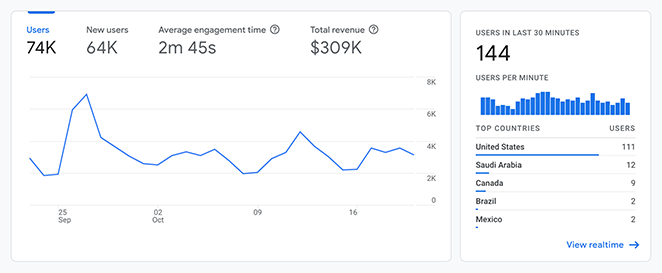
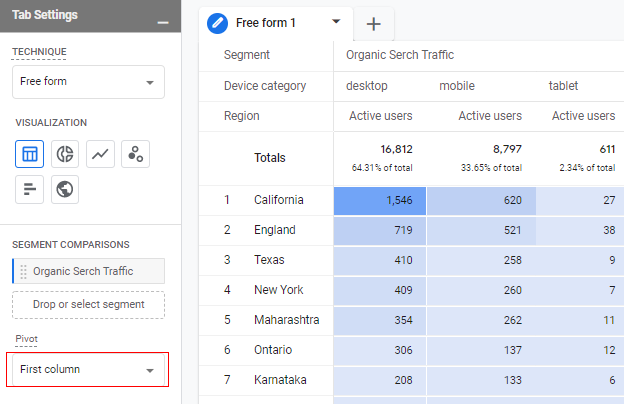
D'après mon expérience, les tableaux de bord fournissent une mine d'informations, bien qu'ils puissent sembler intimidants au premier abord. J'aime particulièrement la fonction Explorer car elle vous permet de filtrer les données par segments et métriques spécifiques pour trouver exactement ce dont vous avez besoin.
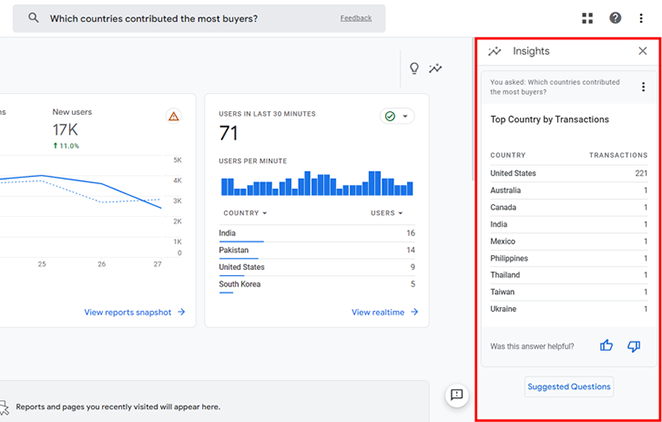
Un autre outil utile pour les débutants est Analytics Intelligence, qui vous permet de poser des questions pour obtenir des réponses rapides sur vos données.
Si vous êtes prêt à commencer, consultez ce guide sur comment ajouter Google Analytics à WordPress.
Avantages
- Entièrement gratuit pour une utilisation standard
- Suit l'activité des utilisateurs en temps réel
- Offre une personnalisation approfondie avec les rapports Explore
- S'intègre facilement à d'autres outils Google
Inconvénients
- Courbe d'apprentissage abrupte pour les débutants
- L'interface peut sembler encombrée et complexe
- Manque de support personnalisé
Mon Verdict : Google Analytics offre les données les plus détaillées du marché, mais je le recommande principalement aux utilisateurs qui ont le temps d'apprendre l'interface complexe de GA4.
2. MonsterInsights
| Tarifs : À partir de 99,50 $/an |
| Plan Gratuit / Essai : Plugin gratuit disponible |
| Fonctionnalités remarquables : |
| 🔹 Analyses du tableau de bord 🔹 Suivi du commerce électronique 🔹 Notes de site |
| Note : A+ |
| Idéal pour : Utilisateurs de WordPress |
MonsterInsights est l'un des meilleurs outils d'analyse Web pour WordPress car il affiche les données de Google Analytics directement dans votre tableau de bord. Il simplifie les données complexes afin que vous puissiez voir exactement comment les gens trouvent et utilisent votre site Web.
Pour l'utiliser, connectez simplement le plugin à votre compte Google en quelques clics pour commencer à suivre les statistiques en temps réel, les clics sur les boutons et les soumissions de formulaires. Il gère la configuration technique automatiquement, vous n'avez donc pas besoin de modifier de code.
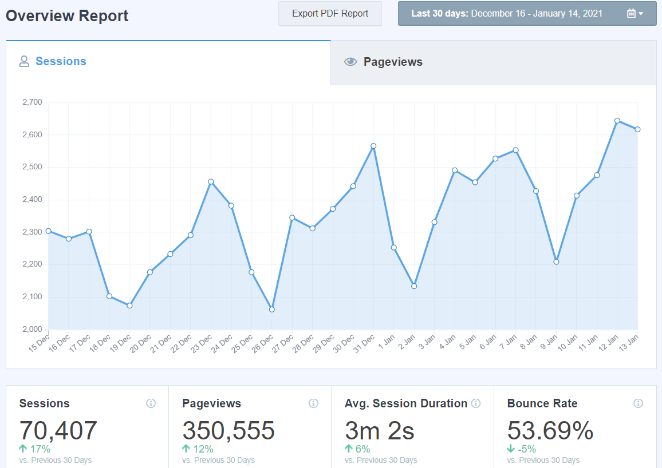
Lors de mes tests, le plus grand avantage a été la possibilité de visualiser des données cruciales sans quitter WordPress ni jongler avec plusieurs onglets de navigateur. Les rapports sont beaucoup plus faciles à lire que l'interface native de Google, ce qui le rend moins intimidant pour les débutants.
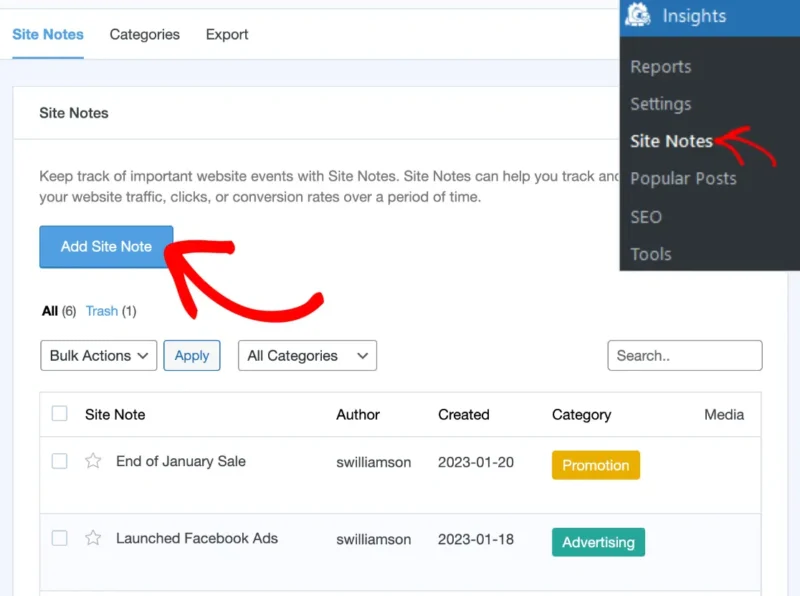
J'aime aussi beaucoup la fonctionnalité Site Notes, qui vous permet de laisser une note lorsque vous modifiez la conception de votre site.
Vous pouvez lire notre avis complet sur MonsterInsights pour voir comment cela vous aide à suivre les taux de conversion au fil du temps.
Avantages
- Configuration facile sans codage requis
- Voir les analyses dans le tableau de bord WordPress
- Suivi avancé pour le commerce électronique et les formulaires
- Les notes de site aident à suivre les changements de résultats
Inconvénients
- Les plans premium peuvent être chers
- La version gratuite a des types de rapports limités
Mon Verdict : MonsterInsights est le meilleur choix pour les utilisateurs de WordPress qui souhaitent des analyses puissantes et faciles à lire sans la complexité de GA4.
3. Google Search Console
| Tarifs : Gratuit |
| Plan gratuit / Essai : Oui |
| Fonctionnalités remarquables : |
| 🔹 Suivi des performances de recherche 🔹 Rapports d'erreurs d'indexation 🔹 Alertes de sécurité |
| Note : A |
| Idéal pour : Gestion du SEO |
Pour vous aider à comprendre Google Search Console, considérez-le comme un bilan de santé pour votre site Web. C'est un service gratuit de Google qui aide à surveiller, maintenir et dépanner la présence de votre site dans les résultats de recherche Google.
Avec cet outil d'analyse Web, vous pouvez voir quels sujets et mots-clés les visiteurs du site Web utilisent pour trouver votre site. Il vous aide également à voir quelles pages sont les plus et les moins populaires afin que vous puissiez les mettre à jour pour qu'elles soient plus performantes.
D'après mon expérience, je trouve que Google Search Console est utile pour identifier les problèmes d'exploration ou d'indexation que les robots de Google peuvent rencontrer sur mon site. Elle fournit également des avertissements critiques sur le piratage ou les logiciels malveillants, ce qui maintient mon site en bonne santé.
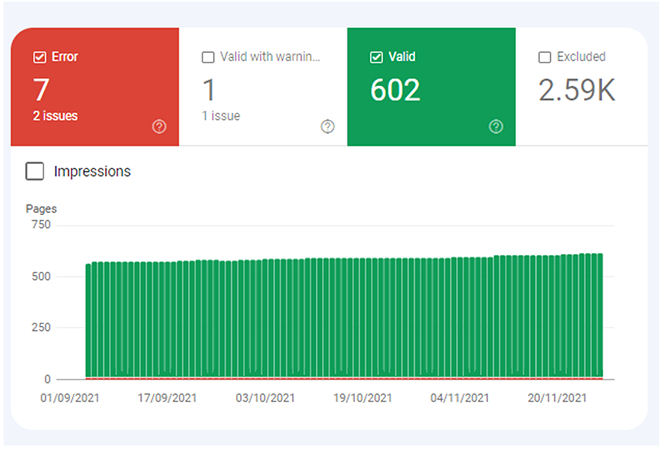
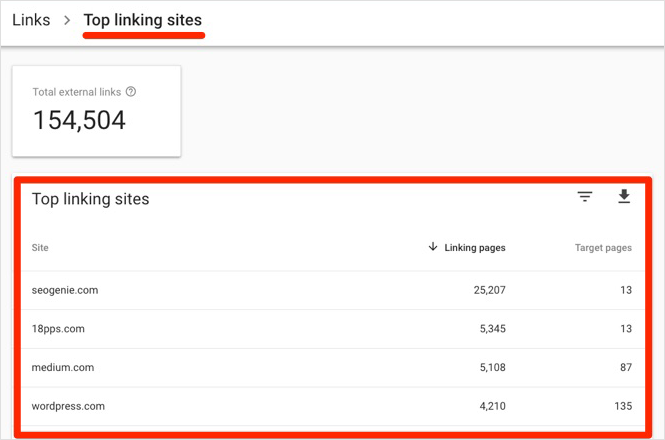
Une fonctionnalité que j'apprécie particulièrement est la possibilité de voir les backlinks vers mon site. Les surveiller est utile pour le SEO et le trafic de recherche organique.
Avantages
- Entièrement gratuit
- Fournit des données officielles de Google
- Vous alerte sur les erreurs critiques du site
- Suit les données des backlinks
Inconvénients
- Les données ne sont pas en temps réel (généralement retardées)
- Rétention limitée des données historiques
Mon Verdict : Google Search Console est un outil indispensable pour quiconque souhaite se classer dans les moteurs de recherche, offrant des données essentielles sur la santé du site sans aucun coût.
4. Tout-en-un SEO
| Prix : À partir de 49,50 $/an |
| Plan Gratuit / Essai : Plugin gratuit disponible |
| Fonctionnalités remarquables : |
| 🔹 Statistiques de recherche 🔹 Score TruSEO 🔹 Générateur de titres IA |
| Note : A+ |
| Idéal pour : l'optimisation SEO |
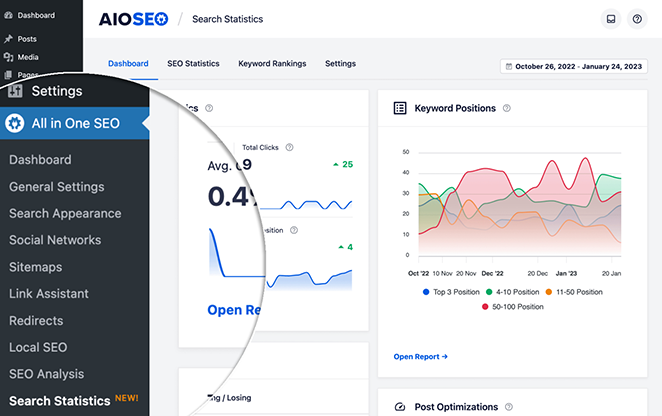
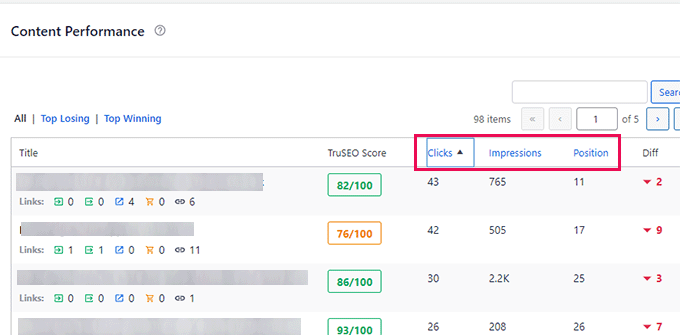
All in One SEO (AIOSEO) est le meilleur plugin d'optimisation pour les moteurs de recherche pour vous aider à mieux vous classer dans les résultats de recherche. Bien qu'il ne s'agisse pas d'un outil d'analyse autonome, il s'intègre directement à Google Search Console pour suivre vos classements de mots-clés dans WordPress.
Le plugin fonctionne en analysant votre contenu et en vous donnant une liste de contrôle claire pour améliorer votre score d'optimisation. Vous pouvez également consulter les statistiques de recherche pour voir quelles pages fonctionnent bien et identifier les opportunités de croissance.
J'utilise AIOSEO quotidiennement pour optimiser le contenu pour SeedProd car il comble le fossé entre l'analyse et l'action. Il est incroyablement convivial pour les débutants et me permet de gérer des paramètres techniques tels que les sitemaps et les balises méta sans avoir besoin d'un développeur.
Ma fonctionnalité préférée est le générateur de titres IA, qui fonctionne en utilisant ChatGPT pour me suggérer des titres.
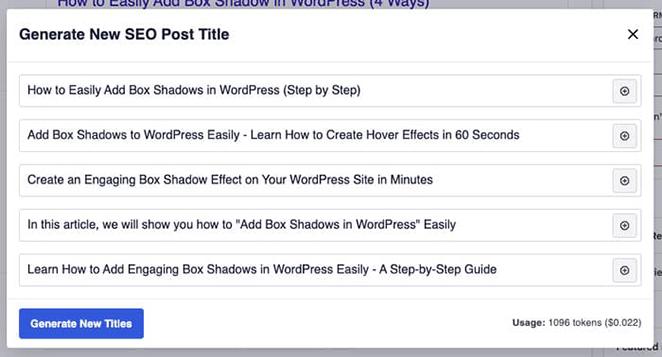
Cela me fait gagner beaucoup de temps pendant le processus d'édition, et vous pouvez en voir plus en détail dans ma critique complète d'All in One SEO.
Avantages
- S'intègre directement à Google Search Console
- Fournit des listes de contrôle SEO exploitables
- Les outils IA accélèrent la création de contenu
- Configuration facile pour les sitemaps et le schéma
Inconvénients
- Le suivi avancé nécessite un plan payant
- Ne remplace pas un logiciel d'analyse complet
Mon Verdict : All in One SEO est le meilleur outil pour connecter les données d'analyse à des tâches SEO exploitables, ce qui le rend essentiel pour augmenter le trafic du site Web.
5. Crazy Egg
| Tarifs : À partir de 24 $/mois |
| Plan gratuit / Essai : Essai gratuit de 30 jours |
| Fonctionnalités remarquables : |
| 🔹 Cartes thermiques 🔹 Cartes de défilement 🔹 Enregistrements de session |
| Note : B+ |
| Idéal pour : les spécialistes du marketing et les concepteurs UX |
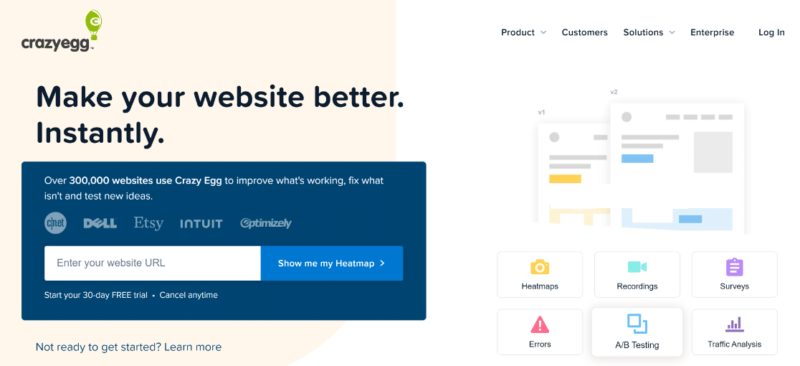
Crazy Egg est un outil d'analyse comportementale qui vous aide à comprendre exactement comment les visiteurs interagissent avec votre site Web. Contrairement aux analyses standard, il utilise des données visuelles pour vous montrer où les utilisateurs regardent, cliquent et se bloquent.
Il fonctionne en enregistrant les sessions des utilisateurs et en générant des cartes thermiques qui mettent en évidence les zones les plus populaires de vos pages. Cela vous permet de repérer où les utilisateurs s'attardent généralement et d'identifier les distractions qui pourraient nuire à vos conversions.
D'après mon expérience, les heatmaps m'ont aidé à identifier des angles morts majeurs dans la disposition de mon contenu. J'ai pu voir clairement les points chauds où les utilisateurs concentraient leur attention et j'ai réalisé que certains de mes boutons importants étaient ignorés.

J'ai également utilisé les cartes de défilement pour optimiser le placement de mon contenu. En voyant exactement jusqu'où les gens faisaient défiler, j'ai pu déplacer mes appels à l'action les plus critiques plus haut sur la page pour m'assurer qu'ils soient vus.
Avantages
- Visualise clairement le comportement des utilisateurs
- Facile à configurer et à utiliser
- Propose des fonctionnalités de test A/B
- Cartes de défilement et de clics détaillées
Inconvénients
- Aucun plan gratuit permanent disponible
- Peut légèrement impacter la vitesse du site
Mon Verdict : Crazy Egg est un excellent choix pour les apprenants visuels qui souhaitent optimiser la disposition de leur page, bien qu'un budget soit nécessaire après la fin de l'essai.
6. Matomo
| Tarifs : Gratuit (Auto-hébergé) / À partir de 23 $/mois |
| Plan Gratuit / Essai : Oui (Version auto-hébergée) |
| Fonctionnalités remarquables : |
| 🔹 Propriété à 100 % des données 🔹 Heatmaps et tests A/B 🔹 Aucun échantillonnage de données |
| Note : A |
| Idéal pour : Les entreprises soucieuses de la confidentialité |
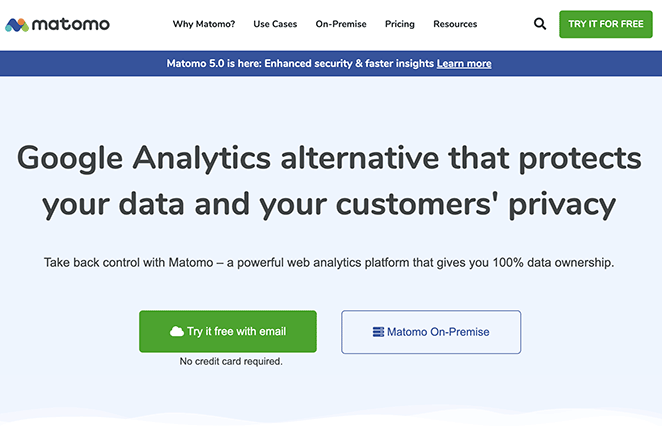
Matomo, anciennement Piwik, est une plateforme d'analyse web open-source qui privilégie la confidentialité des données. Il agit comme une alternative puissante à Google Analytics en vous permettant d'héberger et de posséder toutes vos données utilisateur.
La plateforme vous permet de suivre les transactions eCommerce, les mots-clés de recherche et les performances des pages individuelles, tout comme les autres outils majeurs. Elle est également équipée de fonctionnalités avancées telles que les heatmaps et les capacités de test A/B.
Dans mon utilisation personnelle, ce qui a distingué Matomo, c'est son interface conviviale. Il fournit une richesse de données sans paraître encombré, ce qui facilite la recherche des métriques spécifiques dont j'ai besoin.
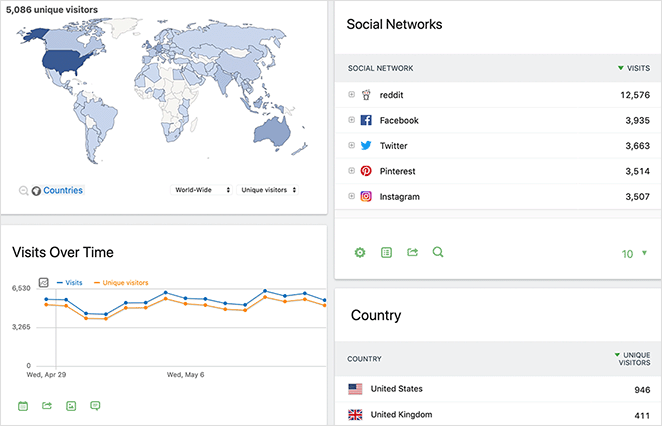
J'ai également apprécié la tranquillité d'esprit concernant la confidentialité. Savoir que mes données utilisateur essentielles n'étaient pas partagées avec des serveurs tiers m'a fait me sentir beaucoup plus en sécurité en matière de conformité.
Avantages
- Vous possédez 100 % de vos données
- Inclut des heatmaps et des enregistrements de session
- Logiciel open-source
- Conforme au RGPD et au CCPA
Inconvénients
- L'auto-hébergement nécessite des compétences techniques
- La version cloud coûte de l'argent
Mon Verdict : Matomo est le meilleur choix pour les entreprises qui ont besoin d'un contrôle total sur la confidentialité de leurs données et qui souhaitent une alternative open-source à Google.
7. Mixpanel
| Tarifs : Gratuit / À partir de 20 $/mois |
| Plan gratuit / Essai : Oui |
| Fonctionnalités remarquables : |
| 🔹 Analyses de produits 🔹 Suivi du parcours utilisateur 🔹 Analyse des entonnoirs |
| Note : B+ |
| Idéal pour : eCommerce et SaaS |
Mixpanel est un outil d'analyse web spécialement conçu pour les sites web eCommerce et les produits SaaS. Son tableau de bord d'analyse vous aide à comprendre l'utilisation du produit, les performances marketing et les données de revenus pour prendre de meilleures décisions commerciales.
Il fonctionne en suivant des événements et des interactions spécifiques plutôt que de simples vues de page. Vous pouvez visualiser les parcours utilisateurs et analyser les entonnoirs pour voir où les clients abandonnent et ce qui génère des conversions.
Lors de mes tests, j'ai trouvé Mixpanel utile pour approfondir l'analyse des produits. J'ai pu facilement découvrir quelles étaient les fonctionnalités de mon site les plus populaires et identifier qui étaient mes utilisateurs les plus actifs.
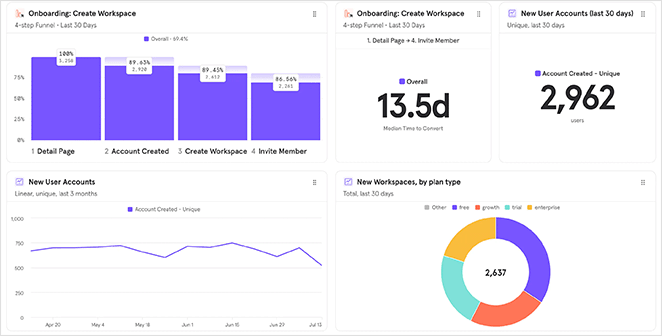
J'ai également pu suivre des parcours utilisateurs complexes et analyser mes entonnoirs de vente. Ces données sont essentielles pour générer des conversions, bien que cela nécessite un peu plus de configuration qu'un plugin standard.
Avantages
- Analyse avancée des entonnoirs
- Plan gratuit généreux pour les startups
- Suit les comportements spécifiques des utilisateurs
- Idéal pour l'optimisation des produits
Inconvénients
- Courbe d'apprentissage plus raide que les simples compteurs
- L'historique est limité sur le plan gratuit
Mon Verdict : Mixpanel est un choix puissant pour les entreprises qui ont besoin de suivre les étapes précises des utilisateurs et les chemins de conversion, en particulier pour les boutiques d'e-commerce.
8. Hotjar

| Tarifs : Gratuit / À partir de 32 €/mois |
| Plan gratuit / Essai : Oui |
| Fonctionnalités remarquables : |
| 🔹 Heatmaps 🔹 Replays de sessions 🔹 Sondages de feedback |
| Note : B+ |
| Idéal pour : Experts UX et CRO |
Hotjar est un outil d'analyse comportementale visuelle qui vous permet d'observer exactement comment les visiteurs interagissent avec votre site web. Il va au-delà des simples chiffres en offrant des heatmaps et des replays en temps réel des sessions utilisateurs.
Vous pouvez voir où les utilisateurs cliquent, jusqu'où ils font défiler et où ils bloquent. Il comprend également des outils de feedback tels que des enquêtes et des sondages pour demander directement aux visiteurs ce qu'ils pensent.
Mon expérience personnelle avec Hotjar a été globalement positive, à commencer par son interface conviviale. J'ai trouvé facile de créer des heatmaps immédiatement et de plonger directement dans le parcours visiteur.
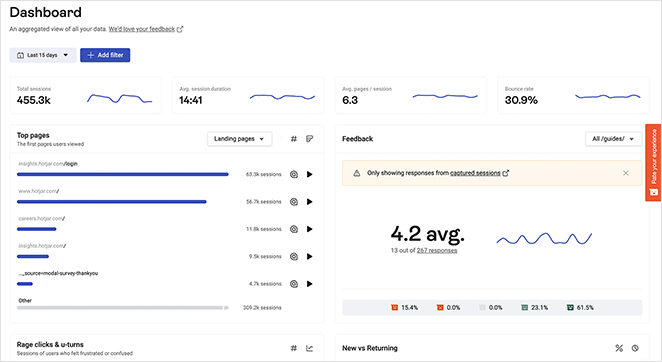
La possibilité de regarder des replays de sessions m'a donné de bons aperçus des goulots d'étranglement et des points de friction que je n'avais pas remarqués auparavant. Cependant, j'ai trouvé qu'il y avait une légère courbe d'apprentissage pour bien comprendre toutes les données.
Avantages
- Visualise clairement le comportement des utilisateurs
- Inclut des enquêtes et des sondages sur site
- Plan de base gratuit disponible
- Facile de repérer les problèmes de conception
Inconvénients
- Les plans payants peuvent être coûteux
- Peut légèrement ralentir la vitesse du site
Mon Verdict : Hotjar est un excellent outil pour visualiser les problèmes d'expérience utilisateur, à condition d'avoir le budget pour les fonctionnalités premium.
9. HubSpot
| Tarifs : Gratuit / À partir de 50 $/mois |
| Plan gratuit / Essai : Oui |
| Fonctionnalités remarquables : |
| 🔹 CRM intégré 🔹 Automatisation du marketing 🔹 Analyse du trafic |
| Note : A |
| Idéal pour : Entreprises en croissance |
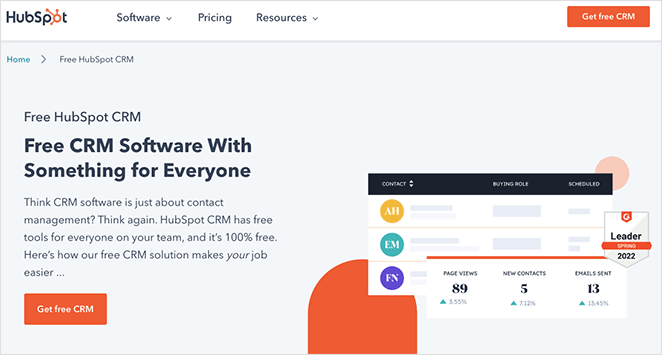
HubSpot est une suite complète d'outils marketing, de vente et de service qui comprend une analyse web intégrée. Il est idéal pour surveiller le trafic et comprendre comment les visiteurs interagissent avec l'ensemble de votre écosystème numérique.
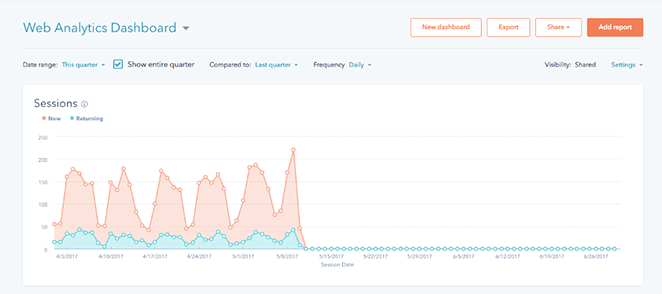
La plateforme vous fournit des rapports détaillés sur les performances des pages et le comportement des visiteurs pour vous aider à optimiser votre contenu. Elle connecte ces données à votre CRM afin que vous puissiez voir le parcours complet du visiteur au client.
En utilisant HubSpot, j'ai appris à apprécier son interface conviviale et ses analyses claires. Il est facile de former des stratégies marketing basées sur des données réelles plutôt que de deviner ce qui fonctionne.
La plateforme s'intègre également de manière transparente avec les fournisseurs de marketing par e-mail et d'autres outils. Cela en fait un choix solide et complet pour toute entreprise cherchant à centraliser ses opérations.
Avantages
- Combine l'analyse avec les données CRM
- Interface conviviale
- Excellents outils gratuits pour les startups
- Intégrations marketing transparentes
Inconvénients
- Les plans premium deviennent rapidement chers
- Peut être écrasant pour des besoins simples
Mon Verdict : HubSpot est la meilleure solution tout-en-un pour les entreprises qui souhaitent connecter leurs analyses Web directement à leurs données de vente et de marketing.
10. SEMRush
| Tarifs : À partir de 129,95 $/mois |
| Plan Gratuit / Essai : Compte gratuit limité |
| Fonctionnalités remarquables : |
| 🔹 Analyse des concurrents 🔹 Recherche de mots-clés 🔹 Audits de site |
| Note : A+ |
| Idéal pour : Les professionnels du SEO |
SEMRush est un puissant outil d'optimisation pour les moteurs de recherche (SEO) qui vous aide à auditer votre site et à analyser les backlinks. Il fournit des informations précieuses pour vous aider à comprendre les performances de votre site dans les résultats de recherche.
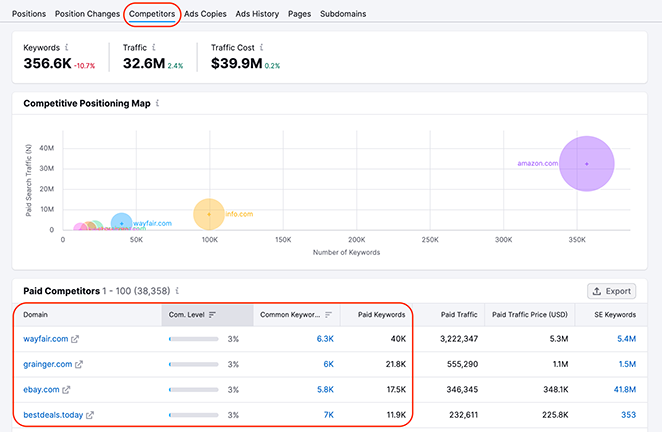
Sa caractéristique distinctive est l'outil d'analyse de domaine et de concurrents. Vous pouvez estimer le trafic de n'importe quel site Web pour voir qui le visite et quel contenu il trouve intéressant.
D'après mon expérience, l'outil de recherche de mots-clés est un favori incontesté. Il me donne une analyse détaillée des mots-clés à utiliser sur mon site, y compris le volume de recherche mensuel moyen et les données d'intention de recherche.
J'utilise également régulièrement la fonction d'analyse de la concurrence. Elle m'aide à comprendre exactement où se situe mon contenu par rapport aux sites concurrents afin que je puisse améliorer mon classement.
Avantages
- Données complètes sur les mots-clés
- Analyse détaillée des concurrents
- Audite la santé du site
- Suit les backlinks
Inconvénients
- Coût mensuel élevé
- Courbe d'apprentissage abrupte
Mon Verdict : SEMRush est un outil indispensable pour analyser vos concurrents, même si le prix est élevé.
Outil Bonus : OnePageGA
| Tarifs : À partir de 10 $/mois |
| Plan gratuit / Essai : Essai gratuit de 14 jours |
| Fonctionnalités remarquables : |
| 🔹 Tableau de bord d'une page 🔹 Accent sur les métriques clés 🔹 Indépendant de la plateforme |
| Note : A |
| Idéal pour : Les débutants et les utilisateurs non techniques |
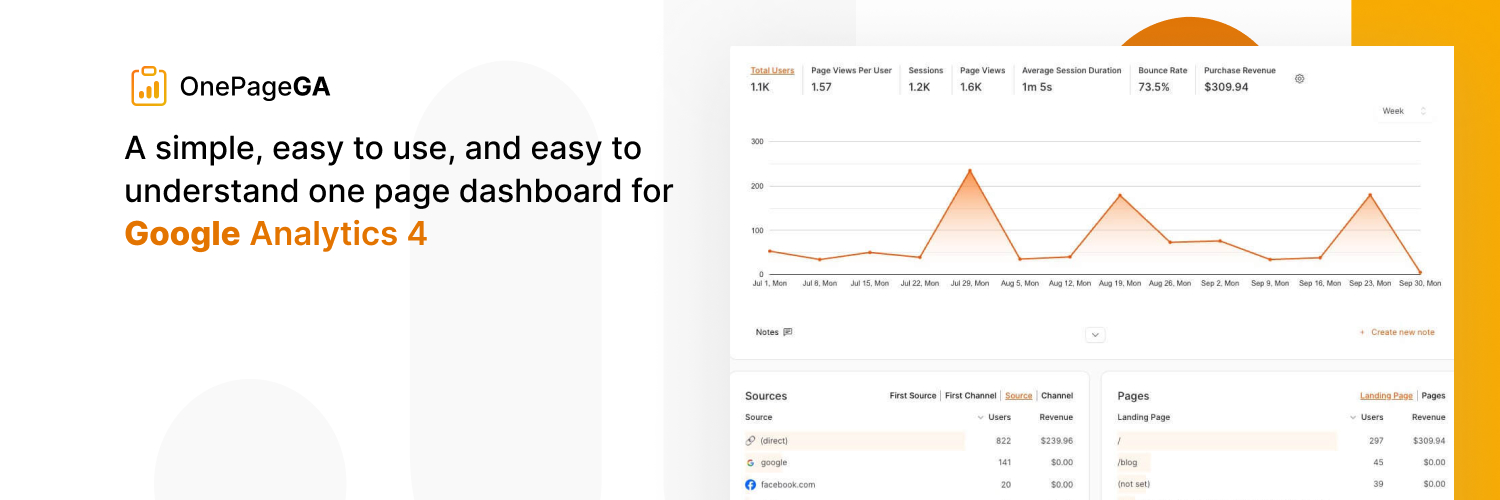
OnePageGA est un outil d'analyse Web simple conçu pour rendre les données de Google Analytics 4 (GA4) faciles à lire. Il fournit un tableau de bord propre, d'une seule page, qui met en évidence vos métriques de performance de site Web les plus importantes en un coup d'œil.
Vous connectez simplement votre compte Google, et il visualise instantanément vos données sans menus complexes ni configuration technique. Contrairement à certains plugins, il est indépendant de la plateforme, ce qui signifie qu'il fonctionne avec n'importe quelle pile de site Web, pas seulement WordPress.
D'après mon expérience, cet outil résout le problème de la complexité de GA4 pour des vérifications quotidiennes rapides. J'ai trouvé incroyablement utile de voir mon trafic, mes pages principales et mes sources d'utilisateurs immédiatement sans avoir à parcourir des couches de rapports natifs.
Il filtre efficacement le bruit de l'interface Google standard. Cela me permet de me concentrer uniquement sur les statistiques qui stimulent réellement la croissance, me faisant gagner du temps chaque fois que j'ai besoin d'un contrôle rapide de la santé de mon site.
Avantages
- Interface simple et épurée
- Aucune configuration complexe requise
- Fonctionne avec n'importe quelle plateforme de site Web
- Filtre les données confuses
Inconvénients
- Pas de plan gratuit permanent
- Moins granulaire que le GA4 complet
Mon Verdict : OnePageGA est le meilleur choix pour les utilisateurs qui souhaitent surveiller la santé de leur site sans se perdre dans la complexité de GA4.
Quel est le meilleur outil d'analyse Web ?
Après avoir exploré, comparé et testé les outils de cette liste, notre meilleur choix est une combinaison de Google Analytics et MonsterInsights.
Bien que Google Analytics soit riche en fonctionnalités, sa complexité peut sembler écrasante, surtout si vos compétences techniques ne sont pas élevées. C'est là qu'intervient MonsterInsights.
MonsterInsights est un excellent compagnon pour les sites Web WordPress, simplifiant les données de Google Analytics en les présentant dans un format clair et facile à comprendre.
D'après notre expérience, cela offre le meilleur des deux mondes : le suivi métrique complet de Google Analytics et la facilité d'utilisation de MonsterInsights. Ensemble, ils créent le meilleur outil d'analyse Web, indispensable pour tout site d'entreprise.
FAQ sur les meilleurs outils d'analyse Web
Si vous n'utilisez pas WordPress, OnePageGA est une excellente alternative car il transforme GA4 en un simple tableau de bord d'une page.
Vous pouvez toujours utiliser Google Analytics pour des rapports plus approfondis plus tard, mais un tableau de bord plus simple vous aide à obtenir de la valeur plus rapidement.
Si vous souhaitez que les données soient moins écrasantes, je vous recommande de l'associer à MonsterInsights pour WordPress, ou à OnePageGA si vous souhaitez un tableau de bord quotidien clair sans avoir à fouiller dans GA4.
Si le SEO est un canal de croissance important pour vous, Google Search Console fait également partie de votre boîte à outils car il montre comment les gens vous trouvent dans les recherches.
MonsterInsights est également très facile à lire pour les utilisateurs de WordPress car il transforme les rapports GA4 en écrans clairs et familiers de style WordPress.
Si vous souhaitez des informations visuelles sur le comportement, des outils comme Crazy Egg ou Hotjar peuvent vous aider, mais ils fonctionnent mieux en complément d'un outil d'analyse principal.
Si vous souhaitez une option axée sur la confidentialité avec plus de contrôle, Matomo est souvent utilisé pour la propriété des données et les configurations axées sur la conformité.
Si vous utilisez Google Analytics, vous devriez examiner votre configuration de consentement aux cookies, vos options d'anonymisation et vos paramètres de conservation des données afin de ne collecter que ce dont vous avez réellement besoin.
Ensuite, plus de conseils d'analyse
J'espère que notre tour d'horizon des meilleurs outils d'analyse Web vous a été utile. Pour plus d'aide sur l'analyse des données et des performances de votre site Web, veuillez consulter les guides suivants :
- Comment suivre l'activité des utilisateurs WordPress avec Google Analytics
- Comment configurer le suivi des liens dans WordPress (la méthode facile)
- Comment configurer le suivi des conversions WooCommerce pour votre boutique
Merci de votre lecture ! Nous serions ravis d'entendre vos réflexions, alors n'hésitez pas à rejoindre la conversation sur YouTube, X et Facebook pour plus de conseils et de contenu utiles pour développer votre entreprise.



