

Most signup forms don’t convert. You add one to the sidebar or below a post, and months later it still shows zero subscribers.
The problem isn’t your site. It’s that visitors need a specific reason to hand over their email address, and a plain “subscribe” box doesn’t give them one. Growing your email list means pairing the right placement with an offer worth signing up for.
Email marketing delivers about $36 in return for every $1 spent, so it’s worth getting right. I’ve tested these strategies across WordPress sites of all sizes. Here are 31 that consistently work.
Website Optimization Tactics
Website optimization is the highest-leverage starting point for email list growth because every visitor who arrives on your site is already warm. The tips below turn pages you already have into signup opportunities.
1. Use a Coming Soon Page Before Launch
Suppose you want to collect email addresses in WordPress and don’t want to wait until your site launches. The solution is to start working on it the day you buy your domain name.
Not sure how to do it?
Just add a beautiful coming soon page to your website. With a coming soon page, you can get a head start building a WordPress mailing list even when your site is still under construction. Then, you can use it to build a buzz and create excitement about your upcoming site.

Creating a coming soon page can help you rank your new website in Google before launching. This can help boost your site’s SEO from day 1.
Add a welcome page to give your visitors a sneak peek. Then, add an option to subscribe to your newsletter for notifications. You can then send emails to users in the run-up to launch day.
If you don’t know how to create an email newsletter to collect email addresses, here’s a guide to help.
2. Use Landing Pages to Collect Email Addresses
Landing pages convert visitors into subscribers because they focus on a single action with no competing navigation or links.
While homepages have lots of information, landing pages direct traffic to a specific action. For instance, buying a product or using a sign-up form to join your email list.
A powerful landing page helps boost your online marketing campaigns and list growth. Yet, many site owners find it challenging to create high-converting landing pages without a developer.
We recommend using a landing page builder like SeedProd to make the process much easier like this waitlist landing page.
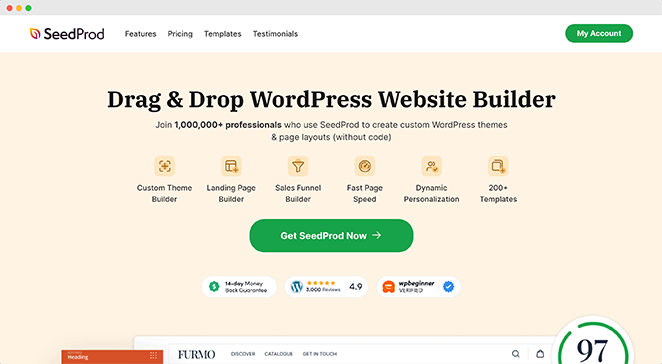
SeedProd is the best WordPress landing page plugin with coming soon and maintenance mode functionality. With its drag-and-drop visual builder, you can create any type of landing page with no coding required.
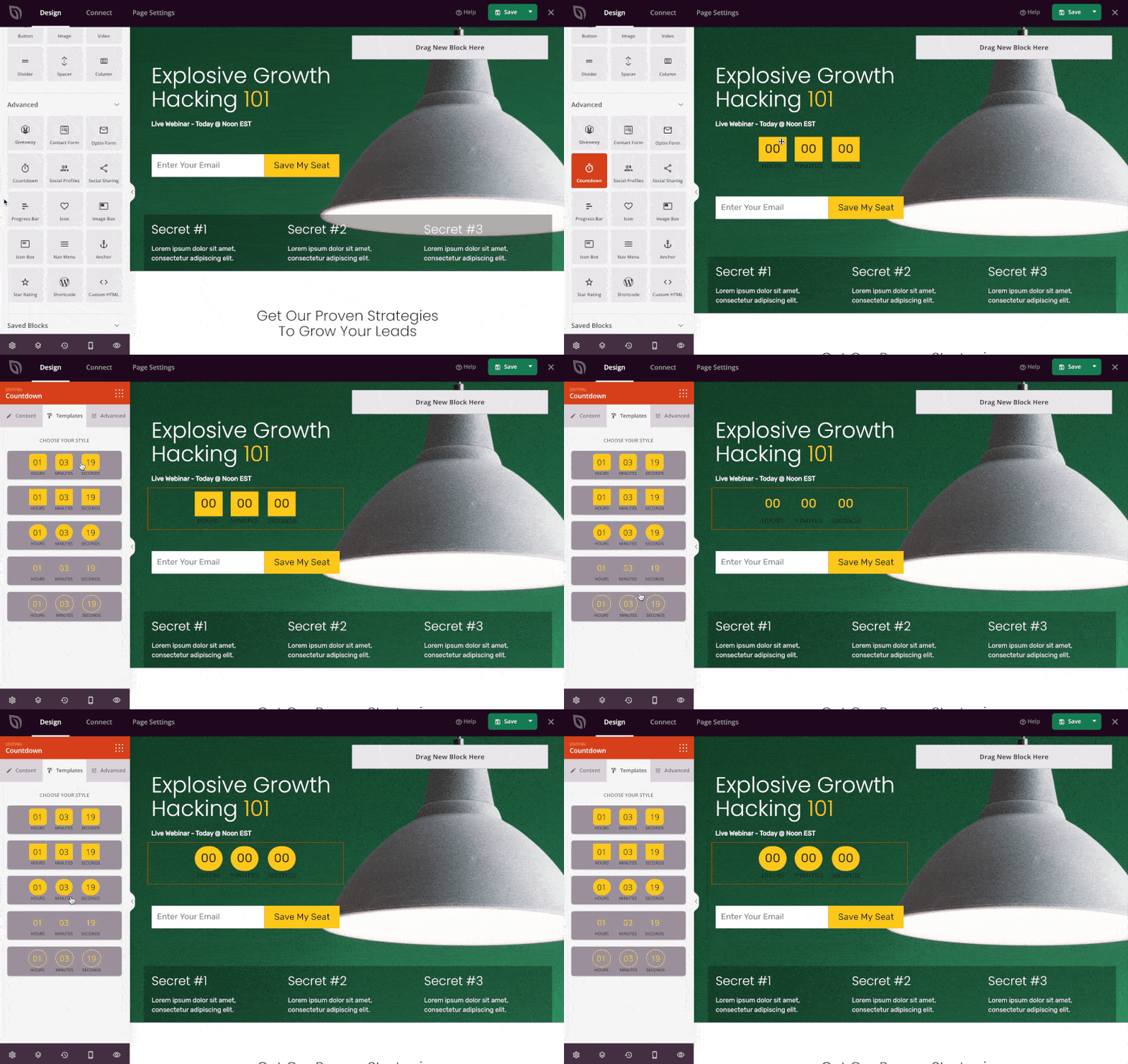
It comes with a growing library of landing page templates to help you get started quickly. You can also work on your site privately by activating the built-in coming soon and maintenance mode pages with a single click.
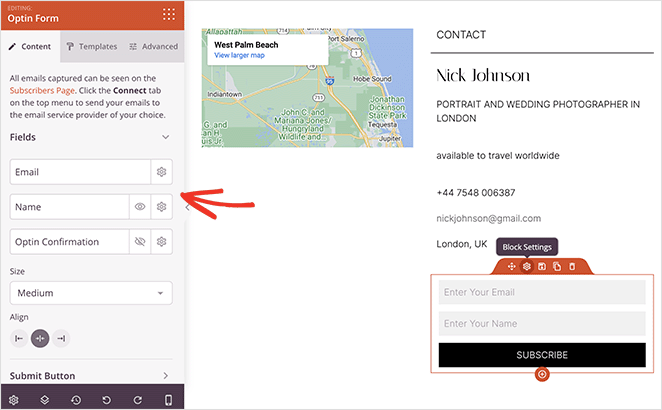
To collect email addresses on WordPress using SeedProd, add the opt-in form block from the block menu. Add the Email field to your form and customize it as needed.
You can also grow your email list with:
- Registration forms to encourage people to sign up for a webinar
- Contact form using the powerful free WPForms form builder
- Giveaways for lead generation using RafflePress
- And more.
Plus, it integrates with popular email marketing services like Mailchimp, Constant Contact, GetResponse, AWeber, etc., to manage and grow your list faster than ever.
Don’t have an email marketing service? SeedProd’s subscriber dashboard allows you to see your email list subscribers right inside WordPress.
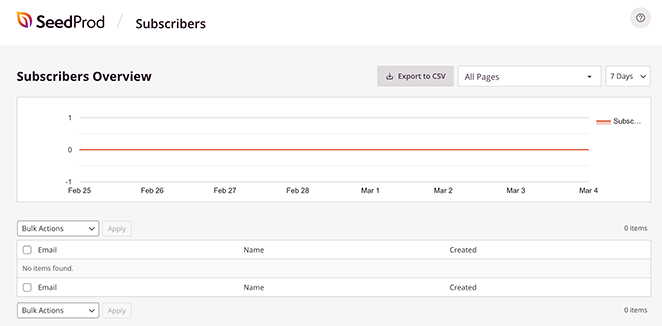
Even better, SeedProd is a bloat-free WordPress plugin. It won’t slow down your website, making it easier to offer an excellent user experience.
The highest-converting email capture landing pages share three traits: a single CTA, no navigation menu (nothing to click away to), and social proof near the signup form. If your current landing page has multiple calls to action, try stripping it down to one.
3. Create a Powerful Lead Capturing Form for Your Site
Visitors who aren’t ready to buy will often trade their email address for something useful. A well-placed lead capture form gives them that option without any friction.
A lead generation or opt-in form helps collect essential data from visitors, such as their email addresses and phone numbers. Here’s an example from the Daily Harvest site:
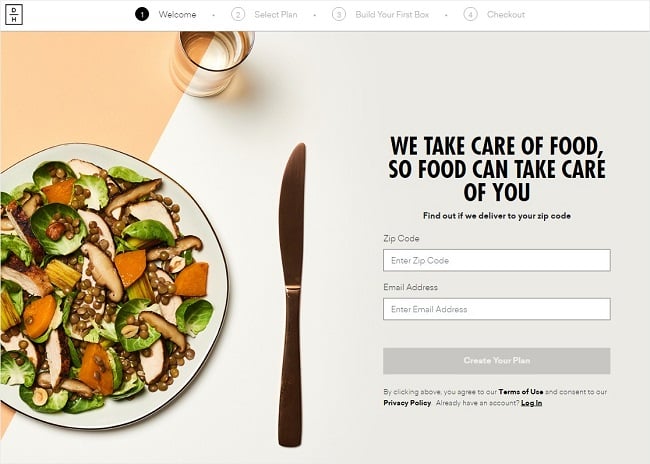
You can also use a CTA on these forms to direct visitors to a landing page that requires their email address.
Plugins like WPForms can make creating forms super easy. You can add forms to posts or pages in WordPress or a widget in your website sidebar.
4. Improve Your Lead Generation Form Design
Not all lead generation forms convert. But a few small changes can make a significant difference. By following a few simple rules, you can make your email optin forms convert much more easily to grow your list.
Here are a few tips you can follow:
- Keep your forms short
- Use eye-catching colors and images
- Create a multi-step form if your form is too long
- Use compelling calls-to-action
- Create distraction-free landing pages
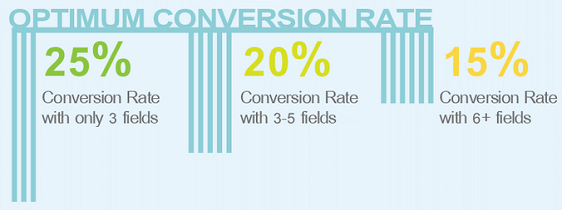
Check out these lead generation form examples for even more lead-capturing ideas and more users subscribing. That said, remember to keep your visitors engaged and your forms short.
5. Be Smart With Your CTA Text
A good CTA text has the power to persuade people to want to click. Words like “Submit” or “Register” consistently underperform on CTA buttons.
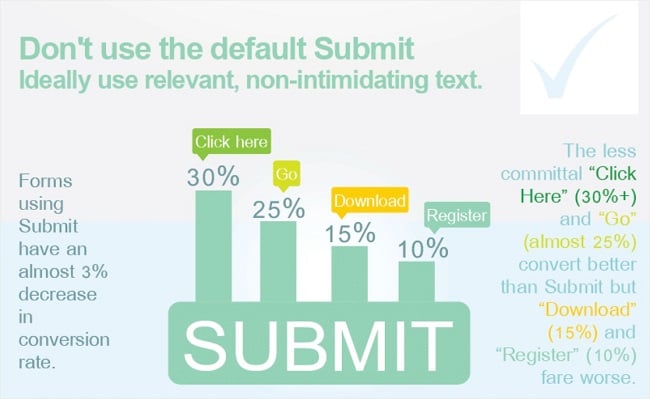
To avoid that, you can use your creativity to develop better alternatives. Here are some examples to help you collect even more email addresses:
- Let’s go
- Click here
- Let’s begin
- Show me
- Prove it
After, make sure you A/B test your CTA to learn which works best.
6. Add Exit-Intent Popups
Exit popups trace visitors’s activity based on their cursor movements. As soon as they detect a user’s intention to exit your site, they display a popup with a message.
You can use popups with signup forms to ask visitors to sign up for your newsletter and grow your WordPress mailing list.
You can have a double benefit by adding exit popups to your website. It can help you:
- Reduce your bounce rate
- Reach your conversion goals
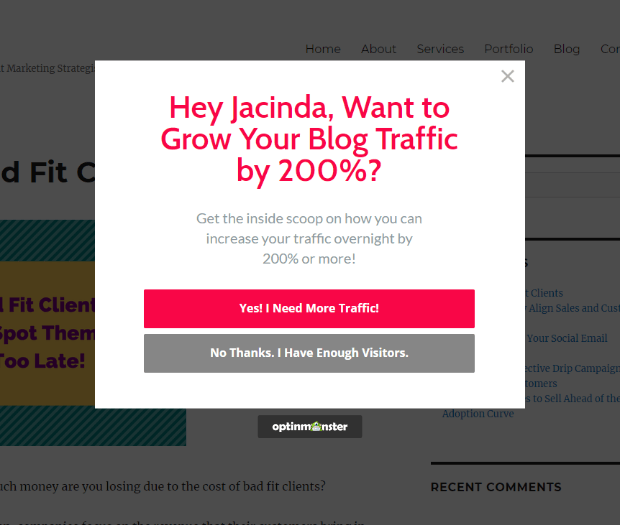
Exit popups can draw all the attention of your visitors just when they are about to leave. According to OptinMonster, using these popups on your site can make 53% of your customers take action before they go.
Pro Tip: Many Exit popups use a stunning lightbox effect to remove page distractions. Learn all about the best WordPress lightbox plugins here.
Content & Offer Strategies
Lead magnets and content offers are the single biggest driver of email list growth for content sites. Visitors who arrive for a free resource convert to subscribers at about 2 to 5 times the rate of visitors who see a generic “subscribe” prompt.
7. Create High-Quality Email Content
You should send quality emails to your WordPress mailing list if you want to increase open rates and keep people subscribed.
If your emails are particularly entertaining, users may even forward your email content to their friends and contacts. Otherwise, they can just as easily unsubscribe, and you may never hear from them again.
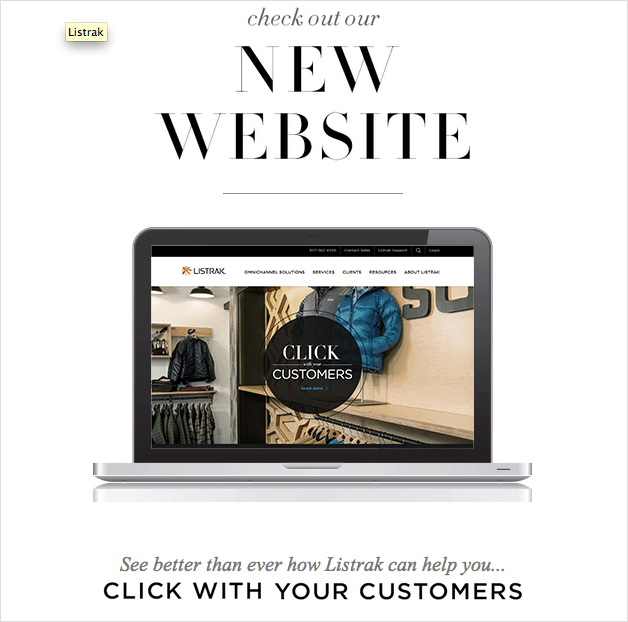
Creating great content for your email starts with writing high-converting email copy. Your readers are more likely to convert to new customers and spread the word with their wider network.
8. Use Lead Magnets to Collect Email Addresses in WordPress
A lead magnet is an incentive offered to potential buyers for their email addresses or contact information. Your lead magnet is generally a piece of content in the form of a digital download.
Not all lead magnets work equally well. Checklists and templates consistently outperform longer PDFs and ebooks because they’re faster to consume and immediately actionable. Quizzes have become one of the fastest-growing formats, with some creators adding 100,000+ subscribers by making the quiz result the gated item.
The format that works best depends on your audience’s problem. If they need to remember steps, a checklist wins. If they need a framework, a template wins. Match the format to the problem before you worry about design.
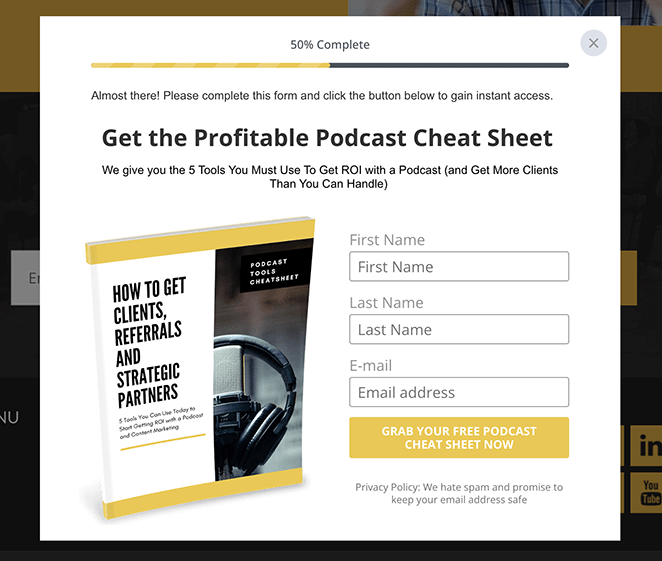
To deliver your lead magnet, you can create a dedicated download page with SeedProd and gate it behind a WPForms opt-in. OptinMonster also handles display rules so the lead magnet offer appears at the right moment for each visitor.
OptinMonster is the most powerful lead generation software and marketing tool on the market. It offers tons of fantastic ways to collect email addresses on your website and a variety of customizable campaigns to make capturing leads super easy.
You can create:
- Slide-ins
- Lightbox popups
- Exit popups
- Floating bars
- Welcome mats
- And much more.
With smart targeting rules, you can target the right website visitors at the right time. You can even start a/b testing campaigns to see which variations work the best.
Plus, you can integrate this tool with many email automation and autoresponder service providers, such as Campaign Monitor and Drip.
Here are some lead magnet examples to get you started.
9. Collect Email Addresses with Content Upgrades
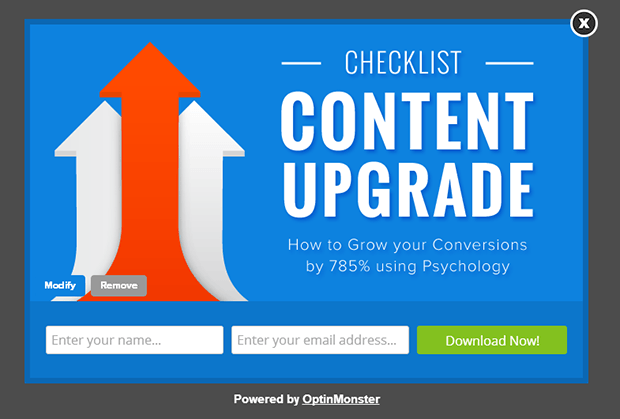
Content upgrades are another way to encourage users to subscribe to your email list.
Often, they’re used to add extra value to existing content in return for the user’s email address.
For example, you can create a handy swipe file of important information used in a blog post. Then, people can download and access it when they need it. Or, if you run a podcast, you can offer the show notes or transcription as a content upgrade.
You can also create a checklist of steps used in an article so users can check off each step as they follow them.
10. Lock Your Content
Adding locked or gated content is another way to collect emails from your visitors. This kind of content needs your visitors to provide their email addresses to access the entire post.
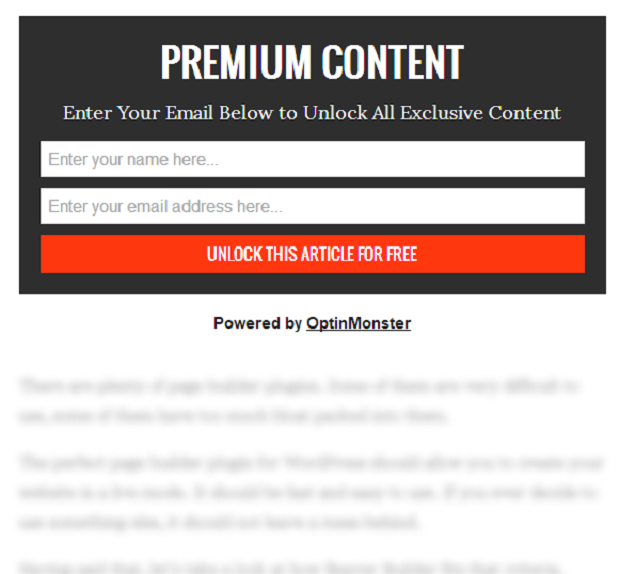
Just remember to add a powerful introduction to hook your readers. This will make them want to continue reading, which they can do only by providing their email addresses.
You can also start writing blog posts to offer free tips for beginners in your niche. Then, add advanced tips and keep it gated. Ask your user to access the full content in exchange for their email address.
11. Publish Case Studies
Case studies are an excellent way to show potential customers how your existing clients enjoy your products or services.
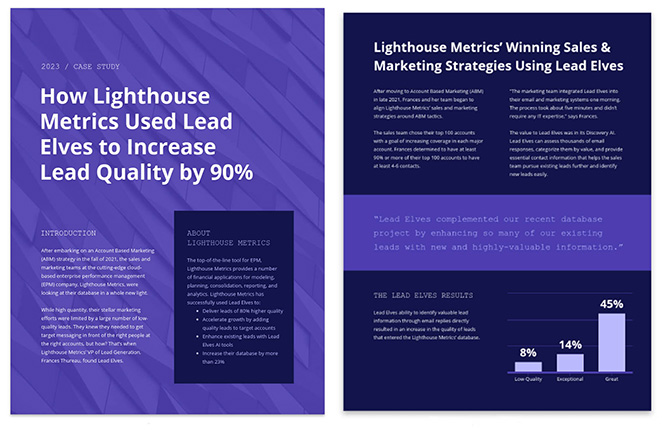
Case studies are super actionable, and they also give users the exact tactics used to achieve the desired results.
When you give readers great content to grow their business, they’re more likely to want to know when to read more of it. So, this is the perfect opportunity to ask for their email addresses in return.
Engagement & Incentives
Incentives can multiply your signup rate because they give fence-sitters a concrete reason to act now rather than later. Giveaways, discount coupons, and gamified opt-ins all work on the same principle: remove the “why should I bother?” objection at the moment of decision.
12. Grow Your Email List With Gamification
Want an exciting way to capture your visitor’s attention? Try using coupon wheel optin forms to collect email addresses in WordPress. This is especially useful for eCommerce sites to offer discounts.
Gamification is a psychological trick that savvy marketers use to get more leads and grow their email lists faster.
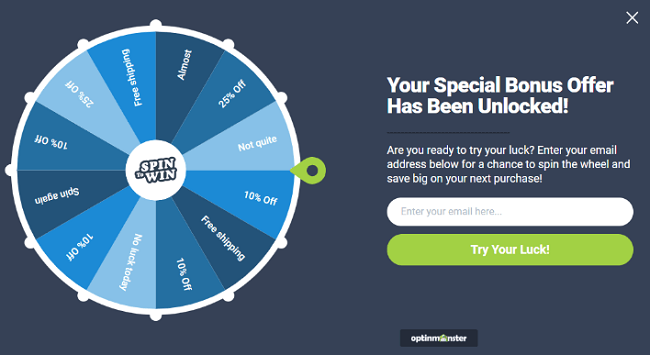
Here’s a tutorial on how to create a spin-to-win email signup form.
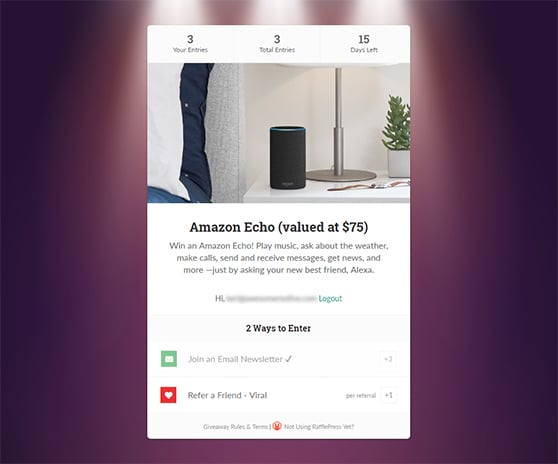
13. Organize Giveaways
People love free stuff. Giveaways consistently drive large spikes in subscribers because they combine scarcity, social sharing, and a clear reward into a single campaign.
The key is requiring an email address to enter. With RafflePress, you can set up a giveaway where participants must subscribe to enter, with optional bonus entries for sharing on social media. After the contest ends, you export the subscriber list directly to your email marketing service.
For the prize, pick something that appeals specifically to your ideal subscriber, not the general public. A $50 Amazon gift card attracts everyone. A resource pack for your niche attracts only the subscribers you actually want.
Here’s a guide on how to run a successful viral giveaway to grow your email list. It also shows you how to create a distraction-free giveaway landing page.
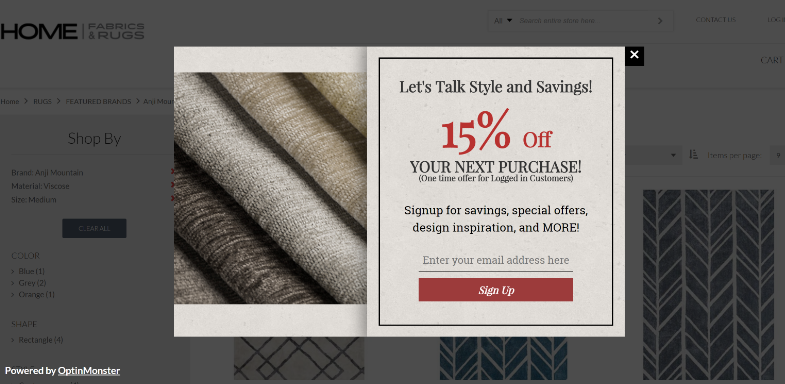
14. Offer a Discount Coupon
Offering discount coupons and birthday rewards is a brilliant way to attract visitors to your site and grow your WordPress mailing list.
If you’re selling your products or services online, offer a discount coupon in exchange for your visitor’s email address. Chances are they’ll hand it over to get a discount.
15. Add Social Proof
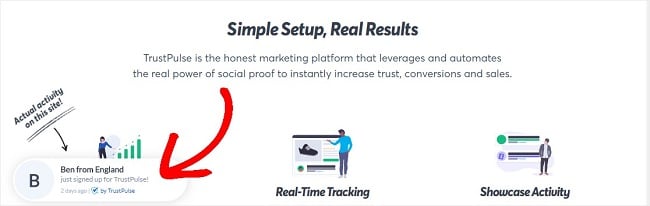
Visitors who are on the fence about subscribing often need one thing: proof that other people found it worthwhile. Social proof does that job without any extra copy.
There are various types of social proof :
- industry experts making recommendations
- celebrity or influencer endorsements
- customer reviews
- huge social media following

Social proof adds genuine value to your business and encourages users to respond to your CTA happily. TrustPulse makes adding social proof to your site super easy.
16. Organize Online Quizzes and Contests
Everyone loves a little friendly competition. That’s why creating online quizzes and contests is such an effective way to boost engagement and collect email addresses.
To make this strategy work, choose a quiz or contest theme that truly speaks to your target audience. Consider their interests, struggles, or knowledge gaps within your industry.
Once you’ve got a winning theme, focus on questions that keep people entertained. You can ask thought-provoking questions, include visuals to make things more interesting, and offer multiple-choice answers. The key is to make the experience interactive and fun.

Of course, you want to make sure that participants know they need to give you their email address to see their final score or results. This little bit of “email gating” provides an incentive for them to sign up, as they’ll be eager to find out how they did.
To maximize the reach of your quiz or contest, make sure to promote it heavily! Share it on social media, send it to your email list (if you have one already), and embed it directly within relevant blog posts.
Lastly, don’t forget about the power of a good follow-up. After someone takes your quiz or enters your contest, send them a targeted email with their results and include a special offer or call to action related to their interests.
17. Host a Free Challenge
Hosting challenges are in trend right now. You must have seen various challenges like the “30-day blogging challenge” doing rounds on the internet.
These challenges inspire and motivate people to do something they have procrastinated on for too long. Many people join challenges to get started or get better at what they do.
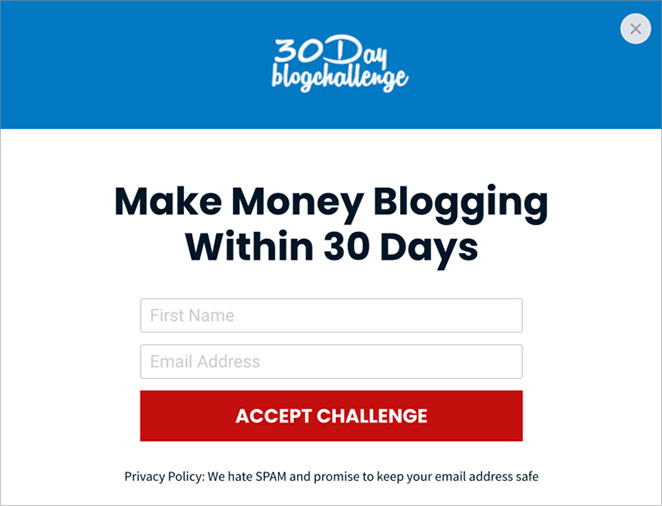
You, too, can host such a challenge and ask people to register with their email addresses to join. RafflePress is an easy way to do this with daily giveaway entries.
19. Host a Webinar
People love attending webinars. Visitors can quickly get advice from industry experts and thought leaders by signing up for one. Here’s how to host a successful webinar.
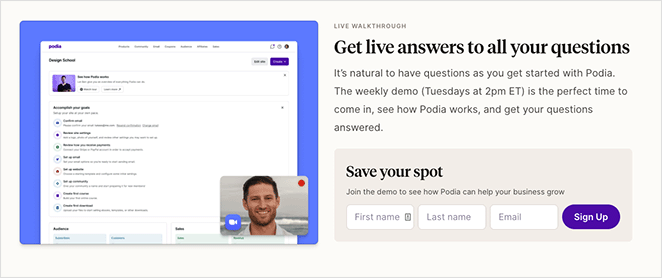
Then use the opportunity to collect email addresses by asking people to register for it to bolster your email list-building efforts. Here is a list of software you can use to host your webinar.
Social Media & Cross-Promotion
Social media followers are rented audiences. Your list is owned. Converting followers to email subscribers locks in the relationship regardless of platform changes or algorithm shifts.
20. Guest Blog
Guest blogging is a brilliant way to expand your WordPress website’s mailing list through content marketing. You can pitch your idea to popular websites in your niche that accept guest posts.
Once approved, write a great post and add a link to your website in the author’s byline. Make sure your visitors land on a page where they must submit their email addresses.

21. Add a Call-to-Action to Your Social Pages
This point is similar to the above one. Except for this, we’ll shift the focus to your social pages.
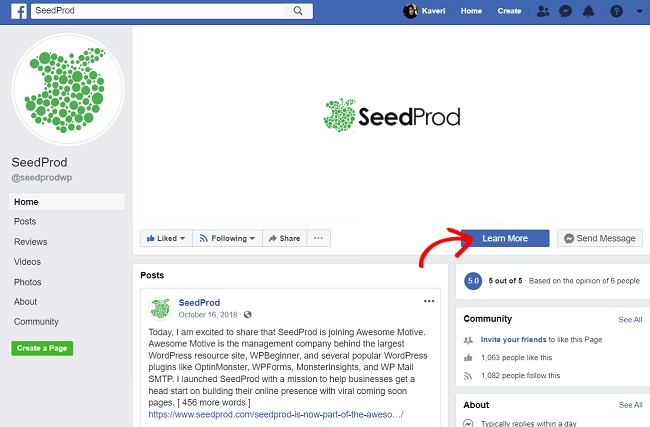
Social platforms like your Facebook page, LinkedIn, Twitter, Pinterest, etc., can help you reach hundreds of people simultaneously. By adding a call to action to your social profile, you can direct your visitors to a landing page to submit their email addresses.
Call-to-action buttons, or CTA buttons, direct your visitors toward your conversion goal. In this case, your conversion goal is to make people subscribe to your email list.
22. Add Cards to Your YouTube Videos
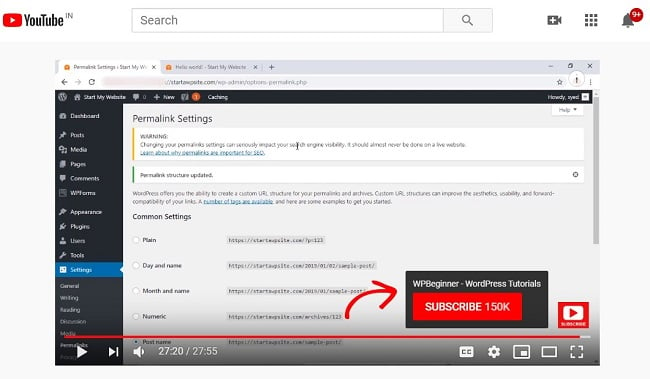
If you have a YouTube channel, try adding hyperlinked end cards to your videos. This can boost engagement on your website and encourage visitors to subscribe. Here’s a screenshot to help you understand better.
23. Set Up Cross Promotions
Instead of promoting your own business all by yourself, try setting up a cross-promotion campaign.
Collaborate with other bloggers in your niche and promote each other’s business. In the process, you can end up with a longer email list.
Not sure how to connect with a potential prospect? Don’t worry. Platforms like Madneto can help you find partners to collaborate with.
24. Run a Twitter Campaign
Paid social campaigns can drive targeted traffic directly to your signup page. X (formerly Twitter) and Meta both offer lead generation ad formats that capture email addresses without the user leaving the platform.
In 2026, short-form video platforms are worth testing for organic list growth. Instagram Reels, TikTok, and YouTube Shorts let you reach new audiences without an ad budget. The strategy is the same: promote a lead magnet or freebie in the video and direct viewers to a link in your bio or pinned comment.
Here are more ideas for using social media for lead generation.
25. Use Facebook Ads to Drive Traffic
You can also use Facebook ads to drive traffic to your most important landing pages. This is an excellent idea if you have an active social media following that regularly engages with your updates.
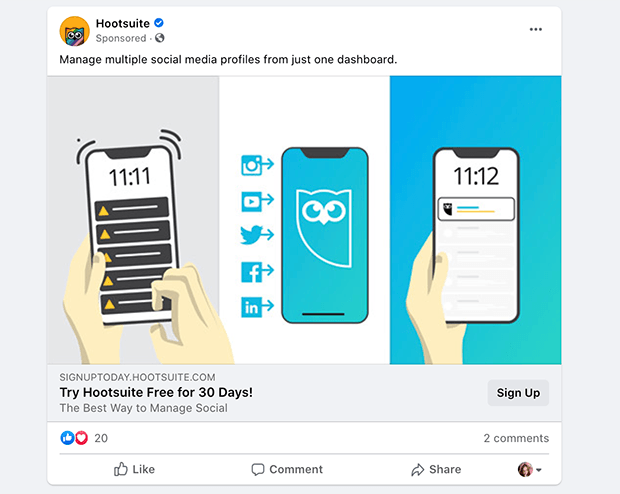
Your ads can include a call to action to visit your landing page, where you can add an optin form to get more subscribers. Just make sure you optimize your Facebook ads to increase conversion rates.
26. Pin Your Optin Landing Page to Pinterest
If you’re already using Pinterest in your marketing strategy, pin your optin landing page to Pinterest. Then, you can promote the pin with Pinterest ads to attract more leads.
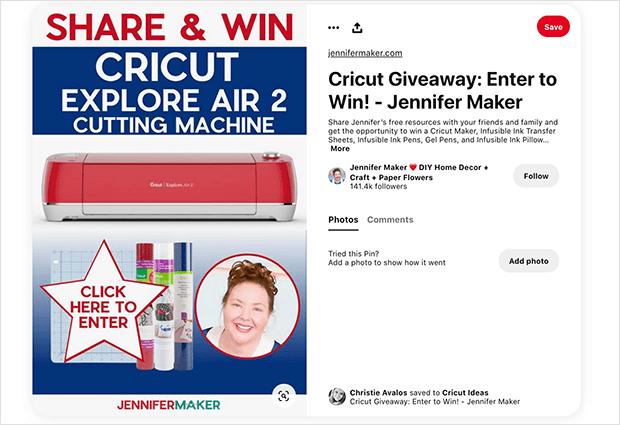
Remember to include a keyword-rich description in your pin and a great image to help you show up in search engine results.
List Maintenance
A large list is not the same as a healthy list. Unengaged subscribers hurt your deliverability scores, which means even your best emails land in the spam folder for the people who actually want them.
27. Segment Your List
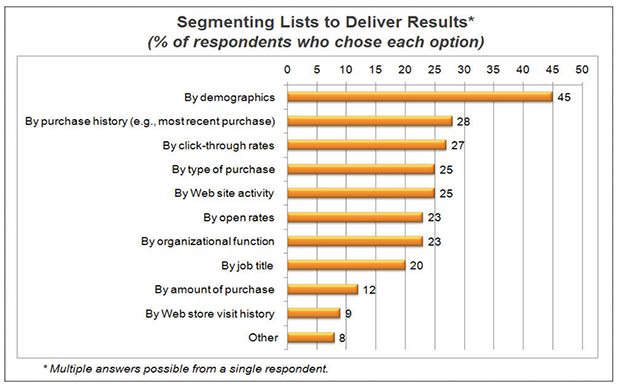
Now that you’ve grown your list slightly using the above tactics, you can use it to increase your sales and collect more email addresses.
Your subscribers are more likely to click email marketing campaigns that cater to their interests. So if you want your emails to work, create targeted content and then segment your list based on your subscribers’ interests.
If your users like your emails, they’ll refer them to a friend or family.
28. Follow Email Compliance Rules
Email compliance is not optional, and it affects your deliverability as much as your legal exposure. GDPR (for EU subscribers), CAN-SPAM (for US), and CASL (for Canada) all require that subscribers actively consent to receiving emails from you.
Double opt-in is the most reliable way to stay compliant. When someone signs up, they receive a confirmation email before being added to your list. It reduces your raw signup numbers, but the subscribers you get are genuinely interested and much more likely to open.
WPForms includes a consent checkbox that you can add to any signup form. WPConsent handles broader cookie and privacy compliance on the WordPress side, including logging consent so you have a record if you’re ever audited.
Every signup form should include a plain-language statement of what subscribers are agreeing to and a link to your privacy policy. Most email marketing services flag accounts without this.
29. Scrub Your Email List
Up to a third of your subscribers may never open your emails.
Do you know that up to one-third of your subscribers never open your emails? Let alone click on your CTAs.
So, what’s the point in having them on your list? That’s when email scrubbing comes in.
If you already have an email list, make sure you keep it clean so you know that whatever data you have is practical and can yield results. Here’s how you can clean up your email list.
Offline & Other Strategies
The highest-volume list builders use every touchpoint, not just their website. Your email signature, printed materials, and cross-promotion partnerships reach people who may never find you through search.
29. Add a Link to Your Email Signature
Don’t underestimate the power of a well-crafted email signature. You send it out with every single email, making it a prime opportunity to passively promote your email list. Instead of just including your basic contact information, why not transform your signature into a subtle call to action?
It’s as simple as adding a link to your website’s sign-up page. But don’t just link to your homepage. Instead, send people directly to a dedicated landing page that clearly explains all the amazing benefits they’ll get by subscribing. Make it incredibly easy for them to sign up.

When crafting your signature, keep the text concise and inviting. You don’t need a long sales pitch. A short and sweet phrase like “Join my free email list for [mention a key benefit]!” or “Don’t miss out! Sign up for my newsletter” often works best.
For an extra visual boost, consider using a visually appealing button with a clear call to action like “Subscribe Now!” instead of a plain text link.
Finally, remember to brand your email signature! Use your brand colors and fonts to maintain consistency.
30. Start a Newsletter Referral Program
Referral programs are one of the fastest-growing list-building tactics because they turn existing subscribers into recruiters. Tools like SparkLoop and Beehiiv’s built-in referral feature let you reward subscribers who share your newsletter with friends. When a referral signs up, both the referrer and the new subscriber get something.
This works especially well once you have a few hundred engaged subscribers. The reward can be as simple as exclusive content or early access to something you’re already creating.
31. Add QR Codes to Leaflets and Flyers
You can also use your printed materials to encourage signups and grow your email list. Then, all people need to do is scan the code to view your optin page and join.

FAQs on Growing Your Email List
What’s a good email list growth rate?
A healthy email list growth rate is about 2 to 5 percent per month after accounting for unsubscribes. That means a list of 1,000 subscribers should add 20 to 50 new subscribers monthly to stay healthy. Early-stage lists often grow faster with consistent lead magnet promotion. If you’re below 2 percent, the most common cause is a missing lead magnet or a signup form that’s buried on the page.
How long does it take to build an email list?
Most bloggers and small business owners see meaningful growth (500 to 1,000 subscribers) within 6 to 12 months when they use a lead magnet and promote it consistently. Without a lead magnet, growth is slower and depends heavily on site traffic. The timeline shortens significantly when you add a giveaway or run a short paid traffic campaign to a high-converting landing page.
What lead magnet gets the most email signups?
Checklists and templates consistently outperform other formats because they’re immediately usable. Quizzes perform well for audiences who want personalized recommendations. Long-form guides and ebooks have lower conversion rates because the perceived time to consume them is high. The best lead magnet is the one that solves a specific problem your ideal subscriber has right now, in the format they can use fastest.
Should I buy an email list?
No. Purchased lists are full of people who never asked to hear from you, which means high spam complaint rates, low open rates, and real risk of getting your sending domain blacklisted. Most reputable email marketing services (Mailchimp, Kit, Constant Contact) prohibit sending to purchased lists and will suspend your account if they detect it. Building a list organically with the tactics in this article takes longer but produces a list that actually converts.
How do I grow my email list without social media?
The most effective non-social tactics are lead magnets on high-traffic blog posts, exit-intent popups, content upgrades, and guest blogging with a link back to a dedicated signup landing page. SEO-driven blog content is particularly powerful because it brings in consistent organic traffic that doesn’t depend on any platform. You can also use QR codes on printed materials and add a signup link to your email signature for passive list growth.
We hope this article helped you learn how to collect email addresses in WordPress. Once your list is growing, you can make money with email marketing.
We hope you found this article helpful. Follow us on Twitter and Facebook for more such content if you do.
Further Reading:
- How to Make a Click to Call Link in WordPress
- How to Create a WordPress Form with File Upload
- Email Unsubscribe Page Examples




