
Drip is an email marketing platform that lets you manage campaigns and grow your subscriber list with powerful automation. This guide walks you through connecting Drip to the SeedProd Optin Form block so new subscribers are automatically added to your Drip account.
Step 1: Open the Connect Page
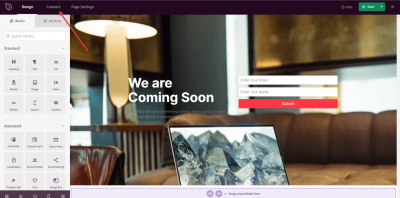
In your WordPress admin, go to the SeedProd Dashboard and click Connect.
Step 2: Select Drip
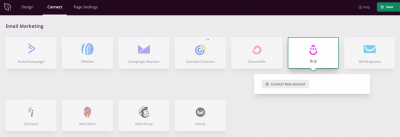
From the list of available email integrations, select Drip and click Connect New Account.
Step 3: Get Your Drip API Token
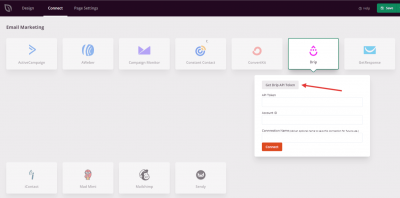
Click the Get Drip API Token button to be taken to your Drip account where you can retrieve your credentials.
Step 4: Find Your API Token
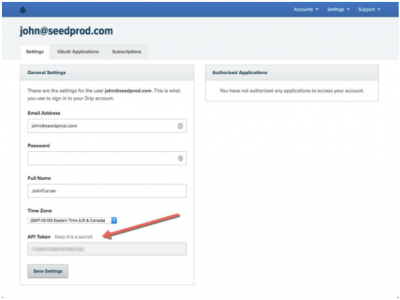
In your Drip account, navigate to Settings > My User Settings to find your API Token. Copy it for use in the next step.
Step 5: Find Your Account ID
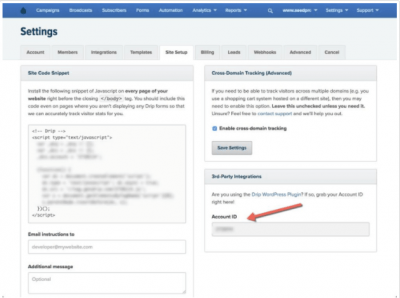
Still in your Drip account, navigate to Settings > Site Setup to find your Account ID. Copy it as well.
Step 6: Enter Your Credentials and Connect
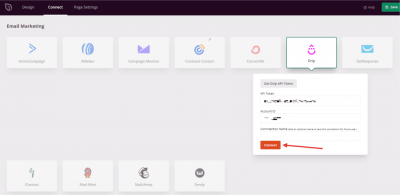
Back in SeedProd, paste your API Token and Account ID into the fields provided and click Connect.
Drip is now connected to SeedProd. You can select your Drip campaign or list in the Optin Form block settings so subscribers are automatically added when visitors submit the form on your page.