
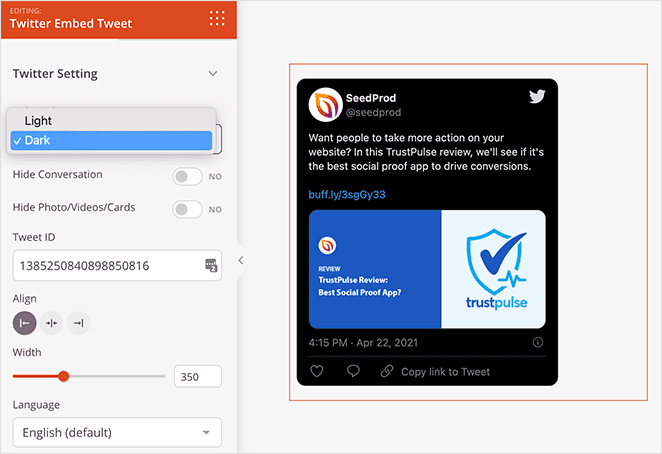
O bloco de Incorporar Tweet do X (Twitter) permite incorporar um tweet específico diretamente em qualquer página do SeedProd. É uma maneira conveniente de destacar uma postagem individual — como um depoimento de cliente, um anúncio de produto ou uma menção notável — e compartilhá-la com seus visitantes sem que eles precisem visitar o X (Twitter).
Tudo o que você precisa é o ID do Tweet, que pode ser encontrado na URL do tweet. Uma vez adicionado, você pode escolher um esquema de cores claro ou escuro, controlar se a thread da conversa e os cartões de mídia são exibidos, definir a largura do widget e selecionar o idioma de exibição para corresponder ao seu público.
Adicionando o Bloco de Incorporar Tweet do X (Twitter) às Suas Páginas
Siga estas etapas para adicionar um bloco de Incorporar Tweet do X (Twitter) à sua página SeedProd:
Etapa 1: Adicionar o Bloco
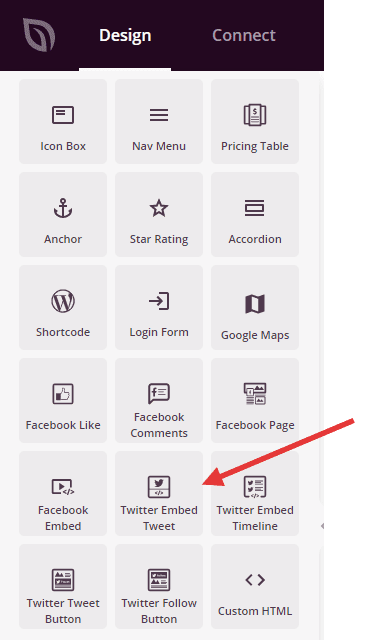
Em Design > Blocos, arraste e solte o bloco Incorporar Tweet do X (Twitter) na seção desejada da sua página.
Etapa 2: Configurar as Definições de Conteúdo
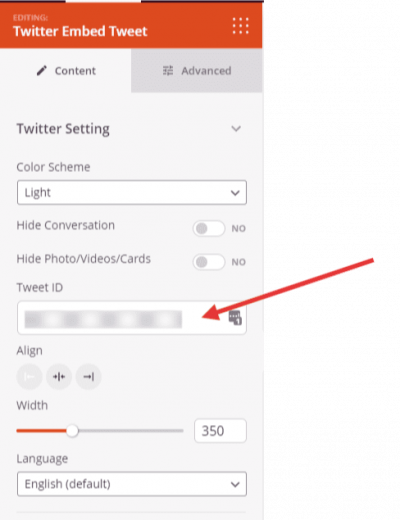
Uma vez adicionado, clique no bloco de Incorporar Tweet do X (Twitter) para abrir suas configurações. Na aba Conteúdo, você encontrará as seguintes opções na seção Configurações do X (Twitter):
- ID do Tweet: Insira o ID numérico do tweet que você deseja incorporar. Você pode encontrar o ID do Tweet na URL do tweet — é o número longo no final, após
/status/. Por exemplo, emhttps://twitter.com/seedprod/status/1385250840898850816, o ID do Tweet é1385250840898850816. - Esquema de Cores: Escolha entre Claro e Escuro para combinar o widget de tweet incorporado com o design da sua página.
- Ocultar Conversa: Ative para ocultar a thread da conversa que aparece abaixo do tweet (Sim/Não).
- Ocultar Fotos/Vídeos/Cartões: Ative para ocultar quaisquer cartões de mídia, fotos ou vídeos anexados ao tweet (Sim/Não).
- Largura: Defina a largura do widget de tweet incorporado em pixels usando um controle deslizante.
- Alinhamento: Defina o alinhamento horizontal do widget na página — Esquerda, Centro ou Direita — com controles por dispositivo para desktop, tablet e celular.
- Idioma: Escolha o idioma de exibição para a interface do widget. As opções incluem Automático, Inglês, Árabe, Bengali, Tcheco, Dinamarquês, Alemão, Grego, Espanhol, Persa, Finlandês, Filipino, Francês, Hebraico, Hindi, Húngaro, Indonésio, Italiano, Japonês, Coreano, Malaio, Holandês, Norueguês, Polonês, Português, Romeno e mais.
Etapa 3: Personalizar o Design
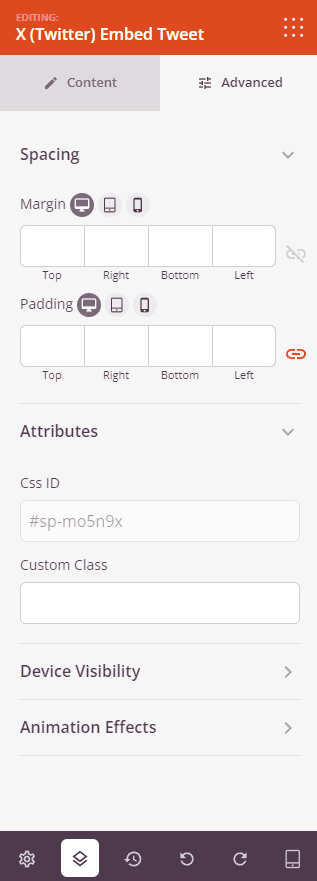
Na aba Avançado, você pode controlar ainda mais o layout e o comportamento do seu bloco de Incorporar Tweet do X (Twitter).
Espaçamento:
- Margem: Defina o espaçamento externo ao redor do bloco em todos os quatro lados, com controles independentes para desktop, tablet e celular.
- Preenchimento: Defina o espaçamento interno dentro do wrapper do bloco em todos os quatro lados, com controles por dispositivo.
Atributos:
- Classe Personalizada: Adicione uma ou mais classes CSS personalizadas ao wrapper do bloco para estilização direcionada.
- ID CSS: O SeedProd gera automaticamente um ID CSS exclusivo para este bloco. Você pode usá-lo para referenciar o bloco em CSS ou JavaScript personalizado.
- Atributos Personalizados: Adicione atributos HTML personalizados ao elemento wrapper do bloco. Insira cada atributo em uma nova linha usando o formato chave|valor.
Visibilidade do Dispositivo:
- Ocultar no Desktop: Ative para ocultar o bloco quando visualizado em telas de desktop.
- Ocultar no Tablet: Ative para ocultar o bloco quando visualizado em telas de tablet.
- Ocultar no Celular: Ative para ocultar o bloco ao ser visualizado em telas de celular.
Efeitos de Animação:
- Efeito de Rolagem: Aplique uma animação acionada por rolagem ao bloco, incluindo opções de Rolagem Vertical e Rolagem Horizontal com controles de direção, velocidade e deslocamento de visualização.
- Efeito do Mouse: Aplique um efeito de paralaxe ao bloco, acionado pelo movimento do mouse.
Etapa 4: Salve Suas Alterações
Depois de terminar de configurar o bloco de Incorporar Tweet do X (Twitter) e personalizar sua aparência, certifique-se de salvar seu trabalho.
Você adicionou com sucesso um bloco de Incorporar Tweet do X (Twitter) à sua página! Incorporar tweets individuais é uma ótima maneira de destacar prova social, apresentar menções notáveis ou compartilhar anúncios em contexto. Use o esquema de cores e as opções de visibilidade para garantir que o widget se integre perfeitamente ao design da sua página.