
O Bloco de Conteúdo do Produto exibe a descrição completa do produto para produtos WooCommerce em seus Modelos de Produto Único. Ele busca dinamicamente a descrição do produto do WooCommerce para cada produto, garantindo que o conteúdo correto apareça sempre sem atualizações manuais.
Este bloco foi projetado exclusivamente para uso em Modelos de Produto Único. Você pode usá-lo como está para exibir a descrição do produto exatamente como inserida no WooCommerce, ou adicionar texto e formatação suplementares ao redor do shortcode para personalizar como o conteúdo aparece em suas páginas de produto.
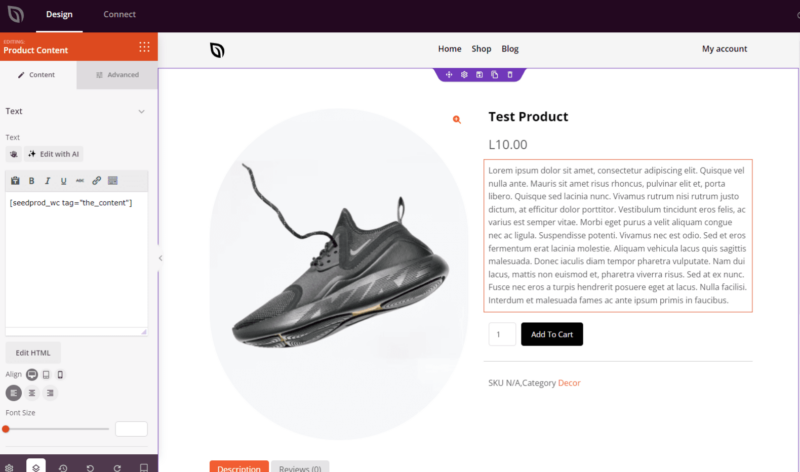
Adicionando o Bloco de Conteúdo do Produto às Suas Páginas
Siga estas etapas para adicionar um bloco de Conteúdo do Produto ao seu Modelo de Produto Único do SeedProd:
Etapa 1: Adicionar o Bloco
Em Design > Blocos > Tags de Modelo do WooCommerce, arraste e solte o bloco Conteúdo do Produto na seção desejada de sua página.
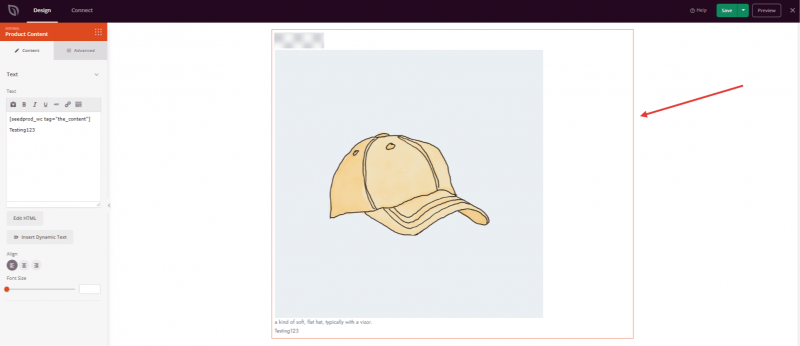
Etapa 2: Configurar as Definições de Conteúdo
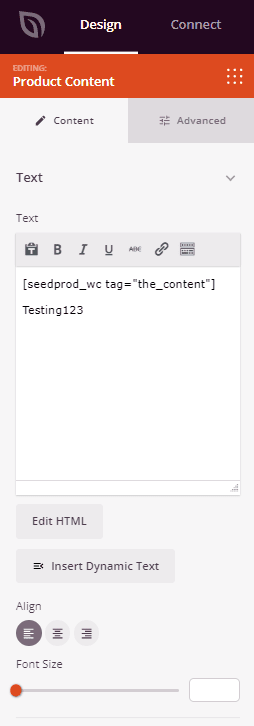
Após adicionado, clique no bloco Conteúdo do Produto para abrir suas configurações. Na guia Conteúdo, você encontrará uma área de texto pré-preenchida com o shortcode do SeedProd que busca dinamicamente a descrição do produto do WooCommerce.
Texto:
- Campo de Conteúdo: Contém o shortcode
por padrão. Este shortcode é o que busca dinamicamente a descrição do produto do WooCommerce para cada produto — não o remova, a menos que pretenda substituir completamente o conteúdo do produto. Você pode adicionar texto, HTML ou formatação adicionais acima ou abaixo do shortcode para complementar a descrição do produto. - Editor Visual / Editar HTML: Alterne entre um Editor Visual de rich-text (para texto formatado com controles de barra de ferramentas) e o editor HTML (para edição direta de código). Ambos os modos permitem que você trabalhe em conjunto com o shortcode dinâmico.
- Alinhamento: Defina o alinhamento horizontal do conteúdo de texto — Esquerda, Centro ou Direita. Suporta alinhamento por dispositivo para desktop, tablet e celular.
- Tamanho da Fonte: Defina o tamanho da fonte base para a área de conteúdo usando o controle deslizante (10–72px).
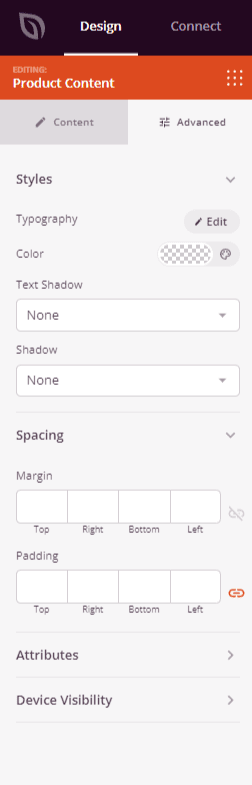
Etapa 3: Personalizar o Design
Na guia Avançado, você pode personalizar a tipografia, cor e estilo visual do seu bloco de Conteúdo do Produto.
Estilos:
- Tipografia: Defina a família da fonte, tamanho, peso, altura da linha, espaçamento entre letras e estilo para o texto do conteúdo do produto.
- Cor: Defina a cor do texto para o conteúdo da descrição do produto.
- Sombra do Texto: Adicione um efeito de sombra ao texto — escolha entre Nenhuma, Fio de Cabelo, Pequena, Média, Grande, X Grande ou 2X Grande.
- Sombra: Adicione uma sombra de caixa a todo o bloco para um efeito sutil de profundidade.
Espaçamento:
- Margem: Controle o espaçamento externo ao redor do seu bloco de Conteúdo do Produto (Superior, Direita, Inferior, Esquerda). Isso determina quanto espaço aparece entre a descrição do produto e os elementos circundantes na página.
- Espaçamento interno: Ajuste o espaçamento interno do seu bloco de Conteúdo do Produto (Superior, Direito, Inferior, Esquerdo). Isso cria um respiro entre o texto da descrição e as bordas do bloco.
Atributos:
- ID CSS: Exibe o identificador exclusivo gerado automaticamente para o seu bloco de Conteúdo do Produto. Este ID é criado automaticamente pelo SeedProd para estilização personalizada ou segmentação por JavaScript.
- Classe Personalizada: Adicione classes CSS personalizadas para aplicar estilos específicos do seu tema ou CSS personalizado.
- Atributos Personalizados: Adicione quaisquer atributos HTML ao elemento wrapper do bloco. Insira cada atributo em uma nova linha usando o formato: nome-do-atributo|valor (por exemplo, data-section|descrição).
Visibilidade do Dispositivo:
- Ocultar em Desktop: Oculte o bloco de Conteúdo do Produto em telas de desktop.
- Ocultar em Tablet: Oculte o bloco de Conteúdo do Produto em dispositivos tablet.
- Ocultar em Celular: Oculte o bloco de Conteúdo do Produto em dispositivos móveis.
Efeitos de Animação:
- Animação de Entrada: Escolha entre vários efeitos de animação que são reproduzidos quando o bloco de Conteúdo do Produto entra na tela. As opções incluem Bounce, Fade In, Zoom In, Rotate In e muitas outras.
Etapa 4: Salve Suas Alterações
Depois de terminar de configurar o bloco de Conteúdo do Produto e personalizar sua aparência, certifique-se de salvar seu trabalho.
Você adicionou com sucesso um bloco de Conteúdo do Produto ao seu Modelo de Produto Único! O bloco exibirá automaticamente a descrição correta do produto para cada produto, garantindo que suas páginas do WooCommerce sempre mostrem conteúdo preciso e atualizado. Use os controles de tipografia e espaçamento para estilizar a descrição, de modo que ela se encaixe perfeitamente no design da sua página de produto.