
O Bloco de Título permite adicionar títulos estilizados a qualquer página do SeedProd. Se você precisa de um H1 em negrito para sua seção principal ou um H4 menor para introduzir uma seção de conteúdo, o Bloco de Título oferece controle total sobre o texto, nível HTML, link e configurações de tipografia.
Ao contrário do texto simples, os títulos criados com este bloco suportam formatação de texto rico, links opcionais, variáveis de texto dinâmicas e controles de tamanho de fonte e alinhamento por dispositivo — tornando-o um dos blocos mais versáteis para criar páginas bem estruturadas e otimizadas para SEO.
Adicionando o Bloco de Título às Suas Páginas
Siga estas etapas para adicionar um bloco de Título à sua página SeedProd:
Etapa 1: Adicionar o Bloco
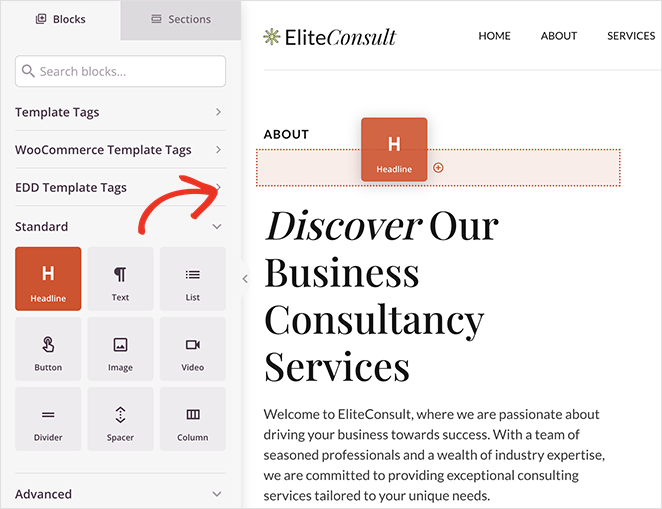
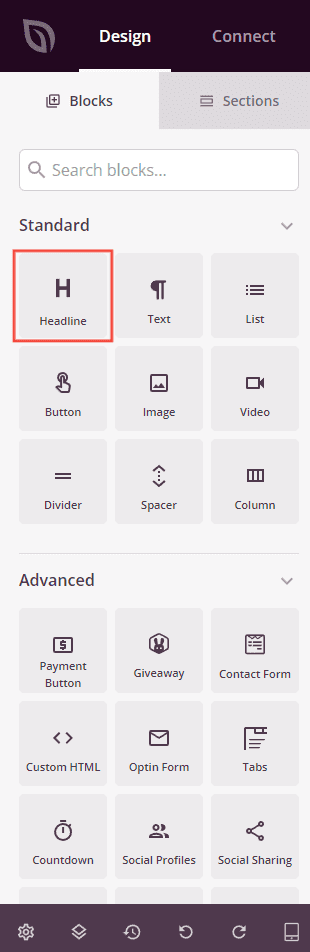
Em Design > Blocos, arraste e solte o bloco Título na seção desejada da sua página.
Etapa 2: Configurar as Definições de Conteúdo
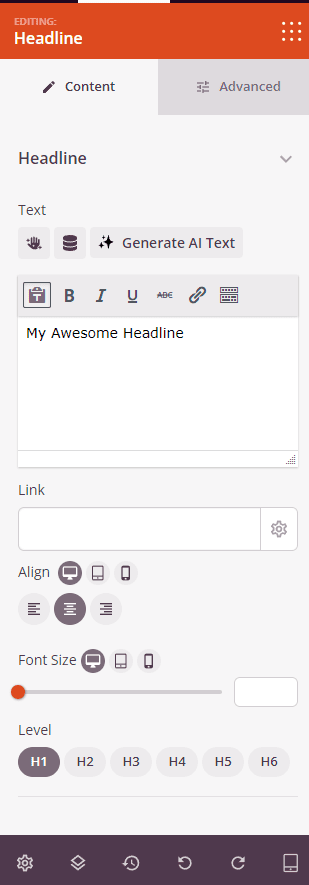
Uma vez adicionado, clique no Bloco de Título para abrir suas configurações. Na aba Conteúdo, configure o texto do título, o link e o layout.
Título:
- Texto: Insira o texto do seu título usando o editor de rich text. Suporta formatação em negrito, itálico, sublinhado, tachado e cores inline. Você também pode inserir variáveis de Texto Dinâmico ou usar a ferramenta de geração de texto por IA para criar e refinar sua cópia de título.
- Link: Opcionalmente, adicione um URL para tornar o título um link clicável. Clique no ícone de configurações ao lado do campo de link para revelar opções adicionais de link.
- Abrir em Nova Janela: Marque esta opção para abrir o URL vinculado em uma nova aba do navegador.
- No Follow: Marque esta opção para adicionar um atributo
rel="nofollow"ao link, informando aos mecanismos de busca para não repassar a autoridade do link para o destino. - Alinhamento: Defina o alinhamento do texto — Esquerda, Centro ou Direita. Suporta valores por dispositivo para desktop, tablet e celular.
- Tamanho da Fonte: Defina o tamanho da fonte do texto do título. Suporta valores por dispositivo para desktop, tablet e celular.
- Nível: Escolha a tag de título HTML para o seu título — H1, H2, H3, H4, H5 ou H6. Use H1 para o título principal da sua página e níveis inferiores para subtítulos para manter a estrutura correta do documento.
Etapa 3: Personalizar o Design
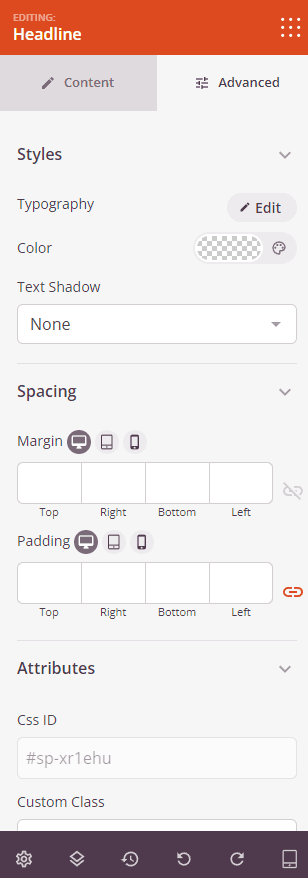
Na aba Avançado, você pode personalizar a tipografia, cor e espaçamento do seu Bloco de Título.
Estilos:
- Tipografia: Ajuste a família da fonte, peso da fonte, altura da linha, espaçamento entre letras e transformação de texto do título. Suporta valores por dispositivo para desktop, tablet e celular.
- Cor: Defina a cor do texto do título usando o seletor de cores.
- Sombra do Texto: Adicione um efeito de sombra ao texto do título. Escolha entre Nenhuma, Fina, Pequena, Média, Grande, X Grande ou 2X Grande para adicionar profundidade e ênfase ao seu título.
Espaçamento:
- Margem: Controle o espaçamento externo ao redor do seu Bloco de Título (Superior, Direita, Inferior, Esquerda). Suporta valores por dispositivo para desktop, tablet e celular.
- Preenchimento: Ajuste o espaçamento interno dentro do seu Bloco de Título (Superior, Direita, Inferior, Esquerda). Suporta valores por dispositivo para desktop, tablet e celular.
Atributos:
- ID CSS: Exibe o identificador exclusivo gerado automaticamente para o seu bloco de Título, criado automaticamente pelo SeedProd para estilização personalizada ou segmentação de JavaScript.
- Classe Personalizada: Adicione classes CSS personalizadas para aplicar estilos específicos do seu tema ou CSS personalizado.
- Atributos Personalizados: Adicione quaisquer atributos HTML ao elemento wrapper do bloco. Insira cada atributo em uma nova linha usando o formato: nome-do-atributo|valor.
Visibilidade do Dispositivo:
- Ocultar no Desktop: Oculta o bloco de Título em telas de desktop.
- Ocultar no Tablet: Oculta o bloco de Título em dispositivos tablet.
- Ocultar no Celular: Oculta o bloco de Título em dispositivos móveis.
Efeitos de Animação:
- Animação de Entrada: Escolha um efeito de animação que é reproduzido quando o bloco de Título entra na tela, como Bounce, Fade In, Zoom In, Rotate In e muitos outros.
Etapa 4: Salve Suas Alterações
Depois de terminar de configurar o bloco de Título e personalizar sua aparência, certifique-se de salvar seu trabalho.
Você adicionou com sucesso um bloco de Título à sua página! Títulos bem elaborados guiam seus visitantes pelo seu conteúdo, reforçam sua mensagem e melhoram a estrutura da página tanto para leitores quanto para mecanismos de busca. Experimente com níveis de cabeçalho, configurações de tipografia e animações para criar títulos que chamem a atenção e correspondam ao estilo da sua marca.