
O Bloco de Sorteio permite que você incorpore uma campanha de sorteio do RafflePress diretamente em qualquer página do SeedProd. Em vez de enviar os visitantes para uma página de sorteio separada, você pode exibir seu concurso exatamente onde seu público já está engajado, ajudando a maximizar a participação e as inscrições.
Depois de ter um sorteio ativo criado no RafflePress, o Bloco de Sorteio permite que você o selecione em um menu suspenso e o adicione a qualquer página em segundos — sem a necessidade de shortcodes ou código personalizado.
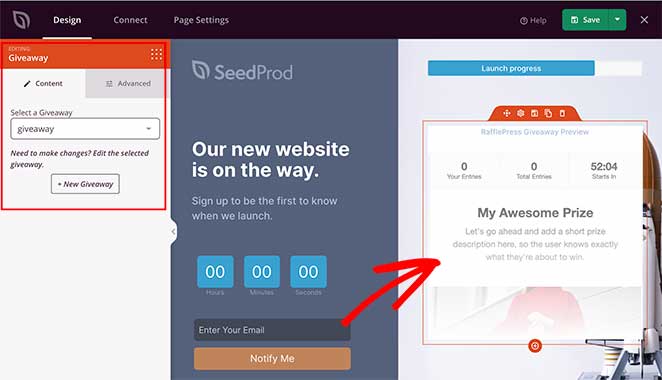
Adicionando o Bloco de Sorteio às Suas Páginas
Siga estas etapas para adicionar um Bloco de Sorteio à sua página do SeedProd:
Etapa 1: Adicionar o Bloco
Em Design > Blocos, arraste e solte o bloco Sorteio na seção desejada da sua página.
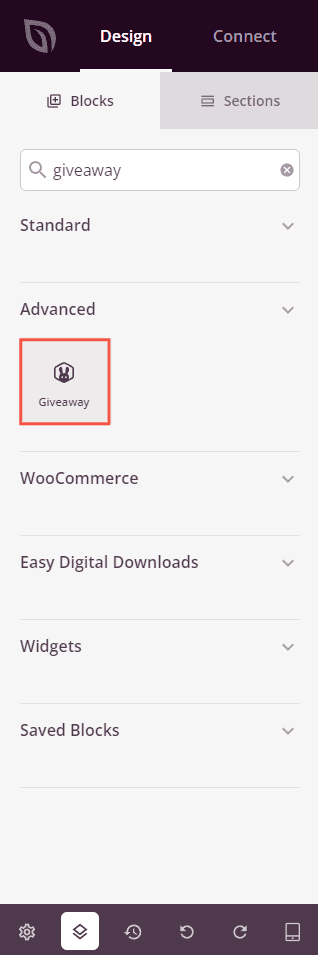
Etapa 2: Configurar as Definições de Conteúdo
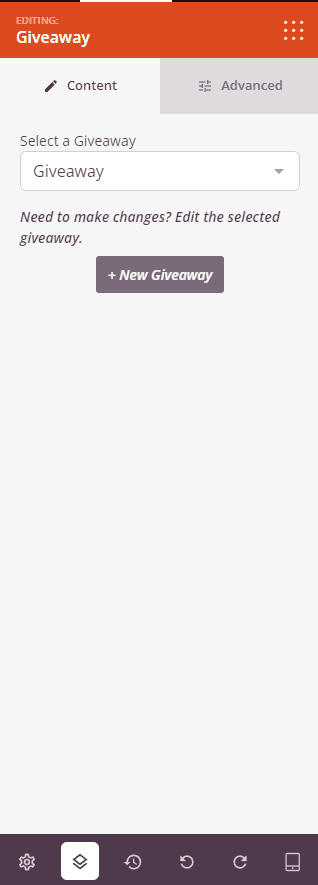
Após adicionado, clique no Bloco de Sorteio para abrir suas configurações. Na aba Conteúdo, selecione qual sorteio do RafflePress exibir.
- Selecionar um Sorteio: Escolha um sorteio existente na lista suspensa. Todos os sorteios ativos do RafflePress em seu site aparecerão aqui.
- Editar Sorteio: Uma vez selecionado um sorteio, um link aparece para abrir e editar esse sorteio diretamente no RafflePress sem sair do seu fluxo de trabalho.
- + Novo Sorteio: Clique neste botão para criar um sorteio totalmente novo no RafflePress, depois retorne a este bloco para selecioná-lo assim que estiver pronto.
Etapa 3: Personalizar o Design
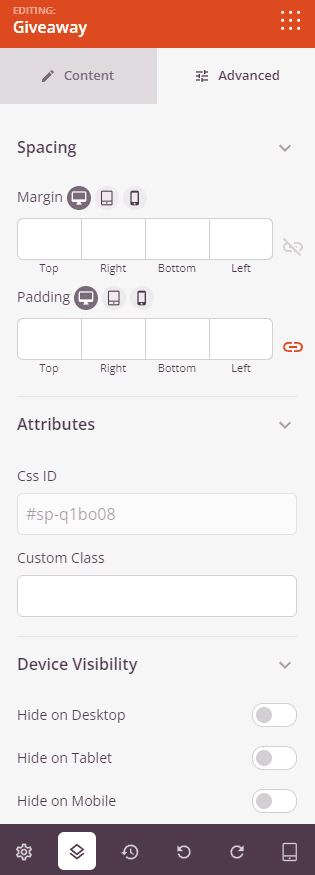
Na aba Avançado, você pode ajustar o espaçamento e a visibilidade do seu Bloco de Sorteio.
Espaçamento:
- Margem: Controle o espaçamento externo ao redor do seu Bloco de Sorteio (Superior, Direita, Inferior, Esquerda). Suporta valores por dispositivo para desktop, tablet e celular.
- Preenchimento: Ajuste o espaçamento interno dentro do seu Bloco de Sorteio (Superior, Direita, Inferior, Esquerda). Suporta valores por dispositivo para desktop, tablet e celular.
Atributos:
- ID CSS: Exibe o identificador exclusivo gerado automaticamente para o seu Bloco de Sorteio, criado automaticamente pelo SeedProd para estilização personalizada ou segmentação de JavaScript.
- Classe Personalizada: Adicione classes CSS personalizadas para aplicar estilos específicos do seu tema ou CSS personalizado.
- Atributos Personalizados: Adicione quaisquer atributos HTML ao elemento wrapper do bloco. Insira cada atributo em uma nova linha usando o formato: nome-do-atributo|valor.
Visibilidade do Dispositivo:
- Ocultar no Desktop: Oculte o Bloco de Sorteio em telas de desktop.
- Ocultar no Tablet: Oculte o Bloco de Sorteio em dispositivos tablet.
- Ocultar no Celular: Oculte o Bloco de Sorteio em dispositivos móveis.
Efeitos de Animação:
- Animação de Entrada: Escolha um efeito de animação que é reproduzido quando o Bloco de Sorteio entra na tela, como Bounce, Fade In, Zoom In, Rotate In e muitos outros.
Etapa 4: Salve Suas Alterações
Depois de terminar de configurar o Bloco de Sorteio e personalizar sua aparência, certifique-se de salvar seu trabalho.
Você adicionou com sucesso um bloco de Sorteio à sua página! Ao incorporar seu sorteio do RafflePress diretamente na sua página do SeedProd, você pode gerar mais inscrições no concurso e manter os visitantes engajados sem enviá-los para outro lugar. Certifique-se de que o RafflePress esteja ativo e seu sorteio publicado para que ele seja exibido corretamente para todos os visitantes.