


長年、多くのWordPressプラグインを試してきました。しかし、今後のイベントを表示したり、予約を受け付けたりする必要があったとき、カレンダープラグインがあればすべてが楽になりました。
イベントの宣伝、予約のスケジュール設定、または単にサイトに簡単なカレンダーを表示するのに苦労したことがあるなら、あなたは一人ではありません。優れたWordPressカレンダープラグインは、何時間ものフラストレーションを解消し、訪問者にとってあなたのサイトをはるかに役立つものにします。
このガイドでは、私が個人的にレビューした最高のWordPressカレンダープラグインをいくつかご紹介します。予約、出欠確認、または完全なイベント管理システムが必要な場合でも、あなたのニーズに合ったツールがここにあります。
カスタムランディングページやテーマにイベントを美しく表示するためのボーナスとして、SeedProdも含まれています。
最高のWordPressカレンダープラグインの簡単な概要
| プラグイン | カテゴリ | 開始価格 | 無料プラン | 最適 |
|---|---|---|---|---|
| シュガーカレンダー | シンプルなイベント&チケット販売 | 年額$99 | いいえ | 軽量イベントカレンダー |
| イベントカレンダー | 完全なイベント管理 | 年額$149 | はい | 大規模または繰り返しイベント |
| イベントマネージャー | 無料ビジュアルカレンダー | 無料 | はい | 登録付き無料ビジュアル表示 |
| マイカレンダー | 柔軟なマルチカレンダー | 無料 | はい | マルチサイトまたはグループイベント |
| 予約カレンダー | 予約受付 | 年額$47 | はい | 予約フォームとスケジュール設定 |
| SeedProd | イベント表示ビルダー | 年額39.50ドル | はい | カスタムイベントページと埋め込み |
私のトップピック:ほとんどのWordPressユーザーのために1つのプラグインを選ぶとしたら、Sugar Calendarを選びます。軽量で設定が簡単で、特にチケット販売とGoogleカレンダー同期オプションを備えた、ちょうど良い機能の組み合わせがあります。
WordPressカレンダープラグインとは?
WordPressカレンダープラグインを使用すると、今後のイベントを表示したり、予約を受け付けたり、ウェブサイトから直接スケジュールを管理したりできます。
シンプルなカレンダー表示ツールもあれば、繰り返しイベント、チケット販売、Googleカレンダー同期、予約フォームなどの強力な機能を持つものもあります。
これらのプラグインは、イベント主催者、コーチ、サービス提供者、または訪問者と空き状況を共有する必要がある人に最適です。ページ、サイドバー、ポップアップ、ランディングページなど、サイトのどこにでもカレンダーを表示できます。
コードを一行も書く必要はありません。すべてドラッグ&ドロップツールまたはショートコードで動作します。
WordPressカレンダープラグインの選び方
これらのプラグインはすべて、実際のWordPressサイトでテストしました。クライアントの予約システムに使用したものもあれば、シンプルなイベントカレンダーに使用したものもあります。初心者向けでありながら、ニーズに合わせて拡張できる十分な機能を備えたツールに焦点を当てました。以下は、私が探した点です。
- WPForms、WooCommerce、SeedProdなどの人気プラグインと連携
- 定期的なアップデートと迅速なサポート
- WordPress初心者でも簡単にセットアップして使用できる
- チケット販売、繰り返しイベント、Googleカレンダー同期などの便利な機能
- 軽量で高速読み込みなので、サイトの速度を維持できる
イベントと予約を管理するための最高のWordPressカレンダープラグイン
以下に、WordPress向けの最高のカレンダープラグインをいくつか紹介します。機能を見て、最適なソリューションを見つけてください。
- 1. Best Lightweight Event Plugin: Sugar Calendar
- 2. Best Full-Featured Event Plugin: The Events Calendar
- 3. Best Free Visual Calendar: Events Manager
- 4. Best Plugin for Grouped or Multisite Events: My Calendar
- 5. Best Plugin for Appointment Scheduling: Booking Calendar
- 6. Bonus: Best Page Builder for Event Showcases – SeedProd
無料オプションをお探しですか? Events Managerは、ビジュアルカレンダー表示と登録機能が組み込まれた、最も強力な無料の選択肢です。My Calendarは、マルチサイト設定に適した無料の代替案です。
1. 最も軽量なイベントプラグイン:Sugar Calendar
| 価格: $99/年から |
| 無料プラン/トライアル:なし |
| 注目の機能: |
| 🔹 簡単なイベント作成 🔹 Stripe決済付きチケット販売アドオン 🔹 GoogleカレンダーとWPForms連携 |
| 評価:A |
| 最適: シンプルで高速なイベントセットアップ(無駄なし) |
| アクティブインストール数: 10,000以上 |
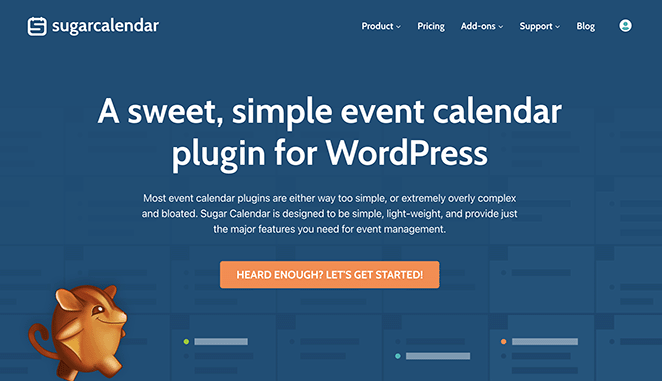
Sugar Calendarは、設定に圧倒されることなく、必要な機能を正確に実行する、軽量で使いやすいWordPressカレンダープラグインです。
イベントをすばやく作成し、開始/終了時刻を表示し、タイムゾーンを追加し、繰り返しの日付を設定することもできます。Googleカレンダーとの同期や、WPForms、Gravity Forms、WooCommerceなどのツールとのスムーズな連携も可能です。
チケットを販売したい場合は、イベントチケット販売アドオンを有効にするだけです。Stripeで支払いを受け付け、ダッシュボードで参加者を管理できます。
特に、メンバー投稿用のフロントエンドフォームとの連携が気に入っています。ユーザーが独自のイベントを投稿する必要があるフォーラム、クラブ、またはメンバーシップサイトに最適な選択肢です。
Sugar Calendarは、SeedProdで日常的に使用しているWPBeginnerファミリーのツールの一部でもあります。そのため、チームが安定性と長期サポートをどのように優先しているかを直接見てきました。
長所
- 非常に使いやすく、無駄がない
- チケット販売、支払い、フロントエンド投稿をサポート
- 主要なWordPressツールと連携
短所
- 無料版はありません
- 高度な機能には有料アドオンが必要
私の評価
もしあなたが、高速で、クリーンで、信頼性の高いカレンダープラグインを必要としているなら、Sugar Calendar は他に類を見ないでしょう。すべてをやろうとはしていませんが、やることに関しては非常に優れています。
2. ベスト総合イベントプラグイン:The Events Calendar

| 料金: 年間149ドルから |
| 無料プラン / トライアル:あり |
| 注目の機能: |
| 🔹 繰り返しイベントとチケット発行 🔹 Google マップと会場管理 🔹 iCal、Eventbrite、Meetupからのイベントインポート |
| 評価: A– |
| 最適な用途: 大規模イベントリストとコミュニティカレンダー |
| アクティブインストール数: 800,000以上 |
The Events Calendar は WordPress で最も人気のあるカレンダープラグインの 1 つであり、それには十分な理由があります。強力で柔軟性があり、イベントスケジューリングを完全に制御する必要がある大規模なサイトや組織に適しています。
単発および繰り返しイベントをサポートし、会場や主催者を作成でき、リストの横にマップを表示できます。Eventbrite、Meetup、Google カレンダーなどのプラットフォームからイベントをインポートするために、Event Aggregator アドオンを使用することもできます。
インターフェースは WordPress ダッシュボードの自然な一部のように感じられ、カレンダーの複数のレイアウトビューが付属しています。さらに制御が必要な場合は、日付のフォーマットからタイムゾーンの設定まで、すべてをカスタマイズできます。
長所
- 複雑な、または繰り返しイベントを簡単に処理
- 外部プラットフォームからイベントを自動的にインポート
- 優れたカレンダーレイアウトとマップ統合
短所
- シンプルなプラグインよりも高価
- 一部の機能にはプレミアムアドオンが必要
私の評価
より大きなサイトを運営している場合や、多くのイベントをホストしている場合は、The Events Calendar は最高のツールの 1 つです。
プレミアムプランに申し込む前に、最近の WordPress.org のレビューを確認してください。一部のユーザーは、メジャーアップデートが時々問題を引き起こし、サポートの応答時間が変動する可能性があると報告しています。
3. ベスト無料ビジュアルカレンダー:Events Manager

| 価格: 無料(Pro は年間 129 ドルから) |
| 無料プラン / トライアル:あり |
| 注目の機能: |
| 🔹 月、週、日、アジェンダのカレンダービュー 🔹 登録と予約管理が無料で含まれる 🔹 Google マップ統合と iCal フィード |
| 評価: B+ |
| 最適な用途: 組み込み登録機能付きの無料ビジュアルイベント表示 |
| アクティブインストール数: 70,000以上 |
Events Manager は、利用可能な最も完全な無料 WordPress カレンダープラグインの 1 つです。追加料金なしで、月、週、日、アジェンダビューを利用できます。
無料版では、繰り返しイベントや複数日のスケジュールを処理できます。また、ほとんどのプラグインが有料プランで提供している予約管理と複数のタイムスロットも含まれています。
有料版が欲しくなるような無料プラグインをたくさんテストしましたが、Events Manager は無料版で Google マップ統合、iCal フィード、マルチサイトサポートを含んでいます。
長所
- 無料版には登録と予約管理が含まれる
- 複数のカレンダービュー:月、週、日、アジェンダ
- Google マップ、iCal フィード、マルチサイトサポートはすべて無料で含まれる
短所
- シンプルなプラグインよりも設定に時間がかかる。外観のカスタマイズには CSS が必要になる場合がある
- 管理画面インターフェースは、最新のプラグインと比較して開発者向けのように感じる
私の評価
Events Managerは、機能制限なしで視覚的な表示が必要な場合に最適な無料WordPressカレンダープラグインです。他のオプションよりも設定に時間がかかりますが、無料版は本当に充実しています。
4. グループまたはマルチサイトイベントに最適なプラグイン:My Calendar

| 価格: 無料 |
| 無料プラン / トライアル:あり |
| 注目の機能: |
| 🔹 WordPressマルチサイト対応 🔹 カスタムショートコードとウィジェット 🔹 場所、グループ、カテゴリによるフィルタリング |
| 評価: B |
| 最適:マルチサイトネットワークまたは詳細なカレンダーカスタマイズ |
| アクティブインストール数:20,000以上 |
My Calendarは、サイト全体、またはWordPressマルチサイトネットワークの複数のサイトにわたってイベントの表示方法を完全に制御できる、高度にカスタマイズ可能なプラグインです。
複数のカレンダー、カスタムイベントグループをサポートし、カテゴリ、場所、作成者、またはホスト別にイベントをフィルタリングできます。ウィジェットを使用してカレンダーを挿入したり、さまざまな表示用にカスタムショートコードを生成したりできます。
このプラグインには組み込みのテーマとビジュアルスタイルエディターが付属しているため、コードに触れることなく外観を調整できます。柔軟ですが、その反面、設定に時間がかかる可能性があります。
長所
- WordPressマルチサイトセットアップに最適
- 高度にカスタマイズ可能なレイアウトとフィルター
- 主要な機能制限なしの無料版
短所
- モダンなプラグインと比較してインターフェースが古く感じる
- シンプルなプラグインよりも設定に時間がかかる:ショートコード、カテゴリ、スタイルエディターの設定に30〜45分を見込んでください
私の評価
イベントカレンダー、特に複数のサイトにわたるカレンダーを細かく制御したい場合は、My Calendarを使用すると、ほぼすべてのことを行うための柔軟性が得られます。設定に時間をかける準備をしてください。
5. 予約スケジューリングに最適なプラグイン:Booking Calendar
| 価格:$47/年から |
| 無料プラン / トライアル:あり |
| 注目の機能: |
| 🔹 フロントエンド予約フォーム 🔹 管理者承認システム 🔹 物件空き状況カレンダー |
| 評価: B+ |
| 最適:予約、レンタル、または宿泊施設の予約 |
| アクティブインストール数:50,000以上 |
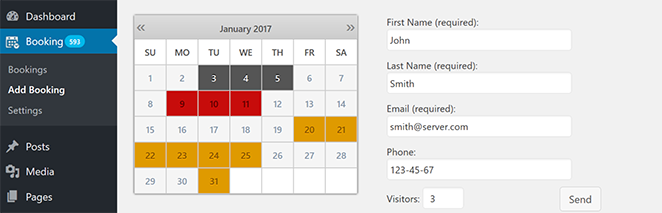
Booking Calendarは、WordPressで最も古く、最も信頼性の高い予約プラグインの1つです。サイトのフロントエンドから、予約リクエスト、予約、空き状況カレンダーをすべて処理できるように設計されています。
訪問者は予約リクエストフォームに記入でき、WordPressダッシュボードから直接承認または拒否できます。賃貸物件、サービスプロバイダー、または個々の時間枠または終日の予約を管理する必要がある人に最適です。
無料版はほとんどの基本的なニーズをカバーしていますが、カスタムフォームフィールドを追加したり、支払いを受け付けたりしたい場合は、プロ版が必要です。
長所
- 時間枠予約とスケジューリングに最適
- フロントエンドのカレンダーとフォームは使いやすい
- 柔軟な承認システムにより、管理を維持できます
短所
- カスタムフォームフィールドと支払い処理は、有料版が必要です
- アップグレードなしでは、支払いまたはカスタムフィールドのサポートはありません
私の評価
Booking Calendarは、サードパーティのプラットフォームに依存せずに予約を行いたい場合に最適です。使いやすく、レンタル、予約、サービスベースのビジネスに最適です。
6. ボーナス:イベントショーケースに最適なページビルダー – SeedProd

| 価格設定: 年間39.50ドルから |
| 無料プラン / トライアル:あり |
| 注目の機能: |
| 🔹 Facebookイベントブロック 🔹 Googleマップとお問い合わせフォームブロック 🔹 ドラッグ&ドロップテーマビルダー |
| 評価:A |
| 最適: コンバージョン率の高いイベントランディングページを作成する |
SeedProdは従来のカレンダープラグインではありませんが、イベントを視覚的に表示し予約を受け付けるのに使える最高のツールの1つです。
私はSeedProdを使用して、コードを書かずに、カウントダウンタイマー、マップ、お問い合わせフォーム、Facebookイベント埋め込みを備えたカスタムイベントページを作成しました。カレンダーブロックだけでなく、完全なイベントランディングページが必要な場合に特に役立ちます。
Facebookページブロックを使用すると、ビジネスページから公開イベントを直接取り込むことができます。訪問者はサイトを離れることなく、イベントの詳細を表示したり、インタラクションしたり、クリックしたりできます。
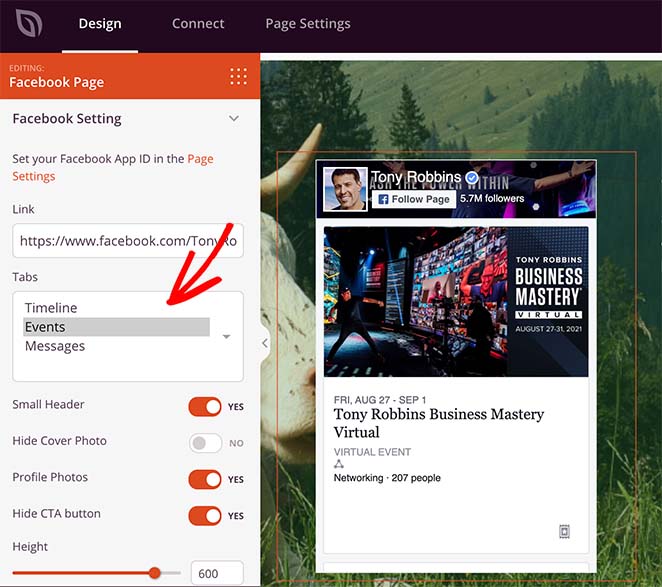
色、レイアウト、コールトゥアクションボタンなど、すべてのブロックをカスタマイズでき、Googleマップ、WPFormsなどと組み合わせることができます。
長所
- イベントページとサイト向けの美しいテンプレート
- 完全にドラッグ&ドロップで、コード不要
- Facebookイベント、Googleマップ、WPFormsと連携
短所
- 専用のイベントカレンダーまたは予約システムではない
- 繰り返しイベントには手動設定が必要
私の評価
イベントのカスタムランディングページを作成して、素晴らしい見た目にしたい場合、SeedProdは私のお気に入りのツールです。カレンダープラグインではありませんが、それに最適なコンパニオンです。
最高のWordPressカレンダープラグインはどれか?
どのカレンダープラグインがあなたにとって最善の解決策になるのか疑問に思っているかもしれません。私たちの意見では、Sugar Calendarが最高のWordPressカレンダープラグインです。WordPressサイトから直接イベントを表示し、予約を受け付け、チケットを販売するために必要なすべてを備えています。
Sugar CalendarとSeedProdを使用して、開発者を雇わずにカスタムイベント管理ウェブサイトを作成することもできます。
最高のWordPressカレンダープラグインFAQ
この記事が、あなたのサイトに最適なWordPressカレンダープラグインを見つけるのに役立ったことを願っています。
あなたのビジネスの成長に役立つ、これらの関連投稿も気に入るかもしれません:
お読みいただきありがとうございます!皆様のご意見をお聞かせいただければ幸いです。お気軽に会話にご参加ください YouTube, X および Facebook で、ビジネスを成長させるための役立つアドバイスやコンテンツをさらにご覧ください。




